 Botmonster Tech
How to Build a Webhook Relay with Cloudflare Tunnels and FastAPI

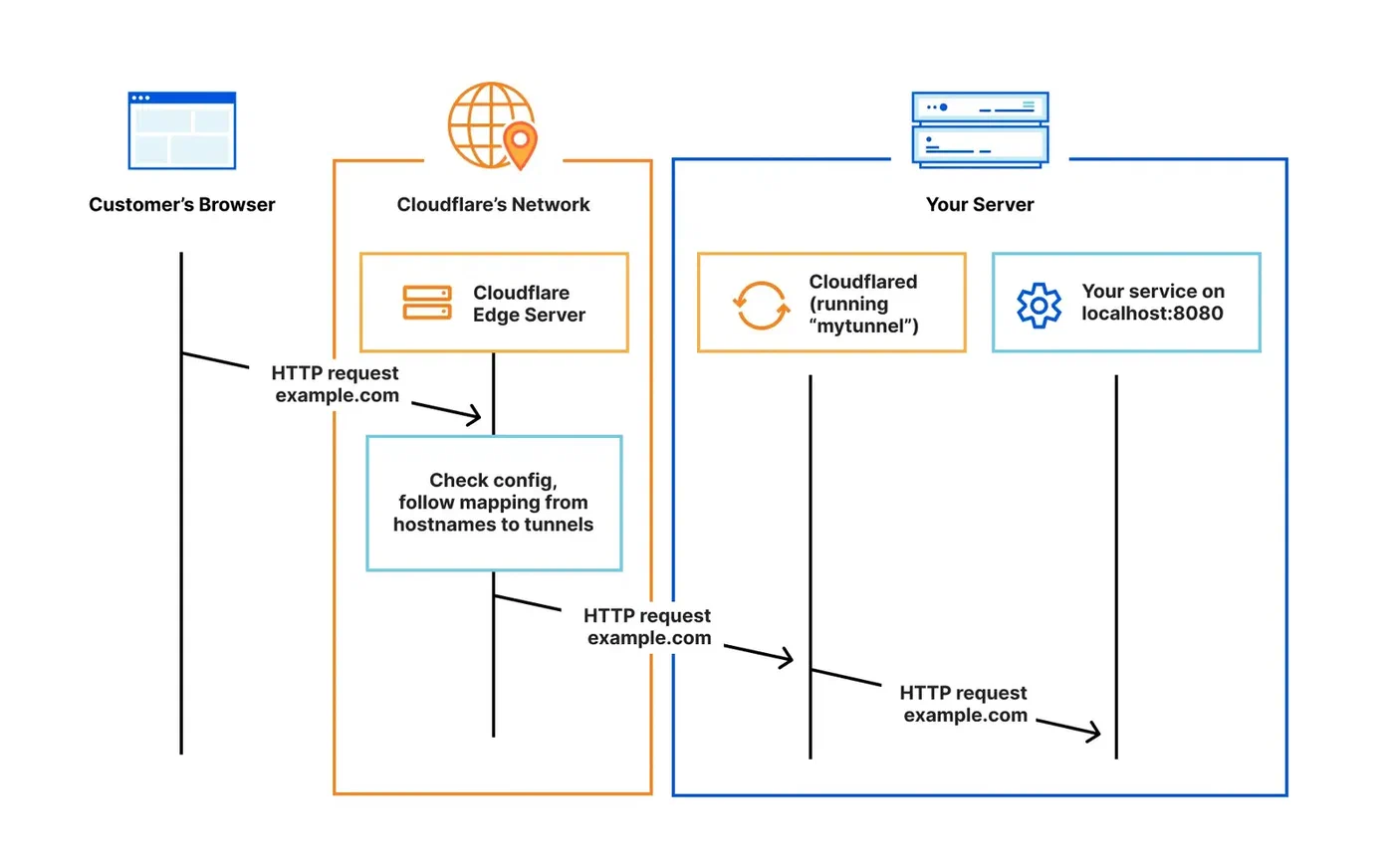
You can expose a local development server to receive webhooks from services like GitHub, Stripe, or Twilio by running cloudflared alongside a FastAPI application. This eliminates port forwarding, public IPs, and paid ngrok subscriptions entirely. Cloudflare Tunnels create an outbound-only encrypted connection from your machine to Cloudflare’s edge network, which then proxies incoming webhook requests back to your local FastAPI endpoint with full TLS, automatic reconnection, and zero firewall changes.
The approach works because cloudflared establishes QUIC connections outward from your machine - no inbound ports ever open on your router. Cloudflare’s edge receives the webhook POST from GitHub or Stripe, routes it through your tunnel, and delivers it to localhost:8000 where FastAPI handles it. You get a stable, publicly reachable URL like webhooks.yourdomain.com that persists across reboots.
Why Webhook Development on Localhost Is Painful
Webhook providers - GitHub, Stripe, Shopify, Twilio - send HTTP POST requests to a URL you configure in their dashboard. The problem is obvious: localhost:8000 is not reachable from the internet. Your development machine sits behind NAT, a firewall, or both. Without intervention, those webhook payloads never arrive.
The traditional workarounds all have drawbacks. Port forwarding requires router access, a static IP or dynamic DNS, and exposes your machine directly to the internet with no protection layer. Running a reverse proxy on a VPS means maintaining another server, paying for hosting, and dealing with TLS certificate management.
ngrok popularized the tunnel approach and remains a solid tool for quick debugging, but its free tier has tightened significantly. As of early 2026, the free plan limits you to 1 GB monthly bandwidth, 2-hour sessions, random ephemeral URLs, and an interstitial browser warning page injected into HTML responses. Custom domains and persistent URLs require a paid plan starting at $8/month for the Personal tier, with Pro at $20/month.
Cloudflare Tunnels
solve this differently. If you have a domain on Cloudflare (free plan works), you can create a named tunnel with a stable hostname at no cost and no bandwidth cap. The cloudflared daemon (current version 2026.3.0) runs on your machine and maintains persistent outbound QUIC connections to Cloudflare’s edge. Because the connection is outbound-only, your firewall and router need zero configuration.
Tunnels also support multiple ingress rules from a single daemon. You can map webhooks.yourdomain.com to localhost:8000 and api.yourdomain.com to localhost:3000 simultaneously. Cloudflare’s WAF, DDoS protection, and bot management sit in front of your local server by default - a significant security advantage over raw port forwarding.
For one-off testing without any Cloudflare account at all, there is a quick-start mode: cloudflared tunnel --url http://localhost:8000 creates a temporary tunnel with a random *.trycloudflare.com subdomain. It is ephemeral and goes away when you stop the process, but it is useful for a quick test.
How Tunnels Compare
| Feature | Cloudflare Tunnels | ngrok (Free) | ngrok (Pro) | Tailscale Funnel | localhost.run |
|---|---|---|---|---|---|
| Price | Free | Free | $20/month | Free (personal) | Free |
| Custom domain | Yes | No | Yes | No | No |
| Persistent URL | Yes | No | Yes | Yes | No |
| Bandwidth cap | None | 1 GB/month | 1 GB/month | None | Unspecified |
| WAF/DDoS protection | Yes | No | Yes | No | No |
| Request inspection | No | Yes | Yes | No | No |
| UDP support | No | No | No | Yes | No |
| Requires install | Yes (cloudflared) | Yes (ngrok) | Yes (ngrok) | Yes (tailscale) | No (SSH only) |
Cloudflare Tunnels win on cost and features for persistent webhook relay use. ngrok wins for interactive API debugging thanks to its request inspection and replay tools. Tailscale Funnel is the simplest option if you already run Tailscale for internal networking, but it cannot assign custom domains. localhost.run requires zero installation - just an SSH command - but only handles temporary, quick-share scenarios.
Setting Up Cloudflare Tunnels with a Named Route
A persistent named tunnel with a stable hostname is what makes this practical for webhook integrations. Providers like GitHub and Stripe store your endpoint URL and keep sending to it - a random URL that changes every session breaks that immediately.
Install cloudflared
On Debian/Ubuntu:
curl -L https://github.com/cloudflare/cloudflared/releases/latest/download/cloudflared-linux-amd64.deb -o cloudflared.deb
sudo dpkg -i cloudflared.deb
cloudflared --version
On macOS:
brew install cloudflaredAuthenticate and Create the Tunnel
Log in to your Cloudflare account. This opens a browser window where you select which domain (zone) the tunnel will use:
cloudflared tunnel loginThis stores a cert.pem file in ~/.cloudflared/. Next, create a named tunnel:
cloudflared tunnel create webhook-relayThis generates a tunnel UUID and a credentials file at ~/.cloudflared/<UUID>.json. Then create a DNS record that points your chosen subdomain to the tunnel:
cloudflared tunnel route dns webhook-relay webhooks.yourdomain.comCloudflare automatically adds a CNAME record pointing webhooks.yourdomain.com to <UUID>.cfargotunnel.com.
Write the Config File
Create ~/.cloudflared/config.yml:
tunnel: webhook-relay
credentials-file: /home/youruser/.cloudflared/<UUID>.json

ingress:
  - hostname: webhooks.yourdomain.com
    service: http://localhost:8000
  - hostname: admin.yourdomain.com
    service: http://localhost:3000
    originRequest:
      noTLSVerify: false
  - service: http_status:404
The ingress block routes requests by hostname. The catch-all http_status:404 at the bottom is required - cloudflared rejects configs without it. You can add as many hostname rules as you need, each pointing to a different local service and port.
Run the Tunnel
cloudflared tunnel run webhook-relayAdd --loglevel debug during initial setup to see exactly what is happening. Once running, any request to webhooks.yourdomain.com gets forwarded to localhost:8000.
Building the FastAPI Webhook Receiver
FastAPI handles async requests natively and validates payloads with Pydantic , which matters for webhook receivers that need to accept diverse JSON structures and respond before the provider’s timeout window closes.
Scaffold the Project
Using uv as the package manager:
uv init webhook-relay && cd webhook-relay
uv add fastapi uvicorn[standard] pydantic structlog
The Core Receiver
Create main.py with a dispatcher pattern that routes webhooks by provider:
import hashlib
import hmac
import json
import os
import secrets
from datetime import datetime, timezone

import structlog
from fastapi import BackgroundTasks, FastAPI, HTTPException, Request, Response

app = FastAPI(title="Webhook Relay")
logger = structlog.get_logger()

GITHUB_SECRET = os.getenv("GITHUB_WEBHOOK_SECRET", "")
STRIPE_SECRET = os.getenv("STRIPE_WEBHOOK_SECRET", "")


@app.get("/health")
async def health():
    return {"status": "ok", "tunnel": "webhook-relay"}


@app.post("/webhook/{provider}")
async def receive_webhook(
    provider: str, request: Request, background_tasks: BackgroundTasks
):
    body = await request.body()
    headers = dict(request.headers)

    # Dispatch to provider-specific verification
    if provider == "github":
        verify_github_signature(headers, body)
    elif provider == "stripe":
        verify_stripe_signature(headers, body)

    # Parse payload
    try:
        payload = json.loads(body)
    except json.JSONDecodeError:
        raise HTTPException(status_code=400, detail="Invalid JSON")

    # Log the delivery
    event_type = headers.get("x-github-event", headers.get("stripe-event", "unknown"))
    delivery_id = headers.get(
        "x-github-delivery", headers.get("stripe-request-id", "none")
    )

    logger.info(
        "webhook_received",
        provider=provider,
        event_type=event_type,
        delivery_id=delivery_id,
        payload_preview=json.dumps(payload)[:200],
        timestamp=datetime.now(timezone.utc).isoformat(),
    )

    # Offload heavy processing to background
    background_tasks.add_task(process_webhook, provider, event_type, payload)

    return Response(status_code=200)


def verify_github_signature(headers: dict, body: bytes):
    signature = headers.get("x-hub-signature-256", "")
    if not GITHUB_SECRET:
        return
    expected = "sha256=" + hmac.new(
        GITHUB_SECRET.encode(), body, hashlib.sha256
    ).hexdigest()
    if not secrets.compare_digest(signature, expected):
        raise HTTPException(status_code=401, detail="Invalid signature")


def verify_stripe_signature(headers: dict, body: bytes):
    sig_header = headers.get("stripe-signature", "")
    if not STRIPE_SECRET or not sig_header:
        return
    try:
        import stripe
        stripe.Webhook.construct_event(body, sig_header, STRIPE_SECRET)
    except stripe.error.SignatureVerificationError:
        raise HTTPException(status_code=401, detail="Invalid Stripe signature")


async def process_webhook(provider: str, event_type: str, payload: dict):
    """Handle webhook processing in the background."""
    logger.info(
        "processing_webhook",
        provider=provider,
        event_type=event_type,
    )
    # Your actual business logic here:
    # - Update a database
    # - Trigger a CI/CD pipeline
    # - Send a notification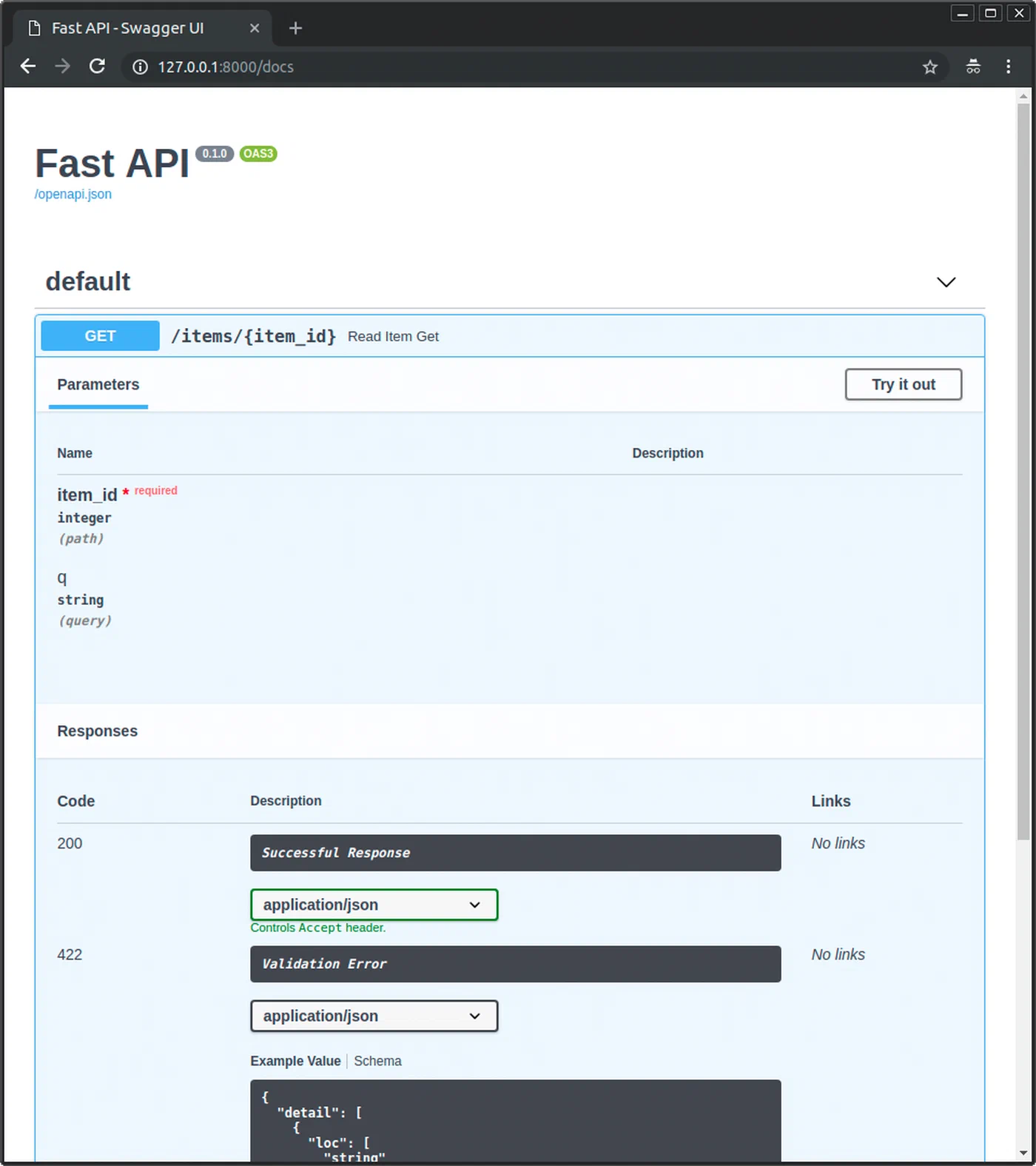
A few things to note in this code. The endpoint returns 200 immediately and pushes actual work into BackgroundTasks. GitHub expects a response within 10 seconds, Stripe within 20 - if your handler blocks on database writes or API calls, the provider marks the delivery as failed and retries. All HMAC comparisons use secrets.compare_digest() rather than == because regular string comparison leaks timing information that could let an attacker forge signatures byte by byte. The handler reads request.body() as raw bytes before parsing JSON because signature verification needs the exact bytes the provider sent - parsing and re-serializing would alter whitespace and break the HMAC. Finally, structlog
gives you structured JSON logs that you can filter by provider, event type, or delivery ID, which beats grepping through free-text log lines when something goes wrong at 2 AM.
Run the Receiver
uvicorn main:app --reload --port 8000With the cloudflared tunnel running simultaneously, webhooks sent to webhooks.yourdomain.com/webhook/github arrive at this endpoint.
Securing and Hardening the Relay
A publicly reachable webhook endpoint is an attack surface. Signature verification is the first layer, but it is not the only one you need.
Content Validation and Size Limits
Add middleware to reject oversized payloads and unexpected content types:
from fastapi import Request
from starlette.middleware.base import BaseHTTPMiddleware

MAX_BODY_SIZE = 1_048_576  # 1 MB

class WebhookSecurityMiddleware(BaseHTTPMiddleware):
    async def dispatch(self, request: Request, call_next):
        if request.url.path.startswith("/webhook/"):
            content_type = request.headers.get("content-type", "")
            if "application/json" not in content_type:
                return Response(status_code=415, content="Unsupported media type")
            content_length = int(request.headers.get("content-length", 0))
            if content_length > MAX_BODY_SIZE:
                return Response(status_code=413, content="Payload too large")
        return await call_next(request)

app.add_middleware(WebhookSecurityMiddleware)
IP Allowlisting
Some providers publish their webhook source IP ranges. GitHub publishes theirs at https://api.github.com/meta in the hooks array. You can fetch these periodically and check incoming request IPs against them in middleware. Note that when running behind Cloudflare Tunnels, the original client IP arrives in the CF-Connecting-IP header, not in the socket’s remote address.
Idempotency Handling
Webhook providers retry deliveries when they do not get a 2xx response. GitHub retries up to 3 times, Stripe retries with exponential backoff for up to 3 days. Without idempotency handling, your application processes the same event multiple times.
Store the delivery ID from each request - X-GitHub-Delivery for GitHub, the timestamp component of Stripe-Signature for Stripe - in a SQLite table or an in-memory cache with a TTL. Before processing, check if you have already seen that delivery ID and skip duplicates.
Rate Limiting
Install slowapi to add per-IP rate limiting:
uv add slowapifrom slowapi import Limiter
from slowapi.util import get_remote_address
limiter = Limiter(key_func=get_remote_address)
app.state.limiter = limiter
@app.post("/webhook/{provider}")
@limiter.limit("60/minute")
async def receive_webhook(provider: str, request: Request, ...):
...A limit of 60 requests per minute per IP absorbs retry storms from providers without affecting normal operation.
Cloudflare Access for Non-Webhook Routes
Use Cloudflare Access
policies to lock down admin or monitoring routes. You can require email-based authentication, mTLS client certificates, or SSO for any path that is not /webhook/*, while leaving the webhook endpoints open for provider traffic.
Running as a Persistent Development Service
Starting both cloudflared and uvicorn manually every session gets tedious fast. You have a few ways to automate it.
Option 1: Process Manager with Honcho
Install honcho
(a Python Procfile runner) and create a Procfile:
tunnel: cloudflared tunnel run webhook-relay
api: uvicorn main:app --reload --port 8000
Then run both with:
honcho startBoth processes start together, their output is interleaved with color-coded labels, and stopping one stops both.
Option 2: systemd User Services
For persistent background operation, create two systemd user services.
~/.config/systemd/user/webhook-relay-tunnel.service:
[Unit]
Description=Cloudflare Tunnel for Webhook Relay
After=network-online.target
Wants=network-online.target

[Service]
ExecStart=/usr/bin/cloudflared tunnel run webhook-relay
Restart=on-failure
RestartSec=5

[Install]
WantedBy=default.target~/.config/systemd/user/webhook-relay-api.service:
[Unit]
Description=FastAPI Webhook Receiver
After=webhook-relay-tunnel.service
Wants=webhook-relay-tunnel.service

[Service]
WorkingDirectory=/home/youruser/webhook-relay
ExecStart=/home/youruser/webhook-relay/.venv/bin/uvicorn main:app --port 8000
Restart=on-failure
RestartSec=5
EnvironmentFile=/home/youruser/webhook-relay/.env

[Install]
WantedBy=default.target
Enable and start both:
systemctl --user enable --now webhook-relay-tunnel webhook-relay-apiThe API service starts after the tunnel service via the After= directive, ensuring the tunnel is up before the receiver begins accepting requests.
Option 3: Docker Compose
For teams or reproducible environments, use Docker Compose with two containers:
services:
  tunnel:
    image: cloudflare/cloudflared:latest
    command: tunnel run webhook-relay
    volumes:
      - ~/.cloudflared:/etc/cloudflared:ro
    restart: unless-stopped

  api:
    build: .
    ports:
      - "8000:8000"
    environment:
      - GITHUB_WEBHOOK_SECRET=${GITHUB_WEBHOOK_SECRET}
      - STRIPE_WEBHOOK_SECRET=${STRIPE_WEBHOOK_SECRET}
    depends_on:
      - tunnel
    restart: unless-stopped
The tunnel container mounts your local ~/.cloudflared directory (which contains the credentials and config) as a read-only volume.
Verifying the Tunnel
Check the tunnel status with:
cloudflared tunnel info webhook-relayA healthy tunnel shows 4 connections across at least 2 Cloudflare edge locations. If you see fewer connections, check your network or run with --loglevel debug.
Testing the Relay End-to-End
With both services running, test with curl first:
curl -X POST https://webhooks.yourdomain.com/webhook/generic \
  -H "Content-Type: application/json" \
  -d '{"event": "test", "data": "hello"}'
For Stripe-specific testing, the Stripe CLI can forward events directly and trigger mock webhooks:
stripe listen --forward-to http://localhost:8000/webhook/stripe
# In another terminal:
stripe trigger payment_intent.succeeded
The Stripe CLI generates a webhook signing secret when it starts listening - use that value as your STRIPE_WEBHOOK_SECRET during local development. For GitHub, go to your repository’s Settings > Webhooks, set the Payload URL to https://webhooks.yourdomain.com/webhook/github, choose application/json as the content type, and enter your secret. GitHub sends a ping event immediately to verify the endpoint is reachable.
For production relay scenarios where webhook payloads need to survive restarts and support replay, add Redis or PostgreSQL as a persistent event store instead of relying on in-memory state or log files. This also enables a dead-letter queue pattern: failed webhook processing attempts get stored and can be retried later rather than lost entirely.