 Botmonster Tech
Manage Your Dev Environment with Nix Shells (No Docker Required)

If you have ever handed a new team member a README full of “install Node 22, then Python 3.12, then make sure your openssl headers match” instructions, you already know the problem. Nix flakes solve it at the root: instead of documenting what to install, you declare the exact toolchain in a flake.nix file, commit it alongside your code, and every developer runs nix develop to get an identical environment - same compiler, same CLI versions, same system libraries. In 2026, Nix flakes
are stable, the Nixpkgs
repository holds over 100,000 packages, and the ecosystem around flakes has matured to the point where the learning curve is manageable even for teams with no prior Nix experience.
Why Nix Shells Beat Docker for Development Environments
Docker is excellent at what it was designed for: packaging an application and its runtime dependencies into a portable image for deployment. Using it as a day-to-day development environment is a different story.
The most painful issue on macOS is bind-mount performance. When your project lives on the host filesystem and you mount it into a container, Docker Desktop has to translate every file system call through a virtualization layer. For directories with many small files - node_modules, Go module caches, Rust’s ~/.cargo/registry - this can run 5-10x slower than native access. Developers notice immediately: npm install takes 90 seconds instead of 10, and cargo build feels sluggish even on fast hardware.
Beyond performance, Docker dev setups add friction in several ways:
- File watcher breakage. Tools like Vite, Next.js, and
cargo-watchrely on inotify events. Bind mounts often miss events or fire them late, so hot reload becomes unreliable. - Debugger and IDE integration. Attaching a debugger to a process inside a container requires port forwarding and remote debug configurations. Language servers need to know where packages are installed, which is inside the container - not on your host PATH. VS Code Dev Containers paper over this with a lot of configuration glue.
- Slow feedback loops. Adding a new system dependency (say,
libpq-devfor a Rust Postgres driver) means editing a Dockerfile, rebuilding the image, and waiting for layer caches to do their job. With Nix, you add a package tobuildInputs, runnix develop, and the environment updates in seconds from the binary cache. - Hardware access. Nix shells run directly on your host, so GPUs, USB devices, and Bluetooth work without any passthrough configuration.
That said, Docker is not the wrong tool for every job. Running a local PostgreSQL or Redis for integration tests, reproducing a production environment exactly, or testing multi-service deployments with Docker Compose - these are all cases where containers are the right answer. Nix and Docker are complementary. Use Nix for your development toolchain and Docker for your service dependencies.
| Feature | Nix Shell | Docker Dev Container |
|---|---|---|
| Startup time | Under 1 second (cached) | 5-60 seconds |
| File I/O performance | Native | 5-10x slower on macOS |
| Hot reload reliability | Native inotify | Often broken on bind mounts |
| GPU / hardware access | Native | Requires passthrough config |
| IDE integration | Full (direnv + extension) | Requires Dev Containers extension |
| Reproducibility | Bit-for-bit (flake.lock) | Image digest (layer content varies) |
| Disk usage | Shared Nix store (efficient) | Per-image layers (can balloon) |
Nix Flakes Crash Course: The Modern Way to Define Environments
A flake.nix file has three top-level attributes:
description- a human-readable stringinputs- external dependencies, primarilynixpkgsoutputs- what the flake provides: packages, apps, dev shells, NixOS modules
Here is the minimal flake for a Node.js project:
{
  description = "My Node.js project";

  inputs = {
    nixpkgs.url = "github:NixOS/nixpkgs/nixos-25.11";
    flake-utils.url = "github:numtide/flake-utils";
  };

  outputs = { self, nixpkgs, flake-utils }:
    flake-utils.lib.eachDefaultSystem (system:
      let
        pkgs = nixpkgs.legacyPackages.${system};
      in {
        devShells.default = pkgs.mkShell {
          buildInputs = [
            pkgs.nodejs_22
            pkgs.nodePackages.pnpm
            pkgs.typescript
          ];
          shellHook = ''
            echo "Node $(node --version) ready"
          '';
        };
      });
}
The key line is nixpkgs.url = "github:NixOS/nixpkgs/nixos-25.11". This pins the entire Nixpkgs tree to a specific branch. When you run nix flake update, Nix resolves the latest commit on that branch and writes a flake.lock file that records the exact Git SHA. Every developer and every CI run uses that SHA - not “whatever was latest when they ran the command.” Rollback is git checkout flake.lock.
To enter the shell: nix develop. To run a single command without entering the shell: nix develop --command node --version.
Legacy shell.nix files still work, but they have no built-in lock mechanism and no hermetic evaluation guarantee. For new projects in 2026, always use flakes.
Automatic Activation with direnv and nix-direnv
Running nix develop manually every time you switch projects gets old fast. direnv
solves this by hooking into your shell’s cd command and automatically activating the environment when you enter a directory.
Setup (one time per machine):
- Install
direnvandnix-direnv. On NixOS or with a Nix home-manager setup, add both to your user profile. On other systems, install direnv from your package manager. - Add the hook to your shell config:
- Bash:
eval "$(direnv hook bash)" - Zsh:
eval "$(direnv hook zsh)" - Fish:
direnv hook fish | source
- Bash:
- Restart your shell.
Per-project setup:
Create a .envrc file in your project root:
use flakeThen run direnv allow once to grant direnv permission to execute it. After that, every cd into the directory activates the Nix shell silently. Leaving the directory deactivates it.
nix-direnv
is the critical companion piece. Without it, direnv would re-evaluate the flake on every shell start. nix-direnv creates a GC root pointing at the cached environment, so it survives nix-collect-garbage and reuses the cached result unless flake.nix or flake.lock actually changed.
For VS Code, install the direnv extension by mkhl . It ensures the integrated terminal and language servers (Pylsp, rust-analyzer, tsserver) inherit the Nix-provided PATH and library paths, so “go to definition” and type checking work against the exact packages declared in your flake.
Commit .envrc, flake.nix, and flake.lock to version control. Add .direnv/ to .gitignore - that directory holds the local cache and is machine-specific.
Real-World Examples: Node.js, Python, and Rust
Node.js / TypeScript
devShells.default = pkgs.mkShell {
  buildInputs = [
    pkgs.nodejs_22
    pkgs.nodePackages.pnpm
    pkgs.typescript
    pkgs.nodePackages.typescript-language-server
  ];
  shellHook = ''
    pnpm install --frozen-lockfile
    echo "Node $(node --version), pnpm $(pnpm --version)"
  '';
};
The shellHook runs pnpm install automatically when you enter the shell, so new contributors never see “you need to run pnpm install first.”
Python with uv
Nix provides the Python interpreter; uv manages the virtualenv and packages. This avoids the pain of Nix trying to manage every Python package (which often breaks with packages that have C extensions):
devShells.default = pkgs.mkShell {
  buildInputs = [
    pkgs.python312
    pkgs.uv
    pkgs.ruff
    # System libraries that Python packages often need
    pkgs.openssl
    pkgs.pkg-config
    pkgs.libpq
  ];
  shellHook = ''
    if [ ! -d .venv ]; then
      uv venv .venv
    fi
    source .venv/bin/activate
    uv pip install -r requirements.txt --quiet
  '';
};
The system libraries in buildInputs (openssl, pkg-config, libpq) fix the “can’t find -lssl” and “pg_config not found” errors that show up when pip tries to compile cryptography or psycopg2 from source.
Rust with a Pinned Toolchain
For Rust, use the fenix flake input to get a specific toolchain version with all the tooling bundled:
{
  inputs = {
    nixpkgs.url = "github:NixOS/nixpkgs/nixos-25.11";
    flake-utils.url = "github:numtide/flake-utils";
    fenix = {
      url = "github:nix-community/fenix";
      inputs.nixpkgs.follows = "nixpkgs";
    };
  };

  outputs = { self, nixpkgs, flake-utils, fenix }:
    flake-utils.lib.eachDefaultSystem (system:
      let
        pkgs = nixpkgs.legacyPackages.${system};
        toolchain = fenix.packages.${system}.stable.withComponents [
          "cargo" "clippy" "rust-src" "rustc" "rustfmt" "rust-analyzer"
        ];
      in {
        devShells.default = pkgs.mkShell {
          buildInputs = [
            toolchain
            pkgs.openssl
            pkgs.pkg-config
          ];
          RUST_SRC_PATH = "${toolchain}/lib/rustlib/src/rust/library";
        };
      });
}
Switching to nightly is one line change: replace fenix.packages.${system}.stable with fenix.packages.${system}.latest. The flake.lock records the exact toolchain revision, so everyone on the team uses the same rustc.
Polyglot Monorepos
For repos with multiple services in different languages, use named shells:
devShells = {
  default = pkgs.mkShell { buildInputs = [ pkgs.git pkgs.gh ]; };
  frontend = pkgs.mkShell { buildInputs = [ pkgs.nodejs_22 pkgs.nodePackages.pnpm ]; };
  backend = pkgs.mkShell { buildInputs = [ pkgs.go_1_23 pkgs.golangci-lint ]; };
};
Enter a specific shell with nix develop .#frontend or nix develop .#backend. In each subdirectory, the .envrc can point at the appropriate named shell: use flake ..#frontend.
devenv.sh: Nix Without the Nix Language
devenv.sh is a higher-level tool built on top of Nix flakes. It lets you configure your development environment using a module system that looks a lot like NixOS configuration - without writing raw Nix expressions.
A devenv.nix for a Python + PostgreSQL project:
{ pkgs, ... }: {
  languages.python = {
    enable = true;
    version = "3.12";
    venv.enable = true;
    venv.requirements = ./requirements.txt;
  };

  services.postgres = {
    enable = true;
    initialDatabases = [{ name = "myapp"; }];
  };

  env.DATABASE_URL = "postgresql://localhost/myapp";
}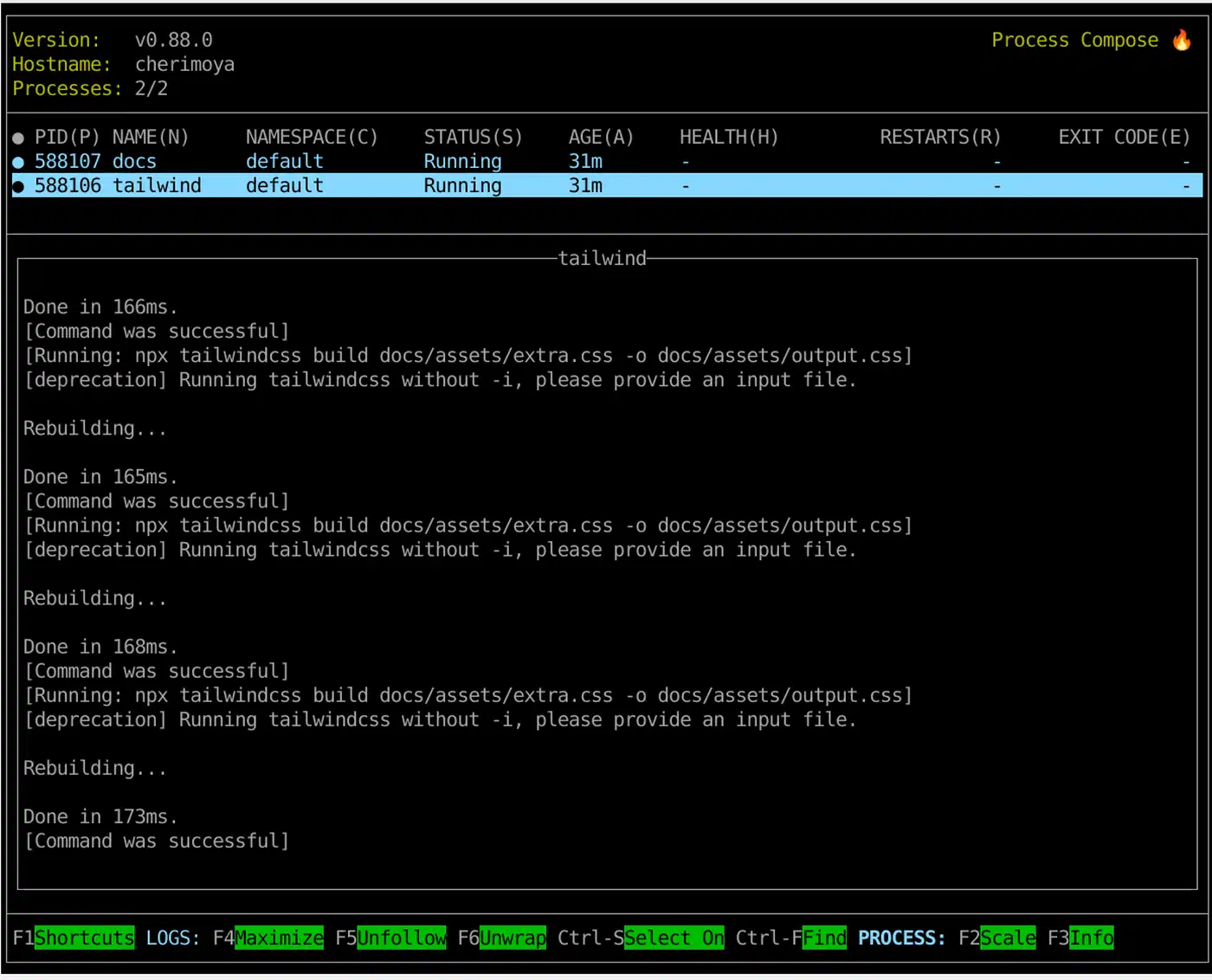
That is it. Running devenv up starts PostgreSQL in the background via process-compose
. Running devenv shell drops you into a Python 3.12 environment with a virtualenv already active and DATABASE_URL set.
Under the hood, devenv generates a valid flake.nix, so the environment is just as reproducible as a hand-written flake. The devenv.lock file pins all inputs the same way flake.lock does.
Teams new to Nix should start with devenv.sh for the first few projects. The module system hides the parts of Nix that have the steepest learning curve (the expression language, mkShell, stdenv). Once the team is comfortable with the reproducibility model and wants finer control - custom derivations, cross-compilation, packaging for deployment - they can read the generated flake.nix and start modifying it directly.
Nix on WSL2 and in CI
Windows via WSL2
Nix works on WSL2 without any special configuration beyond a working WSL2 Ubuntu or Debian install. The recommended installer is from Determinate Systems :
curl --proto '=https' --tlsv1.2 -sSf -L https://install.determinate.systems/nix | shThis single command handles creating the /nix store, enabling the Nix daemon, and configuring flake support. It also integrates with systemd, which WSL2 supports since Windows 11.
One important note: keep your project files inside the Linux volume (/home/yourname/...), not in /mnt/c/. The WSL2 Linux filesystem is fast; the 9P bridge to the Windows NTFS volume is not. Nix store performance is excellent when /nix lives on the Linux volume, which it always does by default.
GitHub Actions
- uses: cachix/install-nix-action@v27
  with:
    nix_path: nixpkgs=channel:nixos-25.11
    extra_nix_config: |
      experimental-features = nix-command flakes

- name: Build
  run: nix develop --command make build

- name: Test
  run: nix develop --command make test
Add a Cachix step to avoid rebuilding packages on every CI run:
- uses: cachix/cachix-action@v15
  with:
    name: your-cache-name
    authToken: '${{ secrets.CACHIX_AUTH_TOKEN }}'
After a successful build, Cachix pushes newly built store paths to your cache. Subsequent runs - and developer machines that add your cache with cachix use your-cache-name - download pre-built binaries instead of compiling from source. For Rust projects with many dependencies, this alone can cut CI time from 15 minutes to under 2.
Add nix flake check as a required PR gate. It validates that all outputs in flake.nix evaluate without errors and catches broken changes before they reach the main branch.
Maintenance and Troubleshooting
Disk usage. The Nix store at /nix/store accumulates every version of every package it has ever built or downloaded. Run garbage collection periodically:
nix-collect-garbage --delete-older-than 30dSet this up as a weekly cron job or a systemd timer. On a developer machine that has been running for a year, this typically recovers 10-40 GB.
Slow first run. If nix develop downloads and builds everything from scratch, you are either missing binary cache configuration or using packages that are not in the default cache. Verify that https://cache.nixos.org is in your nix.conf substituters list. For custom packages, set up Cachix as described in the CI section above.
“Attribute not found in nixpkgs.” Package names in Nixpkgs do not always match what you would expect. postgresql is a valid attribute, but the specific version is postgresql_16. Search at search.nixos.org
or run nix search nixpkgs#postgres from the command line.
macOS with Apple Silicon. Nix runs natively on both x86_64-darwin and aarch64-darwin. When writing flakes for cross-platform teams, use flake-utils.lib.eachDefaultSystem (as shown in the examples above) rather than hardcoding a system. If you also manage your macOS system configuration with nix-darwin
, the same Nixpkgs pin can cover both your system packages and your project dev shells.
Unfree packages. Some packages (like certain CUDA components or proprietary fonts) are marked unfree in Nixpkgs and blocked by default. Allow them selectively:
pkgs = import nixpkgs {
  inherit system;
  config.allowUnfree = true;
};
Onboarding new team members. Document two steps:
- Install Nix:
curl --proto '=https' --tlsv1.2 -sSf -L https://install.determinate.systems/nix | sh - Enter the project:
cd your-project && direnv allow
That is the entire setup. The first direnv allow will download or build the environment - subsequent shell entries are instant from the cache.
The Right Mental Model
Nix shells do not replace Docker. They replace the manual, error-prone process of installing development tools on each developer’s machine. Docker still makes sense for running services locally (databases, message queues, mock APIs) and for packaging your application for deployment.
Think of a Nix flake as a package.json for your entire toolchain - not just your language-level dependencies, but the compiler, the formatter, the linter, the database client, and the system libraries those tools depend on. It is checked into version control, it is locked to specific versions, and it activates automatically when you enter the project directory.
For teams that have spent time debugging “it works on my machine” issues or writing lengthy environment setup documentation, the investment in learning Nix pays off quickly. Start with devenv.sh if the Nix expression language feels like too much upfront, or jump straight to raw flakes if you want full control from day one.