 Botmonster Tech
Git Worktrees for Parallel Claude Code Sessions: Run 10+ AI Agents Without File Conflicts

Git worktrees
let you attach multiple working directories to a single repository, each with its own branch checked out independently. Claude Code
ships a native --worktree (-w) flag that automates the entire setup: one command creates an isolated worktree directory, checks out a new branch, and launches Claude inside it. Run the command again in another terminal and you have a second fully independent coding agent. Scale to five, ten, or more sessions and none of them will collide on disk.
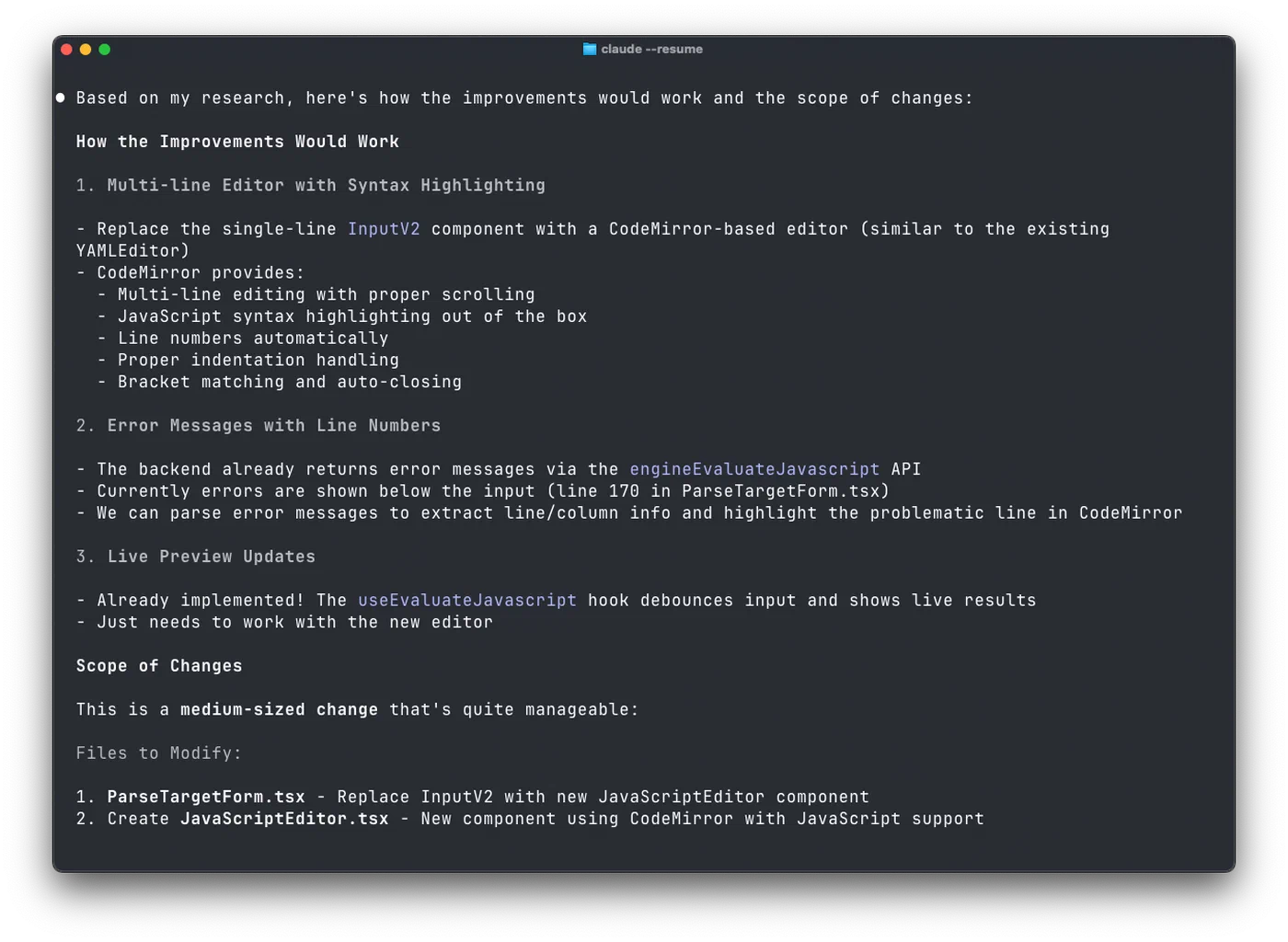
This pattern already has real production mileage. The team at incident.io went from zero Claude Code usage to running four to seven concurrent agents per developer in about four months. Their CTO told the engineering team to “spend as many of my hard-earned VC dollars on Claude as possible” and put a usage leaderboard up in the office. One task - building a JavaScript editor with multiline support, line numbers, and code completion - was estimated at two hours of human work. Claude Code finished it in ten minutes. The friction that made worktrees a niche git feature has been removed by AI tooling that actually needs the isolation they provide.
Why AI Agents Need Worktree Isolation
Without worktrees, two Claude Code sessions operating on the same checkout will fight over the same files on disk. One agent’s edits overwrite another’s, staged changes collide, test runs interfere, and you spend more time resolving chaos than shipping code. Traditional solutions like cloning the repository multiple times waste disk space by duplicating the entire .git directory and lose the shared commit history that makes parallel branch work practical.
Git worktrees solve this cleanly. Each worktree is a separate directory linked back to the same .git database. They share object storage, reflog, and configuration, but each one has its own HEAD, index, and working files. Claude Code auto-detects when it is running inside a worktree and scopes all file reads, writes, bash commands, and test runs to that worktree’s branch. No special configuration is needed.
Worktrees convert a sequential bottleneck - one developer, one branch, one agent - into parallel work with minimal overhead. One developer, N branches, N agents, all operating simultaneously on the same repository without stepping on each other.
This pattern is not exclusive to Claude Code. OpenAI’s Codex CLI and other terminal-based AI coding agents benefit from the same isolation model. But Claude Code was the first to ship built-in CLI support for worktree creation and management, announced by Boris Cherny at Anthropic in early 2026.
The –worktree Flag: Setup in One Command
Claude Code’s --worktree flag (shorthand -w) reduces the entire parallel session setup to a single command per agent:
claude --worktree bugfix-123This creates an isolated worktree at .claude/worktrees/bugfix-123/ with a new branch named worktree-bugfix-123, branched from wherever origin/HEAD points, and launches Claude Code scoped to that directory. Open another terminal and run:
claude -w feature-authNow you have two independent agents. Each sees only its own branch’s state. Scale up by opening more terminals and repeating the pattern.
If you omit the name, Claude generates a random one automatically:
claude --worktreeYou can also combine worktrees with tmux for headless operation:
claude --worktree api-refactor --tmuxThis launches the session in its own tmux pane, freeing your terminal for monitoring or spinning up additional agents.
Worktree Cleanup
Cleanup behavior depends on whether the session produced changes:
- If the session made no changes, the worktree and its branch are removed automatically when the session ends.
- If commits or modifications exist, Claude prompts you to keep or remove the worktree. You can also clean up manually with standard git commands:
git worktree remove .claude/worktrees/bugfix-123. - Orphaned worktrees from crashes or interrupted sessions are auto-pruned at startup once they exceed your configured
cleanupPeriodDayssetting, provided they have no uncommitted modifications or unpushed commits.
Subagent Worktree Isolation
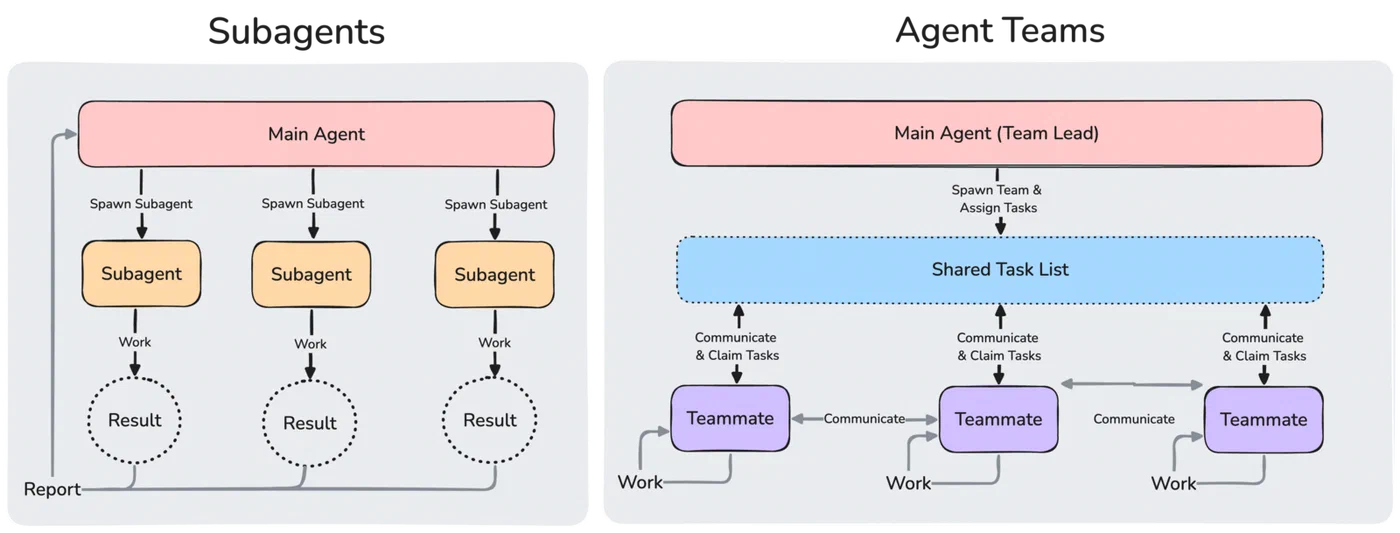
For Claude Code’s built-in subagents, add isolation: worktree to a custom subagent’s frontmatter. Each subagent gets its own auto-provisioned worktree that is cleaned up automatically when the subagent finishes without changes. You can also ask Claude to “use worktrees for your agents” during a session and it will handle provisioning on the fly.
With the newer Agent Teams feature (introduced in v2.1.32), the team lead agent coordinates multiple teammates that each run in their own context windows and worktrees. When they finish, the team lead merges results sequentially - similar to how human developers work on separate branches and merge through pull requests.
Team Patterns and Real-World Results
The incident.io Workflow
incident.io’s engineering team documented their progression from Claude Code newcomers to power users running four to seven concurrent agents per developer. Key takeaways from their experience:
- Their CTO’s instruction to maximize Claude spending, combined with an office leaderboard tracking API token usage, turned experimentation into a team sport.
- Engineer Rory Bain built a
wbash function that combines worktree creation and Claude launch into a single command:w myproject new-feature claude. It auto-completes existing worktrees, creates new ones with username-prefixed branches, and runs commands in the worktree context without changing your current directory. - The biggest productivity gains came from sharing workflow patterns and tooling across the team, more than from crafting perfect prompts. When one person discovered an efficient way to use Plan Mode or worktree isolation, the whole team adopted it.
The Decomposition Pattern
The most effective parallel workflow breaks a feature into independent sub-tasks and assigns each to a separate Claude instance in its own worktree. For a typical feature this might look like:
| Agent | Worktree | Task |
|---|---|---|
| Agent 1 | -w api-users | Build the API endpoint |
| Agent 2 | -w ui-users | Build the UI component |
| Agent 3 | -w test-users | Write integration tests |
| Agent 4 | -w docs-users | Update documentation |
Each agent works independently and simultaneously. The developer’s job shifts from writing code to decomposing work, launching agents, and reviewing their output. Shipyard’s guide to multi-agent orchestration covers more sophisticated orchestration patterns including Agent Teams and third-party tools like Gas Town and Multiclaude.
Desktop Management with Nimbalyst
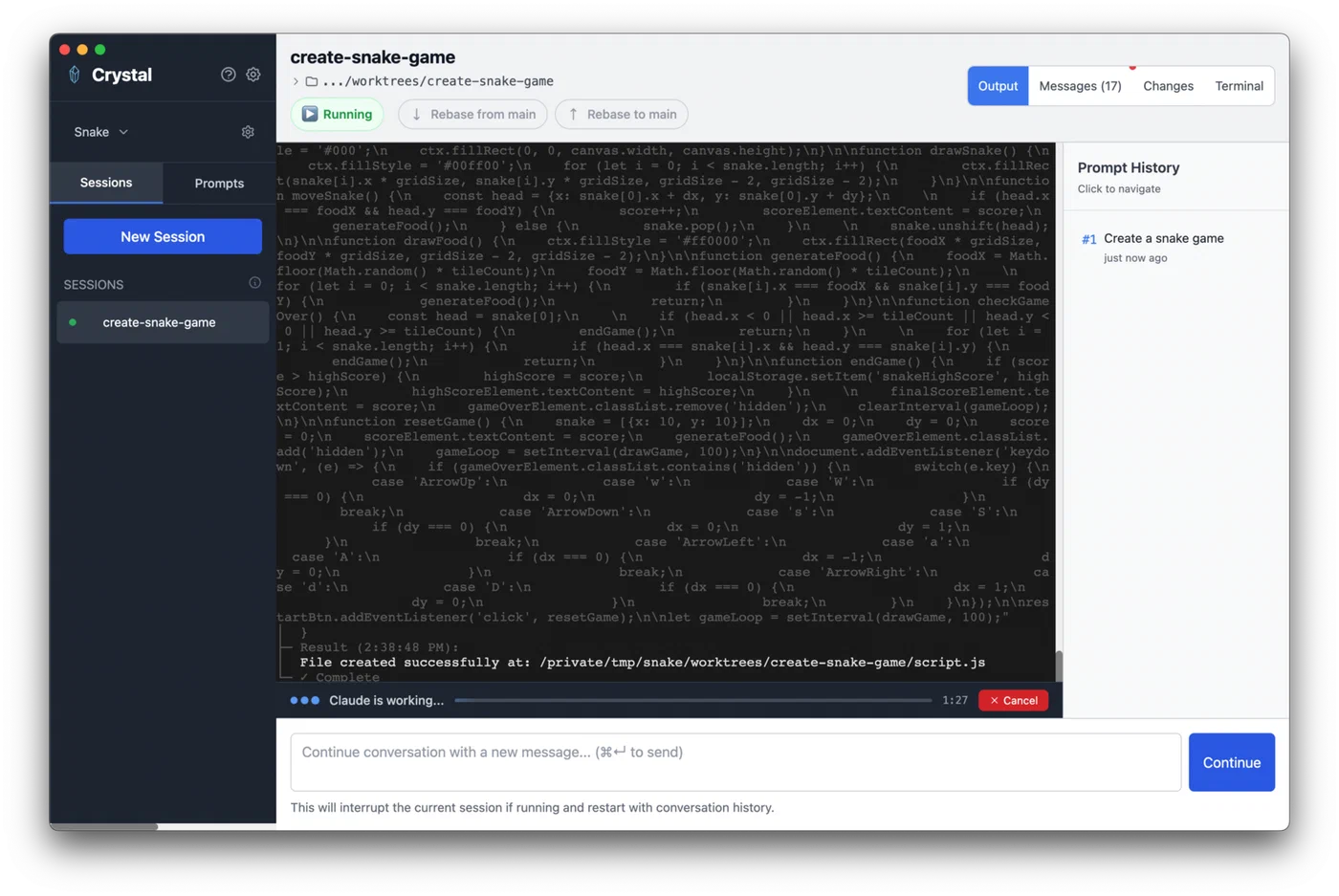
For developers who prefer a GUI over terminal juggling, Nimbalyst (formerly Crystal, open source at github.com/stravu/crystal ) provides a desktop app for managing multiple Claude Code and Codex sessions across parallel git worktrees. It handles worktree creation, session lifecycle, and provides a unified view of all running agents. Useful when you scale past the number of terminals you can comfortably keep in your head.
The Practical Sweet Spot
Five to ten parallel agents works well for most developers. Beyond ten, the merge step becomes the bottleneck rather than the development step. You spend more time reconciling branches than you save from parallelism. Start with two or three agents on a well-scoped feature, get comfortable with the decomposition workflow, and scale up as your task-splitting skills improve.
Coordination Strategies and Avoiding Merge Conflicts
Worktrees prevent filesystem conflicts - each agent has its own directory - but they do not prevent git merge conflicts. If two agents edit the same file on different branches, you will get conflicts when combining their work. The coordination strategy matters as much as the isolation mechanism.
Scope by File and Feature Boundaries
The safest approach assigns each agent to a distinct set of files. One handles api/users.ts, another handles components/UserList.tsx, a third writes tests/users.test.ts. No file overlap means no merge conflicts.
For larger features, scope by vertical slice: each agent owns a complete route-plus-component-plus-test stack that does not overlap with other agents’ slices. This mirrors how you would divide work among human developers on a team.
Watch Out for Shared State
All worktrees share the same local database, Docker daemon, and cache directories. Two agents running database migrations or modifying shared state simultaneously creates race conditions that worktree isolation cannot prevent. Lock files like package-lock.json, go.sum, and Cargo.lock are common conflict sources. Designate one “primary” worktree for dependency changes and instruct other agents to avoid modifying these files.
Coordination via CLAUDE.md
Place coordination notes in the project’s CLAUDE.md file so all agents see the same scoping rules and conventions. You can define which files belong to which agent, what testing patterns to follow, and which files are off-limits. Addy Osmani’s write-up on agent orchestra patterns
describes how AGENTS.md files accumulate patterns and conventions across sessions, making each subsequent session more productive.
The Human Merge Step
After parallel agents complete their work, a human (or a dedicated merge agent) reviews and combines the branches. This is where conflicts surface and get resolved. With well-scoped work, this step is fast. With poorly scoped work, it becomes the bottleneck that eats your time savings.
Scaling Beyond Individual Productivity
CI/CD Integration
The worktree pattern extends to build pipelines. Run Claude Code agents in worktrees as part of CI: one agent runs tests, another generates documentation, a third performs security review, all in parallel. This turns AI agents from developer tools into infrastructure components.
Cost and Resource Management
Each parallel session consumes API tokens independently. At four to seven agents per developer across a twenty-person team, token budgets accumulate fast. incident.io turned this into a feature with their leaderboard approach, but most teams will need to set spending alerts and per-developer token budgets.
On the hardware side, terminal-based Claude Code sessions are relatively lightweight - twenty concurrent sessions use roughly 7% CPU combined
. Rate limits are the actual bottleneck, since local compute is minimal. However, IDE-integrated AI tools (Cursor, VS Code extensions) can consume significantly more CPU due to renderer processes. Each worktree also consumes disk space for working files, though the .git directory is shared. Monitor disk usage when running ten or more worktrees on CI runners with limited storage.
Rate limit behavior matters when scaling: on the Pro plan, you will hit limits within minutes running two Opus-class sessions in parallel. Max 5x subscriptions provide enough headroom for two to three concurrent sessions without constant throttling. Teams running many agents typically use API keys with organization-level rate limits rather than individual subscriptions.
Agent Specialization
Rather than giving every agent the same generic prompt, create specialized CLAUDE.md instructions per worktree. One agent is the test writer and knows your testing framework conventions. Another is the API designer and follows your REST patterns. A third is the code reviewer focused on security and performance. Specialization produces better output than generalist agents juggling multiple concerns.
Merge Queue Integration
Connect parallel worktree branches to your existing merge queue - GitHub merge queue, Mergify, or similar - so completed agent work flows through the same review and CI process as human-authored code. This prevents AI-generated code from bypassing quality gates and keeps your main branch stable as agent output volume increases.
The pattern of parallel AI development through worktrees is still maturing. Six months ago, most developers worked with a single AI assistant in a tight synchronous loop. Today, the most productive teams coordinate multiple agents running asynchronously, each scoped to its own branch and files, while the developer orchestrates from above. The tools and conventions are evolving fast, but the foundational technique - git worktrees for filesystem isolation - has been stable in git since 2015. The AI agents were the missing piece that finally gave worktrees a reason to be part of every developer’s daily toolkit.