 Botmonster Tech
Podman vs Docker on Linux: Which Container Runtime Should You Use?

For most Linux users in 2026, Podman is the better default choice. Its daemonless, rootless architecture eliminates the security surface area that comes with Docker’s persistent root-level daemon, and its native systemd integration means containers behave like any other service on a modern Linux box. That said, Docker remains the safer pick if your workflow leans heavily on Docker Compose v2 plugins, Docker Desktop’s GUI and extension ecosystem, or third-party tooling that still assumes the Docker socket API.
The “which one should I use” question comes up constantly in homelab forums, team Slack channels, and architecture reviews. The honest answer is that neither runtime is universally better - they run the same OCI images on the same OCI runtimes, and the actual container execution is identical. The differences that matter are in how containers are launched, managed, secured, and integrated with the rest of your system. This post breaks down those differences so you can make the call based on your actual workflow instead of tribal loyalty.
Architecture Differences That Actually Matter
The fundamental split between Podman and Docker is the daemon. Docker runs a persistent background process called dockerd that listens on a Unix socket (typically /var/run/docker.sock). Every docker CLI command talks to this daemon, and the daemon manages all container lifecycle operations. This is a client-server model, and it has worked well for over a decade.
Podman takes a different approach entirely. There is no daemon. When you run podman run, Podman forks a new process directly from your shell, sets up the container using the OCI runtime (crun by default on most distros, runc as an alternative), and the container process becomes a direct child of your session. No middleman.
This design difference has several practical consequences. If Docker’s daemon crashes or you upgrade Docker Engine, every running container goes down with it. With Podman, each container is an independent process tree, so one container crashing has zero effect on the others. Docker’s daemon also sits in memory even when no containers are running, typically consuming 30-50 MB of RAM. Podman uses nothing when containers are not active since there is simply no background process to keep around.
Then there is the rootless question. Podman 5.x runs rootless containers out of the box using user namespaces and pasta (the successor to slirp4netns) for networking. Docker does support rootless mode, but it is opt-in and many tutorials and quick-start guides skip it entirely.
The systemd integration story is where Podman really pulls ahead for server workloads. You can generate a systemd unit file from a running container:
podman generate systemd --new --name my-app > ~/.config/systemd/user/my-app.service
systemctl --user enable --now my-app.service
Even better, Podman 4.4+ introduced Quadlet
, which lets you write declarative .container unit files that systemd manages natively. Here is a practical example for running a Caddy reverse proxy:
# ~/.config/containers/systemd/caddy.container
[Container]
Image=docker.io/library/caddy:2-alpine
PublishPort=80:80
PublishPort=443:443
Volume=caddy-data.volume:/data
Volume=caddy-config.volume:/config
Volume=%h/Caddyfile:/etc/caddy/Caddyfile:ro,Z

[Service]
Restart=always

[Install]
WantedBy=default.target
Drop that file in place, run systemctl --user daemon-reload, and you have a container managed with the same tools you use for everything else on your system - journalctl for logs, systemctl for lifecycle, dependency ordering with After= and Requires=. No extra orchestration layer needed.
Docker does not have an equivalent to Quadlet. You can write systemd units that call docker run, but you are bolting two management systems together rather than using an integrated approach.
Docker Compose and Tooling Compatibility
For years, Compose support was the biggest practical gap between Podman and Docker. That gap has narrowed significantly but has not fully closed.
Podman 5.x ships with podman compose, which delegates to external Compose implementations. It can use the standalone docker compose v2 binary or podman-compose (a Python reimplementation now at version 1.3+). For most standard docker-compose.yml files - services, volumes, networks, port mappings, environment variables - this works without modification.
Docker Compose v2.30+, bundled with Docker Engine 27.x, remains the reference implementation with the most complete feature coverage. Features like watch (for live file syncing during development), advanced build options, and profiles for environment-specific service groups are more reliably supported in the Docker-native version.
The compatibility layer that bridges the gap is podman system service, which exposes a Docker-compatible REST API:
# Start the Podman API socket for your user
systemctl --user enable --now podman.socket

# Point Docker-expecting tools at it
export DOCKER_HOST=unix:///run/user/$(id -u)/podman/podman.sock
With this socket running, most tools that expect /var/run/docker.sock will work with Podman. This includes VS Code Dev Containers
, Testcontainers
, and GitHub Actions services: blocks - though each occasionally needs an extra environment variable or config tweak.
One particularly useful Podman feature for development workflows is the --userns=keep-id flag:
podman run --userns=keep-id -v ./project:/app:Z my-dev-imageThis maps your host UID into the container so that files created inside bind mounts are owned by your user, not root. This solves the common file permission mismatch that frustrates Docker rootless users who have to mess with chown commands or custom entrypoint scripts.
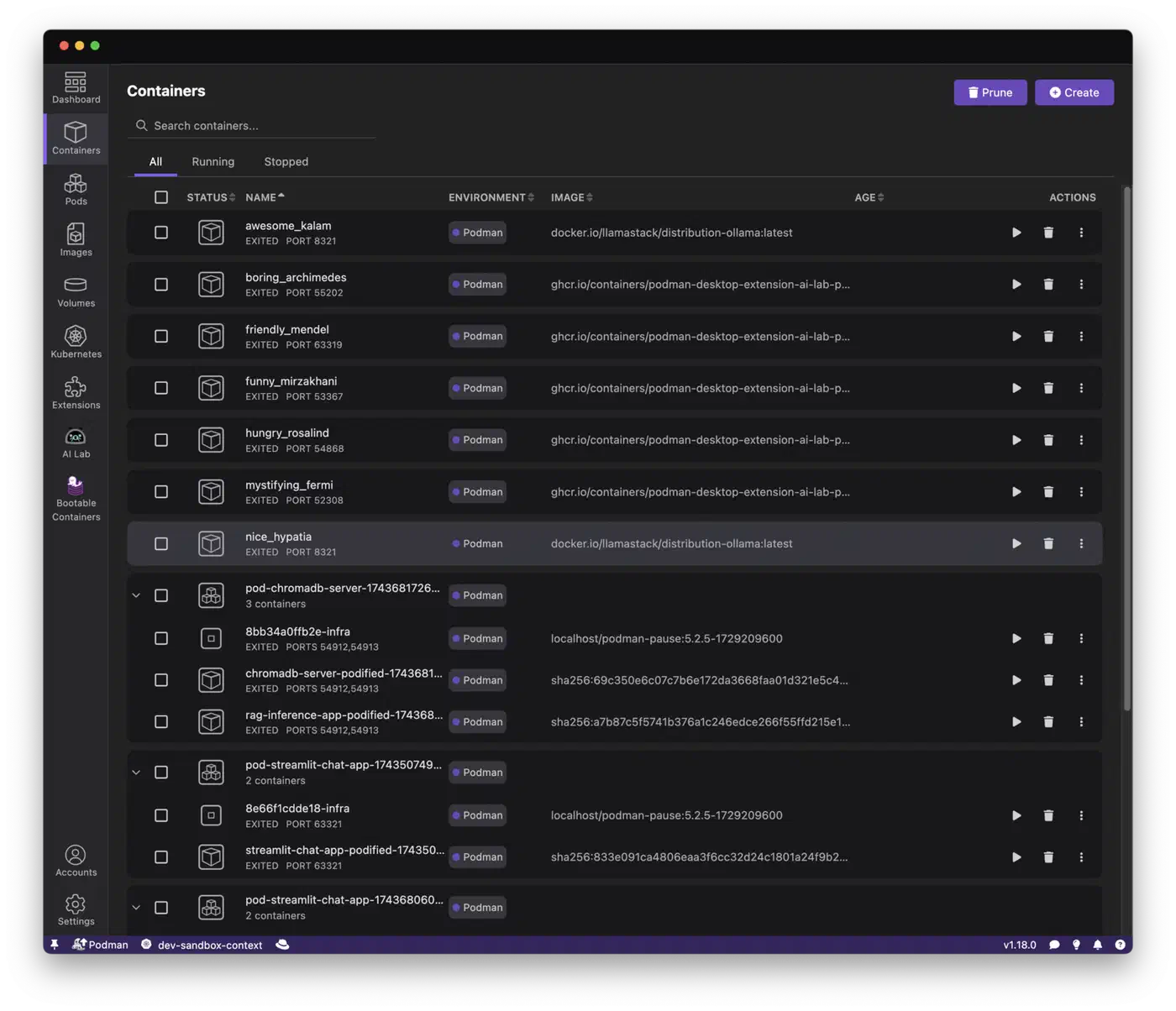
Podman Desktop (v1.x) now mirrors most of what Docker Desktop offers - a GUI for managing containers and images, Kubernetes integration, and an extension marketplace. Docker Desktop still has a larger extension library and a more polished Kubernetes experience, but the gap is closing with each release.
Security and Isolation Compared
Security is the most frequently cited reason to prefer Podman, and the reasoning is solid.
Docker’s default configuration runs the daemon as root on the host. Containers also run as root (UID 0) inside the container by default. If an attacker achieves a container escape - through a kernel vulnerability, a misconfigured volume mount, or a rogue process - they land on the host as root. Docker’s rootless mode and userns-remap mitigate this, but they require explicit configuration.
Podman flips this model. When you run a container as a regular user, Podman maps container root (UID 0) to your unprivileged UID on the host via user namespaces. A container escape yields only your unprivileged user’s access - not root. This is the default behavior, not something you have to opt into.
The user namespace mapping relies on /etc/subuid and /etc/subgid being configured for your user. Most distributions set this up automatically when you create an account, but if you hit permission errors with rootless Podman, check these files first:
# Verify your user has subordinate UID/GID ranges
grep $USER /etc/subuid
grep $USER /etc/subgid

# Expected output like:
# youruser:100000:65536
SELinux and AppArmor policies apply automatically to Podman containers on Fedora/RHEL and Ubuntu respectively. Docker supports these mandatory access control systems too, but a disturbingly common troubleshooting pattern in Docker forums is “just run with --privileged or --security-opt label=disable” - which strips away those protections entirely. Podman’s tighter defaults make this less tempting because things tend to work without disabling security features.
For secret management, Podman supports --secret for build-time secrets and integrates with systemd-creds for encrypted secret injection in Quadlet services:
# Create a secret
echo "my-db-password" | podman secret create db_pass -

# Use it in a container
podman run --secret db_pass my-app
Both runtimes support seccomp profiles, capability dropping, and read-only root filesystems. Podman’s default seccomp profile is slightly more restrictive out of the box.
For teams working with Kubernetes , Podman has a native pod concept that Docker lacks. You can create pods that group containers together, sharing network namespaces just like Kubernetes pods:
podman pod create --name my-app -p 8080:80
podman run --pod my-app -d nginx
podman run --pod my-app -d my-sidecar
You can also import and export Kubernetes YAML directly:
# Generate Kubernetes YAML from a running pod
podman kube generate my-app > my-app.yaml

# Deploy from Kubernetes YAML
podman kube play my-app.yaml
This makes Podman a natural stepping stone for workloads that will eventually run on a Kubernetes cluster.
Performance and Storage Drivers
In practice, runtime performance between Podman and Docker is nearly identical for most workloads. Both use the same OCI runtimes and the same overlay2 storage driver on modern kernels (6.x+). The containers themselves run at the same speed.
There are a few areas where small differences show up.
Container startup time is marginally faster with Podman (roughly 50ms less) because there is no daemon round-trip. For interactive development where you are spinning up and tearing down containers frequently, this adds up slightly. For long-running services, it is irrelevant.
Image pull performance is identical since both use the containers/image library under the hood. Podman additionally supports zstd:chunked layer pulls, which allow partial downloads of large images - useful when you only need a few changed layers from a multi-gigabyte base image.
On the build side, Docker uses BuildKit
by default, which is fast, well-cached, and supports advanced features like --mount=type=cache for persistent build caches. Podman uses Buildah
for builds, which supports the same Dockerfile syntax. BuildKit-specific features like cache mounts require Podman 5.x+. For standard multi-stage builds, both perform comparably.
Storage location is a practical difference worth knowing about. Docker stores all images centrally in /var/lib/docker/, shared across all users. Podman stores images per-user in ~/.local/share/containers/ by default. If multiple users on the same machine pull the same images, Podman will have duplicate copies consuming extra disk space. For single-user systems or servers with dedicated service accounts, this is a non-issue.
For rootless networking, Podman 5.x defaults to pasta, which offers near-native throughput. The older slirp4netns approach (still Docker rootless’s default) has measurably higher latency and lower throughput. If you are running network-intensive workloads in rootless mode, Podman has an edge here.
| Feature | Docker Engine 27.x | Podman 5.x |
|---|---|---|
| Storage driver | overlay2 | overlay2, btrfs, zfs |
| Build engine | BuildKit | Buildah |
| Rootless networking | slirp4netns | pasta (default) |
| Image storage | Central (/var/lib/docker) | Per-user (~/.local/share/containers) |
| Cache mount support | Yes | Yes (5.x+) |
| zstd:chunked pulls | No | Yes |
Making the Decision: Workflow-Based Recommendations
Rather than declaring a universal winner, here is a decision framework based on real scenarios.
Choose Podman if:
- You run Fedora, RHEL, or CentOS Stream. Podman is the default container runtime on these distributions, and Docker is not even packaged in the official repos. Fighting the distro’s defaults is rarely worth it.
- You want rootless containers without extra configuration. Podman does this out of the box.
- You deploy to Kubernetes and want pod-native local development workflows with
podman kube playandpodman kube generate. - You are running a home server or self-hosting setup where Quadlet unit files give you the most “Linux-native” container management experience.
Choose Docker if:
- Your CI/CD pipelines assume Docker and changing them would be costly. Many hosted CI systems (CircleCI, some GitHub Actions runners) still have Docker pre-installed and tested.
- Your team uses Docker Desktop extensions heavily. The extension marketplace is larger than Podman Desktop’s.
- You rely on Docker Swarm for simple multi-node orchestration. Podman has no built-in equivalent - you would need to jump to Kubernetes or another orchestrator.
- You run a mixed team with macOS and Linux users and need a consistent cross-platform experience. Docker Desktop is more mature on macOS, though Podman Desktop is closing the gap.
The hybrid approach is also completely valid. Both runtimes can coexist on the same system since they use separate storage directories and separate socket paths. You can set alias docker=podman in your shell for muscle memory while gradually migrating scripts. This is a practical way to test Podman without committing to a full switch.
Distribution defaults in 2026: Fedora 43 and RHEL 10 ship Podman 5.x. Ubuntu 26.04 LTS ships Docker from upstream repos but Podman is available in the universe repository. Arch ships both in the official repos. If your distro ships one by default, start there unless you have a specific reason not to.
The trend is clear - Podman’s compatibility with Docker tooling improves with every release, and major projects increasingly test against both runtimes. If you are starting fresh with no existing Docker investment, Podman is the pragmatic default. If you have a working Docker setup that is not causing you problems, there is no urgent reason to migrate. Both run the same containers the same way - the difference is in everything around the container.