 Botmonster Tech
Prompt Caching Explained: Cut LLM API Costs by 90%

Prompt caching lets you skip re-processing identical prefix tokens across LLM API calls, cutting costs by up to 90% and reducing latency by 50-80% on requests that share long system prompts, few-shot examples, or document context. Anthropic’s Claude offers prompt caching with explicit cache_control breakpoints, OpenAI’s GPT-4o supports automatic prefix caching, and local inference servers like vLLM and SGLang implement prefix caching natively. The rule: put your static, reusable prompt content first and the variable user query last.
If you are making repeated LLM API calls with similar prompts - and most production applications do exactly that - prompt caching is probably the single highest-impact cost optimization available to you right now.
How Prompt Caching Works Under the Hood
LLM inference happens in two phases. First is prefill, where all input tokens are processed in parallel to build the key-value (KV) cache - an internal representation of the attention state for each token. Second is decode, where output tokens are generated one at a time, each attending back to the KV cache. Prefill is the expensive part for long prompts. Its compute cost scales with input length, and for a 5,000-token system prompt, prefill can take hundreds of milliseconds even on fast hardware.
Prompt caching stores the KV cache from prefill so that subsequent requests sharing the same token prefix can skip directly to the point where the input diverges. Only the new, unique tokens need prefill processing. If your system prompt is 4,000 tokens and the user query is 200 tokens, a cached request only needs to prefill those 200 tokens instead of 4,200.
The matching works strictly from the first token forward. The cache checks whether the incoming request shares a prefix with a stored entry, token by token. Any change in the prefix - even a single token difference - invalidates the cache from that point onward. This is why prompt structure order matters so much. If you put the variable user query before the system prompt, every request has a different prefix, and nothing gets cached.
A few important details about cache behavior:
- Claude caches persist for 5 minutes of inactivity (ephemeral). OpenAI manages eviction transparently and does not expose cache TTL.
- Caches align to token boundaries, not character boundaries. Rephrasing the same instruction differently will miss the cache even if the meaning is identical. The bytes must match exactly.
- Both Claude and OpenAI require at least 1,024 tokens in the prefix before caching activates. Short prompts below this threshold will not benefit.
The cost structure differs by provider. Anthropic charges 0.1x the normal input token price for cached tokens (90% savings) with a 1.25x write surcharge on the first request. OpenAI charges 0.5x for cached tokens (50% savings) with no write surcharge. Local inference has no token cost at all, but prompt caching still saves GPU compute time and increases throughput.
Prompt Caching on Claude - Explicit Cache Control
Claude’s implementation gives you direct control over where cache boundaries sit. You add "cache_control": {"type": "ephemeral"} to any content block in the messages array or system parameter, and Claude caches everything up to and including that block. This explicit control makes Claude’s caching the most flexible option for high-volume applications.
Here is a minimal example of a cached API call:
{
  "model": "claude-sonnet-4-20250514",
  "system": [
    {
      "type": "text",
      "text": "You are a technical support agent for Acme Corp...",
      "cache_control": {"type": "ephemeral"}
    }
  ],
  "messages": [
    {"role": "user", "content": "How do I reset my password?"}
  ]
}
The system prompt gets cached on the first request. Every subsequent request with the same system prompt hits the cache and pays 90% less for those tokens.
Pricing math for Claude Sonnet (as of early 2026): base input costs $3/MTok, cached input costs $0.30/MTok, cache write costs $3.75/MTok (a 25% surcharge on the first request). You break even after just 2 requests with the same prefix. After that, every request saves you 90% on the cached portion.
The optimal prompt structure for Claude looks like this:
- System prompt (instructions, persona, rules) with
cache_control - Few-shot examples with a second
cache_control - Document context or retrieved passages
- User query last
This ordering maximizes the cached prefix length. The system prompt and examples rarely change, so they stay cached. The document context may change per topic but is often reused across multiple queries about the same subject. Only the user query at the end varies on every request.
For minimum cacheable lengths, Claude Sonnet requires 1,024 tokens and Opus requires 2,048 tokens. If your system prompt is shorter than these thresholds, consider padding with additional few-shot examples to cross the minimum.
Multi-turn conversations benefit automatically. The entire conversation history acts as a growing prefix. Each new user message adds tokens at the end, and all previous turns remain cached. A 10-turn conversation where each turn adds 200 tokens means turns 1-9 (roughly 1,800 tokens of history) are cached on turn 10.
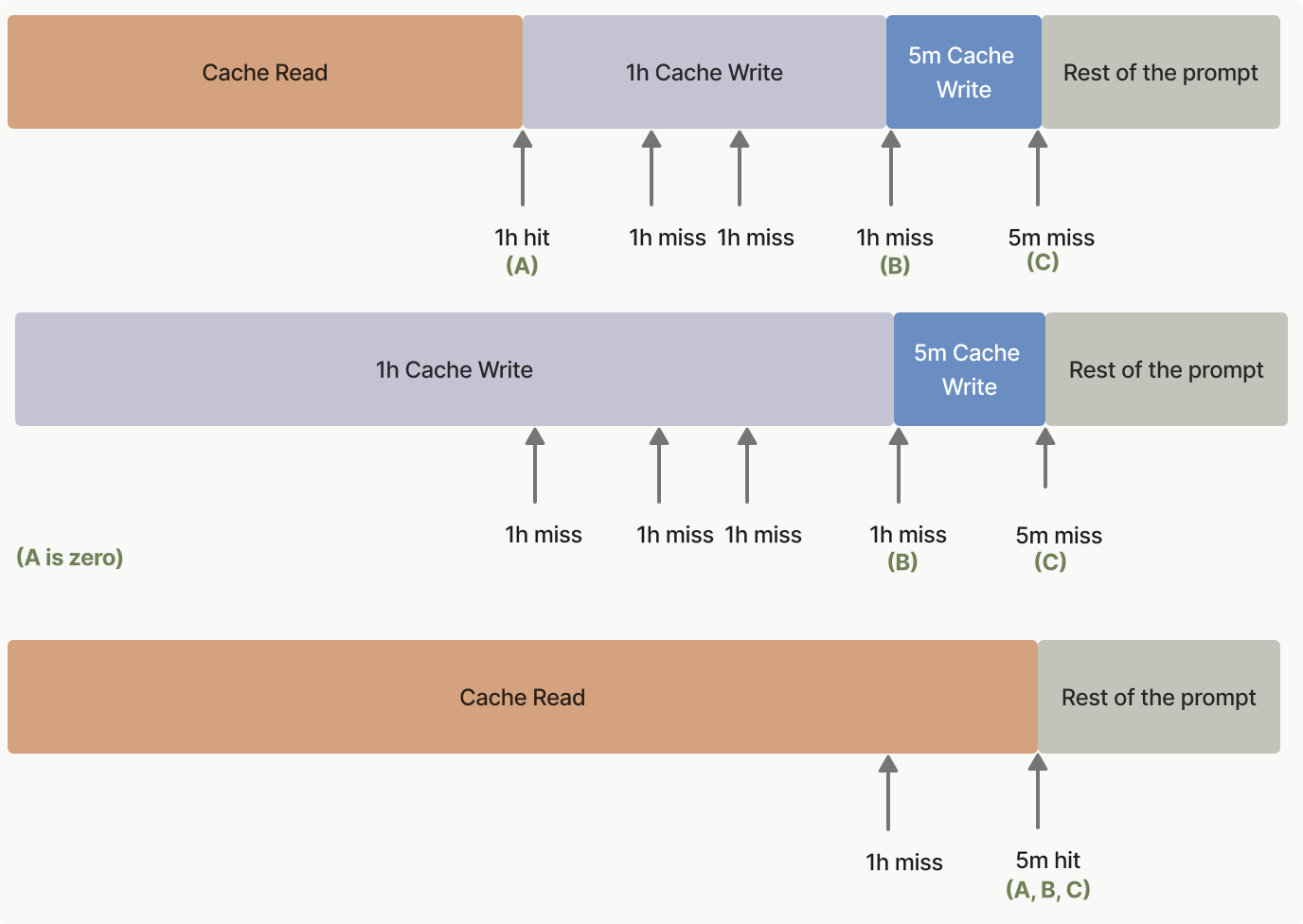
Monitor your cache performance using the API response fields: usage.cache_creation_input_tokens tells you how many tokens were written to cache, and usage.cache_read_input_tokens tells you how many were served from cache. If cache reads are low relative to total input tokens, your prompt structure needs adjustment.
Prompt Caching on OpenAI - Automatic Prefix Caching
OpenAI takes a different approach. Caching happens automatically on GPT-4o and GPT-4o-mini with no API changes required. Any request with an input prefix longer than 1,024 tokens that matches a recent request gets a cache hit. You do not need to add cache markers or change your code.
from openai import OpenAI
client = OpenAI()

# These two calls share a long system prompt prefix
# The second call automatically benefits from prefix caching
response = client.chat.completions.create(
    model="gpt-4o",
    messages=[
        {"role": "system", "content": long_system_prompt},
        {"role": "user", "content": "First question"}
    ]
)
Cached input tokens are billed at 50% of the standard input rate - $1.25/MTok instead of $2.50/MTok for GPT-4o. There is no write surcharge, so you benefit starting from the very first repeated request.
The simplicity of OpenAI’s approach is both its strength and its limitation. You cannot force a cache boundary, inspect cache state, or guarantee cache hits. Cache eviction is managed by OpenAI transparently and may vary based on their infrastructure load. During high-traffic periods, caches might be evicted faster.
One practical advantage: the Batch API (which already offers 50% cost reduction) stacks with prefix caching. If your batch requests share prefixes, you get the Batch API discount plus the caching discount, potentially yielding 75% total cost reduction on high-volume batch jobs. This is worth considering for workloads like document processing or evaluation runs where many requests share the same instructions.
To confirm caching is working, check usage.prompt_tokens_details.cached_tokens in the API response. If this field shows zero consistently, your prefixes are either too short (under 1,024 tokens) or too variable.
The same structural advice applies here: static content first, variable content last, consistent system prompts across all requests in a session, and no randomizing of few-shot example order.
Prompt Caching for Local Inference with vLLM and SGLang
Running models locally means you are not paying per-token, but prompt caching still matters because it directly reduces GPU compute time and increases throughput. That translates to serving more users on the same hardware or getting faster responses.
vLLM (v0.7 and later) supports prefix caching with the --enable-prefix-caching flag:
vllm serve meta-llama/Llama-4-Scout-17B-16E \
  --enable-prefix-caching \
  --gpu-memory-utilization 0.90
vLLM uses an LRU (least recently used) cache over token prefixes. It works with all supported models including Llama 4, Mistral, and Qwen families. The cache lives in GPU memory, so there is a trade-off: more cache means less room for concurrent requests. The --gpu-memory-utilization flag controls total VRAM allocation (default 90%), with a portion reserved for the prefix cache. If you hit out-of-memory errors, reduce this value.
SGLang (v0.4 and later) uses RadixAttention, a radix tree data structure that shares KV caches across requests with common prefixes. Unlike simple prefix matching, a radix tree can efficiently handle partial prefix matches across many different prompt variants simultaneously. RadixAttention is enabled by default in SGLang - no flags needed.
The performance difference is real. On a 4,000-token system prompt, prefix caching reduces time-to-first-token (TTFT) from approximately 800ms to 50ms on an RTX 5080 running Llama 4 Scout 17B (Q4_K_M quantization). That is a 16x reduction in initial latency. In a benchmark serving 100 requests with identical 4K-token system prompts, prefix caching increases throughput from 15 requests per second to 45 requests per second on a single RTX 5080 - a 3x improvement.
For multi-tenant scenarios where you serve different users with different system prompts, both vLLM and SGLang maintain separate cache entries per unique prefix. The practical optimization here is to batch or group requests by system prompt. If user A and user B both use system prompt X, schedule their requests close together so the cache stays warm. If you interleave requests with different system prompts on a GPU with limited memory, the cache will thrash and you lose the benefit.
Practical Strategies for Maximizing Cache Hit Rates
Having prompt caching available does not help if your application architecture works against it. These patterns push cache hit rates above 90% in production.
Version and freeze the exact text of your system prompt. Store it in a config file or database, not inline in code where developers might casually edit it. Even minor changes - adding a period, changing whitespace, fixing a typo - break the cache from that point onward. Treat the system prompt as an immutable artifact that gets versioned and deployed deliberately.
If you randomly sample few-shot examples from a pool, every request gets a unique prefix and a cache miss. Select a fixed, canonical set of examples and always include them in the same order. If you need variety, maintain a small number of fixed example sets (3-4 variants) and route requests consistently to the same set based on some stable key.
In RAG applications, place the retrieved documents before the user query in the prompt. Documents are often reused across multiple queries about the same topic. A user might ask five different questions about the same retrieved document, and with document-first ordering, the document prefix gets cached across all five queries.
In multi-turn chats, resist the urge to summarize previous turns to save tokens. Keeping the full conversation history intact means each new turn extends the cached prefix. Summarization changes the prefix text, breaking the cache entirely. The savings from caching typically outweigh the extra input tokens from keeping full history.
Cache entries expire after a period of inactivity (5 minutes on Claude). If your application processes requests in a bursty pattern - many requests within a short window, then silence - the cache stays warm during the burst. Design your request scheduling to group same-context requests together rather than spreading them evenly over time.
Here is a concrete cost model. Consider a RAG application making 10,000 requests per day with a 3,000-token system prompt and 2,000-token document context (5,000 cached tokens per request):
| Scenario | Monthly Input Token Cost |
|---|---|
| No caching (Claude Sonnet) | ~$450 |
| With prompt caching (Claude Sonnet) | ~$75 |
| No caching (GPT-4o) | ~$375 |
| With prompt caching (GPT-4o) | ~$187 |
The Claude savings are more dramatic (90% vs 50% discount on cached tokens), but OpenAI’s lack of write surcharge means it is cheaper on low-repeat workloads.
Provider Comparison at a Glance
| Feature | Claude | GPT-4o | vLLM | SGLang |
|---|---|---|---|---|
| Cache control | Explicit breakpoints | Automatic | Flag-based | Default (RadixAttention) |
| Cached token discount | 90% | 50% | N/A (local) | N/A (local) |
| Write surcharge | 25% | None | N/A | N/A |
| Min prefix length | 1,024-2,048 tokens | 1,024 tokens | None | None |
| Cache TTL | 5 min inactivity | Opaque | LRU eviction | LRU eviction |
| Cache monitoring | API response fields | API response fields | Server logs | Server logs |
Cache Warming and Cold Start
One scenario that catches people off guard is the cold start problem. When your application deploys fresh or after a period of inactivity, the cache is empty. The first request for each unique prefix pays the full prefill cost (plus the write surcharge on Claude). For latency-sensitive applications, this means the first user after a quiet period gets noticeably slower responses.
A practical workaround is cache warming: send a dummy request with your system prompt immediately after deployment or on a schedule slightly shorter than the cache TTL. On Claude, where the cache expires after 5 minutes of inactivity, a keep-alive request every 4 minutes keeps the cache populated. The cost of these warming requests is negligible compared to the savings from consistent cache hits during actual traffic.
For local inference with vLLM or SGLang, cold starts are less of a concern because the cache rebuilds quickly from the first real request. But if you are running a multi-model setup where different models share the same GPU, switching between models may flush the KV cache. In that case, dedicating specific GPUs to specific models avoids cache thrashing.
Prompt caching requires minimal code changes - restructure your prompt order and maybe add a cache_control annotation - but the savings are immediate and scale linearly with request volume. If you are running any production LLM application with repeated prompts, enabling prompt caching should be the first optimization you try before considering model downgrades, output token limits, or architectural changes.