 Botmonster Tech
How to Serve Multiple LLMs Behind a Single OpenAI-Compatible API

You can unify access to Ollama, vLLM, cloud providers like OpenAI, Anthropic, and Google, plus custom model servers behind a single OpenAI-compatible API endpoint using LiteLLM Proxy
. LiteLLM acts as a reverse proxy that translates the standard /v1/chat/completions request format to each provider’s native API. It handles authentication, model routing, load balancing, fallback chains, rate limiting, and spend tracking from one YAML configuration file. Your application code calls one endpoint with one API key format, and LiteLLM routes the request to the correct backend. You can swap models, add providers, or run A/B tests without changing a single line of application code.
This setup matters because the LLM space in 2026 is fragmented across incompatible APIs. Most teams run multiple models for different tasks, and managing provider-specific SDKs, authentication flows, and request formats across all of them becomes a real operational burden. A unified gateway solves that problem at the infrastructure layer.
Why You Need a Unified LLM Gateway
The core issue is API fragmentation. OpenAI uses messages with role/content fields. Anthropic uses messages but with a separate system parameter. Google Gemini uses contents with parts. Each provider requires different SDK code, different error handling, and different retry logic. If your codebase talks to three providers, you have three sets of API integration code to maintain.
Model specialization is what drives multi-provider adoption in the first place. Claude Opus 4 handles complex reasoning tasks well. GPT-4o is fast for tool-calling workflows. Llama 3.3 70B via Ollama gives you cost-free local inference. Gemini 2.5 Flash handles long-context summarization at a million tokens. No single provider covers every use case optimally, so teams end up stitching together multiple APIs.
Without a proxy layer, each new model addition means code changes: updating imports, rewriting prompt formats, adding provider-specific error handling, and managing separate API key rotation schedules. This is the kind of work that compounds over time and produces fragile integrations.
A unified gateway gives you:
- A single endpoint for all models
- Automatic request format translation between provider APIs
- Centralized API key management
- Request and response logging in one place
- Spend tracking per model, per user, and per team
- Fallback routing when a provider has an outage
There are alternatives to LiteLLM. OpenRouter is cloud-hosted but adds latency and cost since traffic routes through their infrastructure. Portkey is a SaaS product with a free tier. You could build a custom Nginx or Caddy reverse proxy, but those cannot translate between provider-specific request formats. LiteLLM is the most widely used self-hosted open-source option with over 18,000 GitHub stars, and it handles the format translation problem that simpler reverse proxies cannot.
The practical setup for most teams looks like this: LiteLLM Proxy running on a small VPS or Kubernetes pod, fronting Ollama for local models, vLLM for high-throughput GPU serving, and two or three cloud providers as fallbacks.
Setting Up LiteLLM Proxy
Install LiteLLM Proxy with pip on Python 3.10 or later:
pip install 'litellm[proxy]'Or use the official Docker image, which bundles all provider dependencies:
docker pull ghcr.io/berriai/litellm:main-latestThe core of the setup is litellm_config.yaml. Each entry maps a model_name (your alias) to a litellm_params block that specifies the actual model, API key, and base URL. Here is a working configuration with Ollama, vLLM, OpenAI, and Anthropic:
model_list:
  - model_name: "local-llama"
    litellm_params:
      model: "ollama/llama3.3:70b-instruct-q4_K_M"
      api_base: "http://ollama-host:11434"

  - model_name: "fast"
    litellm_params:
      model: "openai/gpt-4o-mini"
      api_key: "os.environ/OPENAI_API_KEY"

  - model_name: "smart"
    litellm_params:
      model: "anthropic/claude-opus-4-20250514"
      api_key: "os.environ/ANTHROPIC_API_KEY"

  - model_name: "vllm-llama"
    litellm_params:
      model: "openai/meta-llama/Llama-3.3-70B-Instruct"
      api_base: "http://vllm-host:8000/v1"
      api_key: "none"

  - model_name: "long-context"
    litellm_params:
      model: "gemini/gemini-2.5-flash"
      api_key: "os.environ/GEMINI_API_KEY"

general_settings:
  master_key: "os.environ/LITELLM_MASTER_KEY"
The model_name field is what your application uses. The model field uses a provider prefix (ollama/, openai/, anthropic/, gemini/) so LiteLLM knows which API format to use. Environment variable references with os.environ/ keep secrets out of the config file.
Start the proxy for development:
litellm --config litellm_config.yaml --port 4000 --detailed_debugFor production, use multiple Uvicorn workers:
litellm --config litellm_config.yaml --port 4000 --num_workers 4Now connect your application. Replace the OpenAI base URL with your LiteLLM proxy address and use the master key for authentication. All existing OpenAI SDK code works unchanged:
from openai import OpenAI

client = OpenAI(
    base_url="http://localhost:4000",
    api_key="your-litellm-master-key"
)

response = client.chat.completions.create(
    model="smart",  # Routes to Claude Opus 4
    messages=[{"role": "user", "content": "Explain container networking"}]
)
The model aliasing here is one of the most practical features. Your application requests model="fast" and LiteLLM routes it to GPT-4o-mini. Request model="smart" and it goes to Claude Opus 4. Request model="local-llama" and it hits your Ollama instance. Swapping the underlying model for any alias is a one-line YAML change with zero application code modifications.
For a production deployment, run LiteLLM alongside PostgreSQL for spend tracking and virtual key management, plus Redis for rate limiting and caching. A Docker Compose setup handles this cleanly:
version: "3.9"
services:
  litellm:
    image: ghcr.io/berriai/litellm:main-latest
    ports:
      - "4000:4000"
    volumes:
      - ./litellm_config.yaml:/app/config.yaml
    environment:
      - DATABASE_URL=postgresql://llmuser:llmpass@db:5432/litellm
      - REDIS_HOST=redis
      - LITELLM_MASTER_KEY=${LITELLM_MASTER_KEY}
      - OPENAI_API_KEY=${OPENAI_API_KEY}
      - ANTHROPIC_API_KEY=${ANTHROPIC_API_KEY}
    command: ["--config", "/app/config.yaml", "--port", "4000", "--num_workers", "4"]
    depends_on:
      - db
      - redis

  db:
    image: postgres:16
    environment:
      POSTGRES_USER: llmuser
      POSTGRES_PASSWORD: llmpass
      POSTGRES_DB: litellm
    volumes:
      - pgdata:/var/lib/postgresql/data

  redis:
    image: redis:7-alpine

volumes:
  pgdata:
Load Balancing, Fallbacks, and Routing Strategies
A unified gateway is only as useful as its routing logic. LiteLLM supports several strategies for distributing traffic and handling failures.
Load Balancing Across Deployments
Load balancing works by defining multiple deployments under the same model_name. If you have three OpenAI API keys or two vLLM instances, list them all with the same alias and LiteLLM distributes requests across them. Supported strategies include simple_shuffle (random distribution), least_busy (fewest in-flight requests), and latency_based (routes to whichever backend responded fastest recently).
router_settings:
  routing_strategy: "latency-based-routing"

model_list:
  - model_name: "gpt4o"
    litellm_params:
      model: "openai/gpt-4o"
      api_key: "os.environ/OPENAI_KEY_1"

  - model_name: "gpt4o"
    litellm_params:
      model: "openai/gpt-4o"
      api_key: "os.environ/OPENAI_KEY_2"
Fallback Chains
Fallback chains define what happens when a provider fails. Use the fallbacks key to set ordered alternatives:
router_settings:
  fallbacks:
    - model_name: "smart"
fallback_models: ["gpt4o", "local-llama"]If Anthropic returns a 429, 500, or times out, LiteLLM transparently retries the same request against GPT-4o. If that also fails, it tries Ollama. The client sees a single response with no indication that fallback routing occurred.
You can also configure cooldown periods to prevent a failing backend from dragging down the whole system. Set allowed_fails: 3 and cooldown_time: 60 on a deployment so that after three consecutive failures, that backend gets removed from the rotation for 60 seconds before LiteLLM tries it again.
Advanced Routing: Context Windows, Tags, and Cost
Context-window routing handles overflow gracefully. Configure context_window_fallbacks so that if a request exceeds GPT-4o’s 128K context limit, it automatically routes to Gemini 2.5 Flash’s 1M context window instead of returning an error.
Tag-based routing covers compliance requirements. Assign tags like eu-region or hipaa to specific deployments, then pass metadata: {"tags": ["hipaa"]} in the request. LiteLLM only routes to backends matching those tags, which is useful for data residency and regulatory constraints.
Cost-based routing with the lowest_cost strategy tracks per-token pricing for each provider and routes to the cheapest available model that meets the request requirements, including context length, streaming support, and tool-calling capability.
Connecting Local Model Servers: Ollama and vLLM
Most teams want at least some local inference capacity, whether for cost savings, latency, or data privacy. The two main options are Ollama for ease of use and vLLM for production throughput.
Ollama for Local Development
Ollama is the simpler path. Start it listening on all interfaces:
OLLAMA_HOST=0.0.0.0:11434 ollama servePull a model:
ollama pull llama3.3:70b-instruct-q4_K_MThen add it to your LiteLLM config with the ollama/ prefix and the Ollama server address as api_base. Ollama handles GGUF quantizations natively, so you can run quantized models without any extra tooling.
vLLM for Production Throughput
vLLM is built for throughput. Launch it with tensor parallelism across multiple GPUs:
vllm serve meta-llama/Llama-3.3-70B-Instruct \
  --tensor-parallel-size 2 \
  --gpu-memory-utilization 0.90
This exposes an OpenAI-compatible endpoint on port 8000. Add it to LiteLLM with the openai/ prefix since vLLM already speaks the OpenAI format, and set api_base to http://vllm-host:8000/v1.
The difference between the two for production workloads is significant. vLLM supports continuous batching, which delivers 10 to 50 times higher throughput than Ollama for concurrent requests. It also supports tensor parallelism across multiple GPUs and speculative decoding for faster generation. Ollama is better suited for single-user local development and testing.
For quantized models on vLLM, use AWQ or GPTQ quantized checkpoints from HuggingFace with the --quantization awq flag. Ollama handles quantization through its native GGUF support.
A practical GPU allocation strategy: dedicate your primary GPU or GPUs to vLLM for production traffic, run Ollama on a secondary GPU or on CPU for development and testing, and use LiteLLM tags to route traffic to the appropriate backend based on the use case.
Configure health checks in LiteLLM with health_check_interval: 30 so it pings each backend’s /health or /v1/models endpoint every 30 seconds. Unhealthy backends get automatically removed from the routing pool until they recover.
Authentication, Rate Limiting, and Spend Tracking
Running a shared LLM gateway requires access control, especially when multiple developers, teams, or applications share the same proxy.
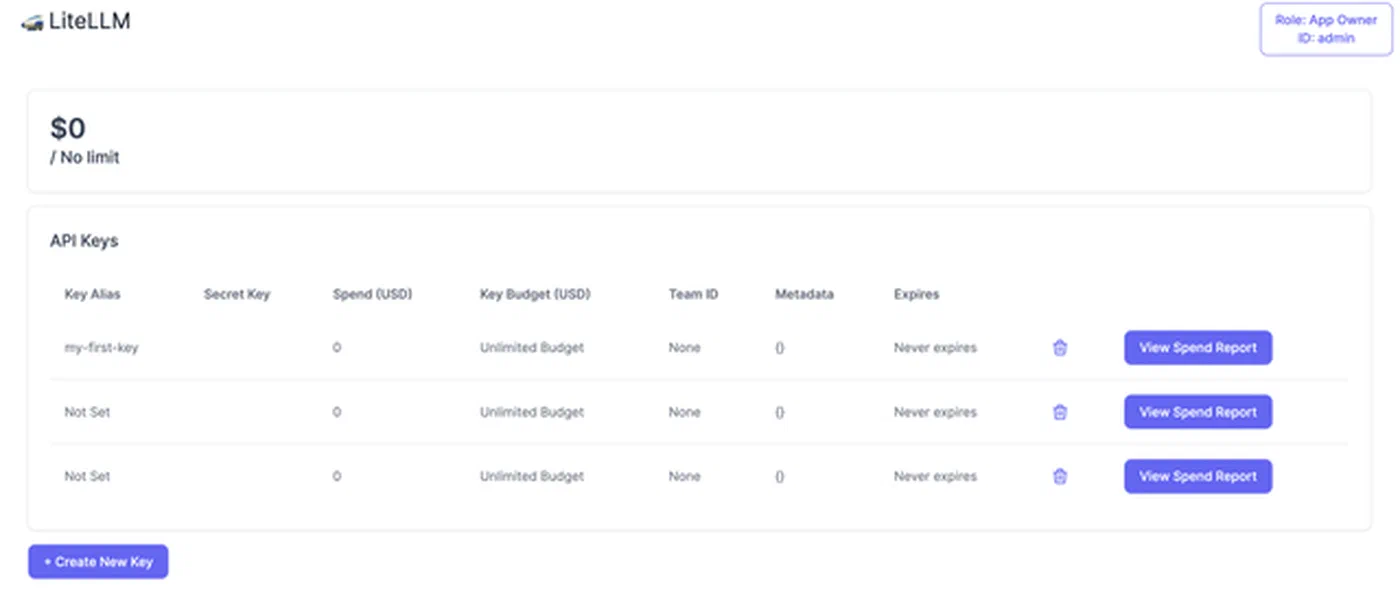
LiteLLM’s virtual key system lets you generate per-user or per-team API keys through the admin API. A POST /key/generate call accepts parameters like models (which models this key can access), max_budget, rpm_limit (requests per minute), and tpm_limit (tokens per minute). Users authenticate to LiteLLM with their virtual key, and LiteLLM maps that to the actual provider API keys internally. No one outside the infrastructure team needs to see the real API keys.
curl -X POST "http://localhost:4000/key/generate" \
  -H "Authorization: Bearer your-master-key" \
  -H "Content-Type: application/json" \
  -d '{
    "models": ["smart", "fast"],
    "max_budget": 50.0,
    "budget_duration": "monthly",
    "rpm_limit": 60,
    "tpm_limit": 100000,
    "metadata": {"team": "backend-engineering"}
  }'
Rate limiting uses Redis-backed sliding window counters. When a virtual key exceeds its rpm_limit or tpm_limit, LiteLLM returns a standard 429 response. This prevents any single user or application from burning through your entire provider quota.
Budget management caps spend per key. Set max_budget: 50.00 with budget_duration: monthly and LiteLLM tracks costs using each provider’s published per-token pricing. When the budget is exhausted, requests are blocked until the next billing period. This replaces the manual spreadsheet tracking that most teams start with and eventually outgrow.
The spend tracking dashboard at http://proxy:4000/ui shows real-time spend broken down by model, user, and team. Historical charts are backed by PostgreSQL, so you can see trends over time and spot which models or teams are driving costs.
Logging and Audit
Request logging integrates with observability platforms. Enable callbacks to Langfuse or Lunary in the config to send all request and response pairs for prompt observability, latency tracking, and quality evaluation:
litellm_settings:
  success_callback: ["langfuse"]

environment_variables:
  LANGFUSE_PUBLIC_KEY: "os.environ/LANGFUSE_PUBLIC_KEY"
  LANGFUSE_SECRET_KEY: "os.environ/LANGFUSE_SECRET_KEY"
Every request’s metadata also lands in the LiteLLM_SpendLogs PostgreSQL table: model used, tokens consumed, latency, user identity, and response status. This data is queryable through the admin API or direct SQL, which covers compliance reporting requirements.
Deployment Path and Overhead
The typical deployment path: start with the Docker Compose stack (LiteLLM, PostgreSQL, Redis), configure two or three cloud providers in the YAML file, add Ollama as a local backend, and generate virtual keys for each team or application. As your usage grows, add vLLM for high-throughput workloads, implement fallback chains between providers, and set up budget caps per team.
The latency overhead of LiteLLM itself is typically 5 to 15 milliseconds per request, which is negligible compared to model inference times that range from hundreds of milliseconds to several seconds.
What makes this setup worth the effort is that model selection becomes a configuration decision rather than a code change. When a new model launches or a provider has an outage, you update a YAML file and restart the proxy. Your application code, your SDKs, your prompt templates - none of them change. That separation between application logic and model infrastructure is what keeps a multi-LLM setup manageable as you scale up the number of models and teams using them.