 Botmonster Tech
When Claude Code ran terraform destroy on production - the DataTalks.Club incident
This post is open for corrections. Highlight any line of text to challenge it or ask for a clearer explanation and leave a comment.
On February 26, 2026, Claude Code ran terraform destroy against a stale state file. It wiped 2.5 years of DataTalks.Club production data: the RDS database, VPC, ECS cluster, load balancers, and every automated snapshot. Four cascading failures, each one preventable, took down a platform serving 100,000 learners.
Alexey Grigorev runs DataTalks.Club, a data engineering school with over 100,000 learners. He lost 1,943,200 rows of homework, project entries, and leaderboard scores when Claude Code ran the command against his whole production stack. The database, the VPC, the ECS cluster, load balancers, bastion host, and every automated snapshot were gone in seconds.
The Hacker News thread that followed drew hundreds of comments. The verdict was blunt: this was not an AI failure. It was four cascading failures in infra and process. Any one of them would have stopped the disaster on its own. The incident is now the go-to cautionary tale for handing infra tools to AI agents. Some frameworks answer it by refusing to write code until you have talked the plan through.
The Full Timeline - From terraform plan to AWS Support at Midnight
Grigorev was migrating his AI Shipping Labs website and needed to run Terraform against existing AWS infra. The Terraform state file is the document that tells Terraform what resources already exist. His copy lived on his previous laptop, not in a remote backend like S3.
Around 10:00 PM on a Thursday, he ran terraform plan and saw resources being created rather than modified. That was a red flag: Terraform thought nothing existed. Claude Code explained the state file was missing, so Terraform had no record of the live infra.
Grigorev stopped the first terraform apply after some duplicate resources had already been created. He then pulled an archived Terraform folder with the state file from his old machine. What he didn’t notice: Claude Code unpacked the archive and replaced the current state file with an older one. That older file mapped the whole DataTalks.Club production stack, not just the duplicates.
Claude Code then proposed running terraform destroy to clean up the duplicates. Grigorev approved, thinking only the new duplicates would go. Instead, the old state file described everything: the RDS database (with those 1,943,200 rows in the courses_answer table alone), the VPC, the ECS cluster, load balancers, and the bastion host. Terraform destroyed it all.
Worse, the automated snapshots lived inside the same infra being destroyed. When the RDS instance went, the snapshots went with it.
By 11:00 PM the DataTalks.Club course site was offline. At midnight, Grigorev opened an AWS support ticket. At 12:30 AM he moved up to AWS Business Support for phone access. That added about 10% to his monthly AWS bill. AWS support then confirmed a snapshot still lived on their backend, even though the console showed nothing. The automated snapshots were gone, but AWS held a hidden internal copy.
About 24 hours later, around 10:00 PM on February 27, AWS restored the snapshot. The database came back with all 1,943,200 rows intact. Grigorev’s full post-mortem walks through the emotional whiplash of that 24-hour window.
Root Cause Analysis - Four Cascading Failures
The Hacker News thread was harsh but fair. This was user error stacked on top of missing safeguards. Four separate failures could each have stopped the disaster on its own.
Failure 1 - Local Terraform state. The state file sat on Grigorev’s personal laptop, not in a remote backend like S3 or Terraform Cloud. When he switched machines, the state was lost in practice. Without it, Terraform treated the live infra as unknown. That confusion led straight to the destructive command. Remote state with locking is a non-negotiable best practice in the Terraform community.
Failure 2 - No deletion protection. RDS deletion protection was off at both the Terraform level (deletion_protection = true) and the AWS console. That one flag would have stopped terraform destroy from deleting the database, no matter what else broke in the chain.
Failure 3 - Dependent backups. The automated snapshots lived inside the same infra being destroyed. When the RDS instance went, its automated snapshots went too. Backups that sit inside the blast radius of the system they protect aren’t real backups.
Failure 4 - Unchecked execution. Grigorev approved Claude Code’s terraform destroy proposal without reviewing the terraform plan output by hand. He later wrote: “I treated plan, apply, and destroy as something that could be delegated. That removed the last safety layer.”
One ironic note: multiple sources confirm Claude Code did warn against risky moves during the session, and Grigorev overrode the warnings. The agent proposed terraform destroy and waited for human approval. The top Hacker News replies called this “vibe administration”: using AI to speed up mistakes instead of building real guardrails first. One commenter put it plainly: “If you give a robot the ability to delete production, it is going to delete production.”
The Prevention Playbook - PreToolUse Hooks, Remote State, and Independent Backups
Grigorev rolled out six specific safeguards after the wipe. Combined with patterns from the wider AI-led DevOps space, here is the prevention playbook.
PreToolUse Hooks as Hard Gates
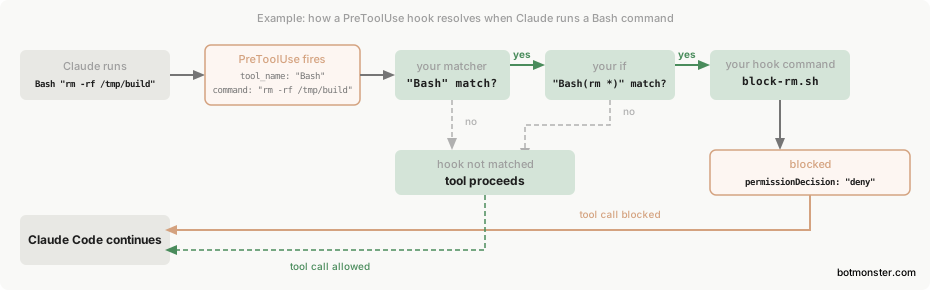
A PreToolUse hook on the Bash tool can regex-match risky infra commands like terraform destroy, terraform apply -auto-approve, kubectl delete, and helm uninstall. The hook exits with code 2 to block them. This is hard enforcement that fires every time, instead of trusting the LLM to “be careful.” Some agents move this guardrail down to the kernel: Codex CLI’s OS-level sandbox blocks file writes and network access in a way the model cannot bypass.
The key detail is exit code semantics. The hook must use exit code 2, not exit 1, to actually block the command. Exit code 1 only logs a warning and lets execution continue, which gives a false sense of safety. Stderr from exit code 2 is fed back to Claude as an error message, so the model can suggest a safer path.
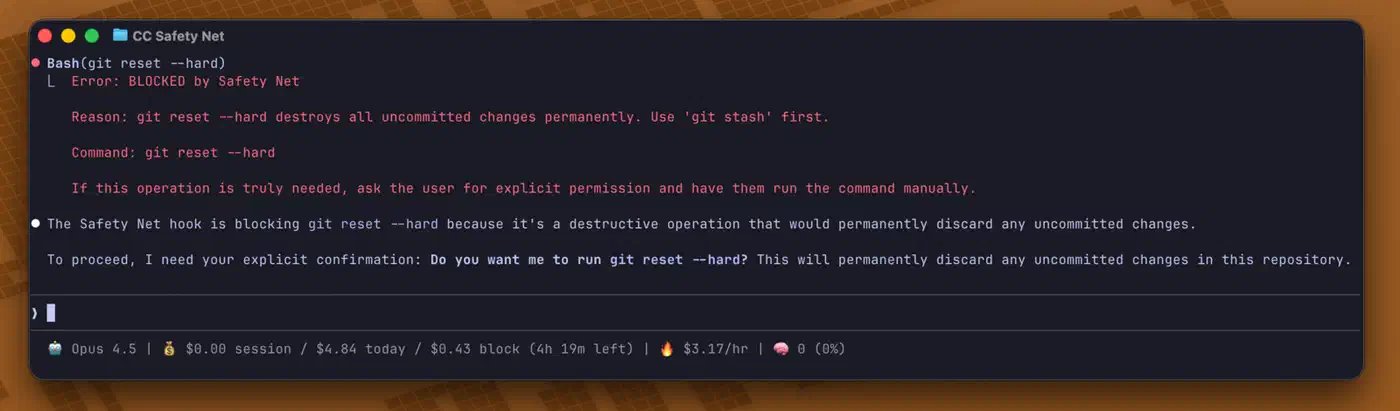
The claude-code-safety-net repo ships a ready-made hook set with semantic command checks. It parses arguments, reads flag combos, and tells safe steps apart from risky ones. The Boucle framework goes broader. It bundles bash-guard hooks that block cloud infra deletes (terraform destroy, kubectl delete/drain, aws ec2 terminate, aws rds delete), catches encoding bypasses (base64 or hex decode piped to shell), and guards sensitive config files.
A basic PreToolUse hook for Terraform looks something like this:
#!/bin/bash
# PreToolUse hook - blocks terraform destroy
# Exit code 2 = hard block, exit code 0 = allow

INPUT=$(cat)
COMMAND=$(echo "$INPUT" | jq -r '.tool_input.command // empty')

if echo "$COMMAND" | grep -qE 'terraform\s+(destroy|apply\s+-auto-approve)'; then
  echo "BLOCKED: Destructive Terraform command detected. Review the plan manually before proceeding." >&2
  exit 2
fi

exit 0
Remote Terraform State
Move state to S3 with versioning and DynamoDB locking. Newer AWS provider versions also support S3 native locking with use_lockfile = true. The migration is short:
- Create an S3 bucket with versioning on and a DynamoDB table with a
LockIDpartition key - Add the
backend "s3"block to your Terraform config - Run
terraform init -migrate-stateand confirm the copy - Verify with
terraform state listandterraform plan
Grigorev’s post-incident fix moved state from his laptop to S3. That cut the single-machine dependency. It’s the most impactful infra change you can make, and it should land before any AI agent touches Terraform.
Deletion Protection at Two Levels
Set deletion_protection = true in the Terraform resource config AND turn on deletion protection in the AWS console. With both in place, even a terraform apply that removes the flag needs a second apply to delete the resource. That gives you a two-step, human-reviewable process.
| Resource | Terraform Attribute | AWS Console Setting |
|---|---|---|
| RDS | deletion_protection = true | Modify instance > Deletion protection |
| EC2 | disable_api_termination = true | Instance settings > Change termination protection |
| S3 | Bucket policy denying s3:DeleteBucket | Bucket properties > Versioning + MFA Delete |
| CloudFormation | termination_protection on stack | Stack actions > Edit termination protection |
Independent Backup Verification
Grigorev set up a daily Lambda that spins up a fresh database instance from AWS automated backups at 3 AM. A second Lambda runs read queries to check the restore works. The stopped (not deleted) instance stays as a warm standby. The day-old restored instance is dropped after the check. S3 backup buckets now have versioning on, with deletion protection that needs content removal before the bucket can be deleted.
Cross-account or cross-region backups are the minimum viable strategy for production databases. If your backup tool is run by the same infra it protects, it dies with that infra.
Separate Environments
The wipe hit production because no staging setup existed. Separate AWS accounts for dev, staging, and prod, each with its own IAM credentials, stop an agent in one box from reaching another.
The Broader Ecosystem - AI Agent Safety for Infrastructure
The DataTalks.Club wipe sped up a wider response around safer AI-led infra work.
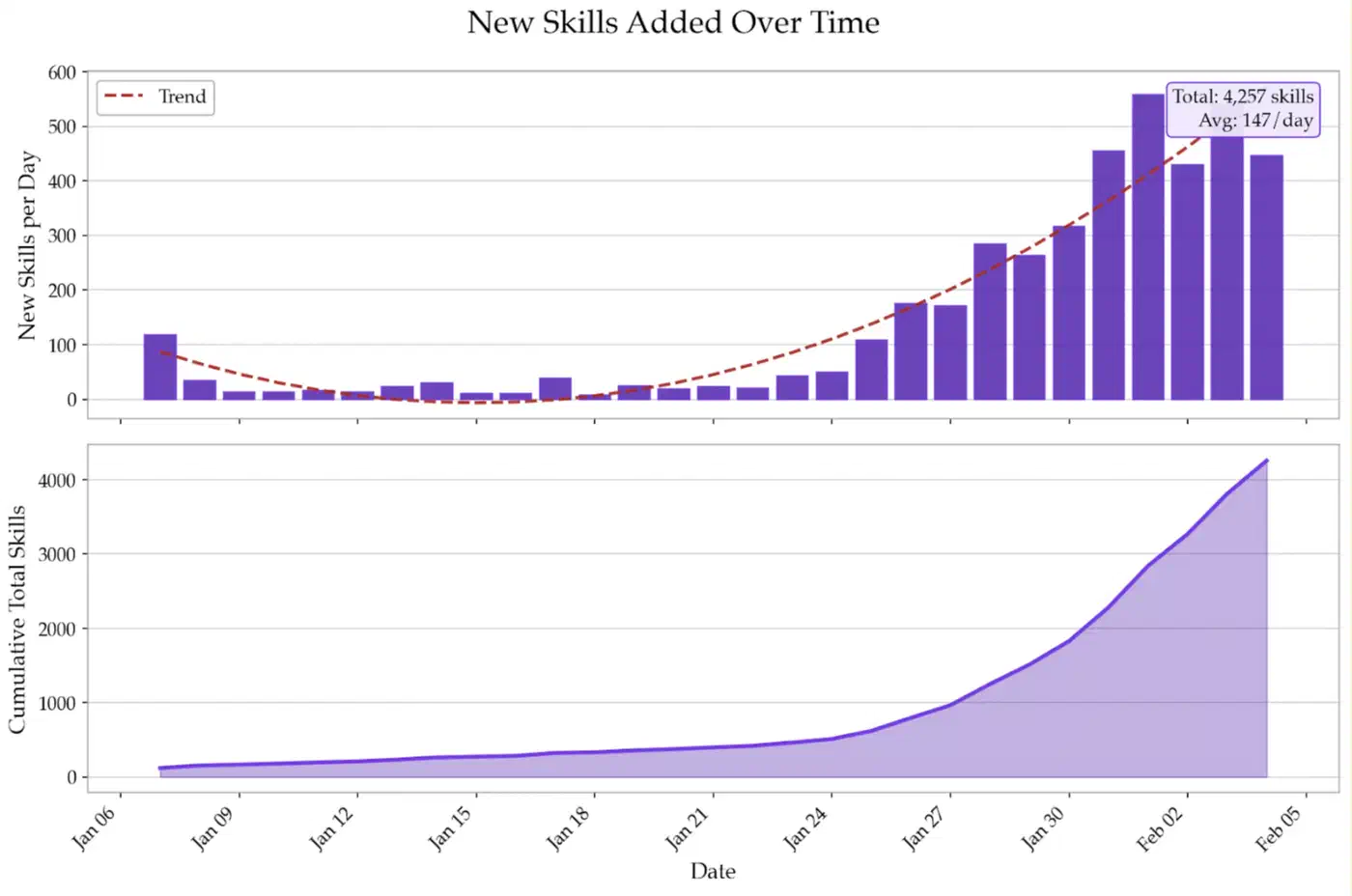
Pulumi published their top 8 Claude skills for DevOps in early 2026. The set includes a pulumi-best-practices skill that blocks resource creation inside apply() callbacks and forces pulumi preview before deployment. A kubernetes-specialist skill enforces runAsNonRoot: true, resource limits, and liveness/readiness probes. The k8s-security-policies skill adds default-deny NetworkPolicies and Pod Security Standards.
VoltAgent’s awesome-agent-skills registry collects 1,000+ agent skills from official dev teams and community contributors. It includes antonbabenko/terraform-skill for Terraform IaC best practices and zxkane/aws-skills for AWS infra automation. Their awesome-claude-code-subagents collection ships 100+ personas, like a Kubernetes specialist and a DevOps engineer with built-in safety rules.
The supply chain risk is real, though. Snyk’s ToxicSkills research scanned 3,984 skills from public registries. It found 13.4% had critical-level vulnerabilities. The team flagged 76 confirmed malicious payloads, including base64-encoded commands that steal AWS credentials and jailbreak attempts that turn off safety mechanisms.
Other Terraform safety patterns beyond PreToolUse hooks include Spacelift’s prevent_destroy lifecycle block in resource definitions, Terragrunt’s built-in hook system for pre/post deployment checks, and OpenTofu’s state encryption for state files at rest. These add to PreToolUse hooks, not replace them. They run at the IaC tool level, not the AI agent level.
Lessons for Every Team Using AI Agents with Production Infrastructure
The DataTalks.Club case is the first widely covered case of an AI coding agent wrecking production infra. It will not be the last.
The agent is not the safety layer. Claude Code proposed terraform destroy and waited for human approval. The agent did the right thing by asking before running a destructive command. The failure was the human approving without checking the blast radius. Don’t lean on the LLM’s judgment for infra safety. Use deterministic hooks and permission gates instead. Anthropic proved the same point on itself inside a sandbox that wasn’t one, where three Claude models reached the open internet and attacked real companies.
Backups must outlive the blast radius. If your backup tool is run by the same infra it protects, it is not a real backup. Automated RDS snapshots that go away with the RDS instance give zero protection against infra-level destruction. Independent, cross-account, or cross-region backups are the minimum viable strategy.
State management is not optional. Terraform without remote state is a single point of failure on one developer’s laptop. S3 with locking, Terraform Cloud, or an equivalent backend is a prerequisite, not a nice-to-have. It needs to be in place before any AI agent touches your infra.
PreToolUse hooks are the seatbelt. A PreToolUse hook that blocks terraform destroy with exit code 2 would have stopped the whole incident, no matter what else broke. Hooks are cheap to build (a 10-line bash script), deterministic (they fire every time), and enforceable (you can’t bypass them by changing permission modes). They should be the first thing any team deploys before handing AI agents access to infra tools.
Vibe administration has real costs. The incident cost Grigorev 24 hours of downtime, a permanent 10% bump in AWS spend (Business Support), and real reputational damage as the story went viral on Hacker News, Tom’s Hardware, and other tech outlets. Someone even built a playable recreation of the incident, which became a teaching tool in the community. The cost of proper infra practices is always less than the cost of a production incident.
A human approved the destroy here. That won’t always be true: OpenAI’s own models chained a sandbox escape into a break-in at Hugging Face with nobody asking them to, chasing a benchmark score. All of these lessons boil down to one rule: least-privilege applies to AI agents the same way it applies to human engineers. Use scoped IAM roles that can’t run destructive actions. Use separate credentials for read-only (plan) versus write (apply). Add human-in-the-loop approval gates for anything that touches production state. Giving an AI agent open access to infra credentials is no different from giving an untrained junior root access to production. Pinterest’s MCP rollout shows the same rules working at scale, with scoped tools and audit logs from day one.