 Botmonster Tech
Cursor vs. VS Code Copilot: best AI coding editor 2026

Cursor wins for most coders in 2026. If you write code daily and you’re not using it, you’re leaving real speed on the table. GitHub Copilot in VS Code still wins in specific cases. What decides it isn’t the model. It’s how deep the tool reads your code, and the agent loop around it.
What “Agentic” Means in 2026
“Agentic” gets slapped on every AI coding tool with a chat box, so it helps to be precise. The capability ladder runs from tab completion at the bottom, to inline chat for single-block edits, to multi-file edit suggestions, and at the top, a real agent loop. That top loop reads your project index, edits across ten or twenty files, runs your linter and tests, reads the errors, fixes them, and keeps going until everything is green. That top tier is where Cursor and Copilot diverge most.
Codebase indexing is the limit. A model that only sees one file can’t safely rework a service layer and its consumers and tests. Cursor builds a local vector index using retrieval-augmented generation (RAG) and pulls the right chunks into the context window when you trigger a task. Copilot Workspace uses a graph of file dependencies instead, similar to a language server’s symbol tree. In practice, Cursor’s RAG approach handles big, messy codebases better. Copilot’s graph wins when the structure is clean and the task maps to an existing issue or PR. Cursor’s index lives locally and tracks one working directory, so switching branches invalidates it and triggers a re-index. Giving each branch its own worktree keeps every index stable.
Agentic Coding: Cursor’s “Apply” Loop
Cursor’s Agent mode (formerly Composer) is what separates it from the pack. You describe the task: “add JWT auth to this Express app with middleware, login and logout routes, and tests.” The agent reads your project index. It learns your route patterns, middleware conventions, and test framework. Then it shows you a plan before touching any code. You can edit the plan first. Once you approve, it writes across every affected file, runs your linter, reads any errors, applies fixes, and runs your test suite in the integrated terminal.
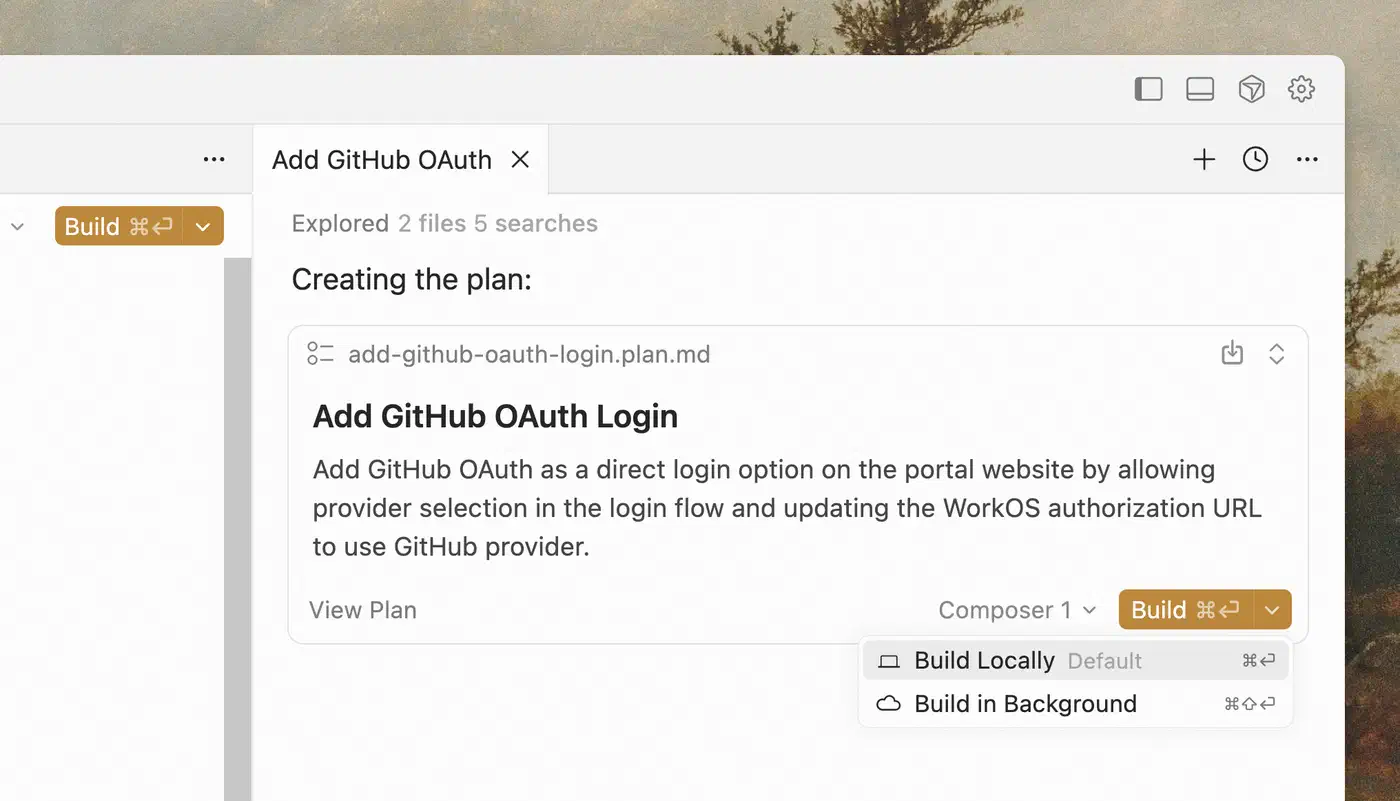
If tests fail, it reads the failure, decides whether the code or the test is wrong, and iterates. On a well-structured project, the whole loop runs end-to-end with no manual edits.
Copilot Workspace offers a competing flow, but the gap shows up fast. It’s tightly bound to GitHub Issues: you pick an issue, it generates a plan, it produces diffs. That’s clean for greenfield features tied to a tracker. However, Workspace runs on a cloud clone of your repo, not your local environment, so it doesn’t run your local tests automatically. Copilot Edits inside VS Code does local multi-file editing well. It still lacks the auto run-and-fix loop Cursor ships natively.
Concrete example: adding auth to a minimal Express app with eight route files and a Jest suite. Cursor Agent gets it green in three to four minutes with no manual edits. Copilot Edits takes seven to ten minutes and needs two or three manual corrections. Usually it’s a missed file or a test that doesn’t match the project’s existing patterns.
Terminal and Self-Healing Builds
The agent loop is only as useful as its grip on the surrounding tools. When Cursor’s agent hits a TypeScript type error, a missing import, or a failed migration, it doesn’t stop and ask. It reads the terminal output, edits the source, and re-runs. The loop repeats until the error clears or the agent gives up with a clear explanation. For the “build, read error, fix, repeat” cycle every developer lives in, cutting most of that loop compounds across the day.
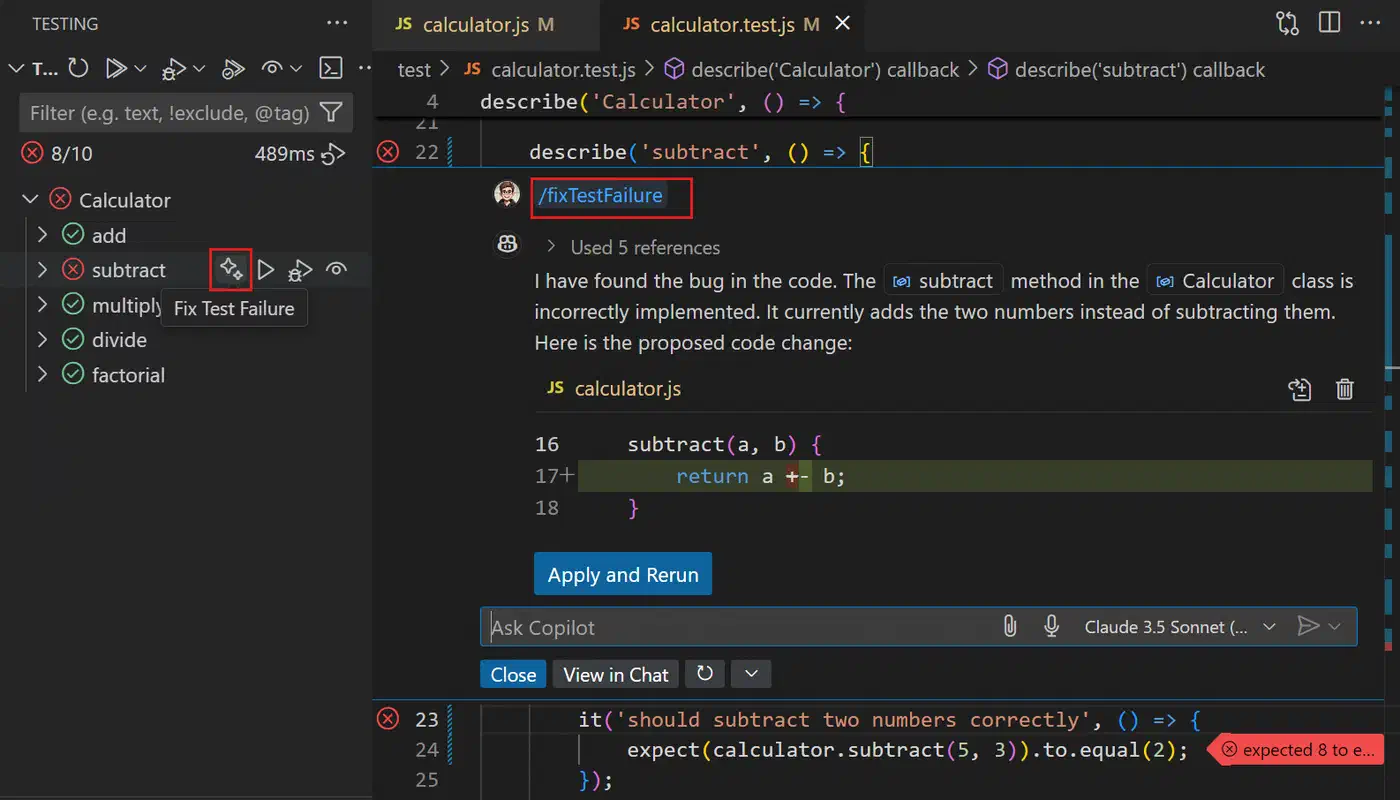
Copilot’s terminal story is split across tools. The GitHub Copilot CLI ships gh copilot explain and gh copilot suggest, both useful but suggestion only. Inside the VS Code terminal, Copilot can explain errors on right-click, but it doesn’t watch terminal output and offer fixes on its own. It’s a smart colleague you have to ask, versus Cursor’s helper that notices your build broke and starts fixing. If you want the agent loop entirely in the terminal rather than an editor, dedicated coding CLIs are the other path, and Google reshuffled that space by migrating off Gemini CLI to a new Antigravity CLI.
Privacy and Data Handling
Before either tool sees your private code, know what leaves your machine. Cursor sends out the chunks pulled for RAG context, your chat messages, and accepted completions (training opt-out available). The index stays local. Privacy Mode turns off training use and cuts data storage. It’s on by default for Business plan customers.
Copilot is built for enterprise out of the box. Individual plan suggestions train the model unless you opt out. Business and Enterprise never train on your code by policy, support file-level or folder-level exclusions, and Enterprise adds audit logs. For regulated work, Copilot’s contract terms are clearer than Cursor’s current Business tier.
For full data control, Cursor accepts a custom API URL. You can point it at a local Ollama instance running DeepSeek-V3 or Qwen 2.5 Coder. Agent features still work, but model quality drops on hard multi-file tasks. The continue.dev extension for VS Code is a similar open-source path, though it trails Cursor’s built-in agent flow. If you want that model freedom as the default rather than a bolt-on, OpenCode and other model-agnostic terminal agents are built to run whatever backend you point them at.
Pricing and Ecosystem
| Feature | Cursor Pro | GitHub Copilot Individual | GitHub Copilot Business |
|---|---|---|---|
| Monthly price | $20/month | $10/month | $19/user/month |
| Annual price | $192/year ($16/mo) | $100/year | $228/user/year |
| AI model access | Claude Sonnet/Opus, GPT-4o, Gemini 2.5 | GPT-4o, Claude Sonnet, Gemini 2.5 | GPT-4o, Claude Sonnet, Gemini 2.5 |
| Agentic multi-file edits | Yes (Agent mode) | Yes (Copilot Edits, limited loop) | Yes (Copilot Edits, limited loop) |
| Codebase indexing | Local RAG (.cursorignore) | Graph-based (cloud) | Graph-based (cloud) |
| Terminal agent loop | Yes (automatic) | Suggestion-based only | Suggestion-based only |
| Privacy mode | Yes (all paid plans) | Opt-out on Individual | On by policy for Business |
| Audit logs | No | No | Yes (Enterprise tier) |
| Local model support | Yes (custom API endpoint) | No | No |
| VS Code extension support | ~99% (VS Code fork) | Native | Native |
| Vim/Neovim support | No | Yes | Yes |
| Free tier | 2,000 completions/month | No (14-day trial only) | No |
Cursor Pro at $20 includes a generous “fast request” allocation. Heavy users running 10 to 20 agent tasks a day can burn through it mid-month. After that, Cursor falls back to a slower tier. Copilot doesn’t have request tiers, so its performance stays flat across the workday. That consistency is underrated for developers leaning on agent features all day.
Cursor is a VS Code fork, so extension support is near complete. ESLint, Prettier, GitLens, Vim keybindings, every major language server, Docker, Kubernetes, and database clients all work. That includes anything you build against the Language Server Protocol yourself. A small number of extensions break on internal API drift, but most coders switch without hitting one. Settings, keybindings, and themes import from your VS Code profile on first launch.

Cursor has no Vim or Neovim support and won’t, since it’s an Electron app. Copilot’s first-party Neovim plugin is excellent. If you live in Vim, Copilot is the call.
Who Should Use What
Cursor is the better tool for most working coders in 2026. The widest margin shows up on large multi-file projects where the agent runs without hand-holding. If your day is feature work, refactors, or cross-file debugging on a codebase with real test coverage, Cursor will make you clearly faster.
Copilot wins in four cases. First, strict data governance: Business and Enterprise have the audit logs and contractual guarantees Cursor’s Business tier doesn’t yet match. Second, Vim or Neovim users: Copilot’s plugin is great, Cursor has nothing. Third, a GitHub-centric workflow built on Issues, Actions, and PR reviews. Fourth, students or hobbyists on a tight budget: $10 Individual with flat performance beats $20 Pro when agent use is light.
For 2026, if you’re starting fresh and can pick either tool, start with Cursor. The agent loop is more capable, the terminal smarter, the codebase understanding deeper. The $10 premium over Copilot Individual pays for itself in the first week of meaningful feature work. For the cases where Copilot is right (Vim, compliance, deep GitHub integration), it’s still a strong tool.