 Botmonster Tech
Testcontainers: PostgreSQL, Redis, Kafka testing

Testcontainers spins up real databases and services as Docker containers inside your test suite. Tests run against production-grade PostgreSQL, Redis, or Kafka instead of flaky mocks. The testcontainers-python library works with pytest. It automates the container life cycle. You get isolated, reproducible integration tests that catch bugs unit tests miss.
Below: setup with pytest, testing services beyond databases, performance patterns, and CI/CD configuration.
Why Mocks and In-Memory Databases Are Not Enough
Mocking db.execute() only checks if your code calls the function. It does not check if the SQL is valid. It also misses schema errors and type mismatches. You might have passing tests while your queries fail in production.
Using SQLite for tests is a common trade-off. However, it lacks the PostgreSQL features real apps lean on, like JSONB and full-text search. It also handles locks differently. If your app uses these features, SQLite tests cannot prove your code works.
Shared test databases create different problems. State builds up between runs and causes tests to fail in the wrong order. You might see tests pass locally but fail in CI. Manual cleanup scripts are slow and often break. If someone forgets a script, tests fail for the wrong reasons.
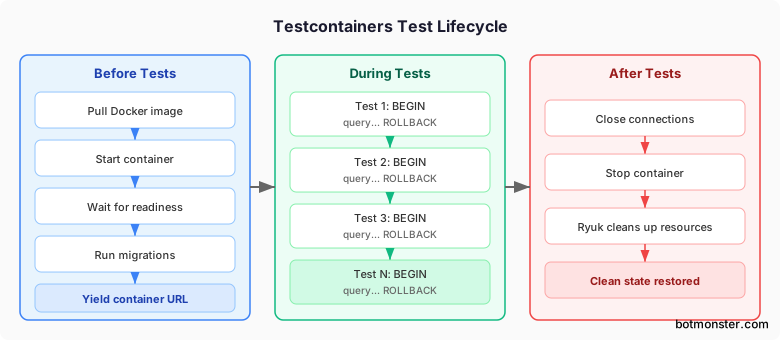
Testcontainers solves these issues. It creates a fresh container for each test session. Every run starts clean, and the library stops the containers after tests end.
The performance cost is low. A PostgreSQL container starts in about 3 seconds. Redis takes less than 1 second. When you use session fixtures, this cost is tiny. You pay for startup once and run hundreds of tests against one container.
Testcontainers works with many languages like Java, Go, and Python. The Python library fits into pytest and covers most use cases by default.
Setting Up Testcontainers with pytest
Installation
Install testcontainers with the extras for the services you need:
pip install testcontainers[postgresql,redis,kafka]Or with uv:
uv add testcontainers[postgresql]You need Docker or a similar tool. Podman works if you enable its Docker socket. Colima is a good light choice for macOS.
Basic PostgreSQL Fixture
The core pattern lives in your conftest.py. A session-scoped fixture starts the container once, and all tests in the session share it:
import pytest
from testcontainers.postgres import PostgresContainer


@pytest.fixture(scope="session")
def pg_container():
    with PostgresContainer("postgres:16") as pg:
        yield pg
The with block manages everything. It pulls the image, starts the container, and waits for it to be ready. It then stops the container when the session ends.
Getting the Connection URL
The container exposes a get_connection_url() method that returns a SQLAlchemy-compatible URL:
url = pg_container.get_connection_url()
# postgresql+psycopg2://test:test@localhost:32789/test
Testcontainers assigns a random port each time. This prevents conflicts if you run tests in parallel or have other databases running.
SQLAlchemy Integration
Wire the container into SQLAlchemy with layered fixtures:
from sqlalchemy import create_engine
from sqlalchemy.orm import Session


@pytest.fixture(scope="session")
def engine(pg_container):
    return create_engine(pg_container.get_connection_url())


@pytest.fixture
def db_session(engine):
    with Session(engine) as session:
        yield session
        session.rollback()
The engine fixture stays active for the session. In contrast, db_session starts fresh for every test. The rollback() call keeps the data clean without a restart.
Running Migrations
If your project uses Alembic for schema migrations, apply them in the fixture before yielding:
from alembic.config import Config
from alembic import command


@pytest.fixture(scope="session")
def pg_container():
    with PostgresContainer("postgres:16") as pg:
        alembic_cfg = Config("alembic.ini")
        alembic_cfg.set_main_option(
            "sqlalchemy.url",
            pg.get_connection_url()
        )
        command.upgrade(alembic_cfg, "head")
        yield pg
This ensures your tests use the same schema as production. It includes all your migrations.
Transaction Rollback for Per-Test Isolation
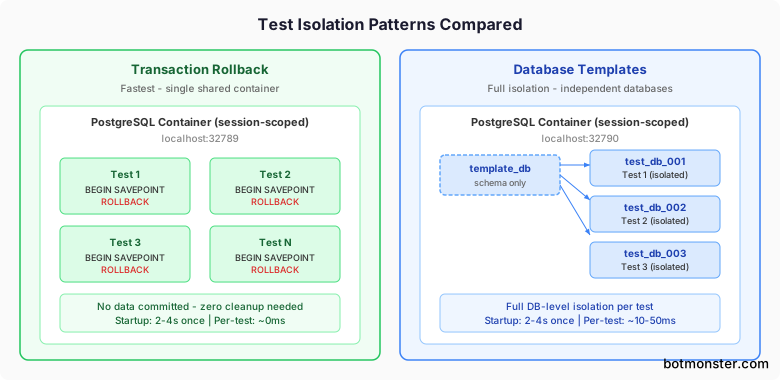
The most effective isolation pattern wraps each test in a transaction. This rolls back after the test ends. No data is committed, so you don’t need cleanup queries. This is the fastest way to isolate tests.
from sqlalchemy import event


@pytest.fixture
def db_session(engine):
    connection = engine.connect()
    transaction = connection.begin()
    session = Session(bind=connection)

    # Start a nested savepoint
    nested = connection.begin_nested()

    @event.listens_for(session, "after_transaction_end")
    def restart_savepoint(session, trans):
        nonlocal nested
        if trans.nested and not trans._parent.nested:
            nested = connection.begin_nested()

    yield session

    session.close()
    transaction.rollback()
    connection.close()
Testing Real Services: Redis, Kafka, and Custom Containers
Testcontainers works with more than just databases. You can use any Docker image as a test dependency.
Redis
Test your caching, pub/sub, and Redis Streams against a real Redis instance:
from testcontainers.redis import RedisContainer
import redis


@pytest.fixture(scope="session")
def redis_client():
    with RedisContainer("redis:7.4") as container:
        client = redis.Redis.from_url(
            container.get_connection_url()
        )
        yield client
The same fixture fits a Redis-backed flag store, the usual next step once JSON-file feature flags outgrow a single node.
Kafka
Test your producer and consumer logic. This includes serialization, consumer groups, and delivery guarantees:
from testcontainers.kafka import KafkaContainer
from kafka import KafkaProducer, KafkaConsumer


@pytest.fixture(scope="session")
def kafka_container():
    with KafkaContainer("confluentinc/cp-kafka:7.7") as kafka:
        yield kafka


def test_produce_and_consume(kafka_container):
    bootstrap = kafka_container.get_bootstrap_server()
    producer = KafkaProducer(bootstrap_servers=bootstrap)
    producer.send("test-topic", b"hello")
    producer.flush()

    consumer = KafkaConsumer(
        "test-topic",
        bootstrap_servers=bootstrap,
        auto_offset_reset="earliest",
        consumer_timeout_ms=5000,
    )
    messages = [msg.value for msg in consumer]
    assert b"hello" in messages
Generic Containers
If a service doesn’t have a specific module, use GenericContainer. Here is MinIO for S3 storage testing:
from testcontainers.generic import GenericContainer


@pytest.fixture(scope="session")
def minio_container():
    container = (
        GenericContainer("minio/minio:latest")
        .with_exposed_ports(9000)
        .with_env("MINIO_ROOT_USER", "admin")
        .with_env("MINIO_ROOT_PASSWORD", "password")
        .with_command("server /data")
    )
    with container:
        yield container
Elasticsearch
Test your index creation, mappings, and queries against a real Elasticsearch node:
from testcontainers.elasticsearch import ElasticsearchContainer
from elasticsearch import Elasticsearch


@pytest.fixture(scope="session")
def es_client():
    with ElasticsearchContainer("elasticsearch:8.15.0") as es:
        client = Elasticsearch(es.get_url())
        yield client
Custom Wait Strategies
Testcontainers checks if ports are open by default. However, you can add custom wait strategies for better startup detection:
from testcontainers.core.waiting_utils import wait_for_logs

with PostgresContainer("postgres:16") as pg:
    wait_for_logs(
        pg,
        "database system is ready to accept connections",
        timeout=30,
    )
Multi-Container Networks
Connect several containers on one network. This lets them talk to each other using container names:
from testcontainers.core.network import Network

with Network() as network:
    pg = PostgresContainer("postgres:16")
    pg.with_network(network)
    pg.with_network_aliases("db")

    with pg:
        # Other containers on the same network
        # can reach postgres at "db:5432"
        yield pg
This mimics multi-service systems where your app talks to a database by its hostname.
Patterns for Fast, Reliable Integration Tests
Starting a new container for every test is slow. Use these patterns to make your tests fast enough for daily development.
Session-Scoped Containers
Start the container once per session with scope="session". All tests then share that container. You get isolation from transactions instead of restarts. This turns a 3-second startup into a one-time cost.
Transaction Rollback Pattern
Wrap each test in a BEGIN and ROLLBACK with a nested SAVEPOINT. No data is committed and no cleanup runs. This is fast because the database does very little work between tests.
Database Template Pattern
Some tests need a fully separate database for DDL or connection pooling. In these cases, PostgreSQL templates are fast:
CREATE DATABASE test_run_001 TEMPLATE template_db;PostgreSQL copies templates as a file operation. This makes the process nearly instant for small schemas. Create the schema in a template once, then clone it for each test.
Parallel Test Execution
If you use pytest-xdist, each worker gets its own container. Testcontainers handles the ports automatically, so no setup is needed. You can also share one container and use separate databases to save resources.
Test Data Factories
Use factory_boy or polyfactory to create test data. Factories are easier to maintain than SQL files. They also adapt when your schema changes:
import factory
from myapp.models import User

class UserFactory(factory.alchemy.SQLAlchemyModelFactory):
    class Meta:
        model = User
        sqlalchemy_session_persistence = "commit"

    username = factory.Faker("user_name")
    email = factory.Faker("email")
Selective Test Running
Mark your integration tests so you can skip them during quick local runs:
@pytest.mark.integration
def test_user_creation(db_session):
    ...
Run only unit tests locally with pytest -m "not integration". Save the full suite for CI. You can also let a strategy-driven generator invent test cases automatically to find edge cases that your manual tests might miss.
CI/CD Integration and Troubleshooting
GitHub Actions
Docker is already on ubuntu-latest runners. You don’t need a services: block because Testcontainers uses the Docker socket. Once tests run in CI, use automated code review to catch issues early. A test-fixing coding agent can also run this suite locally, read the failures, and patch the code before you ever push.
jobs:
  test:
    runs-on: ubuntu-latest
    steps:
      - uses: actions/checkout@v4
      - uses: actions/setup-python@v5
        with:
          python-version: "3.12"
      - run: pip install -e ".[test]"
      - run: pytest
GitLab CI
Use docker:dind as a service and set the host:
test:
  image: python:3.12
  services:
    - docker:dind
  variables:
    DOCKER_HOST: tcp://docker:2375
  script:
    - pip install -e ".[test]"
    - pytest
If your socket path is different, set TESTCONTAINERS_DOCKER_SOCKET_OVERRIDE to the correct path.
The Ryuk Container
Testcontainers starts a helper called Ryuk (testcontainers/ryuk). It monitors your containers and removes them if a test crashes. This stops leaked containers from filling up your CI runners.
If your CI does not allow privileged containers, disable Ryuk. Set TESTCONTAINERS_RYUK_DISABLED=true. Note that crashed runs might leave containers behind. You can also set a timeout to clean up idle containers.
Docker Compose Module
If you already have a docker-compose.yml, use the DockerCompose class:
from testcontainers.compose import DockerCompose

with DockerCompose("/path/to/project") as compose:
    host = compose.get_service_host("webapp", 8080)
    port = compose.get_service_port("webapp", 8080)
    # Test against http://{host}:{port}
This is helpful if your app needs several services to talk to each other. You can reuse your Compose file instead of setting up each container by hand.
Podman Compatibility
Testcontainers works with Podman if you enable Docker compatibility. Check our Podman vs Docker comparison for the trade-offs. The team doesn’t test Podman actively, but the core features work. Key steps:
- Enable the Podman socket.
- Point
DOCKER_HOSTto that socket. - Disable Ryuk for rootless Podman.
Common Errors and Debugging
| Error | Cause | Fix |
|---|---|---|
| “Cannot connect to Docker daemon” | Docker socket not accessible | Check permissions and socket path |
| “Container startup failed” | Image pull timeout or port conflict | Pre-pull images in CI setup step |
| Tests hang on container start | Wait strategy not matching | Add custom log-based wait strategy |
| “Connection refused” to container | Container not ready despite port open | Increase wait timeout or add readiness check |
Set TESTCONTAINERS_LOG_LEVEL=DEBUG for more info. This shows the container ID. You can then use docker logs to see the output if a test fails.
Putting It All Together
Here is a complete conftest.py that sets up PostgreSQL and Redis for a test suite:
import pytest
from testcontainers.postgres import PostgresContainer
from testcontainers.redis import RedisContainer
from sqlalchemy import create_engine, event
from sqlalchemy.orm import Session
import redis


@pytest.fixture(scope="session")
def pg_container():
    with PostgresContainer("postgres:16") as pg:
        yield pg


@pytest.fixture(scope="session")
def redis_client():
    with RedisContainer("redis:7.4") as container:
        client = redis.Redis.from_url(
            container.get_connection_url()
        )
        yield client


@pytest.fixture(scope="session")
def engine(pg_container):
    return create_engine(pg_container.get_connection_url())


@pytest.fixture
def db_session(engine):
    connection = engine.connect()
    transaction = connection.begin()
    session = Session(bind=connection)

    nested = connection.begin_nested()

    @event.listens_for(session, "after_transaction_end")
    def restart_savepoint(session, trans):
        nonlocal nested
        if trans.nested and not trans._parent.nested:
            nested = connection.begin_nested()

    yield session

    session.close()
    transaction.rollback()
    connection.close()
And a test file using these fixtures:
from myapp.models import User


@pytest.mark.integration
def test_create_user(db_session):
    user = User(username="testuser", email="test@example.com")
    db_session.add(user)
    db_session.flush()

    result = db_session.query(User).filter_by(
        username="testuser"
    ).first()
    assert result is not None
    assert result.email == "test@example.com"


@pytest.mark.integration
def test_cache_user(db_session, redis_client):
    user = User(username="cached", email="cached@example.com")
    db_session.add(user)
    db_session.flush()

    redis_client.set(f"user:{user.id}", user.email)
    cached = redis_client.get(f"user:{user.id}")
    assert cached == b"cached@example.com"
Each test runs against real PostgreSQL and Redis instances. The transaction rollback ensures test_create_user does not leave data behind that would affect test_cache_user. The containers start once and are shared across the entire session, keeping the total overhead to a few seconds regardless of how many tests you write.