 Botmonster Tech
Build a portable hacking lab with a Raspberry Pi 5

You can build a self-contained pen testing lab on a Raspberry Pi 5 running Kali Linux ARM64. Add a battery HAT, a 7-inch display, and a wireless adapter that does packet injection. Total cost lands between $295 and $345. The result is a pocket-sized hacking kit that runs Nmap, Burp Suite, Wireshark, Aircrack-ng, and Metasploit in the field, at CTF events, or on jobs where you can’t lug a laptop.
The Pi 5 is the first Raspberry Pi truly worth using for this. Older models didn’t have enough RAM to run several tools at once. Their CPUs were also too slow, which made Metasploit painful. The Pi 5’s quad-core Cortex-A76 at 2.4GHz and 8GB of LPDDR4X memory fix that. This guide walks through hardware picks, Kali setup, tool configs, networking for offense, and the legal and op-sec rules that keep the lab from becoming a liability.
Hardware Selection and Assembly
The Pi 5’s quad-core Cortex-A76 at 2.4GHz and 8GB RAM make it the first Raspberry Pi that can run security tools without painful lag. The 4GB model works but chokes when Metasploit and Burp Suite run together. For real work, the 8GB model is the right pick. Every part below was chosen to push capability while keeping the total under $250.
Raspberry Pi 5 (8GB) is the base. It lists at $175 after Raspberry Pi’s 2026 memory-driven price rises. Don’t sub the 4GB model if you plan to run Metasploit with Burp Suite. The RAM ceiling shows up fast, and swap thrashing on a microSD card is miserable.
Storage is a bigger deal on the Pi 5 than on past models. Metasploit’s database and Kali’s huge tool catalog hammer I/O all the time. A 128GB or 256GB A2-rated microSD card (Samsung EVO Select or SanDisk Extreme) is the floor. If your budget allows an extra $15-25, the Pi 5’s M.2 HAT adds an NVMe slot for 2230 and 2242 drives. Even a cheap 256GB NVMe drive cuts Metasploit startup from 60 seconds to under 20 and makes the whole system feel snappier. That same M.2 slot can instead hold an edge AI accelerator if you later turn the board into a vision or camera rig.
Battery HAT options split into two camps. The PiSugar 3 ($40) holds a 5000mAh lithium cell, mounts under the Pi, and talks over I2C for battery percent reporting in software. It gives 3-4 hours of moderate use. The Waveshare UPS HAT (C) uses removable 18650 cells for longer runtime but is bulkier. Either works. The PiSugar is the neater install if you want a small build.
Portable display: The Waveshare 7" HDMI touchscreen ($50-60) plugs into the Pi’s micro-HDMI port and needs no driver setup under Kali Linux. The official Raspberry Pi Touch Display 2 ($60) also works, but it uses the dedicated DSI connector, which can clash with some HATs. The Waveshare HDMI panel is the safer plug-and-play pick.
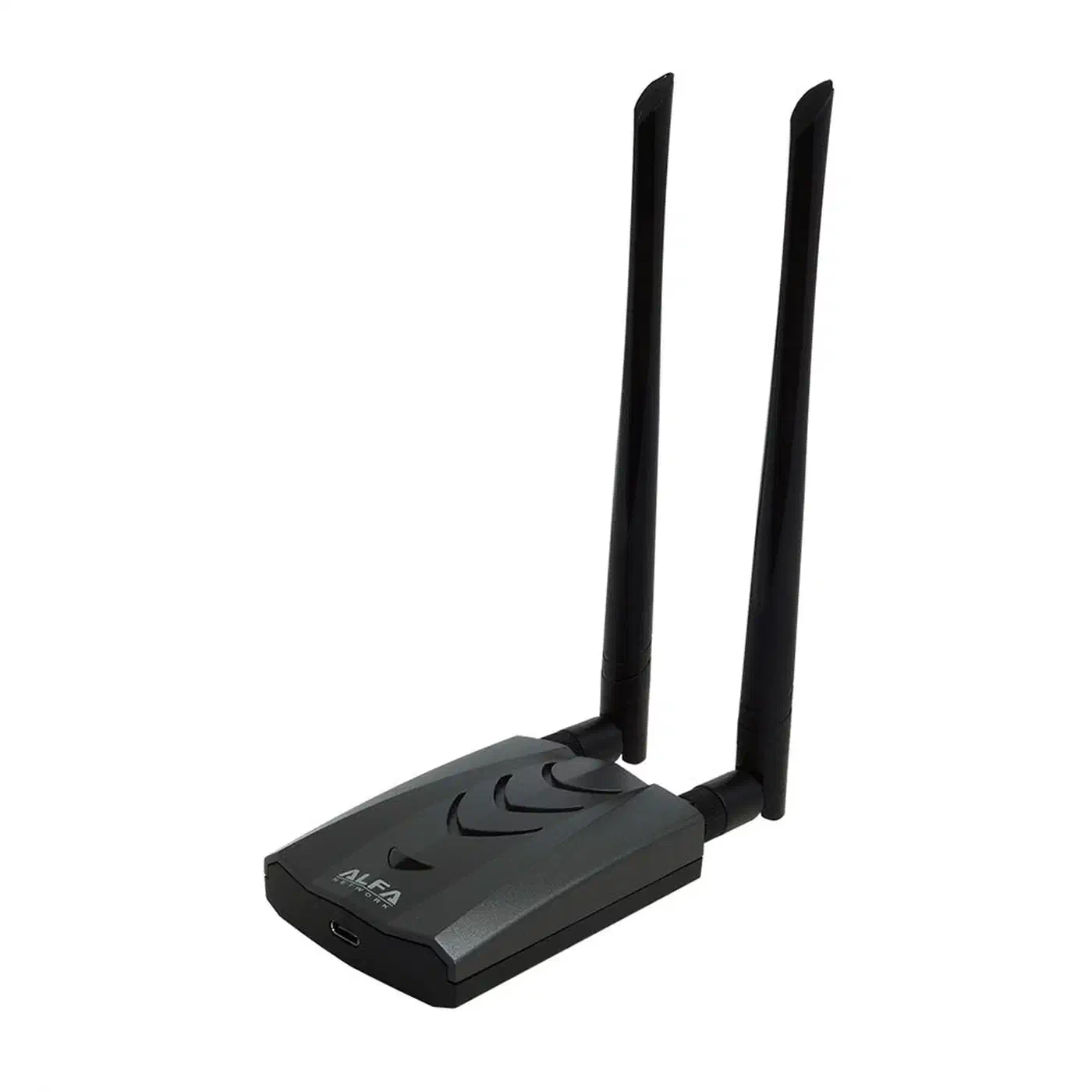
Wireless adapter for packet injection is the part with the least room for compromise. Not all USB wireless adapters do monitor mode and packet injection on Linux. Fewer still have solid drivers on ARM64. The Alfa AWUS036ACH (RTL8812AU chipset) and the Alfa AWUS036ACSM (MediaTek MT7612U) are the two best picks in 2026. Both do dual-band 802.11ac. Both have driver packages in Kali’s repos. Both pass Aircrack-ng’s injection test.
Compact keyboard: The Rii i4 mini Bluetooth keyboard with built-in touchpad ($15-20) pairs fast with Kali’s Bluetooth stack and fits in a jacket pocket. The Logitech K380 is bigger but much comfier for long typing during an assessment.
Case and cooling: The Argon ONE V3 case ($25) gives you passive cooling, a full-size HDMI port adapter, and a clean GPIO panel that fits the battery HAT without snags. Active cooling helps under load. Metasploit DB work and long Nmap scans both push the CPU hard. Add the official active cooler ($5) to the Argon ONE for long sessions.
Installing and Configuring Kali Linux ARM64
Kali ships a pre-packed tool stack that makes this lab useful right away. You skip days of compiling and configuring tools by hand. Offensive Security keeps the ARM64 Pi image in sync with the full x86_64 Kali build.
Grab the official Kali ARM64 image from kali.org/get-kali/#kali-arm. Pick the “Kali Linux RaspberryPi 5” image with the XFCE desktop. Check the SHA256 hash before you flash. Then write to your microSD card or NVMe drive:
# For microSD (replace /dev/sdX with your actual device)
dd if=kali-linux-2026.1-raspberry-pi-arm64.img of=/dev/sdX bs=4M status=progress conv=fsync

# Or use balenaEtcher if you prefer a GUI
On first boot, change the default credentials immediately:
passwd # change from default 'kali' passwordThen update the system completely before installing anything else:
sudo apt update && sudo apt full-upgrade -y
sudo reboot
The Kali image for Pi 5 expands the filesystem on first boot. Check with df -h / that the full card shows up. If you used a minimal image instead of the desktop one, install the full tool suite:
sudo apt install kali-linux-defaultThis metapackage pulls in Nmap, Wireshark, Metasploit Framework, Burp Suite Community, John the Ripper, Hashcat, SQLMap, Nikto, Hydra, and a few hundred more tools. Expect 15-20GB of downloads.
Configure the Alfa wireless adapter. The RTL8812AU chipset in the AWUS036ACH needs a driver that ships outside the standard kernel. Kali has the DKMS package:
sudo apt install realtek-rtl88xxau-dkmsAfter install, check the adapter shows up:
iwconfig # should show wlan1 with the Alfa adapterTest monitor mode:
sudo airmon-ng start wlan1
sudo aireplay-ng --test wlan1mon  # should show injection is working
Performance tuning for the Pi 5. Edit /boot/firmware/config.txt to tune for security tool loads:
# Cut GPU memory: security tools don't need it
gpu_mem=128

# Turn on the 2.4GHz turbo boost
arm_boost=1

# Optional: force PCIe Gen 3 for NVMe HAT stability
dtparam=pcie_gen=3
Set the CPU governor to performance mode for long workloads:
sudo apt install cpufrequtils
sudo cpufreq-set -g performance
Turn on SSH so you can drive the Pi headless. That’s handy when it’s tucked in a bag on a target network:
sudo systemctl enable ssh
sudo systemctl start ssh
Essential Pentesting Tools and Their Pi 5 Performance
Not every security tool runs well on ARM64. Some are CPU-bound in ways that hurt on the Pi. Others lean on GPU acceleration that just isn’t there. Here’s what works, what works with limits, and what you should push to a beefier box.
Nmap runs native and fast on ARM64. A full TCP SYN scan (nmap -sS) of a /24 subnet finishes in under 30 seconds at default timing. Turn on service detection, scripts, and OS fingerprinting for a full host sweep:
sudo nmap -sV -sC -O -T4 192.168.1.0/24 -oA scan-resultsThe -oA flag saves output in all three formats (normal, XML, grepable) at once. That helps when you later import results into Metasploit or a reporting tool.
Metasploit Framework works fine, but has two quirks. First, msfconsole takes about 60 seconds to boot on an SD card and 15-20 seconds on NVMe. The PostgreSQL database is the bottleneck. Init the database before your first session:
sudo msfdb init
sudo msfconsole
Second, searches inside Metasploit run against the DB and run fast once it’s up. Module loading and exploit runs aren’t much slower than on x86 for common exploits. The Pi handles Metasploit better than its reputation suggests.
Burp Suite Community Edition runs on Java 21 ARM64, which sits in Kali’s repos. Set the memory cap explicitly:
java -jar -Xmx1g /usr/bin/burpsuiteManual web app testing works well: catching requests, tweaking parameters, testing auth. Don’t aim Burp’s auto scanner (Community has a limited one) at large apps. It will blow the heap.

Aircrack-ng suite is maybe the Pi 5’s biggest edge over a laptop. The full wireless attack flow runs clean:
# Capture WPA/WPA2 handshakes
sudo airodump-ng --bssid AA:BB:CC:DD:EE:FF -c 6 --write capture wlan1mon

# Deauthenticate clients to force reconnection and handshake capture
sudo aireplay-ng --deauth 5 -a AA:BB:CC:DD:EE:FF wlan1mon

# Crack captured handshake offline with rockyou
aircrack-ng capture-01.cap -w /usr/share/wordlists/rockyou.txt
The Pi 5’s CPU does dictionary attacks at around 50,000 to 100,000 keys per second. That’s slow next to GPU cracking, but fine for common password lists and rule-based candidate lists.
Wireshark runs in GUI mode on the Pi 5’s XFCE desktop. Big capture files (over 100MB) render slowly. For field work, use tshark to capture and filter at the CLI. Then move PCAPs to a laptop for deep analysis:
sudo tshark -i wlan1mon -w capture.pcap -f "not broadcast"Hashcat in CPU-only mode is 100 to 1000 times slower than GPU cracking, depending on the hash. Use it on the Pi for small wordlist tests or to check a hash format. Then move hashes to a GPU box for real cracking. The Pi is not a cracking rig.
Responder and Impacket are Python tools and run fine on ARM64. These Active Directory attack tools (LLMNR/NBT-NS poisoning, SMB relay, pass-the-hash) are some of the most used on internal network jobs. The Pi handles them without trouble:
sudo python3 /usr/share/responder/Responder.py -I eth0 -wrfNetworking Configuration for Offensive Operations
A pen testing lab needs flexible networking, and the Pi 5’s built-in radios plus the external Alfa adapter give you enough interfaces for most field jobs.
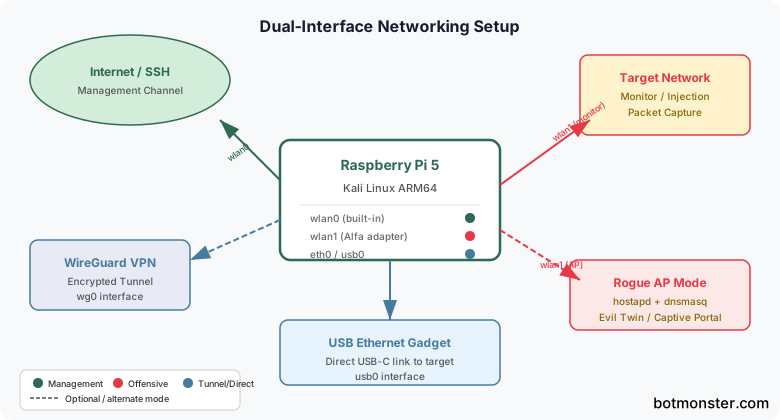
Dual-interface setup is the base config. Use the Pi 5’s built-in Wi-Fi (wlan0) for internet and to manage the Pi itself. Put the Alfa adapter (wlan1) into monitor mode, or use it on target networks, without touching your management channel. That split keeps SSH alive when wlan1 flips to monitor mode.
Rogue access point with hostapd. An evil twin AP needs hostapd for the AP and dnsmasq for DHCP and DNS. Install both:
sudo apt install hostapd dnsmasqA minimal hostapd.conf for creating a rogue AP:
interface=wlan1
driver=nl80211
ssid=TargetNetworkName
hw_mode=g
channel=6
auth_algs=1
wpa=2
wpa_passphrase=password123
wpa_key_mgmt=WPA-PSK
wpa_pairwise=CCMP
Route client traffic through the Pi with iptables NAT:
sudo iptables -t nat -A POSTROUTING -o wlan0 -j MASQUERADE
echo 1 | sudo tee /proc/sys/net/ipv4/ip_forward
VPN for anonymity. For external jobs where you need to hide the Pi’s real IP, route it through a private overlay network by installing the WireGuard client:
sudo apt install wireguardSet up your WireGuard tunnel in /etc/wireguard/wg0.conf and bring it up with:
sudo wg-quick up wg0USB Ethernet gadget mode lets you plug the Pi into a target machine’s USB port for a direct network link, with no visible network kit. Add these lines to /boot/firmware/config.txt:
dtoverlay=dwc2And to /boot/firmware/cmdline.txt, append (on the same line):
modules-load=dwc2,g_etherThe target machine sees a USB Ethernet adapter. Set the Pi’s usb0 interface to a static IP and use it for direct access to the target.
Bluetooth reconnaissance. The Pi 5’s Bluetooth stack supports device discovery and basic chat with BLE devices:
sudo bluetoothctl
[bluetooth]# scan on  # discover nearby devices
[bluetooth]# info AA:BB:CC:DD:EE:FF  # get device details
For BLE attack research in a controlled lab, btlejuice and GATTacker run on Node.js, which is on Kali ARM64.
Operational Security and Legal Considerations
A portable hacking lab creates legal risk that a desktop security setup does not. The same portability and stealth that help on authorized jobs make it look shady if unauthorized use is suspected. Knowing the legal lines is not optional.
The legal rule is hard: never point pen testing tools at networks or systems you don’t own or have explicit written permission to test. Even “passive” tricks like packet capture on public Wi-Fi fall under this. Grabbing other people’s traffic is illegal in most places, even if you don’t read the data. In the US, the Computer Fraud and Abuse Act (CFAA) applies. In the UK, it’s the Computer Misuse Act. Most countries have similar laws. Get written sign-off before you test anything you don’t own.
Full-disk encryption is a must on a portable device that holds security tools, captured creds, client reports, and job notes. If the Pi is lost or seized, LUKS encryption keeps that data safe. Encrypt the SD card or NVMe drive before installing Kali, or use Kali’s installer with the encrypted LVM option. To encrypt an extra volume after install:
sudo cryptsetup luksFormat /dev/sdb1  # format with LUKS
sudo cryptsetup open /dev/sdb1 secure-data  # unlock
sudo mkfs.ext4 /dev/mapper/secure-data  # create filesystem
MAC address randomization keeps your hardware address out of network logs during jobs. Swap the Alfa adapter’s MAC before you connect to any target network:
sudo ip link set wlan1 down
sudo macchanger -r wlan1  # assign random MAC
sudo ip link set wlan1 up
Log management. Kali logs shell history (~/.bash_history), tool output, and app logs by default. After each job, review and securely wipe sensitive logs:
shred -vfz -n 5 ~/.bash_history
history -c && history -w
The laptop you move PCAPs to piles up its own caches and temp files. Kudu clears those on Windows, macOS and Linux, and its cleaning rules are plain JSON you can audit first.
Engagement documentation. Use CherryTree (pre-installed on Kali) or Obsidian to log findings, capture dated screenshots, and sort evidence during jobs. Keep all job data on the LUKS-encrypted volume, not the system partition.
Physical security. The Pi’s portability is both its strength and its biggest risk. Use a plain case. Skip “Kali Linux” branding on the outside. Turn on auto screen lock with a short timeout (5 minutes). Set PAM to cap failed logins. In strict physical-security zones, be ready to explain what the device is if asked.
Isolated practice networks. For learning and drills, build isolated VM labs instead of testing on any live network. VulnHub hosts downloadable vulnerable VMs. Hack The Box offers ranked challenges over a dedicated VPN. Never scan HackTheBox boxes from your regular internet link without the HackTheBox VPN running.
Putting It Together
The Raspberry Pi 5 portable hacking lab is a real and capable tool for pen testers, security students, and CTF players. At $295-345 all-in, it offers a fair capability-to-cost ratio next to a security laptop. Its low profile is also useful on some authorized jobs.
It won’t replace a GPU cracking rig, a high-end fuzzing box, or a machine that can run dozens of jobs at once. Know the ceiling, work inside it, and push the heavy compute to bigger iron, like a 10GbE mini PC back at the lab, when the job calls for it.
The next step after the build is time on VulnHub boxes and Hack The Box. Tools are only as good as the skill behind them. That skill only comes from practice on systems you’re cleared to touch.