 Botmonster Tech
5 Open Source Repos That Make Claude Code Unstoppable (March 2026)
Five open source repositories dropped in March 2026 that expand what Claude Code can actually do. Karpathy’s AutoResearch runs overnight ML experiments without human input. OpenSpace makes your agent skills fix and improve themselves. CLI-Anything turns GUI software into agent-ready command-line tools. Claude Peers MCP lets multiple Claude Code sessions coordinate on the same machine. And Google Workspace CLI opens Gmail, Drive, Calendar, and Sheets to programmatic agent access. All five are free, open source, and plug directly into Claude Code.
Here is a quick comparison before the deep dives:
| Repository | Stars | Category | Install Complexity | Best Use Case |
|---|---|---|---|---|
| AutoResearch | 42,000+ | Autonomous ML | Medium (NVIDIA GPU required) | Overnight ML optimization loops |
| OpenSpace | 1,500+ | Skill Evolution | Low (MCP server install) | Self-healing, self-improving agent skills |
| CLI-Anything | 21,000+ | Software Bridge | Low (Claude Code plugin) | Making GUI apps agent-accessible |
| Claude Peers MCP | 500+ | Multi-Agent | Low (Bun + MCP) | Multi-session coordination |
| Google Workspace CLI | 2,000+ | Productivity | Medium (OAuth setup required) | Gmail, Drive, Sheets automation |
AutoResearch - Autonomous Machine Learning Experiments on Autopilot
AutoResearch is the breakout repo of March 2026. Andrej Karpathy pushed 630 lines of Python to GitHub on March 6, went to sleep, and woke up to 50 completed experiments. Within two weeks the repo had over 42,000 stars - one of the fastest-growing repositories in GitHub history.
You point Claude Code at an ML training task, and it enters an automated loop: run an experiment, measure the result, keep improvements, discard regressions, repeat. Each experiment runs on a fixed 5-minute training budget, making results directly comparable regardless of what the agent changed between runs. At roughly 12 experiments per hour, you get approximately 100 experiments overnight.
The repo has only three files that matter. prepare.py handles fixed constants, one-time data preparation (downloading training data, training a BPE tokenizer), and runtime utilities - you do not touch this file. train.py is the single file the agent edits, containing the full GPT model, optimizer (Muon + AdamW), and training loop. Architecture, hyperparameters, optimizer settings, batch size are all fair game. Finally, program.md is the instructions file that tells the agent what to optimize - the only file you edit as a human, functioning as a lightweight skill definition.
The feedback loop is built on git. Every improvement gets committed. Every regression triggers a git reset. The metric is val_bpb (validation bits per byte) - lower is better, and it is vocabulary-size-independent so architectural changes get fairly compared.
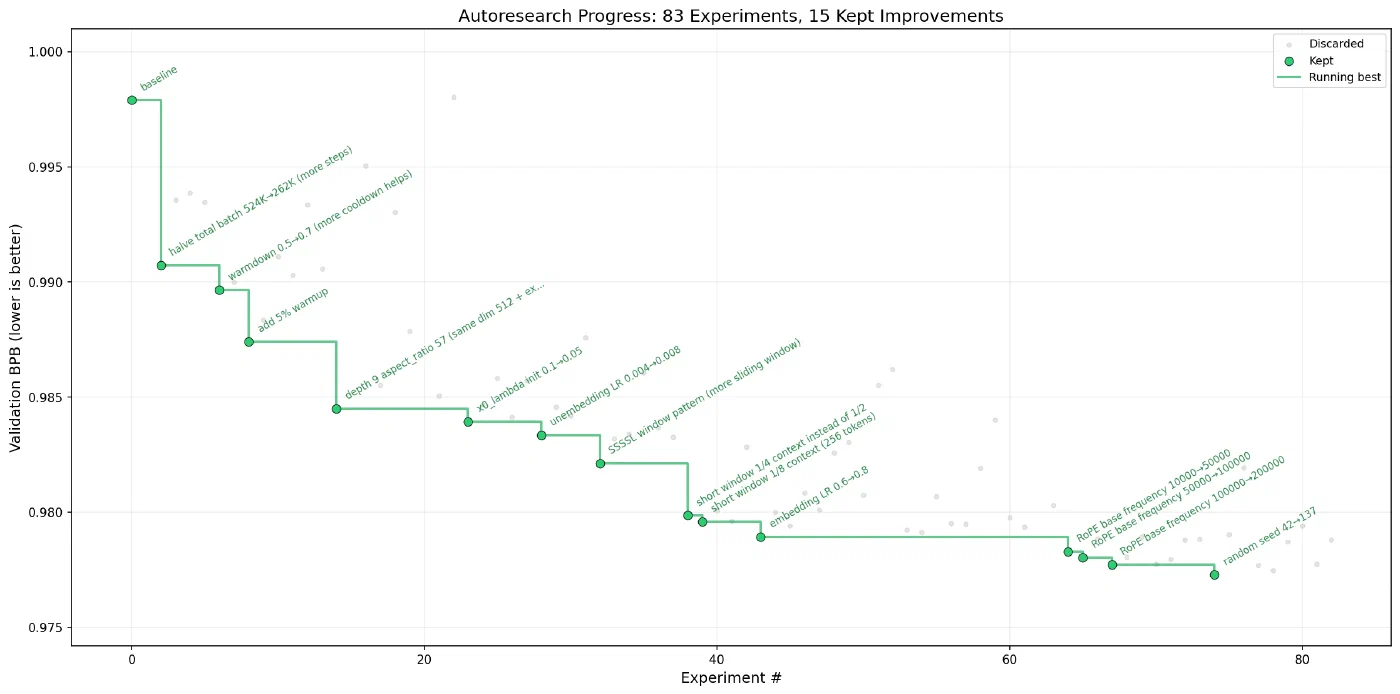
Shopify CEO Tobi Lutke ran AutoResearch on an internal 0.8B parameter model. Over 8 hours and 37 experiments, he reported a 19% efficiency improvement with zero human intervention.
When AutoResearch Works and When It Does Not
AutoResearch excels at anything with a numeric or binary score. Python script speed optimization, prompt pass/fail rates, system prompt format validation, hyperparameter tuning - if a machine can score the output, AutoResearch will grind through variations all night.
It falls apart on subjective tasks. Creative writing quality, social media engagement prediction, cold email effectiveness - anything requiring human judgment turns the loop into random walks. The agent has no real signal to optimize against, so improvements are illusory.
Getting Started
Requirements are an NVIDIA GPU (tested on H100, but community forks exist for macOS , Windows , and AMD ), Python 3.10+, and the uv package manager.
curl -LsSf https://astral.sh/uv/install.sh | sh
git clone https://github.com/karpathy/autoresearch.git
cd autoresearch
uv sync
uv run prepare.py
uv run train.py
Once the single manual run completes, spin up Claude Code in the repo directory, disable permissions, and tell it to read program.md and start experimenting. Walk away. Check the git log in the morning.
For smaller hardware, Karpathy recommends switching to the TinyStories dataset
, lowering vocab_size to 2048 or even 256, reducing MAX_SEQ_LEN to 256, and setting DEPTH to 4. The community forks handle most of these adjustments automatically.
OpenSpace - Self-Evolving AI Agent Skills
OpenSpace comes from the Data Intelligence Lab at Hong Kong University (HKUDS) - the same group behind LightRAG . Where AutoResearch optimizes ML models, OpenSpace optimizes the skills themselves. It is an MCP server that watches how your Claude Code skills perform in practice and sorts them into three buckets for automated intervention.
The three buckets are AUTO-FIX, AUTO-IMPROVE, and AUTO-LEARN. When a skill errors during execution, AUTO-FIX analyzes error logs, locates the root cause, generates a repair patch, and verifies the fix without human intervention. When a task completes smoothly, AUTO-IMPROVE analyzes the execution path, finds optimizable patterns, and upgrades successful practices into standard workflows. When a skill performs well consistently, AUTO-LEARN locks it down as a reference template that future skills can inherit from.
Under the hood, OpenSpace tracks four types of skill evolution: captured (stores successful execution patterns), fixed (auto-generates repair code for failures), derived (merges complementary patterns into enhanced versions), and import (adapts external skills from the community cloud at open-space.cloud for local use).
The Numbers
HKUDS tested OpenSpace on 220 real-world professional tasks across 44 occupations using Qwen 3.5+. The results: average quality jumped from a 40.8% baseline to 70.8%, and agents using improved skills consumed 46% fewer tokens. The upfront cost of running the MCP monitoring pays for itself by eliminating repeated failures and redundant token usage.
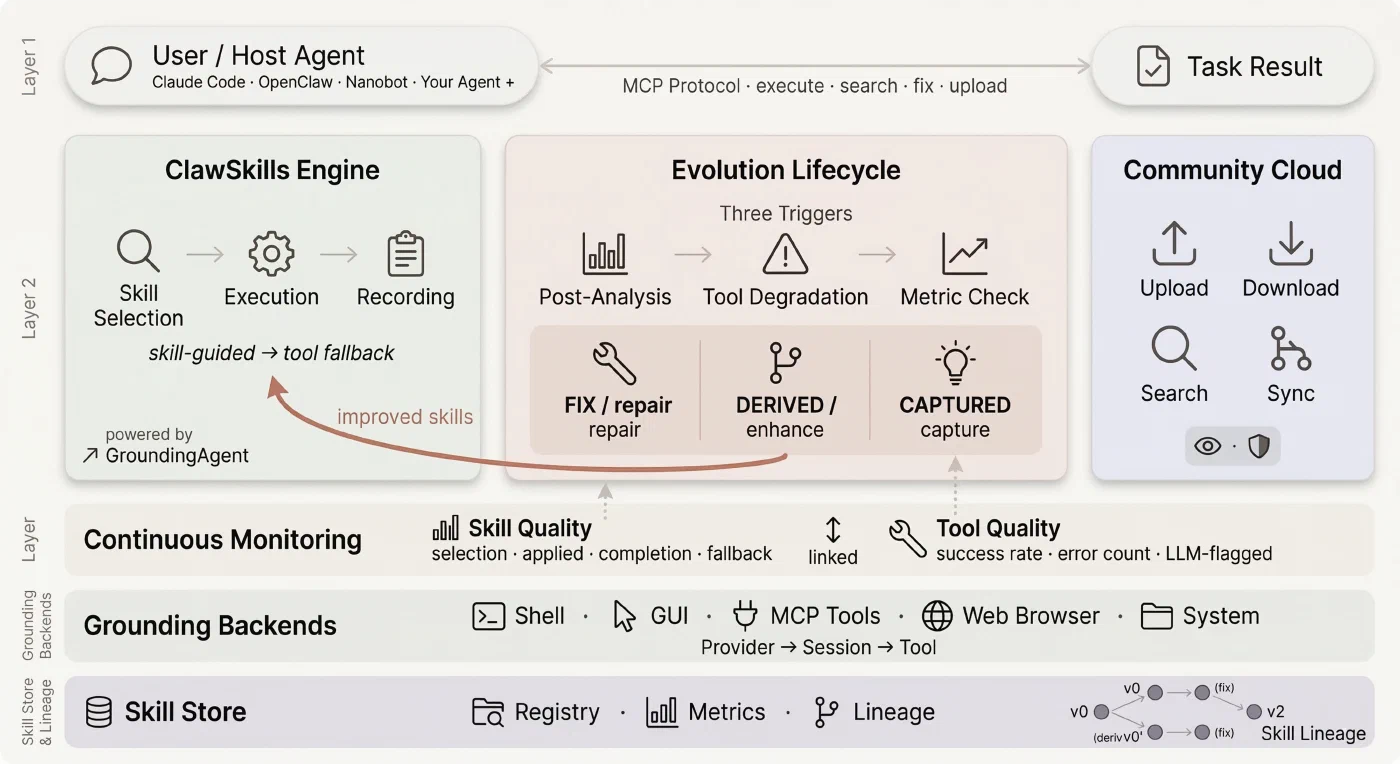
Their showcase project, “My Daily Monitor,” demonstrates the approach at scale. Starting from just 6 initial skills, the agent built 60+ skills from scratch to create a multi-panel live dashboard. No human-written code. The skills evolved through use, each generation fixing bugs and improving patterns from the previous one.
Setting It Up
Install OpenSpace as an MCP server in your Claude Code configuration:
pip install openspace-aiCopy the foundational skills (delegate-task and skill-discovery) to your skills directory. OpenSpace also supports direct execution mode and a Python API for programmatic integration. The system works with Claude Code, Codex, and other agent frameworks that support skills.
CLI-Anything - Turn Any Software into an Agent-Native CLI
CLI-Anything is also from HKUDS and tackles a different problem entirely: Claude Code cannot interact with GUI applications. You can tell it to edit a Blender scene or adjust audio in Audacity, but there is no interface for it to do so. CLI-Anything generates fully-tested, self-documenting command-line interfaces for any open source application - giving Claude Code programmatic control over software it previously could not touch.
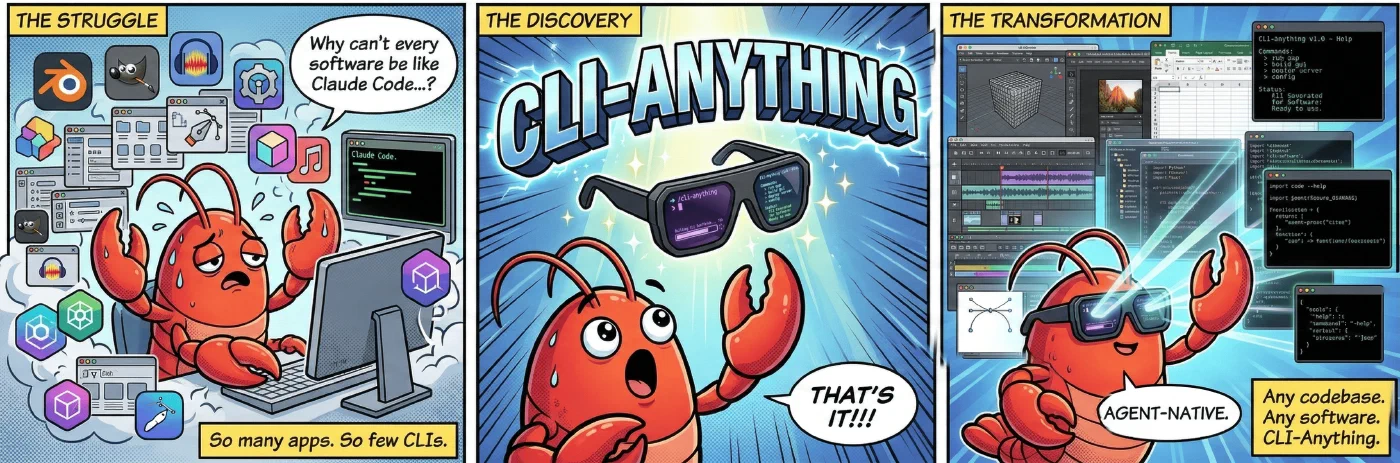
The repo has accumulated over 21,000 GitHub stars since its March 2026 release. The project homepage at clianything.org and the community hub at CLI-Hub provide pre-built CLIs and documentation.
The 7-Phase Pipeline
When you point CLI-Anything at a software project, it runs a 7-phase automated pipeline. First it analyzes the codebase, mapping GUI actions to underlying APIs and entry points. Then it designs command groups that mirror the application’s functionality and implements a Click-based CLI with REPL mode, JSON output, and undo/redo support. It plans and writes comprehensive unit and end-to-end test suites, generates a SKILL.md file for agent discovery along with full --help documentation, and finally publishes the CLI to your system PATH.
The output is a stateful CLI with structured JSON output, proper state management, and deterministic behavior. Each CLI wraps individual endpoints into coherent command groups - one tool instead of dozens of raw API calls.
Pre-Built CLIs and Getting Started
CLI-Anything ships with pre-built CLIs for Blender , GIMP , Krita , Inkscape , Audacity , OBS Studio , LibreOffice , Draw.io , Ollama , ComfyUI , and 30+ more applications. You can also generate CLIs for any software with a codebase.
Installation takes two commands in Claude Code:
/plugin marketplace add HKUDS/CLI-Anything
/plugin install cli-anything
Then point it at any codebase:
/cli-anything:cli-anything ./target-softwareAfter the initial generation, you can continue refining and adding functionality if the first pass did not cover everything. The March 23 launch of CLI-Hub added a meta-skill that lets agents discover and install CLIs autonomously from a community registry.
Why CLI Over MCP
HKUDS makes a deliberate architectural argument: CLIs are more effective than MCPs for agent use. CLIs offer universal compatibility across agents and platforms, composability for complex workflows through piping and chaining, lightweight execution without persistent server overhead, automatic self-documentation via --help, and deterministic behavior that makes automation reliable. MCP servers require a running process and protocol negotiation. A CLI is just a binary on your PATH.
Claude Peers MCP - Let Your Claude Code Instances Talk to Each Other
Claude Peers MCP solves an isolation problem. When you have five Claude Code sessions running across different projects, each one operates in its own bubble. They cannot discover each other, share context, or coordinate work. Claude Peers breaks that wall down.
The architecture is simple. A broker daemon runs on localhost:7899 backed by SQLite. Each Claude Code session spawns its own MCP server that registers with the broker and polls for messages every second. Messages arrive via Claude’s channel protocol, so the receiving session sees them immediately.
Four tools become available to every connected session:
| Tool | What It Does |
|---|---|
list_peers | Find other Claude Code instances - scoped by machine, directory, or repo |
send_message | Send a message to another instance by ID (arrives instantly via channel push) |
set_summary | Describe your current work context (visible to other peers) |
check_messages | Manual message retrieval fallback if not using channel mode |
If you set an OPENAI_API_KEY in your environment, each instance auto-generates a work summary on startup using gpt-5.4-nano (fractions of a cent per call). The summary describes what you are likely working on based on your directory, git branch, and recent files. Without the API key, Claude sets its own summary via set_summary.
The Multi-Agent Harness Pattern
The practical value of Claude Peers connects directly to Anthropic’s own engineering post from March 24, 2026, on harness design for long-running application development . The key insight: Claude Code evaluates its own work poorly. It tends to rate its output too favorably. The solution is role separation - a planner session that defines the task, an executor session that builds it, and an evaluator session that grades the result independently.
Claude Peers makes this three-session pattern practical. The planner sends task definitions to the executor. The executor builds and commits. The evaluator pulls the result, runs checks, and sends feedback to the executor for another iteration. Each session maintains its own context window, avoiding the compaction problems that plague single long-running sessions.
Quick Start
git clone https://github.com/louislva/claude-peers-mcp.git ~/claude-peers-mcp
cd ~/claude-peers-mcp
bun install
claude mcp add --scope user --transport stdio claude-peers -- bun ~/claude-peers-mcp/server.ts
Launch Claude Code with the channel enabled:
claude --dangerously-skip-permissions --dangerously-load-development-channels server:claude-peersThe broker starts automatically on first use. Open a second terminal with the same command, and ask either session to list peers. Requirements: Bun runtime, Claude Code v2.1.80+, and a claude.ai login (channels require it - API key auth will not work).
Google Workspace CLI - Full Google Suite Access for Claude Code
Google Workspace CLI
(gws) is a unified command-line tool covering Drive, Gmail, Calendar, Sheets, Docs, Chat, and Admin services. Built by Google developers under the Apache-2.0 license (though not officially endorsed by Google), it gives Claude Code structured programmatic access to the entire Google productivity stack.
What makes gws different from other Google integrations is the dynamic command surface. The CLI reads Google’s own Discovery Service
at runtime and builds its commands on the fly. When Google adds an API endpoint, gws picks it up automatically. No updates, no new releases, no waiting.
Agent Skills and MCP Server
The repo ships 100+ agent skills
organized by service. Gmail gets +send, +reply, and +triage for inbox management. Sheets has +append and +read for spreadsheet operations. Calendar provides +agenda and +insert for scheduling. Drive includes +upload for file management. And higher-level workflow helpers like +standup-report, +meeting-prep, and +weekly-digest chain multiple services together.
Every response returns structured JSON. For paginated results, NDJSON streaming is available via --page-all. The CLI also exposes an MCP server mode through gws mcp, making it compatible with Claude Desktop, Gemini CLI, and VS Code.
Security: Model Armor Integration
Giving an AI agent access to your email and documents raises obvious security concerns. A malicious actor who controls content in your Drive or inbox could craft a document designed to hijack agent behavior when the file is read. The --sanitize flag integrates with Google Cloud Model Armor
to scan all API responses before they reach the agent. It applies malicious URI detection, responsible AI filters, and prompt injection classifiers. Two enforcement modes are available: warn (log and continue) or block (halt the response entirely).
This does not eliminate all risks. Service account credentials stored incorrectly, overly broad OAuth scopes, and unverified testing-mode apps all create exposure. The sandboxing strategy recommended by the project: do not give Claude Code access to everything. Start with just Drive, or just a separate email account with shared folders. Clone the repo and have Claude Code walk you through which skills match your use case.
Installation and Authentication
npm install -g @googleworkspace/cli
gws auth setup
gws auth login
The auth setup command walks through Google Cloud project configuration, enables required APIs, and handles OAuth. Credentials are encrypted at rest with AES-256-GCM. For headless or CI environments, you can export credentials from an interactive session and set GOOGLE_WORKSPACE_CLI_CREDENTIALS_FILE on the target machine. Service account keys work as well for server-to-server setups.
One caveat: if your OAuth app is unverified (testing mode), Google limits consent to roughly 25 scopes. The recommended scope preset includes 85+ scopes and will fail for unverified apps. Use gws auth login -s drive,gmail,sheets to select only the services you need.
The project is at version 0.4.4 and marching toward v1.0. Breaking changes are expected. It is also available via Homebrew (brew install googleworkspace-cli), Cargo (cargo install google-workspace-cli), and Nix.
What Ties These Repos Together
These five repositories address different parts of the same bottleneck: Claude Code is powerful inside a single coding session, but it hits real walls at the boundaries - autonomous experimentation, skill maintenance, GUI software interaction, multi-instance coordination, and productivity suite access.
Each repo pushes one of those walls outward. Whether you run all five or just the one that matches your workflow, they show how fast community tooling is closing the gaps between what Claude Code does natively and what your actual work requires. The code is on GitHub, MIT or Apache licensed, and installable in minutes.