 Botmonster Tech
Agentic RAG with LangGraph: 25% Better Accuracy, Fewer Calls

Agentic RAG replaces the standard “retrieve-then-generate” pattern. The LLM gets tool-use powers to decide when to retrieve, which sources to query, how to rewrite queries, and whether the result is enough. Instead of fetching docs on every query, the model acts as an orchestrator. It runs targeted searches across vector stores, SQL databases, and web sources, then checks its own answers. This pattern lifts answer accuracy by 15-25% on multi-hop benchmarks and cuts wasted retrieval calls by about 35%.
The build uses a framework like LangGraph , or a custom agent loop with Ollama and tool calling. You define retrieval tools, expose them to the LLM, and let the model think about what it needs before it fetches anything. The result handles vague queries, multi-source questions, and simple factual asks equally well.
Why Naive RAG Fails and Agentic RAG Fixes It
The standard RAG pipeline is simple: take the user query, embed it, run a vector search, stuff the top-k results into the prompt, and generate an answer. This works for direct questions where the answer sits in a single doc chunk. It falls apart in several common cases.
Vague queries are one failure mode. A user asking “why is my build so slow” could mean Docker builds, CI/CD pipelines, or local compilation. Naive RAG just embeds the fuzzy query and hopes for the best. Multi-source questions are another problem. Comparing pricing across cloud providers needs several targeted queries against different doc sections. Sometimes the top-k results just don’t hold the answer, and re-ranking won’t fix it because the query itself was wrong. And often the query doesn’t need retrieval at all.
That last point is bigger than people expect. In a typical chatbot, 30-40% of user queries are chit-chat or facts the LLM already knows. Pulling random context for “What is the capital of France?” or “Explain what a REST API is” hurts answer quality. The model gets confused by stray doc chunks dumped into its context window.
The agentic approach fixes all of these. You give the LLM a search_knowledge_base(query) tool and let it make the calls: Should I search? What should I search for? Was the result useful? Should I search again with a different query?
Think of the difference like this. Naive RAG is a librarian who grabs five books for any question, whether you asked about quantum physics or what time the library closes. Agentic RAG is a researcher who thinks about what they need, checks key references, cross-checks findings, and tests their answer before they hand it over.
Architecture of an Agentic RAG System
An agentic RAG system has four core parts: an LLM with tool calling, a set of retrieval tools exposed to the LLM, one or more knowledge sources , and an orchestration layer that runs the agent loop.
You need a model that supports native tool calling. Llama 4 Scout via Ollama , Claude through the Anthropic API, or GPT-4o all work. The key bit: the model must output structured tool calls, not just text. That way the loop knows when the model wants to search and when it wants to reply.
The retrieval tools are functions the LLM can invoke. Typical tool definitions look like:
search_documents(query: str, collection: str) -> list[str]for vector similarity searchquery_database(sql: str) -> list[dict]for structured data lookupsweb_search(query: str) -> list[str]for real-time information from the internet
Each tool returns results the LLM can reason about. The tool descriptions in the system prompt tell the model what each tool does and when to reach for it.
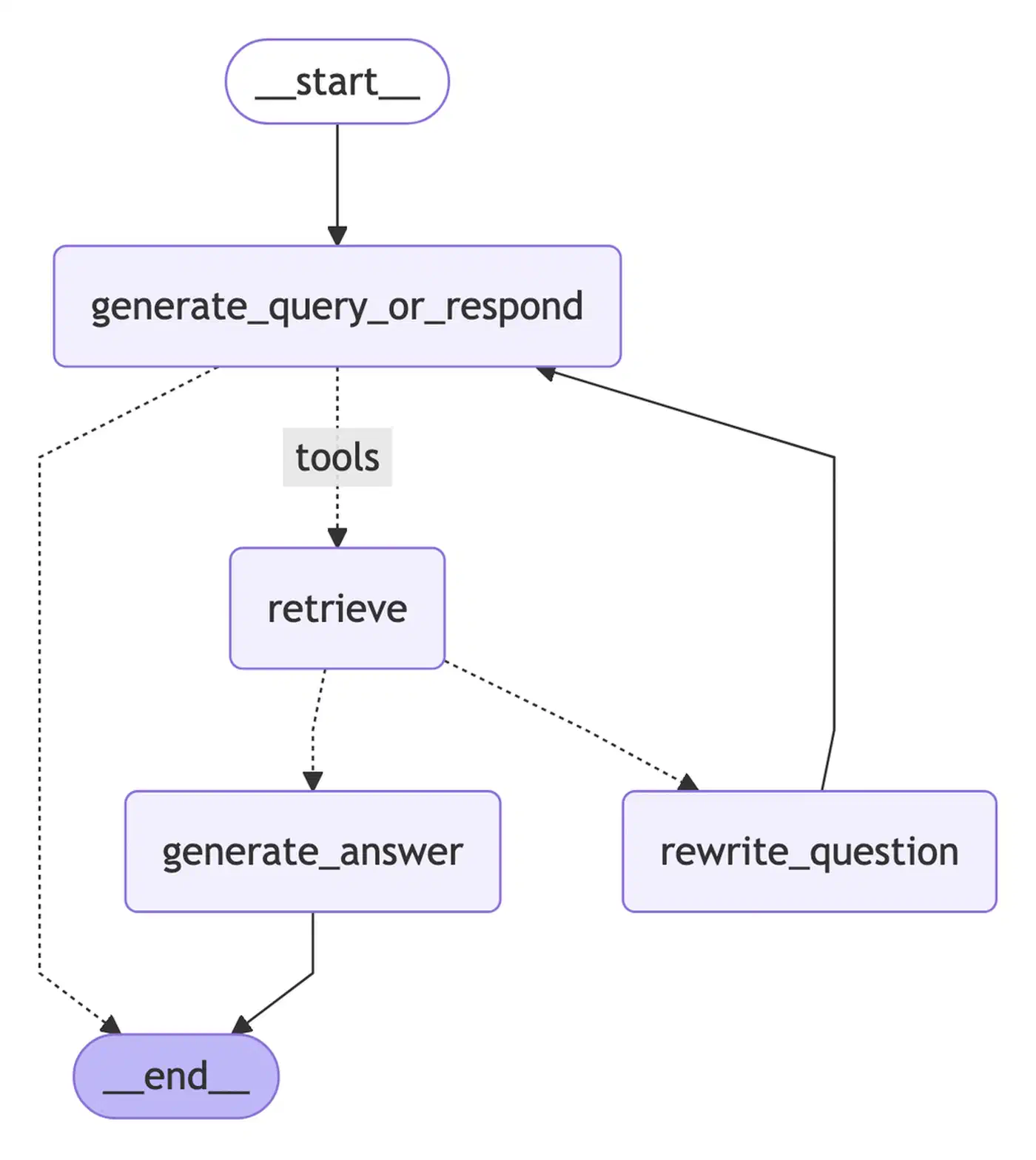
The agent loop follows a consistent pattern:
- The LLM receives the user query plus a system prompt describing available tools
- The LLM decides to call a tool or respond directly
- If a tool call is requested, the orchestration layer executes it and returns results to the LLM
- The LLM evaluates the results and decides on the next action
- This repeats until the LLM generates a final answer or hits a maximum iteration count
Query routing happens on its own. You don’t need a separate classifier to pick a knowledge source. The LLM reads the tool descriptions and makes that call from the query content. A question about “deployment config” routes to the tech docs vector store, while “Q3 revenue” goes to the SQL database. The model handles this routing as part of its reasoning.
State is a big deal here. The full chat and tool-call history stays in the agent’s message buffer. The LLM can refer back to past results and skip duplicate queries. If the first search returned only part of the answer, the model can fire a follow-up that targets the gap rather than repeat what it already found.
For termination, you usually set two conditions. Either the LLM gives a final answer with no tool call attached, or the loop hits a max of 5-8 steps. The cap stops runaway loops where the model keeps searching and never lands on an answer.
Implementing Agentic RAG with LangGraph
LangGraph gives you a clean way to build agent loops with conditional routing and state. Here’s a working build using LangGraph, ChromaDB , and a local LLM through Ollama.
Start with the dependencies:
pip install langgraph langchain langchain-community chromadb langchain-ollamaLangGraph v0.3+ ships the StateGraph class for building agent loops. Define the agent state first:
from typing import TypedDict
from langchain_core.messages import BaseMessage

class AgentState(TypedDict):
    messages: list[BaseMessage]
    retrieved_docs: list[str]
    iteration: int
The state flows through the graph and builds up context across loops. Next, define retrieval tools with LangChain’s @tool decorator:
from langchain_core.tools import tool
import chromadb

client = chromadb.PersistentClient(path="./chroma_db")

@tool
def search_docs(query: str, collection: str = "default") -> str:
    """Search the knowledge base for relevant documents.
    Use this when you need to find information about internal
    documentation, procedures, or technical references."""
    col = client.get_collection(collection)
    results = col.query(query_texts=[query], n_results=5)
    formatted = []
    for doc, meta in zip(results["documents"][0], results["metadatas"][0]):
        source = meta.get("source", "unknown")
        formatted.append(f"[Source: {source}]\n{doc}")
    return "\n\n---\n\n".join(formatted)
Build the graph with nodes for the agent (LLM reasoning), tools (tool runs), and a conditional router:
from langgraph.graph import StateGraph, END
from langgraph.prebuilt import ToolNode
from langchain_ollama import ChatOllama

llm = ChatOllama(model="llama4-scout", temperature=0.1)
llm_with_tools = llm.bind_tools([search_docs])

def agent_node(state: AgentState) -> AgentState:
    response = llm_with_tools.invoke(state["messages"])
    return {"messages": state["messages"] + [response]}

def should_continue(state: AgentState) -> str:
    last_message = state["messages"][-1]
    if last_message.tool_calls:
        return "tools"
    return END

tool_node = ToolNode([search_docs])

builder = StateGraph(AgentState)
builder.add_node("agent", agent_node)
builder.add_node("tools", tool_node)
builder.set_entry_point("agent")
builder.add_conditional_edges("agent", should_continue, {"tools": "tools", END: END})
builder.add_edge("tools", "agent")

graph = builder.compile()
Run the agent with a query:
from langchain_core.messages import HumanMessage

result = graph.invoke({
    "messages": [HumanMessage(content="How do I configure SSL for our nginx proxy?")],
    "retrieved_docs": [],
    "iteration": 0
})
print(result["messages"][-1].content)
The graph runs the agent loop until the LLM gives a reply without tool calls. For live insight into the reasoning, use streaming:
for event in graph.stream(
    {"messages": [HumanMessage(content="Compare our deployment options")]},
    stream_mode="messages"
):
    print(event)
This shows each LLM step and tool call as it happens. It helps with debugging and lets end users see how the system reached its answer.
Advanced Patterns: Query Rewriting, Re-Ranking, and Self-Verification
The basic agent loop covers when to retrieve and what to query. A few extra patterns push retrieval quality much higher in practice.
Query Rewriting
Before the vector search runs, the LLM rewrites the user’s raw question into a tighter search query. “Why is my Docker build so slow?” becomes “Docker build performance layer caching multi-stage.” You can do this with a system prompt rule (“Before searching, reformulate the user’s question into effective search keywords”), or as its own rewrite step in the graph. Either way, the search query lands closer to the words your docs actually use.
Hypothetical Document Embedding (HyDE)
HyDE takes a different angle on the query-document vocabulary gap. Instead of embedding the query, have the LLM write a fake answer paragraph, then embed that for the vector search. The fake answer uses words and structure close to real docs in the knowledge base, so similarity search lands better. This trick lifts recall by 10-15% on niche corpora where user queries don’t match source-doc wording.
Multi-Query Expansion
For tough questions, the LLM writes 3-5 sub-queries, each aimed at a slice of the main question. Each sub-query gets searched on its own. Results merge and dedupe before they go back to the LLM. For “Compare AWS Lambda and Cloud Functions pricing for 1M requests/month,” the agent might fire one query for Lambda pricing tiers, one for the Cloud Functions pricing model, and one for serverless cost benchmarks.
Re-Ranking Retrieved Results
The first vector search returns the top-20 with cosine similarity. That’s fast but rough. A cross-encoder like cross-encoder/ms-marco-MiniLM-L-12-v2 then re-scores each one against the original query. It looks at the full query-document pair, not just their embedding distance. Keep the top-5 after re-ranking. This step adds 100-200ms of latency, but it sharply lifts the relevance of what the LLM sees in its context window.
Self-Verification
After it writes an answer, you can add a check step. The LLM scans each claim against the retrieved sources. If a claim isn’t backed by the docs, the agent either pulls more evidence or softens the statement. This cuts hallucination rates without a separate fact-checker. You add it by appending a check prompt after the first answer, asking the model to cite sources for each claim.
Confidence-Based Routing
The LLM gives its answer a confidence score (1-5). Scores below 3 trigger more retrieval passes or send the query to a different source. The system gets a built-in fallback. It tries harder on questions where the first round didn’t give strong evidence. In practice, about 15-20% of queries hit the low-confidence path and gain from the extra round.
Evaluation and Monitoring for Production Agentic RAG
Agentic systems are harder to score than plain pipelines. The LLM’s retrieval choices shift across runs. The same question might trigger two tool calls one time and four the next. You need steady measurement across several axes.
Track these key metrics:
| Metric | What It Measures | Target |
|---|---|---|
| Answer accuracy | Correctness against ground truth | >85% |
| Retrieval precision | Relevance of retrieved docs | >70% |
| Retrieval recall | Coverage of needed information | >80% |
| Avg tool calls/query | Efficiency of agent reasoning | 2-4 |
| End-to-end latency | Total response time | <10s (p80) |
Build an eval set of 50-100 question-answer pairs with tagged source docs. Include three buckets: single-hop questions (one retrieval needed), multi-hop questions (several retrievals needed), and no-retrieval questions (to test if the agent skips retrieval when it should). This spread tests every path through the system.
For automated eval, Promptfoo or RAGAS can score factual accuracy, faithfulness (is the answer grounded in the retrieved docs), and relevance. Run evals on every pipeline change:
promptfoo eval --config eval.yaml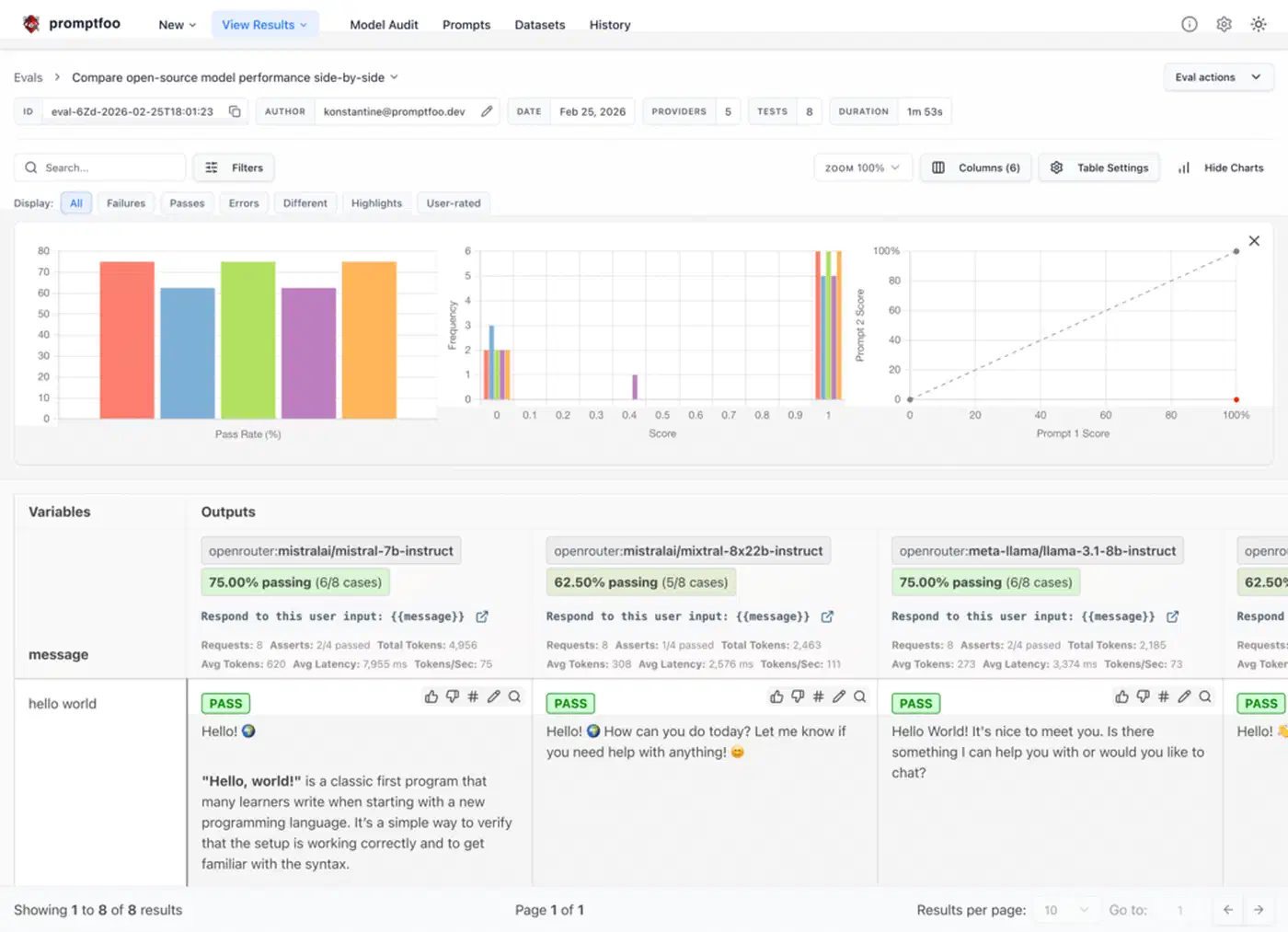
Cost tracking is key for agentic RAG. Multi-step reasoning burns more LLM calls than naive RAG. On average, agentic RAG fires 2-4 LLM calls per query versus 1 for naive RAG. Set an alert if the average tops 6 calls per query. That usually means the agent is stuck on a class of questions and needs prompt tuning or better tool descriptions.
Latency profiling should track each step on its own: LLM inference, vector search, SQL query, and any re-rank cost. The big bottleneck is almost always LLM inference, not retrieval. If you’re running locally with Ollama, model quantization and GPU memory have the biggest pull on total response time.
Before you commit fully to agentic RAG in production, run both systems side by side. Shadow mode sends live traffic to both naive and agentic RAG. You compare answer quality and cost per query, and you build trust that the extra cost gives better results for your use case and doc corpus. Not every RAG app gains from the agentic pattern. If your queries stay simple and single-hop, agent reasoning overhead may not pay off.