 Botmonster Tech
Automate Smart Blinds and Adaptive Lighting for Better Sleep
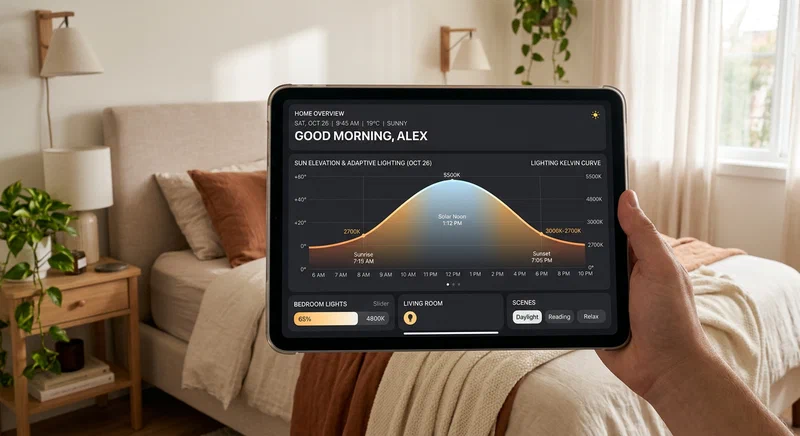
Your home’s lighting environment is one of the most powerful levers you have for improving sleep quality - and it is almost entirely automatable. By combining motorized blinds controlled via Home Assistant solar elevation data with the Adaptive Lighting HACS integration, you can build a system that gradually shifts your home’s light temperature and blind positions throughout the day, automatically aligning your environment with your circadian rhythm. The result: a gentler morning wake-up, a more relaxing evening wind-down, and measurably better sleep.
The Science of Circadian Lighting
The human circadian system is acutely sensitive to light. Specifically, the intrinsically photosensitive retinal ganglion cells (ipRGCs) in the eye respond strongly to short-wavelength blue light in the 470–490 nm range. Exposure to this cool, bluish light - typically in the 5000–6500K color temperature range - suppresses melatonin production and signals the brain that it is daytime. Warm light in the 2200–2700K range falls mostly outside that suppressive band and does not trigger the same response, making it safe and even beneficial for evening use.
Lux levels matter just as much as color temperature. Research has consistently shown that exposure to more than 200 lux in the hour or two before bedtime delays sleep onset - your brain registers the intensity as “daytime” and holds off on melatonin release. The target for that pre-sleep window is below 10 lux, a level roughly equivalent to candlelight. These numbers give us concrete, actionable thresholds to design automations around.
The most elegant master variable available to Home Assistant is solar elevation: the sun’s angle above the horizon in degrees. At solar noon in summer, elevation peaks above 60° at mid-latitudes, corresponding to intense daylight. At civil twilight (approximately −6°), effective daylight disappears. Because solar elevation correlates directly with the natural light intensity your body evolved to track, using it as an automation trigger produces a system that automatically adapts to the seasons without any manual intervention. When days are shorter in winter, the blinds and lights respond to actual solar geometry rather than a fixed clock.
Studies on smart home lighting interventions report 15–20% improvements in sleep onset time in homes where circadian lighting is automated. The key insight is that consistency matters more than perfection: a system that reliably dims and warms every evening trains the circadian system more effectively than a manually controlled one that gets skipped when you are distracted.
Smart Blind Hardware Options
The market for motorized blinds has expanded dramatically, and the right choice depends on your budget, existing hardware, and how deeply you want to integrate with Home Assistant.
Retrofit motors are the most cost-effective option if you already own corded roller shades or venetian blinds. The SOMA Smart Shades 2 attaches to existing corded blinds and adds Wi-Fi or Bluetooth control. Zemismart makes a Zigbee-compatible retrofit motor that integrates natively with HA via Zigbee2MQTT or ZHA. Yoswit offers similar Zigbee retrofit options with solid community support. Before purchasing any retrofit motor, check the torque rating against the weight of your blinds - heavy blackout shades require at least 1.5 N·m; lightweight sheers may work with budget motors at 0.6 N·m.
Native smart blinds offer better integration at a higher upfront cost. The IKEA KADRILJ and FYRTUR roller shades are Zigbee-based, affordable, and have excellent Home Assistant support through ZHA or Zigbee2MQTT. Battery life is respectable at 6–12 months depending on usage. For a premium build, Lutron Serena shades use a proprietary radio (compatible with the Lutron RA3 bridge) and are known for outstanding reliability and whisper-quiet motors.
Matter-compatible options represent the emerging standard. Eve MotionBlinds supports Thread and Matter natively, meaning no hub is required beyond a Thread border router (which modern HomePod mini and Apple TV 4K devices provide). Home Assistant’s Matter integration gives first-class control with essentially zero configuration.
One specification often overlooked: tilt vs. lift control. Roller shades offer only lift (how far open or closed). Venetian and slat blinds can be tilted to control light direction without fully opening, which is valuable for afternoon sun management. If you want to block direct sun while preserving an outward view, choose blinds with tilt control.
Installing the Adaptive Lighting HACS Integration
HACS (Home Assistant Community Store) must be installed before you can add Adaptive Lighting. Once HACS is running, navigate to HACS → Integrations, search for “Adaptive Lighting,” install it, and restart Home Assistant. After the restart, go to Settings → Devices & Services → Add Integration, search for Adaptive Lighting, and add it.
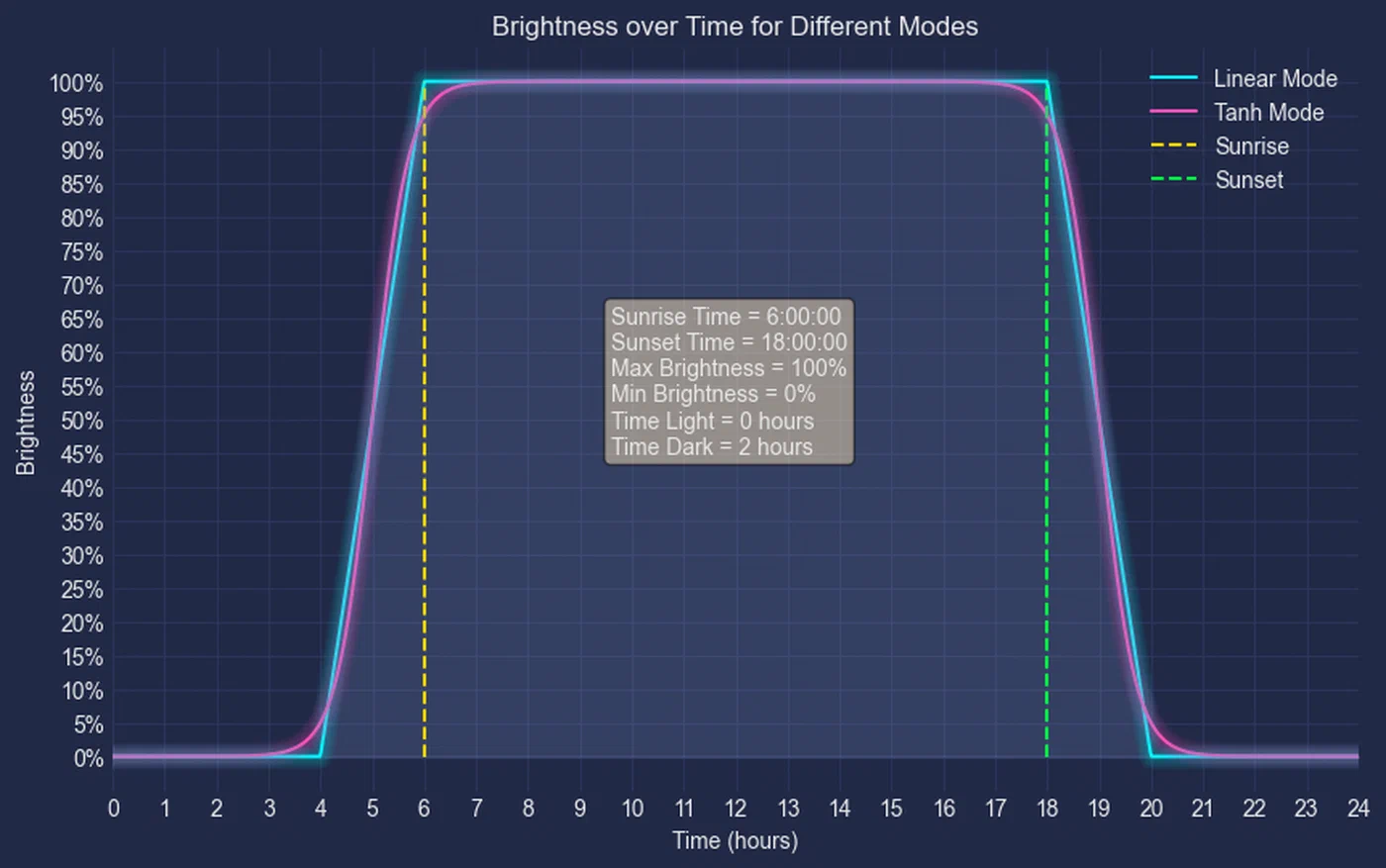
The integration creates a switch.adaptive_lighting entity and a set of associated sensors showing the current calculated color temperature and brightness. The key configuration parameters to know:
min_color_temp: Set to 2200K for a warm amber that falls well below the melatonin-suppressing threshold.max_color_temp: Set to 6500K for cool daylight at solar noon.min_brightness: 1% - Adaptive Lighting will dim lights to near-off at night.max_brightness: 100% - full brightness at solar noon.sleep_mode: When enabled (via a companioninput_booleantoggle), the integration drops to an ultra-low, red-tinted mode at approximately 800K and 1% brightness. This is ideal for brief nighttime wake-ups.only_once: When set totrue, Adaptive Lighting applies the color temperature once on light activation and does not re-apply it if you manually adjust. Whenfalse(the default), it continuously corrects the light to the calculated value. For most users,falseworks best - overrides are handled via the sleep mode toggle or by temporarily disabling the switch entity.
Any lights added to the Adaptive Lighting configuration - including light groups - are automatically managed. The integration calculates the correct color temperature and brightness based on the current solar elevation every minute, smoothly transitioning throughout the day without any additional automation code on your part.
Automating Blinds with Solar Elevation
Home Assistant’s sun.sun entity exposes elevation (degrees above the horizon) and azimuth as attributes, updated every minute. These attributes are the foundation of solar-aware blind control.
The automation trigger type you need is numeric_state on the sun.sun entity, targeting the elevation attribute. Here is a complete automation set covering the full day cycle:
# Morning: gentle dawn at 5° elevation
automation:
  - alias: "Blinds - Gentle Dawn Opening"
    trigger:
      - platform: numeric_state
        entity_id: sun.sun
        attribute: elevation
        above: 5
    condition:
      - condition: state
        entity_id: input_boolean.blinds_manual_override
        state: "off"
      - condition: time
        after: "05:00:00"
        before: "11:00:00"
    action:
      - service: cover.set_cover_position
        target:
          entity_id: cover.bedroom_blind
        data:
          position: 30

  # Afternoon: reduce solar heat gain on west windows above 60°
  - alias: "Blinds - Afternoon Solar Block"
    trigger:
      - platform: numeric_state
        entity_id: sun.sun
        attribute: elevation
        above: 60
    condition:
      - condition: state
        entity_id: input_boolean.blinds_manual_override
        state: "off"
    action:
      - service: cover.set_cover_position
        target:
          entity_id: cover.west_living_room_blind
        data:
          position: 50

  # Evening: close all blinds at civil twilight (-5°)
  - alias: "Blinds - Evening Close"
    trigger:
      - platform: numeric_state
        entity_id: sun.sun
        attribute: elevation
        below: -5
    condition:
      - condition: state
        entity_id: input_boolean.blinds_manual_override
        state: "off"
    action:
      - service: cover.set_cover_position
        target:
          entity_id:
            - cover.bedroom_blind
            - cover.west_living_room_blind
            - cover.office_blind
        data:
          position: 0
The input_boolean.blinds_manual_override helper is a critical safeguard. When someone manually adjusts a blind - either via the HA app or a physical remote - a separate automation sets this boolean to on, pausing all solar automations for the rest of the day. A time-based automation resets it to off at midnight, restoring automatic control the next morning.
# Reset override flag at midnight
automation:
  - alias: "Blinds - Reset Manual Override"
    trigger:
      - platform: time
        at: "00:00:00"
    action:
      - service: input_boolean.turn_off
        target:
          entity_id: input_boolean.blinds_manual_override
South-facing and north-facing rooms need separate automation paths, since the sun’s azimuth (compass direction) determines which windows receive direct exposure. You can add an azimuth condition using a template condition to restrict a blind automation to the relevant time of day when the sun is actually hitting that face of the house.
The Combined Morning Routine Automation
The morning routine automation creates a gradual wake-up experience that replaces the jarring shock of an alarm with a simulated dawn. It relies on two input_datetime helpers - one for weekday wake time and one for weekend wake time - so different schedules are handled automatically.
Create the helpers via Settings → Devices & Services → Helpers → Add Helper → Date and/or time, naming them input_datetime.wake_time_weekday and input_datetime.wake_time_weekend.
automation:
  - alias: "Morning Routine - Gradual Wake-Up"
    trigger:
      # Trigger 30 minutes before wake time on weekdays
      - platform: template
        value_template: >
          {% set wake = states('input_datetime.wake_time_weekday') %}
          {% set wake_dt = today_at(wake) %}
          {% set trigger_dt = wake_dt - timedelta(minutes=30) %}
          {{ now() >= trigger_dt and now() < wake_dt and
             now().weekday() < 5 }}
      # Trigger 30 minutes before wake time on weekends
      - platform: template
        value_template: >
          {% set wake = states('input_datetime.wake_time_weekend') %}
          {% set wake_dt = today_at(wake) %}
          {% set trigger_dt = wake_dt - timedelta(minutes=30) %}
          {{ now() >= trigger_dt and now() < wake_dt and
             now().weekday() >= 5 }}
    condition:
      - condition: state
        entity_id: input_boolean.sleep_mode
        state: "on"
    action:
      # T-30: Disable sleep mode, Adaptive Lighting warms up from 2200K/1%
      - service: switch.turn_off
        target:
          entity_id: switch.adaptive_lighting_sleep_mode
      - service: light.turn_on
        target:
          entity_id: light.bedroom_ceiling
        data:
          brightness_pct: 1
          color_temp_kelvin: 2200
          transition: 60

      # T-20: Open blinds to 10%, ramp lights to 10%
      - delay:
          minutes: 10
      - service: cover.set_cover_position
        target:
          entity_id: cover.bedroom_blind
        data:
          position: 10
      - service: light.turn_on
        target:
          entity_id: light.bedroom_ceiling
        data:
          brightness_pct: 10
          color_temp_kelvin: 2500
          transition: 120

      # T-10: Open blinds to 50%, lights at 3000K/40%
      - delay:
          minutes: 10
      - service: cover.set_cover_position
        target:
          entity_id: cover.bedroom_blind
        data:
          position: 50
      - service: light.turn_on
        target:
          entity_id: light.bedroom_ceiling
        data:
          brightness_pct: 40
          color_temp_kelvin: 3000
          transition: 120

      # Wake time: blinds fully open, daylight simulation
      - delay:
          minutes: 10
      - service: cover.set_cover_position
        target:
          entity_id: cover.bedroom_blind
        data:
          position: 100
      - service: light.turn_on
        target:
          entity_id: light.bedroom_ceiling
        data:
          brightness_pct: 80
          color_temp_kelvin: 5000
          transition: 120

      # Re-engage Adaptive Lighting to take over from here
      - service: switch.turn_on
        target:
          entity_id: switch.adaptive_lighting
After the routine completes, Adaptive Lighting takes over and continues the natural daytime color temperature curve. If you have manually set a preferred scene earlier in the week, HA’s scene feature can save and restore it: use scene.create with a snapshot_entities list to capture the current light state before the routine fires, and scene.turn_on afterward to restore it if needed.
Evening Wind-Down Automation
The evening automation mirrors the morning routine in reverse. Ninety minutes before your target sleep time (stored in input_datetime.sleep_time), the sequence begins:
automation:
  - alias: "Evening Wind-Down"
    trigger:
      - platform: template
        value_template: >
          {% set sleep = states('input_datetime.sleep_time') %}
          {% set sleep_dt = today_at(sleep) %}
          {% set trigger_dt = sleep_dt - timedelta(minutes=90) %}
          {{ now() >= trigger_dt and now() < sleep_dt + timedelta(minutes=1) }}
    condition:
      - condition: state
        entity_id: input_boolean.guest_mode
        state: "off"
    action:
      # Adaptive Lighting handles the gradual 4000K → 2200K transition automatically.
      # Ensure it is active and sleep mode is off at this point.
      - service: switch.turn_on
        target:
          entity_id: switch.adaptive_lighting

      # At T-30, close all blinds except bedroom (leave 10% gap until lights-out)
      - delay:
          minutes: 60
      - service: cover.set_cover_position
        target:
          entity_id:
            - cover.west_living_room_blind
            - cover.office_blind
        data:
          position: 0
      - service: cover.set_cover_position
        target:
          entity_id: cover.bedroom_blind
        data:
          position: 10

      # At sleep time: activate sleep mode and close bedroom blind fully
      - delay:
          minutes: 30
      - service: switch.turn_on
        target:
          entity_id: switch.adaptive_lighting_sleep_mode_bedroom
      - service: cover.set_cover_position
        target:
          entity_id: cover.bedroom_blind
        data:
          position: 0
      - service: input_boolean.turn_on
        target:
          entity_id: input_boolean.sleep_mode
Adaptive Lighting handles the gradual color temperature transition from 4000K at the start of the wind-down through 3000K to 2200K automatically - no manual light.turn_on calls required. The automation simply needs to ensure the integration is active and sleep mode is not engaged prematurely.
Movie mode override is handled by a script that pauses the wind-down when your TV turns on:
script:
  movie_mode:
    alias: "Movie Mode"
    sequence:
      - service: switch.turn_off
        target:
          entity_id: switch.adaptive_lighting
      - service: light.turn_on
        target:
          entity_id: light.living_room
        data:
          brightness_pct: 30
          color_temp_kelvin: 3000
      - service: cover.set_cover_position
        target:
          entity_id: cover.west_living_room_blind
        data:
          position: 0
Trigger this script via an automation that watches media_player.living_room_tv for a playing state during the wind-down window. When the movie ends and the TV transitions to idle or off, a companion automation re-enables Adaptive Lighting and resumes the normal wind-down trajectory.
Sleep mode activation can be triggered in several ways: by scanning a bedside NFC tag (configured in the HA Companion App), by your phone connecting to the bedroom Wi-Fi SSID (detectable via a network scanner and device tracker), or manually via an app widget. All three methods should call the same script or set the same input_boolean.sleep_mode helper.
Tuning and Edge Cases
Overcast days expose the limitation of solar-elevation-only logic. On an overcast December day, outdoor lux levels may stay below 500 even at noon, making mid-day feel as dim as dawn. A dedicated lux sensor corrects for this. A BH1750 light sensor connected to an ESP32 via I2C and flashed with ESPHome costs about $3 and provides real-time illuminance readings in your HA instance. Alternatively, many Zigbee multisensors (such as the Aqara E1 or SONOFF SNZB-02P) include an illuminance channel. With a lux sensor, you can add conditions to the blind automations: “only open blinds to 30% at 5° elevation if outdoor lux > 500, otherwise wait until lux > 1000.” This prevents early morning openings on rainy days that would bring cold drafts without meaningful light benefit.
Guest mode is an important quality-of-life safeguard. Create an input_boolean.guest_mode helper and reference it as a condition in every circadian automation. When guests are staying over, enabling this boolean freezes all automatic blind and lighting changes, returning full manual control without requiring you to disable individual automations. A dashboard button toggle is sufficient; you can add a time-limited version using an automation that automatically disables guest mode after 24 or 48 hours.
Seasonal adjustment is where solar elevation automations genuinely shine over clock-based ones. At 45° latitude, the sun’s noon elevation is approximately 21° in December and 68° in June. A fixed clock-based automation that closes west-facing blinds at 3:00 PM year-round will close them too early in winter (when the sun is already low and heat gain is welcome) and potentially too late in summer. Using elevation thresholds, the same automation naturally shifts its firing time by two or more hours between seasons, tracking actual solar geometry without any user intervention.
Multi-orientation rooms require separate automation paths per cover entity. A room with both east-facing and west-facing windows needs independent automations: east windows should be partially closed in the morning to prevent direct glare, while west windows need closing in the afternoon. Using well-named cover entities (cover.bedroom_east_blind, cover.bedroom_west_blind) and dedicated automations per entity is cleaner than trying to combine them in a single automation with complex branching.
Cost Breakdown: Budget vs. Premium Build
Understanding the cost landscape helps you decide where to invest.
Budget build - IKEA FYRTUR + Adaptive Lighting:
- IKEA FYRTUR blackout blind (per window): $100–130 USD
- IKEA DIRIGERA hub (required for Zigbee): $65 USD (or use existing Zigbee coordinator)
- Adaptive Lighting integration: free (open source, HACS)
- BH1750 lux sensor + ESP32: ~$8 USD
- Typical 2-bedroom setup (4 blinds): ~$500–600 USD total
FYRTUR has good Home Assistant support via Zigbee2MQTT or ZHA, and the blackout fabric makes it genuinely useful for sleep. The limitation is battery-only power and a relatively slow motor.
Premium build - Lutron Serena + Lutron RA3 bridge:
- Lutron Serena roller shades (per window): $350–500 USD
- Lutron RA3 bridge: $200 USD
- Lutron HA integration: free (official integration)
- Typical 2-bedroom setup (4 blinds): ~$1,800–2,400 USD total
The Lutron ecosystem delivers near-instant response, whisper-quiet motors, wired power options for heavy-use windows, and a proprietary radio protocol (Clear Connect) that essentially never experiences interference. The official Home Assistant Lutron Caseta/RA3 integration provides full cover control. For a home where blinds are the primary privacy and light control mechanism - and where budget is secondary - Lutron is the reliable choice professionals use.
The middle ground is Eve MotionBlinds (Thread/Matter): approximately $200–250 per window, no hub required, excellent HA integration, and a path to future-proofing as the Matter ecosystem matures.
Combining solar elevation automations with Adaptive Lighting creates a home environment that works with your biology rather than against it. The morning routine removes the abrupt shock of an alarm; the evening sequence creates a consistent wind-down cue that your circadian system learns to anticipate. Once calibrated, the system runs without manual intervention, adjusting automatically for the seasons, responding to overcast days, and yielding to manual overrides when guests arrive or movie night runs long. The hardware investment ranges from a few hundred dollars with IKEA blinds to several thousand with Lutron, but the configuration work is identical - and the sleep quality improvement is available at every price point.