 Botmonster Tech
Better Presence Detection with Bayesian Sensors in Home Assistant

Bayesian sensors in Home Assistant
give you a single, highly reliable presence signal by fusing multiple weak signals - phone Wi-Fi, GPS zones, motion detection, power consumption, and more - into a calibrated probability estimate. Instead of asking “is this one sensor on?”, the bayesian platform asks “given everything I can observe right now, how confident am I that someone is home?” The result is a presence system that tolerates sensor dropouts, handles sleeping occupants, and eliminates the embarrassing moment when the lights click off while you are sitting on the couch.
Why Single-Source Presence Detection Fails
Every single-source presence setup eventually teaches you its failure mode. Router-based Wi-Fi tracking is the most common starting point, and it works - until modern smartphones begin aggressively disconnecting from Wi-Fi when the screen is off to conserve battery. iOS does this by design. Many Android devices running aggressive power management profiles do the same. Home Assistant sees the phone go offline and concludes the occupant has left the building, triggering the “goodbye” scene while you are still watching TV in the living room.
GPS tracking via the Home Assistant Companion App is more reliable for arrivals but suffers from the opposite timing problem. After you physically arrive home and your phone connects to the local network, the GPS zone update can take anywhere from 30 seconds to two minutes to propagate back to HA. That delay makes it useless for the “welcome home” lighting scene you want to trigger the moment you walk through the door.
Motion sensors are indispensable for room-level awareness but fundamentally cannot confirm absence. A PIR sensor detects movement; the moment you stop moving - while reading, working at a desk, or sleeping - it sees nothing. After a configurable timeout (typically 30–120 seconds), it reports “no motion,” and any automation tied to that signal incorrectly concludes the room is empty. If you have ever had overhead lights snap off while you were deep in a book, this is your culprit.
Multi-person households add another dimension of failure: the “spouse problem.” When one person’s phone drops off Wi-Fi, automations that key off individual device presence will shut down the house while the other person is still home. You could wire up person entity logic with OR conditions, but now you have a fragile web of conditionals rather than a principled model.
The underlying issue with all of these approaches is that they treat a probabilistic question - “is someone home?” - as a binary fact derivable from a single measurement. Bayes’ theorem gives us the correct framework for combining uncertain evidence into a confident conclusion.
Understanding the Bayesian Sensor
Thomas Bayes described a method for updating beliefs in light of new evidence. In plain terms: you start with a prior belief, you observe something new, and you calculate how much that observation should shift your confidence. You repeat this for every piece of evidence until you arrive at a posterior probability - your updated degree of belief.
The Home Assistant bayesian platform implements this directly as a binary_sensor. You configure a prior - your baseline belief that someone is home when you know nothing else. If your household is occupied roughly 35% of the day (accounting for work, school, errands), set prior: 0.35. Then you list observations, each mapping a sensor state to two probabilities: prob_given_true (how likely is this observation when someone IS home?) and prob_given_false (how likely when no one IS home?). HA multiplies these odds together as each observation is evaluated, producing a running posterior probability accessible as a sensor attribute. When the posterior crosses probability_threshold (default 0.5), the binary sensor turns on - reporting “home.”
The elegance of this approach is graceful degradation. If the Wi-Fi scanner misses your phone, the probability drops somewhat but does not collapse to zero, because motion and power draw still contribute their evidence. The sensor is far harder to fool than any single-source alternative.
It is important to understand how Bayesian sensors relate to Home Assistant’s built-in person entity. The person entity aggregates device_tracker entries using its own priority-based logic - it is excellent as a data source for Bayesian observations, but it is not a replacement for the probabilistic layer. Your Bayesian sensor sits above person entities, treating them as one observation among many rather than the authoritative answer. In a multi-person household, run one Bayesian sensor per person (each with their own Wi-Fi tracker, GPS zone, and personal device observations) and then combine them into an anyone_home binary sensor using a template sensor or a group.
Choosing Your Observation Sources
The accuracy of the system depends entirely on choosing well-calibrated probability values. The following table reflects community-tested values from the Home Assistant forums, suitable as starting points before you tune them against your own logbook data.
| Observation Source | prob_given_true | prob_given_false | Notes |
|---|---|---|---|
| Phone Wi-Fi (network scanner) | 0.95 | 0.10 | Phones sometimes drop Wi-Fi while sleeping |
| HA Mobile App GPS zone | 0.90 | 0.05 | Reliable when updated; can lag |
| Motion sensor (common room) | 0.60 | 0.02 | Only useful during waking hours |
| TV / media player active | 0.75 | 0.05 | Strong “someone is awake” signal |
| Home power draw > 300W | 0.85 | 0.15 | HVAC cycles can raise false positives |
| Garage door opened (last 30 min) | 0.80 | 0.01 | Near-perfect arrival indicator |
Phone Wi-Fi via network scanner is the backbone of most configurations. The nmap integration
or a dedicated router integration (see below) creates a device_tracker entity per device. The prob_given_false of 0.10 accounts for the rare scenario where a phone reconnects to a saved network near a neighbor’s house, but in practice this rarely happens.
Router integrations offer more reliable Wi-Fi detection than nmap polling because they receive instant association events rather than scanning on a timer. If you run UniFi Network
, the UniFi integration
exposes device_tracker entities with near-real-time presence. Fritz!Box
users can use the native HA integration for the same benefit. OPNsense
users can install the os-haproxy package and expose ARP table data via the OPNsense HA integration or a custom REST sensor. All three approaches eliminate the multi-minute polling delay that makes nmap unreliable.
GPS zone observations using person.john entity state (value home or not) are valuable precisely because GPS errors in the opposite direction - reporting “not home” when you are - are rare. Once the Companion App checks in, it is trustworthy.
Power consumption above a threshold is a surprisingly strong signal. An empty house draws only standby power from idle devices. The moment someone wakes up, turns on a coffee maker, opens a refrigerator repeatedly, or starts a workstation, total draw spikes. A Shelly EM
or similar whole-home energy monitor feeding a sensor.total_power_draw entity lets you define a template binary sensor: on when power exceeds 300W (adjust for your baseline). The prob_given_false is relatively high (0.15) because HVAC compressors and water heaters will occasionally cross the threshold even in an empty home.
Garage door history makes an excellent high-confidence arrival indicator. A history_stats binary sensor configured to report whether the garage door opened in the last 30 minutes has an almost negligible prob_given_false - your garage door does not open itself.
Writing the Bayesian Sensor Configuration
Place the following in your configuration.yaml under binary_sensor:, or in a dedicated binary_sensors.yaml file if you use !include:
binary_sensor:
  - platform: bayesian
    name: "John Home"
    unique_id: bayesian_john_home
    device_class: presence
    prior: 0.35
    probability_threshold: 0.75
    observations:
      # Phone Wi-Fi presence via nmap or router integration
      - platform: state
        entity_id: device_tracker.johns_iphone
        to_state: "home"
        prob_given_true: 0.95
        prob_given_false: 0.10

      # HA Mobile App GPS zone
      - platform: state
        entity_id: person.john
        to_state: "home"
        prob_given_true: 0.90
        prob_given_false: 0.05

      # Motion in living room or kitchen (waking hours)
      - platform: template
        value_template: >
          {{ is_state('binary_sensor.living_room_motion', 'on') or
             is_state('binary_sensor.kitchen_motion', 'on') }}
        prob_given_true: 0.60
        prob_given_false: 0.02

      # TV or media player active
      - platform: state
        entity_id: media_player.living_room_tv
        to_state: "playing"
        prob_given_true: 0.75
        prob_given_false: 0.05

      # Home power draw above baseline
      - platform: numeric_state
        entity_id: sensor.total_power_draw
        above: 300
        prob_given_true: 0.85
        prob_given_false: 0.15

      # Garage door opened in the last 30 minutes
      - platform: state
        entity_id: binary_sensor.garage_opened_recently
        to_state: "on"
        prob_given_true: 0.80
        prob_given_false: 0.01
A few configuration details worth unpacking. The probability_threshold: 0.75 is intentionally conservative - more than the default 0.5 - because false positives (HA thinking you are home when you are not) waste energy and prevent “away” automations from firing. You want the system to demand strong evidence before declaring “home.” The device_class: presence field tells HA to render this as a proper presence entity in the UI, showing “Detected” and “Not Detected” states rather than “On” and “Off.”
The template observation type is the most flexible. You can express any condition that returns true or false - combining multiple room sensors, checking whether a specific media player has been active within the last hour using states.media_player.tv.last_changed, or evaluating complex time-of-day conditions. For complex temporal conditions, a companion binary_sensor using history_stats or a template with as_timestamp is cleaner than embedding all logic inside the Bayesian observation.
The garage_opened_recently sensor referenced above can be created with:
binary_sensor:
  - platform: history_stats
    name: "Garage Opened Recently"
    entity_id: binary_sensor.garage_door
    state: "on"
    type: count
    start: "{{ now() - timedelta(minutes=30) }}"
    end: "{{ now() }}"
Then use a template to expose it as a boolean: on when the count is greater than zero.
For a multi-person household, replicate the entire bayesian block for each person, substituting their device trackers and person entities. Then create an “anyone home” sensor:
template:
  - binary_sensor:
      - name: "Anyone Home"
        device_class: presence
        state: >
          {{ is_state('binary_sensor.john_home', 'on') or
             is_state('binary_sensor.jane_home', 'on') }}
This anyone_home sensor then drives whole-home automations like thermostat setback and security arming, while the individual sensors drive person-specific preferences like preferred lighting scenes and media playlists.
Per-Room Presence with mmWave Sensors
Whole-home presence is only half the problem. Room-level occupancy - knowing that someone is in the office versus the bedroom - unlocks a new tier of automations: lights that follow you room to room, HVAC zone control, and audio that fades out as you leave. PIR sensors alone cannot deliver this reliably because they go blind the moment you sit still.
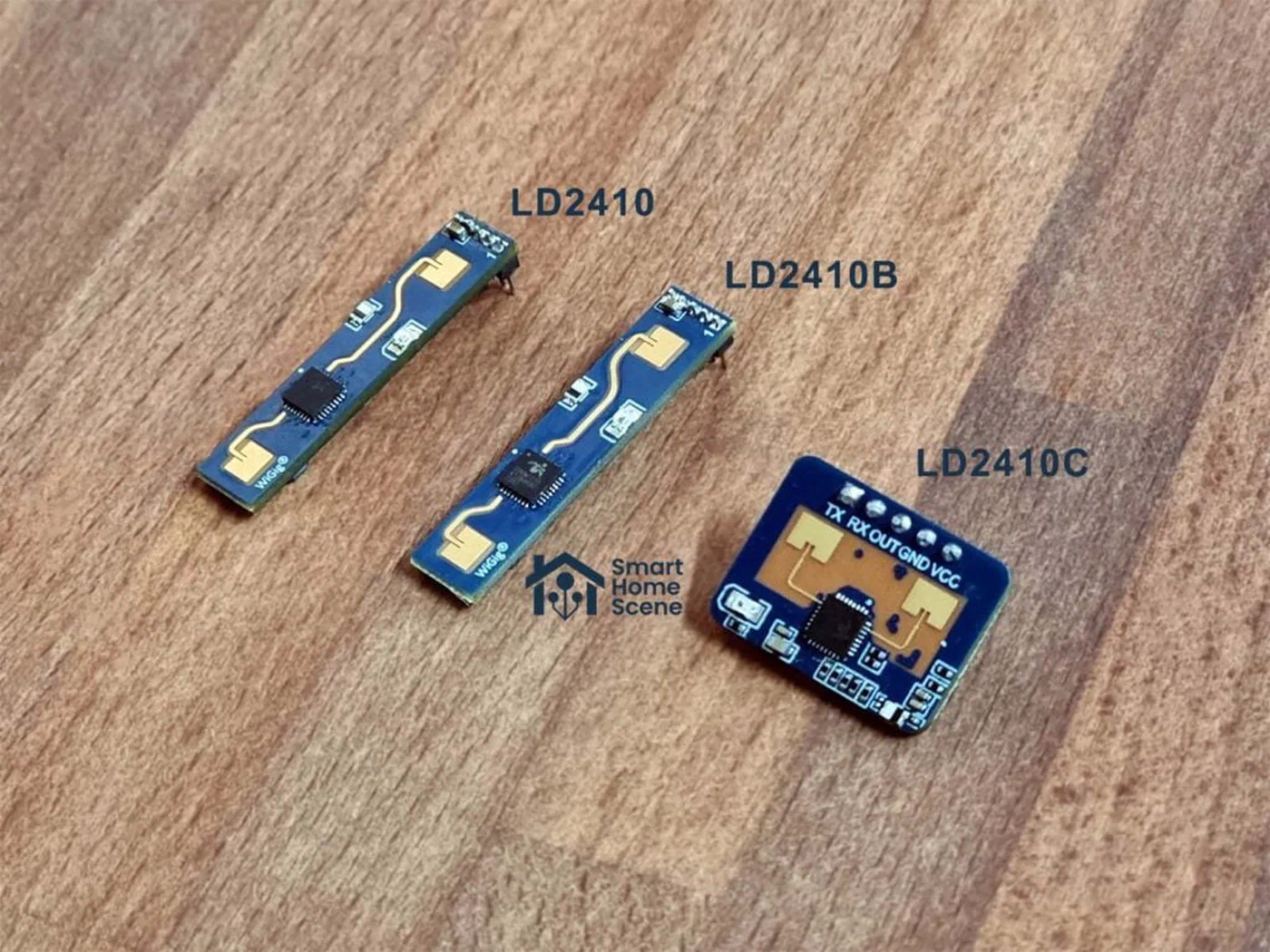
Millimeter-wave radar sensors solve the stationary occupancy problem. The LD2410 ($5 shipped) and the more capable LD2450 ($10, supports multi-target tracking) emit 24 GHz radar and detect the micro-movements of breathing and a heartbeat from a person sitting completely still. They see through thin furniture and do not care about temperature differentials the way PIR does.
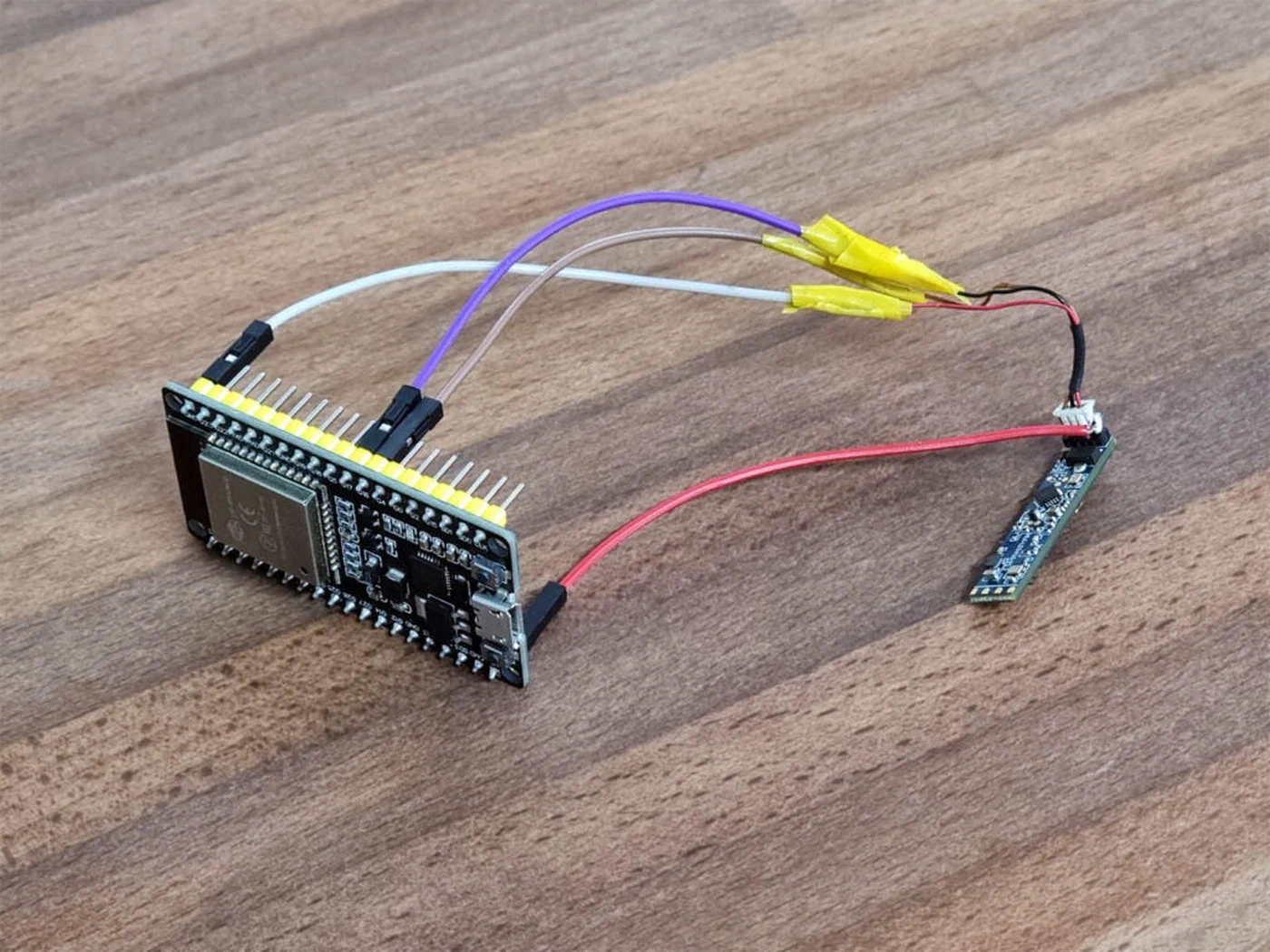
Flashing them with ESPHome firmware and pairing them with an ESP32 gives you full Home Assistant integration. An ESPHome configuration for the LD2410 looks like this:
sensor:
  - platform: ld2410
    moving_distance:
      name: "Office Moving Distance"
    still_distance:
      name: "Office Still Distance"
    moving_energy:
      name: "Office Moving Energy"
    still_energy:
      name: "Office Still Energy"

binary_sensor:
  - platform: ld2410
    has_target:
      name: "Office Has Target"
    has_moving_target:
      name: "Office Has Moving Target"
    has_still_target:
      name: "Office Has Still Target"
The has_still_target binary sensor is the key output - it reports on even when the occupant is motionless. Combine it with the PIR in a room-level Bayesian sensor where PIR acts as the fast-trigger (high prob_given_true when firing, very rapid response) and mmWave provides the persistent confirmation:
binary_sensor:
  - platform: bayesian
    name: "Office Occupied"
    unique_id: bayesian_office_occupied
    device_class: occupancy
    prior: 0.20
    probability_threshold: 0.70
    observations:
      - platform: state
        entity_id: binary_sensor.office_pir
        to_state: "on"
        prob_given_true: 0.70
        prob_given_false: 0.05

      - platform: state
        entity_id: binary_sensor.office_mmwave_still
        to_state: "on"
        prob_given_true: 0.90
        prob_given_false: 0.05

      - platform: state
        entity_id: binary_sensor.office_light_switch
        to_state: "on"
        prob_given_true: 0.65
        prob_given_false: 0.10
The light switch state is a cheap but useful third observation: if someone turned the light on manually, they probably intend to be there.
Practical Automation Patterns
With reliable presence sensors in place, four automation patterns become straightforward to implement safely.
Last Person Leaves. Trigger when binary_sensor.anyone_home transitions from on to off. Add a five-minute delay to prevent triggering when someone briefly ducks outside. The action runs your “goodbye” scene: lights off throughout, thermostat drops to setback temperature (65°F in winter), smart locks engage, and any streaming media pauses. This replaces a cascade of individual device-tracking automations with a single reliable trigger.
Room Lighting Follow. For each room, create an automation that turns on the lights when the room’s Bayesian occupancy sensor turns on, and turns them off five minutes after it turns off. The five-minute buffer prevents lights from cutting out during brief stillness like reading. Because the mmWave sensor keeps the occupancy sensor alive through stationary presence, the light stays on as long as you are genuinely there.
Adaptive Thermostat. When binary_sensor.anyone_home transitions from off to on, switch the thermostat from “away” mode (65°F) to “home” mode (70°F), but add a 15-minute confirmation delay before changing the setpoint. This prevents rapid HVAC cycling if someone briefly returns home and leaves again. When transitioning to “away,” apply a 10-minute delay for the same reason. Both delays are built into the automation using wait_for_trigger or the for: condition on the trigger.
Welcome Home Scene. When binary_sensor.john_home transitions from off to on for the first time after 10:00 AM (preventing the automation from firing when someone gets up in the middle of the night), run the arrival scene: entryway lights at 80% warm white, preferred music playlist starts in the kitchen, thermostat transitions to “home” mode immediately without the usual delay.
A Reusable Blueprint
Rather than hand-writing this YAML from scratch, you can search the HA Blueprints Exchange for community-maintained Bayesian presence blueprints. Several exist with calibrated probability values pre-filled and input fields for your specific entity IDs. Import one via Settings → Automations & Scenes → Blueprints → Import Blueprint and paste the blueprint URL. The best blueprints combine the Bayesian binary sensor configuration with a paired “last person leaves” automation in a single importable package.
Privacy Considerations
The GPS-based observations in this setup depend on the Home Assistant Companion App reporting your phone’s location. It is worth being explicit about what this means for privacy. All location data is transmitted from your phone directly to your Home Assistant instance over your local network (or via Nabu Casa if you use HA Cloud for remote access). No location data is sent to Anthropic, Apple, Google, or any third party. If you use Nabu Casa, location pings travel through their relay servers encrypted end-to-end; Nabu Casa does not log or store location data.
If you prefer zero cloud involvement for any observation, you can entirely omit the GPS/zone observation and rely solely on local signals: Wi-Fi device trackers via your router, ESPHome mmWave sensors, and energy monitoring. The accuracy will be slightly lower, but still dramatically better than any single-source approach.
Calibrating and Improving Over Time
After one week of running the Bayesian sensor, open the HA Logbook and filter for your binary_sensor.john_home entity. Compare each on/off transition against when you actually arrived or departed. Typical mismatches to look for: the sensor staying “home” for 20+ minutes after you left (suggests prob_given_false is too low for a persistent observation like power draw), or the sensor flipping “away” and back within five minutes of someone using the bathroom (suggests the probability threshold is too low).
The Bayesian sensor exposes a probability attribute on the entity, accessible in the Developer Tools → States panel. Create a history graph card in your dashboard that plots this attribute over time. You will immediately see how each sensor departure and arrival creates recognizable patterns in the probability curve - which sensors pull it up (high prob_given_true), which pull it down when active at night (motion sensors during sleep hours becoming noise), and when the threshold crossing lags reality.
If the sensor responds too slowly to arrivals, increase prob_given_true for your fastest-updating observation (typically the router-based Wi-Fi tracker) or lower the probability_threshold slightly. If it produces too many false “home” readings on empty days, tighten prob_given_false for your most persistent observations (power draw, TV state).
Add an override for edge cases. An input_boolean.override_away entity that, when turned on, forces an “away” reading regardless of all observations, can be triggered from an NFC tag near your door or from a mobile app widget. In the Bayesian sensor, implement this by setting the threshold very high and adding a template observation with prob_given_true: 0.001 when the boolean is active - effectively zeroing out the posterior.
The Home Assistant community thread at https://community.home-assistant.io/ contains years of crowd-sourced calibration data, edge cases, and refined probability values for specific devices. Cross-checking your values against community experience - especially for specific router brands, specific phone models, and specific occupancy patterns - is the fastest path to a system you can trust completely.
Building a presence detection system around Bayesian inference is a one-time configuration investment that pays continuous dividends: automations that behave correctly when your phone acts up, lights that know you are still in the room, and a thermostat that actually tracks where you are rather than where your phone thinks you might be.