 Botmonster Tech
Build a DIY Smart Mirror with Home Assistant Integration
A DIY smart mirror is built using a two-way mirror panel, a monitor, and a Raspberry Pi running MagicMirror² software. Behind the one-way glass, the monitor displays information widgets that appear to float in the mirror’s reflection. Integrating it with Home Assistant transforms it from a novelty display into a genuinely useful home status panel - showing which lights are on, whether the front door is locked, and what your next calendar event is.
Materials and Hardware Shopping List
Getting the materials right before you start cutting and mounting saves significant frustration. The two most important components - the mirror material and the monitor - determine the final quality of the build.
Two-Way Mirror
Acrylic spy mirror sheets (sometimes called “two-way mirror acrylic”) cost around $20–45 for a 12"×16" sheet. Acrylic is easy to cut with a circular saw or scoring knife, and the lower cost makes it forgiving for first-time builders. The optical quality is adequate - text and widgets display clearly in dim lighting. The limitation is that acrylic scratches more easily than glass and can flex slightly in large sizes, causing slight distortion.
Glass two-way mirror starts at $100–150 for a custom-cut panel and offers noticeably better optical quality - less distortion, better scratch resistance, and a more polished look. Glass requires professional cutting to size (most glass shops can cut it for $20–30 extra) and significantly more care during handling and installation. For a permanent living room or bedroom installation, glass is worth the premium. For a first build or workshop project, start with acrylic.
The key specification to look for in either material: reflectivity-to-transmissivity ratio around 50/50 or 70/30 (reflective/transparent). Higher reflectivity means better mirror appearance but dimmer widget display - you’ll need a brighter monitor. Lower reflectivity makes widgets more visible but the mirror effect less impressive in bright ambient light. A 70% reflective panel works well in rooms with controllable lighting; a 50% panel works better in bright environments.
Monitor
Any IPS or VA 1080p monitor with slim bezels works. The important criteria are:
- Slim bezels: the frame around the mirror should hide the monitor’s edges; wide bezels create a visible dark border
- High brightness: driving through two-way glass dims the display; 300+ nits helps; 400+ nits is better
- VESA mounting holes: necessary for clean rear mounting inside the frame
- Matte panel: glossy panels create additional reflections behind the glass
A 24-inch 1080p IPS monitor at 300+ nits runs $100–160. Second-hand office monitors in slim bezel designs (Dell P-series, LG 24" UltraSlim) are excellent value on eBay at $40–60.
Compute
The Raspberry Pi 5 (4GB) is the recommended compute for a 2026 smart mirror build. MagicMirror² is an Electron-based Node.js application - it runs in a Chromium window and benefits from the Pi 5’s faster CPU and better GPU performance compared to the Pi 4. The Pi 4 still runs MagicMirror² adequately; the Pi 5 makes it smoother.
A Pi 4 (4GB) works fine and costs less if you already have one. Avoid the Pi Zero 2W for MagicMirror² - the limited RAM causes Chromium to struggle with complex module layouts.
Frame Construction
Three practical approaches:
Wood frame: Most cost-effective and familiar. 3/4" MDF routed with a channel for the monitor to sit flush behind the glass makes a clean, paintable frame. Requires basic woodworking tools and some patience with measurements.
Aluminum extrusion: 20×20mm T-slot aluminum extrusion creates a modern, industrial aesthetic and is precisely machinable without woodworking tools. Hardware from suppliers like MakerBeam or Misumi, with corner brackets and T-nuts, assembles without welding. The clean metal look suits a minimalist space.
Repurposed picture frame: A large deep picture frame from a thrift store or IKEA (RIBBA, HOVSTA) can be adapted with minimal modification if the proportions match your monitor. This is the fastest path from parts to finished mirror.
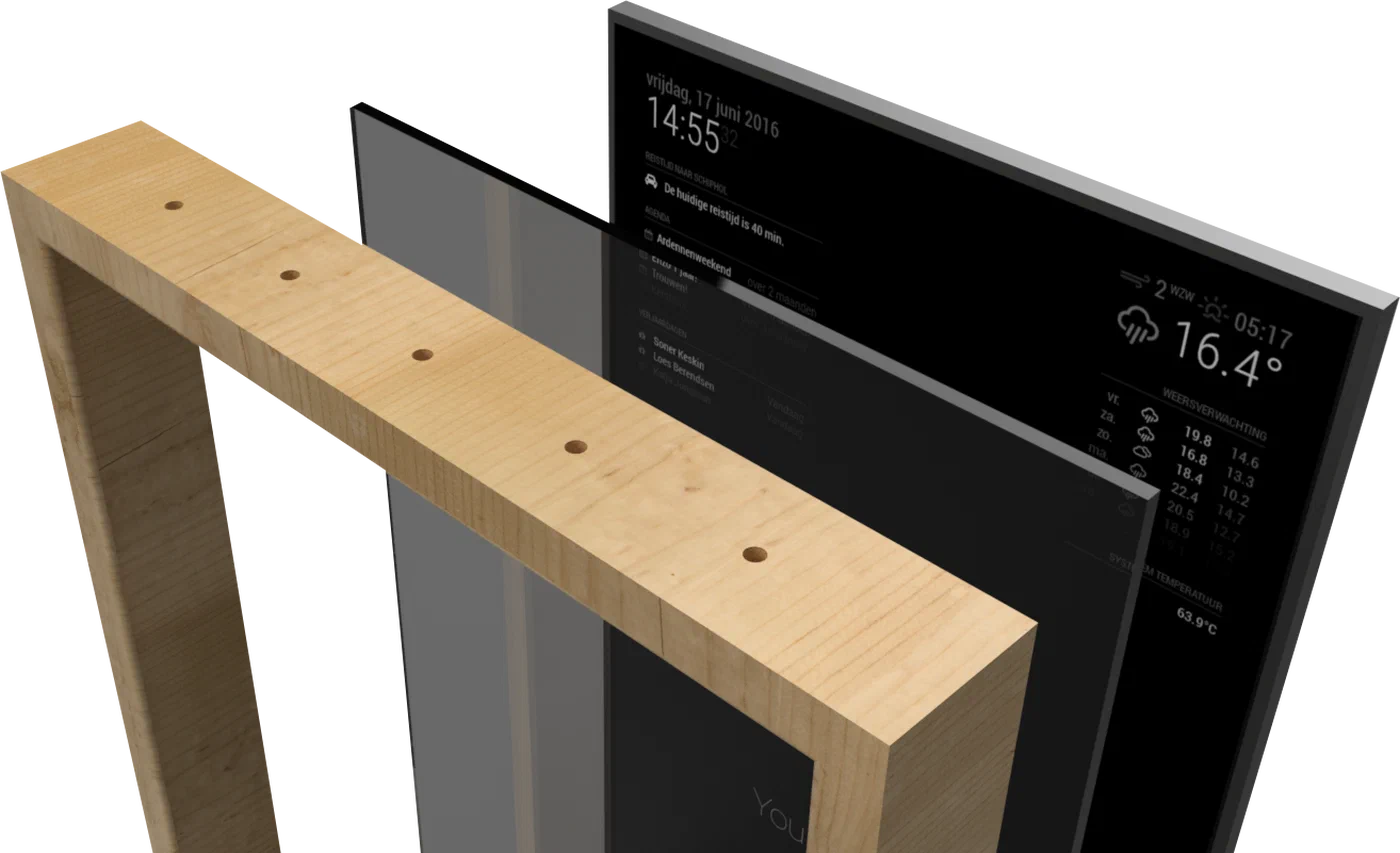
Building the Physical Frame and Mirror Assembly
Precise measurement prevents the most common assembly problems - light bleed and monitor misalignment. Before building anything, measure your monitor’s active display area (not the full monitor size - just the bezel-to-bezel screen dimensions) and cut the mirror panel to match this exactly.
Light bleed is the enemy of a clean smart mirror. Any gap between the back face of the two-way mirror and the front face of the monitor allows light to escape around the edges, creating a glowing border that’s visible in the mirror’s reflection and looks amateurish. The solution is to ensure the mirror sits flush against or slightly over the monitor bezel on all four sides, with no gaps. Black foam weatherstripping tape (3mm thick, 15mm wide) applied to the monitor bezel creates a light seal and cushions the mirror panel.
Routing the frame: The wood or aluminum frame needs a channel or lip on the front face to hold the mirror glass, and a mounting surface on the back for the monitor. The monitor should sit recessed just far enough that its display surface is flush with or slightly behind the mirror’s back face. A 3–5mm recess is typical, adjusted for the thickness of the light-seal foam.
Wiring management: Power cables (monitor power, Pi power) and the HDMI cable need to exit the frame without being visible from the front. Route them through a channel in the bottom or back of the frame, exiting at the wall mount point. Cable management channels ($5 at hardware stores) make this clean if you’re wall-mounting.
Mounting the Pi: Mount the Raspberry Pi to the back of the monitor using a VESA mount adapter or double-sided mounting tape on the monitor’s rear panel. Keep the Pi accessible for SD card removal in case you need to reflash.
Mounting options: Wall mounting in portrait orientation is most common for bedroom mirrors. Landscape orientation works better for hallway or kitchen installations where calendar and clock real estate matters more than height. A freestanding mirror stand allows repositioning but is less elegant for a permanent installation.
Installing and Configuring MagicMirror²
MagicMirror² is a Node.js Electron app that renders information modules in a browser window displayed full-screen. Installation on Raspberry Pi OS:
# Install Node.js (LTS version)
curl -fsSL https://deb.nodesource.com/setup_20.x | sudo -E bash -
sudo apt install -y nodejs

# Install MagicMirror²
git clone https://github.com/MichMich/MagicMirror
cd MagicMirror
npm install

# Copy and edit the config
cp config/config.js.sample config/config.js
nano config/config.jsCore config structure: The config.js file defines regions (top_bar, top_left, top_center, top_right, upper_third, middle_center, lower_third, bottom_left, bottom_center, bottom_right) and assigns modules to each. Example layout:
modules: [
  {
    module: "clock",
    position: "top_center",
    config: { displaySeconds: false, showPeriod: false }
  },
  {
    module: "weather",
    position: "top_right",
    config: {
      weatherProvider: "openmeteo",
      lat: 40.7128,
      lon: -74.0060,
      units: "metric"
    }
  },
  {
    module: "calendar",
    position: "upper_third",
    config: {
      calendars: [{
        url: "https://calendar.google.com/calendar/ical/YOUR_CALENDAR_ID/basic.ics"
      }]
    }
  }
]
Autostart with pm2: PM2 is a Node.js process manager that starts MagicMirror² automatically on boot:
sudo npm install -g pm2
pm2 start ~/MagicMirror/installers/mm.sh --name MagicMirror
pm2 startup
pm2 save
PIR motion sensor for auto-blanking: A cheap PIR sensor ($3 on AliExpress) connected to a GPIO pin, combined with the MMM-PIR-Sensor module, blanks the mirror display after 60 seconds of no motion and wakes it when someone approaches. This extends display lifespan and reduces energy consumption:
npm install --save MMM-PIR-SensorHome Assistant Integration
Connecting to Home Assistant gives the mirror real-time knowledge of your home’s state. There are two main approaches.
MMM-HomeAssistant-Items
The MMM-HomeAssistant-Items module displays entity states from Home Assistant directly in a MagicMirror² panel. It connects via the HA REST API using a Long-Lived Access Token:
Create the token in Home Assistant: Profile > Long-Lived Access Tokens > Create Token. Copy it immediately - it’s only shown once.
cd ~/MagicMirror/modules
git clone https://github.com/jeffreyhu3/MMM-HomeAssistant-Items
cd MMM-HomeAssistant-Items && npm install
// In config.js
{
module: "MMM-HomeAssistant-Items",
position: "bottom_left",
config: {
host: "homeassistant.local",
port: 8123,
token: "YOUR_LONG_LIVED_ACCESS_TOKEN",
entities: [
{ entity: "light.living_room", icon: "💡", name: "Living Room" },
{ entity: "lock.front_door", icon: "🔒", name: "Front Door" },
{ entity: "sensor.outdoor_temperature", icon: "🌡", name: "Outside" }
]
}
}Security note: Create a dedicated HA user with read-only permissions for the mirror token, rather than using an admin token. If the Raspberry Pi is ever compromised, the attacker gets a read-only view of entity states rather than full HA admin access.
HA Lovelace Dashboard as Kiosk (Alternative)
The more powerful alternative to MagicMirror² modules is pointing Chromium directly at a Home Assistant Lovelace dashboard designed for the mirror:
# Start Chromium in kiosk mode pointing at HA
chromium-browser --kiosk --noerrdialogs --disable-infobars \
  --app=http://homeassistant.local:8123/dashboard-mirror
This gives you access to every HACS card, real-time WebSocket entity updates, and the full HA dashboard design tools. The trade-off: the MagicMirror² aesthetic (white widgets on dark background, floating in the mirror) is replaced by HA’s dashboard appearance. For users deeply invested in Home Assistant, the kiosk approach is more powerful and requires less custom configuration.
Automation ideas:
- Display a reminder notification when the front door remains unlocked after sunset
- Show current energy consumption from a smart meter entity
- Display a “Good Morning” greeting with today’s calendar events and weather when motion is first detected after 6AM
- Show an alert when a leak sensor or smoke detector triggers
Finishing Touches and Practical Tips
Light bleed troubleshooting: If you see glowing edges around the display area in the final assembled mirror, add more black foam tape around the monitor bezel and check that the mirror panel is pressed firmly against all four edges. A thin strip of black electrical tape on the monitor frame, visible from inside the assembly, catches any remaining light paths.
Touchscreen capability: Thin IR touch frames (sometimes called “IR touch overlays”) sit between the front of the monitor and the back of the mirror glass, detecting finger position via infrared beam interruption. They connect via USB and present as standard HID touchscreen devices to Linux. A 24-inch IR frame costs around $50 on AliExpress. With touch capability, MagicMirror² modules or the HA kiosk dashboard become interactive - useful for controlling lights directly from the mirror.
Voice control: A USB microphone connected to the Pi, combined with Home Assistant’s Assist pipeline (using Whisper locally or the cloud STT), adds voice command capability. “Hey Jarvis, turn off the living room lights” from in front of the mirror is genuinely useful and impressively fast when HA Assist runs on a local Whisper instance.
Safety and weight: A 24-inch monitor with glass panel in a wood frame can weigh 8–12kg. Use appropriate wall anchors for the wall material (drywall requires hollow-wall anchors rated for 15kg+, not standard drywall screws). A full mirror falling from the wall is a serious safety hazard - mount it securely.
Electrical safety: The monitor, Raspberry Pi power supply, and any powered USB hubs should connect to a properly rated surge protector, not directly into each other in a daisy chain. Keep all mains wiring at the rear of the frame, inaccessible from the front, with no exposed conductors inside the wood frame cavity. If you’re routing mains power through the frame itself, use properly insulated conduit.
The result of a well-executed smart mirror build is surprisingly elegant - useful information that appears to float in your own reflection, blending into your home’s decor in a way that a mounted iPad or screen simply doesn’t.