 Botmonster Tech
Running Gemma 4 26B MoE on 8GB VRAM: Three Strategies That Work

The short answer is no, the Gemma 4 26B MoE model will not fit entirely in 8 GB of VRAM at standard Q4_K_M quantization - the weights alone require roughly 16-18 GB. But with the right approach, you can run it on budget hardware and get usable interactive performance. The three practical strategies are aggressive quantization (IQ3_XS brings weights under 10 GB), GPU-CPU layer offloading (split 15-20 of 30 layers to GPU, rest on system RAM), and multi-GPU setups (two cheap 8 GB cards via tensor parallelism). Each involves different trade-offs between quality, speed, and hardware requirements.
Why the 26B MoE Is Worth the Effort on Budget Hardware
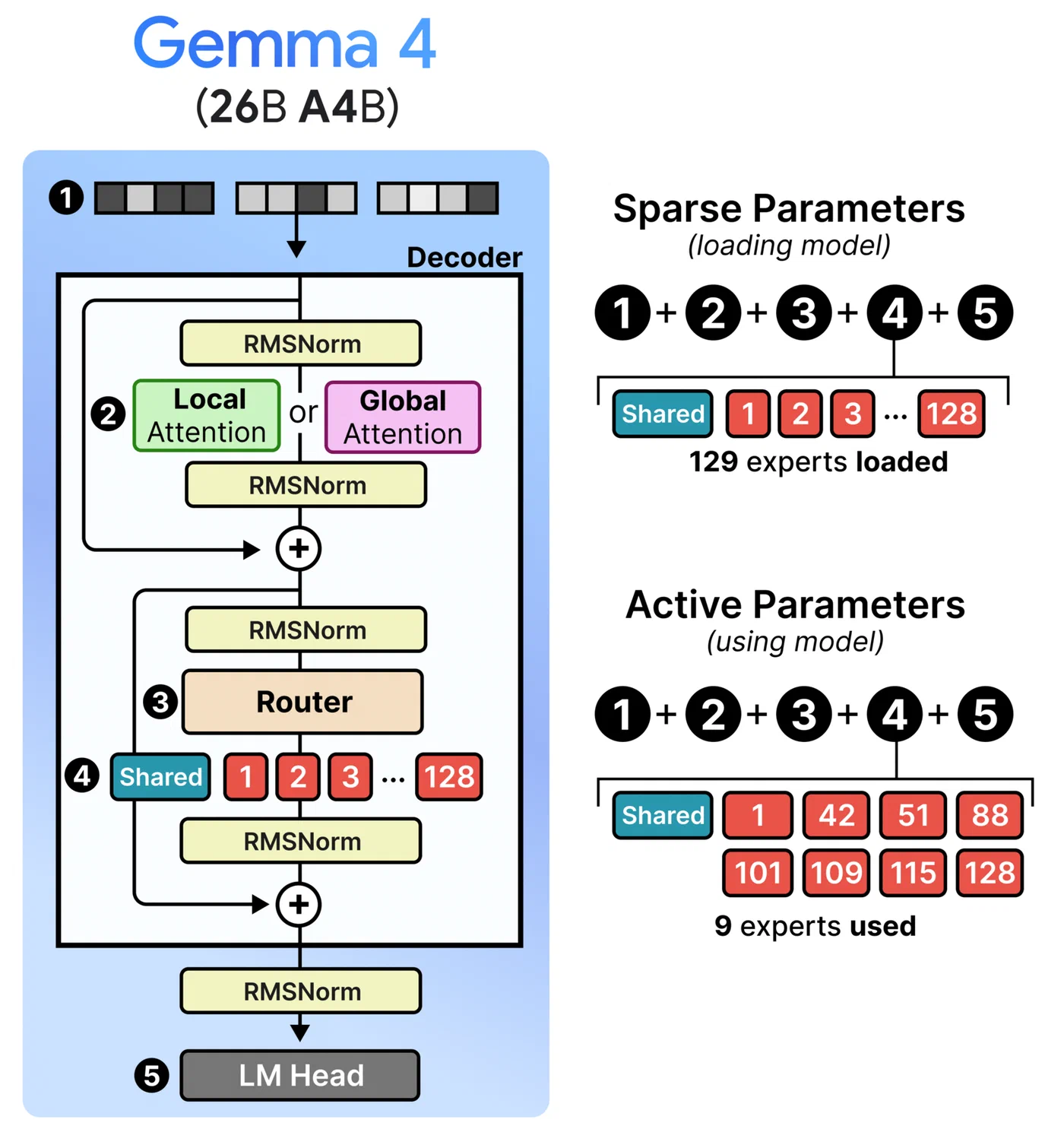
The Gemma 4 26B A4B is Google’s first open Mixture-of-Experts model in the Gemma family, released under the Apache 2.0 license in April 2026. Its architecture is the reason it generates so much interest among people with limited hardware: 128 experts plus one shared expert, with only 8 experts active per token. That means only about 3.8 billion parameters fire during each forward pass, despite the model containing 26 billion parameters total.
In practice, the 26B MoE delivers quality competitive with 31B-class dense models while running inference at speeds closer to a 4B model. On an RTX 3090 at Q4 quantization, the 26B A4B generates 119 tokens/sec at 4K context - compared to 34 tok/s for the dense 31B model on the same GPU. The quality gap over the smaller E4B model (which does fit in 8 GB) is significant enough on reasoning tasks that many users find it worth the hassle to squeeze the larger model onto their hardware.
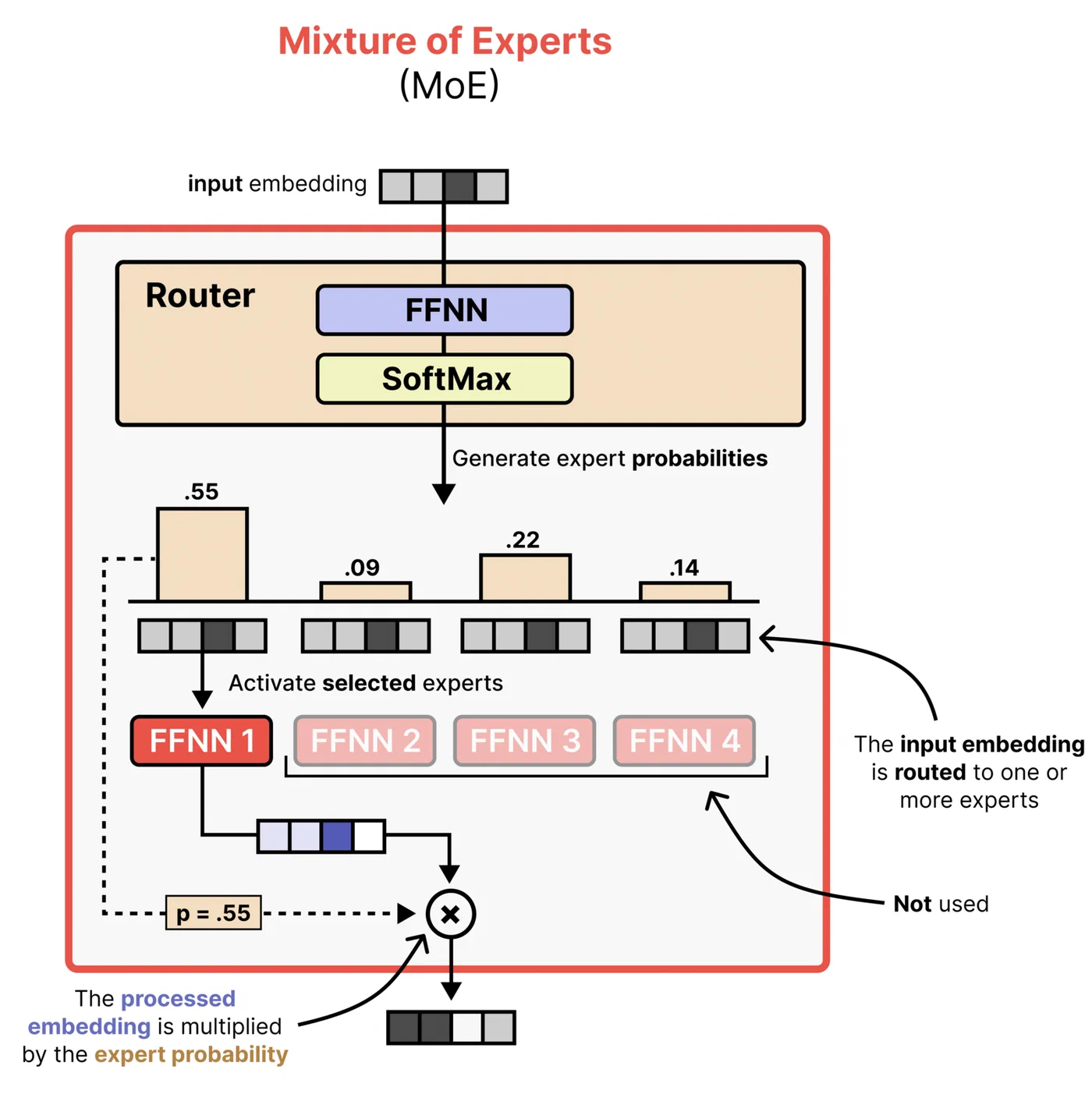
Here is the core problem. MoE memory is deceptive: even though only 8 experts activate per token, the router must have access to all 128 experts to decide which ones to select. That means all 26 billion parameters must be resident in memory at all times. At Q4_K_M quantization, that is roughly 16-18 GB of weights - about double what an 8 GB GPU can hold.
| Quantization | Approx. Size | Fits 8 GB VRAM? |
|---|---|---|
| BF16 (full precision) | ~52 GB | No |
| Q8_0 | ~28 GB | No |
| Q4_K_M | ~16-18 GB | No |
| UD-Q4_K_XL (Unsloth Dynamic) | ~16-18 GB | No |
| IQ4_XS | ~10-11 GB | No (needs partial offload) |
| IQ3_XS | ~8-9 GB | Barely - tight with KV cache |
None of the standard quantizations fit cleanly in 8 GB, but that does not mean 8 GB cards are useless. Here are three strategies that actually work.
Strategy 1: Aggressive Quantization
The most straightforward approach is to quantize the model hard enough that the weights fit (or nearly fit) in your 8 GB of VRAM. llama.cpp has supported Gemma 4 natively since launch day, and GGUF files are available from multiple sources including the official ggml-org/gemma-4-26B-A4B-it-GGUF and Unsloth’s optimized collection .
IQ3_XS is the most aggressive option that remains somewhat usable. At roughly 8-9 GB, it can fit in 8 GB VRAM if you keep the KV cache small by limiting context to 4096 tokens. Quality takes a noticeable hit - expect roughly 3-5% degradation on MMLU Pro compared to Q4_K_M, and reasoning tasks suffer more than simple Q&A. But for coding assistance and straightforward chat, many users report it is still serviceable.
IQ4_XS at 10-11 GB does not fit in 8 GB alone, but it is close enough that you only need to offload a few layers to CPU. This is probably the sweet spot for 8 GB cards because the quality improvement over IQ3_XS is noticeable on complex tasks while the speed penalty from partial offload is modest.
A notable alternative is Unsloth ’s Dynamic 2.0 quantization (UD-Q4_K_XL). Rather than applying uniform quantization across all layers, Unsloth applies higher precision to attention layers and critical routing components while using lower precision for expert feed-forward weights. The result is better quality-per-bit than standard uniform quantization. The file size is similar to Q4_K_M, so it still needs offloading on 8 GB, but you get more quality for your VRAM budget.
To run with llama.cpp at IQ3_XS with flash attention:
./llama-cli -m gemma-4-26B-A4B-it-IQ3_XS.gguf \
  -n 512 --flash-attn --ctx-size 4096 -ngl 99
The --ctx-size 4096 flag is critical here - limiting context keeps the KV cache small enough that the model actually fits. Without it, the 256K default context window would allocate several GB of KV cache on top of the model weights, immediately causing an OOM error.
Strategy 2: GPU-CPU Layer Offloading
If you want to keep Q4_K_M quality (or use Unsloth’s UD-Q4_K_XL) without aggressive quantization, the practical approach is splitting the model between GPU and system RAM. This is the most commonly recommended strategy for 8 GB GPUs paired with 32+ GB of system RAM.
The Gemma 4 26B MoE has 30 transformer layers. The --n-gpu-layers flag in llama.cpp controls how many of those layers run on your GPU, with the remainder handled by CPU. With 8 GB of VRAM and Q4_K_M weights, you can typically fit 15-20 layers on the GPU.
./llama-cli -m gemma-4-26B-A4B-it-Q4_K_M.gguf \
  --n-gpu-layers 18 --ctx-size 8192 \
  --temp 1.0 --top-p 0.95 --top-k 64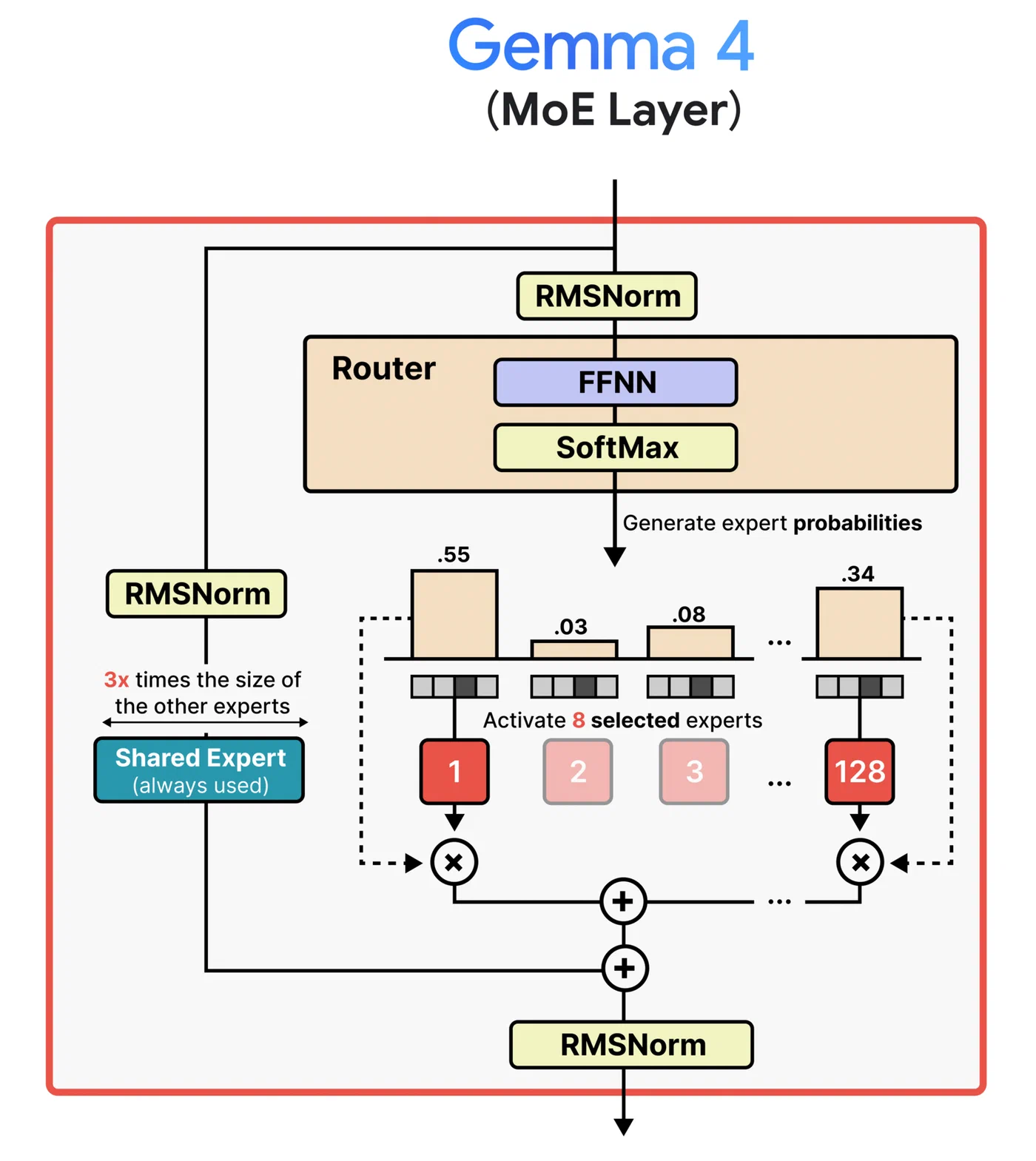
The speed trade-off is real but not devastating. Each layer on CPU adds latency because of the CPU-to-GPU data transfer on every token. With 18 layers on an RTX 4060 and the rest on CPU, expect roughly 15-22 tok/s for text generation. Compare that to the 119 tok/s the 26B A4B achieves with full GPU offload on an RTX 3090 at Q4, and the penalty is clear. But 15-22 tok/s is still fast enough for interactive chat and coding assistance - you will not be staring at a blank screen waiting for responses.
System RAM is the bottleneck you might not expect. The CPU-side layers need space in system RAM for the weights plus working memory. 32 GB of system RAM is the minimum recommendation. 16 GB will technically work but leaves very little headroom for your OS and other applications.
Ollama
handles the GPU-CPU split automatically. If the model exceeds your VRAM, Ollama detects the available memory and splits layers between GPU and CPU without requiring manual --n-gpu-layers tuning. Run ollama run gemma4:26b-a4b and it figures out the split. This is the lowest-friction path if you do not need fine-grained control over the offload ratio.
A few things that affect offload performance more than you might expect:
- DDR5 provides roughly double the memory bandwidth of DDR4, which directly impacts token generation speed for CPU-side layers. If you are still on DDR4, this is where you feel it most.
- PCIe 4.0 x16 saturates faster than 3.0 for the GPU-CPU transfers on each token. If your GPU sits in a x4 or x8 slot, you are leaving performance on the table.
- Try
--n-gpu-layersfrom 15 through 20 and benchmark each setting. The optimal number depends on your specific card’s VRAM availability after driver overhead and KV cache allocation. - Keep context modest. At 8192 tokens the KV cache is small (well under 1 GB). Pushing to 32K or beyond on an 8 GB card will squeeze out layers you could otherwise offload to GPU.
Strategy 3: Multi-GPU Tensor Parallelism
Two cheap 8 GB GPUs can be faster than one expensive 16 GB GPU. If you have a motherboard with two PCIe slots, a pair of used RTX 3060 12 GB cards (roughly $300 total) gives you 24 GB of combined VRAM - enough for Q4_K_M with room for KV cache. Even two RTX 4060 8 GB cards (16 GB combined) fit Q4_K_M if you keep context modest.
vLLM
supports tensor parallelism for Gemma 4 MoE models. The --tensor-parallel-size 2 flag splits the model across both GPUs:
python -m vllm.entrypoints.openai.api_server \
  --model google/gemma-4-26B-A4B-it \
  --tensor-parallel-size 2 \
  --max-model-len 8192
NVLink is not required for models at this scale. PCIe bandwidth is sufficient for the inter-GPU communication the 26B MoE generates. The latency penalty from PCIe versus NVLink is negligible at this parameter count.
A budget-conscious alternative: AMD’s RX 7600 8 GB with ROCm support. AMD announced day-0 Gemma 4 support, and a pair of RX 7600 cards can be had for under $400 total. vLLM and llama.cpp both support ROCm, though driver setup on Linux requires more care than CUDA.
| Budget Build | Total VRAM | Approx. Cost | Fits Q4_K_M? |
|---|---|---|---|
| 2x RTX 3060 12 GB (used) | 24 GB | ~$300 | Yes, with full context |
| 2x RTX 4060 8 GB | 16 GB | ~$500 | Yes, at 8K context |
| 2x RX 7600 8 GB | 16 GB | ~$400 | Yes, at 8K context |
| 1x RTX 4090 24 GB | 24 GB | ~$1,600 | Yes, with full context |
The dual-GPU path is particularly interesting for anyone building a dedicated inference server. The cost-per-VRAM-GB is dramatically better with two cheap cards than one expensive one. The main trade-off is that vLLM’s data parallelism for MoE models has had some stability issues
- tensor parallelism works, but --data-parallel-size > 1 has been reported to crash on the 26B A4B. Stick with tensor parallelism for now.
Taming the KV Cache on Limited VRAM
The Gemma 4 26B A4B supports 256K tokens of context, but on 8 GB VRAM, the KV cache for long conversations can consume as much memory as the model weights themselves.
KV cache memory scales linearly with context length. At 256K tokens, even with quantized KV values, the cache can reach several GB. Gemma 4 helps somewhat with its architecture: it uses a hybrid attention pattern where sliding window attention layers (1024 token window) only cache recent tokens, while global attention layers need the full-context KV. Later layers also reuse K/V tensors from earlier layers via a shared KV cache design, reducing total cache memory compared to standard transformer architectures.
For practical interactive use on 8 GB VRAM, set --ctx-size 8192. This covers most chat conversations and coding sessions while keeping the KV cache under 1 GB. If you are on Apple Silicon with MLX, the --kv-bits 3.5 --kv-quant-scheme turboquant flags can compress the KV cache by roughly 4x, but this option is not yet available in llama.cpp for CUDA.
The avenchat hardware data makes this concrete: the 26B A4B at Q4 uses 17.98 GB at 4K context and only grows to 18 GB at 32K context. The KV cache efficiency of the hybrid attention design means context scaling is gentler than older architectures. But that 18 GB baseline is still more than double what 8 GB cards provide, which is why aggressive quant or offloading remains necessary.
Realistic Performance Expectations
Here is what the research and community benchmarks suggest for budget hardware configurations. These numbers are approximate - your results will vary with driver version, system RAM speed, background processes, and specific llama.cpp build.
| Configuration | Quant | Layers on GPU | Gen Speed (tok/s) | TTFT |
|---|---|---|---|---|
| RTX 4060 8 GB, partial offload | Q4_K_M | 18 of 30 | ~15-22 | ~3s |
| RTX 4060 8 GB, full GPU | IQ3_XS | 30 of 30 | ~25-30 | ~1.5s |
| RTX 4060 8 GB, partial offload | IQ4_XS | 25 of 30 | ~20-25 | ~2s |
| RTX 3060 12 GB, full GPU | Q4_K_M | 30 of 30 | ~40-50 | ~1s |
| M2 MacBook Air 16 GB (unified) | Q4_K_M | All (Metal) | ~15-18 | ~2s |
| 2x RTX 4060 8 GB (vLLM TP=2) | Q4_K_M | All | ~30-40 | ~1.5s |
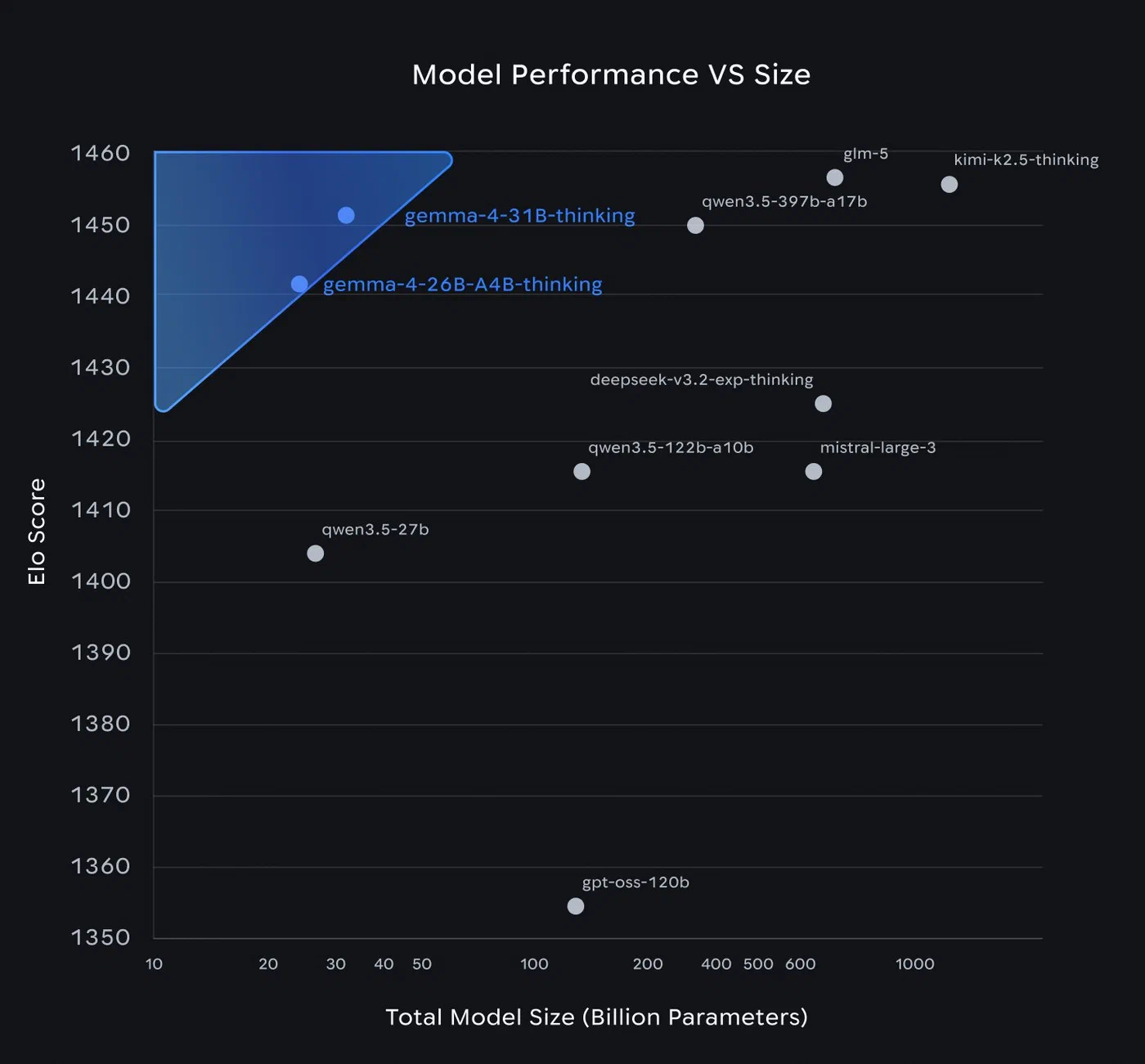
For comparison, the Gemma 4 E4B at Q4_K_M on the same RTX 4060 manages 60-70 tok/s - about 3x faster. But the E4B is a much less capable model for complex reasoning and coding tasks. The quality gap is real and measurable.
The sweet spot for most 8 GB GPU users is probably IQ4_XS with partial offload, targeting around 20-25 tok/s. That is fast enough for interactive use - code completions arrive without a frustrating delay, and chat responses stream at a comfortable reading pace. If you are running a dedicated server for batch processing rather than interactive use, the Q4_K_M with more layers on CPU (slower but higher quality) is the better choice since latency per token matters less.
Common Issues and How to Fix Them
If llama.cpp crashes immediately with a CUDA out-of-memory error on startup, reduce --n-gpu-layers by 2-3 and try again. Remember that the KV cache also needs VRAM - reducing --ctx-size frees memory for more GPU layers.
A subtler failure mode: the model appears to load successfully but crashes on the first inference. This has been reported specifically with the 26B MoE when using -ngl 99 on GPUs with insufficient VRAM. The weight allocation phase succeeds, but the first forward pass allocates additional working memory and fails. Use a lower -ngl value.
If Ollama seems to be using CPU even when your GPU has free space, check ollama ps to see the current layer split. Ollama can be conservative with its VRAM estimation. You can set OLLAMA_NUM_GPU_LAYERS to force a specific split.
Fast prompt processing but slow generation usually means your CPU-side layers are the bottleneck during the token-by-token generation phase. Either offload more layers to GPU (reduce context to free VRAM) or upgrade to faster system RAM.
On Windows, running through WSL2 is recommended over native Windows builds for CUDA. WSL2 passes through the GPU directly and avoids many of the CUDA path issues that affect native Windows llama.cpp builds. Expect roughly 5-10% lower performance compared to bare Linux due to the virtualization overhead.
Should You Bother, or Just Use the E4B?
For users with exactly 8 GB of VRAM and no plans to add a second GPU or upgrade to 12+ GB, the honest answer is: it depends on your use case. The Gemma 4 E4B at Q4_K_M fits comfortably in 8 GB with room for a generous context window and delivers 60-70 tok/s on an RTX 4060. It is a capable model for simple tasks.
But if you work on coding, multi-step reasoning, or tasks where the quality difference between a 4B-active and 26B MoE model is noticeable - and you have 32 GB of system RAM - the partial offload strategy with IQ4_XS or Q4_K_M is viable. You trade speed for capability. At 15-22 tok/s, it is not instant, but it is not painful either.
The multi-GPU path exists for anyone building a dedicated machine. Two used RTX 3060 12 GB cards for $300 total gives you enough VRAM to run Q4_K_M at full speed with room for 256K context. That is a better investment than a single $1,600 RTX 4090 if your only goal is running models in this size class.
Whatever strategy you choose, start with Ollama for the easiest setup, then move to llama.cpp when you need to tune layer counts, context sizes, and quantization levels for your specific hardware.