 Botmonster Tech
Local AI Security Cameras: Frigate with Google Coral TPU
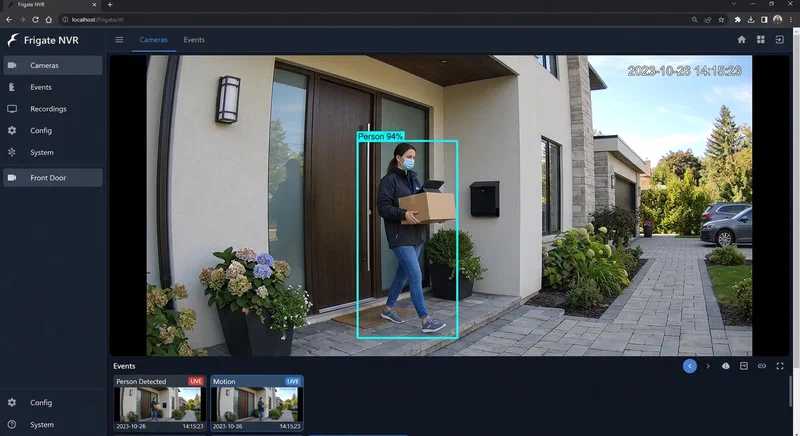
Cloud-based security camera subscriptions have quietly become one of the most expensive recurring costs in the smart home. When you multiply $10–30 per camera per month across a full installation, you are easily spending $500–1,000 a year for the privilege of having your own footage processed on someone else’s servers. Frigate NVR changes that equation entirely. Paired with a Google Coral TPU , it delivers real-time AI-powered person and object detection across multiple 4K camera streams with inference times measured in single-digit milliseconds - all running on hardware you already own, on a network that never phones home.
Why Local AI Security Cameras?
The financial case is straightforward: a Google Coral USB Accelerator costs around $60 as a one-time purchase. A Coral M.2 can be found used for $25. Either device, combined with an existing mini-PC or home server, replaces a subscription service within the first month or two of savings.
The privacy case is more compelling. Every time a cloud camera detects motion, it uploads that video clip to a remote server for analysis. For outdoor cameras this is merely inconvenient; for cameras inside your home, it means a steady stream of footage of your family’s daily life leaving your network. Interior AI cameras with local processing keep that footage entirely on-premises. No clip ever leaves your router.
Resilience is the third pillar. Internet outages, which happen at the worst possible times, render cloud-dependent cameras useless for both recording and alerts. A locally processed Frigate installation keeps recording, keeps running motion analysis, and keeps sending alerts over your LAN to a locally hosted Home Assistant instance regardless of what your ISP is doing.
Finally, Frigate’s detection vocabulary is broad. Out of the box it identifies persons, cars, dogs, cats, birds, and dozens of other COCO dataset classes. Optional add-ons extend that to face recognition and license plate reading. All of this runs entirely on your premises.
Hardware Requirements and Setup
Frigate is not particularly demanding. An Intel N100-based mini-PC or a Raspberry Pi 5 with 4 GB of RAM is sufficient to get started, especially if you offload inference to a Coral. That said, if you plan to run Home Assistant, Frigate, and a local language model on the same machine, a more capable x86 system with 16 GB of RAM and a PCIe slot is worth the investment.
The Coral itself comes in three main form factors. The USB Accelerator ($60) is the easiest entry point: plug it in, configure Frigate, and you are running. It delivers 4 TOPS of inference throughput, which comfortably handles two to four 1080p streams in real time. The M.2 A+E variant ($25 used) connects over PCIe x1, which reduces USB bus latency and is a better fit for machines that will run six or more cameras. The Dual Edge TPU M.2 (~$35) doubles the compute to 8 TOPS, making it the right choice for installations with eight or more streams at 1080p, or four streams at 4K.
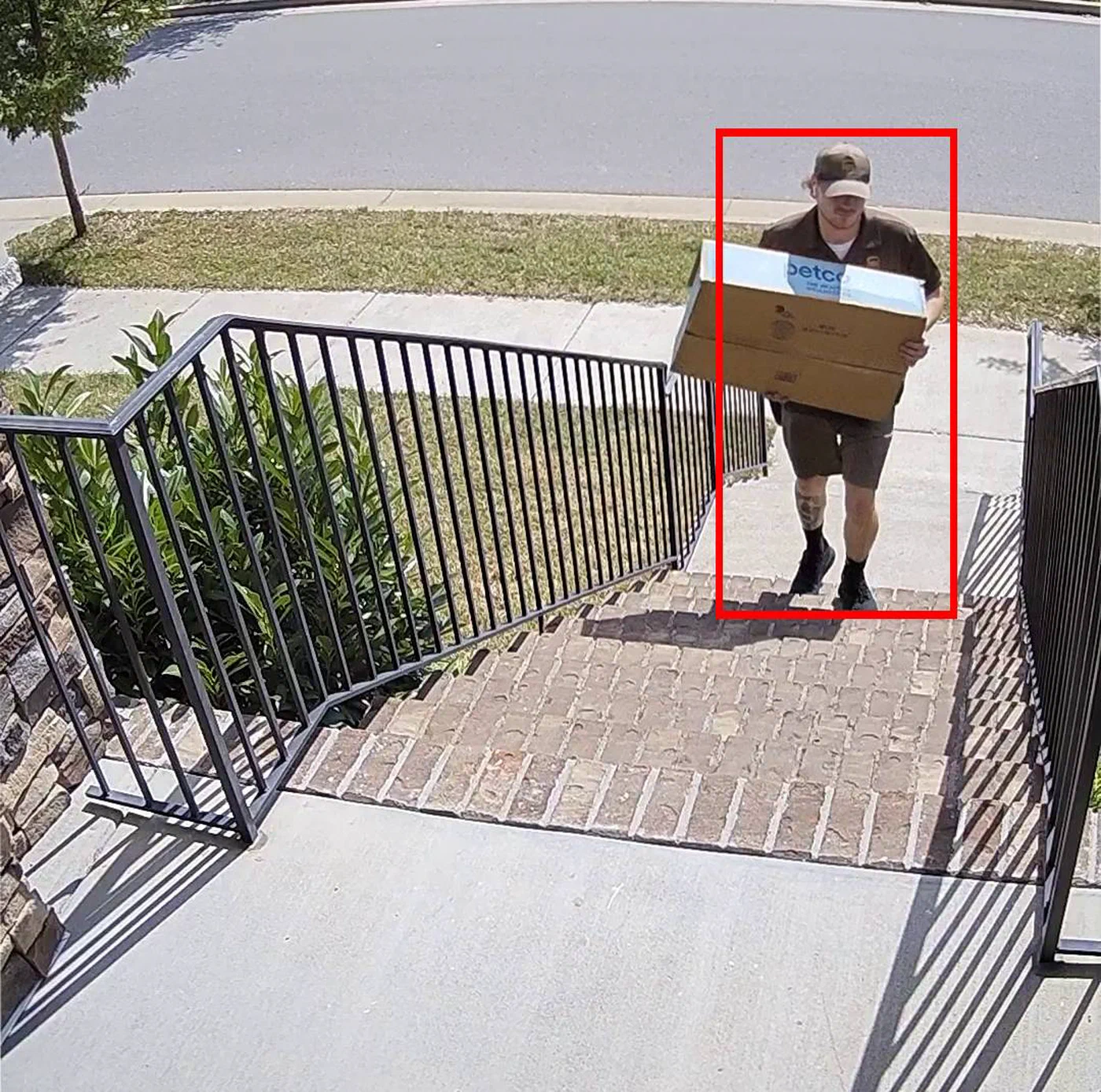
Camera selection matters as much as the server hardware. Frigate requires a camera that exposes an RTSP or RTMP stream and encodes in H.264 or H.265. Any camera that funnels you into a proprietary app with no RTSP option is incompatible. Good budget options include the Reolink RLC-810A (4K PoE, around $50), the Amcrest IP8M-2483EW, and any Hikvision or Dahua OEM. These cameras allow you to pull a direct RTSP URL without needing the manufacturer’s cloud at all.
Network Infrastructure: Put Cameras on Their Own VLAN
Before a single cable is run, plan your camera VLAN. Security cameras should live on an isolated IoT VLAN with no access to the internet and no lateral access to your main LAN. Your Frigate server sits in this VLAN (or has a leg in it via a trunk port) and is the only device that communicates camera streams to the rest of your network. This means a compromised camera firmware cannot reach your NAS, your desktop, or your Home Assistant instance. Most prosumer routers and managed switches support 802.1Q VLANs; UniFi, pfSense/OPNsense, and TP-Link Omada all handle this configuration well.
Moving to On-Camera AI (Edge AI)
2026 has brought a new category of camera worth understanding before you commit to a Frigate-only architecture. Cameras built on the Ambarella H32 SoC include a built-in NPU capable of running person and vehicle detection entirely on the camera itself. Rather than sending a continuous video stream to an NVR for analysis, these cameras send only structured metadata events - “PersonDetected at timestamp X in zone Y” - while the NVR stores the recorded video.
Matter 1.4’s new “Camera” device type formalizes this pattern. A Matter-certified camera can emit PersonDetected and VehicleDetected events to any Matter controller, including Home Assistant’s Matter server, without any custom integration code.
Where does this leave Frigate? For high-priority cameras - front door, main entry, interior spaces - Frigate running on a Coral TPU still wins on detection accuracy. Its models are larger and run on faster dedicated hardware than an embedded NPU. For lower-priority outdoor cameras covering a driveway or backyard perimeter, an edge AI camera reduces both network bandwidth and server load meaningfully. The practical answer in 2026 is a hybrid: edge AI cameras on the perimeter, Frigate plus Coral on the cameras that matter most.
NVR Comparison
Before investing time in a Frigate installation, it is worth understanding how it compares to alternatives:
| Feature | Frigate | Shinobi | MotionEye | Scrypted |
|---|---|---|---|---|
| AI detection | Yes (YOLO, custom) | Plugin-based | Motion only | Yes (CoreML, TF) |
| Coral TPU support | Native | No | No | Limited |
| Home Assistant integration | Native (HACS) | Manual | Manual | Yes |
| Web UI | Modern, built-in | Full-featured | Basic | Modern |
| Hardware encoding | Yes (QSV, NVENC) | Limited | No | Yes |
| License | Open source | Open source | Open source | Open source |
| Active development | High | Moderate | Low | High |
Shinobi is the most feature-complete general-purpose NVR, but its AI capabilities are bolted on rather than native. MotionEye is still widely used but lacks any modern AI detection. Scrypted is an excellent HomeKit-centric option with growing HA support, but its Coral integration is less mature than Frigate’s. If AI detection and Home Assistant are your priorities, Frigate is the clear choice.
Installing Frigate with Docker Compose
The fastest path to a working installation is Docker Compose. The following service definition covers a USB Coral setup with hardware-accelerated video decoding via Intel Quick Sync (QSV):
services:
  frigate:
    container_name: frigate
    image: ghcr.io/blakeblackshear/frigate:stable
    restart: unless-stopped
    privileged: true
    shm_size: "256mb"
    devices:
      - /dev/bus/usb:/dev/bus/usb       # USB Coral TPU
      # For PCIe/M.2 Coral, use instead:
      # - /dev/apex_0:/dev/apex_0
      - /dev/dri/renderD128:/dev/dri/renderD128  # Intel QSV
    volumes:
      - /etc/localtime:/etc/localtime:ro
      - ./frigate/config:/config
      - /mnt/nvr/frigate:/media/frigate
    ports:
      - "5000:5000"   # Web UI
      - "8554:8554"   # RTSP restream
      - "8555:8555/tcp"  # WebRTC
      - "8555:8555/udp"
    environment:
      FRIGATE_RTSP_PASSWORD: "changeme"
For NVIDIA GPU hardware encoding, replace the QSV device line with - /dev/nvidia0:/dev/nvidia0 and add runtime: nvidia to the service definition. For AMD GPUs, use VAAPI with /dev/dri/renderD128 and set hwaccel_args to preset-amd-vaapi in your config.
The minimum config.yml to get Frigate running with a single camera and Coral detection looks like this:
mqtt:
  host: 192.168.1.10   # Your MQTT broker IP
  user: frigate
  password: changeme

detectors:
  coral:
    type: edgetpu
    device: usb

cameras:
  front_door:
    ffmpeg:
      inputs:
        - path: rtsp://admin:password@192.168.10.50:554/stream1
          roles:
            - detect
            - record
    detect:
      width: 1920
      height: 1080
      fps: 5
    record:
      enabled: true
      retain:
        days: 7
    snapshots:
      enabled: true
      retain:
        default: 14
After bringing the stack up with docker compose up -d, navigate to http://your-server:5000 to see the Frigate UI. The most important verification step is checking the /api/stats endpoint. With a working Coral, the detector_inference_speed value should read below 10 ms per frame. On CPU alone, this number typically lands between 100 ms and 500 ms - a 20–50x performance gap that explains why the Coral is non-negotiable for multi-camera deployments.
Storage Planning
Storage consumption depends on motion frequency and camera count. A useful rule of thumb: at default settings with seven-day clip retention and ten cameras, budget 50–100 GB per month. Frigate records only motion-triggered clips by default, which is far more efficient than continuous recording. If you enable 24/7 recording, multiply that figure by 5–10x depending on resolution and encoding. An 8 TB drive covers a ten-camera installation with comfortable headroom. For longer retention, Frigate supports tiered storage to network shares via NFS or SMB mounts.
Configuring Detection Zones and Masks
A raw Frigate installation will generate a flood of notifications - wind-blown trees, passing cars, a flag waving in the breeze. Zones and masks are what transform Frigate from noisy to useful.
Motion masks are polygon regions drawn in the Frigate UI where motion is ignored entirely. Draw one over a tree, a flag, or a busy road visible through the frame and Frigate will stop reacting to movement in those areas at the pixel level.
Object masks operate at the detection layer rather than the motion layer. If a garden statue or a parked bicycle keeps triggering person detections, an object mask over that region tells Frigate to discard detections from that area even after the neural network has classified them.
Zones are named polygon regions that carry semantic meaning for automations. Define a front_door_zone that covers just the porch, a driveway_zone that covers the driveway, and a street_zone that covers the public sidewalk. Your Home Assistant automations can then fire specifically when a person enters front_door_zone rather than appearing anywhere in the camera’s field of view.
The required_zones configuration key is the most effective false-positive reduction tool Frigate offers. It instructs Frigate not to emit a detection event unless the detected object has entered a specified zone. A person walking past on the street will not trigger your front-door notification; a person walking up the driveway and crossing into front_door_zone will.
Object filters provide a final layer of quality control. Setting min_score: 0.7 rejects any detection below 70% confidence. min_area rejects implausibly small detections (a distant figure that occupies only 40 pixels). max_ratio rejects detections with an unusual width-to-height ratio, which catches common false positives like a rectangular patch of sunlight being misclassified.
Face and Pet Recognition with Local VLMs
Frigate’s built-in detection tells you that a person is present. What most users actually want to know is which person. There are two approaches.
Frigate+ is a subscription service (~$5/month) that provides access to custom-trained models including face recognition and license plate reading. Critically, while the model training portal is cloud-based, the inference runs entirely on your local hardware. Your video never leaves the premises; you are paying for a better model, not cloud processing.
For a fully free alternative, a local Visual Language Model delivers something arguably more useful than face recognition: a natural language description of the scene. The workflow is straightforward. When Frigate emits a person detection event over MQTT, a Home Assistant automation grabs the latest snapshot from Frigate’s snapshot API and sends it to a locally hosted Ollama
instance running LLaVA-7B or MiniCPM-V. The model returns a sentence like “A person in a red jacket is standing at the front door holding a package.” That description is then appended to your mobile notification.
This is meaningfully better than a binary “person detected” alert. It lets you decide, without opening an app, whether the notification warrants attention. LLaVA-7B on a dedicated GPU processes a 1080p snapshot in 0.5–2 seconds, which is perfectly acceptable for notification enrichment that does not need to be real-time.
Home Assistant Integration and Automations
Install the Frigate integration
from HACS by searching for “Frigate” in the HACS store, then add the integration via the Home Assistant UI with Frigate’s hostname and port 5000. The integration automatically creates a rich set of entities for each camera: binary_sensor.front_door_person, binary_sensor.front_door_motion, and camera.front_door_latest_person (a snapshot entity that updates with each detection).
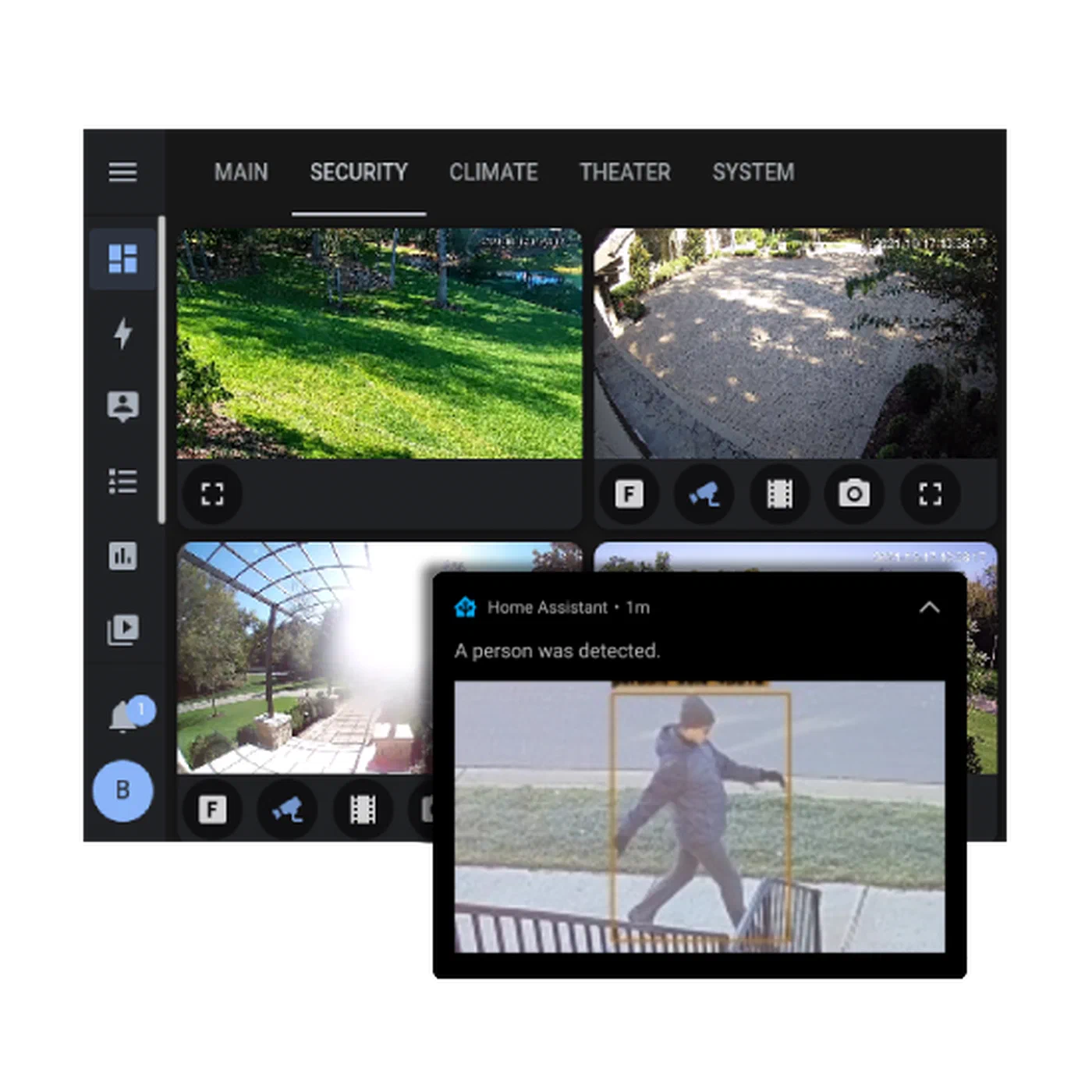
For lower-latency automations, bypass the HTTP-based integration and listen to Frigate’s MQTT events directly. Frigate publishes events to frigate/events and per-camera topics like frigate/front_door/person. An MQTT trigger in a Home Assistant automation reacts within milliseconds of the detection rather than waiting for the polling interval.
Three automations cover the most common use cases:
Person at Front Door. Trigger: Frigate person detection event in front_door_zone. Action: fetch the latest snapshot from http://frigate:5000/api/front_door/latest.jpg and send it as an actionable mobile notification with options to “View Camera” or “Dismiss.” This replaces the default Ring-style doorbell notification with a completely local, subscription-free equivalent.
Armed Away + Intruder Alert. Trigger: any Frigate person detection event while the Home Assistant alarm is in armed_away state. Action: trigger a siren via Home Assistant, switch Frigate’s recording mode to 24/7 via its REST API, and send a high-priority notification to all household devices. This gives you a full intruder response chain that operates entirely without internet access.
Package Delivery Detection. Trigger: person detected in front_door_zone, followed by no person detected in the same zone within 30 seconds, between 08:00 and 20:00. Action: “A package may have been delivered to the front door” notification. This pattern - presence followed by absence within a short window - has a surprisingly high accuracy rate for detecting drop-offs without any additional hardware.
Putting It Together
A complete Frigate installation takes an afternoon of setup time and produces a surveillance system that is genuinely superior to most consumer cloud alternatives in every dimension that matters: detection accuracy, privacy, resilience, and long-term cost. The Google Coral TPU is the enabling hardware that makes multi-camera real-time AI feasible on modest server hardware, and Frigate’s integration with Home Assistant turns raw detections into actionable, context-aware automations.
The one-time hardware cost - a mini-PC, a Coral TPU, and a handful of PoE cameras - pays for itself within the first few months compared to equivalent cloud subscription tiers. Everything beyond that is equity: footage that stays yours, a system that works when the internet goes down, and automations that get smarter as you refine your zones and filters over time.