 Botmonster Tech
OpenAI Codex CLI: the Rust-powered terminal agent taking on Claude Code


OpenAI Codex CLI
is an open-source, Rust-built terminal coding agent. It has over 72,000 GitHub stars. It pairs GPT-5.4’s 272K default context window, which you can push to 1M tokens, with OS-level sandboxing. That sandbox runs on Apple Seatbelt on macOS and Landlock plus seccomp on Linux. Here is the key point: Codex CLI is the only major AI coding agent that enforces security at the kernel level, not through application-layer hooks. Its review output is chatty next to Alibaba’s deliberately quiet reviewer
, which optimizes for signal instead. With codex exec for CI pipelines, MCP client and server support, and a GitHub Action for PR review, it is the most infrastructure-ready rival to Claude Code
in 2026. The Codex subscription now leans on the GPT-5.6-Sol flagship
, which Reddit rates a cheaper coder than Claude.
Key Takeaways
- Codex CLI is OpenAI’s free, open-source coding agent, rebuilt almost entirely in Rust for a faster, self-contained binary.
- It is the only major AI coding agent that enforces its security limits in the operating system kernel, so the model cannot talk its way past them.
- The
codex execcommand and a ready-made GitHub Action drop Codex into CI pipelines and auto-review every pull request. - Codex burns roughly 3 to 4 times fewer tokens per task than Claude Code, so it costs less to run at scale.
- Claude Code still produces higher-quality code on real bug-fixing tests, while Codex leads on terminal-native tasks.
Architecture and the Rust Rewrite
Codex CLI started life as a Node.js and TypeScript project in mid-2025. By late 2025, OpenAI had rewritten the core in Rust (the codex-rs crate). Rust now makes up roughly 95% of the codebase. This was not a vanity rewrite. The reasons were practical: drop the Node.js runtime, cut memory use with no garbage collection pauses, and reach platform sandboxing APIs natively without FFI overhead.
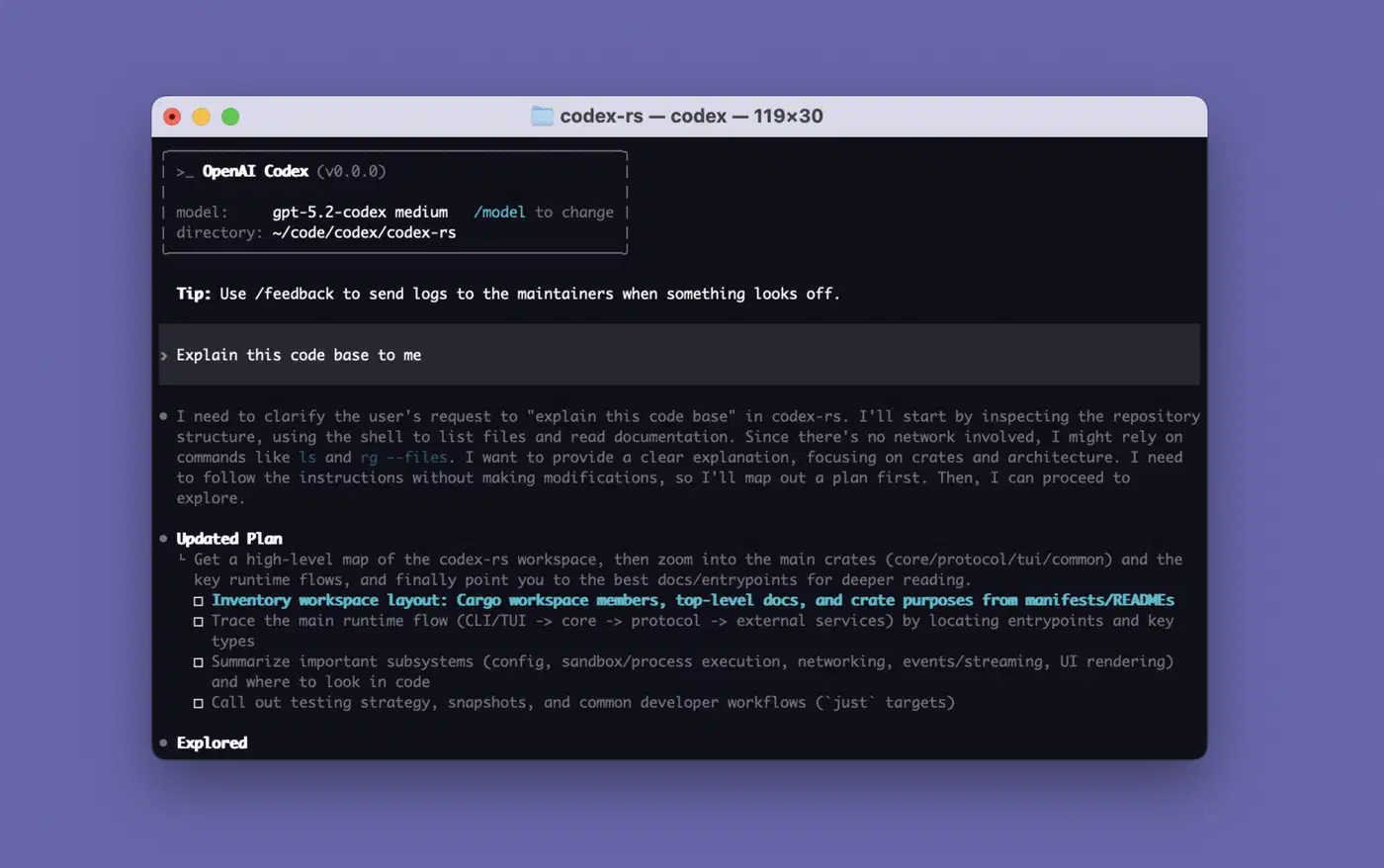
The resulting binary is self-contained. No Node.js, no Python, no Docker required at runtime. You can install it through several channels:
npm install -g @openai/codex(an npm wrapper that downloads the Rust binary)brew install --cask codexon macOS- Direct binary download from the releases page
The project moves fast. It has shipped over 640 tagged releases, roughly one per day since launch. It also holds 5,075+ commits from 400+ contributors and 9,000 forks. That pace points to a large, well-funded team shipping hard. The full history sits on the Codex CLI changelog .
The default model is GPT-5.4. It ships with a 272K standard context window. You can push this to 1M tokens with model_context_window and model_auto_compact_token_limit in the config. Earlier defaults were GPT-5.3-Codex and GPT-5.2-Codex, and you can still pick these or any other OpenAI model. Beyond the terminal, Codex also runs as a desktop app via codex app, with editor support for VS Code
, Cursor
, and Windsurf.
Setting the Context Window in config.toml
Codex CLI reads its settings from ~/.codex/config.toml. A project can override them with a local .codex/config.toml. Two keys control the context window:
model_context_windowsets how many tokens the active model can use.model_auto_compact_token_limitsets the token count at which Codex compacts the conversation history on its own.
To run GPT-5.4 with the full 1M-token window, add this to ~/.codex/config.toml:
model = "gpt-5.4"
model_context_window = 1000000
model_auto_compact_token_limit = 900000
Keep both keys at the top level of the file. Codex ignores them inside a [profiles.<name>] block, so a profile-scoped value will not take effect. The full set of options lives in the Codex configuration reference
.
OS-Level Sandboxing - The Security Architecture That Sets It Apart
Most AI coding agents rely on application-layer safety: permission prompts, command allowlists, hook-based interception, or a skills framework that stalls the agent until the plan is settled . Codex CLI goes a level deeper. It enforces restrictions through the OS kernel. The model cannot bypass them, no matter what commands it tries to run. Some agents skip the question entirely, and Pi ships no permission system at all .
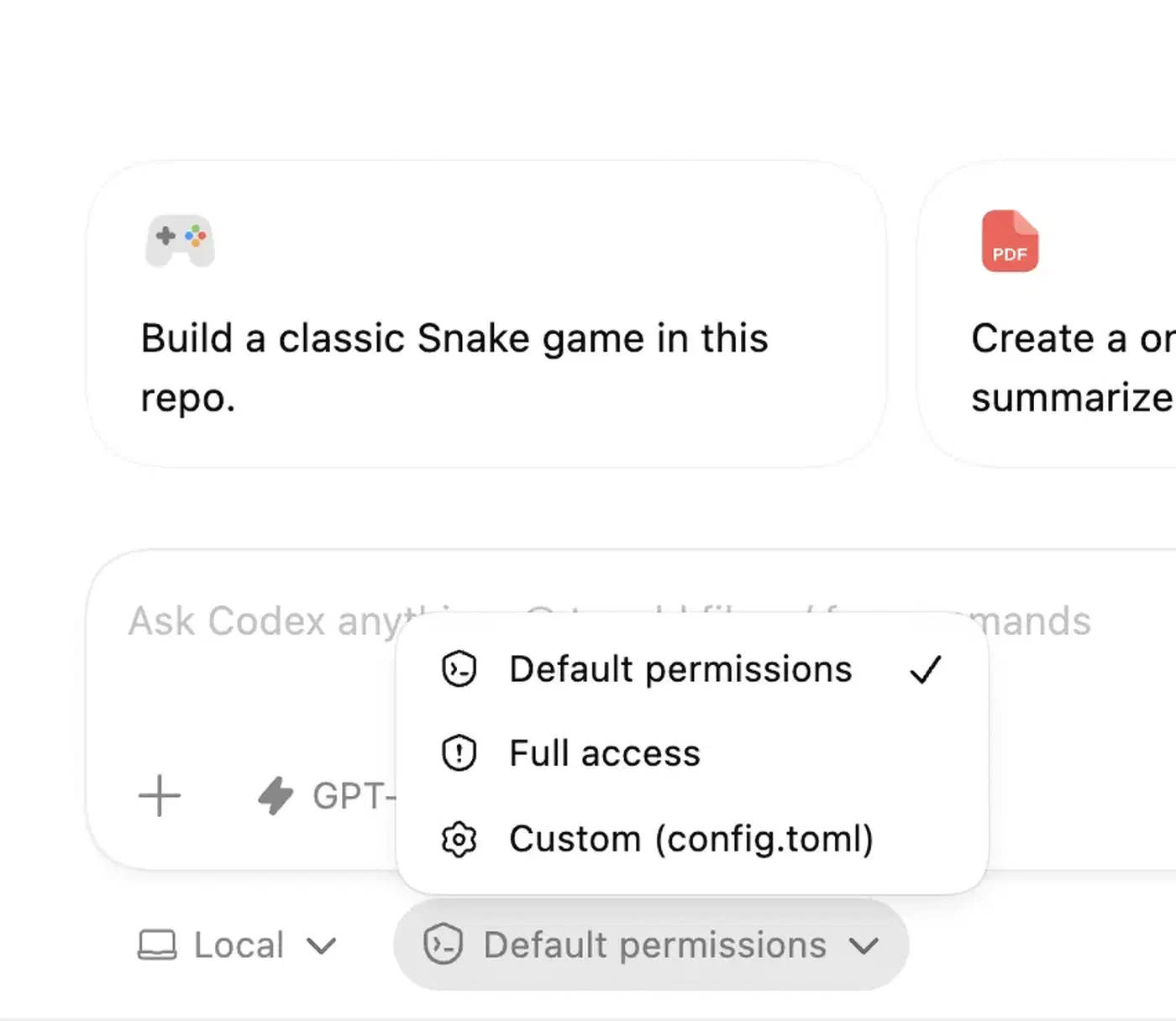
There are three sandbox permission modes:
| Mode | Behavior |
|---|---|
| Read-only (suggest) | Agent can read files and propose changes but cannot modify anything |
| Workspace-write (default) | Agent can write files within the project directory; network is blocked |
| Full access (danger) | No restrictions - intended for trusted environments only |
The implementation is platform-specific:
- macOS: Uses Apple’s Seatbelt
framework via
sandbox-exec, with custom profiles for each permission level. With restricted read access on, Codex appends curated macOS policies instead of broadly allowing/System. That keeps tools working while it holds isolation. - Linux: Combines Bubblewrap
(
bwrap) for filesystem namespacing with seccomp for syscall filtering. Landlock LSM adds a second filesystem access control layer. Standard sandbox modes block the network by default. Codex ships its own copy of Bubblewrap so behavior stays the same across distros. - Windows: Runs the Linux sandbox through WSL.
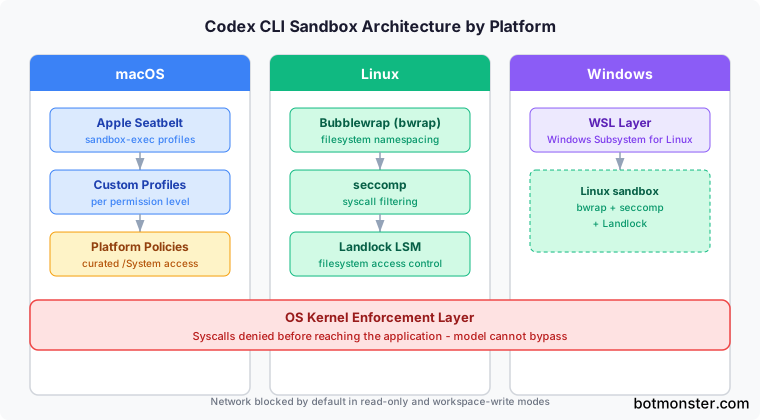
For debugging, codex debug seatbelt and codex debug landlock let you test any command through the sandbox before a real session. That helps when you need to find out why a tool fails under sandboxing.
Compare this to Claude Code. Claude Code uses application-layer safety through its hooks system , which gives 17 points where it can step in during a run. Hooks can check and block commands before they run, but they work at the app level. A bad or broken command could in theory slip past them. Codex’s kernel-level approach is harder to bypass but less flexible. The tradeoff is real. Claude Code’s hooks let teams write narrow, project-specific rules: block some API calls but allow others, for example. Codex’s model is more rigid. You pick a sandbox tier and the OS enforces it. OpenAI lays out the full isolation model in its sandboxing architecture docs.
CI, GitHub Integration, and the codex exec Pipeline
The codex exec command (short form codex e) runs Codex in non-interactive mode for scripted and CI workflows. It takes a prompt plus stdin, so you can pipe input from another process and pass a separate instruction on the command line. That turns Codex into a tool you can drop into automated pipelines, not just use by hand.
The Codex GitHub Action
(openai/codex-action@v1) wraps this into a GitHub Actions workflow step. It installs the CLI, starts the Responses API proxy when you give it an API key, and runs codex exec with permissions you set. Practical use cases include:
- Automatically applying patches when tests fail in CI
- Posting code review comments on every PR
- Running Codex-driven quality checks as a merge gate
The automatic PR review feature is worth its own mention. When you turn it on in Codex settings, a separate Codex agent reviews every new pull request. You do not need an @codex review comment. It posts inline review comments just like a human reviewer would.
Multi-agent coordination has also matured. Sub-agents now use readable path-based addresses like /root/agent_a with structured messaging between agents. That enables workflows where one Codex instance directs others: one agent writes code while another runs tests and a third reviews the diff.
Enterprise teams get proxy support with custom CA certificates and network rules. So Codex works behind corporate firewalls without TLS errors. There is also a growing plugins system
. Codex syncs plugins at startup, and you browse, install, and remove them through the /plugins menu.
MCP, AGENTS.md, and the Extensibility Stack
Codex CLI supports Model Context Protocol (MCP) as both client and server. That makes it a flexible building block in larger agent setups.
On the client side, you can connect Codex to external MCP servers for more tools and context. Config lives in ~/.codex/config.toml or per-project config files. Local servers get a longer startup window, and failed handshakes show warnings in the TUI. You manage servers with the codex mcp CLI commands, and Codex launches them on its own when a session starts.
On the server side, other agents can call Codex CLI itself. So you can embed Codex inside larger workflows run by the OpenAI Agents SDK or any MCP-compatible tool.
For project-specific instructions, Codex reads AGENTS.md files from the project root. It is the parallel to Claude Code’s CLAUDE.md and Gemini CLI’s GEMINI.md. AGENTS.md is built to be simpler than those. The same config, AGENTS.md, skills, and MCP setup are shared across all Codex surfaces: the CLI, the VS Code integration, and the desktop app.
Codex CLI also supports agent skills
, reusable workflow packages much like Claude Code’s skills. A skill is a folder with a SKILL.md file: YAML frontmatter for the name and description, then plain-language instructions. Codex scans .agents/skills directories from your working directory up to the repo root, plus ~/.agents/skills for personal skills. You run a skill with the /skills command or by typing $ and the skill name. Codex can also pick a skill on its own when your task matches its description.
Recent updates added MCP install keyword suggestions and a server submenu in the “Add context” menu. Both make tool discovery faster. Codex also supports web search for live information during coding sessions, plus image input so you can attach screenshots and design files as visual context.
Pricing, Performance, and How It Stacks Up
Codex CLI is free and open-source. You pay for the models behind it. OpenAI has moved Codex pricing to a token-based model that lines up with standard API rates.
Benchmark Comparison
| Benchmark | Codex CLI (GPT-5.3) | Claude Code (Opus 4.6) | Winner |
|---|---|---|---|
| Terminal-Bench 2.0 | 77.3% | 65.4% | Codex CLI |
| SWE-Bench Verified | 75.2% | 80.9% | Claude Code |
| Blind code quality (head-to-head) | 25% | 67% | Claude Code |
The benchmarks tell a split story. Codex CLI leads on terminal-native tasks by a 12-point margin on Terminal-Bench 2.0. Claude Code leads on real-world bug fixing (SWE-Bench) and wins 67% of blind code quality comparisons. MorphLLM’s benchmark comparison and Builder.io’s analysis both dig into these gaps.
Token use favors Codex CLI by a wide margin. It burns roughly 3-4x fewer tokens per task than Claude Code, so it costs less per operation at scale.
GPT-5.4 Pricing
| Tier | Price |
|---|---|
| Input tokens | $2.50 / 1M tokens |
| Cached input tokens | $1.25 / 1M tokens |
| Output tokens | $15.00 / 1M tokens |
| Long-context input (>272K) | $5.00 / 1M tokens |
ChatGPT subscribers can use Codex CLI without separate API billing. Plus ($20/month) subscribers get 30-150 messages per 5-hour window, and Pro ($200/month) subscribers get 300-1,500 messages. On API billing, average developer spend runs $100-200/month, based on how hard you use it and which model you pick.
GPT-5.4 generates at 240+ tokens per second. The lighter Spark model tops 1,000 tokens per second. That raw speed, plus the token edge, means Codex CLI sessions tend to feel faster and cost less per task than comparable Claude Code sessions. Claude Code, though, often produces higher-quality output that needs fewer iterations.
What To Optimize For
The choice between Codex CLI and Claude Code comes down to priorities:
- Codex CLI makes more sense if you value OS-level sandboxing, CI/CD integration, open-source licensing, token efficiency, and raw terminal speed.
- Claude Code is the better fit if you prioritize code quality, complex reasoning across large codebases, flexible hook-based policies, and a mature skill ecosystem.
For data-sensitive work, the open-weight option is Alibaba’s Qwen3.6-35B-A3B with its bundled Qwen Code CLI . It scores 73.4 on SWE-bench Verified while firing only 3B parameters per token. If you want a larger open-weight model, MiniMax M2.7 scores 78 on SWE-bench Verified and runs offline on 128GB unified-memory hardware.
Neither tool is standing still. Codex CLI’s daily release pace and growing contributor base suggest the code quality gap may close over time. Claude Code’s agent teams feature and wider MCP support show Anthropic is working to match Codex on infrastructure. The Codex pricing page and Blake Crosley’s deep dive help you weigh the two against your own workflow.
Frequently Asked Questions
How do I set the Codex CLI context window in config.toml?
Open ~/.codex/config.toml and add two top-level keys: model_context_window for the token budget the model can use, and model_auto_compact_token_limit for the point at which Codex compacts the history. To unlock GPT-5.4’s full 1M-token window, set model_context_window = 1000000. Keep both keys at the top level. Codex ignores them inside a [profiles.<name>] block.
Why does Codex CLI say “stdin is not a terminal”?
This error shows up when an interactive Codex command runs without a real terminal attached. A script or a CI job is the usual setting, and the codex fork command is the common trigger. For non-interactive use, run the headless codex exec path instead. It takes a prompt plus piped stdin and needs no terminal.
Is Codex CLI made by OpenAI or Anthropic?
Codex CLI is OpenAI’s open-source terminal coding agent. Claude Code is the equivalent tool from Anthropic. The two are direct rivals, so search results often mention both, but Codex CLI itself is an OpenAI project.