 Botmonster Tech
Running Gemma 4 Locally with Ollama: All Four Model Sizes Compared

Google’s Gemma 4 is not one model - it is a family of four, each targeting different hardware and different use cases. The smallest runs on a Raspberry Pi. The largest ranks #3 on LMArena across all models, open and closed. All four ship under the Apache 2.0 license, a first for the Gemma family. This guide walks through installing each variant with Ollama (currently at v0.20.2), benchmarks them on real consumer hardware, and helps you decide which one fits your setup.
Four Models, Three Architectures
The Gemma 4 family spans three different architectures across its four size tiers. Understanding what you are downloading matters because parameter count alone does not tell the full story here.
The E2B has 2.3 billion effective parameters out of 5.1 billion total. The gap comes from Per-Layer Embeddings (PLE) - a secondary embedding table that feeds a small residual signal into every decoder layer, giving each layer its own specialization path. Despite its small footprint, it handles text, images, and audio input with a 128K token context window.
The E4B uses the same PLE architecture at 4.5 billion effective parameters out of 8 billion total. Same modalities as E2B (text, image, audio), same 128K context - just more capacity for laptops and mid-range hardware.
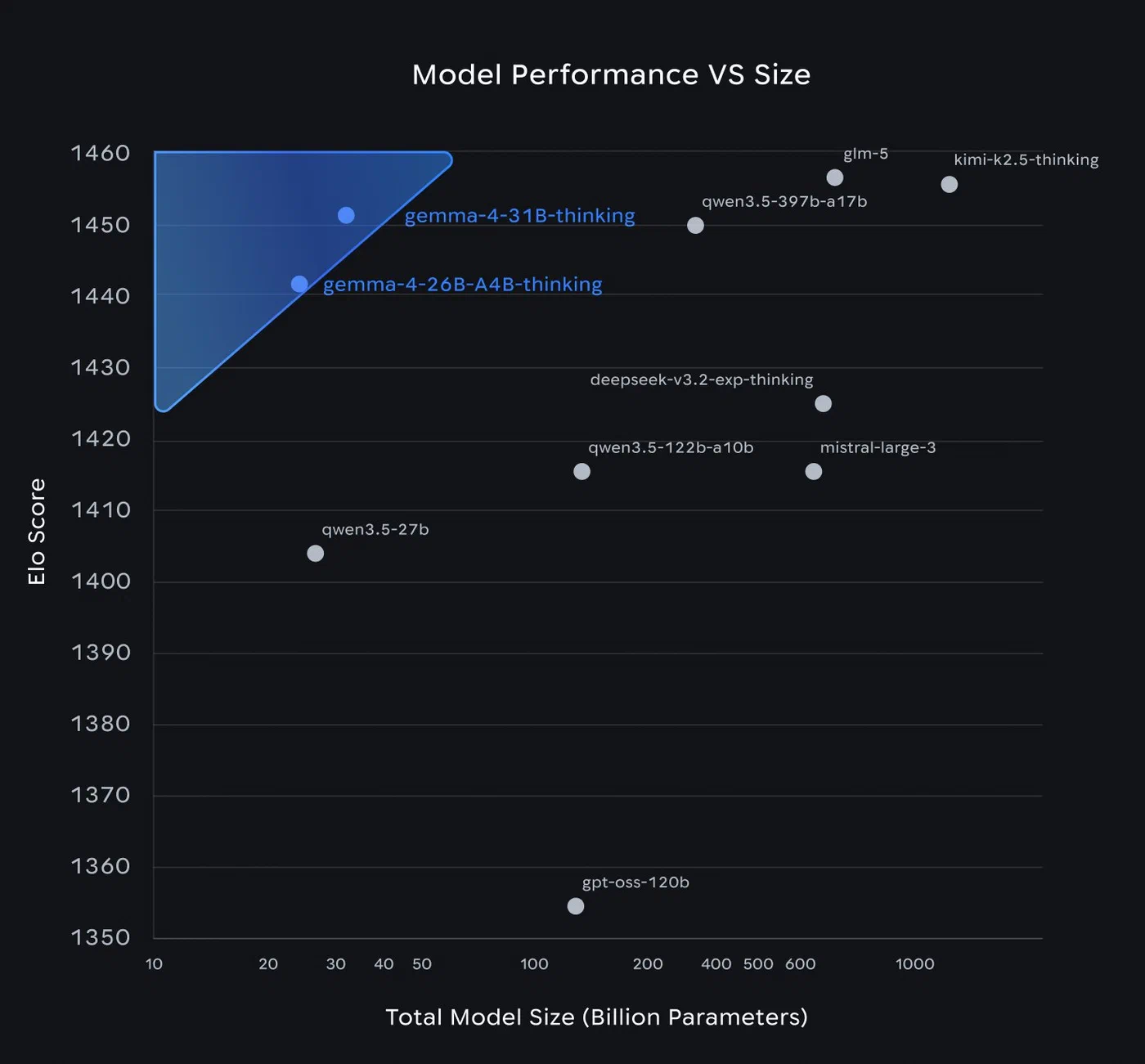
The 26B A4B is a Mixture-of-Experts (MoE) model. It has 25.2 billion total parameters but only activates 3.8 billion per token. That difference is why the 26B is the most interesting variant in the lineup - you get 31B-class quality at roughly 4B-class inference speed. It supports text, image, and video input (up to 60-second clips at 1fps) with a 256K token context window, but drops audio support.
The 31B is a traditional dense transformer. All 30.7 billion parameters fire on every token. It supports the same modalities as the 26B (text, image, video - no audio) with 256K context. If you have 24 GB of VRAM and want the best possible output, this is what you run.
All four models use Dual RoPE - standard rotary position embeddings for local sliding-window attention layers and proportional RoPE for global full-context attention layers. This combination is what makes the 256K context window on the larger models work without the usual quality degradation at long distances.
| Model | Effective Params | Total Params | Context | Modalities | Architecture |
|---|---|---|---|---|---|
| E2B | 2.3B | 5.1B | 128K | Text, Image, Audio | Dense + PLE |
| E4B | 4.5B | 8B | 128K | Text, Image, Audio | Dense + PLE |
| 26B A4B | 3.8B active | 25.2B | 256K | Text, Image, Video | MoE |
| 31B | 30.7B | 30.7B | 256K | Text, Image, Video | Dense |
Installing Ollama and Pulling Gemma 4
On Linux or macOS, install Ollama with:
curl -fsSL https://ollama.com/install.sh | shOn Windows, grab the installer from ollama.com/download . Once installed, pull whichever model fits your hardware:
ollama pull gemma4:e2b
ollama pull gemma4:e4b
ollama pull gemma4:26b
ollama pull gemma4:31b
All variants default to Q4_K_M quantization - a good balance of quality and disk space. Storage requirements at each quantization level:
| Model | Q4_K_M | Q8_0 | BF16 |
|---|---|---|---|
| E2B | 7.2 GB | 8.1 GB | 10 GB |
| E4B | 9.6 GB | 12 GB | 16 GB |
| 26B | 18 GB | 28 GB | - |
| 31B | 20 GB | 34 GB | 63 GB |
To verify everything works, run a quick test:
ollama run gemma4:e4b "Explain the difference between MoE and dense transformers in two sentences"For multimodal input, pass an image directly:
ollama run gemma4:e4b "Describe this image" --image photo.jpgGoogle maintains an official Ollama integration guide with additional configuration options.
Hardware Requirements: What Runs Where
All requirements below assume Q4_K_M quantization.
The E2B needs roughly 2 GB of VRAM or 4 GB of system RAM. This runs on a Raspberry Pi 5, NVIDIA Jetson boards, phones, and any laptop made in the last decade.
The E4B needs around 5 GB of VRAM or 8 GB of system RAM. Any GPU from a GTX 1060 6GB onward handles it fine. On Apple Silicon, an M1 with 8 GB unified memory is the floor, though 16 GB gives comfortable headroom.
The 26B MoE needs 15-18 GB of VRAM. That means an RTX 3090, RTX 4090, RTX 5070 Ti, or Apple Silicon M2 Pro or better with 32 GB of unified memory. On a 16 GB Mac, you will hit constant swapping - do not bother.
The 31B Dense needs around 20 GB of VRAM. Same GPU tier as the 26B (RTX 3090/4090/5090) or Apple Silicon with 32 GB. The dense architecture is slightly hungrier at the same quantization level.
All four models can fall back to CPU-only inference through Ollama, but expect 2-5x slower generation compared to GPU. Budget disk space at roughly 120% of the download size to account for KV cache overhead during long conversations. The 26B and 31B variants use a shared KV cache design that reduces memory pressure at longer context lengths.
| Model | Min VRAM | Min System RAM | Suitable GPUs |
|---|---|---|---|
| E2B | ~2 GB | ~4 GB | Any, including Raspberry Pi |
| E4B | ~5 GB | ~8 GB | GTX 1060 6GB+, Apple M1+ |
| 26B | ~15-18 GB | ~32 GB | RTX 3090/4090/5070 Ti, M2 Pro 32GB+ |
| 31B | ~20 GB | ~32 GB | RTX 3090/4090/5090, M2 Pro 32GB+ |
Speed Benchmarks: Tokens Per Second Across Hardware
Raw generation speed determines whether a model feels interactive or painful. These numbers come from community benchmarks using the same methodology - 512-token generation, Q4_K_M quantization, Ollama defaults.
| Model | RTX 4090 | M2 Pro | M4 Pro |
|---|---|---|---|
| E2B | 80-120 tok/s | 40-60 tok/s | - |
| E4B | 60-80 tok/s | 30-40 tok/s | - |
| 26B MoE | ~50 tok/s | - | ~20-25 tok/s |
| 31B Dense | ~30-35 tok/s | - | ~15 tok/s |
The MoE speed advantage is significant. The 26B variant approaches 31B quality while running at nearly twice the speed. Only 3.8 billion parameters activate per token, so despite the 25.2B total parameter count, inference throughput resembles a much smaller model. For comparison, Qwen 3.5 27B runs at approximately 60 tok/s on an RTX 4090 - Gemma 4’s 26B MoE is competitive, especially after early speed issues were patched in Ollama v0.19.
Prompt processing (prefill) speed is another consideration. The 26B and 31B models handle up to 256K tokens of context, but longer prompts take proportionally more time during the prefill phase. For interactive use, keeping prompts under 32K tokens on consumer hardware keeps the experience responsive.
Quality Comparison: When to Use Which Model
More parameters generally mean better benchmark scores, but the right model for a given task varies.
On MMLU Pro (reasoning), the 31B scores 85.2%, the 26B MoE trails slightly at around 83%, the E4B drops to roughly 65%, and the E2B lands at approximately 55%. For complex multi-step reasoning, the 26B offers the best quality-to-VRAM ratio unless you can spare the memory for the 31B.
For coding, the 31B reaches a Codeforces ELO of 2150. The 26B MoE handles everyday coding tasks well - code reviews, refactoring suggestions, boilerplate generation. The E4B manages simple scripts and completions. The E2B is limited to autocomplete-level assistance.
Multimodal support splits along an unexpected line: the E2B and E4B handle image and audio input (speech transcription, image descriptions), while the 26B and 31B handle image and video (up to 60-second clips) but cannot process audio at all. If audio matters to your workflow, you need one of the smaller models.
For creative writing, the 31B produces better narrative flow and wider vocabulary. The 26B MoE is hard to tell apart from it in practice for blog posts, documentation, and technical writing.
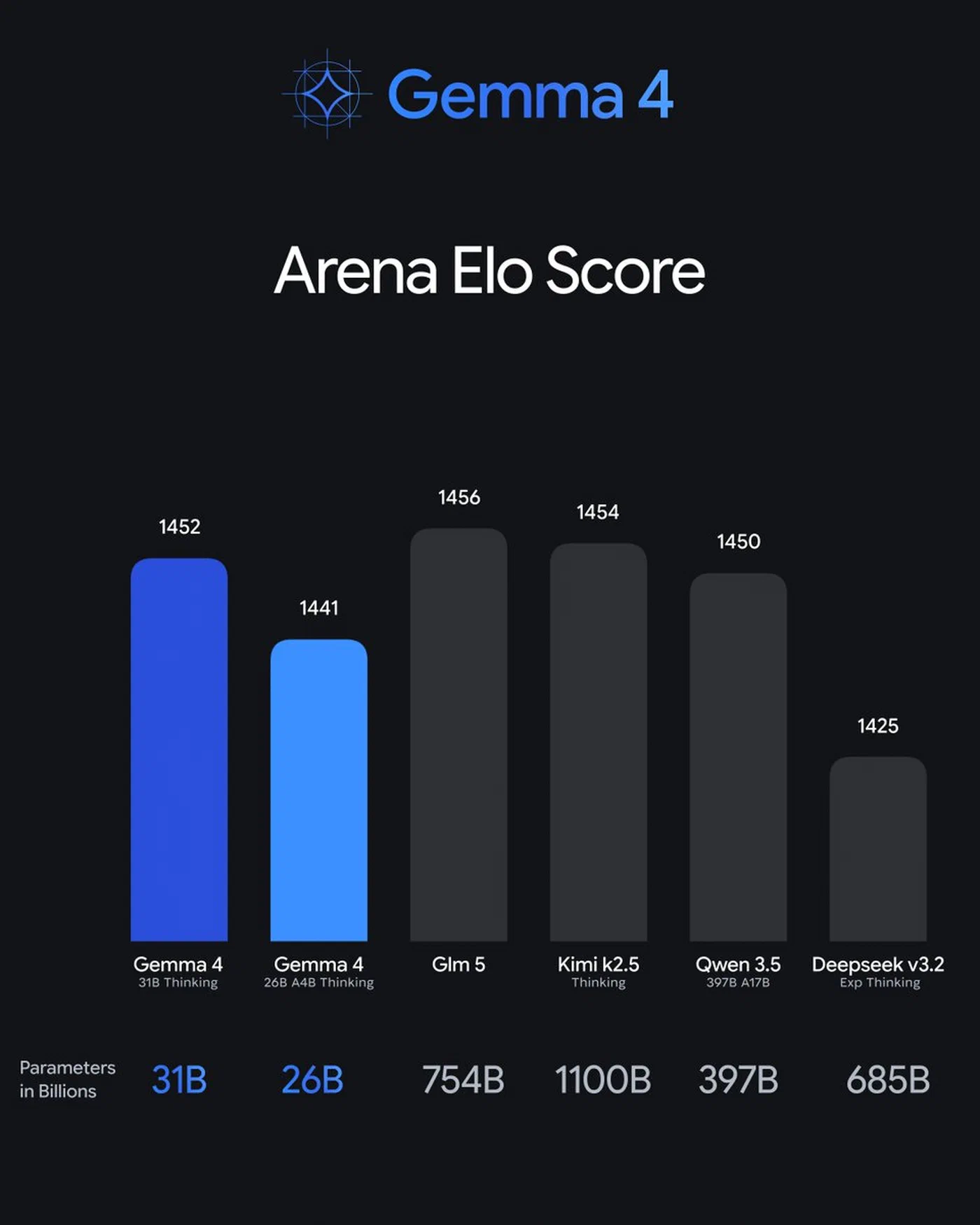
On the Arena leaderboard , the 31B sits at an ELO of approximately 1452 - that is #3 across all models including closed commercial ones. The 26B MoE is at roughly 1441. Gemma 4 is the only model family with two entries in the top ten.
Here is a practical decision matrix:
| Use Case | Recommended Model | Why |
|---|---|---|
| Mobile / embedded devices | E2B | Fits in 2 GB VRAM |
| Laptop daily driver | E4B | Fast, handles audio, 8 GB RAM sufficient |
| Best quality per VRAM | 26B MoE | 31B-class quality at half the speed cost |
| Maximum capability | 31B Dense | #3 globally on LMArena |
Using Gemma 4 with the Ollama API and Third-Party Tools
Ollama exposes an OpenAI-compatible API at http://localhost:11434/v1/chat/completions. Most tools that work with the OpenAI API work with your local Gemma 4 models without code changes.
In VS Code, set your model to gemma4:26b in the Continue
configuration. Use the 26B for code reviews and the E4B for fast autocomplete - switching models per task keeps things responsive.
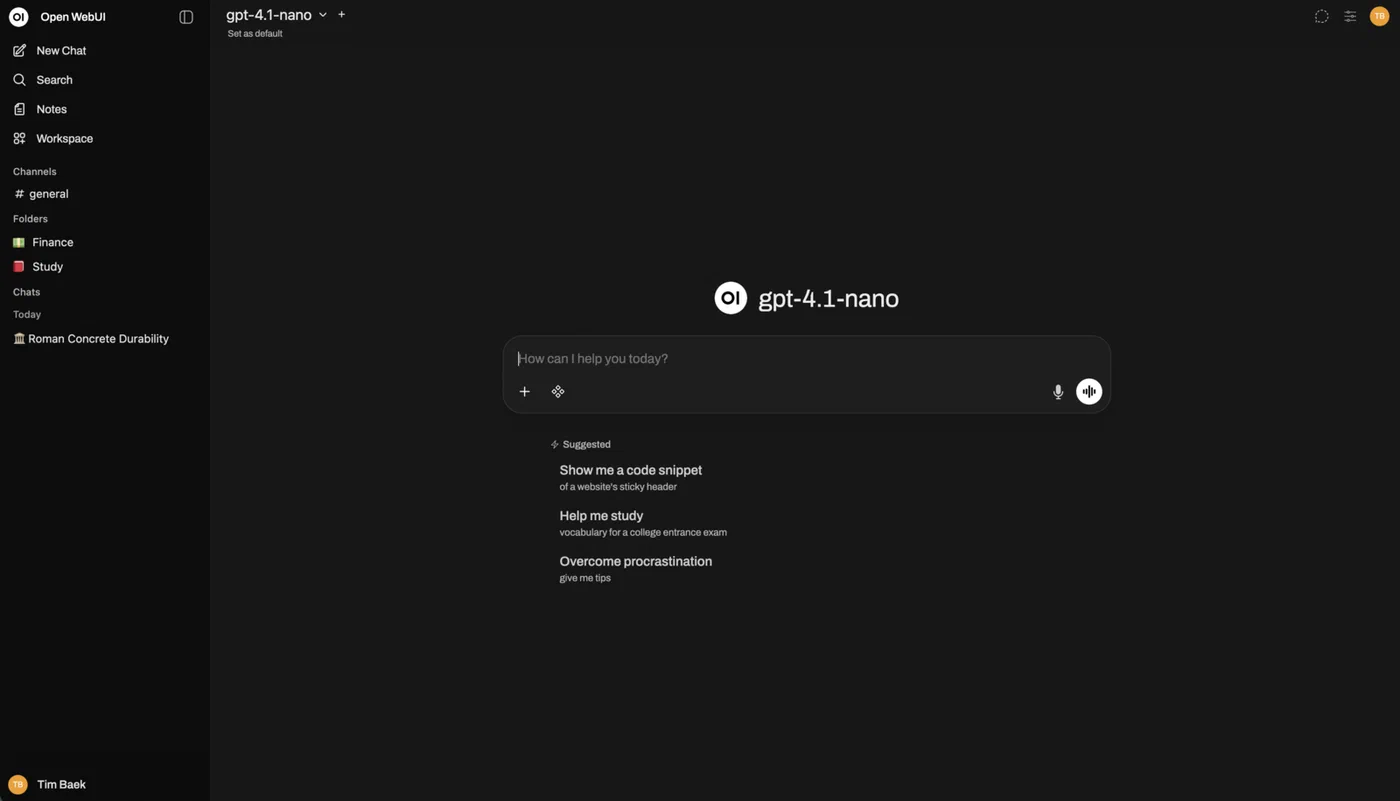
Open WebUI gives you a ChatGPT-style interface pointed at your local Ollama instance. It auto-detects available models and handles conversation history.
For Python, use the standard openai library:
from openai import OpenAI

client = OpenAI(
    base_url="http://localhost:11434/v1",
    api_key="ollama"  # any string works
)

response = client.chat.completions.create(
    model="gemma4:26b",
    messages=[{"role": "user", "content": "Review this function for bugs"}]
)
For per-model customization, create an Ollama Modelfile to set system prompts, temperature, and context window size. This is useful when you want the 26B to behave as a code reviewer with specific instructions, or the E4B to act as a writing assistant with a particular tone.
Troubleshooting Common Issues
Flash Attention hangs on large prompts (31B): The 31B Dense model can hang indefinitely during prompt evaluation when prompts exceed 3-4K tokens with Flash Attention enabled. The fix is to set OLLAMA_FLASH_ATTENTION=0 and restart Ollama. The 26B MoE variant is not affected.
Out of memory errors: If the model fails to load or gets killed by the OOM reaper, you are likely on insufficient hardware. The 26B needs at minimum 32 GB of unified memory on Apple Silicon - 16 GB will not work even with aggressive quantization. On NVIDIA GPUs, check that no other processes are consuming VRAM with nvidia-smi.
Slow first token: On Apple Silicon with Ollama v0.19 and later, Gemma 4 uses the MLX backend for better performance. If generation feels sluggish, confirm you are on the latest Ollama version and close memory-hungry applications. Browsers with dozens of tabs are the usual culprit on Macs with unified memory.
Tool calling issues: As of Ollama v0.20.0, Gemma 4 tool calling has known issues where the tool call parser fails and streaming drops calls entirely. If you need reliable function calling, pin to Ollama v0.19.x or set "reasoning": false in your model config.
Model not found after pull: If ollama run gemma4:26b says the model is not found immediately after pulling, restart the Ollama service. Early versions (pre-0.19) had a race condition during model registration that has since been fixed.
Keep Ollama updated. The Gemma 4 integration has gotten noticeably better across the v0.19 and v0.20 releases, and Google continues working with the Ollama team on performance patches.