 Botmonster Tech
Run Vision Models Locally: Florence-2 and Qwen-VL for Image Analysis
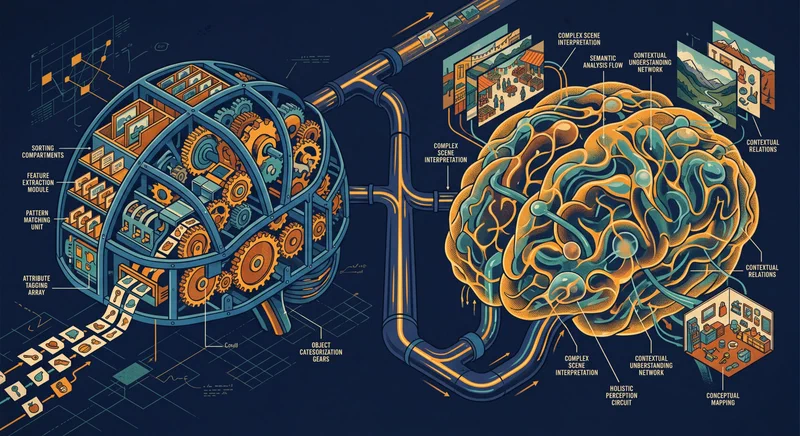
Florence-2 and Qwen2-VL both run on consumer NVIDIA GPUs starting at 8 GB VRAM and handle OCR, object detection, image captioning, and visual question answering entirely offline. Florence-2 uses a compact sequence-to-sequence architecture with task-specific prompt tokens, which makes it fast and reliable for structured extraction work. Qwen2-VL takes a conversational approach and handles open-ended reasoning, complex documents, and follow-up questions - making the two models complementary rather than interchangeable.
Why Run Vision Models Locally
Cloud vision APIs have made image analysis easy. Google Cloud Vision , AWS Rekognition , and OpenAI’s GPT-4o Vision all return solid results. The catch is that every image you send leaves your infrastructure, carries a per-request cost, and adds round-trip latency.
For many workloads, none of that matters much. But consider medical imaging, security camera frames, internal product catalogs, or scanned legal documents - categories where compliance requirements or plain privacy concerns make cloud uploads genuinely risky. Even without hard compliance constraints, the cost math can shift quickly: processing 10,000 product images per day at $0.0015 each adds up to around $450 per month for a single analysis task.
Local inference flips that. Once the models are loaded into GPU memory, each additional image costs essentially nothing beyond electricity. An RTX 5070 processes a Florence-2-large image in roughly 150ms and returns a Qwen2-VL 7B response in around 600ms - fast enough for batch jobs and many real-time applications.
The models themselves have gotten good enough to make this a real trade. Sub-10B parameter vision-language models in 2026 match or exceed specialized cloud models from a few years back on benchmarks like TextVQA and COCO Captions. You are no longer swapping accuracy for privacy - the local models are genuinely capable.
The use cases that benefit most from running locally:
- Batch OCR on scanned documents, receipts, or invoices
- Automated alt-text generation for large image libraries
- Security camera frame analysis where footage cannot leave the network
- Product catalog tagging and categorization
- Screenshot-to-code extraction for UI automation workflows
Florence-2: Architecture and Setup
Florence-2 is Microsoft’s unified vision foundation model, and its design is distinctive. Both the task instruction and the output are plain text. You prompt the model with a task token - <OD> for object detection, <OCR> for text extraction, <CAPTION> for a short description - and it returns structured text you can parse directly.
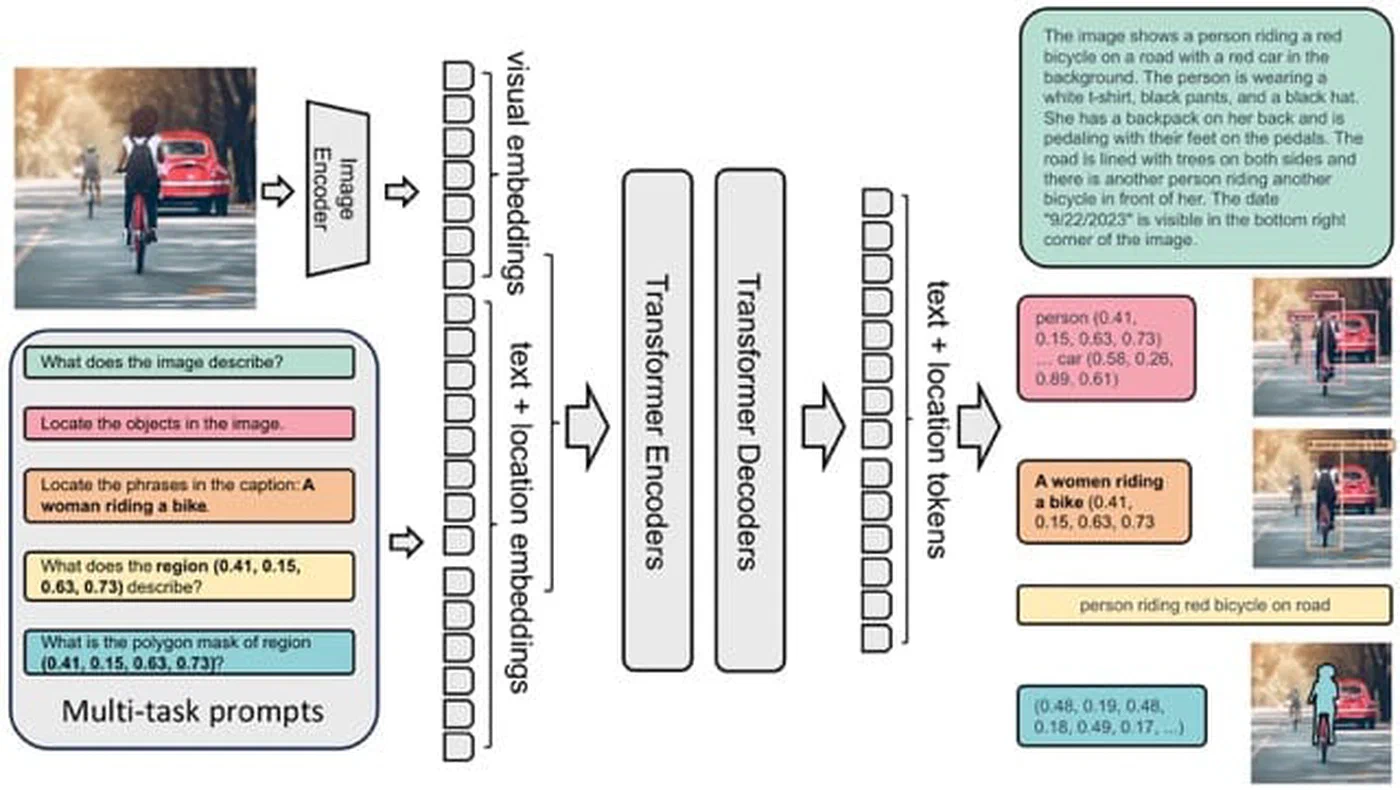
Two model sizes are available. Florence-2-base is 0.23B parameters (~1.2 GB VRAM), and Florence-2-large is 0.77B parameters (~2.5 GB VRAM). Both fit comfortably on any modern GPU, leaving most of your VRAM free for batching or other models.
Installation:
pip install transformers torch pillowLoading the model:
from transformers import AutoProcessor, AutoModelForCausalLM
from PIL import Image
import torch

model = AutoModelForCausalLM.from_pretrained(
    "microsoft/Florence-2-large",
    torch_dtype=torch.float16,
    trust_remote_code=True
).to("cuda")

processor = AutoProcessor.from_pretrained(
    "microsoft/Florence-2-large",
    trust_remote_code=True
)
Running inference:
def run_florence(image_path, task_token):
    image = Image.open(image_path).convert("RGB")
    inputs = processor(
        text=task_token,
        images=image,
        return_tensors="pt"
    ).to("cuda")

    with torch.no_grad():
        output_ids = model.generate(
            input_ids=inputs["input_ids"],
            pixel_values=inputs["pixel_values"],
            max_new_tokens=1024,
            do_sample=False
        )

    result = processor.batch_decode(output_ids, skip_special_tokens=False)[0]
    parsed = processor.post_process_generation(
        result,
        task=task_token,
        image_size=image.size
    )
    return parsed

# Extract text from a scanned document
text_result = run_florence("document.jpg", "<OCR>")

# Object detection - returns bounding boxes
detection_result = run_florence("photo.jpg", "<OD>")
The task tokens worth using day-to-day:
<CAPTION>- short one-sentence description<DETAILED_CAPTION>- dense multi-sentence description<OD>- object detection with bounding boxes in<loc_XXX>format<OCR>- text extraction from the image<REGION_PROPOSAL>- generate region proposals<REFERRING_EXPRESSION_SEGMENTATION>- segment a referred object
Florence-2’s bounding box output uses a normalized 1000x1000 coordinate space. The post_process_generation method converts those back to pixel coordinates, so you can pass results directly to PIL’s ImageDraw or OpenCV’s rectangle function without extra math.
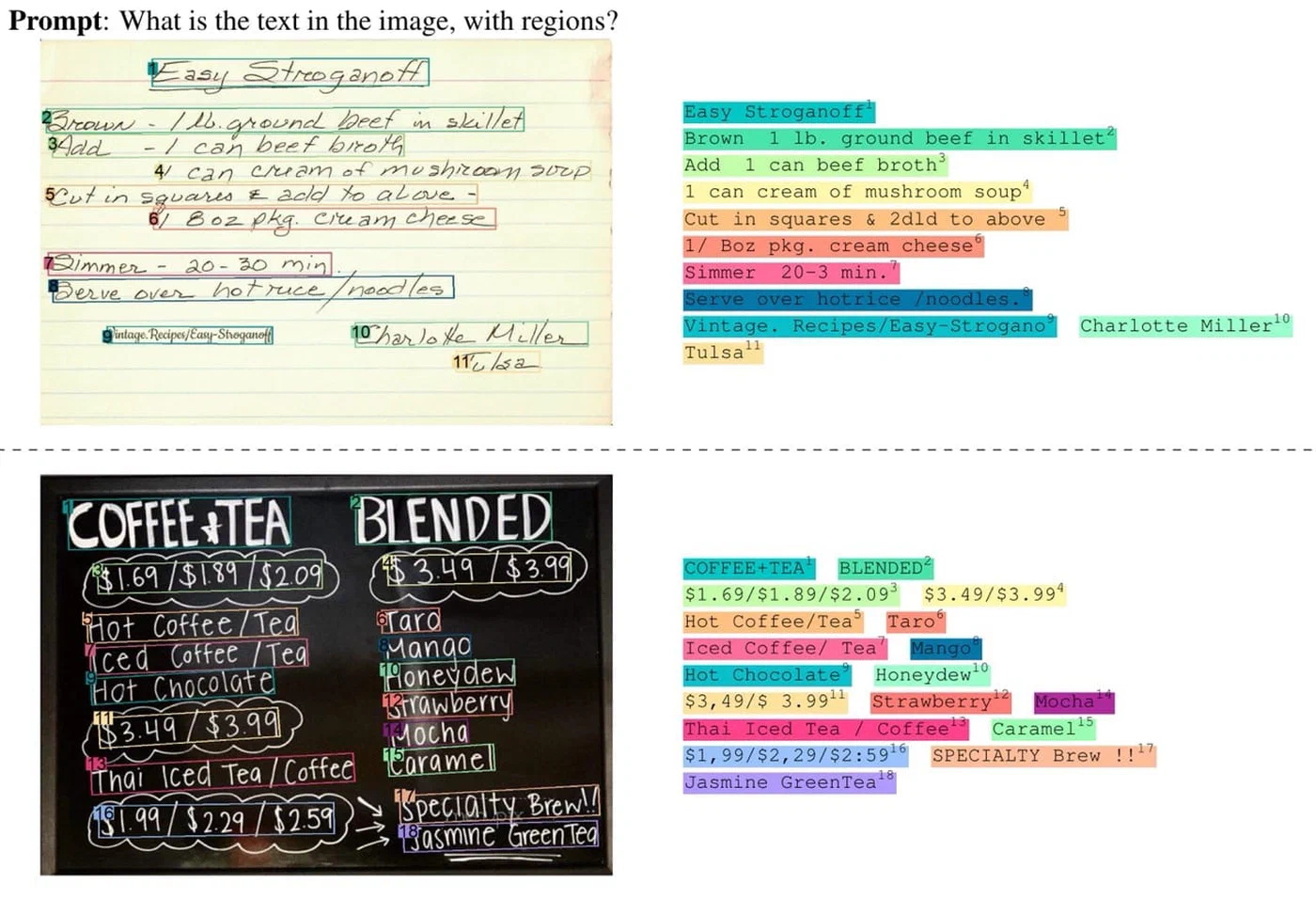
Florence-2 is intentionally narrow. It is not designed for open-ended conversational questions, multi-image comparisons, or tasks that require reasoning about context beyond a single frame. For those, you want Qwen2-VL.
Qwen2-VL: Architecture and Setup
Qwen2-VL is Alibaba’s multimodal model built for visual understanding and reasoning. Where Florence-2 uses structured task tokens, Qwen2-VL accepts natural language: you ask “What text is visible in this image?” or “Describe the relationship between the objects in this scene” and it answers conversationally.
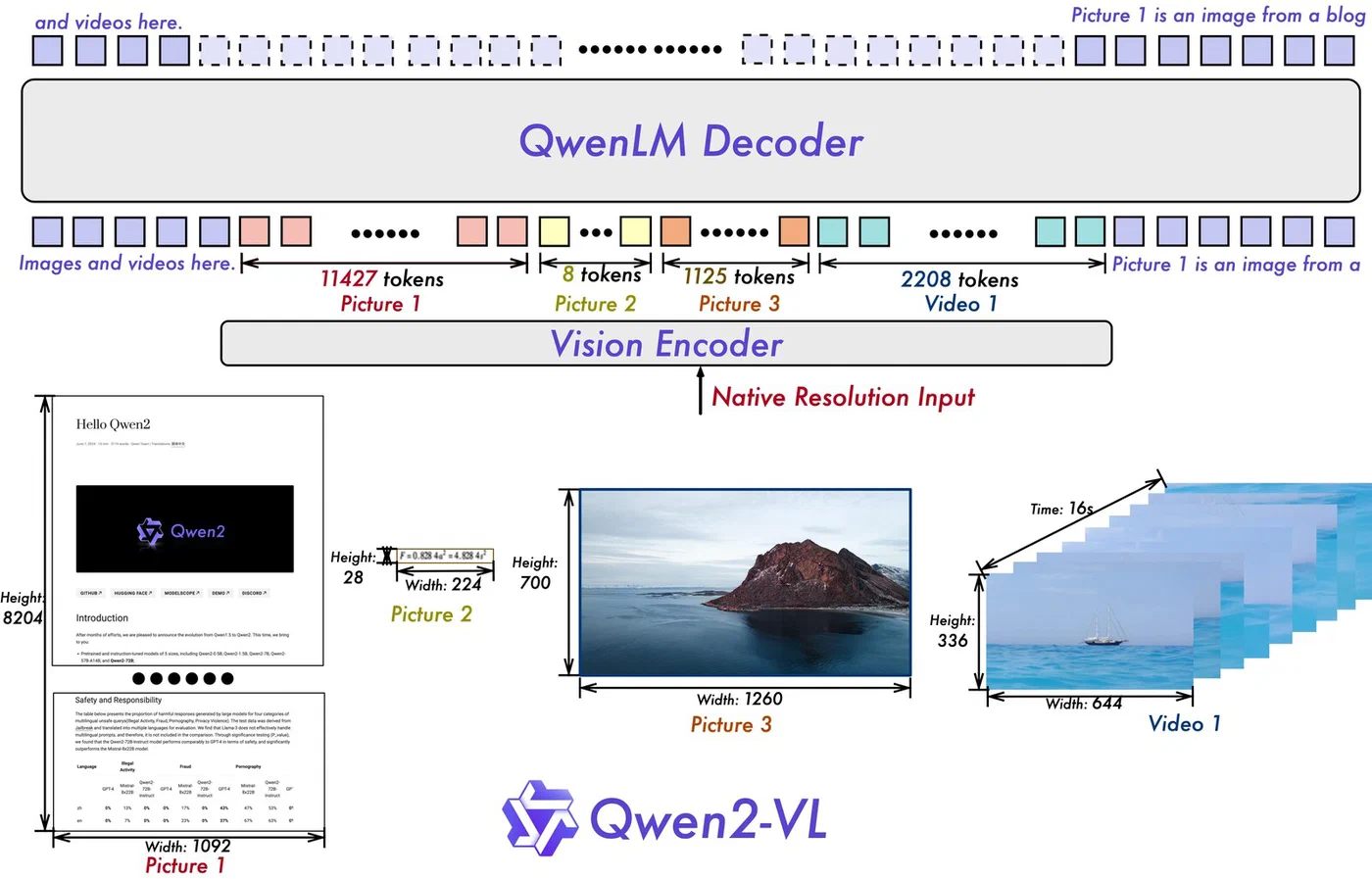
Three parameter sizes are available: 2B, 7B, and 72B. The 7B variant is the right choice for consumer hardware, requiring approximately 5.5 GB VRAM at Q4_K_M quantization. The 72B version works on a multi-GPU setup or with aggressive quantization, but the 7B hits the right accuracy-to-resource ratio for most tasks.
The quickest way to get started is Ollama :
ollama pull qwen2-vl:7b
ollama run qwen2-vl:7b "Describe this image" --images ./photo.jpg
Ollama handles quantization and GPU memory management, and the --images flag accepts local file paths. For batch processing or API integration, the transformers library gives you more control:
from transformers import Qwen2VLForConditionalGeneration, AutoProcessor
from qwen_vl_utils import process_vision_info
import torch

model = Qwen2VLForConditionalGeneration.from_pretrained(
    "Qwen/Qwen2-VL-7B-Instruct",
    torch_dtype=torch.float16,
    device_map="cuda"
)
processor = AutoProcessor.from_pretrained("Qwen/Qwen2-VL-7B-Instruct")

def run_qwen(image_path, question):
    messages = [
        {
            "role": "user",
            "content": [
                {"type": "image", "image": image_path},
                {"type": "text", "text": question}
            ]
        }
    ]

    text = processor.apply_chat_template(
        messages,
        tokenize=False,
        add_generation_prompt=True
    )
    image_inputs, video_inputs = process_vision_info(messages)

    inputs = processor(
        text=[text],
        images=image_inputs,
        padding=True,
        return_tensors="pt"
    ).to("cuda")

    with torch.no_grad():
        output_ids = model.generate(**inputs, max_new_tokens=512)

    trimmed = [
        out[len(inp):]
        for inp, out in zip(inputs.input_ids, output_ids)
    ]
    return processor.batch_decode(trimmed, skip_special_tokens=True)[0]

caption = run_qwen("photo.jpg", "Describe what you see in this image in detail.")
Qwen2-VL accepts multiple images in a single message - include additional {"type": "image"} entries in the content array for comparison tasks or frame sequences. It also handles images at their native resolution, so you do not need to resize before passing them in.
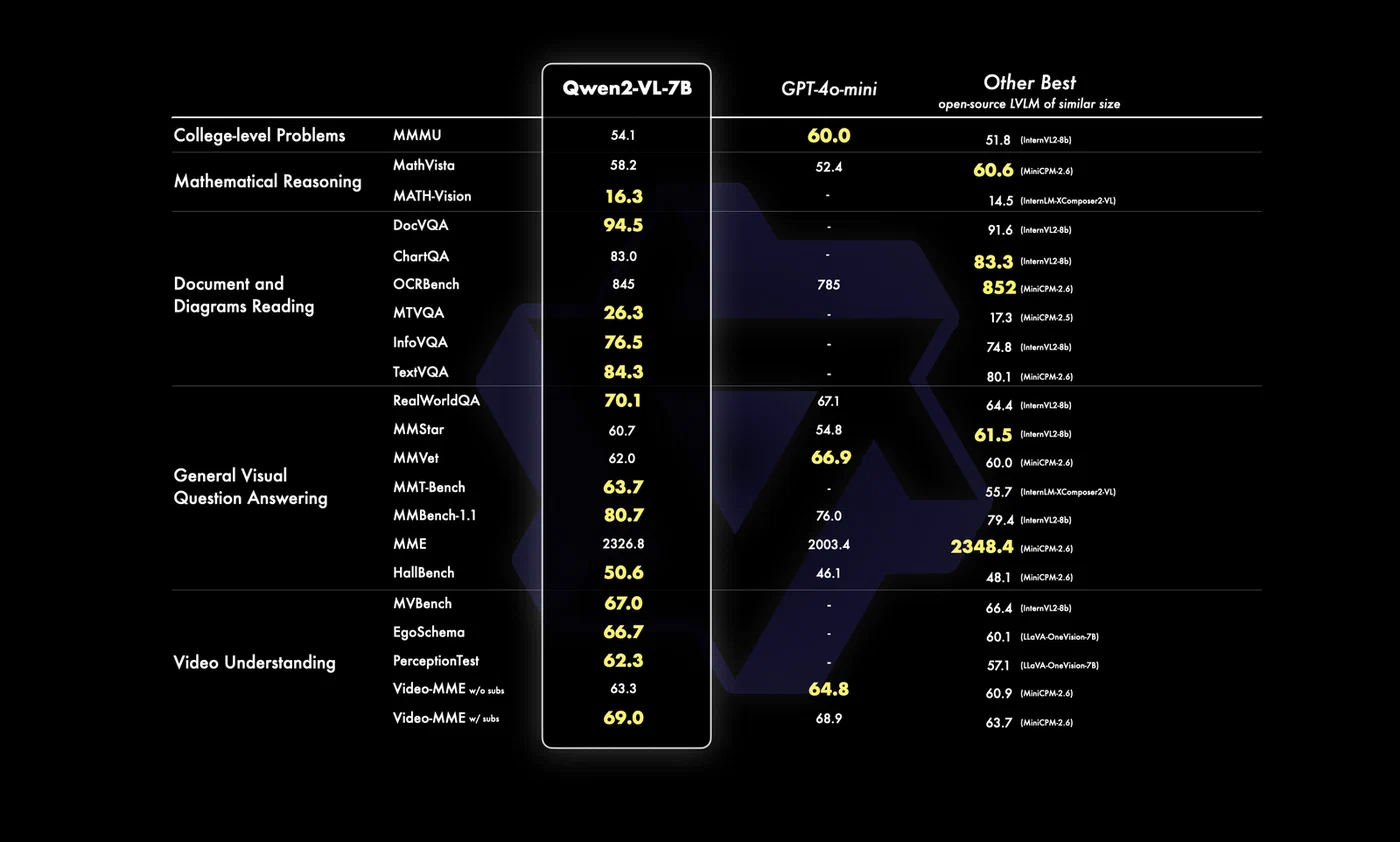
Where Qwen2-VL pulls ahead of Florence-2:
- Multi-turn visual QA with follow-up questions in a chat loop
- Document understanding for tables, charts, and infographics
- Cultural and contextual reasoning about scene content
- Comparing multiple images in a single prompt
- Video analysis by passing extracted keyframes as an image sequence
The trade-off is speed. Qwen2-VL 7B takes 600ms to 2 seconds per image depending on response length, against 150ms for Florence-2-large. For bulk structured extraction, that gap compounds fast.
Head-to-Head: Which Model for Which Task
Choosing between them comes down to what a specific task actually needs.
| Task | Florence-2 | Qwen2-VL 7B |
|---|---|---|
| OCR accuracy (printed English) | ~94% char-level | ~91% char-level |
| Object detection output | Structured bounding boxes | Natural language descriptions |
| Image captioning depth | Flat but accurate | Rich, contextually aware |
| Visual QA | Not designed for it | Strong, handles follow-ups |
| Inference speed (RTX 5070) | ~150ms | ~600ms - 2s |
| VRAM at float16 | ~2.5 GB | ~5.5 GB (Q4_K_M) |
| Multi-image input | No | Yes |
A few specifics: Florence-2’s OCR advantage comes from its dedicated text extraction task head. The gap narrows on handwritten or low-resolution text. Qwen2-VL’s object location output requires post-processing if you need pixel coordinates - it tells you “a dog in the lower right” rather than returning a bounding box.
On captioning, the gap is more pronounced than benchmarks show. Florence-2 produces technically correct but flat descriptions. Qwen2-VL picks up on humor, visual irony, implied motion, and scene context in ways that make its output more usable for anything a person will read.
One practical detail: both models can run simultaneously on a 12 GB VRAM card. Florence-2-large at 2.5 GB and Qwen2-VL 7B at 5.5 GB leaves enough room for inference overhead. That opens up a useful pipeline architecture.
Building a Two-Stage Image Analysis Pipeline
A pipeline using Florence-2 for fast triage and Qwen2-VL for deeper analysis on flagged images gets you the speed of the smaller model for most of your data while applying the more expensive inference selectively.
The logic: run Florence-2’s <OD> and <OCR> on every image. If the object count exceeds a threshold, or if the OCR output looks like a form, receipt, or table, pass that image to Qwen2-VL for detailed interpretation. Simpler images - single object, no text, clean scene - get handled by Florence-2 alone.
import sqlite3
from pathlib import Path
from fastapi import FastAPI, UploadFile

app = FastAPI()

def analyze_image(image_path: str) -> dict:
    # Stage 1: Florence-2 fast pass
    detection = run_florence(image_path, "<OD>")
    ocr_output = run_florence(image_path, "<OCR>")
    caption = run_florence(image_path, "<DETAILED_CAPTION>")

    object_count = len(detection.get("labels", []))
    has_complex_text = len(ocr_output.get("<OCR>", "")) > 100

    qwen_analysis = None
    if object_count > 5 or has_complex_text:
        qwen_analysis = run_qwen(
            image_path,
            "Describe what is happening in this image in detail, "
            "including any visible text and the relationships between objects."
        )

    return {
        "caption": caption,
        "objects": detection,
        "text": ocr_output,
        "deep_analysis": qwen_analysis
    }

@app.post("/analyze")
async def analyze_endpoint(file: UploadFile):
    tmp_path = f"/tmp/{file.filename}"
    with open(tmp_path, "wb") as f:
        f.write(await file.read())
    result = analyze_image(tmp_path)
    return result
For batch processing, wrap Florence-2 calls in a torch.utils.data.DataLoader with a batch size of 4 to 8 - the small model fits several images in its VRAM context at once. Run Qwen2-VL queries one at a time since its dynamic resolution handling does not parallelize as cleanly.
Store results in SQLite with columns for file path, Florence-2 captions, detected objects as JSON, extracted text, and Qwen2-VL analysis. That gives you a searchable index over an image library without depending on any external service.
A concrete example: process 1,000 product photos to generate alt-text, extract visible label text, and categorize by product type. With Florence-2 handling the roughly 80% of images that are clean product shots, and Qwen2-VL picking up the 20% with complex scenes or label-heavy content, the full batch finishes in under 15 minutes on an RTX 5070. Running the same job through a cloud API costs $3 to $5 per run, every run.
Hardware Requirements and GPU Compatibility
The minimum practical setup is an NVIDIA GPU with 8 GB VRAM. That gives you enough headroom for Florence-2-large with plenty to spare, and for Qwen2-VL 7B at Q4_K_M quantization with a small margin. Running both models simultaneously requires around 10-11 GB VRAM with inference overhead, so a 12 GB card (RTX 4070 Ti, RTX 3080 12GB, RTX 4080, or RTX 5070) is the comfortable baseline for the two-stage pipeline.
If you are limited to 8 GB, the simplest workaround is to keep only one model loaded at a time and use Python’s garbage collection to free the GPU memory between calls. For Florence-2 this is straightforward since the model fits easily and reloads fast. For Qwen2-VL, Ollama’s built-in model loading and unloading handles this automatically.
import gc
import torch

def free_gpu_memory():
    gc.collect()
    torch.cuda.empty_cache()

# Unload Florence-2 before loading Qwen2-VL
del model
free_gpu_memory()
CPU inference is technically possible for Florence-2-base (0.23B parameters runs tolerably on a modern CPU), though at roughly 5-10 seconds per image it is only practical for low-volume tasks. Qwen2-VL is too slow on CPU for anything beyond testing.
For AMD GPU users, ROCm
support via PyTorch is available but requires confirming your GPU is in the ROCm compatibility list. Florence-2 and Qwen2-VL both load on ROCm-capable cards with the same code - just replace "cuda" with "cuda" (ROCm exposes itself as CUDA to PyTorch). Apple Silicon users can run Qwen2-VL through Ollama
, which ships Metal-optimized builds, or via MLX
for direct framework access.
Wrapping Up
Both models are on Hugging Face
and need only standard Transformers
and PyTorch
dependencies. Florence-2 requires trust_remote_code=True at load time because its processor includes custom code. Qwen2-VL needs the qwen-vl-utils package for image preprocessing.
For most people, the fastest path to experimenting is Ollama for Qwen2-VL and the Hugging Face Transformers path for Florence-2. Once you have both models running, the two-stage pipeline described above can be assembled in an afternoon. The combination covers the large majority of practical vision tasks without sending a single image off your machine.