 Botmonster Tech
Self-Hosting Gitea as a GitHub Alternative: Setup, CI/CD, and Mirroring

Gitea is the lightest full Git hosting platform you can self-host. Version 1.25 fits in under 200 MB of RAM as a single Go binary or Docker container. It covers pull requests, code review, issues, CI/CD through GitHub Actions-compatible runners, package registries, and two-way mirroring with GitHub. If you want to own your code without GitLab’s overhead, Gitea is the best option today.
Why Gitea Over Forgejo, GitLab, or Gogs
A few self-hosted Git platforms compete here. The right pick depends on what you care about.
Gitea vs. Forgejo. Forgejo forked from Gitea in late 2022, after a for-profit firm took the Gitea project. Both are actively built and their core features are near twins. Forgejo runs under Codeberg e.V., a non-profit, and leans on community rule and ActivityPub federation. It also has more contributors (232 vs 153) and a faster commit pace in recent months. So if federation or governance is the priority for you, pick Forgejo. If you want a bigger plugin pool and faster upstream features, Gitea still leads.
Gitea vs. GitLab CE. GitLab Community Edition needs 4 GB of RAM at the low end (8 GB is the suggested target). It also pulls in PostgreSQL, Redis, Sidekiq, Puma, and a fleet of background jobs. Gitea runs in 200 to 512 MB of RAM with one binary and one database. For a homelab or a team under 50 users, GitLab’s load is hard to justify.
Gitea vs. Gogs. Gogs is Gitea’s ancestor. Gitea forked from Gogs in 2016. Gogs lacks pull request reviews, CI/CD, and package registries. Its work has slowed a lot. There is no strong reason to pick Gogs for a new setup in 2026.
| Feature | Gitea | Forgejo | GitLab CE | Gogs |
|---|---|---|---|---|
| Minimum RAM | ~200 MB | ~200 MB | 4 GB+ | ~100 MB |
| CI/CD | Gitea Actions | Forgejo Actions | Built-in | None |
| Package Registry | Yes | Yes | Yes | No |
| Federation | Experimental | Active (ActivityPub) | No | No |
| Migration Tool | GitHub, GitLab, Bitbucket | GitHub, GitLab, Bitbucket | GitHub, Bitbucket | Limited |
| Governance | For-profit company | Non-profit (Codeberg) | For-profit | Single maintainer |
Resource needs are modest. Gitea with PostgreSQL and an Actions runner fits on a Raspberry Pi 4 (4 GB) or a $5/month VPS. It handles repos with 100K+ commits and serves 20+ users at once on 2 CPU cores and 1 GB of RAM.
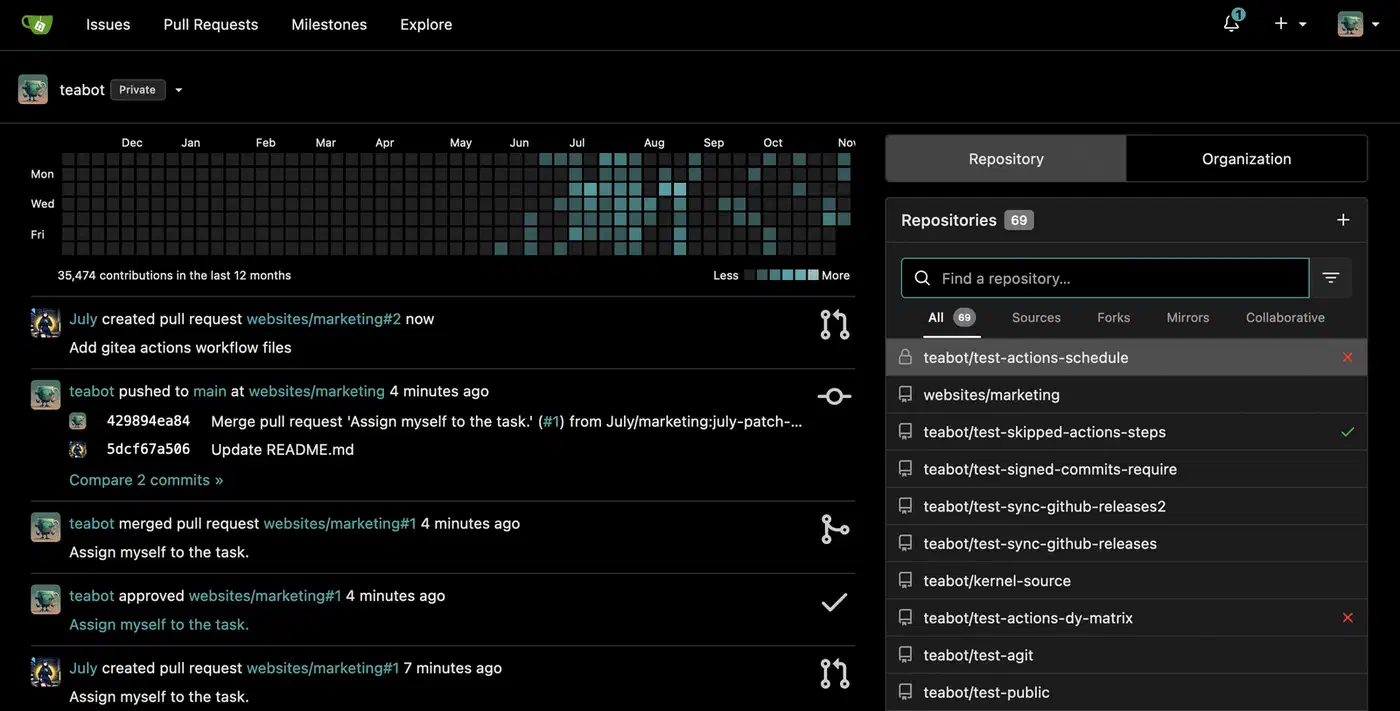
Gitea’s feature set against GitHub is wide. You get issues, pull requests with code review, branch protection rules, webhooks, OAuth2 login, org and team admin, container and NPM package registries, Kanban project boards, a wiki, and Actions-compatible CI/CD. The built-in tool at Settings > Migrations brings in repos with their issues, pull requests, labels, milestones, and releases from GitHub, GitLab, Bitbucket, and other Gitea hosts.
Installation with Docker Compose and PostgreSQL
Gitea supports SQLite for smaller instances , but a Postgres database backend is the safe pick for anything past a test box. Here is a Docker Compose deployment ready for production:
services:
  gitea:
    image: gitea/gitea:1.25
    container_name: gitea
    environment:
      - USER_UID=1000
      - USER_GID=1000
      - GITEA__database__DB_TYPE=postgres
      - GITEA__database__HOST=db:5432
      - GITEA__database__NAME=gitea
      - GITEA__database__USER=gitea
      - GITEA__database__PASSWD=${DB_PASSWORD}
    volumes:
      - gitea_data:/data
      - /etc/timezone:/etc/timezone:ro
      - /etc/localtime:/etc/localtime:ro
    ports:
      - "3000:3000"
      - "2222:22"
    depends_on:
      db:
        condition: service_healthy
    restart: unless-stopped
    mem_limit: 512m
    cpus: 1.0

  db:
    image: postgres:16-alpine
    container_name: gitea-db
    environment:
      - POSTGRES_DB=gitea
      - POSTGRES_USER=gitea
      - POSTGRES_PASSWORD=${DB_PASSWORD}
    volumes:
      - postgres_data:/var/lib/postgresql/data
    healthcheck:
      test: ["CMD", "pg_isready", "-U", "gitea"]
      interval: 10s
      timeout: 5s
      retries: 5
    restart: unless-stopped
    mem_limit: 256m

volumes:
  gitea_data:
  postgres_data:
Make an .env file next to this compose file with DB_PASSWORD=your_secure_password_here. The GITEA__section__key format lets you override any app.ini setting through env vars.
After running docker compose up -d, open http://your-server:3000 to finish the setup wizard. Set the site title, make your admin account, and pick the server domain and SSH port. These land in /data/gitea/conf/app.ini inside the container.
A few app.ini settings to adjust after installation:
[server]
ROOT_URL = https://gitea.yourdomain.com/
SSH_DOMAIN = gitea.yourdomain.com
SSH_PORT = 22

[service]
DISABLE_REGISTRATION = true
Set ROOT_URL to match your reverse proxy URL exactly. Set SSH_PORT to the public port, not the container’s inner port. Turn off public sign-up once your accounts exist.
For backups, run gitea dump -c /data/gitea/conf/app.ini inside the container. It makes a ZIP of all repos, the database, and config. Schedule it with cron. For faster database restores, also run pg_dump against the PostgreSQL container. If your host uses ZFS, ZFS snapshots add cheap point-in-time recovery for the data volumes.
SSH Access, Git Operations, and LFS
Git over SSH is the best path for push and pull. No password prompts. Faster than HTTPS for large repos.
SSH passthrough maps the container’s SSH port to the host. With the compose file above, users clone like this:
git clone ssh://git@gitea.yourdomain.com:2222/user/repo.gitAdd this to ~/.ssh/config for cleaner URLs:
Host gitea.yourdomain.com
    Port 2222
    User git
Users add their public keys in the web UI under Settings > SSH/GPG Keys. Gitea supports ED25519 (the pick we suggest), RSA (4096-bit floor), and ECDSA. For CI/CD, use deploy keys: read-only SSH keys tied to one repo, made under repository Settings > Deploy Keys.
Git LFS (Large File Storage) handles binary files that do not belong in regular Git history: images, models, datasets. Turn it on in app.ini:
[lfs]
PATH = /data/lfs
MAX_FILE_SIZE = 1073741824
Gitea backs LFS with local disk, MinIO/S3-compatible object storage, or Azure Blob Storage. Each LFS object is stored once, no matter how many branches point to it.
Where SSH is blocked, HTTPS cloning works: git clone https://gitea.yourdomain.com/user/repo.git. Users sign in with their Gitea password or a personal access token. Pair Gitea with a private WireGuard
VPN to keep SSH and the web UI on an encrypted tunnel rather than the open internet.
Gitea Actions: CI/CD with GitHub Actions Compatibility
Gitea Actions
has been ready for production since version 1.22, per the official Actions docs
. It runs GitHub Actions-compatible workflow YAML files through the act_runner agent.
Enable Actions by adding this to app.ini and restarting Gitea:
[actions]
ENABLED = true
This adds an Actions tab to every repo. Without a registered runner, workflows queue but never run.
Install act_runner: grab the binary from the Gitea releases page
, or pull the Docker image.
docker pull gitea/act_runner:latest

# Register the runner
act_runner register --no-interactive \
  --instance https://gitea.yourdomain.com \
  --token YOUR_RUNNER_TOKEN \
  --name my-runner \
  --labels ubuntu-latest,self-hosted,linux
Get the sign-up token from Gitea’s admin panel under Site Administration > Runners. The runner uses Docker containers (default: catthehacker/ubuntu:act-latest) to give each job a clean, walled-off build box.
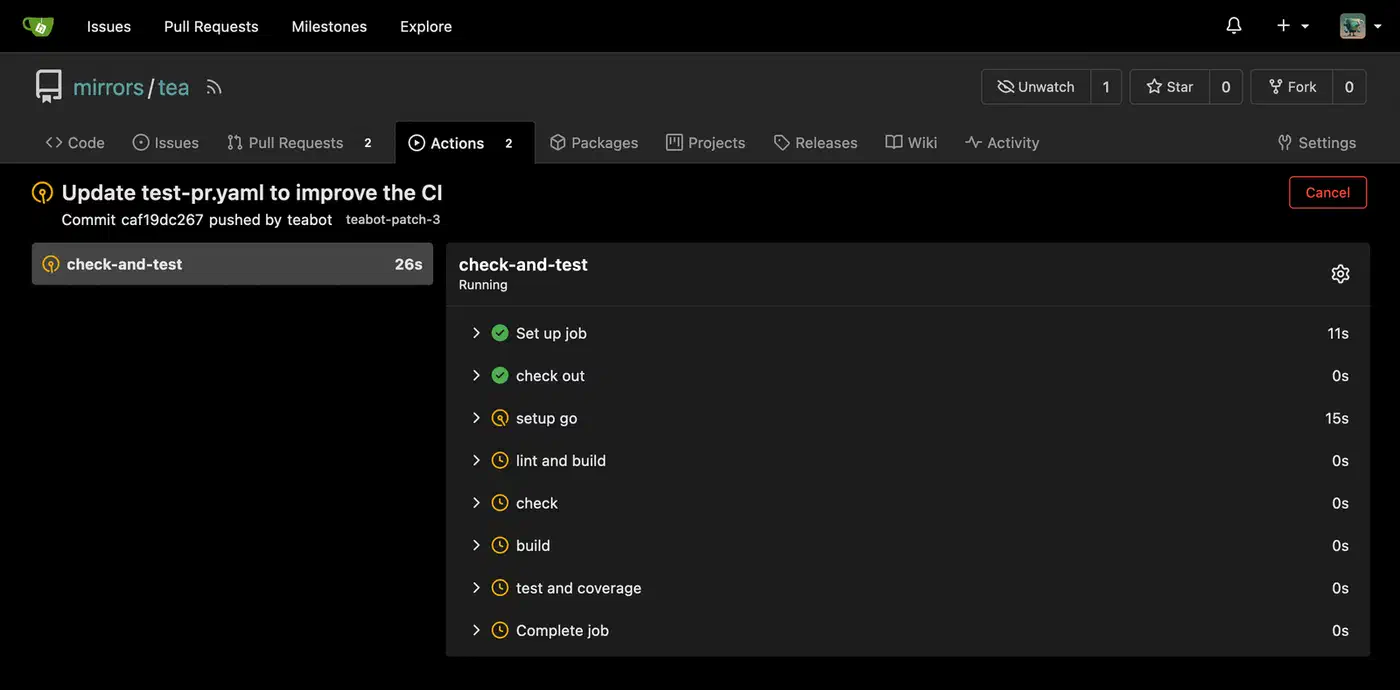
Workflow support covers about 90% of GitHub Actions syntax: on: push/pull_request triggers, jobs with steps, uses: for third-party actions, env vars, secrets, matrix builds, and artifacts. The gaps in version 1.25 are a thin workflow_dispatch inputs UI and limited cache action support.
Put workflows in .gitea/workflows/, not .github/. Here is a basic CI pipeline for a Go project:
name: CI
on: [push, pull_request]

jobs:
  build-and-test:
    runs-on: ubuntu-latest
    steps:
      - uses: actions/checkout@v4
      - uses: actions/setup-go@v5
        with:
          go-version: '1.22'
      - run: go build ./...
      - run: go test ./...
Add repo secrets in Settings > Actions > Secrets and call them with ${{ secrets.DEPLOY_KEY }}. Org-wide secrets sit at the org settings level.
Repository Mirroring and GitHub Backup
Self-hosting Gitea does not mean leaving GitHub. Mirror sync lets you keep both.
To push from Gitea to GitHub, open repo Settings > Mirror Settings and add a push mirror with the GitHub remote URL and a personal access token. Gitea pushes all branches and tags on every push. You can set the sync gap from 1 minute up to 24 hours.
To pull from GitHub into Gitea, make a new repo via New Migration, pick GitHub, and tick the Mirror option. Gitea pulls changes on a set gap (default 8 hours). It is the simplest way to keep a local backup of key GitHub repos.
In practice, you use Gitea as your main dev platform and push-mirror to GitHub for reach. Your GitHub profile stays live, others can find your code, and you keep full control over your main Git host.
For bulk moves, pair the Gitea API with the gh CLI:
# List all your GitHub repos
gh repo list --json nameWithOwner --limit 500 -q '.[].nameWithOwner'

# Migrate each one via Gitea API
curl -X POST "https://gitea.yourdomain.com/api/v1/repos/migrate" \
  -H "Authorization: token YOUR_GITEA_TOKEN" \
  -H "Content-Type: application/json" \
  -d '{
    "clone_addr": "https://github.com/user/repo.git",
    "mirror": true,
    "repo_name": "repo",
    "repo_owner": "your-gitea-user",
    "service": "github",
    "auth_token": "YOUR_GITHUB_TOKEN"
  }'
Gitea webhooks send GitHub-shaped payloads on push, pull request, and issue events. So most GitHub webhook receivers for Discord, Slack, Matrix, or ntfy work as-is.
Looking ahead, both Gitea and Forgejo are building ForgeFed/ActivityPub support for cross-instance work: pull requests between different hosts without mirroring. It is still experimental, but moving along.