 Botmonster Tech
Add WebAuthn passwordless login to any Node app in a day
A WebAuthn passwordless login swaps the password for a public/private keypair, kept in the device keychain or on a hardware key, and unlocked by Face ID, Touch ID, Windows Hello, or a tap on a YubiKey. The browser API does the crypto work, while @simplewebauthn/server covers Node, Bun, and Deno backends in TypeScript. Sign-up, autofill login, and account recovery all fit in one evening of work.
Key Takeaways
- A WebAuthn passwordless login is about 150 lines of Node, not a hosted identity provider.
- Your server stores a public key. There is no password hash left to steal.
- Hardware keys hold 25 or 100 credentials depending on firmware, and firmware is fixed at the factory.
- Never reject a login just because the signature counter did not go up. Most authenticators leave it at zero.
- Pick your relying party ID on day one. Change it later and every credential you issued dies.
What passkeys are and why 2026 is the year to ship them
A passkey is a public/private keypair made on the user’s device. The private key never leaves the secure enclave (Secure Enclave on Apple hardware, StrongBox on Android, TPM on Windows). Only a signed challenge travels over the wire. Your server stores no shared secret to steal and no hash to crack offline. The signature is bound to your domain, so it can’t be phished. If a user visits examp1e.com instead of example.com, the browser refuses to sign. Credential phishing ends at the protocol layer.
The spec has two kinds. A discoverable key (the older name is resident) stores a username hint on the device itself, so the browser can show the account as an autofill chip before the user types a thing. The other kind needs your server to hand back an allowCredentials list first, the way the old U2F second factor worked. For a normal consumer login, you want the discoverable kind.
The sync story finally makes sense in 2026. iOS 18 and macOS 15 sync passkeys via iCloud Keychain across a user’s Apple devices. Android 9 and newer sync through Google Password Manager. Since Android 14, third-party vaults like 1Password, Bitwarden, Dashlane, and Proton Pass act as full passkey providers on mobile. Windows 11 23H2 supports synced passkeys through browser extensions, and 25H2 adds native third-party support. A user on a Pixel with 1Password can log in from a Mac running Safari without re-enrolling. The passkeys.dev support matrix tracks this better than any blog post, since support shifts monthly.
Relying Party ID (rpID) is the setting you most need to get right on day one. It’s your registrable domain, example.com for most sites, and it scopes every credential you store. Change it later and every passkey you’ve issued goes invalid overnight. Pick the parent domain if you plan to share credentials across subdomains.
There is no reason left to wait another year. Conditional UI has shipped in every major browser. The OS-level UX no longer needs the user to know the word “passkey.” The fallback story for older clients (device-bound hardware keys, or a magic-link email) is well understood. Product teams can now make passkeys the primary login method instead of hiding them behind an “advanced security” toggle.
The registration flow with a server challenge
Run the registration ceremony
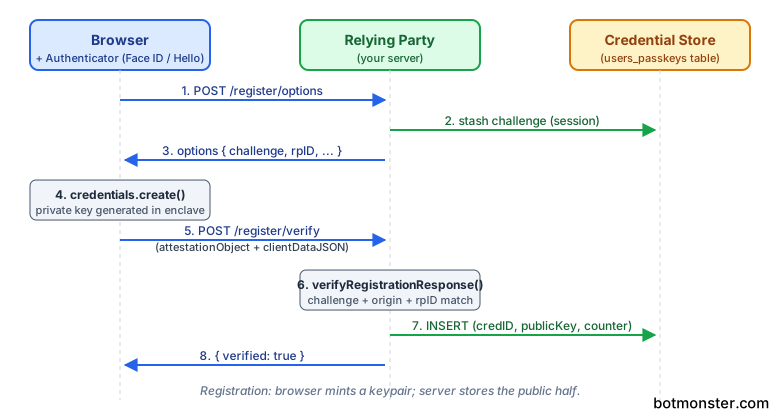
Registration is the flow where a user makes a new passkey for your site. The server builds options that include a random challenge. The browser asks the authenticator to mint a keypair bound to your rpID. The server then stores the public key. Every field in PublicKeyCredentialCreationOptions has a purpose, but only a handful are load-bearing in practice.
The server starts by calling generateRegistrationOptions() from @simplewebauthn/server:
import { generateRegistrationOptions } from '@simplewebauthn/server';

const options = await generateRegistrationOptions({
  rpName: 'Botmonster',
  rpID: 'example.com',
  userID: new TextEncoder().encode(user.id), // stable opaque handle, NOT email
  userName: user.email,
  userDisplayName: user.displayName,
  attestationType: 'none',
  authenticatorSelection: {
    residentKey: 'required',
    userVerification: 'preferred',
  },
  excludeCredentials: user.passkeys.map(p => ({
    id: p.credentialID,
    transports: p.transports,
  })),
});

session.challenge = options.challenge;
return options;
residentKey: 'required' makes the key discoverable so autofill can find it later. userVerification: 'preferred' asks for a face, finger, or PIN check when the device can do one, without shutting out older keys. The userID is a fixed opaque handle that never changes for the life of the account. Don’t use the email address. People change emails, and you would be left with a key pointing at nobody.
The browser receives that JSON and calls navigator.credentials.create({ publicKey: options }). The OS pops the native passkey sheet. The user taps Face ID or scans a fingerprint. The authenticator returns an attestationObject plus a clientDataJSON blob, and the client posts both back to your server. The server then verifies:
import { verifyRegistrationResponse } from '@simplewebauthn/server';

const verification = await verifyRegistrationResponse({
  response: req.body,
  expectedChallenge: session.challenge,
  expectedOrigin: 'https://example.com',
  expectedRPID: 'example.com',
});

if (verification.verified && verification.registrationInfo) {
  const { credential, credentialDeviceType, credentialBackedUp } =
    verification.registrationInfo;
  await db.passkeys.insert({
    userID: user.id,
    credentialID: credential.id,
    publicKey: credential.publicKey,
    counter: credential.counter,
    transports: credential.transports ?? [],
    deviceType: credentialDeviceType,
    backedUp: credentialBackedUp,
  });
}
Watch the shape of registrationInfo. Plenty of guides still pull credentialID, credentialPublicKey, and counter straight off it. That was the layout before v11. The fields now sit one level down on registrationInfo.credential as id, publicKey, counter, and transports, per the @simplewebauthn/server docs. Copy an old snippet and you write undefined to your database, then the next login fails for no clear reason.
Attestation is usually overkill for a consumer app. Set attestationType: 'none' unless you ship a regulated product that has to prove which model of key the user holds. The FIDO Metadata Service route adds work most apps never need.
The excludeCredentials list stops a user from adding the same key twice to one account. When the browser spots an ID it already holds, it greys out sign-up and asks for a different device. NotAllowedError means the user cancelled. InvalidStateError usually means the key is already on file. If the client has no authenticator at all, fall back to a magic-link email.
Conditional UI and the autofill experience
Enable conditional UI autofill
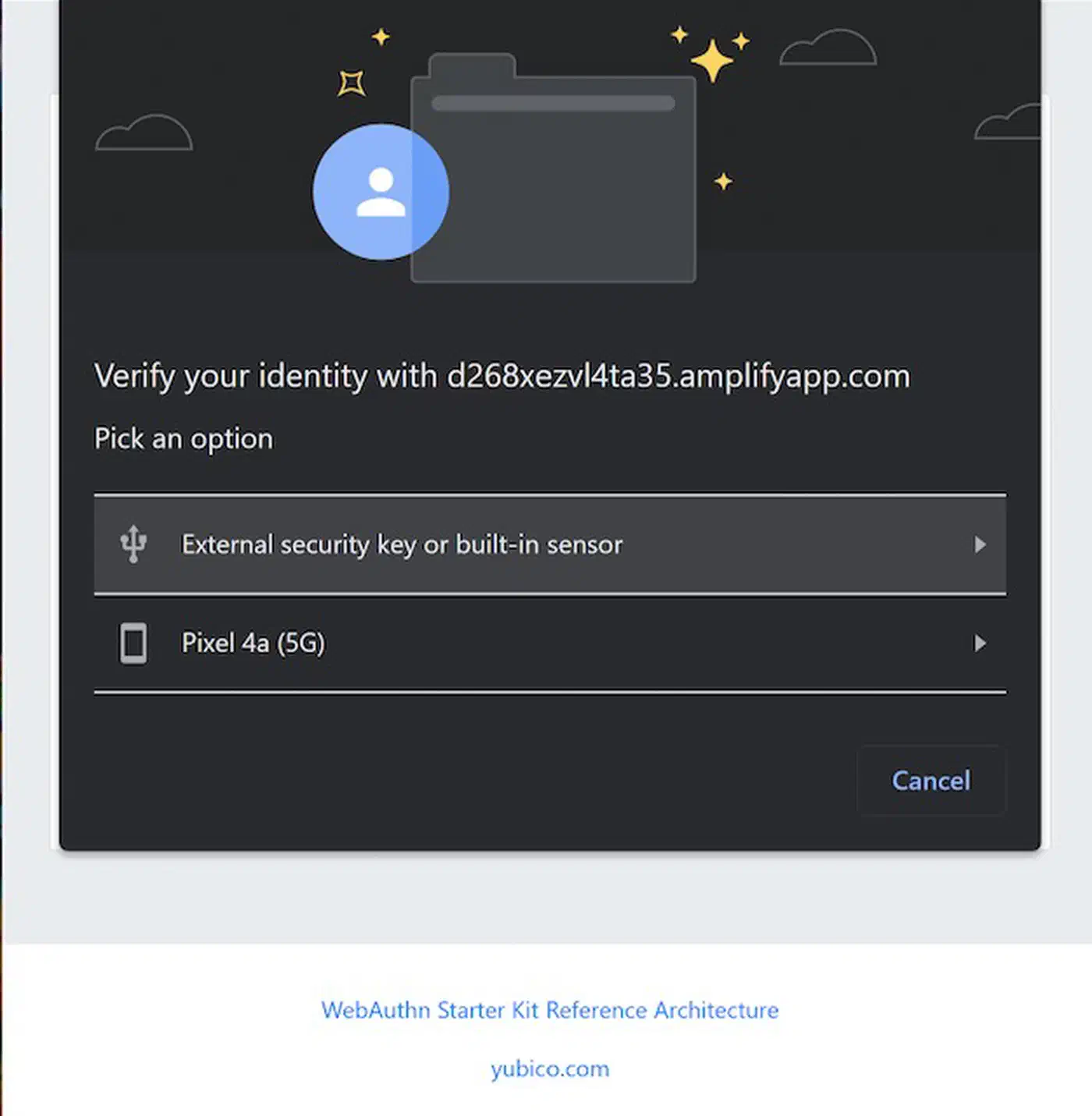
Login is the step that makes passkeys feel worth shipping. Conditional UI (also called autofill UI in the spec) surfaces the passkey inside the native browser autofill dropdown. There is no separate “sign in with passkey” button to find. The user clicks the username field, sees “Sign in as alice@example.com”, taps Face ID, and is signed in on that one tap.
Modal mode is what you get when the user clicks a button and you call navigator.credentials.get() with no extra flags: the OS sheet pops right up. Conditional mode is what you call on page load with mediation: 'conditional'. The browser then waits, and surfaces the passkey as an autofill chip the moment the user focuses the username input.
The one HTML attribute that unlocks conditional UI is the webauthn token in the autocomplete list:
<input
  type="text"
  name="username"
  autocomplete="username webauthn"
  required
/>
Leave webauthn out of that list and the browser will never show a passkey in the dropdown. The autocomplete attribute counts for WCAG too, so plan accessible sign-in field markup from the start. Check support before you call conditional mode, or older Safari and Firefox builds throw an unhandled rejection:
import { startAuthentication } from '@simplewebauthn/browser';

if (
  PublicKeyCredential.isConditionalMediationAvailable &&
  await PublicKeyCredential.isConditionalMediationAvailable()
) {
  const options = await fetch('/webauthn/login/options').then(r => r.json());
  const assertion = await startAuthentication({ optionsJSON: options, useBrowserAutofill: true });
  const result = await fetch('/webauthn/login/verify', {
    method: 'POST',
    headers: { 'Content-Type': 'application/json' },
    body: JSON.stringify(assertion),
  });
  if (result.ok) location.href = '/dashboard';
}
On the server, pass an empty allowCredentials: [] to generateAuthenticationOptions() for a discoverable-credential flow. The browser scans the keychain for a passkey that matches your rpID and hands back the one the user picks. That’s what makes username-less login work.
Update the stored counter after every good verify. Some authenticators bump it on every signature as a clone-detection signal, and others never touch it. The rule for reading that number is stricter than it looks, and it has its own section below. Bump a lastUsedAt timestamp at the same time, so your security-settings page can show users when each passkey was last seen. Store it as an instant and format it with Temporal instead of Date, or the timezone bugs will find you.
One JavaScript gotcha: keep the AbortController from the conditional call around. If the user clicks an explicit “sign in with passkey” button, call abort() on the conditional request before you start a modal one. Otherwise the two flows collide and both fail in ways that look like browser bugs.
A working Hono endpoint pair for WebAuthn login
Wire the four server endpoints
Here is a minimal Hono app with the four endpoints you need. The shape is the same in Express, Fastify, or Elysia if those are more familiar.
import { Hono } from 'hono';
import { getSignedCookie, setSignedCookie } from 'hono/cookie';
import {
  generateRegistrationOptions,
  verifyRegistrationResponse,
  generateAuthenticationOptions,
  verifyAuthenticationResponse,
} from '@simplewebauthn/server';

const app = new Hono();
const rpID = process.env.RP_ID ?? 'localhost';
const origin = process.env.ORIGIN ?? 'http://localhost:3000';

app.post('/webauthn/register/options', async (c) => {
  const user = await getOrCreateUser(c);
  const options = await generateRegistrationOptions({
    rpName: 'Botmonster',
    rpID,
    userID: new TextEncoder().encode(user.id),
    userName: user.email,
    excludeCredentials: user.passkeys.map(p => ({ id: p.credentialID })),
    authenticatorSelection: { residentKey: 'required', userVerification: 'preferred' },
    attestationType: 'none',
  });
  await setSignedCookie(c, 'challenge', options.challenge, SECRET, { httpOnly: true, maxAge: 300 });
  return c.json(options);
});

app.post('/webauthn/register/verify', async (c) => {
  const user = await getUser(c);
  const expectedChallenge = await getSignedCookie(c, SECRET, 'challenge');
  const verification = await verifyRegistrationResponse({
    response: await c.req.json(),
    expectedChallenge: expectedChallenge as string,
    expectedOrigin: origin,
    expectedRPID: rpID,
  });
  if (verification.verified && verification.registrationInfo) {
    await savePasskey(user.id, verification.registrationInfo);
  }
  return c.json({ verified: verification.verified });
});

app.post('/webauthn/login/options', async (c) => {
  const options = await generateAuthenticationOptions({
    rpID,
    userVerification: 'preferred',
    allowCredentials: [],
  });
  await setSignedCookie(c, 'challenge', options.challenge, SECRET, { httpOnly: true, maxAge: 300 });
  return c.json(options);
});

app.post('/webauthn/login/verify', async (c) => {
  const body = await c.req.json();
  const passkey = await findPasskeyByCredentialID(body.id);
  const expectedChallenge = await getSignedCookie(c, SECRET, 'challenge');
  const verification = await verifyAuthenticationResponse({
    response: body,
    expectedChallenge: expectedChallenge as string,
    expectedOrigin: origin,
    expectedRPID: rpID,
    credential: {
      id: passkey.credentialID,
      publicKey: passkey.publicKey,
      counter: passkey.counter,
      transports: passkey.transports,
    },
  });
  if (verification.verified) {
    await updateCounter(passkey.id, verification.authenticationInfo.newCounter);
    await startSession(c, passkey.userID);
  }
  return c.json({ verified: verification.verified });
});
A Postgres schema that backs it is small:
| Column | Type | Notes |
|---|---|---|
credential_id | bytea PRIMARY KEY | base64url on the wire, bytes in storage |
user_id | uuid NOT NULL REFERENCES users(id) | foreign key to your users table |
public_key | bytea NOT NULL | COSE-encoded public key |
counter | bigint NOT NULL DEFAULT 0 | bumped on every signature |
transports | text[] | usb, nfc, ble, internal, hybrid |
device_type | text | singleDevice or multiDevice |
backed_up | boolean | true if synced to a cloud keychain |
label | text | user-editable (“iPhone 16”, “YubiKey 5C”) |
last_used_at | timestamptz | for security settings display |
created_at | timestamptz NOT NULL DEFAULT now() | audit |
Add an index on credential_id because verifyAuthenticationResponse looks up by it on every login.
Two traps catch almost every first-time builder. In local dev your origin is http://localhost:3000 and your rpID is localhost with no port. In prod the origin is https://example.com and the rpID is example.com. Set the rpID to the parent domain and subdomains share the same keys. If you need to share across origins for a consent page, use Related Origin Requests rather than juggling several rpIDs.
If your backend is Go, the go-webauthn/webauthn package has the same four-function shape: BeginRegistration, FinishRegistration, BeginLogin, FinishLogin. The rest of the design maps 1:1. Python devs have py_webauthn from the Duo Labs team, and Java shops can use webauthn4j.
| Library | Language | License | Notable Consumers |
|---|---|---|---|
@simplewebauthn/server | TypeScript (Node, Bun, Deno) | MIT | Supabase Auth, Clerk add-on, many indie SaaS |
go-webauthn/webauthn | Go | BSD-2-Clause | Authelia, Gitea, pocket-id |
py_webauthn | Python | BSD-3-Clause | Django Allauth, FastAPI starters |
webauthn4j | Java/Kotlin | Apache 2.0 | Keycloak, Spring Security |
What is a WebAuthn security key, and how is it different from a passkey?
Point the browser at a physical key
Everything above assumes a synced passkey: iCloud Keychain, Google Password Manager, a vault app. A WebAuthn security key is the other kind of authenticator. It is a physical FIDO2 token you plug in or tap. The private key is welded to the hardware and nothing syncs anywhere, which will catch you out in production. The SimpleWebAuthn docs say it plainly: FIDO2 security keys “are unaffected. They will continue to produce credentials that are hardware bound, and most already support discoverable credentials.”
The API, the four server calls, and the database columns are identical, but the capacity, the prompts, and the failure modes are not.
To steer the browser toward a plugged-in key rather than the fingerprint reader, pass preferredAuthenticatorType:
const options = await generateRegistrationOptions({
  rpName: 'Botmonster',
  rpID: 'example.com',
  userID: new TextEncoder().encode(user.id),
  userName: user.email,
  attestationType: 'none',
  preferredAuthenticatorType: 'securityKey',
  authenticatorSelection: {
    residentKey: 'discouraged',
    userVerification: 'preferred',
  },
});
The option takes three values. 'securityKey' is a FIDO2 USB token, and the docs name the YubiKey 5 and Feitian K40 directly. 'localDevice' is the fingerprint or face reader on the machine in front of the user. 'remoteDevice' is the QR-code hop to a phone. One trap sits underneath it: setting preferredAuthenticatorType overwrites whatever you put in authenticatorSelection.authenticatorAttachment. The library does that on purpose, to stay compatible with browsers that don’t understand hints yet, but it means the two options fight and the newer one wins silently.
Notice residentKey: 'discouraged' in that snippet, where the earlier passkey flow used 'required'. On a phone that choice is nearly free. On a hardware key it costs a physical storage slot, and the slots run out.
Hardware keys have a credential limit, and it is small
A discoverable credential is what lets a user log in without typing a username, and on a security key each one occupies a permanent slot. How many slots depends on firmware, which is burned in at the factory.
| YubiKey 5 firmware | Discoverable credentials |
|---|---|
| 5.0.x to 5.6.x | 25 |
| 5.7.x and 5.8.x | 100 |
Those numbers come from Yubico’s firmware overview matrix, and the 5.7 launch post confirms the jump from 25 to 100. Watch which Yubico page you trust. The older FIDO application page still says a flat “up to 25 resident keys”, and it has been wrong since 5.7 shipped. Firmware is burned in at the factory, so a 5.6 key is a 25-slot key for life.
When the slots run out, sign-up does not fail softly. The key returns CTAP2_ERR_KEY_STORE_FULL, and the CTAP 2.1 spec gives it no way to drop an old credential to make room. Someone has to delete one by hand:
ykman fido credentials list          # needs a PIN already set
ykman fido credentials delete <id>   # matches a unique substring of the ID
Those come from the ykman FIDO commands reference. Both need a PIN on the key, and that is its own trap. A YubiKey ships with no PIN set, yet a discoverable key needs one. Sign up without setting a PIN first and the whole thing fails with CTAP2_ERR_PIN_NOT_SET. Fix it with ykman fido access change-pin. Tell users up front, because if the FIDO app locks, the only way back is ykman fido reset, which wipes every key on the device.
Do not reject a login just because the counter did not move
The signature counter is the single most misimplemented field in WebAuthn, and hardware keys are where the mistake surfaces. The usual advice is to compare the new counter with the stored one and reject any non-increase as a cloned authenticator. That advice is wrong, and following it breaks logins for most of your users.
The WebAuthn Level 3 spec states the rule with a condition people skip: “If either is non-zero, and the new signCount value is less than or equal to the stored value, a cloned authenticator may exist.” The same section explains why the condition is there: “Authenticators that do not implement a signature counter leave the signCount in the authenticator data constant at zero.”
Both values at zero means the authenticator has no counter, so the comparison does not apply at all. iCloud Keychain, Google Password Manager, and Windows Hello in most configurations all report a permanent zero. Guard for it:
const stored = passkey.counter;
const fresh = verification.authenticationInfo.newCounter;

if ((stored > 0 || fresh > 0) && fresh <= stored) {
  await flagPossibleClone(passkey.id);
  return c.json({ verified: false }, 401);
}
Even a real mismatch proves nothing on its own. The spec is blunt: “Detecting a signature counter mismatch does not indicate whether the current operation was performed by a cloned authenticator or the original authenticator.” Treat it as a reason to go look, never as a reason to lock the account.
Device loss, account recovery, and multiple passkeys per user
Plan device-loss recovery
Account recovery is the hard part of shipping passkeys, and the crypto is the easy half. Users lose phones, switch from iOS to Android, let password-manager subs lapse, or want to pair a hardware key with a synced passkey. The policies and UI patterns below are what keep passkey auth survivable in prod. A passkey also cannot be handed to software, which is why WebMCP runs inside your logged-in tab rather than letting an agent sign in on its own.
Always allow many passkeys per user. A security settings page should list each credential with its added-on date, last-used timestamp, transports, and a user-editable label. “iPhone 16” is a better label than a base64 credential ID. Right after the first passkey is set up, prompt the user to add a backup on a different device or provider. A second credential on a second sync fabric is the best anti-lockout step you can take.
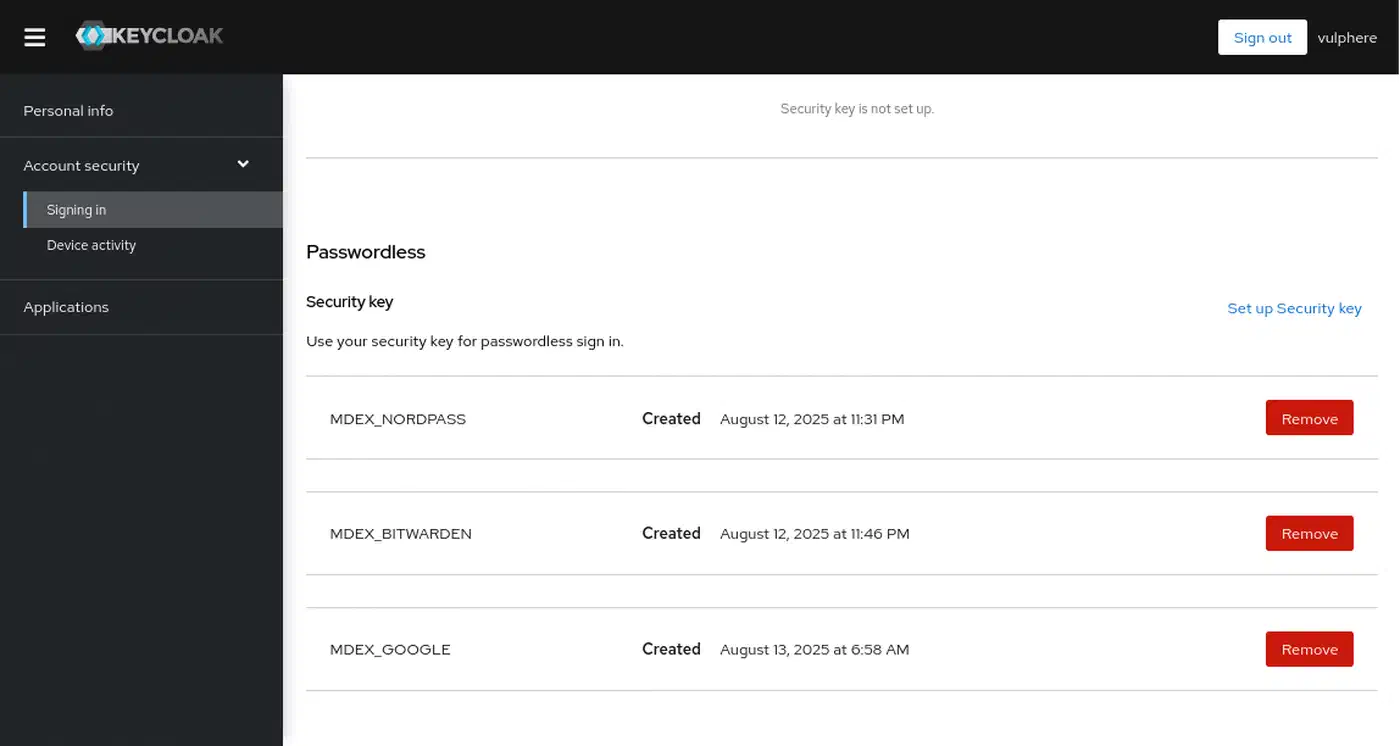
The backedUp flag returned at sign-up tells you if the credential will survive device loss. A value of true means the credential is synced to iCloud, Google Password Manager, 1Password, or similar, and a new iPhone will inherit it. A value of false means the credential is device-bound, usually a hardware key. It must be paired with a backup, or the user is one lost YubiKey away from a support ticket.
Cross-device login, also called hybrid transport and once known as caBLE, lets a desktop user scan a QR code with their phone and log in using a passkey kept in the phone’s keychain. The browser and OS handle it for you. You don’t build anything, but you also shouldn’t block transports: ['hybrid'] in any allowCredentials list, since that breaks the mode.
Rank your recovery fallbacks with care. A second passkey on another device is the best option. An emailed magic link to a verified address is a fair middle ground. A recovery code printed at sign-up is fine if users will actually print it. Support-team-led identity checks are the last resort. Falling back to a plain password throws away the phishing resistance that made you adopt passkeys in the first place, so don’t do it. If you’re adding passkeys to an app that already relies on OAuth 2.0 login flows, keep both paths live during the rollout so users can cross-enroll without losing access.
Let users delete single passkeys, but refuse to delete the last credential unless a backup recovery method is in place, or your support queue will never empty. When you move an existing password-plus-TOTP product, keep the old flow alive for 60 to 90 days. Offer passkey sign-up on every login. Retire the password field only after a user has at least one cloud-synced passkey on file.
Good logs pay for themselves the first time a user reports “it just says error.” Log every sign-up, every login try, and every failed verify with the reason: challenge mismatch, origin mismatch, counter regression, unknown credential ID. The newer Signal API (PublicKeyCredential.signalAllAcceptedCredentials and PublicKeyCredential.signalCurrentUserDetails) lets you push server-side changes back to the key. Stale entries drop off the user’s passkey list on their own. Check for it with PublicKeyCredential.getClientCapabilities() and call it on every good login.
Troubleshooting the four errors you will hit
Four failure modes cover most of what you’ll see in logs. SecurityError: The operation is insecure usually means the page loaded over plain HTTP on a host that isn’t localhost, or the set rpID doesn’t match the current origin. WebAuthn needs a secure context. HTTPS in production and localhost in dev are the only accepted cases. Use https://localhost with a self-signed cert if you need to mirror prod more closely.
An rpID mismatch between sign-up and login is the most common reason a flow works in staging and fails in prod. A credential made against rpID: 'staging.example.com' is useless at example.com. Pick the registrable parent domain and keep it stable.
127.0.0.1 isn’t treated the same way as localhost across browsers. Stick with localhost in dev, or use an ngrok tunnel when you need a public HTTPS hostname to test cross-device hybrid flows.
NotAllowedError is the catch-all for user cancel, timeout, and browser policy denial. You can’t tell these cases apart from JavaScript by design. The spec hides the reason so sites can’t probe authenticator state. Show a generic “that didn’t work, try again or use a magic link” message rather than guess.
Ship the endpoints, wire up the autofill attribute, and prompt for a second passkey right after the first. Your login form will feel instant for the 90% of users on modern hardware, and it still degrades cleanly for everyone else, in an evening of work.