 Botmonster Tech
Local image models in 2026: Qwen vs FLUX vs SDXL on VRAM

No single local image model wins everything in 2026. After running one prompt set on a single 24 GB GPU, the picture is clear: Qwen-Image renders legible in-image text, FLUX leads prompt adherence, and SDXL keeps the deepest LoRA library on the lowest VRAM. The real frontier is quality-per-VRAM, not one champion. Generate small and upscale afterwards with Real-ESRGAN or SUPIR and that VRAM ceiling stops mattering as much.
Key Takeaways
- No local model wins on everything; pick the one that fits your bottleneck.
- Qwen-Image renders legible in-image text far better than its rivals.
- FLUX.2 leads prompt adherence but is the heaviest on VRAM.
- SDXL still has the biggest LoRA and ControlNet library by far.
- Check the license: FLUX dev blocks selling output, Qwen and SDXL don’t.
How Do I Choose a Local Image Model in 2026?
Match the model to the one thing you can’t compromise on. That single rule beats chasing a mythical “best” pick, because each model sits in a different corner of the quality-per-VRAM map. The 2026 local field narrows to three serious families, and the rest are mostly noise. If you also want the hosted apps and services, our roundup of cloud image generators covers those.
Those three families are FLUX (the FLUX.1 dev and schnell line plus the new FLUX.2 dev and klein variants), SDXL with its mature community ecosystem, and Alibaba’s Qwen-Image. Stable Diffusion 3.5 sits in an awkward middle: more VRAM than SDXL, less quality than FLUX, and barely any ecosystem. The Will It Run AI comparison reaches the same verdict, so most people can skip it.
The decision spine is short. Need legible text inside the image? Pick Qwen-Image. Need the prompt obeyed literally on busy multi-subject scenes? Pick FLUX. Need a specific style, a character LoRA, or a precise ControlNet pose? Pick SDXL.
VRAM is the gatekeeper. SDXL runs fine on 8 GB. FLUX.1 dev wants about 12 to 16 GB at FP8. Qwen-Image’s 20B base wants 24 GB, or 8 GB through GGUF with some quality loss. FLUX.2 dev’s 32B base needs 18 to 24 GB quantized, or up to 80 GB at full precision, as covered in my FLUX.2 local setup guide.
License is the second gate. SDXL and Qwen-Image allow commercial output. FLUX.1 dev and FLUX.2 dev block selling output unless you buy a Black Forest Labs license. FLUX.1 schnell and the FLUX.2 klein 4B model are Apache 2.0, so their output is yours.
The Spec and Feature Matrix
Before you download 20 GB of weights, you want the hard numbers in one place. So here is the baseline: one row per model family with architecture, VRAM, speed, license, and ecosystem depth. This is the table worth screenshotting.
A bit of architecture context helps explain the numbers. FLUX and Qwen-Image are MMDiT designs, short for multimodal diffusion transformer. SDXL uses the older U-Net latent diffusion design. That age is exactly why its ecosystem runs so deep and its VRAM stays so low.
| Model | Architecture | VRAM (min / comfy) | Speed (steps, ref GPU) | License | Ecosystem |
|---|---|---|---|---|---|
| SDXL | Latent diffusion U-Net | 6-8 GB / 12 GB | 25-30 base, 4-step Lightning ~0.5s on RTX 4090 | OpenRAIL++ (commercial OK) | 5,000+ LoRAs, 5+ ControlNets, full ComfyUI + Diffusers |
| FLUX.1 dev / schnell | 12B MMDiT | 7 GB GGUF / 12-16 GB FP8 | dev 20-28, schnell 4 | dev non-commercial, schnell Apache 2.0 | Growing LoRAs, 3 ControlNets, full ComfyUI + Diffusers |
| FLUX.2 dev / klein | 32B dev, 4B/9B klein | klein 4B ~13 GB, dev 18-24 GB quantized / 80 GB FP | dev 20-28, klein 4 steps sub-0.5s | dev non-commercial, klein 4B Apache 2.0 | Early but fast-growing, ComfyUI + Diffusers, FP8/NVFP4 builds |
| Qwen-Image | 20B MMDiT | 8 GB GGUF / 24 GB | 20-50, or 4-8 with Lightning LoRA | Apache 2.0 (commercial OK) | LoRA + Lightning LoRA, ComfyUI native + Diffusers, GGUF |
Speed needs a reference point to mean anything. SDXL base runs around 25 to 30 steps, but Lightning and Turbo LoRAs hit 4 steps at roughly 0.3 to 0.5 seconds on an RTX 4090, per the SDXL Lightning benchmarks. FLUX.1 dev runs about 20 to 28 steps, and schnell hits 4. The step-distilled FLUX.2 klein clears sub-0.5 second at 4 steps, according to the BFL klein blog. Qwen-Image runs 20 to 50 steps, or 4 to 8 with its Lightning LoRA.
One thing is universal in 2026: all three families have native ComfyUI and Diffusers support. GGUF builds exist for FLUX.1, Qwen-Image, and FLUX.2 dev too. Therefore the runner is never the deciding factor anymore. The community library is.
The Quality Frontier: Text, Adherence, and VRAM
Most roundups stop at the spec sheet. So I ran one fixed prompt battery on a single 24 GB consumer card, which keeps VRAM and speed apples-to-apples across all four models. The battery splits into three buckets, and each bucket exposes a different weakness.
The buckets are simple. First, text-heavy prompts like “a coffee shop chalkboard menu reading ‘TODAY: Flat White $4’.” Second, complex multi-subject scenes like “three differently dressed people at a market stall, one holding a red umbrella.” Third, style and LoRA-dependent prompts targeting a specific character or art look.
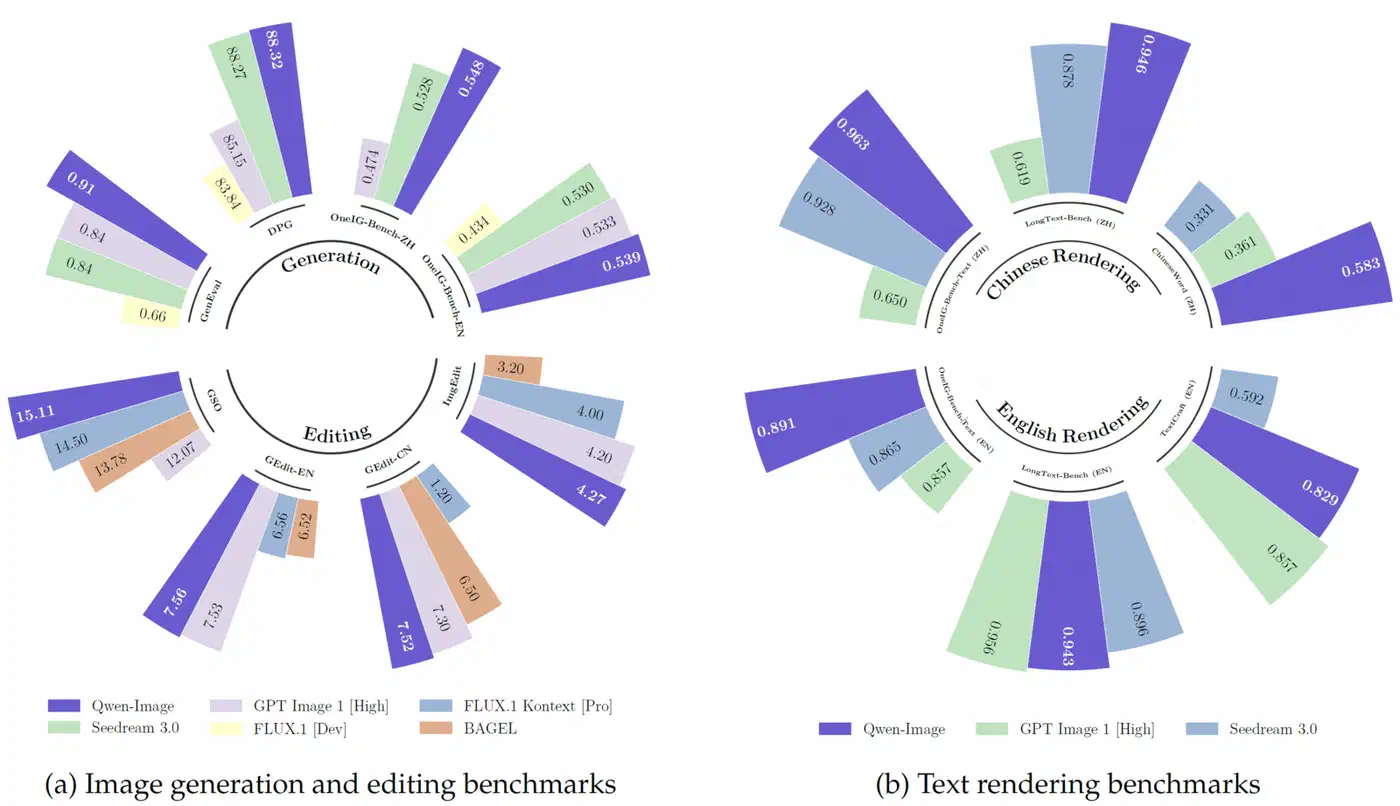
The text bucket has a clear winner. Qwen-Image was built for native text rendering, and it produces legible, correctly spelled in-image text across both English and CJK scripts, as shown in the Qwen-Image blog. FLUX renders short text decently. SDXL base garbles anything past a word or two.

The adherence bucket flips the result. FLUX leads literal prompt-following on counting, spatial relations, and attribute binding. The 32B foundation in FLUX.2 pushes this even further. Qwen-Image stays strong on semantic adherence too. SDXL needs ControlNet or careful prompting to keep up.

| Model | Text accuracy | Prompt adherence | VRAM | Speed | Best for |
|---|---|---|---|---|---|
| Qwen-Image | Excellent (multilingual) | Strong | 8 GB GGUF / 24 GB full | Medium (4-8 step Lightning) | Posters, signage, any in-image text |
| FLUX.2 dev | Good | Best-in-class | 18-24 GB quantized | Medium | Complex scenes, max adherence |
| FLUX.1 dev | Fair to good (short text) | Excellent | 12-16 GB FP8 | Medium | Adherence on a mid-range card |
| SDXL | Poor on text | Fair (great with ControlNet) | 6-8 GB | Fastest (4-step Lightning) | Styles, LoRAs, low VRAM, fast iteration |
The VRAM frontier tells the rest of the story. SDXL is cheapest per image and fastest with Lightning. FLUX.2 dev is the most VRAM-hungry. Qwen-Image sits in between and leans on GGUF to fit 24 GB. The line is consistent: as you climb toward better text plus adherence, the VRAM bill climbs with you. SDXL plus a LoRA is the budget escape hatch.
On my own 24 GB card, the pattern held. The Qwen-Image GGUF nailed a multi-line chalkboard menu that FLUX.1 dev mangled on every seed I tried. Still, FLUX won the “three people, one red umbrella” counting prompt outright, getting the count and the umbrella color right when Qwen drifted. My FLUX setup posts draw the most traffic here, and FLUX is still what I reach for on adherence-heavy work.
The friction is real, though. GGUF load times run long, the offload stutter on a tight VRAM budget is annoying, and switching models mid-session costs minutes. Day to day, I keep SDXL loaded for fast style iteration and pull in Qwen-Image only when a job needs readable text.
Quantization Changes the VRAM Math
Those VRAM numbers shift with quantization, so it’s worth a quick note. FLUX.1 dev runs about 33 GB at FP16, drops to roughly 13 GB at FP8, and squeezes to about 7 GB at GGUF Q4, per the Local AI Master FLUX guide and the FLUX.1-schnell model card.
Each step down trades quality for fit. FP8 is nearly lossless for most work. GGUF Q4 saves the most VRAM but softens fine detail and can hurt text rendering, which is exactly where Qwen-Image earns its keep. Newer NVFP4 builds aim to keep more quality at low VRAM on recent GPUs. In short, the right quantization is the difference between a model that runs and one that won’t load at all.
License and Commercial Use
Licensing is the hidden landmine most roundups skip. If you sell output or ship a product, the weights you can download are not the same as the output you can legally sell. The FLUX dev family is where people get burned.
FLUX.1 dev and FLUX.2 dev are open weights you can download and run freely. Commercializing the output, however, requires a Black Forest Labs self-hosted commercial license or the paid API. They’re free for experiments, not for selling, under the FLUX.2 dev non-commercial terms described by VentureBeat.
The Apache 2.0 options are cleaner. FLUX.1 schnell and the FLUX.2 klein 4B model are Apache 2.0, so their output is yours to sell. Note that klein 9B reverts to the non-commercial license. Qwen-Image is Apache 2.0 as well, per the Qwen-Image GitHub repo, and SDXL ships under CreativeML OpenRAIL++-M, which broadly permits commercial use with standard restrictions.
| Model | License | Commercial output? |
|---|---|---|
| SDXL | OpenRAIL++-M | Yes |
| Qwen-Image | Apache 2.0 | Yes |
| FLUX.1 schnell | Apache 2.0 | Yes |
| FLUX.2 klein 4B | Apache 2.0 | Yes |
| FLUX.1 dev | BFL non-commercial | No (license needed) |
| FLUX.2 dev | BFL non-commercial | No (license needed) |
So the practical guidance is blunt. If you ship a paid product, your realistic open-license picks are SDXL, Qwen-Image, or FLUX schnell and klein 4B. FLUX dev quality comes with a license bill attached.
Ecosystem and Tooling
A great base model with no LoRAs or ControlNets is a dead end for production work. This is SDXL’s single biggest remaining advantage in 2026, and the reason it refuses to die. Ecosystem depth keeps it in daily rotation long after newer models passed it on raw quality.
SDXL leads by a wide margin. It has 5,000+ LoRAs on CivitAI, more than five ControlNet types including a union multi-control model, plus the deepest inpainting and tooling stack, again per Will It Run AI. If your workflow depends on a niche style or precise pose control, SDXL is still the answer.
FLUX is catching up but thinner. It offers three ControlNets (canny, depth, and union) and a fast-growing LoRA library. FLUX.2 is newer, so its ecosystem is leaner still, though it’s accelerating quickly.
Qwen-Image has native ComfyUI support, Diffusers, GGUF builds, and a Lightning LoRA for 4 to 8 step generation. The ComfyUI Wiki Qwen guide also notes that DiffSynth-Studio adds layer-by-layer offload to run within about 4 GB. Consequently the deciding factor across all three is community LoRAs and ControlNets, never whether the runner exists.
Quick-Pick by VRAM Budget
If you want a fast answer keyed to your card, use this:
- 6 to 8 GB: SDXL, ideally with a Lightning LoRA for 4-step speed. Nothing else fits comfortably.
- 12 to 16 GB: FLUX.1 dev at FP8 for adherence, or SDXL plus a Qwen-Image GGUF for text work.
- 24 GB: Qwen-Image full for text, FLUX.2 dev quantized for adherence, SDXL for fast style iteration.
- Selling output: SDXL, Qwen-Image, or FLUX schnell/klein 4B only.