 Botmonster Tech
Claude Code for data analysis: process 500K rows without writing code

Yes, you can point Claude Code at a 541,909-row retail dataset and walk away with a six-sheet Excel workbook, professional charts, and a parameterized report script, without opening a Python file or debugging a single line of code. The complete workflow takes roughly 15 to 20 minutes from raw data to finished output.
The goal is real delegation. Claude handles setup, cleaning, math, and charts. You focus on the right questions to ask.
The 500K-Row Workflow in Practice
VelvetShark documented a complete end-to-end analysis using the UCI Online Retail Dataset. The file holds 541,909 transactions from a UK-based gift retailer, spanning December 2010 to December 2011. It carries every messy trait of real business data: returns mixed with orders, cancellations, negative quantities, ambiguous dates, and roughly 25% of rows missing customer IDs.
The first decision was environment setup. Claude Code used UV, the fast Python package manager, to create a reproducible virtual environment. Then it installed pandas, openpyxl, seaborn, and matplotlib. It also created a CLAUDE.md file documenting the user’s data analysis preferences: packages, chart style, output directory layout. Future sessions inherit the same setup with no re-prompting.
One prompt rule fixes the worst accuracy bug. Never trust a summary that did not come from real code. The pattern looks like this:
Before you answer anything with numbers: write Python code that loads the file with pandas, execute it, and only then summarize findings from the printed outputs. Do not estimate or infer row counts, date ranges, or totals in chat.
This forces real math, not pattern-matched guesses. If the date range looks wrong, you catch it right away. If the row count is off, that is a parsing bug to fix before any deeper work.
Most guides tell you to drop returns and cancels. VelvetShark kept them all and added new columns instead:
IsCancellation: flags rows where the invoice starts with ‘C’ or quantity is below zero.LineTotal: quantity times unit price.GrossLineTotalandReturnLineTotal: gross and return values split out so you can track each on its own.
Returns are business data. A 40% return rate on one product is a signal worth seeing. Drop those rows and you hide it.
From there, Claude wrote a Python script called retail_report.py. It takes CLI flags: --top_n, --freq, --start_date, and --end_date. Run it once and you get a six-sheet Excel workbook:
| Sheet | Contents |
|---|---|
| KPIs | Gross/net revenue, return rates, transaction counts |
| Top Products | Ranked by revenue and volume, with return rates |
| Top Customers | Lifetime value, order frequency |
| Sales Over Time | Weekly or monthly trend (controlled by --freq) |
| Country Breakdown | Revenue and transaction share by market |
| QA Reconciliation | Cross-checks comparing revenue calculations by two independent methods |
The reconciliation sheet is the key one. It works out net revenue two ways and checks they match to zero. That is how you know the numbers are right, not just plausible.
The reusability payoff is significant. One command regenerates the entire report with different parameters. Compare that to rebuilding Excel pivot tables each quarter, or babysitting a fragile spreadsheet with hard-coded date references. A parameterized script is genuinely faster and more reliable.
What Claude Code Actually Does Under the Hood
When you tell Claude Code to “analyze this CSV,” it writes Python scripts, runs them, and reads stdout and stderr back. Then it sums up what it found. Knowing that loop helps you write better prompts and spot bugs before they stack up.
The standard tool stack it reaches for:
- pandas to load, filter, group, and sum data.
- matplotlib and seaborn for bar charts, line graphs, heatmaps, and spread plots.
- openpyxl to build multi-sheet Excel workbooks with proper formatting.
- scipy or statsmodels for stats tests when you ask for one.
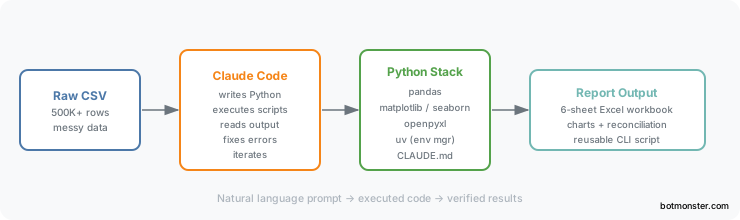
One real win over browser tools: Claude Code runs on your box and uses all your RAM. A 500K-row CSV that hangs Google Sheets or breaks ChatGPT’s upload cap loads in seconds with pandas. For files too big for RAM, Claude Code writes chunked processing code on its own. The trick pd.read_csv('file.csv', chunksize=50000) keeps peak memory flat no matter the file size.
Error recovery is built in. When a pandas call fails on a bad type, a missing column, or an encoding issue, Claude reads the traceback. Then it works out the cause and writes a fix. A human dev would burn a few debug cycles and a trip to Stack Overflow on the same loop.
Claude Code vs ChatGPT Code Interpreter for Data Analysis
ChatGPT’s Code Interpreter has a real edge here. It runs code in a cloud sandbox. You upload a file and get results with no local setup. For quick looks at small or mid-size files, that is hard to beat.
| Feature | Claude Code | ChatGPT Code Interpreter |
|---|---|---|
| Runs locally | Yes | No (sandboxed cloud) |
| File size limits | No practical limit | Limited by upload cap |
| Persistent codebase | Yes | Session-only |
| Memory for large files | Machine RAM | Cloud sandbox limits |
| Cost model | Claude subscription | ChatGPT Plus |
| Produces reusable scripts | Yes | Partial |
Claude Code’s advantage is depth. It works inside your project directory, remembers preferences through CLAUDE.md, produces reusable scripts you can run independently, and handles datasets that would hit cloud sandbox limits. For one-off exploration of a small file, Code Interpreter starts faster. For recurring analysis, production-ready scripts, or large datasets, Claude Code wins on most fronts.
The Jupyter Notebook Problem
Jupyter notebooks are the default tool for data folks. They play poorly with Claude Code for two reasons.
First, plots inside a Jupyter file live as base64 inside the JSON. A notebook with ten matplotlib charts can eat tens of thousands of tokens in image data alone. That burns context before you reach the real work. Patrick Mineault, writing in The NeuroAI Archive, flagged this as a big real-world problem for scientists on Claude Code.
Second, Claude Code can’t see Jupyter kernel state. It does not know which vars exist, which imports are loaded, or which cells have run. So edits to a cell can cause NameError or stale-state bugs tied to run order.
Marimo is the recommended alternative. Marimo notebooks store code as plain Python files, with no base64 blobs. They also use a reactive execution model. Cells form a dependency graph instead of a top-down sequence, which eliminates the stale-state problem. Claude Code can edit a marimo notebook, run marimo check to detect errors, and fix them without tracking kernel state manually. Marimo also supports a --mcp flag that exposes notebooks as Model Context Protocol servers, letting AI agents inspect and modify them in a structured way.
If you must stay in Jupyter, here is the middle path from Dataquest’s guide. Use Claude Code to build helper modules as .py files. Your notebooks then import them. Keep the poking-around work in notebooks. Keep the reusable bits (cleaning, sums, chart templates) in Python files that Claude can edit freely, with no base64 bloat.
Other text-first options worth a look: jupytext turns notebooks into plain Python files with round-trip fidelity. quarto supports many languages with text-based storage. R Markdown does the same for R users. All of these kill the base64 bloat and make notebooks work with normal diff tools.
Community Skills and the CSV-to-Insight Pipeline
The Claude Code ecosystem has built skills that handle common data tasks for you. Instead of writing the same prompts each time, these skills store the patterns in SKILL.md files. Claude Code loads them only when needed.
Two worth knowing:
The CSV Data Summarizer (by Corbin Brown, MIT license) reads any CSV you give it. It builds summary stats, finds gaps in the data, and makes charts with pandas. It also peeks at the data first to choose which checks fit. So it adapts to the column types and the field, not a one-size-fits-all stats run.
DataStory (by Dinesh, open source) builds a full exec-style report from any CSV or Excel file. It goes past raw stats to write up findings and tips that non-tech readers can use.
The skill setup means neither one eats your CLAUDE.md token budget each session. They load only when called and stay out of the way the rest of the time.
For recurring analysis, the workflow pattern that works well:
- Build or grab a community skill that bundles your standard checks.
- Set up a project rules file with your folder layout (
data/raw,data/processed,data/generated), your package manager (UV is the pick right now), and your output formats. - Call Claude Code with one prompt: “run the quarterly sales analysis on
data/raw/q1-2026.csv.”
For work that runs on a schedule, Patrick Mineault says to track data lineage with DAG tools. Snakemake fits bio-style pipelines. Apache Airflow handles heavy jobs. Plain shell scripts are fine as a starter. Claude Code can write and maintain these pipeline files too.
Prompting Strategies for Accurate Analysis
The quality of what Claude Code gives back hangs on how you write your prompts. A few patterns reliably yield trustworthy, repeatable work:
Always force a run before a summary. The prompt “Load this CSV with pandas, print the shape, dtypes, and first 5 rows, then summarize what you see from the printed output” stops Claude from making up traits of the data. Never trust a number summary that did not come from real code.
After any sum, ask Claude to check it a second way. For example: “Total revenue by summing LineTotal. Then check it by multiplying Quantity by UnitPrice and summing. Compare the two totals.” The VelvetShark workflow uses this cross-check all the way through, including in the final Excel file.
Make lots of rough plots first, before any deep work. As Mineault notes, single plots that look low-value still add up to confidence the data is loading and parsing right. A spread plot on every number column and a count plot on every text column cost almost no time. They also catch parsing bugs that would otherwise hide inside the sums.
Use flags from day one. Instead of asking “what were the top 10 products in Q3,” ask Claude to “make a script with --top_n, --start_date, and --end_date flags that I can rerun with new values.” You end up with a reusable tool, not a one-shot answer.
One thing Claude Code can’t do is judge whether your analytical approach fits your specific question. Picking the right statistical test, drawing the line between a return and a cancellation, choosing whether to aggregate by week or month: those remain the analyst’s call. The VelvetShark workflow produced good results because the analyst made those choices deliberately and built reconciliation checks to verify them. Claude simply executed the work efficiently. That split, where you own the questions and Claude owns the implementation, is what gives you analysis you can defend.