 Botmonster Tech
Fine-tune Whisper with 3 hours of audio, 30% WER gains

OpenAI’s Whisper is one of the best open-source speech models around. Out of the box, whisper-large-v3-turbo hits about 8% word error rate (WER) on general English tests like LibriSpeech. But point it at radiology reports, esports commentary, court audio, or factory SOPs and that number can spike to 30-50%. The model just hasn’t seen enough of those niche terms in training.
You can fix this. Fine-tuning Whisper on a small set of domain audio, as little as one to three hours, with LoRA adapters cuts domain-term WER by 30-60%. The full training run fits on a single consumer GPU with 12-16 GB of VRAM. It takes a couple of hours and yields an adapter file under 100 MB. Below is the full path from data prep to deployment.
When to Fine-Tune Instead of Prompting or Post-Processing
Whisper has an initial_prompt parameter that nudges its decoder toward expected terms. If you only need to get 5-10 key terms right, this is often enough. You pass the terms in a short prompt and Whisper shifts its predictions.
For messier cases, post-processing with a fuzzy matcher or a small language model can catch common slip-ups after decoding. This adds lag and can bring its own errors. Still, it works when the mistakes are simple and the vocab is small.
Fine-tuning makes sense when:
- You have more than 50 unique domain terms that the base model keeps getting wrong
- Accuracy on those terms is critical (medical notes, legal records, compliance docs)
- You need exact output: medical abbreviations, chemical formulas, brand names spelled right
- You process enough audio that small per-file errors add up
The cost is modest. On an RTX 5080 with 16 GB VRAM, a LoRA run takes 2-4 hours of GPU time. The resulting adapter doesn’t change inference speed at all. You can also merge it into the base model and deploy with no extra deps.
Which Model to Start From
Your main options in the Whisper family:
| Model | Parameters | Speed | Fine-tuning suitability |
|---|---|---|---|
openai/whisper-large-v3-turbo | 809M | Fast | Best accuracy-to-speed ratio, recommended starting point |
openai/whisper-large-v3 | 1.5B | Moderate | Marginally better accuracy, 2x slower, needs more VRAM |
distil-whisper/distil-large-v3 | ~756M | Fastest | Distilled model, less responsive to fine-tuning |
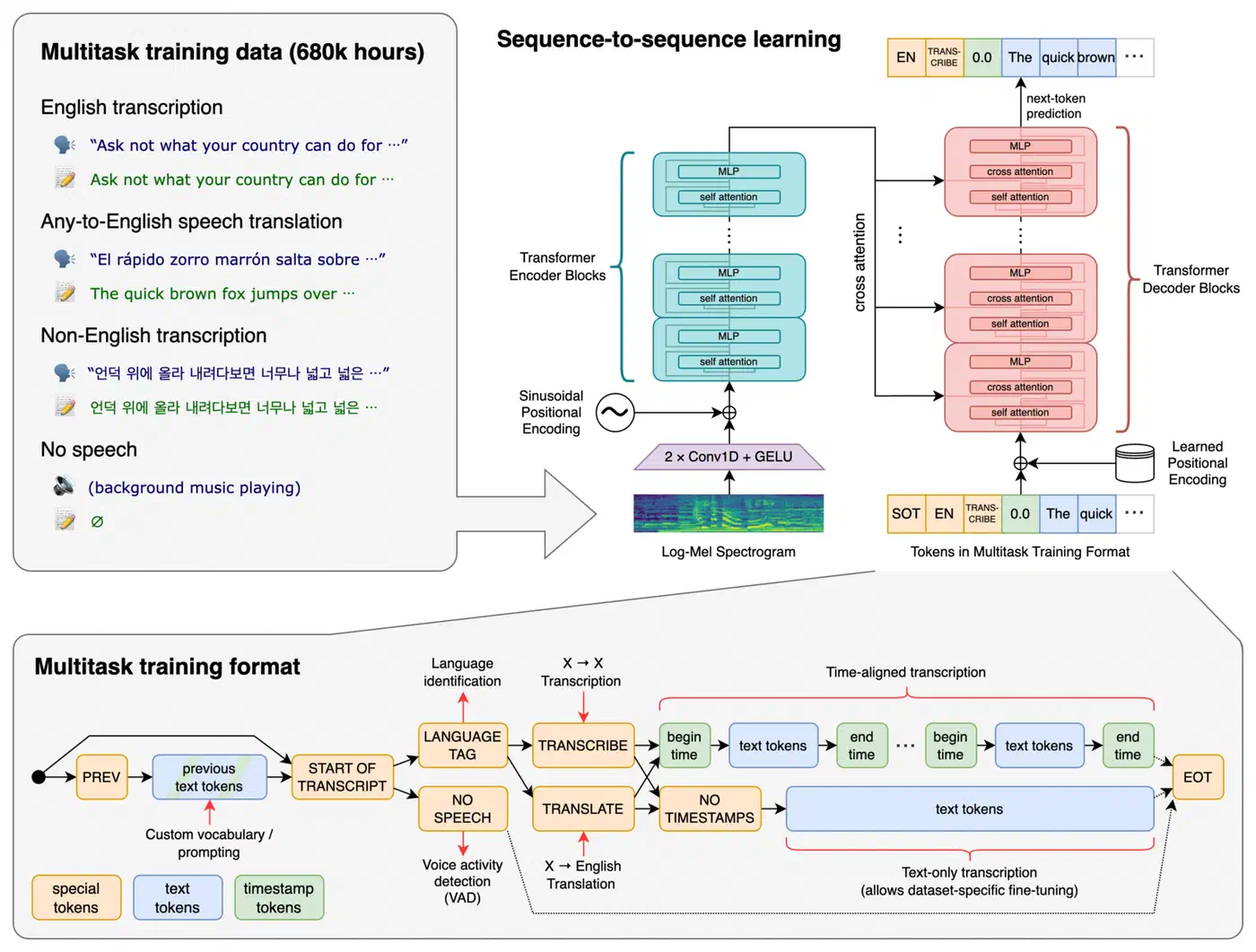
Start with whisper-large-v3-turbo unless you have a clear reason to use the full 1.5B model. The turbo variant hits the best mix of quality and resource use during training and inference.
Preparing Your Domain-Specific Dataset
Data quality drives fine-tuning more than any hyperparameter. A clean, well-cut hour of audio beats a sloppy ten hours.
How Much Audio You Need
- 1 hour of well-transcribed domain audio gives a clear lift on key terms
- 3+ hours yields strong, steady results across the full domain vocabulary
- Past 10 hours you hit diminishing returns for narrow domains. Broader domains that span many sub-specialties can still gain from more
Audio Format and Segmentation
Whisper expects 16kHz mono audio inside. Pre-convert everything to avoid drift during training:
ffmpeg -i input.mp3 -ar 16000 -ac 1 output.wavSplit long clips into 10-30 second segments, lined up to sentence breaks. WhisperX (v3.3+) handles forced alignment well. It gives you timestamps you can use to cut the audio. After auto-segmenting, you’ll need to fix the transcripts by hand. This is the part where the work pays off.
Bootstrapping Transcripts
If you’re starting from raw audio with no transcripts, run the base Whisper model first to get rough drafts. Then fix the domain terms by hand. This bootstrap path is 5-10x faster than typing from scratch. Most common words land right, so you only fix the niche vocabulary.
Dataset Format
Hugging Face Datasets expects a DatasetDict with train and test splits. Each example needs:
- An
audiocolumn with the path to the WAV file - A
transcriptioncolumn with the ground-truth text
from datasets import DatasetDict, Dataset, Audio

train_data = Dataset.from_dict({
    "audio": train_audio_paths,
    "transcription": train_transcripts
}).cast_column("audio", Audio(sampling_rate=16000))

test_data = Dataset.from_dict({
    "audio": test_audio_paths,
    "transcription": test_transcripts
}).cast_column("audio", Audio(sampling_rate=16000))

ds = DatasetDict({"train": train_data, "test": test_data})
Validation Checklist
Before training, verify:
- No audio leaks between train and test splits (same speaker, same session should not appear in both)
- Unicode and punctuation are normalized the same way
- All audio files load and aren’t silent
- Blank or near-silent clips are removed
- Transcripts match the actual audio
Data Augmentation
If you’re short on audio, the audiomentations library can stretch your set. Apply speed shifts (0.9x to 1.1x) and add light background noise to make new variants without recording more. This makes the model tougher, mostly for noisy real-world settings.
from audiomentations import Compose, TimeStretch, AddGaussianNoise

augment = Compose([
    TimeStretch(min_rate=0.9, max_rate=1.1, p=0.5),
    AddGaussianNoise(min_amplitude=0.001, max_amplitude=0.015, p=0.5),
])
Fine-Tuning with Hugging Face Transformers and LoRA
Full fine-tuning of whisper-large-v3-turbo needs 40+ GB of VRAM. LoRA skips that. It freezes the base model and trains small adapter matrices on the attention layers. You end up updating about 2% of the total params, which fits in 11-12 GB of VRAM.
Install Dependencies
pip install "transformers[torch]>=4.48.0" datasets accelerate peft evaluate jiwerPin transformers>=4.48.0 to get the latest Whisper support and bug fixes.
Load the Model and Processor
from transformers import WhisperForConditionalGeneration, WhisperProcessor

model_name = "openai/whisper-large-v3-turbo"
processor = WhisperProcessor.from_pretrained(model_name)
model = WhisperForConditionalGeneration.from_pretrained(model_name)
Configure LoRA
from peft import LoraConfig, get_peft_model

lora_config = LoraConfig(
    r=16,
    lora_alpha=32,
    target_modules=["q_proj", "v_proj"],
    lora_dropout=0.05,
    task_type="SEQ_2_SEQ_LM",
)

model = get_peft_model(model, lora_config)
model.print_trainable_parameters()
# Output: trainable params: ~16M || all params: ~809M || trainable%: ~2.0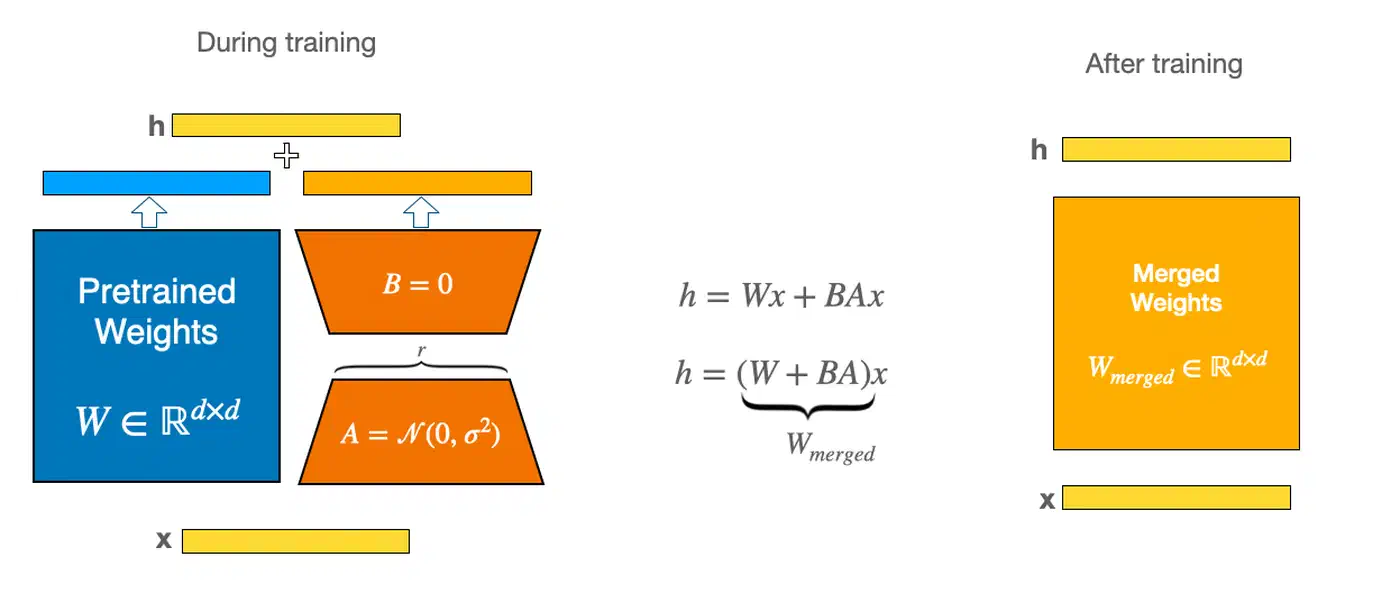
Targeting q_proj and v_proj in the attention layers is the standard start. If results aren’t good enough, you can extend to k_proj and o_proj or bump the rank from 16 to 32. The same LoRA rank and target module picks work across model types. The Stable Diffusion XL fine-tuning guide covers the same adapter pattern for image work if you want to see LoRA on a different model.
Data Collator and Training Arguments
The data collator pads variable-length audio inputs. It also sets up the decoder input IDs for English text:
from transformers import Seq2SeqTrainingArguments, Seq2SeqTrainer
from dataclasses import dataclass
from typing import Any, Dict, List, Union
import torch

@dataclass
class DataCollatorSpeechSeq2SeqWithPadding:
    processor: Any

    def __call__(self, features: List[Dict[str, Union[List[int], torch.Tensor]]]) -> Dict[str, torch.Tensor]:
        input_features = [{"input_features": f["input_features"]} for f in features]
        batch = self.processor.feature_extractor.pad(input_features, return_tensors="pt")

        label_features = [{"input_ids": f["labels"]} for f in features]
        labels_batch = self.processor.tokenizer.pad(label_features, return_tensors="pt")

        labels = labels_batch["input_ids"].masked_fill(
            labels_batch.attention_mask.ne(1), -100
        )
        batch["labels"] = labels
        return batch

data_collator = DataCollatorSpeechSeq2SeqWithPadding(processor=processor)
training_args = Seq2SeqTrainingArguments(
output_dir="./whisper-finetuned",
per_device_train_batch_size=4,
gradient_accumulation_steps=4,
learning_rate=1e-4,
warmup_steps=100,
max_steps=1000,
fp16=True,
evaluation_strategy="steps",
eval_steps=100,
save_steps=100,
predict_with_generate=True,
logging_steps=25,
report_to="none",
)Launch Training
import evaluate
import jiwer

wer_metric = evaluate.load("wer")

def compute_wer(pred):
    pred_ids = pred.predictions
    label_ids = pred.label_ids
    label_ids[label_ids == -100] = processor.tokenizer.pad_token_id
    pred_str = processor.tokenizer.batch_decode(pred_ids, skip_special_tokens=True)
    label_str = processor.tokenizer.batch_decode(label_ids, skip_special_tokens=True)
    wer = wer_metric.compute(predictions=pred_str, references=label_str)
    return {"wer": wer}

trainer = Seq2SeqTrainer(
    model=model,
    args=training_args,
    train_dataset=ds["train"],
    eval_dataset=ds["test"],
    data_collator=data_collator,
    compute_metrics=compute_wer,
)

trainer.train()
Expect about 2 hours for 1000 steps on an RTX 5080. VRAM usage should sit near 11 GB with batch size 4 and fp16 on. If you hit out-of-memory errors, drop the batch size to 2 and bump gradient_accumulation_steps to 8 to keep the same effective batch size.
Evaluating and Iterating on Your Fine-Tuned Model
A single WER number on your test set won’t tell the whole story. You need to measure domain-term accuracy on its own, and check that general quality has not slipped.
Domain-Term Accuracy
Pull your list of domain terms and compute two metrics:
- Recall: what share of domain terms in the reference transcripts does the model get right?
- Precision: how often does the model fake similar-sounding non-domain terms where none exist?
def domain_term_recall(references, hypotheses, domain_terms):
    hits = 0
    total = 0
    for ref, hyp in zip(references, hypotheses):
        for term in domain_terms:
            if term.lower() in ref.lower():
                total += 1
                if term.lower() in hyp.lower():
                    hits += 1
    return hits / total if total > 0 else 0.0
Baseline Comparison
Always run the base Whisper model on the same test set. Log both overall WER and domain-term WER side by side:
| Metric | Base Model | Fine-Tuned |
|---|---|---|
| Overall WER | 32.1% | 14.7% |
| Domain-term recall | 41% | 87% |
| Domain-term precision | 78% | 94% |
These numbers are for illustration. A 30-60% relative WER drop on domain terms is typical with 1-3 hours of training data.
Catastrophic Forgetting Check
Test on a slice of LibriSpeech or Common Voice to check that general quality has not slipped. If WER goes up by more than 2% on general audio versus the base model, your run is overfitting. Cut the number of steps or lower the learning rate.
Iteration Strategies
If domain-term accuracy is still weak after your first run:
- Add more training examples that hold the tricky terms
- Bump LoRA rank from 16 to 32 (trains more params, may catch richer patterns)
- Train for more steps with a lower learning rate (try 5e-5 instead of 1e-4)
- Expand
target_modulesto includek_projando_projon top ofq_projandv_proj
Merge and Export
Once you’re happy with the results, merge the LoRA adapter into the base model. Then you can ship without the PEFT dep:
model = model.merge_and_unload()
model.save_pretrained("./whisper-domain-merged")
processor.save_pretrained("./whisper-domain-merged")
Deploying Your Fine-Tuned Whisper Model
You have a trained model. Now you need to run it somewhere other than your training box.
Quick Local Inference
Load the merged model with the Hugging Face pipeline API:
from transformers import pipeline

pipe = pipeline(
    "automatic-speech-recognition",
    model="./whisper-domain-merged",
    device="cuda",
)

result = pipe("recording.wav")
print(result["text"])
This gives you about 1.5x real-time speed on an RTX 5080. Fast enough for live use, but not ideal for batch jobs.
Faster Inference with CTranslate2
CTranslate2 and the faster-whisper library can hit 3x more speed and use 50% less VRAM than the stock Hugging Face pipeline:
ct2-opus-converter --model ./whisper-domain-merged \
    --output_dir ./whisper-ct2 \
    --quantization float16
from faster_whisper import WhisperModel
model = WhisperModel("./whisper-ct2", device="cuda", compute_type="float16")
segments, info = model.transcribe("recording.wav")
for segment in segments:
print(f"[{segment.start:.2f}s -> {segment.end:.2f}s] {segment.text}")The converted model drops into any faster-whisper pipeline as a plain path. For example, swap it into a local meeting transcription setup and your team’s jargon comes out spelled right in every call.
Docker API Endpoint
For production use, wrap the model in a FastAPI service:
from fastapi import FastAPI, UploadFile
from faster_whisper import WhisperModel
import tempfile

app = FastAPI()
model = WhisperModel("./whisper-ct2", device="cuda", compute_type="float16")

@app.post("/transcribe")
async def transcribe(file: UploadFile):
    with tempfile.NamedTemporaryFile(suffix=".wav") as tmp:
        tmp.write(await file.read())
        tmp.flush()
        segments, info = model.transcribe(tmp.name)
        return {
            "text": " ".join(s.text for s in segments),
            "language": info.language,
        }
Use nvidia/cuda:12.4.1-runtime-ubuntu24.04 as the Docker base image. Install faster-whisper and fastapi with uvicorn in your Dockerfile.
Batch Processing
For bulk runs on large audio sets, parallelize with the Datasets library:
from datasets import Dataset, Audio

audio_ds = Dataset.from_dict({"audio": audio_file_paths})
audio_ds = audio_ds.cast_column("audio", Audio(sampling_rate=16000))

def transcribe_batch(batch):
    results = pipe(batch["audio"], batch_size=8)
    batch["transcription"] = [r["text"] for r in results]
    return batch

transcribed = audio_ds.map(transcribe_batch, batched=True, batch_size=8)
Model Versioning
Tag each fine-tuned model with the training data version and eval scores. Push to a private Hugging Face Hub repo or save in a local model store. Include the training config, WER scores on both domain and general test sets, and the date of the run. That way you can roll back or compare models when you retrain on fresh data.
Real-World Integration Examples
A few concrete spots where this works well:
- Medical dictation: transcribe clinical notes with the right drug names, procedure codes, and anatomy terms, then feed into an EHR system
- Gaming commentary: capture esports lingo, character names, and ability names for auto-highlight clips
- Local AI assistant: use as the speech frontend for a voice-controlled assistant where domain accuracy is more important than general chat
- Factory docs: transcribe floor workers’ verbal reports with the right part numbers and process names
The model itself is just a checkpoint on disk. How you wire it in depends on your app. The inference code stays the same no matter the downstream use.