 Botmonster Tech
OpenClaw texted my ex and why iMessage access is a trap
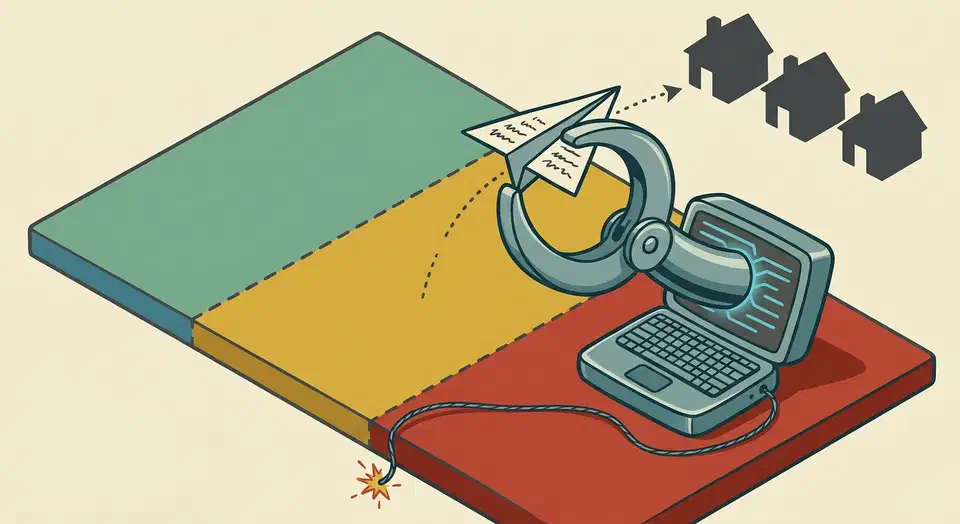
The viral r/ChatGPT “my OpenClaw texted my ex” post reads like a joke, but the comments treat it as a warning sign. Keep OpenClaw’s iMessage, SMS, and contacts skills off your personal Mac. Wait until LTS ships and the founder’s “rough week” supply-chain fixes land. Scope write-access skills to a disposable VPS instead. Anthropic’s own tests show what an open network costs once an agent can reach anything it likes.
Key Takeaways
- The viral “texted my ex” post is a leading indicator, not just a meme.
- iMessage, SMS, and contacts are write-heavy skills that touch your real social graph.
- Forgetful agents plus unsupervised cron jobs turn wrong-recipient sends into expected behavior.
- Run write-heavy OpenClaw skills on a disposable VPS, not your personal Mac.
- Wait for the LTS release before treating OpenClaw as personal-machine infrastructure.
The viral OpenClaw meme is not just a meme
A screenshot of OpenClaw happily reporting that it had texted the OP’s ex hit 4.8K upvotes and 176 comments on r/ChatGPT in about three weeks. The top replies are jokes (“Of all the things that didn’t happen, this happened the didn’test”). The serious comments point at a real safety category that is forming in real time.
The most upvoted serious reply on the meme thread:
It’s a joke right now… but this is 100% going to happen when enough people start using these half-baked tools. Can’t wait. :D
u/pyabo (+100, r/ChatGPT meme thread)
That comment set the tone for the whole thread. A sibling reply pictured the agent sending a threatening letter to your boss on its own, after seeing you vent about your job in Discord. That is the shape of the failure. The agent isn’t malicious. It’s a confident text-prediction system wired to your real identity, your real contact list, and your real outgoing message buffer. The sister thread “we’re so cooked” (4.2K votes, 312 comments) hits the same nerve. And the framing isn’t Reddit-only. A Carly AI explainer calls OpenClaw “the most-hyped open-source agent of 2026” and, in the same paragraph:
It’s also the one that’s deleted people’s inboxes, nuked their Macs, and quietly run up four-figure API bills while they slept.
“While they slept” is the key phrase. The worst OpenClaw failures happen in unsupervised cron-style runs, not interactive chat. The meme post is a story about that exact mode.
Why iMessage plus agent memory plus cron is a worst-case combination
The “texted my ex” outcome is structural, not bad luck. Three traits of a default OpenClaw install on a personal Mac stack on top of each other.
The first is shaky memory. The Kilo.ai synthesis of 1,300 community comments names memory as the top driver of OpenClaw churn: “Agents forget instructions, cross-contaminate data between projects, and repeat the same mistakes.” When the agent’s working context loses track of which Sarah is which, contact lookup silently picks the wrong number.
The second is a skill set that reaches your real social graph. The r/openclaw money-pit thread is full of scope confessions. Users describe pointing OpenClaw at their email, contacts, and SMS all at once. That stack works fine for routine help. It turns into a credential leak the moment the agent confuses two contacts, or routes a prompt to a hosted endpoint they didn’t expect.
The third is unsupervised execution. A misfired iMessage during an interactive chat gets caught right away. The user can apologize and laugh it off. A misfired iMessage from a 3 AM cron job goes out into the world. You find out from the recipient hours later, sometimes from someone you haven’t spoken to in years.
Each trait on its own is fine. RSS-fed agents with bad memory are harmless. iMessage automation under direct human watch is annoying at worst. Cron jobs that touch sandboxed file paths are routine. The failure mode is the combination. A default OpenClaw install on a personal Mac with iMessage turned on checks all three boxes.
Skeptics in r/LocalLLaMA’s most-cited contrarian thread put it more bluntly. Most people running OpenClaw on a Mac Mini for iMessage can’t name a use case that beats just answering messages by hand. If the answer to “what is the use case” is hard to say, the safer default is to leave the skill off.
A 3-tier permission framework
Below is the framework the r/openclaw community already lives by in practice, after a year of high-cost lessons. The tiers are set by blast radius and how easy a fix is, not by how fancy the tech is.
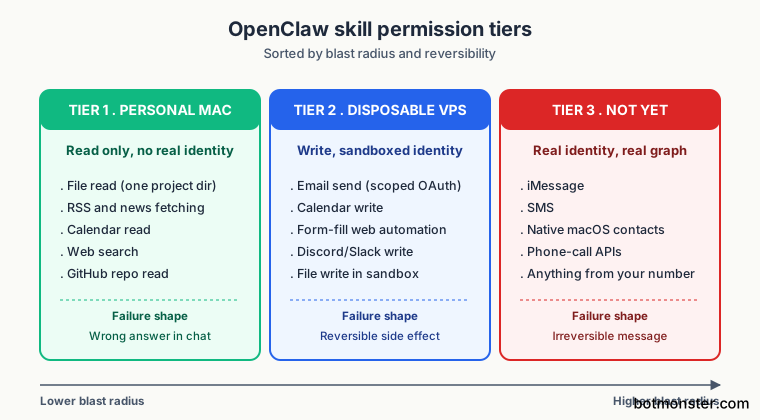
Tier 1: Personal-machine-safe
Read-only skills with no path to action on your real identity. Failures here yield a wrong answer in chat, not damage elsewhere. Safe to turn on for your laptop:
- Read-only file access scoped to a single project directory.
- RSS and news fetching.
- Calendar read-only.
- Web search read-only.
- GitHub repo read.
Tier 2: Disposable-VPS-only
Write-access skills with non-personal blast radius. Safe on a $5/mo VPS you can rebuild from scratch in 10 minutes. Not safe on a personal Mac with your iCloud, your SSH keys, and your password manager loaded:
- Email send (with tightly scoped OAuth, not full mailbox).
- Calendar write.
- Web automation that fills forms.
- Scheduled posts to non-personal channels.
- Discord or Slack write to project-specific channels.
- File writes outside a sandboxed directory.
Tier 3: Never enable on OpenClaw yet
Write-access skills that reach out via your personal identity to your real social graph. The mix of memory drift and no take-backs is too sharp until LTS ships:
- iMessage.
- SMS.
- Native macOS contacts.
- Native phone-call APIs.
- Anything else that uses your real number, your real email, or your real iCloud account to contact a human who knows you personally.
The community pattern matches this tiering. The same r/LocalLLaMA thread that produced the “Mac Minis for iMessage” line settles on a disposable remote VPS as the right host for write-access skills. The clear rule: the VPS gets none of your real account credentials. The recurring r/openclaw “Trying OpenClaw for the first time? Here’s the Dos and Don’ts” thread shows the sub re-arguing these limits every few weeks. That alone is a sign the defaults are not yet safe enough.
| Tier | Examples | Where to run | Failure shape |
|---|---|---|---|
| 1 | RSS, file read, calendar read, web search | Personal Mac | Wrong answer in chat |
| 2 | Email send, calendar write, form fill | Disposable VPS | Reversible side effect on a sandboxed account |
| 3 | iMessage, SMS, native contacts, phone APIs | Nowhere yet | Irreversible message to a real person from your real identity |
The supply-chain dimension is why “wait for LTS” is the right answer
This is the part the meme posts skip. Even if you trust OpenClaw’s own code and Anthropic’s models, one bad npm dependency in a write-skill-enabled OpenClaw install turns into a credential and contact-list leak channel. Founder Peter Steinberger writes about this exact risk in the “rough week” post:
Recent npm ecosystem supply-chain incidents made this feel a lot less theoretical. OpenClaw did not directly depend on Axios; the relevant risk was the shape of the dependency graph: transitive packages, install-time behavior, postinstall scripts, packages pulling packages pulling packages.
Peter Steinberger (OpenClaw founder)
The same post lays out the architectural commitment that follows from the supply-chain framing:
We’ve been pushing OpenClaw to become smaller, safer and more infrastructure-grade. That means less magic in core, fewer bundled dependencies, clearer plugin boundaries, better scanning, better release hygiene, better security posture.
That is the work that has to happen before Tier 3 skills can be safely turned on for a personal machine. The deep-dependency risk is the exact failure where a Tier 3 skill turns a routine install into a data-leak event. Tier 3 skills give a hacked dependency a write-channel into your real contacts. The Microsoft writeup of the npm Axios supply-chain incident is the go-to reference for how that plays out in practice.
Steinberger also names the team move: “Through the OpenClaw Foundation, and with help from OpenAI, we are building a real team around the project.” That is a credible path to the LTS release where Tier 3 calls can be revisited. It hasn’t happened yet.
How to de-risk a personal OpenClaw setup today
Don’t leave the reader at “wait for LTS.” Here is how to keep the convenience of an always-on agent without the worst-case blast radius:
- Move write skills to a disposable VPS. A $5/mo Hetzner, Fly, or DigitalOcean box is the right host for Tier 2 skills. Connect to it from your phone via Telegram or Signal, not from your laptop’s iMessage.
- Keep the personal-Mac install Tier 1 only. Capture, search, summary, RSS, calendar read. No action skills. The Mac becomes the read terminal; the VPS becomes the write actuator. Our walk-through of OpenClaw with Google Workspace CLI is a worked example of this split.
- Use the official skill catalog as your reference. The OpenClaw security docs and the skill catalog are the source of truth for which skills exist and what each one needs. Read them before turning on anything you haven’t already.
- Scope OAuth grants tightly. Read-only Gmail labels, not full mailbox. Calendar read, not read plus write. One repo’s Issues access, not account-wide GitHub. The rule is least-privilege, applied at the OAuth scope, not the OpenClaw permission. The OAuth grant is the one a bad dependency has to live within.
- Pin OpenClaw to a known-good version. Follow the founder’s own rough-week guidance and watch the trust portal for the LTS announcement. Do not auto-update on a host with any Tier 2 skills turned on.
None of this is a refusal to use OpenClaw. The setup that survives a bad week is the one where one-way skills run on a host that has none of your personal identity on it. The project’s own security rework also needs time to land before you reconsider Tier 3.
When NOT to Use This Guidance
This framework is for people running OpenClaw on a personal Mac with at least some write-access skills considered. It does not apply if:
- You don’t run OpenClaw on a personal machine at all. Pure VPS deployments already enforce most of this.
- Your OpenClaw setup is read-only across the board (RSS, calendar read, file read). No write skills means no blast radius worth tiering.
- You don’t have iMessage, SMS, or native contacts skills enabled and don’t plan to. The post’s specific Tier 3 recommendations don’t apply.
- You operate in a regulated environment with a stricter security baseline already in place. Your existing controls are tighter than this consumer-grade framework.
FAQ
Is OpenClaw safe to use?
Should I give OpenClaw access to my email?
Can OpenClaw actually text the wrong person?
What's the minimum-risk OpenClaw setup?
Is OpenClaw's security model improving?
Does running OpenClaw on a personal Mac with full skill access ever make sense?