 Botmonster Tech
Self-hosted AI agent frameworks in 2026: local-first compared
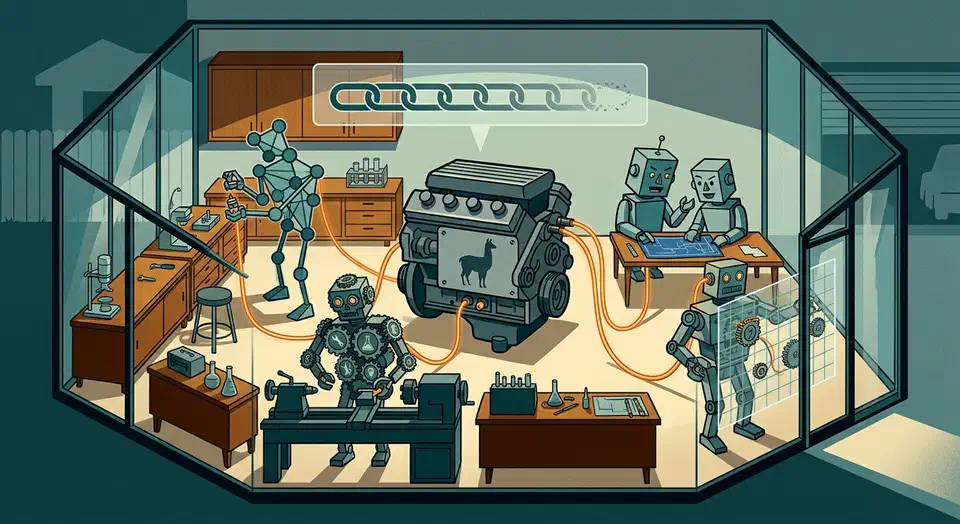
A self-hosted AI agent needs to run entirely on your own Ollama or vLLM with no OpenAI key. All four major frameworks claim that support, but only LangGraph and CrewAI wire to a local model with zero workarounds. AutoGen needs a client swap, and Flowise needs one base-URL field. The model, not the framework, is the real reliability ceiling.
Key Takeaways
- All four run on Ollama, but only LangGraph and CrewAI need zero workarounds.
- The small local model, not the framework, is what breaks tool calling.
- Flowise is the only true no-code pick; LangGraph is the most code-heavy.
- Most framework docs still assume an OpenAI key, so budget setup time.
- Use Qwen3 or larger for agents; smaller models drop tool calls under load.
Why Local-First Fitness Is the Axis That Counts
Most “best agent framework” roundups assume you have an OpenAI key and a credit card. The first code sample spins up a hosted client, and the “swap to local” path is a footnote if it shows up at all. Self-hosters ask a sharper question about whether any of these run on their own box with no cloud call.
To answer that, I graded each one on local-first fitness, which I treat as three concrete things. The first is how much config it takes to point the tool at an Ollama, vLLM, or llama.cpp endpoint. The second is how reliably it calls tools with a model small enough to self-host. The third is whether the docs assume a hosted provider by default.
The third axis hides a trap. Per-call tool reliability stacks up across an agent loop. A 95% success rate per call over 8 steps lands at only about 66% end to end. According to PromptQuorum’s local tool-calling benchmarks, the Qwen3 series is the most stable local family for tool calls. The Ollama structured-outputs docs show that JSON mode is the main fix.
Here is what I saw on my own Ollama box. The wiring took the easy 20 minutes, but the real wall was the model. Small models that pass a single tool-call demo start to return prose instead of a tool_calls field once the loop runs five or more steps. A 7B model fell apart fast, while a Qwen3 30B-class model was the first that held up across a full run on my hardware. Wrapping calls with format="json" plus a Pydantic retry loop saved the runs that slipped.
This post also grades a second lens: the no-code to code spectrum. It runs from Flowise’s visual canvas to LangGraph’s explicit Python graph. Move along it and you trade flexibility and debugging power for speed.
Running an AI Agent Framework on Ollama With No OpenAI Key
This is the exact query a self-hoster types. The phrase “supports Ollama” hides a wide range of real effort. Here is the config friction per framework.
LangGraph: install langchain-ollama, instantiate ChatOllama(model="qwen3"), and pass it as the node’s model. No hosted client sits anywhere in the path. The LangChain Ollama integration docs cover Qwen3, Gemma3, GPT-OSS, and DeepSeek-R1.
from langchain_ollama import ChatOllama
llm = ChatOllama(model="qwen3", base_url="http://localhost:11434")
# pass llm into your LangGraph nodeCrewAI: set llm="ollama/qwen3" using the LiteLLM-style provider prefix, or pass an LLM object with a local base_url. There is no LangChain dependency underneath. The CrewAI LLM connections docs walk through both paths.
from crewai import LLM
llm = LLM(model="ollama/qwen3", base_url="http://localhost:11434")AutoGen: use the native OllamaChatCompletionClient from autogen-ext instead of the default OpenAI client. For models with no native Ollama client, you route through LiteLLM. The AutoGen models tutorial covers both. The friction is small but real. You must swap the default client by hand, because the default is hosted.
Flowise: drop a ChatOllama node on the canvas and set the base URL to http://host.docker.internal:11434. No API key field is required. The Flowise GitHub repo ships these local nodes out of the box, alongside LlamaCpp and HuggingFace nodes.
One note on production serving. All four can target a vLLM OpenAI-compatible endpoint. You override the base URL and use a dummy key. The override is a single line.
llm = ChatOpenAI(base_url="http://localhost:8000/v1", api_key="dummy", model="qwen3")vLLM is the production-serving path while Ollama is the dev-layer path, per the aicompetence local-stack comparison. For a fuller breakdown of each local runtime, including where llama.cpp and LM Studio fit, the inference-engine genealogy explains why these two cover the two ends of the spectrum.
Local-First Scorecard
| Framework | Runs on Ollama out of the box? | Local tool-calling reliability | OpenAI assumed in docs? | Code spectrum | Best for |
|---|---|---|---|---|---|
| LangGraph | Yes, native via langchain-ollama | Good with Qwen3-class; you control retries and grammar | Partly; examples mix hosted and local | Full code (Python graph) | Engineers who want explicit control and durable state |
| CrewAI | Yes, ollama/<model> provider string | Good; the LiteLLM layer adds some prompt overhead | Partly; quickstart shows hosted first | Mostly code (declarative Python) | Fast multi-agent crews without LangChain |
| AutoGen | Yes, but swap to OllamaChatCompletionClient | OK; needs careful client and model choice | Yes; defaults are OpenAI clients | Code (conversational Python) | Multi-agent conversation patterns and research |
| Flowise | Yes, ChatOllama node, set base URL | Depends entirely on the chosen model | No; local nodes are first-class | No-code (visual canvas) | Non-developers and rapid prototyping |
The Capability Matrix
Before the verdicts, here is the base comparison every reader needs. One row per framework, so you can rule options out at a glance.
The programming model differs sharply. LangGraph is a graph of nodes and edges with explicit control flow. CrewAI is role-based crews of agents with tasks, plus event-driven Flows. AutoGen is conversational, so agents talk to each other. Flowise is a visual canvas of connected nodes.
The language choice shapes your team’s options. LangGraph supports Python and JS/TS. CrewAI is Python. AutoGen is Python, with a .NET track now folded into the Microsoft Agent Framework. Flowise runs as a Node.js app, so you build visually and write no code at all.
On licensing, all four are free to self-host. LangGraph, CrewAI, and AutoGen are MIT. AutoGen docs are CC-BY 4.0. Flowise is Apache 2.0. The Flowise site confirms no flow, user, or run caps when self-hosted.
State and persistence is where durability lives. LangGraph has first-class checkpointers (MemorySaver, SQLite, Postgres) for resumable runs. CrewAI offers @persist() plus SQLite checkpointing and an on-disk memory layer built on LanceDB, described in CrewAI’s cognitive memory writeup. AutoGen can save and load agent and team state. Flowise stores chat state and flows in its own database.
Human-in-the-loop support splits the field too. LangGraph’s interrupt() pauses the graph, saves state, and resumes on approval. That is the strongest HITL story here. CrewAI supports human input on tasks. AutoGen uses a UserProxyAgent for human turns. Flowise has human-input nodes in flows.
One status flag deserves attention. AutoGen entered maintenance mode in early 2026. Microsoft now points new builds at the Microsoft Agent Framework, which merges AutoGen with Semantic Kernel. AutoGen still gets community bug fixes. Still, self-hosters should weigh this signal before starting a new build on it.
| Framework | Model | Language | License | State / persistence | Human-in-the-loop |
|---|---|---|---|---|---|
| LangGraph | Graph (nodes + edges) | Python, JS/TS | MIT | Checkpointers: memory, SQLite, Postgres | interrupt() pause and resume (strongest) |
| CrewAI | Role-based crews + Flows | Python | MIT | @persist(), SQLite checkpoint, LanceDB memory | Human input on tasks |
| AutoGen | Conversational multi-agent | Python (.NET via MAF) | MIT (docs CC-BY 4.0) | Save and load agent + team state | UserProxyAgent human turns |
| Flowise | Visual no-code canvas | None (Node.js app) | Apache 2.0 | Built-in DB for flows and chat state | Human-input nodes |
Control Versus Convenience: Where Each Framework Sits
The second lens maps each tool on the flexibility and debugging axis, then turns it into a who-it-is-for verdict. This is the opinionated payoff. Keeping the whole stack local also eases the data-handling duties that rules like the EU AI Act now impose.
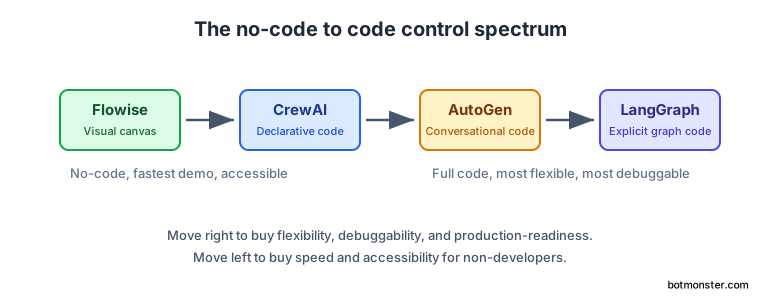
LangGraph gives the most control with the steepest curve. You hand-build the state graph. That buys maximum flexibility and the best debugging story, since you can inspect and replay any node through checkpoints. The cost is a hard learning curve. The 2026 line shipped better interrupt() behavior and broad Python support. Verdict: pick it when correctness, durability, and step-level visibility beat speed to first demo.
CrewAI is fast, opinionated, and fairly code-light. Role-and-task abstractions get a crew running in a few dozen lines, and it stands alone with no LangChain underneath. CrewAI claims it runs up to 5.76x faster than LangGraph on some tasks per the CrewAI repo. Treat that vendor number with care. Verdict: best when you want agents that collaborate quickly and the role metaphor fits.
AutoGen is conversational and research-leaning. The agents-in-conversation model is elegant for brainstorming and research. However, the maintenance-mode status and OpenAI-first defaults make it a weaker bet for a new production build. Verdict: great for learning multi-agent patterns, but check the Microsoft Agent Framework before you commit new work.
Flowise is no-code, fastest to a working flow, and the hardest to version-control. The visual canvas is great for prototyping and for handing agent-building to non-developers, and local nodes are first-class. The tradeoff is weaker source control, harder debugging, and a ceiling on custom logic. Verdict: pick it when the builder is not a coder or when you need a demo today.
The spectrum runs Flowise (no-code), then CrewAI (declarative code), then AutoGen (conversational code), then LangGraph (graph code). Move right and you buy flexibility and production-readiness. Move left and you buy speed.
Observability and Debugging Your Self-Hosted Agent
A self-hosted agent you cannot see inside is a risk. Here is what each one gives you, with weight on what works without a paid cloud account.
LangGraph offers native tracing through LangSmith (hosted, free tier) plus full local state inspection through checkpoints, so you can replay a run node by node. It has the strongest debugging story of the four. CrewAI ships built-in tracing and works with open tools like Arize Phoenix for fully local traces, as shown in this CrewAI, Ollama, and Phoenix walkthrough.
AutoGen exposes logging and OpenTelemetry-style telemetry. The conversation transcript itself also reads as a trace of how the agents reasoned. Flowise shows a visual run view in the UI that walks node by node, which is the most beginner-friendly form here. Still, that view is shallower than code-level tracing when failures get complex.
One tip applies to all four. Wrap local tool calls with format="json" plus Pydantic validation and a retry loop. That catches and recovers from the structured-output failures that dominate local-model debugging, as the Instructor Ollama guide shows. On my own runs, this one pattern turned flaky loops into repeatable ones.