 Botmonster Tech
Self-hosted AI search: combine SearXNG and a local RAG pipeline

You can build a private AI search engine modeled on Perplexity. You combine SearXNG with a local language model running through Ollama. Here is the stack. SearXNG pulls results from many search engines at once. A Python scraper fetches and cleans the actual page content. The LLM then turns everything into a cited answer with inline references like [1], [2]. No API keys, no telemetry, no query logging to third-party AI services. A machine with 12 GB VRAM runs the whole pipeline, and most queries come back in 5-15 seconds.
This is a practical build guide. By the end you’ll have a working Docker Compose stack with three services. You also get a small web interface you can open in any browser.
How the Pipeline Works
The data flow has four stages. The user submits a query. SearXNG searches Google, Bing, DuckDuckGo, and other engines at once. It returns ranked URLs with short snippets. A scraper fetches the top 5 URLs and pulls out clean article text. That text gets chunked and passed to the LLM along with the original query. The model then writes an answer where each claim is tied to a numbered source.
The RAG part here stays simple on purpose: no vector database, no embeddings, no stored index. For live web search you don’t need them. If you want a stored, document-centric option, see the guide on building a private local RAG knowledge base with Qdrant and BGE-M3 embeddings. The search engine has already ranked results by relevance. So all you need is to strip the HTML, break the text into small pieces, and give the LLM enough raw material to write a grounded answer. People call this approach “naive RAG” or “context stuffing.” It works well because the hard work of ranking is already done upstream.
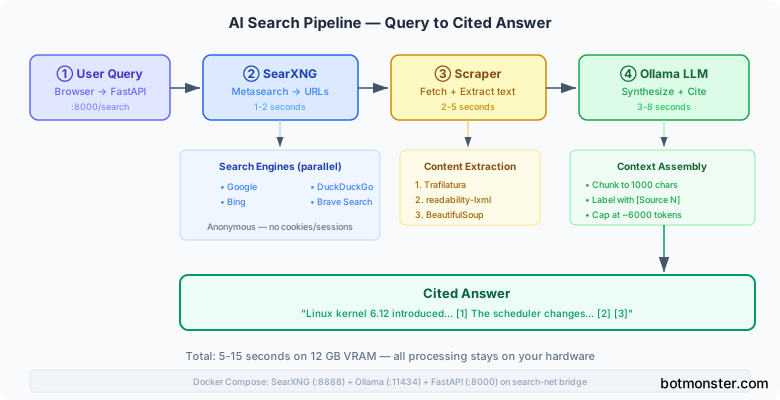
The three components talk over localhost HTTP: SearXNG on port 8888, Ollama on port 11434, and a FastAPI app on port 8000. The browser talks only to FastAPI, which drives the rest.
Deploying SearXNG with Docker Compose
Start with SearXNG, since everything else depends on it. The official Docker image is easy to deploy. Create a docker-compose.yaml with its own internal network:
services:
  searxng:
    image: searxng/searxng:latest
    ports:
      - "8888:8080"
    volumes:
      - ./searxng:/etc/searxng
    networks:
      - search-net

networks:
  search-net:
    driver: bridge
The ./searxng volume mount holds your settings.yml. You must make two changes in that file before anything else works.
First, turn on JSON output format. Without this you can’t query SearXNG from code. It only returns HTML by default:
search:
  formats:
    - html
    - json
Second, turn off the rate limiter. It exists to block abuse on public instances, but you don’t need it on a private deployment:
server:
  limiter: false
For search engines, turn on Google, Bing, DuckDuckGo, Brave Search, and Wikipedia. Turn off social media engines. They tend to surface low-quality results for technical queries. SearXNG ships with about 70 engines and most are off by default. So this is mainly a matter of turning on the ones you want.
Once the container is running, test JSON output directly in a terminal:
curl "http://localhost:8888/search?q=linux+kernel+6.12&format=json" | jq '.results[:3]'You should get back an array with title, url, and content fields for each result. The content field is the search snippet, typically 100-200 characters. That is nowhere near enough text for the LLM to write a solid answer. So the scraper layer comes next.
SearXNG uses little memory, around 150 MB RAM. It does not add real overhead to your server.
Building the Scraper and Chunking Layer
The scraper has one job: fetch URLs and return clean article text. The tricky part is that web pages vary a lot in structure. Some are clean article pages. Others are buried under navigation bars, sidebars, cookie banners, and footer links. Convert that HTML to text the naive way and you get garbage.
Trafilatura handles this well. It is built to find the main content block of a page and drop the clutter around it. That makes it far more reliable than writing custom BeautifulSoup selectors per site. Set up a three-step fallback chain for cases where trafilatura comes up empty:
- Try
trafilatura.extract() - Fall back to
readability-lxmlif that returns empty - Fall back to
BeautifulSoupwithget_text()as a last resort
Fetch URLs in parallel using httpx and asyncio. A 5-second timeout per request keeps slow pages from stalling the whole pipeline:
import asyncio
import httpx
import trafilatura

async def fetch_and_extract(client: httpx.AsyncClient, url: str) -> str:
    try:
        response = await client.get(url, timeout=5.0, follow_redirects=True)
        text = trafilatura.extract(response.text)
        return text or ""
    except Exception:
        return ""

async def scrape_urls(urls: list[str]) -> list[str]:
    headers = {"User-Agent": "Mozilla/5.0 (compatible; ResearchBot/1.0)"}
    async with httpx.AsyncClient(headers=headers) as client:
        tasks = [fetch_and_extract(client, url) for url in urls]
        return await asyncio.gather(*tasks)
After fetching, chunk each page’s text into 1000-character segments with 100-character overlap. The overlap means a sentence split at a chunk boundary still shows up in full in at least one chunk. Prepend each chunk with its source number so the LLM knows which URL to cite:
def chunk_text(text: str, chunk_size: int = 1000, overlap: int = 100) -> list[str]:
    chunks = []
    start = 0
    while start < len(text):
        chunks.append(text[start:start + chunk_size])
        start += chunk_size - overlap
    return chunks

def build_context(scraped_pages: list[str], urls: list[str]) -> str:
    parts = []
    for i, (text, url) in enumerate(zip(scraped_pages, urls), 1):
        if not text:
            continue
        for chunk in chunk_text(text):
            parts.append(f"[Source {i}: {url}]\n{chunk}\n")
    return "\n".join(parts)
Keep the total context under 6000 tokens, about 24 KB of text. This leaves room in an 8K-16K context window for the system prompt, user query, and the answer. Got a model with a larger context window and enough VRAM? You can expand this and pull in more source material.
LLM Synthesis and Citation
Model choice counts less than prompt structure here. Both Qwen 2.5 7B Instruct and Mistral 7B Instruct v0.3 give reliable cited answers at Q4_K_M quantization. If you have the VRAM for something larger, Z.ai’s open coder is the one self-hosters rate highest right now. The system prompt needs to be clear about two things: use only the provided sources, and follow the citation format:
You are a research assistant. Answer the user's question using ONLY the
provided sources. Cite sources inline using [1], [2], etc. where the number
matches the source number in the context. If the sources do not contain enough
information to answer the question, say so. Do not invent information that
is not present in the sources.
Build the user prompt so it keeps the question apart from the source material:
Question: {query}

Sources:
{context}

Provide a comprehensive answer with inline citations.
Call the Ollama API with parameters tuned for factual output:
import httpx

SYSTEM_PROMPT = "..."  # prompt above

async def generate_answer(query: str, context: str) -> str:
    payload = {
        "model": "qwen2.5:7b-instruct-q4_K_M",
        "messages": [
            {"role": "system", "content": SYSTEM_PROMPT},
            {"role": "user", "content": f"Question: {query}\n\nSources:\n{context}"}
        ],
        "options": {
            "temperature": 0.3,
            "num_ctx": 16384,
            "num_predict": 1024
        },
        "stream": False
    }
    async with httpx.AsyncClient() as client:
        response = await client.post(
            "http://localhost:11434/api/chat",
            json=payload,
            timeout=60.0
        )
        return response.json()["message"]["content"]
Temperature 0.3 keeps the output factual without pushing the model into repetitive loops. After you get the response, run a quick pass to strip any citation numbers that go past your real source count. A made-up citation like [8] when you only gave 5 sources is easy to catch with a regex. Remove it before you show the answer to the user.
Here is a typical timing breakdown. SearXNG returns in 1-2 seconds. Parallel scraping takes 2-5 seconds. Generation takes 3-8 seconds, depending on the model and your GPU. The overall 6-15 second window is in line with what Perplexity delivers. Consistency varies more, though, since you scrape real websites rather than a pre-indexed corpus.
The Orchestration Layer and Web Interface
Wire everything into a FastAPI app. The main endpoint takes a query string and drives the three stages:
from fastapi import FastAPI
from pydantic import BaseModel

app = FastAPI()

class SearchRequest(BaseModel):
    query: str

@app.post("/search")
async def search(request: SearchRequest):
    urls, snippets = await query_searxng(request.query)
    pages = await scrape_urls(urls[:5])
    context = build_context(pages, urls[:5])
    answer = await generate_answer(request.query, context)
    return {
        "answer": answer,
        "sources": [{"url": u, "snippet": s} for u, s in zip(urls, snippets)]
    }
Add a streaming endpoint using Server-Sent Events so the browser can show the answer as it generates. The 5-8 second generation window feels much shorter when tokens appear one by one. Use Ollama’s stream: true mode and forward each chunk as an SSE event:
import json
from fastapi.responses import StreamingResponse

@app.post("/search/stream")
async def search_stream(request: SearchRequest):
    urls, snippets = await query_searxng(request.query)
    pages = await scrape_urls(urls[:5])
    context = build_context(pages, urls[:5])

    async def generate():
        sources = [{"url": u, "snippet": s} for u, s in zip(urls, snippets)]
        yield f"data: {json.dumps({'sources': sources})}\n\n"
        async for token in stream_answer(request.query, context):
            yield f"data: {json.dumps({'token': token})}\n\n"

    return StreamingResponse(generate(), media_type="text/event-stream")
The frontend can be a single static HTML file. An input box, a results area, and a source sidebar is all you need. The browser’s built-in EventSource API handles the SSE stream with no JavaScript framework.
For the complete three-service Docker Compose setup:
services:
  searxng:
    image: searxng/searxng:latest
    ports:
      - "8888:8080"
    volumes:
      - ./searxng:/etc/searxng
    networks:
      - search-net

  ollama:
    image: ollama/ollama:latest
    ports:
      - "11434:11434"
    volumes:
      - ollama-data:/root/.ollama
    deploy:
      resources:
        reservations:
          devices:
            - driver: nvidia
              count: 1
              capabilities: [gpu]
    networks:
      - search-net

  app:
    build: .
    ports:
      - "8000:8000"
    depends_on:
      - searxng
      - ollama
    networks:
      - search-net
    environment:
      - SEARXNG_URL=http://searxng:8080
      - OLLAMA_URL=http://ollama:11434

volumes:
  ollama-data:

networks:
  search-net:
    driver: bridge
The depends_on directive makes SearXNG and Ollama start before the app. For production use within a home network, also add a health check against Ollama’s /api/tags endpoint. That way the app waits until the model is loaded before it takes requests.
Running the Stack
With all three services running, pull your chosen model into Ollama once:
docker exec -it <ollama-container> ollama pull qwen2.5:7b-instruct-q4_K_MThen point your browser at http://localhost:8000. Type a question. SearXNG fires off requests to many search engines in parallel. The scraper fetches real page content from the top results. Within 10-15 seconds you get an answer with numbered citations that link back to the original sources.
The setup gives you a real privacy edge over cloud AI search tools. Your queries go to SearXNG, which passes them to public search engines as anonymous requests. There is no stored session cookie and no account tied to them. The LLM work, the part that reads your question and writes an answer, happens fully on your hardware. Nothing about that step touches an external service. Handling everything on your own hardware also keeps you clear of much that the AI Act’s data rules demand.
One practical note: SearXNG can hit rate limits on individual search engines, mostly when you run many queries in quick succession. Spreading requests across more enabled engines lowers the chance that any single engine throttles you. If you see partial results on some queries, check the SearXNG admin interface at http://localhost:8888/admin to see which engines are erroring out.
For follow-up questions, store the last two or three query-answer pairs in the session and add them to the LLM prompt. Most 7B models can handle a few turns of conversation without losing the thread. That makes the system useful for back-and-forth research, not just one-off lookups. For memory that outlasts a single session, an open source AI tutor writes its notes to disk so you can read and correct what it learned. You can also add a simple Redis cache keyed on query hashes to skip re-scraping and re-generating for repeated queries. This helps when several household members share the same instance.
Extending the Stack
Once the basic pipeline runs well, a few additions improve day-to-day use without much extra work.
A browser bookmarklet that sends selected text to your local search endpoint is handy for quick lookups while reading. A simple fetch() call to http://localhost:8000/search with the selected text as the query body is all it takes. On mobile, you can expose the FastAPI app through a local reverse proxy or a WireGuard tunnel, then add the URL as a home screen shortcut. Coding agents need the same lookup in a different shape, and wigolo packages keyless search, fetch and crawl as one local MCP server.
If answer quality on broad or vague queries feels uneven, the most direct fix is a reranking step after scraping. For a more advanced approach, a self-directed retrieval loop lets the LLM decide on its own which sources to query and whether the results are enough before it writes an answer. Instead of passing all chunks in document order, score each chunk against the query with a small cross-encoder model. The ms-marco-MiniLM model works well and runs fully on CPU. Sort by score before you assemble the context block. This costs a few hundred milliseconds but clearly improves results when the top search hits mix on-topic and off-topic content.
For households where several people use the same instance, basic HTTP authentication on the FastAPI app blocks unwanted external access. A single HTTPBasic dependency added to your route handlers is enough for a local network deployment. Pair it with nginx as a reverse proxy if you want TLS.