 Botmonster Tech
Structured output from LLMs: JSON schemas and the Instructor library

The Instructor library patches LLM client libraries to return validated Pydantic models instead of raw text. It does this with JSON schema enforcement in the system prompt, auto retries on validation failure, and native structured output modes where the provider supports them. It works with OpenAI, Anthropic, Ollama, and any OpenAI-compatible API. You define your output as a Python class and get back typed, validated data. No regex parsing, no json.loads() wrapped in try/except, no manual type casting.
The Problem with Free-Text LLM Output
LLMs return strings. Most production apps need structured data: a JSON object with specific fields, typed values, and checked constraints. Bridging this gap is one of the most common pain points in LLM apps. The naive fixes tend to fail at the worst times.
The most common approach prompts the model to return JSON and parses it with json.loads(). In practice this fails 5-15% of the time. The model wraps the JSON in markdown code fences, adds trailing commas, drops quotes around keys, or prepends a line like “Here is the JSON you requested:”. Every one of these breaks the parser.
The next approach is regex extraction: write a pattern to find the JSON block inside the response. This works for simple cases. But it breaks on nested objects and becomes unmaintainable fast. A schema with more than two levels of nesting will defeat most regex parsers in the end.
Even when JSON parses correctly, type safety is not a given. The model might return "count": "twelve" instead of "count": 12. It might drop a required field, or add unexpected keys your code can’t handle. If you feed this data into a database or another service, one bad response can corrupt records or crash the pipeline.
The cost compounds. Without structured output, you need manual error handling, retry logic, and fallback parsing for every LLM call that returns structured data. That’s 50-100 lines of boilerplate per endpoint. The code does nothing except cover for the model’s quirks. Free-text output also makes it harder to catch and fix LLM hallucinations in production. Schema validation gives you a clear checkpoint that raw text never provides.
How Instructor Works Under the Hood
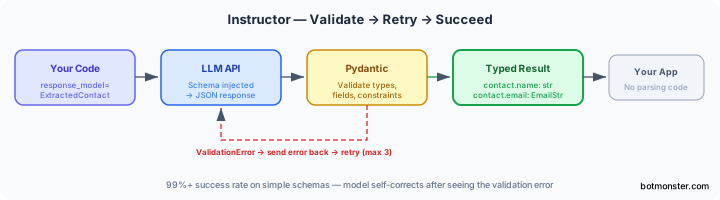
Instructor solves this with a three-layer approach that sits between your code and the LLM API.
Layer 1, schema injection: Instructor turns your Pydantic model into a JSON schema. It injects that schema into the system prompt or the API’s native response_format parameter, based on the mode. The model gets clear, machine-built instructions about what structure to produce.
Layer 2, response parsing: The library grabs the raw API response, pulls out the JSON content (handling code fences, markdown wrappers, and partial responses), and tries to parse it into your Pydantic model.
Layer 3, validation and retry: If Pydantic validation fails on wrong types, missing fields, or constraint violations, Instructor sends the validation error back to the model as a follow-up message and asks it to fix the output. It retries up to max_retries times (default 3). In practice, GPT-4o mini and Claude Haiku both correct their output on the first retry once they see the real error message.
Instructor supports several operating modes:
TOOLS: uses the API’s native function/tool-calling interface. Best for OpenAI and Anthropic models.JSON: usesresponse_format: {"type": "json_object"}. Works everywhere but needs the schema in the prompt.MD_JSON: pulls JSON from markdown code blocks. A fallback for older models.
The right mode depends on your provider. For OpenAI and Anthropic, TOOLS mode is the most reliable. For Ollama and other local model servers, JSON mode works better. Most local models don’t support the full function-calling format.
The Pydantic model is the single source of truth. Field descriptions feed into the schema that guides the LLM. Validators enforce business rules. Type hints make sure your code gets exactly the types it expects. You write one class and get type safety, validation, and LLM guidance all at once.
Getting Started: Installation and First Structured Call
Install Instructor and Pydantic:
pip install instructor pydanticInstructor v1.7+ requires Python 3.9+ and has no heavy dependencies beyond Pydantic v2.
Define your output model:
from pydantic import BaseModel, EmailStr, Field
from typing import Optional

class ExtractedContact(BaseModel):
    name: str
    email: EmailStr
    phone: Optional[str] = None
    company: str = Field(description="The company or organization they work for")
Patch your client and make a call:
import instructor
from openai import OpenAI

client = instructor.from_openai(OpenAI())

contact = client.chat.completions.create(
    model="gpt-4o-mini",
    response_model=ExtractedContact,
    messages=[{
        "role": "user",
        "content": "Extract contact info: John Smith, john@acme.com, works at Acme Corp"
    }]
)

print(contact.name)     # "John Smith"
print(contact.email)    # "john@acme.com"
print(contact.company)  # "Acme Corp"
The returned contact is a fully typed Pydantic object. contact.email is checked as a proper email address. contact.phone is None if the input doesn’t contain one. No JSON parsing, no type casting, no error handling needed at the call site.
For Anthropic, swap the client patch:
import instructor
from anthropic import Anthropic

client = instructor.from_anthropic(Anthropic())

contact = client.messages.create(
    model="claude-3-5-haiku-latest",
    max_tokens=1024,
    response_model=ExtractedContact,
    messages=[{"role": "user", "content": "..."}]
)
You can add field-level validation with Pydantic validators to enforce business rules the LLM alone can’t guarantee:
from pydantic import field_validator
import re

class ExtractedContact(BaseModel):
    name: str
    email: EmailStr
    phone: Optional[str] = None

    @field_validator("phone")
    @classmethod
    def validate_phone(cls, v):
        if v is not None and not re.match(r"^\+?[\d\s\-\(\)]{7,15}$", v):
            raise ValueError("Invalid phone number format")
        return v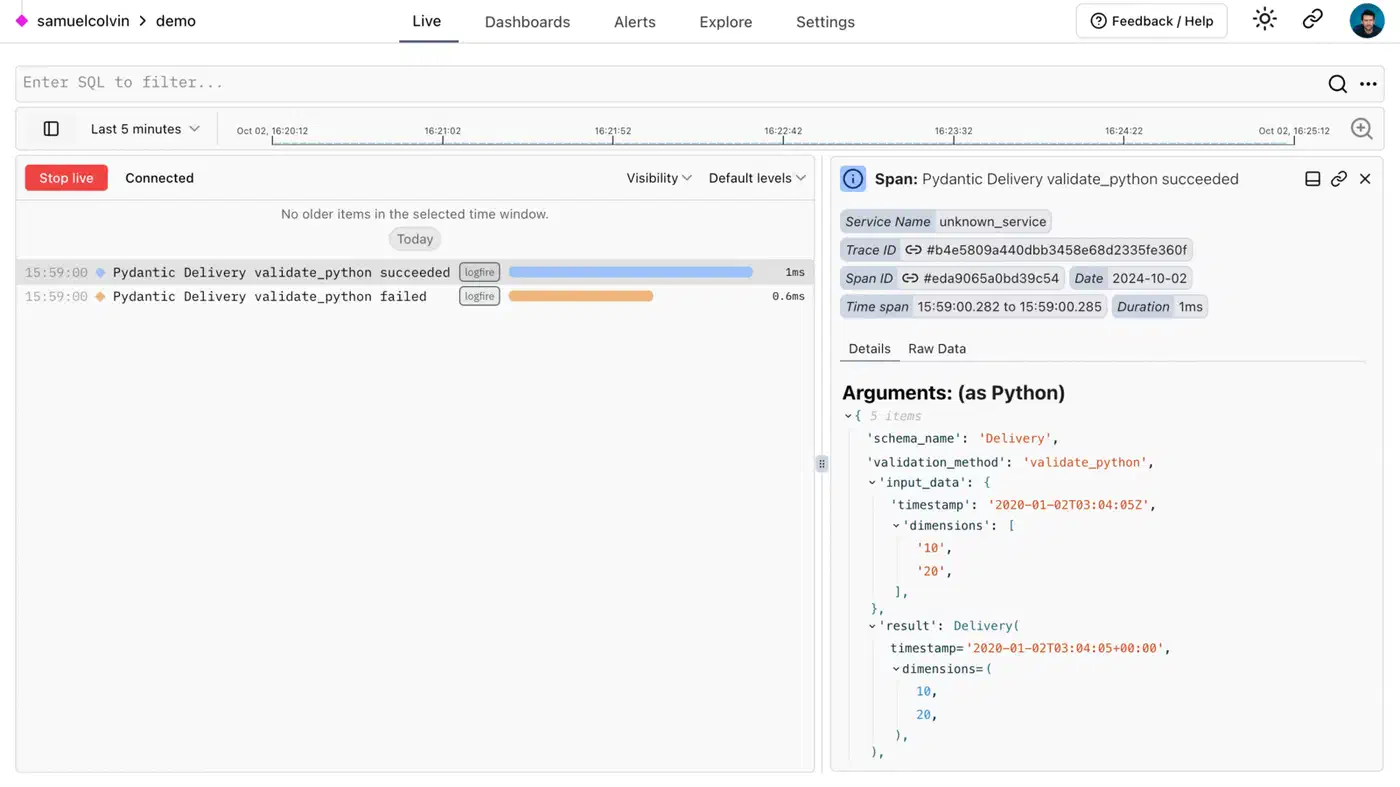
When the validator raises, Instructor catches it, formats the error message, sends it back to the model, and retries. The model sees something like “phone: Invalid phone number format, please correct the value” and adjusts its output to match.
Advanced Patterns: Lists, Nested Models, and Streaming
Extracting lists: Use response_model=list[ExtractedContact] to get the model to return an array of validated objects. Instructor handles the schema wrapping for you. This helps with batch extractions: process an email thread and get back a list of every contact mentioned.
Nested models: Define models that reference other models:
from decimal import Decimal

class Company(BaseModel):
    name: str
    tax_id: Optional[str] = None

class LineItem(BaseModel):
    description: str
    quantity: int
    unit_price: Decimal

class Invoice(BaseModel):
    vendor: Company
    line_items: list[LineItem]
    total: Decimal
    currency: str = "USD"
The JSON schema is built recursively. The LLM then produces nested JSON that Pydantic checks at every level. For GPT-4o and Claude Sonnet, deep nested schemas like this work reliably on the first try with TOOLS mode.
Constrained choices with Literal and Enum:
from typing import Literal

class TicketClassification(BaseModel):
    category: Literal["billing", "technical", "feature-request", "other"]
    urgency: Literal["low", "medium", "high"]
    summary: str
The Literal constraint appears in the schema. The model then picks from your set options, not whatever synonym it prefers. This is important when category values feed into routing logic downstream: “BILLING”, “billing issue”, and “payment problem” all become "billing". A newer class of model drops the text step altogether. A decision model like Jev hands back the pick and a probability, so there is no JSON to validate.
Chain of thought with hidden fields: Add a reasoning field that you discard after the call:
class ExtractedSentiment(BaseModel):
    reasoning: str = Field(
        description="Step-by-step reasoning for the classification"
    )
    sentiment: Literal["positive", "negative", "neutral"]
    confidence: float = Field(ge=0.0, le=1.0)
The model fills out reasoning before it commits to sentiment. On hard or unclear inputs, this lifts accuracy by a clear margin. The model has to think before it produces its final answer. Discard reasoning in your response handling if you don’t need it downstream.
Streaming partial results: For long extractions where you want progressive UI updates, use create_partial:
for partial_contact in client.chat.completions.create_partial(
    model="gpt-4o-mini",
    response_model=ExtractedContact,
    messages=[...]
):
    if partial_contact.name:
        print(f"Name so far: {partial_contact.name}")
Fields stay None until the model has generated them. As each field arrives, you can update a UI or pass partial data to downstream consumers.
Range constraints with Annotated: Use Annotated with Field for numeric range constraints:
from typing import Annotated

class ProductReview(BaseModel):
    rating: Annotated[int, Field(ge=1, le=5, description="Rating from 1 to 5")]
    summary: str
    would_recommend: bool
The description guides the model and Pydantic enforces the constraint as a safety net.
Using Instructor with Ollama and Local Models
For local model inference, Ollama exposes an OpenAI-compatible API. Instructor connects to it with a custom base URL:
import instructor
from openai import OpenAI

client = instructor.from_openai(
    OpenAI(
        base_url="http://localhost:11434/v1",
        api_key="ollama"  # required by the client library, not checked by Ollama
    ),
    mode=instructor.Mode.JSON
)

contact = client.chat.completions.create(
    model="qwen2.5:7b-instruct",
    response_model=ExtractedContact,
    messages=[{
        "role": "user",
        "content": "Extract: Jane Doe, jane@startup.io, CTO at StartupIO"
    }],
    temperature=0
)
A few things are worth getting right when you use local models:
Use instructor.Mode.JSON, not TOOLS. Most local models don’t support the full function-calling format. Ollama’s native JSON mode limits generation to valid JSON tokens at the grammar level. That is more reliable than prompt-only enforcement. The Outlines library applies the same token masking to a full Pydantic schema, not just JSON syntax.
Set temperature=0 for extraction tasks. Extraction doesn’t gain from creativity. Higher temperatures raise schema violations. Those eat tokens on retries and cut overall throughput.
Model choice is important. Qwen 2.5 7B Instruct and Mistral 7B Instruct v0.3 follow JSON schemas most reliably in practice. Smaller models at 3B parameters and below struggle with all but the simplest flat schemas. If you need a 3B model for speed, keep schema depth to one level and fields to five or fewer.
Keep schemas small for local models. Flat objects with five to eight fields and basic types (str, int, float, bool, Optional) work reliably. Deep schemas with three or more levels may need max_retries=5 to succeed each time. For hard schemas, break the extraction into two calls. A fast first call handles simple fields. A slower second call handles nested structure, using the first call’s output as context.
Speed in practice: A structured extraction call to Qwen 2.5 7B via Ollama on decent hardware (RTX 3080 or better) finishes in 1-3 seconds for simple schemas, validation included. That is fast enough to batch-process hundreds of documents per minute. It is more than enough for most offline data extraction pipelines, such as pulling decisions and action items out of the transcript in a local meeting transcription pipeline.
Handling failure after max retries: If all retries run out and validation still fails, Instructor raises a ValidationError. Catch it and decide what to do. Log the raw response for manual review, fall back to a stronger model, or return a default. Don’t silently drop the error:
from pydantic import ValidationError

try:
    result = client.chat.completions.create(
        model="qwen2.5:7b-instruct",
        response_model=ExtractedContact,
        max_retries=3,
        messages=[...]
    )
except ValidationError as e:
    # Log the failure, fall back, or escalate
    print(f"Extraction failed after retries: {e}")
    result = None
Together, Pydantic’s schema generation, Instructor’s retry loop, and Ollama’s grammar-bound JSON mode get you to 99%+ success rates on simple schemas with local 7B models. For hard schemas or edge cases that keep failing, switch to a larger model or a cloud API for those specific documents. Don’t just tune retry counts upward.
Instructor doesn’t change the programming model for LLM calls. You still write messages and get back a response. It just makes the contract between your code and the model precise. You say exactly what structure you need, the model produces it, and Pydantic enforces it. The result is LLM code that handles failures in a clean, repeatable way rather than through ad-hoc string surgery.
Writing Field Descriptions That Actually Help
Field descriptions are part of the schema sent to the model. They’re not just for human readers. They actively guide extraction quality. A few habits make a real difference:
Be specific about format and source. Instead of description="The date", write description="The invoice date in ISO 8601 format (YYYY-MM-DD)". Instead of description="The amount", write description="The total amount due, as a number without currency symbols".
Clear up unclear cases. If a document might hold several dates (issue date, due date, payment date), the description is where you tell the model which one to pick: description="The payment due date, not the invoice issue date".
State what to return when the value is absent. For optional fields: description="The purchase order number if present, otherwise None". This stops the model from inventing a plausible-looking value.
Use examples for tight formats: description="Two-letter ISO 3166-1 country code, e.g. US, GB, DE". Short examples cut ambiguity faster than long prose.
Good descriptions cut retry rates and lift first-try accuracy. This helps most with local models, which have less instruction-following skill baked in. They’re also self-documenting. A Pydantic model with good field descriptions is easier to read and maintain than one with bare type hints.
When you build a new extraction schema, test with a sample document and print the raw API response before you plug in Instructor. If the model produces the right fields but wrong formats, the fix is almost always a better description, not a more complex validation rule.