 Botmonster Tech
Route Ollama, vLLM, OpenAI through one LiteLLM API


You can unify access to Ollama, vLLM, cloud providers like OpenAI, Anthropic, and Google, plus custom model servers behind one OpenAI-compatible endpoint using LiteLLM Proxy
. LiteLLM is a reverse proxy. It maps the standard /v1/chat/completions request to each provider’s native API. From one YAML file it handles auth, model routing, load balancing, fallbacks, rate limits, and spend tracking. Your app calls one endpoint with one key, and LiteLLM picks the right backend. You can swap models, add providers, or run A/B tests without touching app code.
The LLM space in 2026 is split across APIs that don’t talk to each other. Most teams run more than one model, so they have to babysit different SDKs, auth flows, and request shapes. A unified gateway moves that pain out of your app and into the infra layer.
Why You Need a Unified LLM Gateway
The core issue is API drift. OpenAI uses messages with role and content fields. Anthropic uses messages but pulls system out into its own slot. Google Gemini uses contents with parts. Each provider wants different SDK code, different errors, and different retry logic. Talk to three providers and you keep three sets of glue code alive.
Model fit is the real reason teams reach for more than one provider. Claude Opus 4 is strong on tricky reasoning. GPT-4o is quick on tool calls. Llama 3.3 70B via Ollama gives you free local inference. Gemini 2.5 Flash chews through a million tokens of context. No one provider wins on every job, so teams stitch APIs together.
Without a proxy layer, every new model means code changes. You update imports, rewrite prompts, add new error paths, and juggle more keys. That kind of work piles up and leaves you with brittle code.
A unified gateway gives you:
- A single endpoint for all models
- Automatic request format translation between provider APIs
- Centralized API key management
- Request and response logging in one place
- Spend tracking per model, per user, and per team
- Fallback routing when a provider has an outage
There are options other than LiteLLM. OpenRouter is cloud-hosted, but it adds cost and latency since traffic runs through their network. Portkey is a SaaS product with a free tier. You could roll a custom Nginx or Caddy reverse proxy, but those can’t rewrite provider-specific request bodies. LiteLLM is the most popular self-hosted open-source pick, with over 18,000 GitHub stars. It solves the format-rewrite problem that plain reverse proxies can’t.
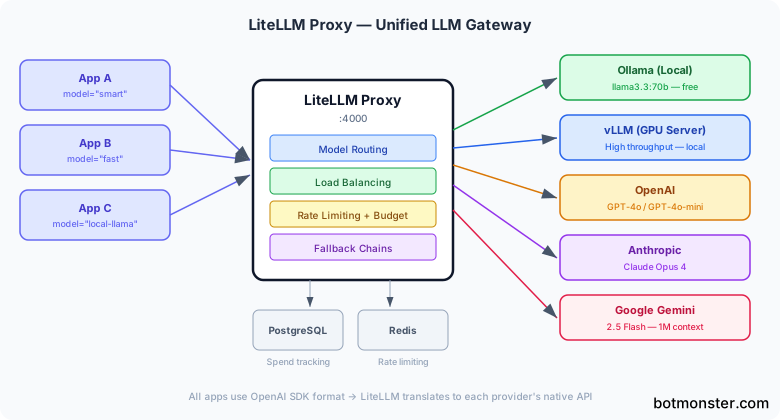
The day-to-day setup for most teams looks like this. LiteLLM Proxy runs on a small VPS or a Kubernetes pod. It fronts Ollama for local models and vLLM for high-throughput GPU work. Two or three cloud providers sit behind it as fallbacks. Once the gateway is in place, it becomes the base for downstream jobs like agentic RAG , which need to pick a model per query type.
Setting Up LiteLLM Proxy
Install LiteLLM Proxy with pip on Python 3.10 or later:
pip install 'litellm[proxy]'Or use the official Docker image, which bundles all provider dependencies:
docker pull ghcr.io/berriai/litellm:main-latestThe core of the setup is litellm_config.yaml. Each entry maps a model_name (your alias) to a litellm_params block. That block names the real model, API key, and base URL. Here is a working config with Ollama, vLLM, OpenAI, and Anthropic.
model_list:
  - model_name: "local-llama"
    litellm_params:
      model: "ollama/llama3.3:70b-instruct-q4_K_M"
      api_base: "http://ollama-host:11434"

  - model_name: "fast"
    litellm_params:
      model: "openai/gpt-4o-mini"
      api_key: "os.environ/OPENAI_API_KEY"

  - model_name: "smart"
    litellm_params:
      model: "anthropic/claude-opus-4-20250514"
      api_key: "os.environ/ANTHROPIC_API_KEY"

  - model_name: "vllm-llama"
    litellm_params:
      model: "openai/meta-llama/Llama-3.3-70B-Instruct"
      api_base: "http://vllm-host:8000/v1"
      api_key: "none"

  - model_name: "long-context"
    litellm_params:
      model: "gemini/gemini-2.5-flash"
      api_key: "os.environ/GEMINI_API_KEY"

general_settings:
  master_key: "os.environ/LITELLM_MASTER_KEY"
The model_name field is what your app sees. The model field uses a provider prefix (ollama/, openai/, anthropic/, gemini/) so LiteLLM knows which API shape to use. The os.environ/ refs keep secrets out of the config file.
Start the proxy for development:
litellm --config litellm_config.yaml --port 4000 --detailed_debugFor production, use multiple Uvicorn workers:
litellm --config litellm_config.yaml --port 4000 --num_workers 4Now connect your app. Point the OpenAI base URL at your LiteLLM proxy and use the master key to sign in. Existing OpenAI SDK code works unchanged.
from openai import OpenAI

client = OpenAI(
    base_url="http://localhost:4000",
    api_key="your-litellm-master-key"
)

response = client.chat.completions.create(
    model="smart",  # Routes to Claude Opus 4
    messages=[{"role": "user", "content": "Explain container networking"}]
)
Model aliasing is one of the most useful features. Your app asks for model="fast" and LiteLLM routes it to GPT-4o-mini. Ask for model="smart" and it goes to Claude Opus 4. Ask for model="local-llama" and it hits your Ollama box. Swapping the real model behind any alias is a one-line YAML change. No app code moves. This split is a big help when you build multi-step AI agent workflows, where each agent node may want a different model tuned for speed, cost, or smarts.
In production, run LiteLLM next to PostgreSQL for spend tracking and virtual keys, plus Redis for rate limits and cache. A Docker Compose file ties it all together.
version: "3.9"
services:
  litellm:
    image: ghcr.io/berriai/litellm:main-latest
    ports:
      - "4000:4000"
    volumes:
      - ./litellm_config.yaml:/app/config.yaml
    environment:
      - DATABASE_URL=postgresql://llmuser:llmpass@db:5432/litellm
      - REDIS_HOST=redis
      - LITELLM_MASTER_KEY=${LITELLM_MASTER_KEY}
      - OPENAI_API_KEY=${OPENAI_API_KEY}
      - ANTHROPIC_API_KEY=${ANTHROPIC_API_KEY}
    command: ["--config", "/app/config.yaml", "--port", "4000", "--num_workers", "4"]
    depends_on:
      - db
      - redis

  db:
    image: postgres:16
    environment:
      POSTGRES_USER: llmuser
      POSTGRES_PASSWORD: llmpass
      POSTGRES_DB: litellm
    volumes:
      - pgdata:/var/lib/postgresql/data

  redis:
    image: redis:7-alpine

volumes:
  pgdata:
Load Balancing, Fallbacks, and Routing Strategies
A unified gateway is only as good as its routing logic. LiteLLM ships with a few ways to spread traffic and handle failures.
Load Balancing Across Deployments
Load balancing works by listing more than one deployment under the same model_name. If you have three OpenAI API keys or two vLLM boxes, list them all under one alias. LiteLLM spreads requests across them. Built-in strategies include simple_shuffle (random), least_busy (fewest in-flight requests), and latency_based (sends to the backend that was fastest lately).
router_settings:
  routing_strategy: "latency-based-routing"

model_list:
  - model_name: "gpt4o"
    litellm_params:
      model: "openai/gpt-4o"
      api_key: "os.environ/OPENAI_KEY_1"

  - model_name: "gpt4o"
    litellm_params:
      model: "openai/gpt-4o"
      api_key: "os.environ/OPENAI_KEY_2"
Fallback Chains
Fallback chains say what happens when a provider fails. Use the fallbacks key to set ordered backups.
router_settings:
  fallbacks:
    - model_name: "smart"
      fallback_models: ["gpt4o", "local-llama"]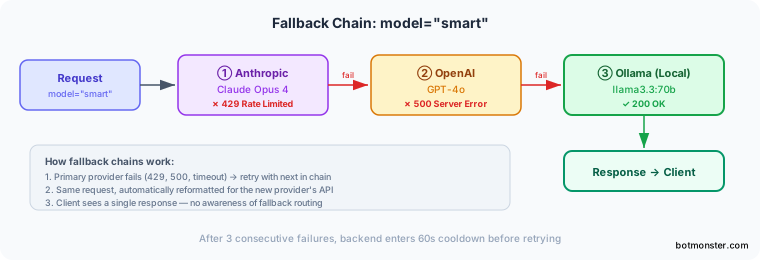
If Anthropic returns a 429, a 500, or times out, LiteLLM quietly retries the same request against GPT-4o. If that also fails, it tries Ollama. The client sees one response and has no clue a fallback ran.
You can also set cooldown windows so a sick backend doesn’t drag the whole system down. Set allowed_fails: 3 and cooldown_time: 60. After three failures in a row, that backend drops out of rotation for 60 seconds before LiteLLM tries it again.
Advanced Routing: Context Windows, Tags, and Cost
Context-window routing handles overflow without an error. Set context_window_fallbacks. If a request blows past GPT-4o’s 128K context limit, it shifts to Gemini 2.5 Flash’s 1M window instead.
Tag-based routing covers compliance needs. Tag deployments with labels like eu-region or hipaa. Then pass metadata: {"tags": ["hipaa"]} in the request. LiteLLM only sends it to backends with those tags. Helpful for data-residency and audit rules.
Cost-based routing with lowest_cost tracks per-token prices and picks the cheapest model that still meets the request. It checks context length, streaming support, and tool-calling, then picks the winner.
Connecting Local Model Servers: Ollama and vLLM
Most teams want some local inference, whether for cost, speed, or privacy. The two main picks are Ollama for ease of use and vLLM for production throughput. Local inference also unlocks fully private setups. A local RAG knowledge base backed by Ollama can route queries through LiteLLM and never leak data off your boxes.
Ollama for Local Development
Ollama is the simpler path. Start it listening on all interfaces:
OLLAMA_HOST=0.0.0.0:11434 ollama servePull a model:
ollama pull llama3.3:70b-instruct-q4_K_MThen add it to your LiteLLM config with the ollama/ prefix and the Ollama server address as api_base. Ollama handles GGUF quantizations natively
, so you can run shrunk-down models with no extra tooling.
vLLM for Production Throughput
vLLM is built for throughput. Launch it with tensor parallelism across multiple GPUs:
vllm serve meta-llama/Llama-3.3-70B-Instruct \
  --tensor-parallel-size 2 \
  --gpu-memory-utilization 0.90
This exposes an OpenAI-compatible endpoint on port 8000. Add it to LiteLLM with the openai/ prefix since vLLM already speaks the OpenAI format. Set api_base to http://vllm-host:8000/v1.
For production work, the gap between the two is big. vLLM does continuous batching, so it gets 10 to 50 times more throughput than Ollama under concurrent load. It also runs tensor parallelism across many GPUs and uses speculative decoding for faster output. Ollama is a better fit for single-user dev and test work.
For shrunk-down models on vLLM, use AWQ or GPTQ checkpoints from HuggingFace with the --quantization awq flag. Ollama handles quantization through its built-in GGUF support.
A workable GPU split: pin your main GPU or GPUs to vLLM for production traffic. Run Ollama on a side GPU or on CPU for dev and test. Then use LiteLLM tags to route each request to the right backend.
Set up health checks in LiteLLM with health_check_interval: 30 so it pings each backend’s /health or /v1/models endpoint every 30 seconds. Sick backends drop out of the pool until they come back.
Authentication, Rate Limiting, and Spend Tracking
A shared LLM gateway needs access control, more so when many devs, teams, or apps share the same proxy.
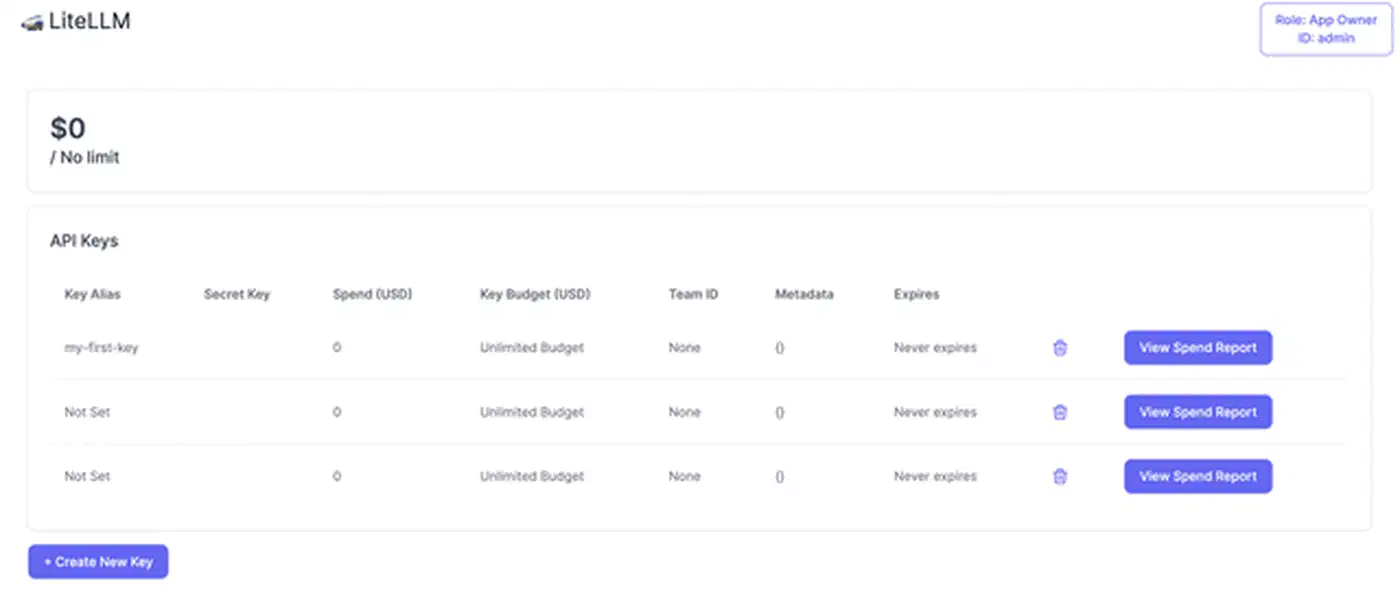
LiteLLM’s virtual key system lets you mint per-user or per-team API keys through the admin API. A POST /key/generate call takes fields like models (which models this key may use), max_budget, rpm_limit (requests per minute), and tpm_limit (tokens per minute). Users sign in to LiteLLM with their virtual key, and LiteLLM swaps in the real provider keys inside. No one outside the infra team ever sees the real keys.
curl -X POST "http://localhost:4000/key/generate" \
  -H "Authorization: Bearer your-master-key" \
  -H "Content-Type: application/json" \
  -d '{
    "models": ["smart", "fast"],
    "max_budget": 50.0,
    "budget_duration": "monthly",
    "rpm_limit": 60,
    "tpm_limit": 100000,
    "metadata": {"team": "backend-engineering"}
  }'
Rate limiting uses Redis-backed sliding window counters. When a virtual key blows past its rpm_limit or tpm_limit, LiteLLM sends back a normal 429. This stops any one user or app from chewing through your whole provider quota.
Budgets cap spend per key. Set max_budget: 50.00 with budget_duration: monthly. LiteLLM tracks costs using each provider’s per-token pricing. Once the budget is spent, the proxy blocks more calls until the next billing window. This kills off the spreadsheet tracking most teams start with and grow out of.
The spend dashboard at http://proxy:4000/ui shows real-time spend by model, user, and team. PostgreSQL backs the history, so you can see trends and spot which models or teams drive cost.
Logging and Audit
Request logging plugs into observability tools. Turn on callbacks to Langfuse or Lunary in the config to send each request and response pair. You get prompt traces, latency stats, and quality checks.
litellm_settings:
  success_callback: ["langfuse"]

environment_variables:
  LANGFUSE_PUBLIC_KEY: "os.environ/LANGFUSE_PUBLIC_KEY"
  LANGFUSE_SECRET_KEY: "os.environ/LANGFUSE_SECRET_KEY"
Each request’s metadata also lands in the LiteLLM_SpendLogs PostgreSQL table: model used, tokens spent, latency, user, and status. You can query that via the admin API or direct SQL, which covers most compliance reports.
Security Considerations: The March 2026 Supply Chain Attack
A central LLM gateway turns the proxy into a juicy target. It holds API keys for every provider, sees all traffic, and reads every prompt and response. The March 2026 LiteLLM supply chain incident shows what that risk looks like in real life.
On March 24, 2026, attackers used stolen maintainer logins to push bad LiteLLM builds (v1.82.7 and v1.82.8) to PyPI. The break-in likely came in through a Trivy dependency used in LiteLLM’s CI/CD scan job. The bad code planted a credential stealer in proxy_server.py. It grabbed env vars, SSH keys, cloud creds (AWS, GCP, Azure), Kubernetes tokens, and database passwords. Stolen data was encrypted and sent to domains that had nothing to do with LiteLLM. The bad packages were live for about 40 minutes before PyPI pulled them.
Users on the official LiteLLM Proxy Docker images with pinned versions were safe. The attack hit anyone who ran pip install litellm without a version pin in that window, built Docker images with loose LiteLLM versions, or pulled it in as a transitive dep.
The LiteLLM team pulled the bad packages from PyPI, rotated maintainer creds, and brought in Google Mandiant for forensics. By March 30 they shipped a clean v1.83.0 from a rebuilt CI/CD pipeline and rolled out cosign image signing for verifiable Docker builds.
The follow-up security hardening in April 2026
closed a few more holes in v1.83.0. A critical OIDC cache collision (CVE-2026-35030) let attackers forge tokens by reusing JWT header prefixes. Fix: switch cache keys from token[:20] to sha256(token). A privilege escalation (CVE-2026-35029) let any signed-in user edit runtime config via /config/update. Fix: require the proxy_admin role. Password hashing moved from unsalted SHA-256 to scrypt with random salts, and hashes no longer leak into API responses. LiteLLM also launched a bug bounty paying $1,500 to $3,000 for critical supply chain bugs and hired Veria Labs for third-party reviews.
The takeaways for anyone self-hosting LiteLLM Proxy:
- Pin your versions. Never run an unpinned
pip install litellmin a production Dockerfile or CI job. Use exact pins and check the hashes. - Use the official Docker images. They are now cosign-signed and were not hit by the supply chain attack.
- Keep LiteLLM updated. Run v1.83.0 or later to pick up the fixes, more so if you use JWT or OIDC sign-in.
- Rotate creds early. If you ran v1.82.7 or v1.82.8 during the window, rotate every secret the proxy could see: provider API keys, database passwords, cloud creds, and SSH keys.
- Box in the proxy. Run LiteLLM in a network slice with tight outbound rules. It needs to reach your LLM providers and nothing else. Egress filtering would have blocked the bad domains in this attack.
No software is safe from supply chain attacks, and LiteLLM was open about what went wrong. Still, the event shows that a unified LLM gateway is a key piece of infra. Treat it like any other production system that holds creds. Beyond supply chain risk, the prompt injection and data leak vectors specific to LLM applications need their own guardrails at the app layer.
Deployment Path and Overhead
The usual rollout path: start with the Docker Compose stack (LiteLLM, PostgreSQL, Redis), wire two or three cloud providers into the YAML file, add Ollama as a local backend, and mint virtual keys for each team or app. As use grows, add vLLM for heavy throughput, set up fallback chains between providers, and put budget caps on each team.
LiteLLM itself adds about 5 to 15 milliseconds per request. That is tiny next to model inference times, which run from hundreds of milliseconds to several seconds.
What makes this setup pay off is that model choice is a config tweak, not a code change. When a new model lands or a provider has an outage, you edit a YAML file and reboot the proxy. Your app code, your SDKs, your prompt templates: none of them change. That split between app logic and model infra is what keeps a multi-LLM setup sane as the model count and team count grow. Pair this infra layer with output checks for hallucinations and you cover the two most common failure modes once you move past a prototype.