 Botmonster Tech
Clone your voice with Coqui TTS: 5 minutes to custom speech

You can clone your own voice with Coqui TTS using just 5 minutes of recorded audio, all on your own hardware. The steps are simple. Record clean audio. Turn it into a training set. Fine-tune an XTTS v2 or VITS model. Export the result for real-time use. On a modern GPU like the RTX 5070 with 12 GB of VRAM, fine-tuning takes 2 to 4 hours. The output sounds natural and keeps the target voice’s timbre, pacing, and accent.
What follows covers the full path: picking a model, recording audio, training, and shipping your custom voice.
Coqui TTS in 2026: Current State and Alternatives
Coqui the company shut down in late 2023. The open-source project lived on through community work. The original coqui-ai/TTS repo is archived on GitHub but still installs fine. The most active fork comes from Idiap Research Institute. It tracks Python 3.12+ and PyTorch 2.5+.
The flagship model is XTTS v2. It is a multi-speaker, multi-lingual TTS model. It can clone a voice from a 6-second clip with no fine-tuning at all (zero-shot mode). Fine-tuning with your own data gives much better results. The older VITS model (Variational Inference with adversarial learning for Text-to-Speech) is a single-speaker design. It needs more data, 30 minutes or more, but yields top quality for one dedicated voice.
Other options include Bark from Suno, StyleTTS2, Fish Speech, and OpenVoice. Hosted AI voice generators like ElevenLabs beat all of them on quality, but they meter every character and keep your voice on their servers. Still, Coqui TTS with XTTS v2 hits the best mix of cloning quality, training speed, and ease of use on consumer gear. If you also need speech-to-text next to your custom voice, the same fine-tuning idea works for Whisper. Our guide on fine-tuning Whisper for domain-specific speech recognition walks through LoRA adapters and dataset prep for the transcription side.
Installation is simple:
pip install TTSOr from the community fork:
pip install git+https://github.com/idiap/coqui-ai-TTS.gitVerify the installation by listing available pre-trained models:
tts --list_modelsA quick note on licensing. Coqui TTS itself ships under MPL-2.0. The XTTS v2 model weights carry a non-commercial Coqui Public Model License. If you plan to sell a product, check the license terms with care. VITS models you train from scratch on your own data are yours to use however you want.
Recording and Preparing Your Voice Dataset
The quality of your cloned voice rides almost fully on the quality of your training audio. Garbage in, garbage out hits harder here than almost anywhere else in machine learning.
Recording Equipment and Environment
A USB condenser mic like the Blue Yeti or Audio-Technica AT2020USB+ in a quiet room works fine. Skip laptop mics and Bluetooth headsets. They add too much noise and compression. If you don’t have a treated space, record inside a closet or hang blankets around your desk. The goal is to cut reverb and background hiss. On Linux, configure your audio interface for low-latency recording to capture clean samples with no dropouts or buffer artifacts.
Record in 44.1 kHz or 48 kHz, 16-bit WAV, mono. The training pipeline resamples to 22.05 kHz inside. Starting with higher quality keeps detail that helps during downsampling.
Session Guidelines
Read scripts that cover a wide range of phonemes and sentence shapes. Speak in your normal voice and at your normal pace. Don’t whisper or shout. Take a break every 15 to 20 minutes to keep your energy steady. Vocal fatigue shifts your voice traits in ways that confuse training.
For scripts, use a balanced corpus like the Harvard Sentences or CMU Arctic prompts. If the voice needs to handle technical terms for your use case, add that vocabulary in. Aim for 100 to 200 sentences. That gives you about 5 to 15 minutes of audio.
Preprocessing Pipeline
After recording, split your audio into one sentence per WAV file. You can use Audacity’s “Silence Finder” or do it in Python:
from pydub import AudioSegment
from pydub.silence import split_on_silence

audio = AudioSegment.from_wav("recording.wav")
chunks = split_on_silence(audio, min_silence_len=500, silence_thresh=-40)

for i, chunk in enumerate(chunks):
    chunk.export(f"audio_{i:03d}.wav", format="wav")
Normalize volume across all files to -3 dBFS:
ffmpeg -i input.wav -filter:a "loudnorm=I=-23:TP=-3:LRA=7" output.wavTrim the leading and trailing silence from each file. Then listen through them to check for clipping or stray noise.
Dataset Structure
Create a folder with your WAV files and a metadata.csv file. The format is pipe-delimited, no header, one line per clip:
audio_001.wav|The quick brown fox jumps over the lazy dog.
audio_002.wav|She sells seashells by the seashore.
audio_003.wav|How much wood would a woodchuck chuck.
This is the layout Coqui TTS expects for both XTTS and VITS training.
Fine-Tuning XTTS v2 for Voice Cloning
XTTS v2 can clone a voice from a 6-second clip in zero-shot mode. Fine-tuning with your full dataset gives far better results. Zero-shot cloning gets the general timbre, but often misses the target voice’s natural rhythm and intonation.
Zero-Shot Baseline
Start by testing the zero-shot mode to set a baseline:
tts --model_name tts_models/multilingual/multi-dataset/xtts_v2 \
    --speaker_wav reference.wav \
    --language_idx en \
    --text "Hello, this is a test of voice cloning." \
    --out_path test_zero_shot.wav
Listen to the output. It will sound okay, but it will likely miss the small speech quirks that make a voice clear to someone who knows the speaker.
Training Setup
Create a training script train_xtts.py. It loads the XTTS config, points at your dataset, and sets training params:
from TTS.tts.configs.xtts_config import XttsConfig
from TTS.tts.models.xtts import Xtts
from trainer import Trainer, TrainerArgs

config = XttsConfig()
config.output_path = "./output_xtts/"
config.datasets = [{
    "path": "./my_dataset/",
    "meta_file_train": "metadata.csv",
}]
config.batch_size = 4          # fits in 12 GB VRAM
config.num_epochs = 50         # usually converges in 20-30
config.lr = 5e-6               # low LR avoids catastrophic forgetting
config.max_audio_len = 255995  # ~11.6 seconds max per utterance
The low learning rate is key. XTTS v2 is a large pre-trained model with broad speech skills. Training with too high a rate causes catastrophic forgetting. The model learns your voice but loses the skill to speak well at all.
Training Data Requirements
XTTS v2 fine-tuning works with surprisingly little data:
| Audio Length | Utterances | Result |
|---|---|---|
| 2 minutes | 20-30 | Noticeable voice similarity, some inconsistencies |
| 5-10 minutes | 50-100 | Natural-sounding results for most use cases |
| 15+ minutes | 100+ | Diminishing returns; quality plateaus |
Running Training
Launch training and monitor with TensorBoard:
python train_xtts.py
tensorboard --logdir output_xtts/
Watch the loss_gen (generator loss) and loss_disc (discriminator loss) curves. Training takes about 2 hours for 50 epochs on an RTX 5070.
Test every 10 epochs by generating sample sentences and listening to them. Don’t always pick the checkpoint with the lowest loss. A checkpoint that sounds better to the ear can have a slightly higher loss. Save the best 3 checkpoints to compare.
Troubleshooting
Common issues and their fixes:
| Symptom | Fix |
|---|---|
| Robotic-sounding output | Increase training data or reduce learning rate |
| Voice sounds like someone else | Verify your metadata.csv entries match the correct audio files |
| Audio artifacts or crackling | Check for clipping in the training audio; re-normalize problematic files |
| Training loss not decreasing | Learning rate may be too low; try 1e-5 |
Training a VITS Model from Scratch
If you want the best quality for one voice and you have 30 minutes or more of clean audio, train a VITS model from scratch. You’ll get a dedicated single-speaker model. VITS can beat fine-tuned XTTS for that one voice. All of the model’s capacity goes to one speaker. Budget the time honestly: a full AI engineering curriculum runs about 1,095 hours, and training runs like this are where a lot of it goes.
When to Choose VITS Over XTTS
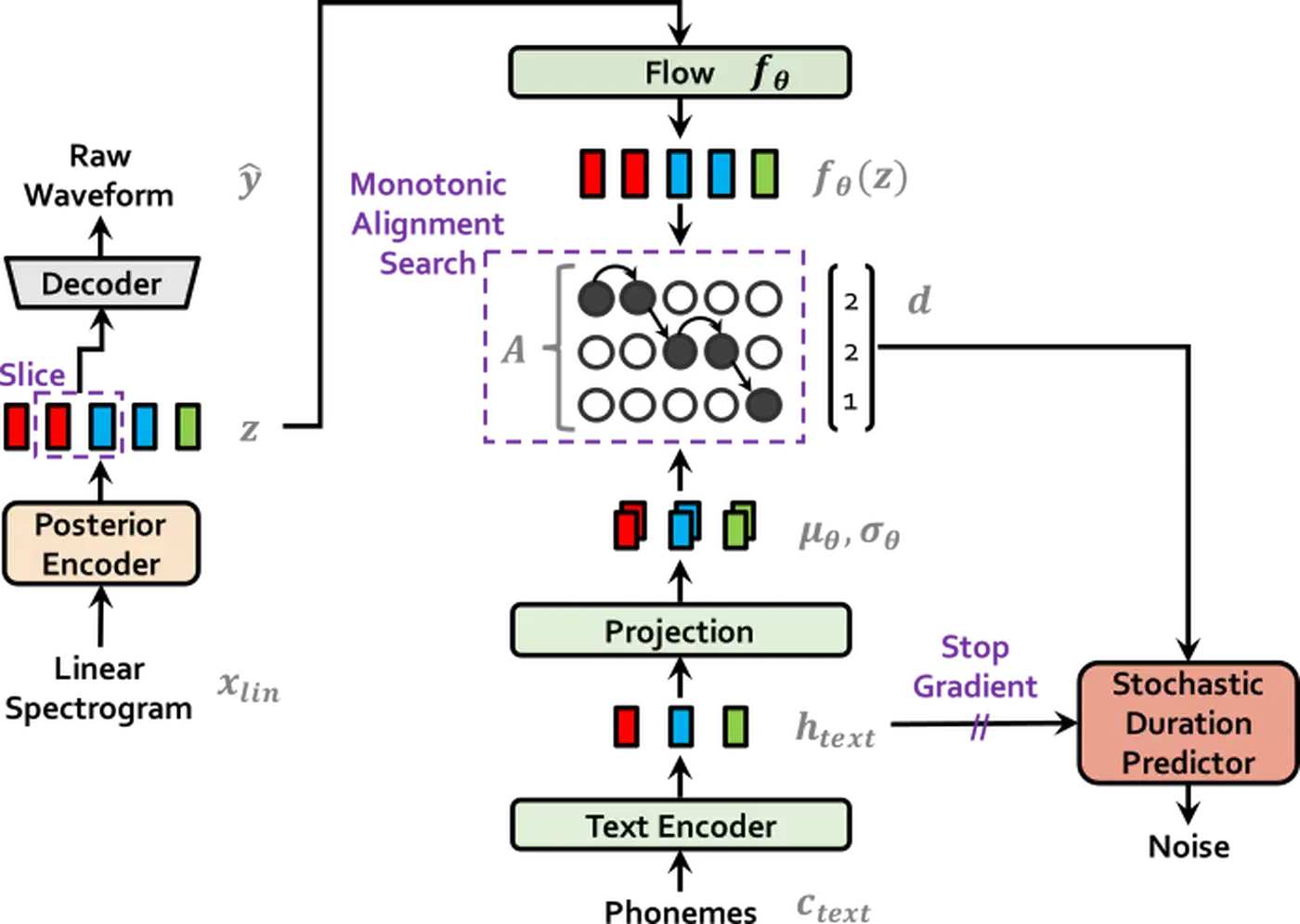
Pick VITS when you have one target voice with 30 minutes or more of audio. Pick it when you need the lowest inference latency (VITS is faster). Pick it when you want a model free of the XTTS license terms. VITS models trained on your own data from scratch carry no license baggage.
Data Requirements
VITS needs more data than XTTS fine-tuning:
| Data Amount | Quality |
|---|---|
| 30 minutes | Minimum viable, decent quality |
| 1-2 hours | Good quality, natural prosody |
| 3+ hours | Diminishing returns |
Each clip should be 2 to 15 seconds long with a matching line in metadata.csv.
Configuration and Training
Set up the VITS config with eSpeak-NG as the phonemizer:
apt install espeak-ngfrom TTS.tts.configs.vits_config import VitsConfig
config = VitsConfig()
config.audio.sample_rate = 22050
config.text.phonemizer = "espeak"
config.model.hidden_channels = 192
config.model.num_layers = 6
config.use_noise_augment = True # improves robustnessLaunch training:
python TTS/bin/train_tts.py --config_path config.jsonVITS trains a generator and discriminator side by side. Expect 100 to 200 epochs, taking 4 to 8 hours on a modern GPU. Enable use_noise_augment=True to add slight noise during training. It makes the model more robust. Skip pitch augmentation. It hurts voice identity.
Evaluation
Generate the same 10 test sentences at every checkpoint for fair side-by-side compares. For automated quality scoring, use UTMOS:
pip install speechmosThis gives you a Mean Opinion Score estimate. You don’t need human listeners for every checkpoint check.
The trained model folder holds config.json and model.pth. Generate speech with:
tts --model_path model.pth --config_path config.json \
    --text "Your text here" --out_path output.wav
Inference, Deployment, and Real-Time Integration
With a trained model in hand, the next step is serving it fast. The right approach depends on your use case: batch audio jobs, real-time narration, or hooking it into other apps.
CLI and Python API
The simplest path for batch jobs is the command line:
tts --model_path ./output/best_model.pth \
    --config_path ./output/config.json \
    --text "Your text here" \
    --out_path speech.wav
For code-level access, use the Python API:
from TTS.api import TTS

tts = TTS(model_path="./output/best_model.pth",
          config_path="./output/config.json", gpu=True)
tts.tts_to_file(text="Hello world", file_path="output.wav")
Expect 200 to 300 ms per sentence on GPU.
Real-Time Streaming
For XTTS v2, the streaming mode yields audio chunks as they are made. Pipe them to sounddevice or pyaudio for real-time playback with about 500 ms to first audio. If you want to wire your trained voice into a full offline assistant, with wake word detection, intent parsing, and a local LLM for replies, see the walkthrough on building a private local AI voice assistant:
import sounddevice as sd

for chunk in tts.tts_with_xtts_stream(text, speaker_wav):
    sd.play(chunk, samplerate=22050)
    sd.wait()
HTTP API Deployment
To serve the model over a network, wrap it in FastAPI. Add a /synthesize POST route that takes text and returns WAV audio. Use StreamingResponse for chunked audio. Dockerize the whole thing with an NVIDIA CUDA base image so the model runs on GPU in production.
Batch Processing
To make audiobooks or podcast content, split text into paragraphs and process each in parallel:
from concurrent.futures import ThreadPoolExecutor
from pydub import AudioSegment

paragraphs = text.split("\n\n")
with ThreadPoolExecutor(max_workers=2) as executor:
    audio_files = list(executor.map(generate_paragraph, paragraphs))

combined = sum(audio_files, AudioSegment.empty())
combined.export("full_audio.wav", format="wav")
Cap workers at 2. GPU memory limits parallel jobs.
Pacing and Control
Coqui TTS doesn’t support full SSML. You can still shape the output through punctuation. Commas make short pauses. Periods make longer ones. For longer breaks, insert explicit silence between sections using pydub. For emphasis, small tweaks help: add a comma before a key word, or use shorter sentences to shift the delivery.
CPU Fallback
For boxes without GPUs, speed depends on the model:
| Model | CPU Speed |
|---|---|
| VITS | ~1x real-time (10s audio = 10s generation) |
| XTTS v2 | ~0.5x real-time (10s audio = 20s generation) |
VITS is the clear winner for CPU-only setups where latency is the key concern.
Wrapping Up
The Coqui TTS ecosystem gives you a practical path to custom voice synthesis. No cloud. No paid API. XTTS v2 is the fast route. Fine-tune with 5 minutes of audio and get usable output in a couple of hours. VITS takes more data and more training time, but it gives the top quality for one dedicated voice. Either way, you end up with a model that runs on your box, makes speech in real time on consumer hardware, and sounds like the voice you trained it on.