 Botmonster Tech
NATS JetStream vs Kafka: simpler ops, sub-millisecond latency

To wire up loose Python microservices, use NATS JetStream as the message bus with the nats-py client. JetStream gives you durable consumers with full stream replay, plus exactly-once delivery through message dedup and double-ack. It does this in sub-millisecond time from one small server binary, without Kafka brokers or ZooKeeper.
This guide covers JetStream setup, pub/sub with durable consumers, a three-service order pipeline, and the steps to harden it for production.
JetStream vs Kafka
JetStream vs Kafka is mostly a question of operations. JetStream runs inside the NATS server, a single 20 MB binary with no outside dependencies, and you switch it on with the -js flag. Kafka needs a JVM, a ZooKeeper or KRaft controller, and heap tuning before you publish anything. Kafka still wins on raw throughput at large scale. For services moving tens or hundreds of thousands of messages per second, JetStream is fast enough and much simpler to run.
Why NATS JetStream Over Kafka or RabbitMQ
NATS keeps showing up in architecture discussions that once went straight to Kafka or RabbitMQ, mostly because it needs far less ops work.
Between the dependency-free NATS binary and Kafka’s JVM stack, RabbitMQ falls in the middle: it needs the Erlang/OTP runtime and its own cluster setup.
JetStream is the storage layer baked into the NATS server. Flip one flag (-js) and you get durable streams with replay and consumer groups on top of core pub/sub. There is no second cluster piece like Kafka Streams or RabbitMQ’s Streams plugin; everything runs in one process.
Here is how the three compare:
| Feature | NATS JetStream | Apache Kafka | RabbitMQ |
|---|---|---|---|
| Server binary | ~20 MB, zero deps | JVM + KRaft/ZooKeeper | Erlang/OTP runtime |
| Throughput (persisted) | 200K-400K msgs/sec | 500K-1M+ msgs/sec (batched) | 50K-100K msgs/sec |
| Latency (persisted) | 1-5 ms | 10-50 ms (batching overhead) | 5-20 ms |
| Core latency (in-memory) | ~100-200 microseconds | N/A | N/A |
| Delivery semantics | At-most-once, at-least-once, exactly-once | At-least-once, exactly-once | At-most-once, at-least-once |
| Built-in extras | KV store, object store, WebSocket | Kafka Connect, Kafka Streams | Exchange routing, plugins |
| Config complexity | Single config file | Broker + controller + topic configs | Server + vhost + policy configs |
If you’re sizing up other backends, our guide on real-time data pipelines with Redis Streams covers a sister approach using Redis’s append-only log and consumer groups.
NATS also ships a built-in key-value store that can stand in for etcd or Consul for light config storage, and an object store that holds small artifacts without S3. Subject-level auth handles fine-grained access control without an extra proxy, and native WebSocket support lets browsers and edge devices connect directly.
The nats-py async client is the official Python SDK with full JetStream support. It is built on async/await with no C extensions, and it supports Python 3.7 through 3.13.
Setting Up NATS JetStream and Your Python Project
A working dev setup takes about five minutes. You need the NATS server with JetStream on, plus a Python project with the async client.
Starting the NATS Server
The fastest path is the official alpine Docker image with JetStream turned on:
docker run -d --name nats \
  -p 4222:4222 \
  -p 8222:8222 \
  nats:2.12-alpine -js -m 8222
Port 4222 takes client connections, and port 8222 serves HTTP monitoring, which you’ll use later for health checks and Prometheus metrics.
For a stable local setup, create a nats-server.conf:
server_name: dev-nats
listen: 0.0.0.0:4222
http_port: 8222

jetstream {
  store_dir: "/data/nats"
  max_mem: 1G
  max_file: 10G
}
Then run nats-server -c nats-server.conf. The max_mem and max_file knobs cap how much RAM and disk JetStream can use for stream storage on this node.
Scaffolding the Python Project
Make a virtual env and install the client:
python -m venv .venv
source .venv/bin/activate
pip install nats-py
Check that the link works with a tiny script:
import asyncio
import nats

async def main():
    nc = await nats.connect("nats://localhost:4222")
    js = nc.jetstream()
    print(f"Connected to NATS, JetStream available: {js is not None}")
    await nc.drain()

asyncio.run(main())
The nc.jetstream() call returns a JetStream context. You use it for all stream and consumer work. The drain() call finishes any in-flight messages before it closes the connection cleanly.
Creating Your First Stream
Streams are the durable storage layer. Each stream grabs messages sent to one or more subjects:
from nats.js.api import RetentionPolicy, StorageType

await js.add_stream(
    name="ORDERS",
    subjects=["orders.>"],
    retention=RetentionPolicy.LIMITS,
    max_msgs=1_000_000,
    storage=StorageType.FILE,
)
The orders.> wildcard means the stream grabs every message sent to orders.created, orders.paid, orders.shipped, and any other subject that starts with orders..
The NATS CLI for Debugging
Install the NATS CLI to poke at streams and consumers while you build:
nats stream ls           # List all streams
nats stream info ORDERS  # Show stream details
nats consumer ls ORDERS  # List consumers on the ORDERS stream
nats pub orders.test "hello"  # Publish a test message
nats sub "orders.>"      # Subscribe to all order subjects
You’ll reach for this a lot when you trace message flow during dev work. When you want a running picture instead of one-off commands, you can wrap these calls in a terminal monitoring tool that lists streams and consumer lag and refreshes them live.
Pub/Sub with Durable Consumers and Exactly-Once Delivery
JetStream makes delivery safe by combining publish-side dedup, durable consumers, and explicit ack.
Publishing with Deduplication
When you publish, set the Nats-Msg-Id header to a unique idempotency key. JetStream holds a dedup window of 2 minutes by default, set per stream. Any second publish inside that window gets rejected:
from nats.aio.msg import Msg
import nats

async def publish_order_created(js, order):
    ack = await js.publish(
        "orders.created",
        order.json().encode(),
        headers={"Nats-Msg-Id": f"order-{order.id}-created"},
    )
    print(f"Published to stream: {ack.stream}, seq: {ack.seq}")
If your publisher retries after a network timeout, JetStream drops the duplicate, so the order is not created twice. That is the publish side of exactly-once delivery.
Creating Durable Consumers
A durable consumer keeps its place in the stream across restarts. Without that, each reconnect either replays from the top or skips messages:
from nats.js.api import DeliverPolicy, AckPolicy, ConsumerConfig

sub = await js.subscribe(
    "orders.created",
    durable="order-processor",
    config=ConsumerConfig(
        deliver_policy=DeliverPolicy.ALL,
        ack_policy=AckPolicy.EXPLICIT,
        max_deliver=5,
        ack_wait=30,
    ),
)
The deliver_policy sets where the consumer starts reading. JetStream offers a few options:
| Policy | Behavior | Use Case |
|---|---|---|
ALL | Start from the first message in the stream | Rebuilding state, new service catching up |
LAST | Start from the most recent message | Dashboard or status display that only needs current state |
NEW | Only messages published after consumer creation | Real-time notifications, live monitoring |
BY_START_SEQUENCE | Start from a specific sequence number | Replaying from a known checkpoint |
BY_START_TIME | Start from a specific timestamp | Disaster recovery, replaying from a point in time |
LAST_PER_SUBJECT | Last message for each matching subject | Compacted state reconstruction |
Acknowledgment and Error Handling
Explicit ack is the consumer side of exactly-once delivery. Handle the message, then ack. If it fails, nak with a delay to requeue:
async def process_messages(sub):
    async for msg in sub.messages:
        try:
            order = json.loads(msg.data.decode())
            await handle_order(order)
            await msg.ack()
        except TransientError:
            # Requeue with 5-second delay
            await msg.nak(delay=5)
        except PermanentError:
            # Don't retry - message goes to dead letter
            # after max_deliver attempts
            await msg.term()
The msg.term() call ends delivery for that message and stops retries. Paired with max_deliver=5 on the consumer config, messages that keep failing stop getting redelivered. You can catch them by watching JetStream advisory subjects, or by routing them to a dead-letter stream.
Pull vs Push Consumers
Pull-based consumers use fetch() to ask for a batch of messages. You get explicit backpressure control:
msgs = await sub.fetch(batch=10, timeout=5)
for msg in msgs:
    await process_and_ack(msg)
Push-based consumers send messages as they arrive. They suit live notification fan-out, where speed beats flow control. For most backend service work, pull consumers are the safer default, because a slow consumer will not pile up an endless in-memory queue.
Building a Real Microservice: Order Processing Pipeline
The order pipeline below has three services, each running as its own Python process and talking to the others only through NATS subjects.
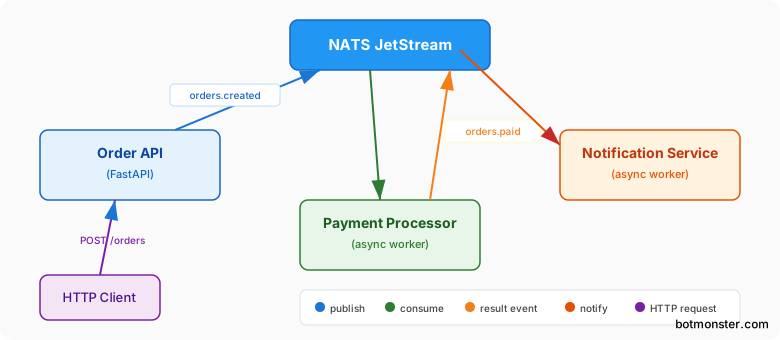
Service 1: Order API
A FastAPI endpoint checks the order and sends events:
import asyncio
import nats
from fastapi import FastAPI
from contextlib import asynccontextmanager
from pydantic import BaseModel
from uuid import uuid4

class OrderRequest(BaseModel):
    customer_id: str
    items: list[dict]
    total: float

nc = None
js = None

@asynccontextmanager
async def lifespan(app: FastAPI):
    global nc, js
    nc = await nats.connect("nats://nats:4222")
    js = nc.jetstream()
    await js.add_stream(name="ORDERS", subjects=["orders.>"])
    yield
    await nc.drain()

app = FastAPI(lifespan=lifespan)

@app.post("/orders")
async def create_order(req: OrderRequest):
    order_id = str(uuid4())
    payload = {"order_id": order_id, **req.model_dump()}
    await js.publish(
        "orders.created",
        json.dumps(payload).encode(),
        headers={
            "Nats-Msg-Id": f"order-{order_id}",
            "X-Correlation-Id": order_id,
        },
    )
    return {"order_id": order_id, "status": "accepted"}
The X-Correlation-Id header flows through every downstream service. That lets you trace one order across all three services in your logs.
Service 2: Payment Processor
A standalone worker reads orders.created and sends the result:
import asyncio
import json
import nats
import structlog

logger = structlog.get_logger()

async def process_payment(order: dict) -> bool:
    # Call your payment gateway here
    return order["total"] < 10000  # Simplified

async def main():
    nc = await nats.connect(
        "nats://nats:4222",
        reconnect_time_wait=2,
        max_reconnect_attempts=-1,
    )
    js = nc.jetstream()

    sub = await js.subscribe(
        "orders.created",
        durable="payment-processor",
    )

    async for msg in sub.messages:
        order = json.loads(msg.data.decode())
        correlation_id = msg.headers.get("X-Correlation-Id", "unknown")
        log = logger.bind(correlation_id=correlation_id)

        try:
            success = await process_payment(order)
            result_subject = "orders.paid" if success else "orders.payment_failed"
            await js.publish(
                result_subject,
                json.dumps(order).encode(),
                headers={
                    "Nats-Msg-Id": f"{order['order_id']}-payment",
                    "X-Correlation-Id": correlation_id,
                },
            )
            log.info("payment_processed", subject=result_subject)
            await msg.ack()
        except Exception as e:
            log.error("payment_failed", error=str(e))
            await msg.nak(delay=5)

asyncio.run(main())
The reconnect_time_wait=2 and max_reconnect_attempts=-1 settings let the client survive brief NATS outages by retrying the connection every 2 seconds, forever.
Service 3: Notification Service
This service reads both result subjects with two separate consumers:
async def main():
    nc = await nats.connect("nats://nats:4222")
    js = nc.jetstream()

    paid_sub = await js.subscribe(
        "orders.paid", durable="notifier-paid"
    )
    failed_sub = await js.subscribe(
        "orders.payment_failed", durable="notifier-failed"
    )

    async def handle_paid(sub):
        async for msg in sub.messages:
            order = json.loads(msg.data.decode())
            await send_confirmation_email(order)
            await msg.ack()

    async def handle_failed(sub):
        async for msg in sub.messages:
            order = json.loads(msg.data.decode())
            await send_failure_alert(order)
            await msg.ack()

    await asyncio.gather(
        handle_paid(paid_sub),
        handle_failed(failed_sub),
    )
Each service ships on its own. You can scale the payment processor by running more copies. JetStream auto-shares messages across consumers that use the same durable name.
Docker Compose for Development
Tie it all together with a Docker Compose file for local work:
services:
  nats:
    image: nats:2.12-alpine
    command: ["-js", "-m", "8222"]
    ports:
      - "4222:4222"
      - "8222:8222"
    volumes:
      - nats-data:/data

  order-api:
    build: ./services/order-api
    ports:
      - "8000:8000"
    depends_on:
      - nats
    environment:
      - NATS_URL=nats://nats:4222

  payment-processor:
    build: ./services/payment-processor
    depends_on:
      - nats
    environment:
      - NATS_URL=nats://nats:4222

  notification-service:
    build: ./services/notification-service
    depends_on:
      - nats
    environment:
      - NATS_URL=nats://nats:4222

volumes:
  nats-data:
Every service hits nats://nats:4222 using the Compose service name for DNS. The nats-data volume keeps JetStream storage across container restarts.
Graceful Shutdown
Each service needs to handle SIGTERM and SIGINT so the container scheduler can stop it cleanly:
import signal

async def main():
    nc = await nats.connect("nats://nats:4222")
    shutdown_event = asyncio.Event()

    def signal_handler():
        shutdown_event.set()

    loop = asyncio.get_event_loop()
    for sig in (signal.SIGTERM, signal.SIGINT):
        loop.add_signal_handler(sig, signal_handler)

    # ... start consumers ...

    await shutdown_event.wait()
    await nc.drain()  # Finishes in-flight messages
The nc.drain() call tells the NATS client to stop taking new messages, finish what is in flight, and then close the link. That keeps you from losing messages during a deploy.
Production Hardening and Monitoring
A dev setup with one NATS server works fine on a laptop. Production needs a cluster and metrics.
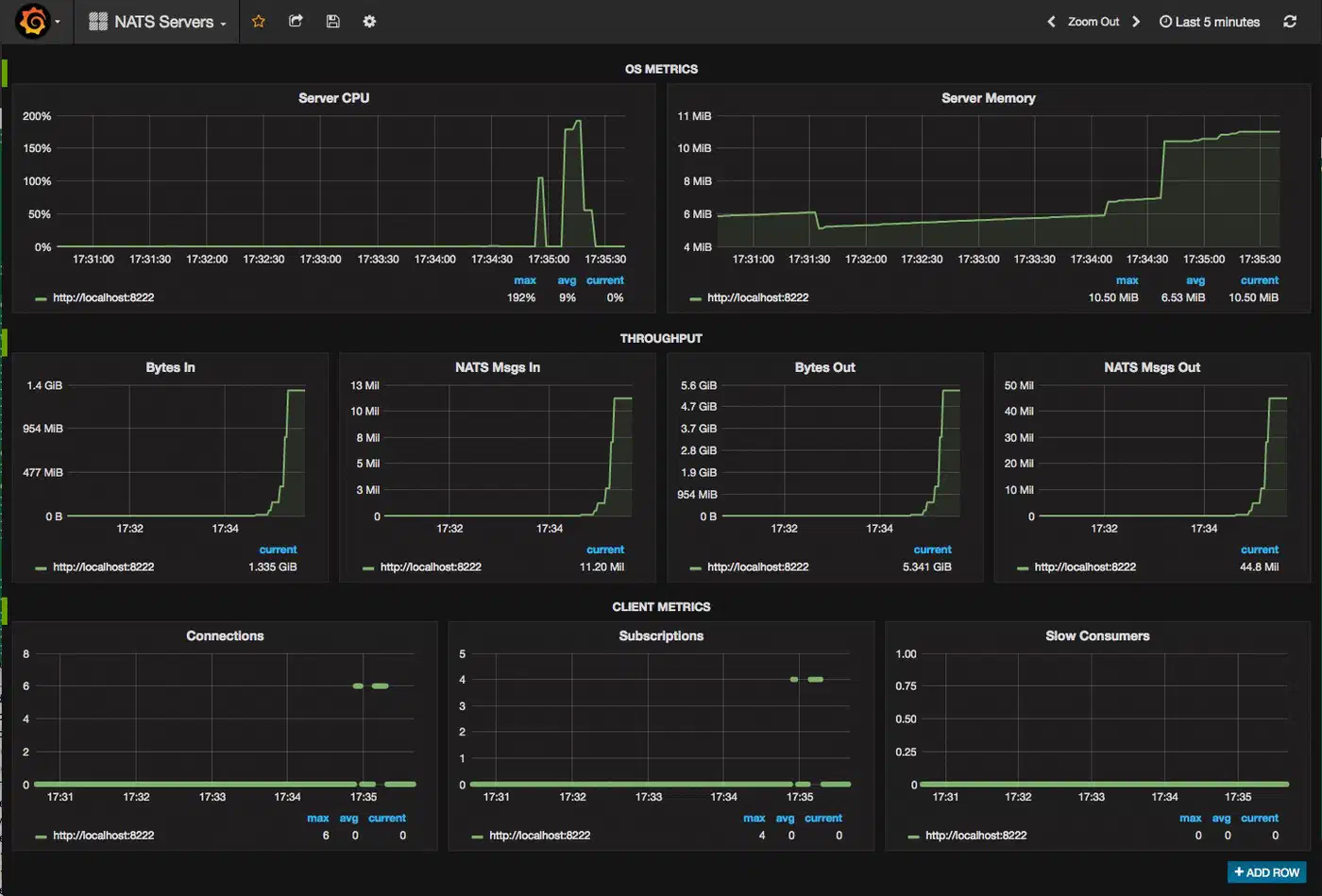
NATS Clustering
Run at least a 3-node cluster for high uptime. Each node needs a routes block pointing at the others:
cluster {
  name: production
  listen: 0.0.0.0:6222
  routes: [
    nats-route://nats-1:6222,
    nats-route://nats-2:6222,
    nats-route://nats-3:6222,
  ]
}

jetstream {
  store_dir: "/data/nats"
  max_mem: 4G
  max_file: 50G
}
When you create streams, set the replica count to match how much you can afford to lose:
await js.add_stream(
    name="ORDERS",
    subjects=["orders.>"],
    num_replicas=3,  # Replicate across all 3 nodes
)
With num_replicas=3, the stream survives the loss of any single node. The cluster uses Raft for leader election and data replication.
Monitoring with Prometheus
NATS shows metrics on its HTTP monitor port. Use nats-surveyor or the built-in /varz, /jsz, and /connz endpoints to feed Prometheus:
# prometheus.yml scrape config
scrape_configs:
  - job_name: 'nats'
    static_configs:
      - targets: ['nats-1:8222', 'nats-2:8222', 'nats-3:8222']
    metrics_path: /metrics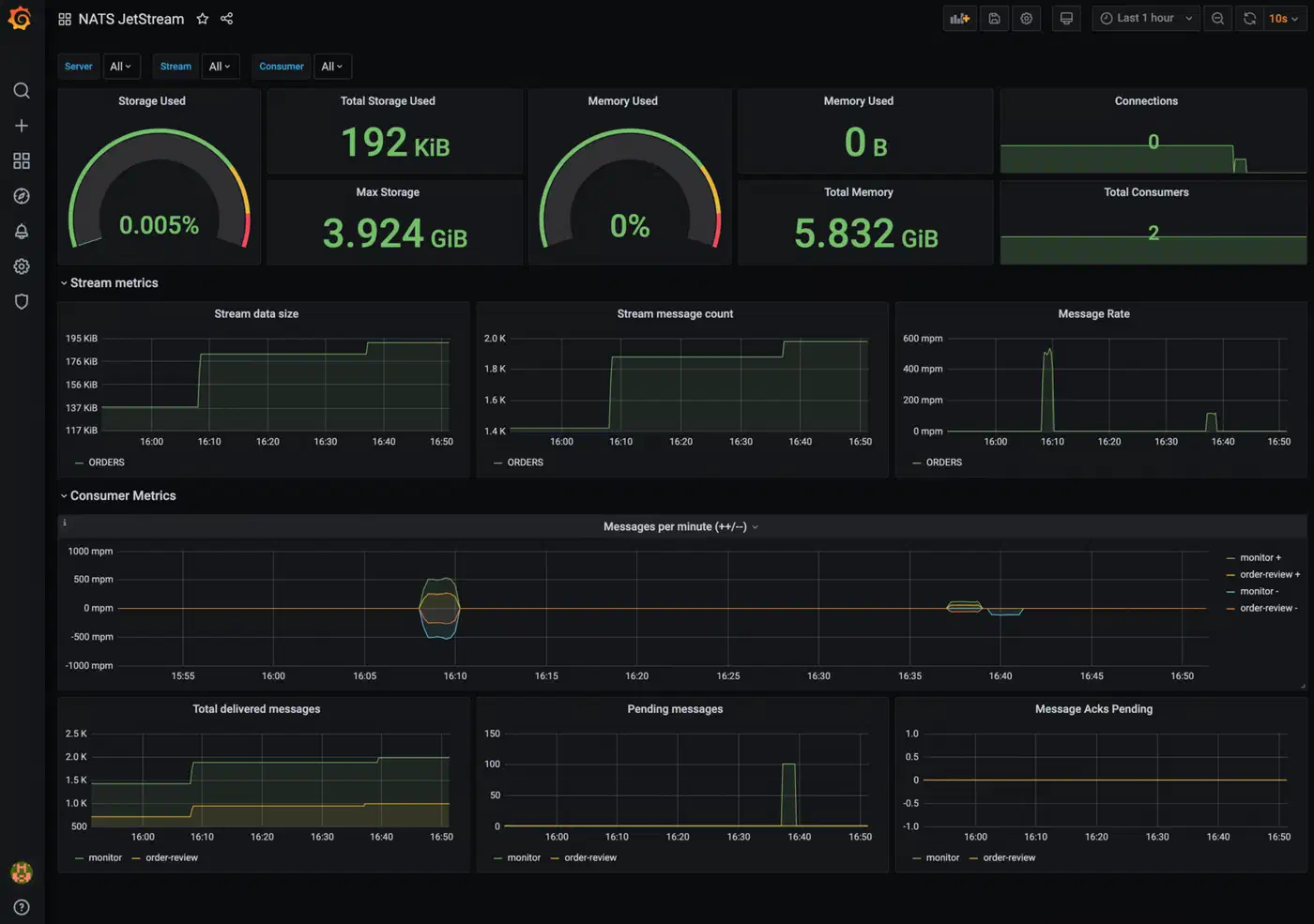
Key metrics to alert on:
- Consumer lag (
num_pending): if pending messages keep growing, a consumer is falling behind. Alert when it stays above your threshold for a few minutes. - Stream storage use: watch it against your
max_filelimits. - Connection count: a sudden drop points to network trouble or a crash.
- Message rate: baseline your normal throughput and alert on large swings.
Stream Management Policies
Cap storage growth with retention limits:
from nats.js.api import DiscardPolicy

await js.add_stream(
    name="ORDERS",
    subjects=["orders.>"],
    max_age=86400 * 30,     # 30 days in seconds
    max_msgs=10_000_000,
    max_bytes=10 * 1024**3,  # 10 GB
    discard=DiscardPolicy.OLD,
)
The discard=DiscardPolicy.OLD setting drops the oldest messages when any limit is hit, so new publishes keep landing.
Health Check Pattern
Each service should expose a health route for container liveness probes:
@app.get("/health")
async def health():
    if nc is None or nc.is_closed:
        return JSONResponse(
            {"status": "unhealthy", "reason": "NATS disconnected"},
            status_code=503,
        )
    return {"status": "healthy", "nats": "connected"}
Testing Your Event-Driven Services
For integration tests with real infra containers, the nats-tools package ships a pytest fixture that boots a real NATS server per test:
import pytest
from nats_tools import NATSD

@pytest.fixture
def nats_server():
    with NATSD() as server:
        yield server

@pytest.mark.asyncio
async def test_order_processing(nats_server):
    nc = await nats.connect(nats_server.client_url)
    js = nc.jetstream()
    await js.add_stream(name="ORDERS", subjects=["orders.>"])

    # Publish and verify processing
    await js.publish("orders.created", b'{"order_id": "test-1"}')
    # ... assert expected outcomes ...
    await nc.drain()
Your tests run against a real NATS server instead of mocks, which is useful because message order, ack timing, and consumer rebalancing are hard to fake well.
Schema Evolution for Event Payloads
As your system grows, event schemas will shift. NATS is payload-agnostic and moves raw bytes, so you choose the schema strategy:
- JSON with versioning: add a
"version": 1field to every payload. Consumers read the version and run their own migration logic. Easy to start, but it gets messy at scale. - Protocol Buffers: define events in
.protofiles and build Python code withgrpcio-tools. Protobuf handles back and forward compat through field numbering. It works better once you have more than a few event types. - JSON Schema: use a shared schema registry, even a Git repo, with JSON Schema files. Validate at publish time to catch breaks before they hit prod.
Whichever path you pick, version your events from day one. Bolting schema rules onto a live system later is much more painful than starting with them.
Where to Go from Here
The order pipeline above covers the most common case: services publishing events and reading them through durable subs. Beyond that, key-value watches let you build reactive config systems, and the object store can ship ML models or config bundles between services. Subject mapping with import/export rules between accounts opens up multi-tenant setups, with no extra clusters.
Start with one stream and two services, get the publish-sub-ack loop working, and add dedup headers. Then layer on clustering, metrics, and schema rules as you grow. The NATS by Example site has runnable code for most of these patterns in Python and other languages.