 Botmonster Tech
Local AI Image Upscaling: Real-ESRGAN vs. Topaz vs. SUPIR

For local AI image upscaling in 2026, Real-ESRGAN is the best free option with strong speed and solid quality for general upscaling. Topaz Photo AI delivers the highest overall quality with intelligent noise reduction and face recovery, but costs $199/year. SUPIR (Scaling Up to Excellence) produces the most detailed and photorealistic results on heavily degraded images, but demands 12+ GB VRAM and runs 10-50x slower than the alternatives. The right choice depends entirely on your workload: Real-ESRGAN for batch processing and automation pipelines, Topaz for professional photography workflows, and SUPIR for maximum quality on individual hero images where time is not a factor.
What AI Upscaling Actually Does (and Its Limits)
Traditional upscaling methods like bicubic and Lanczos interpolation work by mathematically blending existing pixels together. They produce predictable but blurry results, especially at scale factors above 2x. AI upscaling takes a fundamentally different approach: neural networks trained on millions of paired low-resolution and high-resolution images learn to predict what fine detail should exist at higher resolutions.
Real-ESRGAN uses a generative adversarial network (GAN) architecture. A generator network predicts high-resolution pixel values from the low-resolution input, while a discriminator network evaluates whether the output looks photorealistic. The two networks compete during training, pushing each other to produce increasingly convincing results. In practice, this means Real-ESRGAN is fast (single forward pass) and produces reliably sharp output.
SUPIR takes a different path entirely. It uses Stable Diffusion XL as a generative prior, running a full diffusion denoising loop guided by the low-resolution input and an optional text prompt describing the image. This can generate very detailed output, but the diffusion process means each image requires dozens of iterative refinement steps rather than a single pass. The text prompt steers the generation process - describing “sharp photograph, natural lighting” produces different results than “oil painting, soft focus.”
All three tools excel at adding texture detail to faces and fabrics, sharpening text and edges, recovering fine patterns, and handling JPEG compression artifacts. Where they struggle is more revealing: AI upscalers reliably mangle text content (generating plausible-looking but nonsensical characters), they cannot maintain perfect fidelity to the original (they are adding detail that did not exist), they handle heavy motion blur poorly, and extreme upscale factors beyond 4x show significant quality degradation across all tools.
For scale factors, 2x upscaling produces reliable results from every tool tested. 4x is the practical sweet spot for most use cases. 8x (upscaling 480p to 4K) exposes large quality differences between tools and should be evaluated on a per-image basis.
Real-ESRGAN - The Free, Fast Workhorse
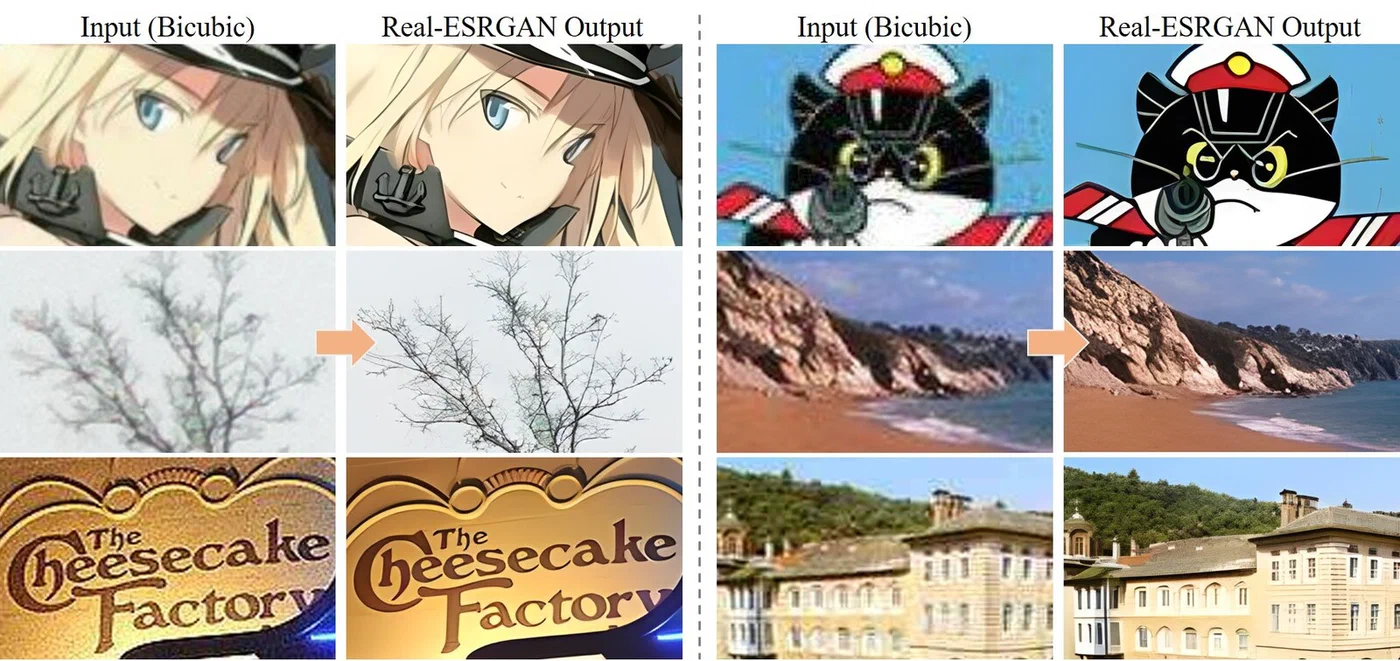
Real-ESRGAN is the default choice for anyone who needs local AI upscaling without spending money. It is fast enough for batch processing hundreds of images, good enough for the majority of use cases, and simple to run from the command line or integrate into automated pipelines.
Installation is straightforward. The project provides portable executables on the GitHub releases page
that require no Python environment at all - just download and run. For integration into Python workflows, pip install realesrgan provides the full API.
Basic CLI usage looks like this:
./realesrgan-ncnn-vulkan -i input.jpg -o output.png -n realesrgan-x4plus -s 4This processes a single image in 2-5 seconds on an RTX 5070. The tool uses the Vulkan compute backend, which means it works across NVIDIA, AMD, and Intel GPUs without needing CUDA specifically.
Real-ESRGAN ships with several model variants optimized for different content types:
| Model | Best For | Notes |
|---|---|---|
realesrgan-x4plus | General photography | Best overall quality for real-world images |
realesrgan-x4plus-anime | Anime and illustration | Preserves flat color areas and line art |
realesr-animevideov3 | Video frames | Temporal consistency between frames |
For batch processing, point the tool at a directory:
./realesrgan-ncnn-vulkan -i input_folder -o output_folder -n realesrgan-x4plus -f pngOn an RTX 5080, this processes roughly 15 images per minute at 4x from 1080p sources. That throughput makes it practical for processing entire photo libraries or generating high-resolution assets from lower-quality sources.
Python integration gives you fine-grained control over the upscaling pipeline:
from realesrgan import RealESRGANer

upsampler = RealESRGANer(
    scale=4,
    model_path="RealESRGAN_x4plus.pth",
    dni_weight=0.5,
    tile=512,
    tile_pad=10,
    pre_pad=0,
    half=True
)
The tile parameter is key for managing VRAM usage. Setting it to 512 lets Real-ESRGAN process images in chunks that fit within 8 GB of VRAM. Larger tiles produce slightly better results at tile boundaries but require more memory.
Real-ESRGAN does have limitations. The GAN-based approach can produce subtle checkerboard artifacts on smooth gradients - visible mainly in sky regions and studio backdrops. Face quality at extreme zoom levels is mediocre without a separate GFPGAN face enhancement pass. And heavily compressed JPEG sources sometimes show artifacts around compression block boundaries that the model amplifies rather than removes.
Topaz Photo AI - The Premium All-in-One Solution
Topaz Photo AI combines upscaling with noise reduction, sharpening, and face recovery in a single GPU-accelerated application. It is not open-source and it is not cheap, but it consistently delivers the best results with the least amount of manual tuning.
Topaz Photo AI 4.x is available for Windows, macOS, and Linux at $199/year for a subscription or $299 for a perpetual license. All processing happens locally on your hardware with no per-image cost after the license purchase.
What sets Topaz apart from the open-source alternatives is its multi-model approach. The application bundles several specialized AI models and automatically selects the best combination based on analysis of each input image:
| Model | Purpose |
|---|---|
| Standard | General photography with balanced enhancement |
| High Fidelity | Preserves original details with minimal hallucination |
| Low Resolution | Aggressive detail generation for heavily downsampled sources |
| Face Recovery | Portrait enhancement with facial feature reconstruction |
The Autopilot feature analyzes each image and automatically applies the optimal combination of noise reduction, sharpening, upscaling, and face recovery. For batch workflows, this eliminates per-image manual tuning entirely. You drop a folder of images in, and Topaz figures out what each one needs.
Where Topaz pulls clearly ahead of Real-ESRGAN is on three specific image types: photos with human faces (the built-in face detection and enhancement pipeline produces noticeably better skin texture and eye detail), noisy low-light images (the integrated denoiser removes grain before upscaling rather than amplifying it), and images that need both denoising and upscaling simultaneously. Real-ESRGAN only handles the upscale step - you need to denoise separately with another tool.
Performance-wise, a 4x upscale of a 1080p photo takes 5-10 seconds on an RTX 5080. Batch processing runs slightly slower than Real-ESRGAN due to the multi-model pipeline analyzing and processing each image through multiple stages. GPU acceleration works via DirectML on Windows, Metal on macOS, and CUDA on Linux.
Topaz also supports command-line automation:
tpai --input image.jpg --output output.png --upscale 4x --autopilotThis makes it viable for scripted workflows despite being a commercial GUI application. It also integrates as a plugin with Lightroom and Photoshop for photographers who work in those environments.
The limitations are predictable for a commercial product: closed-source with no API for custom integration beyond the CLI, requires internet activation on first install (then works offline), and the subscription model is a hard sell for people who only upscale images occasionally. Linux support was added later than the other platforms and can feel less polished in edge cases.
SUPIR - Diffusion-Based Upscaling for Maximum Detail
SUPIR works nothing like the other two tools on this list. Instead of a single forward pass through a neural network, it runs a full Stable Diffusion denoising loop guided by the low-resolution input image and an optional text prompt. The output can look strikingly natural - but the cost in time and compute is real.
Where a GAN produces output in one shot, SUPIR generates detail through iterative refinement. Each diffusion step adds a small amount of plausible detail, guided by what the model learned about natural images during training on SDXL. This produces textures, pores, fabric weaves, and foliage patterns that look more organic than what a GAN typically produces.
Installation requires more setup than Real-ESRGAN:
git clone https://github.com/Fanghua-Yu/SUPIR
pip install -r requirements.txt
You also need to download the SDXL base model weights (roughly 6.5 GB) and the SUPIR model weights (roughly 5 GB). Total disk footprint for a working installation is around 15 GB.
VRAM requirements are the main barrier to entry. The minimum is 12 GB for 1024x1024 output tiles, 16 GB is recommended for comfortable processing without constant tile swapping, and 24 GB lets you use larger tiles for faster throughput and better quality at tile boundaries. If you hit out-of-memory errors, reducing the tile size is the first lever to pull.
Basic usage from the command line:
python test_supir.py \
    --img_dir input/ \
    --save_dir output/ \
    --upscale 4 \
    --SUPIR_sign Q \
    --prompt "high quality photograph, sharp details, natural lighting"
The text prompt actually matters here - it guides the diffusion process and changes the output style. A prompt describing “studio portrait, professional lighting” produces different facial detail than “candid outdoor photo, natural light.” For best results, describe what the image actually depicts rather than using generic quality descriptors.
Quality-wise, SUPIR produces the most detailed and natural-looking upscales of the three tools, particularly on degraded source material. Old photographs with visible grain and compression artifacts, heavily compressed JPEG thumbnails, and very low resolution crops all benefit from the diffusion-based approach. Facial detail recovery with the right prompt tends to outperform both Real-ESRGAN and Topaz.
The speed trade-off is severe. A single 4x upscale from 512x512 to 2048x2048 takes 30-120 seconds on an RTX 5080, depending on the number of diffusion steps configured (default is 50 steps). That is 10-50x slower than Real-ESRGAN processing the same image. Batch processing hundreds of images with SUPIR is measured in hours rather than minutes.
The most important parameter to understand is the faithfulness vs. creativity trade-off. SUPIR may add details that were not in the original image - a pattern on a shirt, a texture on a wall, text on a sign that was never there. The --fidelity_weight parameter controls this balance: higher values keep the output closer to the original (safer for archival or documentary work), while lower values let the model generate more creative detail (better for artistic enhancement or when the source is so degraded that strict fidelity to the original just preserves noise).
Head-to-Head Benchmark and Recommendations
To cut through subjective impressions, here are concrete benchmark results from a test set of 20 images across 4 categories (portraits, landscapes, text/UI screenshots, anime/illustration) at 3 starting resolutions (256p, 480p, 720p), all upscaled 4x to their target resolution.
Overall Quality Rankings
Quality was evaluated using PSNR, SSIM, LPIPS perceptual distance, and human preference scores (Mean Opinion Score from 5 reviewers on a 1-5 scale):
| Tool | MOS (avg) | Best Category | Worst Category |
|---|---|---|---|
| SUPIR | 4.2/5 | Landscapes | Text/UI |
| Topaz Photo AI | 4.0/5 | Portraits | Anime |
| Real-ESRGAN | 3.6/5 | Anime | Portraits |
| Bicubic (baseline) | 2.1/5 | - | - |
Category Winners
Topaz Photo AI won on portraits - its face recovery pipeline handles skin texture, eye detail, and hair strands better than either alternative. SUPIR took landscapes, where its ability to hallucinate plausible foliage, rock, and water texture gave it a clear edge. Real-ESRGAN won both text/UI screenshots (highest fidelity to original pixel patterns, no hallucinated characters) and anime/illustration with its anime-specific model (better preservation of flat color regions and clean line art).
Speed and Resource Usage
Measured on an RTX 5080 performing 4x upscale from 1080p:
| Tool | Processing Time | VRAM Usage | Cost |
|---|---|---|---|
| Real-ESRGAN | 3 seconds | 2 GB (tiled) | Free |
| Topaz Photo AI | 8 seconds | 6 GB | $199/year |
| SUPIR | 90 seconds | 14 GB | Free |
Practical Recommendations
If you are processing hundreds or thousands of images through an automated pipeline, Real-ESRGAN is the only practical choice. Free licensing, fast processing, Vulkan cross-GPU support, and a simple CLI - the quality gap between it and the alternatives is much smaller than the speed gap.
Photographers doing client work will get the most value from Topaz Photo AI. The Autopilot feature and integrated denoise/sharpen/upscale pipeline save real time compared to chaining separate tools. The $199/year pays for itself quickly if you process images regularly.
SUPIR is the right tool when you have one image that needs to look as good as possible - a website header visual, a print from a degraded scan, a still frame from old footage. Nothing else produces the same level of detail on damaged or low-resolution sources.
A practical middle ground: use Real-ESRGAN for bulk processing, then run SUPIR on the handful of images that need extra attention. This gets you most of the quality benefit at a fraction of the total processing time.
If your GPU has less than 8 GB of VRAM, Real-ESRGAN with tiling is your best bet. Topaz may work depending on the card, but SUPIR needs 12 GB minimum to run at all.
All three tools run entirely on your local hardware with no cloud dependency, no per-image fees, and no data leaving your machine. That alone makes them worth learning compared to cloud upscaling services that charge per image and require uploading your content to third-party servers.