 Botmonster Tech
Custom Linter Rules: JavaScript, Python, Go ASTs

You can catch domain-specific anti-patterns that ESLint
, Ruff
, or golangci-lint
miss by writing custom linter rules that parse your code into an Abstract Syntax Tree (AST), walk the tree to match specific node patterns, and report violations with auto-fix suggestions. The process is the same regardless of language: parse source into a tree, define the pattern you want to catch, walk the tree to find matches, and emit diagnostics. In JavaScript/TypeScript, this means writing an ESLint plugin with a visitor-pattern rule. In Python, you write a flake8 plugin using the ast module or a Ruff plugin in Rust. In Go, you use the go/ast and go/analysis packages.
What follows covers each of these ecosystems: AST fundamentals, concrete rule implementations, and CI integration.
Why Custom Linter Rules Matter
Generic linters catch generic problems - unused variables, missing semicolons, unreachable code. Every codebase, though, has its own conventions and anti-patterns that no off-the-shelf rule will ever know about.
Consider these real-world examples of conventions that only a custom rule can enforce:
- “API handlers must call
ctx.Validate()before accessing the request body” - “All database queries must use the
db.WithTimeout()wrapper” - “React components in
components/shared/must not import fromfeatures/” - “Never call
JSON.parse()without a try-catch in handler code” - “Don’t use
time.Sleep()in production code - use a ticker or timer” - “All SQL strings must use parameterized queries, never string concatenation”
Without automation, enforcing these rules falls entirely on code reviewers . Reviewers are human. They get tired, they miss things, and they spend time pointing out the same violations over and over instead of reviewing actual logic. New developers joining the team don’t know about these conventions until they get their first PR comments, which slows onboarding and creates friction.
A custom linter rule fixes this by catching violations at the source. When a developer writes db.Query(sql) instead of db.QueryContext(ctx, sql), the linter immediately tells them: “Use db.QueryContext() instead of db.Query() - all database calls must be context-aware for cancellation support.” The error message itself teaches the convention at the point of violation. That is documentation that actually gets read.
The return on investment is straightforward. If a custom rule catches two bugs per month that would each take two hours to debug in production, and the rule takes four hours to write, it pays for itself in the first month. After that, it just keeps saving time. The rule runs in the same linter pass as built-in rules, violations block PRs in CI just like any other lint error, and enforcement becomes automatic with zero ongoing effort.
AST Fundamentals: How Source Code Becomes a Tree
Before writing rules, you need to understand what an AST actually is and how to work with one.
An Abstract Syntax Tree is a tree representation of source code where each node represents a syntactic construct. A function declaration, a variable assignment, a function call, an if statement, a binary expression - each becomes a node in the tree. Unlike a concrete syntax tree (CST), an AST strips away whitespace, comments, and other syntactic sugar that doesn’t affect the program’s meaning.
Take this JavaScript:
const total = price + tax;The AST for this looks roughly like:
VariableDeclaration
  └─ VariableDeclarator
       ├─ Identifier (name: "total")
       └─ BinaryExpression (operator: "+")
            ├─ Identifier (name: "price")
            └─ Identifier (name: "tax")
Each node has a type (VariableDeclaration, BinaryExpression, etc.) and properties that describe it (name, operator, left, right). When you write a linter rule, you are looking for specific combinations of node types and property values.
The best way to explore ASTs interactively is AST Explorer . Paste any code snippet and see its AST in real time. It supports JavaScript (ESTree, Babel, TypeScript), Python, Go, Rust, and over 30 other parsers. You will use this constantly when developing rules.
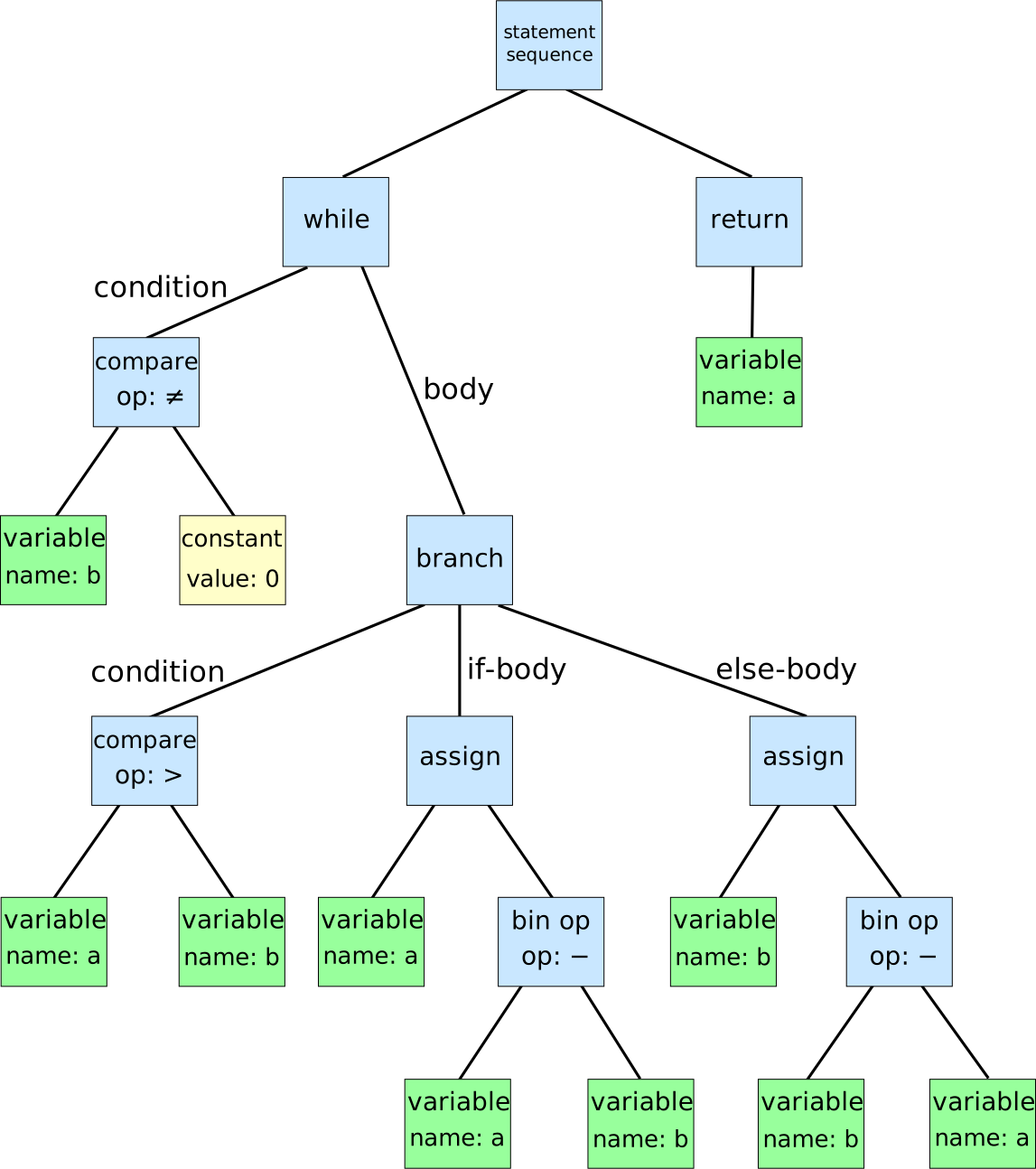
Different languages use different AST specifications:
In JavaScript, ASTs follow the ESTree specification
. A CallExpression has a callee (the function being called), arguments (array of argument nodes), and location info (loc.start.line, loc.start.column). TypeScript extends this with nodes like TSTypeAnnotation and TSInterfaceDeclaration.
Python uses the built-in ast module. ast.parse("x = 1 + 2") produces a Module whose body contains an Assign node, with a BinOp value containing left=Constant(1), op=Add(), right=Constant(2).
Go uses go/parser. Calling parser.ParseFile(fset, "file.go", src, parser.ParseComments) returns an ast.File node. You traverse it with ast.Inspect() or ast.Walk().
The key concept tying all of these together is the visitor pattern. Instead of manually recursing through every node in the tree, you register callback functions for specific node types. The linter framework handles the tree traversal and calls your function whenever it encounters a matching node. You just write the matching logic.
Writing a Custom ESLint Rule for JavaScript and TypeScript
ESLint ’s plugin architecture is the most mature custom rule system in any language ecosystem. Here is how to build one from scratch.
Setting Up the Plugin
Start by scaffolding a plugin project:
mkdir eslint-plugin-myproject
cd eslint-plugin-myproject
npm init -y
npm install --save-dev eslint @typescript-eslint/utils
The @typescript-eslint/utils package gives you TypeScript-aware utilities if you need type information in your rules.
Rule Structure
Every ESLint rule exports a RuleModule object with two parts: meta (metadata about the rule) and create (a function that returns visitor callbacks):
module.exports = {
  meta: {
    type: "problem",
    docs: {
      description: "Disallow raw fetch() calls in the API layer",
      category: "Best Practices",
    },
    fixable: "code",
    schema: [],
  },
  create(context) {
    return {
      CallExpression(node) {
        // Your matching logic goes here
      },
    };
  },
};
The create function receives a context object that gives you access to the source code, the filename, reporting utilities, and more. It returns an object where keys are AST node types and values are handler functions. ESLint will call your CallExpression handler every time it encounters a CallExpression node during the tree walk.
Example: No Raw Fetch in API Layer
Say your project has an apiClient module that wraps fetch with error handling, auth headers, and retry logic. You want to prevent developers from calling fetch() directly in API layer files:
module.exports = {
  meta: {
    type: "problem",
    docs: {
      description: "Disallow raw fetch() in API layer files",
    },
    fixable: "code",
    messages: {
      noRawFetch:
        "Use apiClient.request() instead of raw fetch for consistent error handling and auth headers.",
    },
    schema: [],
  },
  create(context) {
    const filename = context.getFilename();
    if (!filename.includes("/api/")) {
      return {};
    }

    return {
      CallExpression(node) {
        // Match fetch()
        if (node.callee.type === "Identifier" && node.callee.name === "fetch") {
          context.report({
            node,
            messageId: "noRawFetch",
            fix(fixer) {
              const sourceCode = context.getSourceCode();
              const argsText = node.arguments
                .map((arg) => sourceCode.getText(arg))
                .join(", ");
              return fixer.replaceText(
                node,
                `apiClient.request(${argsText})`
              );
            },
          });
        }

        // Match window.fetch()
        if (
          node.callee.type === "MemberExpression" &&
          node.callee.object.name === "window" &&
          node.callee.property.name === "fetch"
        ) {
          context.report({
            node,
            messageId: "noRawFetch",
          });
        }
      },
    };
  },
};
This rule does three things: checks whether the file is in the API layer, matches both fetch() and window.fetch() calls, and provides an auto-fix that rewrites fetch(url, options) to apiClient.request(url, options).
Testing with RuleTester
ESLint provides RuleTester for unit testing rules
:
const { RuleTester } = require("eslint");
const rule = require("./no-raw-fetch");

const ruleTester = new RuleTester({
  parserOptions: { ecmaVersion: 2020 },
});

ruleTester.run("no-raw-fetch", rule, {
  valid: [
    {
      code: 'apiClient.request("/users")',
      filename: "src/api/users.js",
    },
    {
      code: 'fetch("/data")',
      filename: "src/components/widget.js", // Not in API layer
    },
  ],
  invalid: [
    {
      code: 'fetch("/users")',
      filename: "src/api/users.js",
      errors: [{ messageId: "noRawFetch" }],
      output: 'apiClient.request("/users")',
    },
  ],
});
Each valid case should pass without errors. Each invalid case should trigger the expected errors, and if your rule provides fixes, the output field verifies the fixed code.
TypeScript Type-Aware Rules
For rules that need type information, use @typescript-eslint/utils:
import { ESLintUtils } from "@typescript-eslint/utils";

const createRule = ESLintUtils.RuleCreator(
  (name) => `https://myproject.dev/rules/${name}`
);

export default createRule({
  name: "await-promise-returns",
  meta: {
    type: "problem",
    docs: { description: "Require await on Promise-returning calls" },
    messages: { missingAwait: "This call returns a Promise and must be awaited." },
    schema: [],
  },
  defaultOptions: [],
  create(context) {
    const services = ESLintUtils.getParserServices(context);
    const checker = services.program.getTypeChecker();

    return {
      CallExpression(node) {
        const tsNode = services.esTreeNodeToTSNodeMap.get(node);
        const type = checker.getTypeAtLocation(tsNode);
        const typeName = checker.typeToString(type);

        if (typeName.startsWith("Promise") && node.parent.type !== "AwaitExpression") {
          context.report({ node, messageId: "missingAwait" });
        }
      },
    };
  },
});
This rule uses the TypeScript type checker to detect when a function that returns a Promise is called without await. This kind of rule is impossible without type information since you cannot tell from the AST alone whether a function returns a Promise.
Writing Custom Rules in Python and Go
Python: flake8 Plugin
A flake8
plugin is a Python class with a run() generator method. Here is a rule that catches bare except: clauses:
import ast
from typing import Generator, Tuple

class NoBareExceptChecker:
    name = "no-bare-except"
    version = "1.0.0"

    def __init__(self, tree: ast.AST):
        self.tree = tree

    def run(self) -> Generator[Tuple[int, int, str, type], None, None]:
        for node in ast.walk(self.tree):
            if isinstance(node, ast.ExceptHandler) and node.type is None:
                yield (
                    node.lineno,
                    node.col_offset,
                    "NBE001 Bare except clause detected. Use 'except Exception:' instead.",
                    type(self),
                )
Install this as a package with a flake8.extension entry point in your setup.py or pyproject.toml, and flake8 auto-discovers it. The run() method walks the AST looking for ExceptHandler nodes where node.type is None (meaning except: without specifying an exception type).
For something faster, Ruff
v0.9+ supports plugin rules written in Rust via the ruff_plugin crate. You define a Rule struct that implements traits like check_call(), check_function_def(), or check_import(). The plugin compiles as a dynamic library that Ruff loads at runtime. This is 100-1000x faster than flake8 plugins, but it requires knowing Rust.
Go: The analysis Framework
Go has a built-in framework for custom linters in the go/analysis package. Here is a rule that enforces context.Context as the first parameter of every function:
package ctxfirst

import (
    "go/ast"
    "golang.org/x/tools/go/analysis"
)

var Analyzer = &analysis.Analyzer{
    Name: "ctxfirst",
    Doc:  "checks that context.Context is the first parameter",
    Run:  run,
}

func run(pass *analysis.Pass) (interface{}, error) {
    for _, file := range pass.Files {
        ast.Inspect(file, func(n ast.Node) bool {
            funcDecl, ok := n.(*ast.FuncDecl)
            if !ok || funcDecl.Type.Params == nil {
                return true
            }

            params := funcDecl.Type.Params.List
            if len(params) == 0 {
                return true
            }

            first := params[0]
            if sel, ok := first.Type.(*ast.SelectorExpr); ok {
                if ident, ok := sel.X.(*ast.Ident); ok {
                    if ident.Name == "context" && sel.Sel.Name == "Context" {
                        return true
                    }
                }
            }

            // Check if any parameter IS context.Context
            for i, param := range params {
                if i == 0 {
                    continue
                }
                if sel, ok := param.Type.(*ast.SelectorExpr); ok {
                    if ident, ok := sel.X.(*ast.Ident); ok {
                        if ident.Name == "context" && sel.Sel.Name == "Context" {
                            pass.Reportf(param.Pos(),
                                "context.Context should be the first parameter")
                        }
                    }
                }
            }
            return true
        })
    }
    return nil, nil
}
One major advantage of Go’s go/analysis framework is that type information is built in. The pass.TypesInfo field resolves types, imports, and interface implementations, which means you can write rules like “all implementations of the Repository interface must call span.End() in every method” without any extra setup.
You can integrate this with golangci-lint by building a plugin .so file or submitting the analyzer upstream.
The Cross-Language Pattern
Regardless of which language you work in, the development loop is identical:
- Write the code you want to catch
- Paste it into AST Explorer and study the tree
- Identify the node types and field values that uniquely match the pattern
- Write the visitor function
- Add test cases for both valid and invalid code
This process works whether you are writing an ESLint rule for TypeScript, a flake8 checker for Python, or a go/analysis analyzer for Go. The AST node names change, the visitor registration mechanism changes, but the thinking is the same.
Integrating Custom Rules into Your Development Workflow
A custom rule that only runs when someone remembers to run it is barely better than no rule at all. You want it running automatically, everywhere, all the time.
Editor Integration
ESLint plugins load automatically in VS Code through the ESLint extension
and in Neovim through none-ls or nvim-lint. Your custom rules show inline warnings and code actions for auto-fixes as you type. No configuration beyond installing the plugin is needed - if it is in your eslintrc, the editor picks it up.
Pre-Commit Hooks
Add your custom linter to .pre-commit-config.yaml as a local hook:
repos:
  - repo: local
    hooks:
      - id: custom-lint
        name: Custom Lint Rules
        entry: npx eslint --rule 'myproject/no-raw-fetch: error'
        language: system
        types: [javascript]
This runs only on staged files, so it is fast. Developers get feedback before they even push.
CI Pipeline
In your GitHub Actions or GitLab CI
job, run the linter with --max-warnings 0 to fail the build on any violation:
- name: Lint
  run: npx eslint . --max-warnings 0
For GitHub Code Scanning integration, output in SARIF format using eslint --format @microsoft/eslint-formatter-sarif and upload the results. This puts lint violations directly in the PR’s “Files changed” tab.
Gradual Adoption
For existing codebases with hundreds of existing violations, start with warnings instead of errors:
npx eslint . --rule 'myproject/no-raw-fetch: warn'This surfaces violations without blocking anyone. Track the violation count in CI metrics, fix them over time, and promote the rule to error once the codebase is clean.
Monorepo Setup
In a monorepo, publish your ESLint plugin to a private npm registry like Verdaccio
or GitHub Packages. Alternatively, keep it as a workspace-local package at packages/eslint-plugin-myproject/ that your build tool includes in the dependency graph.
Auto-Generated Documentation
Tools like eslint-doc-generator
create Markdown documentation automatically from the meta.docs field in your rules. It pulls valid/invalid examples from your test cases, so the documentation stays in sync with the implementation without any manual effort.
Wrapping Up
Writing a custom linter rule is a four-hour investment that saves hundreds of hours of code review time and prevents bugs from reaching production. The process is the same in every language: study the AST, write a visitor that matches the pattern you want to catch, add tests, and wire it into your CI pipeline. Start with the one convention violation that comes up most often in code reviews. Automate that, and you will immediately see the value. Then write the next one.