 Botmonster Tech
Production Docker with Traefik v3.6: auto TLS, 30K RPS

Run Traefik v3 as a Docker container to build a production-ready stack. It discovers services through Docker labels and handles Let’s Encrypt TLS certificates automatically. You won’t need separate Nginx configs because everything lives in one docker-compose.yml file. This setup gives you a self-managing reverse proxy for multi-service deployments.
Key Takeaways
- Traefik automates service discovery using Docker labels to build routes instantly.
- Native Let’s Encrypt support handles SSL certificates without manual Certbot configuration.
- A built-in web dashboard provides real-time visibility into your routing health.
- Middlewares enable easy setup of security headers, rate limiting, and compression.
- The single-binary architecture handles over 30,000 requests per second on modest hardware.
All examples in this guide target the Traefik v3.x line.
Why Traefik Replaces Nginx for Docker-Based Deployments
Nginx is a great reverse proxy, but using it with Docker is often slow. You have to update config files and reload the process whenever a service changes. You add a container, edit a block, test the config, and reload. Traefik was built for dynamic containers and removes this work entirely.
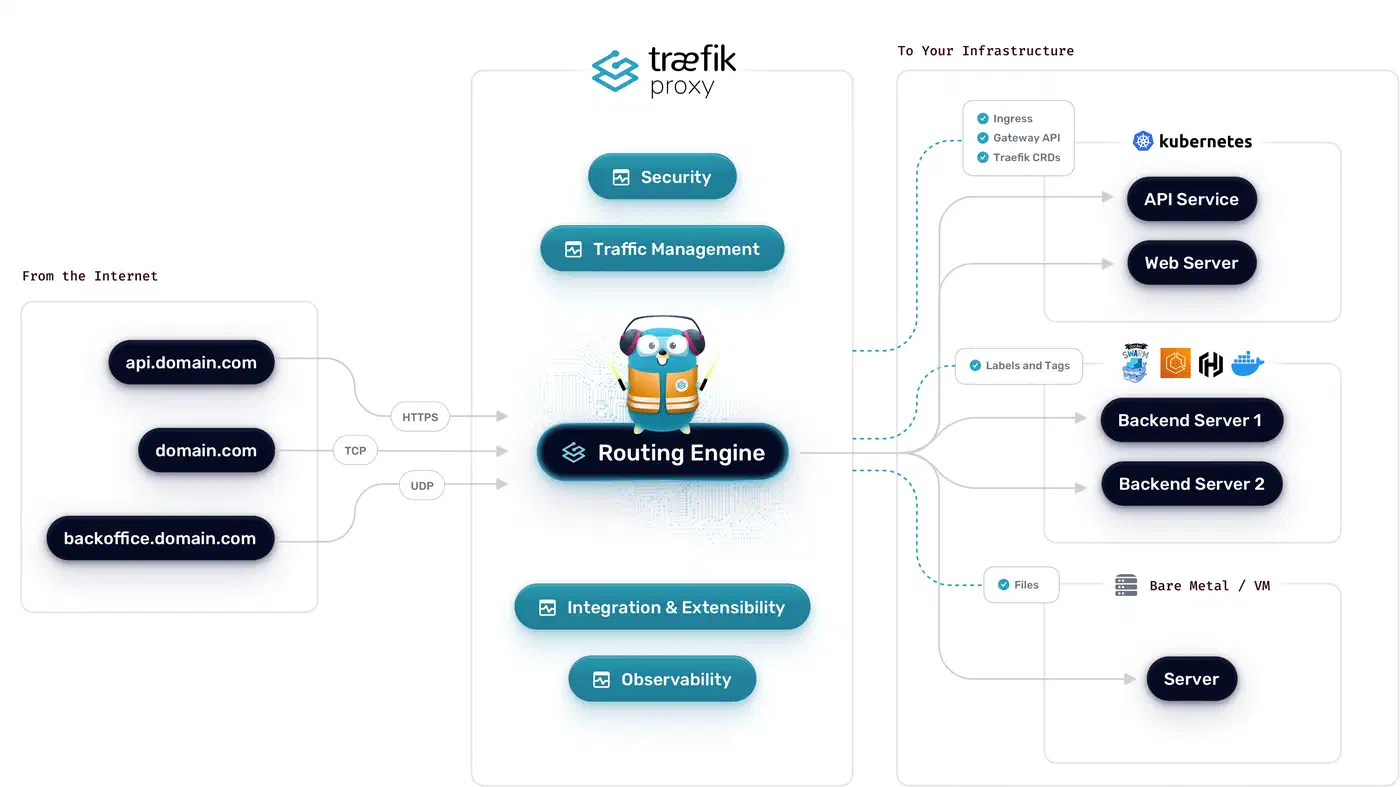
Traefik’s main strength is automatic service discovery. When a container starts with labels, Traefik builds the route instantly. When it stops, the route goes away. You don’t need to touch config files. It has native Docker support and avoids complex web UIs.
Traefik handles Let’s Encrypt certificates automatically. It supports HTTP-01 and DNS-01 challenges. It stores them in one acme.json file. It renews certificates before they expire. You can stop using Certbot and cron jobs.
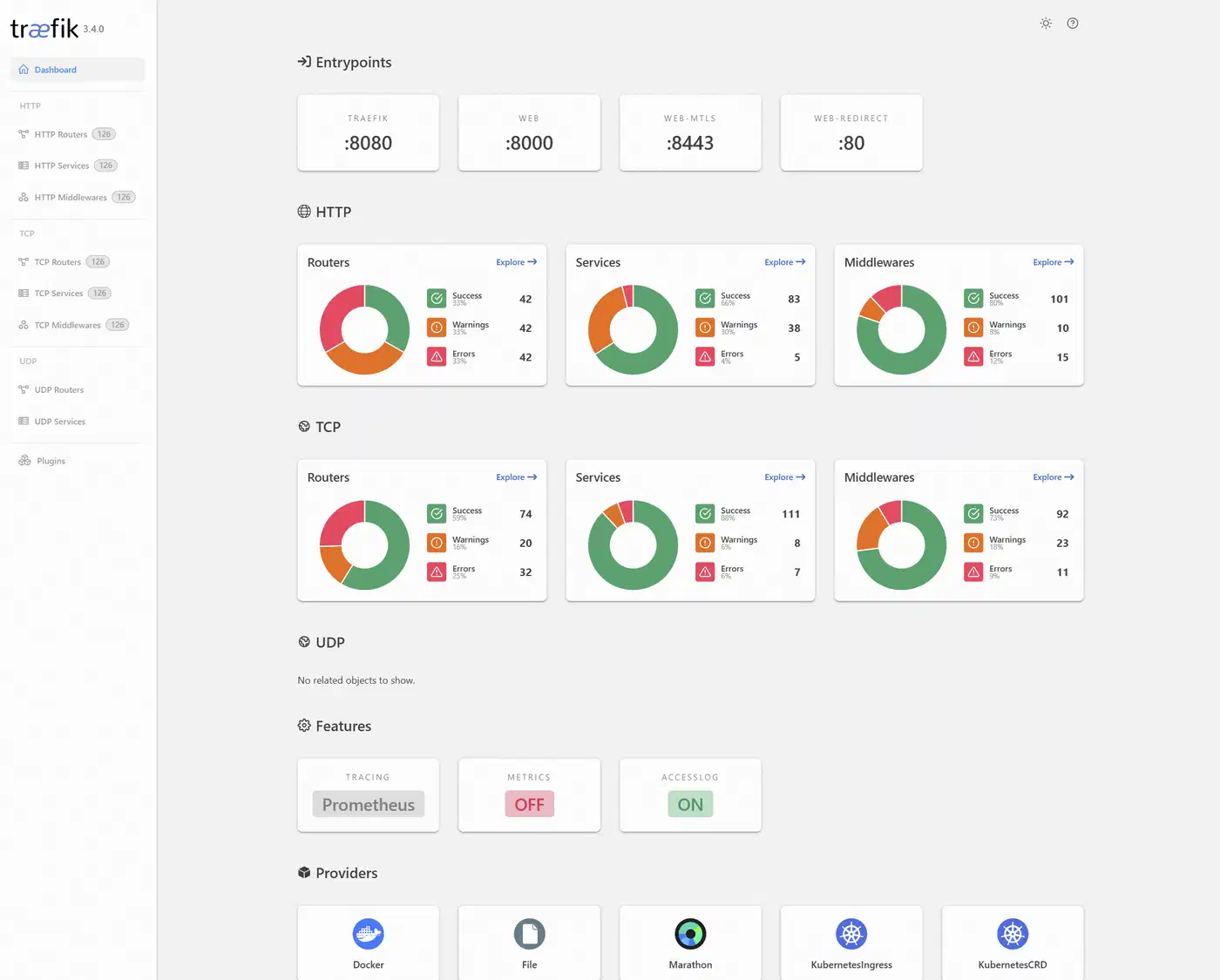
It includes a web dashboard. This shows your routers and services in real time. If a route fails, you can see active rules and their targets. This makes debugging much easier.
Performance is great for most tasks. Traefik handles over 30,000 requests per second on modest hardware. It has very low overhead. If you need over 100K requests, Nginx might be better. For most users, Traefik is the better fit.
Setting Up Traefik with Docker Compose
Start with a docker-compose.yml file. It runs Traefik as the entry point for traffic. Every service must share a network with the Traefik container. If you still need to pick a runtime, our guide on choosing a Linux container engine compares security and features.
First, create a dedicated network:
docker network create traefik-publicContainers on the default bridge network are invisible to Traefik. Any service you want to route must join the traefik-public network.
Next, create the certificate storage file:
touch acme.json
chmod 600 acme.json
Traefik won’t start if acme.json has the wrong permissions. This file stores your TLS certificates and keys, so treat it like a private key.
Here is the complete Traefik service definition:
services:
  traefik:
    image: traefik:v3.6
    container_name: traefik
    restart: unless-stopped
    command:
      # Enable Docker provider
      - "--providers.docker=true"
      - "--providers.docker.exposedbydefault=false"
      - "--providers.docker.network=traefik-public"
      # Entrypoints
      - "--entrypoints.web.address=:80"
      - "--entrypoints.websecure.address=:443"
      # Global HTTP to HTTPS redirect
      - "--entrypoints.web.http.redirections.entrypoint.to=websecure"
      - "--entrypoints.web.http.redirections.entrypoint.scheme=https"
      # Let's Encrypt
      - "--certificatesresolvers.letsencrypt.acme.email=you@example.com"
      - "--certificatesresolvers.letsencrypt.acme.storage=/acme.json"
      - "--certificatesresolvers.letsencrypt.acme.httpchallenge.entrypoint=web"
      # Logging
      - "--accesslog=true"
      - "--accesslog.format=json"
    ports:
      - "80:80"
      - "443:443"
    volumes:
      - "/var/run/docker.sock:/var/run/docker.sock:ro"
      - "./acme.json:/acme.json"
    networks:
      - traefik-public
    deploy:
      resources:
        limits:
          memory: 256m
          cpus: '0.5'

networks:
  traefik-public:
    external: true
Note a few details. The Docker socket mount is read-only. Traefik only needs to read metadata. The exposedbydefault=false flag keeps containers hidden. Services must opt in with a label. This stops you from exposing internal databases.
The redirect on the web entry point means every request to port 80 goes to port 443. You don’t need separate redirect rules for each service.
Test with Let’s Encrypt staging: Use the staging environment before you go live. This helps you avoid rate limits. Production limits you to five duplicate certificates per week. Add this flag:
- "--certificatesresolvers.letsencrypt.acme.caserver=https://acme-staging-v02.api.letsencrypt.org/directory"Your browser will show a warning. However, if the certificate loads, your setup is correct. Remove the flag and delete acme.json. Then restart Traefik to get a real certificate.
Adding Services with Docker Labels
You configure every service through Docker labels. You’ll never need to edit a config file or run a reload command. The same pattern works for any container; the walkthrough on running Plausible behind Traefik shows it applied to a real privacy-friendly analytics stack.
Here is a basic label set for a web application:
services:
  myapp:
    image: myapp:latest
    restart: unless-stopped
    labels:
      - "traefik.enable=true"
      - "traefik.http.routers.myapp.rule=Host(`app.example.com`)"
      - "traefik.http.routers.myapp.entrypoints=websecure"
      - "traefik.http.routers.myapp.tls.certresolver=letsencrypt"
      - "traefik.http.services.myapp.loadbalancer.server.port=8080"
    networks:
      - traefik-public
The server.port label tells Traefik which port the container uses. If your container only has one port, Traefik usually finds it, but being explicit is safer.
Path-based routing lets you split traffic by URL. For example, you can route /api/ to a backend and everything else to a frontend:
# API service
labels:
  - "traefik.http.routers.api.rule=Host(`example.com`) && PathPrefix(`/api`)"
  - "traefik.http.routers.api.priority=100"

# Frontend service
labels:
  - "traefik.http.routers.frontend.rule=Host(`example.com`)"
  - "traefik.http.routers.frontend.priority=50"
Higher priority wins if rules overlap. If you don’t set priorities, Traefik uses rule length as a tiebreaker, which can cause issues.
Multi-service example: Here is a realistic compose file with a Hugo static site served by Nginx Alpine, a Go API, and a PostgreSQL database. Note that PostgreSQL has no Traefik labels - it should never be exposed to the internet:
services:
  blog:
    image: nginx:alpine
    volumes:
      - ./public:/usr/share/nginx/html:ro
    labels:
      - "traefik.enable=true"
      - "traefik.http.routers.blog.rule=Host(`blog.example.com`)"
      - "traefik.http.routers.blog.entrypoints=websecure"
      - "traefik.http.routers.blog.tls.certresolver=letsencrypt"
    networks:
      - traefik-public

  api:
    build: ./api
    labels:
      - "traefik.enable=true"
      - "traefik.http.routers.api.rule=Host(`api.example.com`)"
      - "traefik.http.routers.api.entrypoints=websecure"
      - "traefik.http.routers.api.tls.certresolver=letsencrypt"
      - "traefik.http.services.api.loadbalancer.server.port=3000"
      - "traefik.http.services.api.loadbalancer.healthcheck.path=/health"
      - "traefik.http.services.api.loadbalancer.healthcheck.interval=10s"
    networks:
      - traefik-public
      - backend

  postgres:
    image: postgres:16
    environment:
      POSTGRES_PASSWORD_FILE: /run/secrets/db_password
    volumes:
      - pgdata:/var/lib/postgresql/data
    networks:
      - backend

networks:
  traefik-public:
    external: true
  backend:
    internal: true

volumes:
  pgdata:
The backend network is internal, so it has no outside access. Only the API container can reach PostgreSQL. For a full example of this pattern, see our Gitea self-hosting guide.
WebSockets work automatically. Traefik proxies these connections without extra labels. If you want to be explicit, use the scheme label on the service.
Middleware for Security, Rate Limiting, and Headers
Traefik middleware sits between the router and the service. It changes requests and responses as they move through the proxy. Every production setup should use a basic middleware chain.
Security Headers
These labels add security headers that stop common attacks like clickjacking and MIME sniffing:
labels:
  - "traefik.http.middlewares.security-headers.headers.frameDeny=true"
  - "traefik.http.middlewares.security-headers.headers.contentTypeNosniff=true"
  - "traefik.http.middlewares.security-headers.headers.stsSeconds=63072000"
  - "traefik.http.middlewares.security-headers.headers.stsIncludeSubdomains=true"
  - "traefik.http.middlewares.security-headers.headers.stsPreload=true"
  - "traefik.http.middlewares.security-headers.headers.referrerPolicy=strict-origin-when-cross-origin"
Rate Limiting
Add rate limit middleware to protect your app from DoS and brute-force attacks:
labels:
  - "traefik.http.middlewares.ratelimit.ratelimit.average=100"
  - "traefik.http.middlewares.ratelimit.ratelimit.burst=50"
This allows each IP 100 requests per second with bursts up to 50. Change these values to match your own traffic.
Basic Authentication
If you need password protection for an admin page, create a hash with htpasswd and use it in a label:
# Generate the password hash
htpasswd -nb admin yourpassword
# Output: admin:$apr1$xyz...labels:
- "traefik.http.middlewares.auth.basicauth.users=admin:$$apr1$$xyz..."Use double dollar signs ($$) because Docker Compose uses single signs for variables. You must escape them to make it work.
IP Allowlisting
To restrict access to internal services, limit source IPs:
labels:
  - "traefik.http.middlewares.internal.ipallowlist.sourcerange=192.168.1.0/24,10.0.0.0/8"
Compression
Enable compression with a single label:
labels:
  - "traefik.http.middlewares.compress.compress=true"
Traefik v3 supports Brotli compression by default when the client sends Accept-Encoding: br, falling back to gzip for older clients.
Chaining Middleware
Apply multiple middlewares to a single router by listing them comma-separated:
labels:
  - "traefik.http.routers.myapp.middlewares=ratelimit,security-headers,compress"
Order matters - middleware executes left to right. Put rate limiting first to reject abusive traffic before it hits your headers middleware or service.
Wildcard Certificates with DNS-01 Challenge
The HTTP-01 challenge works well for single domains. However, if you run many subdomains, requesting separate certificates is wasteful. It also hits Let’s Encrypt rate limits faster. Wildcard certificates issued over DNS-01 (*.example.com) solve this problem. They require a DNS-01 challenge because Let’s Encrypt must verify you control the DNS zone.
Cloudflare is a common DNS provider for this setup. You need an API token with Zone:DNS:Edit permissions for your domain.
services:
  traefik:
    image: traefik:v3.6
    environment:
      - CF_DNS_API_TOKEN=your-cloudflare-api-token
    command:
      - "--certificatesresolvers.letsencrypt.acme.email=you@example.com"
      - "--certificatesresolvers.letsencrypt.acme.storage=/acme.json"
      - "--certificatesresolvers.letsencrypt.acme.dnschallenge=true"
      - "--certificatesresolvers.letsencrypt.acme.dnschallenge.provider=cloudflare"
      - "--certificatesresolvers.letsencrypt.acme.dnschallenge.delaybeforecheck=10"
The delaybeforecheck parameter (in seconds) tells Traefik to wait before verifying the DNS record, giving Cloudflare’s API time to propagate the TXT record. Ten seconds is usually enough.
For AWS Route 53, replace the provider and set AWS_ACCESS_KEY_ID and AWS_SECRET_ACCESS_KEY environment variables instead.
Routing to Non-Docker Services with the File Provider
Not everything runs in Docker. You might have a service on the host or a NAS with a web interface. You might also have an app on another machine. Traefik’s file provider handles these cases.
Enable the file provider alongside the Docker provider:
command:
  - "--providers.docker=true"
  - "--providers.file.directory=/etc/traefik/dynamic"
  - "--providers.file.watch=true"
volumes:
  - "./dynamic:/etc/traefik/dynamic:ro"
Then create a YAML file in the dynamic/ directory:
# dynamic/external-services.yml
http:
  routers:
    nas:
      rule: "Host(`nas.example.com`)"
      entryPoints:
        - websecure
      tls:
        certResolver: letsencrypt
      service: nas

  services:
    nas:
      loadBalancer:
        servers:
          - url: "http://192.168.1.50:5000"
The watch=true flag makes Traefik reload the file provider configuration when files change, without restarting the container. You can add, remove, or modify external service routes by editing files in the dynamic/ directory.
Production Hardening and Zero-Downtime Deployments
Getting Traefik running is the easy part. Keeping it reliable in production takes more effort. You must focus on logging, monitoring, updates, and backups.
Access Logging
Structured JSON logs feed directly into aggregation tools like Grafana Loki or any JSON-capable collector:
command:
  - "--accesslog=true"
  - "--accesslog.format=json"
  - "--accesslog.filepath=/var/log/traefik/access.log"
Mount a host volume for /var/log/traefik so logs persist across container restarts.
Prometheus Metrics
Expose a metrics endpoint for Prometheus to scrape:
command:
  - "--metrics.prometheus=true"
  - "--metrics.prometheus.entrypoint=metrics"
  - "--entrypoints.metrics.address=:8082"
Monitor traefik_entrypoint_requests_total for traffic volume. Use traefik_service_request_duration_seconds_bucket for latency. Watch traefik_tls_certs_not_after to alert when certificates expire. Our Gatus monitoring guide shows how to build a status page for your users. A stack like this is also what sits in front of a self-hosted team chat once you put one behind your own domain.
Zero-Downtime Container Updates
Traefik’s dynamic discovery makes rolling updates simple. Rebuild and restart a single service:
docker compose up -d --no-deps --build myappTraefik detects the new container in seconds and routes traffic to it. Use health checks (loadbalancer.healthcheck.path) to ensure stability. This stops Traefik from sending traffic to containers that are not ready.
Backing Up acme.json
This file holds all your TLS certificates and keys. If you lose it, Traefik must request new certificates. Let’s Encrypt limits you to five duplicate certificates per week. A simple cron job is enough for backups:
0 3 * * * cp /path/to/acme.json /backups/acme-$(date +\%F).jsonCrowdSec Integration
The CrowdSec bouncer plugin is a Traefik middleware. It checks requests against IP blocklists from the CrowdSec community:
command:
  - "--experimental.plugins.crowdsec.modulename=github.com/maxlerebourg/crowdsec-bouncer-traefik-plugin"
  - "--experimental.plugins.crowdsec.version=v1.3.0"
Static IP lists often go stale. However, CrowdSec updates in real time. It uses attack patterns from its entire network.
Restart Policies and Resource Limits
Set restart: unless-stopped on all your services. Traefik should be the first service to start. It will find other containers as they come online.
On a small VPS, use 256m memory and 0.5 CPUs for Traefik. Monitor your usage with docker stats. You can adjust these values later.
Canary Deployments with Weighted Load Balancing
Traefik supports weighted load balancing. This allows canary deployments where you shift traffic to a new version. You must use the file provider because Docker labels cannot define weights.
Create a dynamic config file:
# dynamic/canary.yml
http:
  services:
    app-weighted:
      weighted:
        services:
          - name: app-v1@docker
            weight: 9
          - name: app-v2@docker
            weight: 1

  routers:
    app:
      rule: "Host(`app.example.com`)"
      entryPoints:
        - websecure
      tls:
        certResolver: letsencrypt
      service: app-weighted
This sends 90% of traffic to v1 and 10% to v2. To increase the canary flow, edit the weights. Traefik picks up the change instantly with file.watch=true. Once v2 works, remove v1.
Run both versions as separate Docker services. Use standard labels but skip the router rules. The file provider handles the routing logic.
Full Stack Overview
A production Traefik setup on one VPS includes several parts:
| Component | Purpose |
|---|---|
| Traefik container | Reverse proxy, TLS termination, routing |
traefik-public network | Shared network for all routed services |
acme.json | Certificate storage (back up regularly) |
| Docker labels | Per-service routing and middleware config |
dynamic/ directory | File provider for external services and canary configs |
| Prometheus + Grafana | Metrics and alerting |
| CrowdSec | IP reputation and threat blocking |
The configuration lives in version control with your code. To add a service, add labels to your compose file. Then run docker compose up -d. If you stop a container, Traefik removes the route.
This setup handles many services on one VPS. Traefik also supports Docker Swarm and Kubernetes. However, a single VPS works well for most tasks. It offers great performance with low effort.