 Botmonster Tech
n8n and Ollama local AI: $0/month, honest hardware math

Running private n8n and Ollama AI automations at home costs $0/month in software, but the hardware bill is real. The honest anchor: a used 64GB Mac Studio near EUR1,995 can replace a $90 to $125 monthly cloud bill, yet local tool-calling stays broken until you raise Ollama’s default num_ctx from 2048 to 8192.
Key Takeaways
- “$0/month” covers software only. The hardware and electricity are still real costs.
- Dockerized n8n reaches Ollama at host.docker.internal:11434, never localhost.
- Ollama’s 2048 context default cuts off tool results. Raise it to 8192.
- qwen2.5:14b is the most reliable local model for the AI Agent node.
- Once set up, a local n8n stack runs for months without babysitting.
What is the n8n and Ollama local AI stack?
Ollama is the local engine that runs language models on your own machine. It serves them over port 11434, so anything on your network can send prompts to it. The same engine powers other local builds, like an Ollama-driven terminal assistant wired into shell scripts. n8n is the workflow orchestrator. It has over 400 integrations and dedicated AI nodes, so you can chain a model into real automations.
Together they give you a private AI stack with no cloud API cost. Your data never leaves your machine, there are no usage caps, and you pay nothing per token. That pitch repeats on every tutorial and ranking page, and it is mostly true. The catch is that “free” describes the software license, not the full picture. The same split hits an open source SEO tool that ships free but bills every search query to your own data account.
Inside n8n you will touch three pieces. The Ollama Chat Model credential points n8n at your local engine. The Basic LLM Chain node handles simple prompt-and-reply tasks. The AI Agent node is the interesting one, because it gives the model access to tools it can call on its own.
For models, the common starters are llama3.2, qwen2.5, qwen2.5-coder, and deepseek-r1. The self-hosting community leans hard toward Qwen2.5-coder 14b or 32b for agent and tool work. The rest of this post covers the three things tutorials skip. First, the real hardware cost. Second, the truth about tool-calling. Third, one worked automation you can copy.
How much does a $0/month local AI setup really cost?
The “$0/month” claim is true for software and misleading for everything else. Hardware capex plus electricity is the real recurring picture. The honest framing puts a price on the box, not just the license.
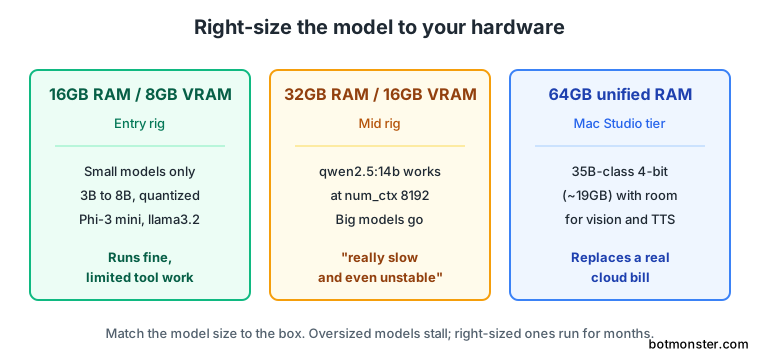
Here is a concrete data point. One self-hoster in the r/n8n community moved a multi-agent stack off Gemini 3 Flash. The new home was a used Mac Studio M1 Ultra with 64GB of unified RAM. The all-in cost landed near EUR1,995: about $1,700 for the US listing, plus forwarding, plus EUR445 in EU import duty. That box runs Qwen 3.5 35B-A3B at 4-bit (about 19GB) with headroom left over for vision, text-to-speech, and speech-to-text. It replaced a recurring $90 to $125 monthly cloud bill in their r/n8n migration thread.
Still, the skeptic’s pushback belongs in the open, not buried in a footnote.
it’s nowhere near as capable as Gemini. And if you spent 1800 euros on something, you didn’t save anything; you actually spent 1800 euros
That comment is fair. The savings story only works if you already had a recurring bill that size to kill. If your cloud spend is $10 a month, a EUR1,995 box never pays itself back. The practical rule from the thread is simple. Keep local models handling the bulk of the work. Fall back to a remote model only when a task is genuinely too complex.
Cost comparison: capex plus power vs the cloud bill
The table below puts the two paths side by side. The amortized column spreads the hardware cost over an illustrative 24 months. Electricity is extra and varies by rig and tariff, so it is not priced here. To put a real number on that line for your own box, plug your rate into the energy calculator .
| Path | Up-front cost | Monthly cost (amortized) | Capability ceiling |
|---|---|---|---|
| 64GB Mac Studio (local) | ~EUR1,995 | ~EUR83 hardware, amortized, plus electricity | Mid-tier local models |
| Cloud API (Gemini Flash tier) | EUR0 | $90 to $125 | Top-tier frontier models |
The numbers show why this is a design choice, not a free lunch. Local wins on privacy, control, and predictable cost. Cloud wins on raw capability. Right-size the model to the hardware, and if you are still shopping the box, compare options against a home lab mini PC buyer’s guide. A 16GB box with an 8GB GPU runs small models fine. Push a big model onto a 32GB box with a 16GB GPU, though, and it runs, in community words, “really really slow and even unstable.”
How do I fix n8n connection refused to Ollama?
The fix is to set the Ollama Chat Model credential base URL to http://host.docker.internal:11434 , not localhost. This single gotcha breaks more first setups than any other.
The root cause is Docker networking. Inside a container, localhost means the container itself, not your host machine. So when Dockerized n8n calls http://localhost:11434, it looks for Ollama inside the n8n container and finds nothing. Use http://localhost:11434 only when n8n runs bare-metal directly on the host.
Creating an Ollama API key does not help here. This is a networking problem, not an authentication one, as the DevTechie n8n walkthrough shows. People burn an hour generating keys when the base URL was the only thing wrong.
If Ollama still is not reachable after the URL fix, bind it to all interfaces. Set OLLAMA_HOST=0.0.0.0, add a host firewall rule for port 11434, then point n8n at your host IP and port.
Also watch for silent out-of-memory failures. A model that exceeds your free RAM or VRAM returns a 500 error a few minutes in, once the KV cache fully loads. To confirm the pipe works at all, drop to a tiny model first. The NetworkCoder Ollama video uses Phi-3 mini at about 2.5GB to test the connection before scaling up.
Why does local model tool-calling break in the n8n AI Agent?
This is the section no ranking article covers, and it is where most local setups fall apart. In short, the model calls a tool, gets a result, then ignores it. The real cause is usually a context window that is too small.
When I wired a local model into the AI Agent node myself, the first runs looked broken in confusing ways. The model would call my tool. The tool would return clean data. Then the model would reply that it “hit a technical issue.” Nothing in the logs screamed the problem. Switching to qwen2.5:14b with a larger context fixed most of it, though it was, in the community’s honest phrasing, still not perfect. Next time I would start with the context fix before touching anything else.
The four failure modes
Local tool-calling fails in four documented ways, reported across the r/n8n tool-calling thread :
- The model ignores a valid tool result and hallucinates a “technical issue” reply.
- It prints raw tool-call XML straight to the user instead of acting on it.
- Reasoning
<think>tokens leak into the final response. - You hit “Cannot assign to read only property ’name’… No execution data available.”
The real root cause of failure 1 is the context window. Ollama defaults qwen2.5:7b to a 2048-token context. A large tool result, say a 700-product inventory JSON, blows past that limit. The result truncates, the model never sees its own tool output, and it gives up. The Ollama Modelfile docs confirm 2048 as the baseline default.
The fix is a custom Modelfile. Write FROM qwen2.5:14b and PARAMETER num_ctx 8192, then run ollama create qwen2.5-14b-ctx -f Modelfile. Now large tool results fit, and the model can actually read what it fetched.
For model choice, the most consistent local pick is qwen2.5:14b at num_ctx 8192 or higher. One r/LocalLLaMA contributor summed up the trade-off well: they default to Qwen2.5 or 2.5-coder at 14b or 32b for agent nodes because it “just kinda works out the box most of the time,” though it still occasionally ignores the requested response format, and no local model they have run is flawless every time.
Failure modes mapped to fixes
The table pairs each failure with its primary fix, so you can jump straight to the cause.
| Failure mode | Primary fix |
|---|---|
| Ignores tool result, claims “technical issue” | Raise num_ctx to 8192 in a Modelfile |
| Prints raw tool-call XML | Use the HTTP Request node or an OpenAI-provider node |
Leaks <think> reasoning tokens | Disable thinking on the model |
| “No execution data available” error | Swap the built-in chat node for the HTTP node |
Two workarounds beyond the context fix help a lot. First, the built-in n8n Ollama chat node injects extra junk into prompts. Pointing the HTTP Request node, or an OpenAI-provider node, at Ollama is more reliable for tool calling, as defmans7 noted in r/n8n . Second, keep local models for classification and short replies. Then fall back to a free Groq tier running Llama 3.3 70B when a tool call has to be right.
One last caveat on reasoning models. Thinking-enabled models, even larger Qwen variants, tend to mix reasoning output into tool calls. The AI Agent node behaves better with thinking turned off.
How To Run a Private n8n and Ollama Automation at Home
Install the Self-hosted AI Starter Kit
Clone the official Self-hosted AI Starter Kit and run docker compose --profile cpu up (or --profile gpu-nvidia / --profile gpu-amd). This starts n8n, Ollama, Qdrant, and Postgres together. Open n8n at http://localhost:5678. The n8n starter kit docs
cover each profile.
Pull a tool-calling model
In the Ollama container, run ollama pull qwen2.5:14b. This is the community’s most consistent local pick for agent tool-calling. Avoid sub-8B models for tool work, since they fumble structured output far more often.
Fix the context window
Create a Modelfile with FROM qwen2.5:14b and PARAMETER num_ctx 8192, then run ollama create qwen2.5-14b-ctx -f Modelfile. This stops Ollama’s 2048-token default from truncating large tool results.
Add the Ollama Chat Model credential
In n8n, create an Ollama Chat Model credential and set the base URL to http://host.docker.internal:11434 . Dockerized n8n cannot reach Ollama on localhost. Then select your num_ctx model.
Wire the AI Agent node
Add an AI Agent node, attach the Ollama Chat Model, give it one tool, and write a tight system prompt. If the model leaks raw tool-call XML or think tokens, swap to the HTTP Request node or an OpenAI-provider node pointed at Ollama.
Verify the automation end to end
Trigger the workflow with a real input. Confirm the tool gets called and the model uses the returned result. Check that the execution log shows actual data, not “No execution data available.”
A worked example: build one real local automation node by node
Let me make this concrete with a single automation: an RSS-to-digest workflow that reads new posts and writes a short summary. It uses every piece above and proves the stack end to end. Scaled up, the same idea becomes a 500-feed news monitor running on one desktop.
Start with an RSS Read node pointed at a feed. Wire its output into an AI Agent node. On that agent, attach the Ollama Chat Model credential with the base URL set to http://host.docker.internal:11434 and your qwen2.5-14b-ctx model selected. That base URL is the same Docker-networking fix from earlier, shown here in real context.
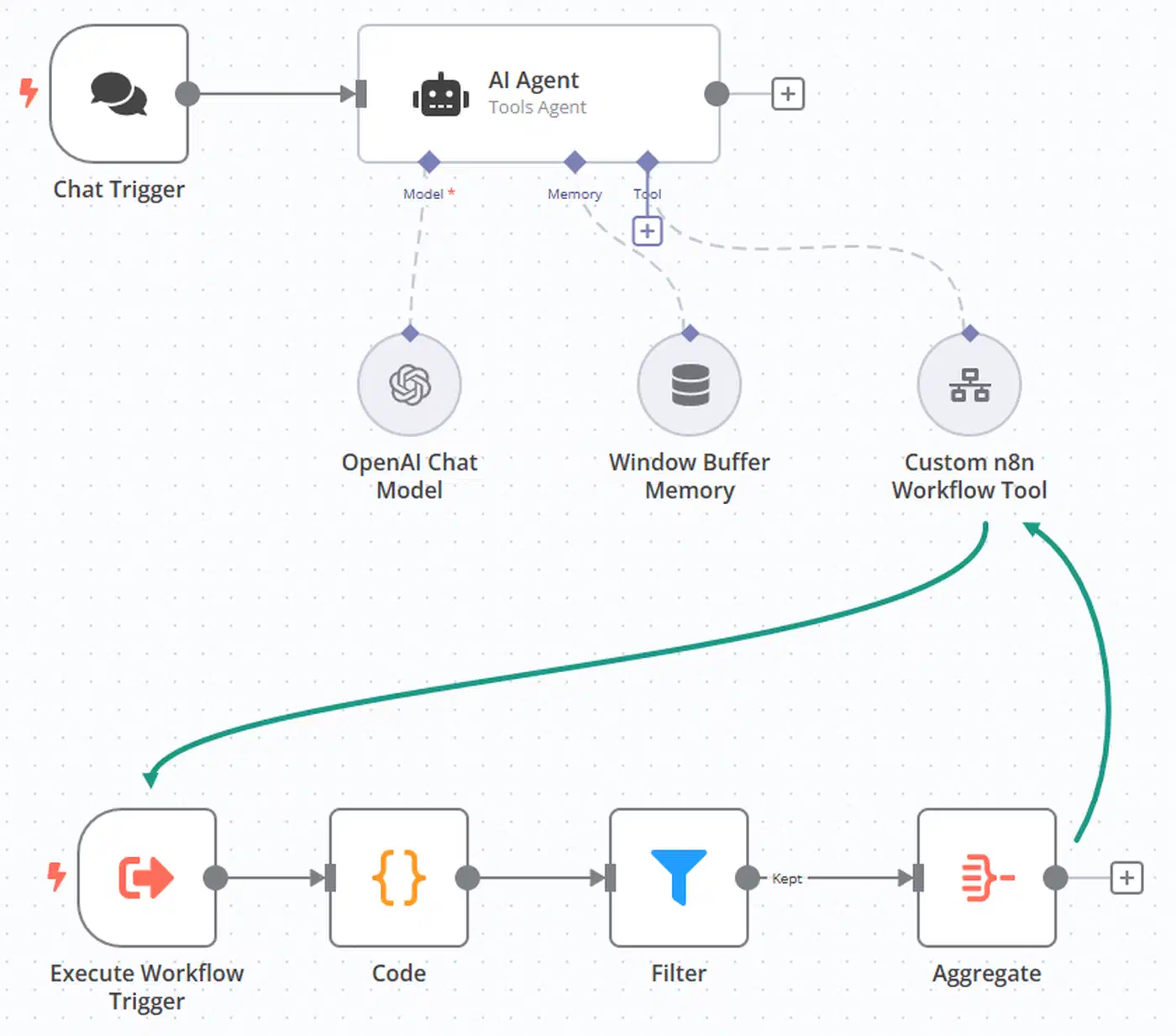
The system prompt should be short and strict. Something like: “You summarize blog posts. Read the title and body, then return three plain bullet points. No preamble, no markdown headers.” A tight prompt keeps a local model from rambling or leaking format noise. Feed it a real article body as input, and the agent returns three clean bullets you can pipe into a Telegram or email node.
For retrieval-augmented work, pair Ollama with the Qdrant vector database that ships in the Starter Kit. Use an embedding model like nomic-embed-text to index your documents, then persist conversation memory in self-hosted Postgres so it survives container restarts. The Leon van Zyl RAG walkthrough builds exactly this pattern step by step.
One performance note from the field: some users see a model that is fast in the terminal but sluggish inside n8n. The lag usually comes from the built-in chat node bloating the prompt. Routing the call through the HTTP Request node sidesteps that overhead and brings n8n latency back in line with the terminal.
Is a self-hosted n8n stack reliable enough to leave running?
Yes, the community consensus is that the stack is fairly bulletproof once configured. As one r/n8n_ai_agents user put it, once it is set up it is “fairly bulletproof,” with their only failures coming when external APIs are down. The “it’s 2am and my workflows stopped” framing is a title hook, not the lived experience most self-hosters report.
A few practical settings keep it that way. Set Docker restart policies so containers come back after a reboot. Use persistent named volumes for n8n_data and Postgres so you do not lose workflows or history. Set the time-zone environment variable and the editor base URL, and disable the secure cookie if you are not behind a reverse proxy. These take ten minutes and prevent most “why did it stop” moments.
It helps to frame cloud versus on-prem as a design choice, not a moral one. You self-host for control and privacy, not because it is “free.” Both can be the right call depending on the workload.
One ops note worth borrowing from r/n8n_ai_agents : some admins refuse the n8n command node on Docker, since it can run shell commands. Using community nodes plus REST API calls is a safer pattern for anything you leave running unattended.