 Botmonster Tech
Reverse engineer USB devices with Wireshark and Python

Reverse engineering an unknown USB device means working out the protocol it uses to talk: the byte sequence that makes it do things. The good news is that most USB devices don’t encrypt their traffic. Everything they send and get back travels in plain sight on the USB bus, and Linux gives you the tools to watch it. Once you know the protocol, a Python script using pyusb can drive the device directly and skip the vendor software. The same capture tools work on RISC-V hardware, which is often the only way to get an unsupported peripheral working there.
Understanding USB Communication: The Protocol Basics
Before you capture any traffic, you need a mental model of how USB devices talk. Every USB device has a set of endpoints: logical channels for data flow. Endpoints are numbered and directional (IN for device-to-host, OUT for host-to-device). The device lists its endpoints in descriptors: structured data it sends to the host on plug-in. You can read these descriptors right now on any connected device:
lsusb -v -d 046d:c52bThis shows the Vendor ID (046d = Logitech), Product ID (c52b), and a full dump of the device’s descriptor tree. Look at the bDeviceClass, bInterfaceClass, and bEndpointAddress values. They tell you what kind of device it is and where to send data.
USB has four transfer types, and you’ll hit each one in a different setting. Control transfers handle device setup and config. They go both ways and follow a request/response shape. Interrupt transfers suit devices that send small data fast but not often: mice, keyboards, and gamepads all use them. Bulk transfers move big payloads when timing doesn’t matter, like printers and USB storage. Isochronous transfers handle live streams where some data loss is fine, like audio and webcam video.
The key split for reverse engineering is HID class versus vendor-specific class. A device with bDeviceClass: 3 (HID) uses a public protocol. The host OS knows how to drive it without any vendor driver, and you can read HID reports directly. A vendor-specific device (bDeviceClass: 0xff) uses whatever protocol the maker invented. That is where real reverse engineering starts.
Setting Up Your Capture Environment
Linux with usbmon
On Linux, USB traffic capture runs through the usbmon kernel module. Load it if it isn’t there yet:
sudo modprobe usbmon
ls /dev/usbmon*
You’ll see devices like /dev/usbmon0, /dev/usbmon1, and so on, one per USB bus. The number matches the bus number from lsusb output. To capture from all buses at once, use /dev/usbmon0, which grabs bus 0 (not always there), or pick Wireshark’s “any” USB interface.
Wireshark needs read access to these devices. Instead of running Wireshark as root, add your user to the right group:
sudo chmod a+r /dev/usbmon*
# Or permanently via udev rule:
echo 'SUBSYSTEM=="usbmon", GROUP="wireshark", MODE="640"' | sudo tee /etc/udev/rules.d/99-usbmon.rules
sudo usermod -aG wireshark $USER
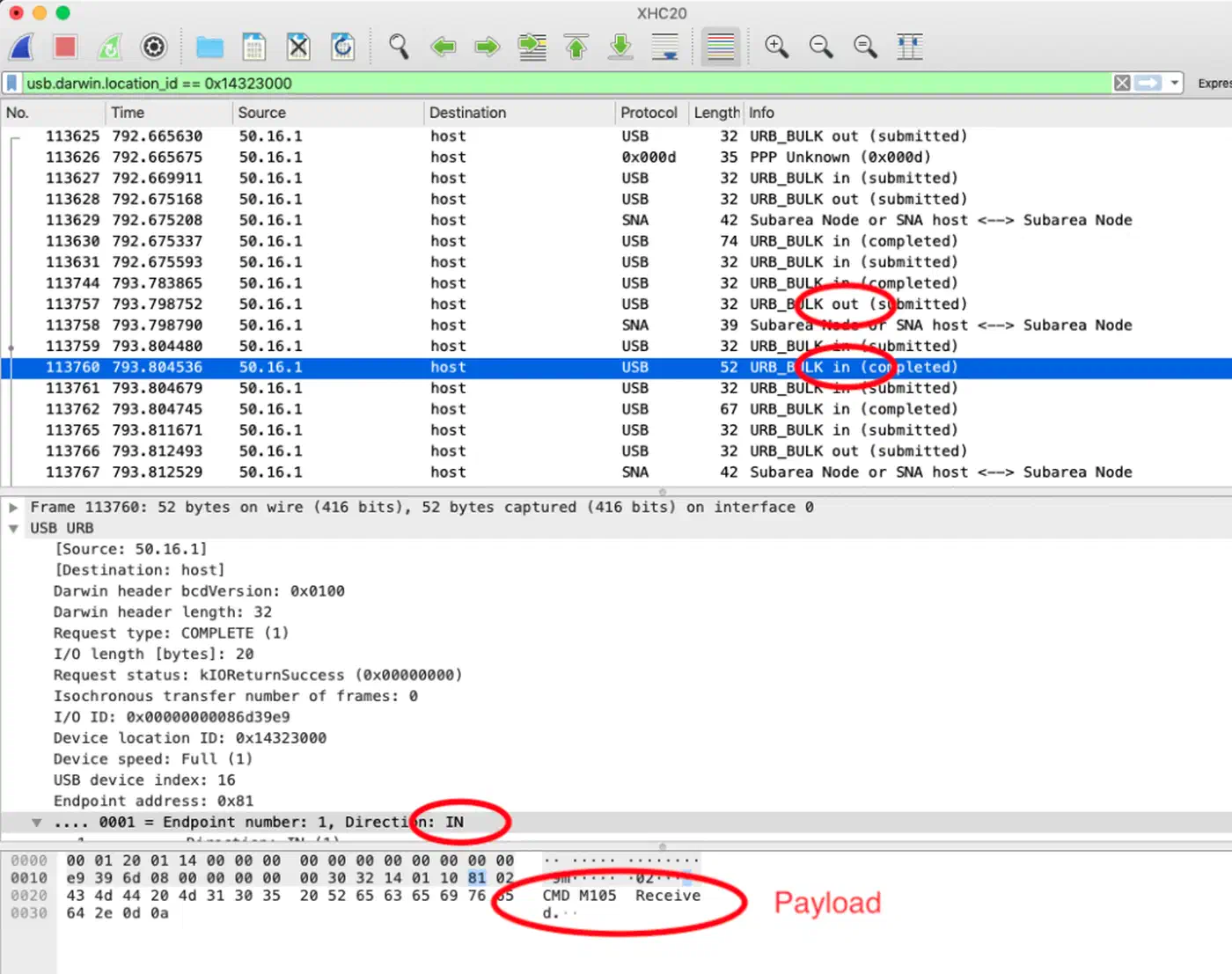
Once Wireshark has access, open it. You’ll see usbmon interfaces in the capture list. Pick the one that matches your device’s bus number, click Start, and you’re catching raw USB traffic.
Windows with USBPcap
Many cheap peripherals only work on Windows because the vendor ships a Windows-only driver. Think RGB lighting controllers, custom HID devices, and gaming accessories. To capture what that driver is sending, install USBPcap. It plugs into Wireshark on Windows as a USB capture source. Capture the traffic while the vendor software runs, then move the .pcap file to Linux for analysis.
One practical tip: some devices act up or even crash when watched. If your target is shaky during software capture, a USB hub with hardware logging (like the OpenVizsla) records at the hardware level without bothering the device. For a dedicated rig, a portable hacking lab running Kali Linux gives you a self-contained box with all these tools pre-installed.
Analyzing Traffic in Wireshark
Raw USB captures are noisy. Open one and you’ll see a flood of packets: SOF (Start of Frame) tokens, various class requests, plus traffic from other devices on the same bus. Filter hard to single out your target.
First, identify your device’s bus and address numbers:
lsusb
# Bus 003 Device 007: ID 1a2c:0e24  Your Target Device
In Wireshark, apply the display filter:
usb.bus_id == 3 && usb.device_address == 7Now trigger the action you want to capture. Change an LED color, press a button, or tweak a setting in the vendor software. Watch Wireshark in real time. You’re hunting a burst of packets that lines up with your action.
Reading Control Transfer Setup Packets
Control transfers are the richest packets to read. Each one starts with an 8-byte Setup packet that holds:
bmRequestType: direction, type (Standard/Class/Vendor), and recipientbRequest: the request number, often a vendor-defined command IDwValueandwIndex: parameters for the requestwLength: how many bytes of data follow
For vendor-class devices, bRequest is usually a small integer (0x01, 0x09, and so on) that stands for a command in the device’s private protocol. If the same bRequest value shows up every time you change a setting, that’s your target command.
Identifying Command-Response Patterns
The best trick is to make the same change many times and watch what stays the same. If switching an LED to red always sends the same 64-byte packet, with the same shape except for the color bytes, the color bytes pop out. Change to green and repeat. Now you know which byte slots hold R, G, and B values.
In Wireshark, right-click a packet and pick “Follow > USB Stream” to see the full chat between host and device, with framing stripped out. Export the packets you want as hex: File > Export Specified Packets, then tick the ones you care about. This hex dump is what you’ll rebuild in Python.
Filtering SOF Noise
USB Start of Frame packets fire every millisecond and almost never matter to you. Filter them out:
usb.bus_id == 3 && usb.device_address == 7 && !(usb.transfer_type == 0x05)Focus on URB_BULK and URB_CONTROL types with DATA IN or DATA OUT directions. These hold the real command and response payloads.
Writing a Python Driver with pyusb
With enough captured packets, you can rebuild the protocol in Python. Install the prereqs:
pip install pyusb
sudo apt install libusb-1.0-0  # Debian/Ubuntu
# On Windows, use Zadig to install the WinUSB driver for your device
Enumerating and Opening the Device
import usb.core
import usb.util

# Find by Vendor ID and Product ID from lsusb
dev = usb.core.find(idVendor=0x1a2c, idProduct=0x0e24)

if dev is None:
    raise ValueError("Device not found")

# Detach any kernel driver that has claimed the interface
if dev.is_kernel_driver_active(0):
    dev.detach_kernel_driver(0)

dev.set_configuration()
Sending Control Transfers
Control transfers in pyusb map straight to the Wireshark fields you decoded:
# Sending a vendor control transfer
dev.ctrl_transfer(
    bmRequestType=0x21,  # Host-to-device, Class, Interface
    bRequest=0x09,       # SET_REPORT (common HID command)
    wValue=0x0300,       # Report type + report ID
    wIndex=0,            # Interface number
    data_or_wLength=payload_bytes
)
The payload_bytes is the byte array you rebuilt from Wireshark. If you caught a 64-byte packet that sets LED colors, copy that exact byte order here. Swap in the color values at the byte slots you spotted.
Sending Bulk and Interrupt Transfers
For devices that use bulk or interrupt endpoints in place of control transfers:
# Find the OUT endpoint
cfg = dev.get_active_configuration()
intf = cfg[(0, 0)]

ep_out = usb.util.find_descriptor(
    intf,
    custom_match=lambda e: usb.util.endpoint_direction(e.bEndpointAddress) == usb.util.ENDPOINT_OUT
)

# Send data
ep_out.write(payload_bytes)

# Read response from IN endpoint
ep_in = usb.util.find_descriptor(
    intf,
    custom_match=lambda e: usb.util.endpoint_direction(e.bEndpointAddress) == usb.util.ENDPOINT_IN
)
response = ep_in.read(64)  # Read up to 64 bytes
Practical Example - Reverse Engineering an RGB Keyboard
Here’s how this process runs end to end on a typical cheap RGB keyboard that ships with Windows-only software for lighting.
Step 1: Capture the vendor software’s traffic. Install the vendor software on a Windows VM. Open Wireshark (or USBPcap) and start capturing from the keyboard’s USB bus. Change the whole keyboard to solid red. Stop the capture and export it.
Step 2: Spot the relevant packets. Filter by the keyboard’s device address. You’ll usually see a burst of 4 to 8 packets right after the color change. The packets are normally 64 bytes each, the standard HID report size.
Step 3: Rebuild the packet structure. Change to solid green and capture again. Compare the two captures byte by byte. In a typical RGB keyboard protocol, you’ll find something like:
Byte 0:    0x00        (report ID)
Byte 1:    0x0b        (command: set colors)
Byte 2:    key_index   (which key)
Bytes 3-5: 0xFF 0x00 0x00  (R, G, B for red)
Bytes 6-63: 0x00...    (padding)
Swap red for green and bytes 3-5 become 0x00 0xFF 0x00. Now you know the protocol.
Step 4: Write the Python script.
import usb.core
import usb.util

dev = usb.core.find(idVendor=0x1a2c, idProduct=0x0e24)
if dev.is_kernel_driver_active(0):
    dev.detach_kernel_driver(0)
dev.set_configuration()

def set_key_color(key_index, r, g, b):
    payload = bytes([0x00, 0x0b, key_index, r, g, b]) + bytes(58)
    dev.ctrl_transfer(0x21, 0x09, 0x0300, 0, payload)

# Set key 0 to purple
set_key_color(0, 128, 0, 255)
This pattern works for most non-encrypted consumer USB devices: capture, compare, extract, replay.
Handling Encrypted or Obfuscated Protocols
Some devices add light obfuscation: XOR with a fixed key, byte-swapping, or simple rolling checksums. These aren’t encryption. They’re speed bumps. If your captured packets look random but stay the same for the same operation, try XORing them with common keys (0xAA, 0x55, 0xFF), or check if the bytes sum to a known value. The Scapy library can help automate pattern checks across many captures.
True encryption is rare in consumer USB but shows up in some DRM-protected dongles. Those need deeper tools that fall outside this guide.
Legal and Ethical Considerations
USB reverse engineering for interop, meaning driving your own hardware without vendor software, is broadly legal in most places. In the US, DMCA Section 1201 carves out clear exemptions for interop research, so long as the goal is to make new software work with the device. Writing an open-source Linux driver for a device that lacks one fits right inside that carve-out.
The line gets fuzzy when the device’s USB protocol enforces DRM or access control. Bypassing those controls, even by accident, can create legal risk based on how the device is sold and used.
If you find a security flaw in a device’s USB protocol, like an auth bypass, a buffer overflow in command parsing, or unencrypted sensitive data, the right move is responsible disclosure to the maker. Projects like OpenRGB and libratbag keep open-source databases of reverse-engineered RGB and gaming peripheral protocols, and they welcome new entries. If you figure out a device’s protocol, consider sending it in. Your work will help everyone who runs that hardware on Linux.