 Botmonster Tech
HTMX + Alpine.js: 35KB interactive UIs, zero build step


Combine HTMX
(about 14KB gzipped) with Alpine.js
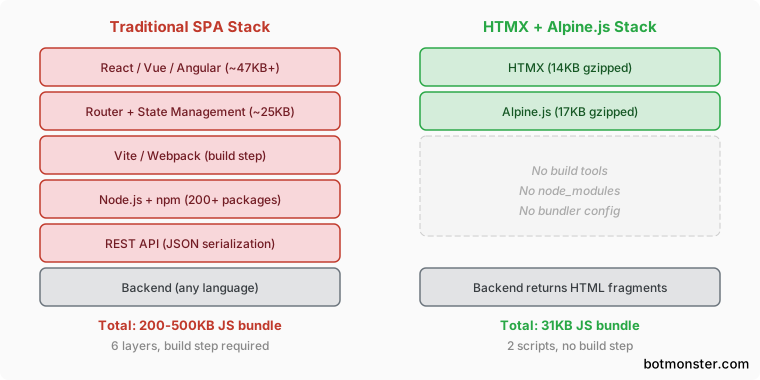
(about 17KB gzipped). You get a full interactive web stack for 31KB total. No Webpack. No Vite. No Node.js. No build step. Drop two <script> tags in your HTML, sprinkle a few attributes on your markup, and let any backend serve HTML fragments. That’s the whole setup.
The split is clean. HTMX drives server-side partial updates. Alpine.js covers light client reactivity. The server returns HTML, not JSON. The browser swaps it into the page. Alpine.js attributes in the markup handle toggles, dropdowns, and modals. No compile step sits between you and your running app.
Why Skip the Build Step
JavaScript tooling has turned into its own job. A stock Vite + React + TypeScript project pulls in 200+ node_modules packages before you write a line of app code. React 19 plus React DOM weighs 47KB gzipped on its own. Add React Router
(14KB), a store like Zustand
(2KB) or Redux Toolkit
(11KB), and a form library. You’re shipping over 70KB of framework code before your own logic ships at all. Real React apps often hit 200-500KB. If you stay on a big framework, splitting the bundle
by route and component is the usual way to claw that first-load number back down.
HTMX + Alpine.js totals 31KB gzipped. No compile step. No transpile. No tree-shake config. No bundler plugins to debug. You build with a text editor and a browser.
| Metric | React 19 SPA | HTMX + Alpine.js |
|---|---|---|
| Minimum framework size (gzipped) | ~47KB (React + DOM alone) | ~31KB (both libraries) |
| Typical real-world bundle | 200-500KB | 31KB + your HTML |
| Build tool dependencies | 200+ npm packages | 0 |
| Build step required | Yes (Vite, Webpack, etc.) | No |
| First-load performance vs React | Baseline | 40-60% faster for CRUD apps |
| Backend language | Typically Node.js | Any (Python, Go, Ruby, PHP, Rust) |
Server-side rendering comes free. HTMX serves HTML fragments straight from the server, so your content is crawlable and SEO-ready with no hydration to manage. A Django + HTMX app can stand in for a Django REST Framework + React SPA setup, at roughly half the code.
When this stack fits well: CRUD apps, admin dashboards, content sites with a few widgets, internal tools, prototypes, and teams stronger on the backend than on the frontend.
When to pick something else: Real-time co-editors (Google Docs style), heavy drag-and-drop UIs, offline-first apps, or projects that need a native mobile build from the same code via React Native or Expo. Those cases usually call for a full React framework , and it is worth comparing the self-hostable options before you commit.
HTMX Fundamentals: Server-Driven Interactions
HTMX adds attributes to plain HTML so any element can fire HTTP requests and swap parts of the page with the server’s reply. Here are the core attributes that cover most of what a JS framework does.
hx-get="/url" and hx-post="/url" send GET or POST requests from any HTML element: buttons, divs, forms, links. The server returns an HTML fragment, and HTMX swaps it into the page. hx-put, hx-patch, and hx-delete round out full REST support.
hx-target="#element-id" sets where the response HTML lands. It defaults to the element that fired the request. CSS selectors work too: hx-target="closest .card" or hx-target="find .result" walk up or down the DOM tree.
hx-swap="innerHTML" controls how the response replaces content. Options include innerHTML (swap children), outerHTML (swap the element itself), beforebegin and afterend for next-door inserts, delete to drop the element, and none to fire the request without any swap.
hx-trigger="click" sets when a request fires. Defaults vary by element (click for buttons, submit for forms, change for inputs). Modifiers like hx-trigger="keyup changed delay:500ms" give you debounced search-as-you-type. hx-trigger="revealed" fires when an element scrolls into view, handy for infinite scroll. If you would rather show numbered page links, a single-script jQuery pagination widget like bootpag
fits the same no-build philosophy: drop in the tag, render the page buttons, and let HTMX load each page on the widget’s page event.
hx-indicator="#spinner" shows a loading state during requests. It toggles the htmx-request CSS class on the chosen element. A small CSS rule does the rest:
.htmx-indicator { display: none; }
.htmx-request .htmx-indicator { display: inline; }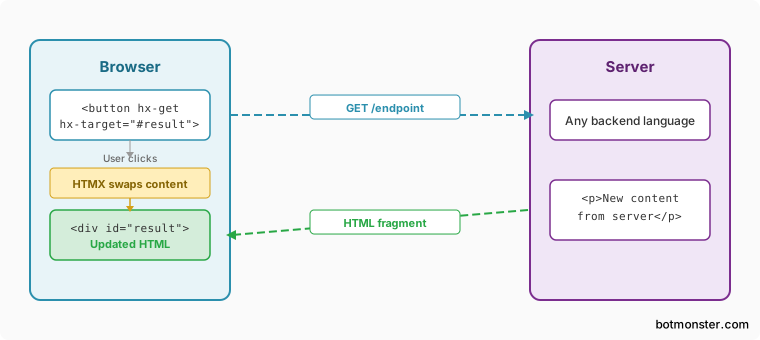
Need to send extra data? hx-vals='{"key":"value"}' tacks extra params onto the request. hx-include="[name='field']" pulls values from other form fields. Both let you pass context like page cursors or filter state without hidden form fields.
Alpine.js Essentials: Client-Side Reactivity
HTMX handles server traffic. Alpine.js handles the client-side reactivity for modals, dropdowns, tabs, and form checks: the bits that don’t need a server round-trip.
x-data="{ open: false }" sets reactive state on any HTML element. All child elements can read and write this state. Think of it as a scoped Vue.js
instance pinned to a DOM subtree, minus the build step.
x-show="open" toggles an element via CSS display, keeping the DOM node in place. x-if inside a <template> tag adds and removes DOM nodes for real. Tack on .transition for smooth CSS fades.
@click="open = !open" (short for x-on:click) binds event handlers inline. Modifiers like @click.outside="open = false" shut a dropdown on outside clicks. @keydown.escape="open = false" wires up keyboard shortcuts. @submit.prevent calls preventDefault() for you, which is where you wire up ARIA-friendly field validation
so screen readers hear every error.
:class="{ 'active': tab === 'home' }" (short for x-bind:class) binds CSS classes to reactive state. It’s the base for tab UIs and active-state styling.
x-for="item in items" renders lists inside <template> tags. Pair it with x-transition and you get animated list changes with no JS functions to write.
For app-wide state, Alpine’s $store lets you set global reactive data. Use Alpine.store('darkMode', { on: false }) to set it, then read $store.darkMode.on anywhere. That covers dark mode toggles, user prefs, and shared notification state.
Putting It Together: A Live Search Example
Here’s a concrete demo of how the two libraries pair up. A live search interface needs debounced input (HTMX), loading states (both), server-side search (HTMX), and keyboard navigation (Alpine.js).
The HTML structure:
<div x-data="{ selected: -1 }">
  <input type="search"
         name="q"
         hx-get="/search"
         hx-trigger="keyup changed delay:300ms"
         hx-target="#results"
         hx-indicator="#spinner"
         @keydown.arrow-down="selected++"
         @keydown.arrow-up="selected = Math.max(selected - 1, 0)"
         placeholder="Search...">
  <span id="spinner" class="htmx-indicator">Loading...</span>
  <ul id="results"></ul>
</div>
The /search endpoint takes a q param. It returns an HTML fragment of <li> items with highlighted matches. The server does the search (SQL LIKE, full-text search, or in-memory filter) and ships back pre-rendered HTML. No JSON to serialize, no client-side templates to render.
HTMX runs the debounced HTTP call, the DOM swap, and the loading state. Alpine.js drives keyboard navigation through the results, a purely client-side job with no server round-trip. Each library sticks to what it does best.
For error handling, hx-on::afterRequest lets you check response status. When the query matches nothing, the server returns a “No results found” fragment. The render logic stays on the server, where it belongs.
Beyond the Basics
HTMX also supports WebSocket connections
via its ws extension. Attributes like ws-connect="/chatroom" and ws-send on a form unlock real-time features
: chat, live notifications, shared updates. All of it stays in the same HTML-first style.
Checking the alternatives? Hotwire/Turbo (22KB, tied closely to Rails) and Unpoly (mature, big in the Ruby world) solve the same problem. HTMX is the most backend-neutral of the three, its main draw if you don’t live in Rails. Meanwhile, the Tokio team is building a Rails-style framework for Rust called Topcoat. It re-renders components on the server and swaps the HTML into place, with no client bundle. For UI parts that need to work across any stack, browser-native custom elements give you another build-free path to reusable widgets.
Testing HTMX is easiest as server-side integration tests. Check that each endpoint returns the right HTML fragment for a given input. For end-to-end runs, Playwright drives HTMX pages the same way it drives any other page. The output is plain HTML in the DOM.
HTMX + Alpine.js won’t replace React or Vue on every project. But most web apps are server-driven CRUD with a few widgets sprinkled in. For those, this stack cuts a lot of needless machinery. Two script tags, some HTML attributes, and the backend you already know.