 Botmonster Tech
Real-time chat with WebSockets: under 150 lines, no framework
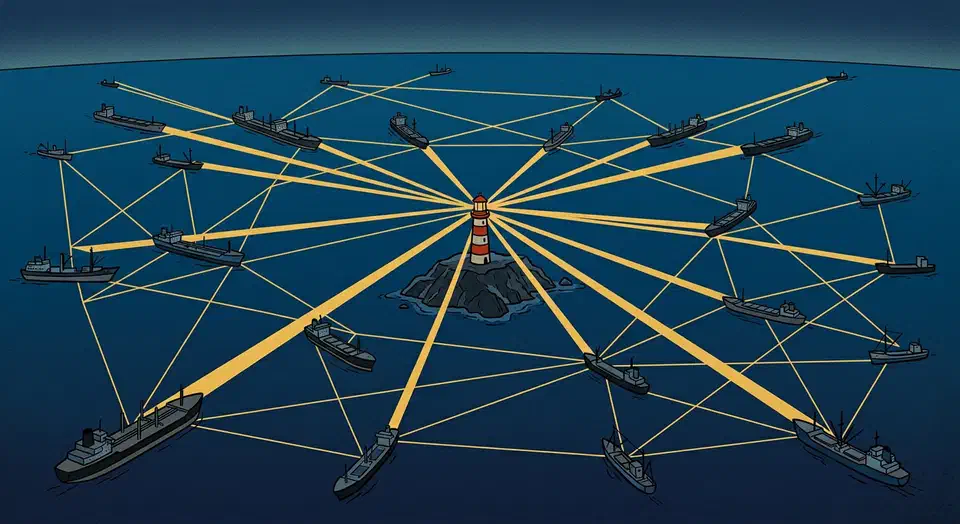
A WebSocket chat needs two pieces. The server holds open connections and sends each message to every client. The browser client opens a socket, sends text on form submit, and shows new messages in the page. This build uses Node.js with the ws library and plain JavaScript on the client. No React, no Socket.IO, no build step. The whole thing fits in under 150 lines and handles dozens of users at once on a cheap server. This tutorial walks through every part.
WebSockets vs. HTTP: Why Persistent Connections Matter for Chat
Before you write any code, it helps to know why HTTP falls short for chat and what WebSockets do instead.
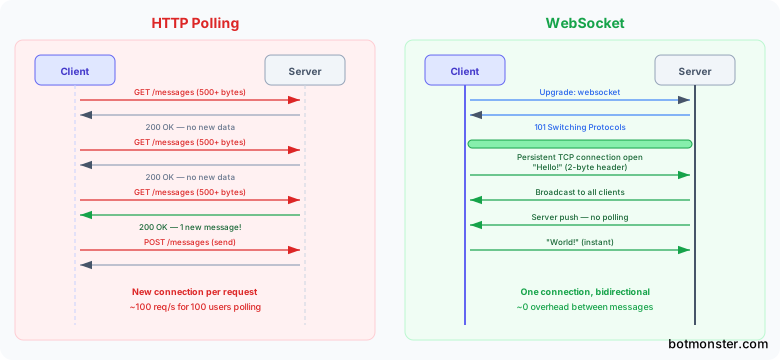
HTTP follows a request-response model. The client always starts a request, and the server can never push data on its own. To check for new messages, you have to ask for them. A naive chat with setInterval(() => fetch('/messages'), 1000) works, but it fires one request per second per client. At 100 users polling every second, that’s 100 requests per second of pure waste. Most return nothing new. This does not scale.
Long polling helps. The server holds the HTTP request open until new data shows up, then sends the response. The client opens a fresh request right away. It beats short polling, but every message still carries full HTTP overhead, and the server side gets tricky to manage.
A WebSocket connection starts as a normal HTTP request with an Upgrade: websocket header. The server replies with HTTP 101 Switching Protocols. After that, the TCP connection stays open. Both sides can send messages in either direction at any time. The framing cost is tiny: a 2-byte header for most messages, against 500+ bytes for a typical HTTP request with headers and cookies.
Server-Sent Events (SSE) are another option. SSE streams from server to client over HTTP, but it only goes one way. The client would still need to send messages with separate HTTP POST requests. For chat, where data flows both ways all the time, WebSockets fit better. SSE suits broadcast-only cases like stock tickers or live dashboards, where clients only read data.
When should you stick with HTTP? For plain request-response patterns where the server reply is complete and final, such as API calls, form submissions, and page loads, HTTP is simpler. Caches and CDNs support it well. WebSockets make sense when data flows both ways all the time and low latency is the goal.
Building the WebSocket Server in Node.js
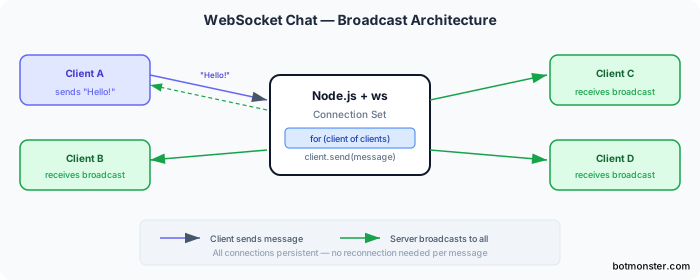
The server is the central broadcast hub. It keeps a list of active connections and routes messages between them. The code below is minimal but production-aware, built on the ws library.
Start with project setup:
mkdir chat-server && cd chat-server
npm init -y
npm install ws
Node.js 22 LTS ships a native WebSocket client, but not a server. The ws package fills the gap with WebSocketServer. It is stable, fast, and handles thousands of open connections with ease. The same server code runs on Bun and Deno too, so which runtime wins comes down to your other needs, not this chat app.
The minimal server looks like this:
const { WebSocketServer } = require('ws');
const wss = new WebSocketServer({ port: 8080 });
const clients = new Map();
function escapeHtml(text) {
return text
.replace(/&/g, '&')
.replace(/</g, '<')
.replace(/>/g, '>')
.replace(/"/g, '"')
.replace(/'/g, ''');
}
function broadcast(data) {
const message = JSON.stringify(data);
wss.clients.forEach((client) => {
if (client.readyState === 1) {
client.send(message);
}
});
}
wss.on('connection', (ws) => {
ws.on('message', (raw) => {
let data;
try {
data = JSON.parse(raw.toString());
} catch {
return;
}
if (data.type === 'join' && data.username) {
const username = escapeHtml(data.username.slice(0, 30));
clients.set(ws, username);
broadcast({
type: 'system',
text: `${username} joined the chat`,
timestamp: Date.now(),
});
return;
}
if (data.type === 'message' && data.text) {
const username = clients.get(ws) || 'Anonymous';
broadcast({
type: 'message',
username,
text: escapeHtml(data.text.slice(0, 500)),
timestamp: Date.now(),
});
}
});
ws.on('close', () => {
const username = clients.get(ws);
clients.delete(ws);
if (username) {
broadcast({
type: 'system',
text: `${username} left the chat`,
timestamp: Date.now(),
});
}
});
ws.on('error', (err) => {
console.error('Socket error:', err.message);
});
});
console.log('WebSocket server running on ws://localhost:8080');A few design choices in this code are worth a closer look.
The server parses every message as JSON and checks it before relaying it. It expects at least a type field and either a username for join or text for messages. It ignores everything else.
The escapeHtml function cleans <, >, &, ", and ' in message text before broadcast. This is a belt-and-suspenders move. The client should also use safe DOM methods, as you will see soon. But cleaning on the server means no client can inject bad content, no matter how other clients render it.
A Map<WebSocket, string> ties each socket to a username so the server can track connections. When a client sends a join message, the server stores the pair. On close, it drops the entry and broadcasts a “user left” note.
The error event handler on each socket stops a stray exception from crashing the process. Without it, a bad close frame from one client could take down the whole server.
One piece is missing from this minimal version: heartbeat checks. In production, add a ping/pong interval to catch zombie connections. Those are clients that dropped without sending a close frame:
const interval = setInterval(() => {
  wss.clients.forEach((ws) => {
    if (ws.isAlive === false) return ws.terminate();
    ws.isAlive = false;
    ws.ping();
  });
}, 30000);

wss.on('connection', (ws) => {
  ws.isAlive = true;
  ws.on('pong', () => { ws.isAlive = true; });
  // ... rest of connection handler
});

wss.on('close', () => clearInterval(interval));
This pings every client every 30 seconds. If a client does not reply with a pong before the next cycle, the server drops it.
The Vanilla JavaScript Client
The browser client connects to the server, takes in messages, and shows them in the page. It all lives in one HTML file, with no framework and no build step.
The complete client HTML:
<!DOCTYPE html>
<html lang="en">
<head>
  <meta charset="UTF-8">
  <meta name="viewport" content="width=device-width, initial-scale=1.0">
  <title>WebSocket Chat</title>
  <link rel="stylesheet" href="style.css">
</head>
<body>
  <div class="chat-container">
    <div class="chat-header">
      <h2>Chat Room</h2>
      <div id="status" class="status disconnected">Disconnected</div>
    </div>
    <div id="chat-log" class="chat-log"></div>
    <form id="chat-form" class="chat-form">
      <input type="text" id="message-input"
        placeholder="Type a message..." autocomplete="off" />
      <button type="submit">Send</button>
    </form>
  </div>
  <script src="client.js"></script>
</body>
</html>
The message box is a real <form>, so treat it like any other form. Give the input a proper <label> and pair it with clear, announced error messaging so screen reader users can send messages too.
And the JavaScript in client.js:
const chatLog = document.getElementById('chat-log');
const chatForm = document.getElementById('chat-form');
const messageInput = document.getElementById('message-input');
const statusEl = document.getElementById('status');

const username = prompt('Enter your username:') || 'Anonymous';
let ws;
let reconnectDelay = 1000;

function connectWebSocket() {
  ws = new WebSocket('ws://localhost:8080');

  ws.onopen = () => {
    statusEl.textContent = 'Connected';
    statusEl.className = 'status connected';
    messageInput.disabled = false;
    reconnectDelay = 1000;
    ws.send(JSON.stringify({ type: 'join', username }));
  };

  ws.onmessage = (event) => {
    const data = JSON.parse(event.data);
    appendMessage(data);
  };

  ws.onclose = () => {
    statusEl.textContent = 'Disconnected - reconnecting...';
    statusEl.className = 'status disconnected';
    messageInput.disabled = true;
    setTimeout(() => connectWebSocket(), reconnectDelay);
    reconnectDelay = Math.min(reconnectDelay * 2, 30000);
  };

  ws.onerror = (err) => {
    console.error('WebSocket error:', err);
  };
}

function appendMessage(data) {
  const div = document.createElement('div');

  if (data.type === 'system') {
    div.className = 'message system';
    div.textContent = data.text;
  } else {
    const isOwn = data.username === username;
    div.className = `message ${isOwn ? 'own' : 'other'}`;

    const nameSpan = document.createElement('span');
    nameSpan.className = 'username';
    nameSpan.textContent = data.username;

    const textSpan = document.createElement('span');
    textSpan.className = 'text';
    textSpan.textContent = data.text;

    div.appendChild(nameSpan);
    div.appendChild(textSpan);
  }

  chatLog.appendChild(div);
  chatLog.scrollTop = chatLog.scrollHeight;
}

chatForm.addEventListener('submit', (e) => {
  e.preventDefault();
  const text = messageInput.value.trim();
  if (!text || ws.readyState !== WebSocket.OPEN) return;
  ws.send(JSON.stringify({ type: 'message', text }));
  messageInput.value = '';
});

connectWebSocket();
A few details in this code deserve attention.
This client renders every new message into one growing log, which is fine for a live session. Once you load older history from the server, that backlog needs paging. Bootpag, a tiny jQuery pagination plugin, handles the “previous page” links with no framework if you ever add a Bootstrap-style frontend.
The appendMessage function uses textContent and nothing else to set message content. This is the single most important security choice in the client. With innerHTML instead, any message that holds <script>alert('xss')</script> or an event handler like <img onerror="..."> would run in every connected browser. textContent treats the string as plain text and never parses it as HTML.
When the connection drops, the onclose handler schedules a retry with setTimeout. The delay doubles on each failure and caps at 30 seconds. After a good connection, it resets to 1 second. This backoff stops hundreds of clients from all hitting a recovering server at the same time.
The form submit handler checks ws.readyState === WebSocket.OPEN before it calls ws.send(). Without this guard, a send on a closed or closing socket throws an error. The error event on a WebSocket is always followed by close, so retry logic only needs to live in the close handler.
Styling the Chat UI with Pure CSS
A working chat interface needs clear visual hierarchy, message bubbles that set your messages apart from others, and a fixed input at the bottom. The CSS below handles all of that:
* { margin: 0; padding: 0; box-sizing: border-box; }

body {
  font-family: -apple-system, BlinkMacSystemFont, 'Segoe UI', sans-serif;
  background: #f5f5f5;
  height: 100vh;
}

.chat-container {
  display: grid;
  grid-template-rows: auto 1fr auto;
  height: 100vh;
  max-width: 700px;
  margin: 0 auto;
  background: #fff;
}

.chat-header {
  display: flex;
  justify-content: space-between;
  align-items: center;
  padding: 12px 16px;
  border-bottom: 1px solid #eee;
}

.status.connected { color: #22c55e; }
.status.disconnected { color: #ef4444; }

.chat-log {
  overflow-y: auto;
  padding: 16px;
  display: flex;
  flex-direction: column;
  gap: 8px;
  scroll-behavior: smooth;
}

.message {
  max-width: 70%;
  padding: 8px 14px;
  border-radius: 18px;
  word-wrap: break-word;
}

.message.own {
  margin-left: auto;
  background: #0066ff;
  color: #fff;
  border-radius: 18px 18px 4px 18px;
}

.message.other {
  background: #f0f0f0;
  color: #333;
  border-radius: 18px 18px 18px 4px;
}

.message .username {
  display: block;
  font-size: 0.75em;
  font-weight: 600;
  margin-bottom: 2px;
  opacity: 0.8;
}

.message.system {
  color: #999;
  font-size: 0.8em;
  text-align: center;
  max-width: 100%;
  background: none;
  padding: 4px 0;
}

.chat-form {
  display: flex;
  padding: 12px;
  gap: 8px;
  border-top: 1px solid #eee;
  position: sticky;
  bottom: 0;
  background: #fff;
}

.chat-form input {
  flex: 1;
  padding: 10px 14px;
  border: 1px solid #ddd;
  border-radius: 20px;
  outline: none;
  font-size: 1em;
}

.chat-form input:disabled {
  background: #f0f0f0;
  cursor: not-allowed;
}

.chat-form button {
  padding: 10px 20px;
  background: #0066ff;
  color: #fff;
  border: none;
  border-radius: 20px;
  cursor: pointer;
  font-size: 1em;
}

@media (prefers-color-scheme: dark) {
  body { background: #1a1a1a; }
  .chat-container { background: #2a2a2a; }
  .chat-header { border-color: #444; }
  .message.other { background: #3a3a3a; color: #eee; }
  .chat-form { background: #2a2a2a; border-color: #444; }
  .chat-form input {
    background: #3a3a3a;
    border-color: #555;
    color: #eee;
  }
}
The layout uses CSS Grid with grid-template-rows: auto 1fr auto on the container. The header and input form take their natural height. The message log fills the rest. The log scrolls on its own with overflow-y: auto, and scroll-behavior: smooth gives a clean auto-scroll when new messages land.
Message bubbles use max-width: 70% so they do not span the full width on wide monitors. Your own messages get margin-left: auto to push them to the right. This mimics the layout users know from iMessage, WhatsApp, and every other chat app.
System messages for join and leave are center-aligned with a smaller, muted font and no bubble. That sets them apart from user content.
The dark mode block uses @media (prefers-color-scheme: dark) to swap background, bubble, and text colors. Reusable CSS variables like --bg-color and --msg-color would make this cleaner. The direct override shown here keeps a tutorial simple.
Production Considerations: Security, Scaling, and Deployment
The code above shows the basics. But a WebSocket server in production also needs authentication, scaling, and encryption. If you are picking a sign-in method now, passkeys and WebAuthn hand you a session token without a password to leak.
Authentication
HTTP-level authentication, such as a JWT in the Authorization header, does not work during the WebSocket handshake in browsers. The browser’s WebSocket constructor does not support custom headers. Instead, pass a short-lived token as a URL query parameter:
// Client
const ws = new WebSocket(`wss://chat.example.com/?token=${authToken}`);

// Server - verify during the upgrade event
const server = require('http').createServer();
const wss = new WebSocketServer({ noServer: true });

server.on('upgrade', (request, socket, head) => {
  const token = new URL(request.url, 'http://localhost').searchParams.get('token');
  if (!verifyToken(token)) {
    socket.write('HTTP/1.1 401 Unauthorized\r\n\r\n');
    socket.destroy();
    return;
  }
  wss.handleUpgrade(request, socket, head, (ws) => {
    wss.emit('connection', ws, request);
  });
});
Verify the token during the upgrade event, before the WebSocket is fully set up. This drops unauthenticated connections before they can send any messages.
Rate Limiting
Without rate limiting, one client can spam thousands of messages per second. A simple token bucket works well:
const rateLimits = new Map();

function checkRateLimit(ws) {
  const now = Date.now();
  let bucket = rateLimits.get(ws) || { tokens: 10, lastRefill: now };
  const elapsed = (now - bucket.lastRefill) / 1000;
  bucket.tokens = Math.min(10, bucket.tokens + elapsed * 2);
  bucket.lastRefill = now;
  if (bucket.tokens < 1) return false;
  bucket.tokens -= 1;
  rateLimits.set(ws, bucket);
  return true;
}
This allows a burst of 10 messages with a steady rate of 2 per second. If a client goes over the limit, drop the message quietly, or disconnect the client after repeat offenses.
Scaling Across Multiple Processes
A single Node.js WebSocket server handles 10,000+ open connections with ease, but it runs on one CPU core. To use more cores, add Redis Pub/Sub as a message broker. Each server process subscribes to a Redis channel. When a process gets a message from a client, it publishes to Redis. Every process then gets that message and relays it to its own connected clients. This pattern lets you run one WebSocket process per CPU core behind a load balancer.
TLS and Reverse Proxy
In production, serve WebSocket connections behind Nginx or Caddy with TLS termination. The browser connects over encrypted wss://, and Nginx proxies to plain ws:// on the internal network:
location /ws {
    proxy_pass http://localhost:8080;
    proxy_http_version 1.1;
    proxy_set_header Upgrade $http_upgrade;
    proxy_set_header Connection "upgrade";
    proxy_set_header Host $host;
    proxy_read_timeout 86400;
}
The proxy_read_timeout is important. Without it, Nginx’s default 60-second timeout closes idle WebSocket connections. Set it to a large value, such as 86400 seconds for 24 hours, or use the heartbeat from earlier to keep connections alive. If you containerize the WebSocket server, a Docker Compose and Traefik setup handles TLS termination and reverse proxying. It also brings automatic Let’s Encrypt certificates and zero-downtime deploys. To share a chat server running on your laptop before any of that, point a free ngrok alternative built on Cloudflare Tunnels at the local port.
Bun as a Faster Alternative
Bun 1.2 ships a built-in WebSocket server through Bun.serve(), with an API close to Cloudflare Workers. Benchmarks show Bun handling 3-5x more messages per second than Node.js with ws at the same concurrency. The API differs a little, but the concepts are the same:
Bun.serve({
  port: 8080,
  fetch(req, server) {
    if (server.upgrade(req)) return;
    return new Response('Not found', { status: 404 });
  },
  websocket: {
    open(ws) { /* connection opened */ },
    message(ws, message) { /* handle message */ },
    close(ws) { /* connection closed */ },
  },
});
If you start a new project and do not need the Node.js ecosystem, Bun is worth a look for WebSocket-heavy work.
Serverless WebSockets with Cloudflare Durable Objects
For apps that need global edge deployment with no long-lived server, Cloudflare Durable Objects keep a single-threaded WebSocket hub per room. Each Durable Object instance holds the connection state for one chat room, and Cloudflare routes clients to the right instance on its own. It scales worldwide and costs about $0.15 per million WebSocket messages. That is a solid option when running your own servers is not practical.
Wrapping Up
The whole build, server, client, and styles, fits in three small files. No build step, and no dependencies beyond the ws package. The WebSocket protocol does the hard part of holding two-way connections open. Plain JavaScript is more than enough to build a snappy chat UI.
For a production deploy, add authentication during the upgrade handshake, rate limiting in the message handler, heartbeat pings to catch dead connections, and TLS through a reverse proxy. If you outgrow one process, Redis Pub/Sub links many server instances. None of these change the core design. They layer on top of the same broadcast pattern shown here.
Drop the full source for this tutorial into any directory and run it with node server.js. Open a few browser tabs at index.html, and you have a working multi-user chat room in under a minute.
If one of those participants is a machine, an AI agent can drive the page directly instead of holding its own socket, because the tools it calls run in the tab you already built.