 Botmonster Tech
Monorepo management with Turborepo: a practical guide

Turborepo is a fast build system for JavaScript and TypeScript monorepos. It uses content-aware caching, parallel tasks, and smart dependency ordering. The result: multi-package repos that stay fast to work with. You define workspace packages in a pnpm-workspace.yaml file, then add a turbo.json that declares task dependencies and caching rules. Turborepo handles the rest. Running turbo run build only rebuilds packages whose source files changed. Cache hits restore build outputs in milliseconds instead of minutes.
This guide walks through setting up a Turborepo monorepo from scratch. You will configure caching for local and remote use, build shared internal packages, and wire everything into CI/CD pipelines that stay fast as your codebase grows.
Why Turborepo and Monorepo Architecture
A monorepo keeps shared code between services in internal packages. Your API, web app, mobile app, and CLI tools all live in one repo with TypeScript type safety across boundaries. A single pull request can update a shared library and every package that uses it. That ends the version drift you get between separate repos. When your button component changes, the web app and the admin dashboard both pick up the change in one commit.
The challenge is performance. A plain npm run build in a 20-package repo rebuilds everything every time. CI times balloon to 15-30 minutes. Developers sit waiting for builds of packages they never touched. Dependency ordering becomes manual and easy to break. You build package A before package B because B imports from A. Forget the order, and things break silently.
Turborepo solves this with three mechanisms. First, content-aware hashing. It fingerprints input files, environment variables, and dependency outputs to know what changed. Second, topological scheduling. It reads your workspace graph and builds packages in the right dependency order. Third, local and remote caching. It stores build outputs keyed by content hash, so it never rebuilds what has not changed.
Turborepo vs. Nx
Nx packs in more features. It has generators for scaffolding new packages, a graph visualization tool, and plugins for non-JavaScript languages like Go and Rust. That power comes with complexity. Turborepo is simpler: one turbo.json config file, fewer concepts to learn, and a faster start. It focuses only on task running and caching. For JavaScript and TypeScript repos under about 50 packages, Turborepo is usually the better fit. If you need multi-language support or heavy code generation, Nx is worth the extra learning curve.
Turborepo vs. Lerna
Lerna, now maintained by the Nx team, is mainly a versioning and publishing tool. Turborepo is a build orchestrator. They solve different problems, and you can use them together. Turborepo handles builds and task scheduling, while Changesets manages versioning and changelogs.
What Turborepo v2 Brings
Turborepo v2 is written in Rust for better speed. It adds task dependencies with file outputs through the outputs key in turbo.json. It adds watch mode via turbo watch for development, daemon mode for background caching, and Boundary rules that enforce package dependency limits at build time. The same Rust-rewrite trend shows up in styling tools too. The Tailwind CSS v4 Oxide engine cut full builds to a fraction of the v3 PostCSS time.
Setting Up a Turborepo Monorepo from Scratch
Let’s build a monorepo step by step. We’ll use pnpm as the package manager. Its workspace support is simple, and its strict dependency resolution stops phantom dependency bugs.
Initialize the Workspace
Start by creating the root project and installing Turborepo:
mkdir my-monorepo && cd my-monorepo
pnpm init
pnpm add -Dw turbo
Create pnpm-workspace.yaml to define your package directories:
packages:
  - "apps/*"
  - "packages/*"
This tells pnpm that any directory under apps/ or packages/ with a package.json is a workspace package.
Create the Directory Structure
A practical monorepo keeps deployable apps separate from shared libraries:
my-monorepo/
  apps/
    web/          # Next.js frontend
    api/          # Express or Fastify backend
  packages/
    ui/           # Shared React components
    config-ts/    # Shared tsconfig.json bases
    eslint-config/ # Shared ESLint configuration
  turbo.json
  pnpm-workspace.yaml
  package.json
Each package gets its own package.json with a scoped name. For example, the UI package:
{
  "name": "@myorg/ui",
  "version": "0.0.0",
  "private": true,
  "scripts": {
    "build": "tsup src/index.ts --format esm,cjs --dts --external react",
    "lint": "eslint src/",
    "test": "vitest run"
  },
  "dependencies": {
    "@myorg/config-ts": "workspace:*"
  }
}
The "workspace:*" version specifier tells pnpm to resolve that dependency from the local workspace, not the npm registry.
Configure turbo.json
Create turbo.json at the root to define your task pipeline:
{
  "$schema": "https://turbo.build/schema.json",
  "tasks": {
    "build": {
      "dependsOn": ["^build"],
      "outputs": ["dist/**", ".next/**"]
    },
    "lint": {
      "dependsOn": ["^build"]
    },
    "test": {
      "dependsOn": ["^build"]
    },
    "dev": {
      "cache": false,
      "persistent": true
    }
  }
}
The "dependsOn": ["^build"] syntax means “before building this package, build all of its dependencies first.” The caret (^) points to upstream dependencies in the package graph. The outputs array tells Turborepo which files to cache. Those files get stored and restored on cache hits.
The dev task has "cache": false because dev servers produce no cacheable output. It has "persistent": true because they run without stopping.
TypeScript Project References
Each package’s tsconfig.json should use project references for cross-package type checking:
{
  "extends": "@myorg/config-ts/library.json",
  "compilerOptions": {
    "composite": true,
    "outDir": "dist"
  },
  "references": [
    { "path": "../config-ts" }
  ]
}
The @myorg/config-ts package exports shared compiler options that all packages extend. That keeps your TypeScript config consistent across the monorepo.
First Run
Run the build:
pnpm turbo run buildTurborepo builds everything in topological order. The first run takes whatever time your packages need. Run it again with no changes:
>>> FULL TURBOAll tasks hit cache and finish in under a second. Now change one file in packages/ui/ and build again. Only @myorg/ui and the packages that depend on it, apps/web and apps/api, rebuild. Everything else stays cached.
Caching: Local, Remote, and Content Hashing
Caching is the main reason to use Turborepo. Once you know how it works, you can debug cache misses and get the most out of shared builds.
How Content Hashing Works
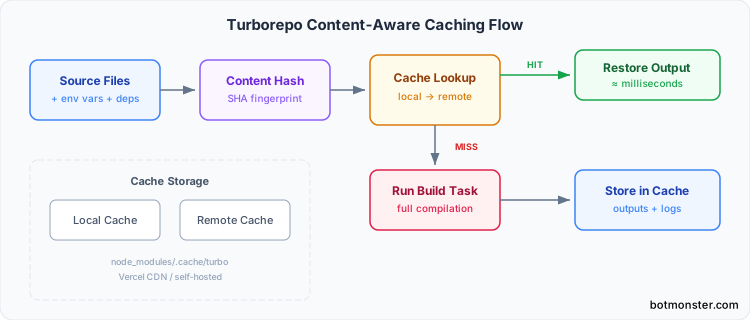
Turborepo builds a hash for each task from several inputs:
- The source files in the package (respecting
.gitignore) - The resolved dependencies from
package.json - The task configuration from
turbo.json - Specified environment variables (via
envandglobalEnvkeys) - The output hashes of upstream dependencies
If any of these inputs change, the hash changes and the task reruns. If everything is the same, the cached output is restored.
Local Cache
By default, cached artifacts live in node_modules/.cache/turbo/. Each cached task stores its stdout and stderr output and the files listed in outputs. They go into a compressed archive keyed by the content hash. This works out of the box with no setup.
Remote Caching with Vercel
Remote caching lets your whole team and your CI runners share one cache. If one developer builds a package, everyone else gets the cached result.
To set up remote caching with Vercel:
npx turbo login
npx turbo link
This connects your repo to a Vercel project. Cached artifacts are stored in Vercel’s CDN. The free tier gives you 10GB of cache storage, which is plenty for most teams.
Self-Hosted Remote Cache
If you need to keep build artifacts on your own servers, you can deploy the open-source turborepo-remote-cache server. It can store data in S3, GCS, or the local filesystem. Set the environment variables in your CI:
export TURBO_API=https://your-cache.internal
export TURBO_TOKEN=your-token
Environment Variable Handling
Environment variables that change build output need to be declared in turbo.json so they join the hash. Use env for per-task variables and globalEnv for variables that affect every task:
{
  "tasks": {
    "build": {
      "dependsOn": ["^build"],
      "outputs": ["dist/**"],
      "env": ["NODE_ENV", "API_URL"]
    }
  },
  "globalEnv": ["CI"]
}
Changing API_URL invalidates the build cache for tasks that declared it, even when no source files changed. So you never get a stale, environment-specific build served from cache.
Troubleshooting Cache Issues
When builds aren’t caching the way you expect, Turborepo has commands to dig in:
# See what inputs go into each task's hash
turbo run build --dry=json

# Bypass cache entirely for debugging
turbo run build --force

# Get a detailed cache hit/miss report
turbo run build --summarize
The --dry=json output is the most useful one. It shows the exact list of files, environment variables, and dependency hashes that feed each task’s hash. That makes it easy to spot what is causing a surprise cache miss.
Shared Packages: UI Libraries, Configs, and Utilities
Most of the value in a monorepo comes from shared internal packages. Get these right, and your apps stay consistent while your teams stop duplicating work.
Shared UI Library
A shared UI package (packages/ui/) exports React components from one entry point, ready to consume from the web/ app whether it runs Next.js and its peers or a lighter setup. Use tsup, a bundler built on esbuild, for fast builds:
tsup src/index.ts --format esm,cjs --dts --external reactThis produces dist/index.js (ESM), dist/index.cjs (CommonJS), and dist/index.d.ts (TypeScript declarations). Set the exports field in package.json so consumers get the right format:
{
  "exports": {
    ".": {
      "import": "./dist/index.js",
      "require": "./dist/index.cjs",
      "types": "./dist/index.d.ts"
    }
  },
  "main": "dist/index.cjs",
  "module": "dist/index.js"
}
Shared TypeScript Config
The packages/config-ts/ package exports several tsconfig files that consuming packages extend: base.json, nextjs.json, and library.json.
{
  "extends": "@myorg/config-ts/library.json"
}
This package needs no build step. Other packages read the JSON files directly. Set "private": true and you’re done.
Shared ESLint Config
With ESLint’s flat config format, your shared config package exports an array that each app extends:
// packages/eslint-config/index.js
import tsPlugin from "@typescript-eslint/eslint-plugin";
import tsParser from "@typescript-eslint/parser";

export default [
  {
    files: ["**/*.ts", "**/*.tsx"],
    plugins: { "@typescript-eslint": tsPlugin },
    languageOptions: { parser: tsParser },
    rules: {
      "@typescript-eslint/no-unused-vars": "error",
      // your team's custom rules here
    },
  },
];
Consuming packages import it in their eslint.config.js. If lint time is what hurts across a big workspace, the Rust-based linters take the same config idea and run it far faster:
import config from "@myorg/eslint-config";
export default [...config];
Internal vs. Published Packages
For packages used only inside the monorepo, set "private": true and use "workspace:*" version specifiers. For packages you want to publish to npm, use Changesets to manage versioning and changelogs. The two approaches work side by side. Some packages stay internal while others get published. If you need to share packages across teams without using the public registry, you can run a self-hosted npm registry with Verdaccio to host internal packages privately.
Just-in-Time Transpilation
Instead of building shared packages, you can tell your bundler to compile internal packages on the fly from TypeScript source. Next.js supports this with transpilePackages, and Vite has optimizeDeps.include. It is simpler, since shared packages get no build step. But it gets slower as packages grow, because every consumer recompiles the source on its own.
CI/CD, Task Orchestration, and Scaling
Monorepos pay off the most when CI is fast. Turborepo’s filtering and caching keep CI quick even as your repo grows.
GitHub Actions Workflow
A typical GitHub Actions setup for a Turborepo monorepo:
name: CI
on: [push, pull_request]

jobs:
  build:
    runs-on: ubuntu-latest
    steps:
      - uses: actions/checkout@v4
      - uses: pnpm/action-setup@v4
        with:
          version: 9
      - uses: actions/setup-node@v4
        with:
          node-version: 20
          cache: "pnpm"
      - run: pnpm install --frozen-lockfile
      - run: pnpm turbo run build lint test
        env:
          TURBO_TOKEN: ${{ secrets.TURBO_TOKEN }}
          TURBO_TEAM: ${{ secrets.TURBO_TEAM }}
The remote cache secrets let CI share cached artifacts with your dev machines and other CI runs. A build that takes 8 minutes cold can finish in 15 seconds when the relevant packages haven’t changed. If you want full control over your pipeline, you can run a self-hosted CI/CD pipeline with Gitea Actions and Docker on your own hardware. It uses a GitHub Actions-compatible workflow syntax.
Affected Package Detection
The --filter flag is where things get efficient:
# Only build packages changed since main
turbo run build --filter=...[origin/main]

# Build a specific package and its dependents
turbo run build --filter=@myorg/ui...

# Build everything in apps/
turbo run build --filter=./apps/*

# Only what changed since last commit
turbo run build --filter=...[HEAD~1]
In a 20-package repo, a change to one shared library might trigger 3 builds instead of 20. Add remote caching, and even those 3 builds may be cache hits if another developer already built them.
Watch Mode for Development
Instead of juggling many terminal tabs or wiring up concurrently scripts, use Turborepo’s watch mode:
turbo watch devThis starts all dev tasks in dependency order. It restarts downstream tasks when an upstream package changes. Edit a component in packages/ui/, and both apps/web and apps/api pick up the change on their own.
Turborepo Boundaries
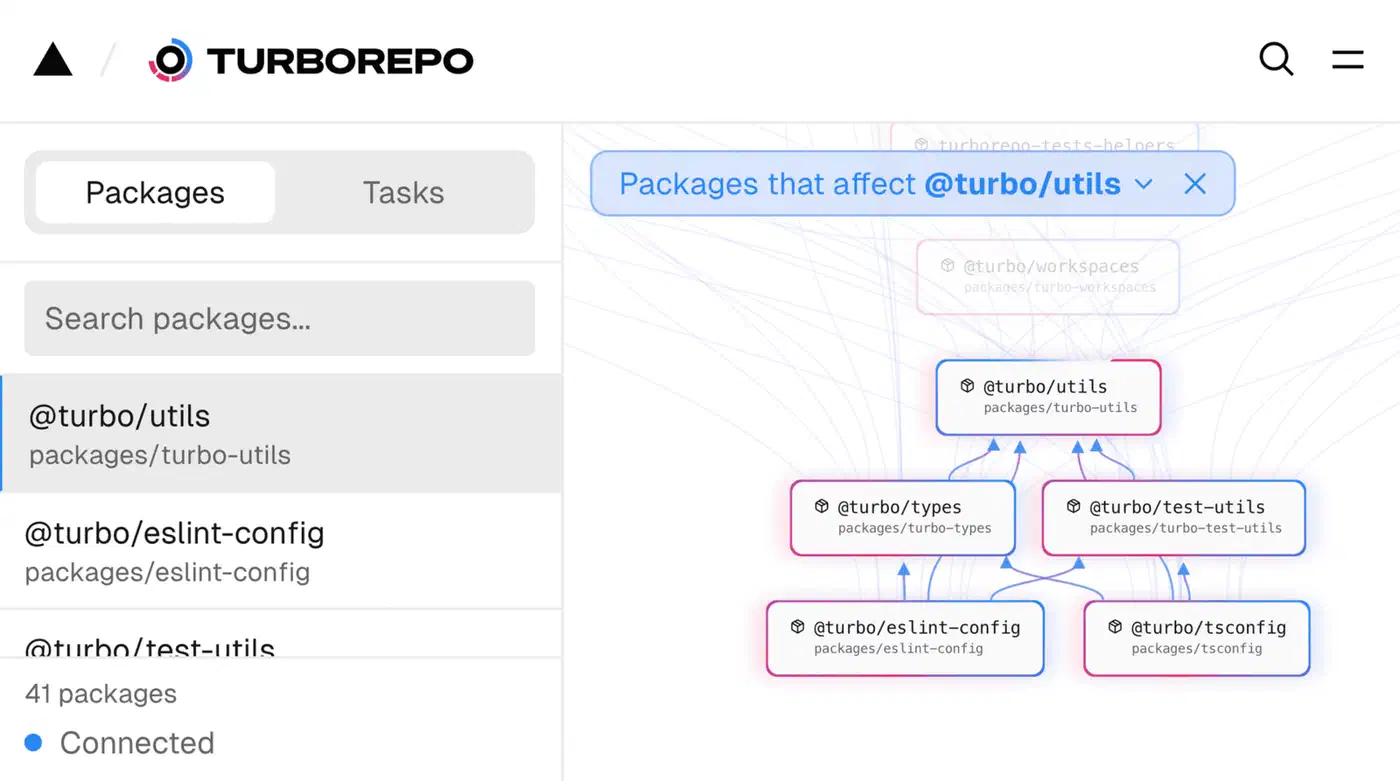
Boundaries let you set rules about which packages can depend on which. Define them in turbo.json:
{
  "boundary": {
    "@myorg/ui": {
      "dependsOn": ["@myorg/config-ts"]
    },
    "apps/*": {
      "dependsOn": ["packages/*"]
    }
  }
}
This makes sure apps can depend on packages, but packages cannot depend on apps. A violation fails the build, so you catch the drift before it reaches main.
Scaling Beyond 50 Packages
As your monorepo grows past 50 packages, a few moves help:
- Split into focused monorepos. Keep platform code apart from product code so each monorepo stays easy to manage and each team has clear ownership.
- Use
turbo prune @myorg/web --dockerto build a small Docker context. It includes only the files one deployable needs, which cuts image sizes and build times. - If you start adding Rust, Go, or Python packages next to JavaScript, look at Bazel for the non-JS parts. Turborepo handles JS and TS well, but it was not built for other language ecosystems.
Where to Go from Here
If you haven’t used Turborepo before, start small. Two apps share one UI package and one config package. Get caching working locally, then add remote caching. The setup cost is low: one turbo.json file and your workspace config. You will see results on your very next build. Once >>> FULL TURBO shows up on a build that used to take five minutes, monorepo doubts tend to fade fast.
From there, the path forward is step by step. Add more shared packages as you spot duplicated code between apps. Wire in CI with the --filter flag so pull requests only build what they touch. If your team works on several features at once, git worktrees for multi-branch development pair well with the --filter flag. Each worktree runs its own build without sharing cache state. Set up Boundaries once your package graph is large enough that you want to enforce rules. Turborepo scales well into the dozens of packages. By the time you outgrow it, you will have a clear picture of whether Nx, Bazel, or splitting into many repos is the right next step.