 Botmonster Tech
Make navigation feel instant with the Speculation Rules API, no framework

Drop a single <script type="speculationrules"> JSON block into your HTML and the browser will prefetch or fully prerender the URLs you nominate before the user clicks them. With a prerender rule and moderate eagerness, hover-to-paint latency on a typical content site collapses from 400-900 ms to under 50 ms, and you do not need Next.js, Astro, or any client router to get there. It is a plain platform feature shipping in Chromium-based browsers, with Firefox and Safari tracking the spec at the WICG.
What Speculation Rules Are (and Why Prefetch-on-Hover Libraries Are Obsolete)
For a decade, the answer to “make my multi-page site feel instant” was instant.page, Quicklink, or Turbo Drive. The Speculation Rules API replaces all of them with a declarative browser primitive that does more than they ever could: it can prerender the entire next page, including running its scripts, inside a hidden tab-like context.
The one-paragraph definition: a JSON-in-script declaration that tells the browser which same-origin (and, with opt-in, cross-origin) URLs are likely next, and how aggressively to act on that hint. The browser handles the rest, including cache warming, resource fetching, and the eventual activation swap.
Why does it supersede the old prefetch libraries? Those libraries could only do <link rel="prefetch"> on HTML responses. Speculation Rules can fully prerender, which means DOM construction, JS execution, image decoding, and even fetch responses all happen in a hidden context. The navigation becomes a near-instant tab swap rather than a parse-and-paint cycle. When the user clicks, the page is already there.
Support: stable in Chrome, Edge, Opera, Brave, and Samsung Internet; behind a flag in Firefox Nightly with an active prototype; “in development” status in WebKit, where Yoav Weiss from Shopify has a working implementation that is not yet enabled by default. Unsupported browsers ignore the script tag entirely, so there is zero downside to shipping it today.
The isolation model matters for correctness. A prerendered page loads in a hidden, throttled context with restricted storage access until activation. Dialog prompts get blocked, permission requests wait, audio autoplay stays suppressed. That is why analytics, ad impressions, and anything else with a “page view” side effect need the prerenderingchange event rather than running on initial script execution.
You no longer need a SPA to get instant navigation. The combination of MPA plus Speculation Rules plus View Transitions gives you single-page-app feel with HTML-first architecture, server-rendered URLs, and zero hydration cost. A static Hugo site or a WordPress blog can feel as fluid as a hand-tuned React app without shipping a kilobyte of client router code.
Rules can live in three places. Inline in the document is the common case. An external JSON file referenced via <script type="speculationrules" src="..."> works too. Or you can inject them dynamically with document.createElement('script') for runtime decisions, such as preloading the dashboard after a user logs in.
Prefetch vs Prerender: When to Use Each
The API exposes two actions and they are not interchangeable. prefetch warms the HTTP cache with the response body; prerender actually constructs the next page in memory. Pick wrong and you waste bandwidth or, worse, fire analytics for pages the user never sees.
prefetch downloads the HTML (and, optionally, subresources) but does not parse or execute it. The request carries a Sec-Purpose: prefetch header so your server can tell speculation apart from real traffic. It is cheap, safe, and works for almost any page. Use it as your default for medium-confidence links.
prerender is more aggressive. It renders the page in a hidden frame tree, runs JavaScript, fires DOMContentLoaded, decodes images, and fetches API data. The activation on click is a swap rather than a load. Reserve this for high-confidence next URLs: the cart page from a product page, the next article in a series, the dashboard from a login confirmation screen.
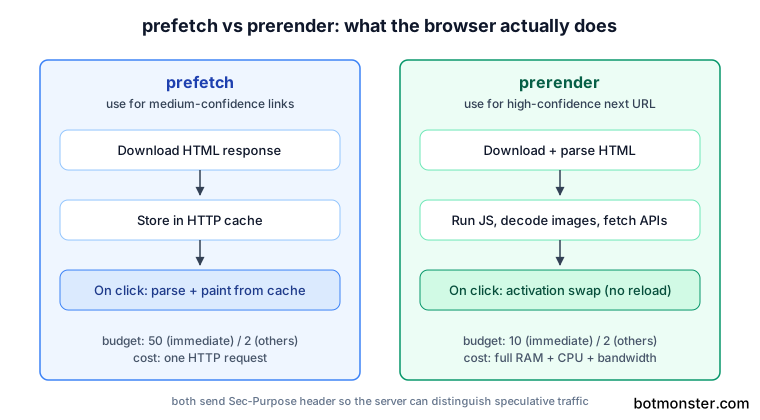
Resource cost is real. A prerender consumes RAM, CPU, and network bandwidth for a page the user might not visit. Chrome enforces caps to prevent you from accidentally DoSing your own users. The limits look like this:
| Eagerness | Prefetch budget | Prerender budget |
|---|---|---|
immediate | 50 | 10 |
eager / moderate / conservative | 2 (FIFO) | 2 (FIFO) |
Almost everyone trips on the analytics gotcha on first deployment. A prerendered page that calls gtag('event', 'page_view') at script start logs a phantom view for every hover. Always gate analytics behind document.prerendering === false or the prerenderingchange event.
Server-side detection uses the Sec-Purpose: prefetch and Sec-Purpose: prefetch;prerender request headers. Your origin can distinguish speculative requests from real ones for skipping access logs, A/B test bucketing, rate limiting, or any other action that should not count until the user actually arrives.
Here is a working JSON snippet showing both rules in one block:
<script type="speculationrules">
{
  "prerender": [{
    "where": { "href_matches": "/posts/*" },
    "eagerness": "moderate"
  }],
  "prefetch": [{
    "where": { "href_matches": "/tags/*" },
    "eagerness": "conservative"
  }]
}
</script>
The rule of thumb: prerender the one or two URLs you are 80% or more confident about, prefetch everything else worth warming, and leave low-signal navigation unoptimised.
URL Matching with where Clauses
Speculation Rules support two targeting modes. list rules enumerate URLs explicitly. document rules let the browser scan live <a> elements and pick matches. Document rules are what lets this API replace prefetch libraries entirely.
list rules use a static urls array. They are best for known navigation targets like /cart, /checkout, or the next paginated page. If a client-side pagination widget like bootpag generates your page links from an href template, those predictable URLs make ideal list rule targets. They are predictable, easy to reason about, and carry no DOM scanning cost.
document rules observe anchor elements in the page and apply your where predicate to their href values. As the DOM mutates through infinite scroll or dynamic content, new links automatically become candidates without any extra code.
The where predicate vocabulary is small. href_matches takes a URL pattern, supporting * wildcards and the full URLPattern syntax. selector_matches runs a CSS selector against the anchor element. The boolean combinators and, or, and not compose these predicates.
A practical example for a Hugo site:
{
  "where": {
    "and": [
      { "href_matches": "/posts/*" },
      { "not": { "selector_matches": ".no-prerender a" } },
      { "not": { "selector_matches": "[rel~=nofollow]" } }
    ]
  }
}
This prerenders post links, excludes anything inside an opt-out container, and respects rel="nofollow" hints, all without touching the server.
Cross-origin rules need an opt-in from the destination. By default only same-site URLs are eligible. To prerender a different origin, that origin must send Supports-Loading-Mode: credentialed-prerender (or the looser uncredentialed-prefetch) in its response headers. The prerender pages guide on developer.chrome.com covers the handshake in detail.
URLPattern integration pays off the moment your routes get interesting. href_matches accepts the same syntax as the URL Pattern API, so /posts/:slug and /posts/:year/:month/:slug style matchers work out of the box without regex gymnastics.
Fragment-only links (#section) are never eligible because they do not trigger navigation. Query string filtering pairs well with the No-Vary-Search header, which lets a prerendered response match URLs that differ only by specified query parameters. Add expects_no_vary_search to your rule and the browser reuses a prerender for /search?q=foo&utm_source=x even if it was triggered by /search?q=foo.
Eagerness Levels and When the Browser Acts
Eagerness is the dial that controls the bandwidth-versus-speed trade-off. There are four levels and they map to very different user behaviours: firing on page load, on hover, on pointerdown, or on actual mousedown. Misconfiguring this is the most common Speculation Rules bug I have seen in the wild.
immediate starts speculating as soon as the browser parses the rule. Use it only for list rules with one or two near-certain URLs, such as the second page of an article series or the onboarding destination after signup. Budget per page: 50 prefetches and 10 prerenders.
eager is aggressive but participates in the same global budget. On desktop it triggers after just 10 milliseconds of hovering; on mobile it uses simple viewport heuristics, firing roughly 50 ms after an anchor enters the viewport. It is a reasonable default for high-trust navigation inside a dashboard.
moderate works well for document rules on content sites. The browser triggers on around 200 ms of hover dwell or on the pointerdown event. This roughly matches what instant.page did, but with prerender capability instead of mere prefetch. On mobile it uses complex viewport heuristics (about 500 ms after scrolling stops).
conservative triggers only on pointerdown or touchstart, the moment the user starts to click but before they release. You get around 80 ms of head start, which is still enough to hide most navigation latency, with almost no wasted speculation. It is the default for document rules and the right choice for bandwidth-sensitive contexts.
Picking between them comes down to three questions: how confident are you about the next URL, how expensive is the destination to render, and how bandwidth-constrained is your audience. For a mobile-heavy content site, conservative is often the better default. For a desktop dashboard with predictable flows, eager or moderate pays off.
The Data Saver and battery interaction happens without any code from you. Chrome automatically downgrades or skips speculation when the user has Lite Mode enabled, when the connection is metered, or when the device is in low-power mode. On Android devices with less than 2 GB of RAM, prerenders are suppressed entirely. You never need to detect this yourself.
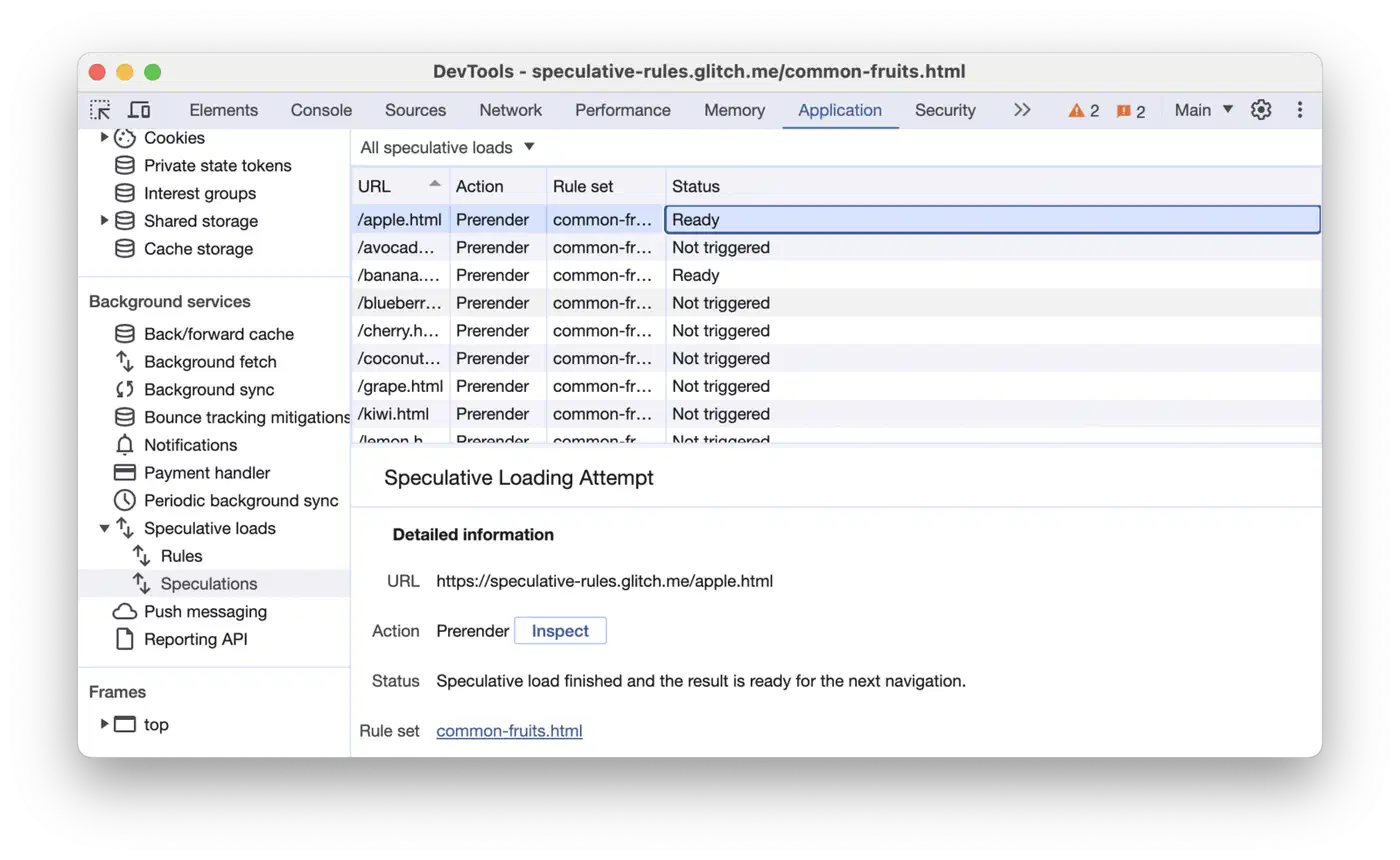
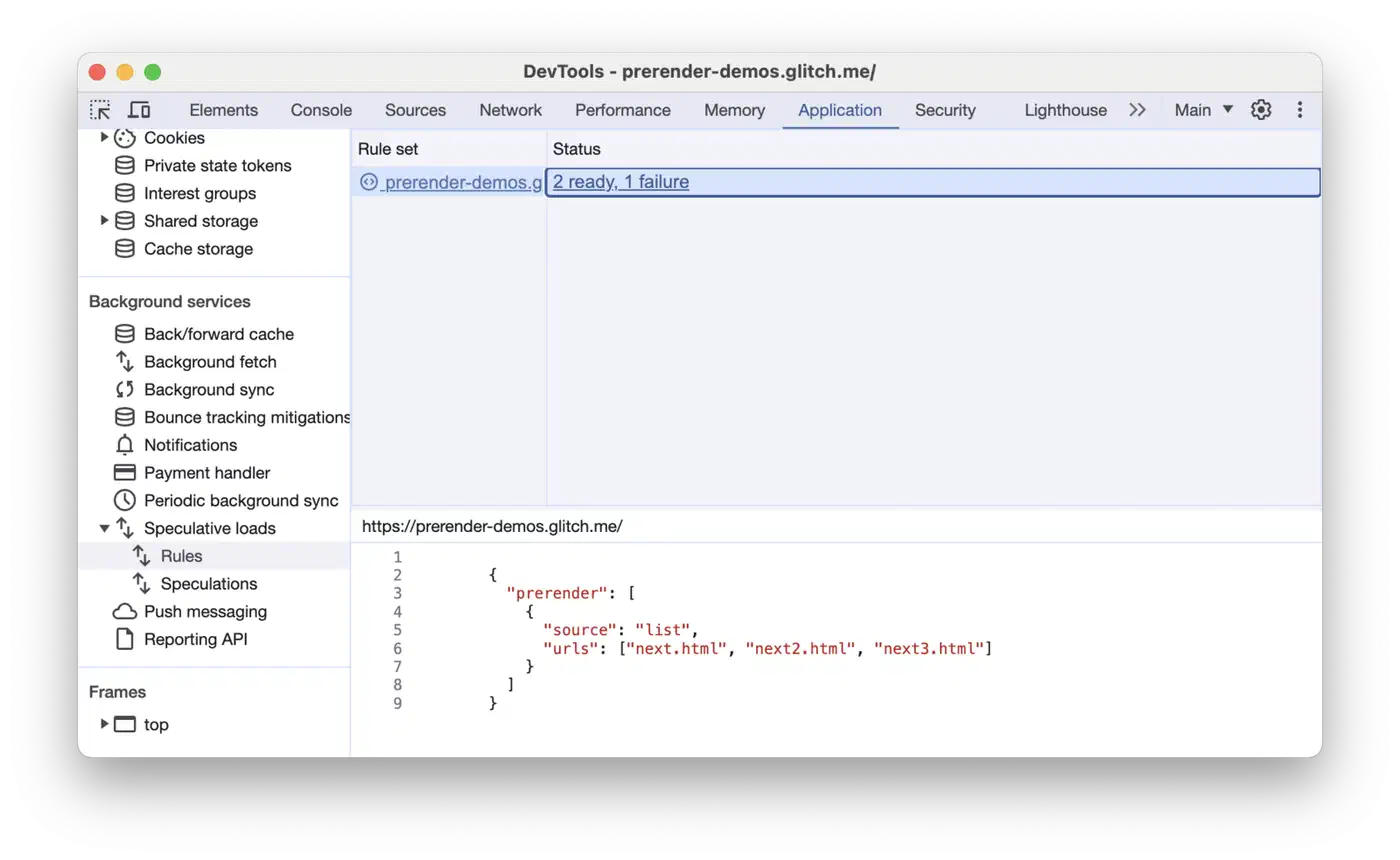
Debugging lives in DevTools. The Application panel has a dedicated “Speculative loads” section showing every rule, every candidate URL, the eagerness, and the outcome (Ready, Failure, NotEligible). When a prerender silently fails to fire, this is the first place to look. Common reasons include a mismatched href_matches pattern, a cross-origin link without the right Supports-Loading-Mode header, or hitting the concurrent prerender budget.
Pairing with MPA View Transitions
Prerendering eliminates the load delay. MPA View Transitions eliminate the visual flash. Together they make a static Hugo or WordPress site feel like a hand-built SPA without a line of client-side routing code.
The two-line CSS opt-in looks like this:
@view-transition {
  navigation: auto;
}
Add that to your stylesheet and every same-origin navigation gets a default cross-fade. Both the source and destination pages need the at-rule for the browser to animate between them. Cross-document view transitions ship in Chrome 126+, Edge 126+, and Safari 18.2+, with Firefox support in development.
Composition is straightforward: when the user clicks, the prerendered page activates, then the view transition runs the cross-fade or shared-element animation. You get one continuous visual experience instead of a white flash. Neither feature blocks the other, and activation happens fast enough that the transition feels like it is animating a live page rather than stitching two loads together. The same ::view-transition pseudo-elements also drive in-page view transitions, so one set of animation rules covers both page loads and DOM updates.
Shared-element transitions need a name to match elements across pages. Add view-transition-name: post-hero to the article hero image on both the list and detail pages, and the browser morphs it during navigation:
.post-hero {
  view-transition-name: post-hero;
}
The prerenderingchange event handles the analytics side of the equation. Here is the pattern that works for Plausible, GA4, and Fathom:
function sendAnalytics() {
  // your analytics call goes here
  plausible('pageview');
}

if (document.prerendering) {
  document.addEventListener('prerenderingchange', sendAnalytics, { once: true });
} else {
  sendAnalytics();
}
Without that gate, page-view counts get wildly inflated and your LCP and INP numbers get measured against the wrong moment. For accurate LCP and INP, subtract performance.getEntriesByType('navigation')[0].activationStart from your measurements. Any metric captured before activation is a prerender-time metric, not a user-experience metric.
A few things get deferred until activation: sound autoplay, permission prompts, dialog popups, most storage writes, and cross-origin iframe rendering. If your page assumes these run on load, audit them. A common bug is a “welcome back” toast that fires during prerender and is gone by the time the user arrives.
Here is a complete Hugo-friendly snippet to drop into baseof.html. It is around 15 lines of code for SPA-grade UX on an MPA:
<script type="speculationrules">
{
  "prerender": [{
    "where": {
      "and": [
        { "href_matches": "/posts/*" },
        { "not": { "selector_matches": "[rel~=nofollow]" } }
      ]
    },
    "eagerness": "moderate"
  }]
}
</script>
<style>
  @view-transition { navigation: auto; }
</style>
Ship that, gate your analytics, and measure. On a typical Hugo content site the navigation timing histogram shifts from a long tail centered around 600 ms to a cluster under 50 ms for cached-hit prerenders, with small cost for users who hover without clicking. A static site ends up feeling like a native app, with platform features doing the work a framework used to do. The same trade plays out in UI work, where you can position dropdowns and tooltips with zero shipped JavaScript instead of bundling a layout library.
Comparison Table
| Feature | instant.page | Quicklink | Turbo Drive | Speculation Rules |
|---|---|---|---|---|
| Strategy | Prefetch on hover | Prefetch on viewport | SPA-style intercept | Prefetch + Prerender |
| Full page execution | No | No | Partial (DOM swap) | Yes |
| Bundle size | ~1 KB | ~1.6 KB | ~40 KB | 0 (platform) |
| JavaScript required | Yes | Yes | Yes | No |
| DevTools integration | No | No | No | Yes |
| Progressive enhancement | Yes | Yes | Partial | Yes |
| Browser support | All | All | All | Chromium (Firefox/Safari in progress) |
The old libraries still work fine as a fallback or on projects that need broader browser support. For any new deployment targeting Chromium-majority audiences, Speculation Rules is the better default.
Troubleshooting
A short diagnostic list for the three failure modes that come up most:
- Prerender not firing at all: open DevTools, Application panel, Speculative loads. Check that your rule parses (JSON errors silently disable the entire block), that the URL matches your
href_matchespattern, and that the destination is same-origin or carriesSupports-Loading-Mode: credentialed-prerender. - Prerender canceled mid-flight: the destination probably tried something prerender-forbidden, such as a permission prompt, an alert, a top-level navigation, or a cross-origin iframe. The Application panel shows the exact cancellation reason.
- Prerender activated but slow: the page is too heavy to prerender within the 2-slot budget before the click lands. Either reduce page weight or drop eagerness to
conservativeso the speculation starts earlier relative to the click.
With those three checked, most sites get a working deployment in a single afternoon. The performance numbers are useful, but the real payoff is getting them without a framework rewrite, without hydration, and without shipping another JavaScript router to users who already have one built into their browser.