 Botmonster Tech
Cross-document view transitions: animate between full page navigations without JavaScript


Drop @view-transition { navigation: auto; } into your stylesheet. Modern browsers will then cross-fade between same-origin page loads on their own. No SPA router, no fetch() interception, no JS framework needed. Add view-transition-name to shared elements like hero images, headings, or nav bars, and the browser morphs them between separate HTML documents. This works today in Chrome 126+, Edge 126+, and Safari 18.2+. Firefox support lands through the Interop 2026
push.
SPA View Transitions vs. Cross-Document View Transitions
The View Transitions API
first shipped in Chrome 111 (March 2023) for single-page apps only. It needed a JS call to document.startViewTransition(updateCallback). The call was manual, imperative, and stuck to cases where the same document rewrote its own DOM.
The 2024-2025 updates pushed the API out to plain multi-page sites. That is the bigger deal. The browser now snaps a picture of the old page, fires the nav, and tweens to the new page on its own. For classic web stacks like Hugo , WordPress, Rails, and Django, this means SPA-style polish with no client-side router.
Three things worth knowing up front:
- You don’t need Astro
view transitions, Next.js
app/transitions, or any JS router to get smooth page-to-page animation. A single CSS at-rule is enough. - The spec leaves out cross-origin nav on purpose, for safety and privacy. No pixels leak across origins.
- Both the old and new pages must ship
@view-transition { navigation: auto; }in their CSS. If only one side opts in, no transition fires.
How It Compares to Turbo, HTMX, and pjax
Libraries like Turbo , HTMX , and pjax pull off smooth swaps by catching link clicks and pulling new content with AJAX. They work. However, they add a JS dependency, need care to re-init scripts, and can fight with browser-native features like back/forward cache (bfcache).
Native cross-document view transitions step around all of that. The browser owns the full nav lifecycle: history entries, scroll restore, bfcache. It then layers the animation on top. You can still mix HTMX
or Turbo with view transitions (HTMX 1.9+ has a transition:true swap attribute). Still, for many sites the native path is enough on its own.
Enabling @view-transition in Your Stylesheet
The minimum viable CSS is a single at-rule at the top of your main stylesheet:
@view-transition {
navigation: auto;
}This is a top-level at-rule, not a property you nest inside a selector. It applies to the whole document. Add it to a stylesheet that loads on every page. If only one side of a nav opts in, the transition is skipped.
The navigation descriptor accepts two values:
| Value | Behavior |
|---|---|
auto | Turns on transitions for same-origin traverse, push, and replace navs that a user starts |
none | Turns off transitions (handy for checkout flows or pages where motion feels wrong) |
The default is a 250ms cross-fade. The old snapshot fades out while the new page fades in. It is quiet enough to ship as-is, with no extra tuning.
Customizing the Root Transition
Override the default cross-fade using the ::view-transition-old(root) and ::view-transition-new(root) pseudo-elements:
@view-transition {
  navigation: auto;
}

::view-transition-old(root) {
  animation: 0.4s ease-in both slide-out;
}

::view-transition-new(root) {
  animation: 0.4s ease-in both slide-in;
}

@keyframes slide-out {
  to { transform: translateX(-100%); }
}

@keyframes slide-in {
  from { transform: translateX(100%); }
}
Testing Locally
Any local dev server plus Chrome 126+ or Edge 126+ is enough. Click any internal link and watch the cross-fade fire at once. No build step changes needed.
Shared Element Transitions with view-transition-name
The cross-fade is useful on its own. The richer trick, though, is making an element appear to stay put and morph between two separate HTML pages. Give a DOM element the same view-transition-name on both pages, and the browser tweens its spot, size, and contents between them.
A common pattern is a blog index thumbnail that morphs into a full-size hero image on the post page:
/* Shared stylesheet loaded on both pages */
.post-card img.hero,
article .hero-image {
  view-transition-name: post-hero;
  contain: layout;
}
<!-- list page -->
<a href="/posts/example/">
<img class="hero" src="/posts/example/hero.jpg" alt="Example post hero">
</a>
<!-- post page -->
<article>
<img class="hero-image" src="/posts/example/hero.jpg" alt="Example post hero">
</article>The browser snaps a bitmap of the old element, snaps the new one, and animates between them on the GPU. The thumbnail seems to fly out of the card and grow into the hero image.
Key Rules
- A given
view-transition-namecan sit on at most one element per page at transition time. Duplicates kill the transition flat out. - The spec asks for
contain: layoutorcontain: painton elements that get a transition name, to dodge snapshot sizing bugs. - For per-item transitions on an index page, make unique names in your template, e.g.
view-transition-name: post-{{ .Slug }}. Each card gets its own ID, so clicking any card morphs just that one thumbnail.
If your index is paginated, the same morphing applies as visitors page through the list. The pager links themselves can come from your template or from a client-side widget like a drop-in jQuery pagination control , and a cross-document transition still fires on each page-to-page navigation as long as both pages opt in.
Fine-Tuning the Shared Animation
Each named transition exposes a set of pseudo-elements you can style one by one:
::view-transition-group(post-hero) {
  animation-duration: 0.35s;
  animation-timing-function: cubic-bezier(0.4, 0, 0.2, 1);
}

::view-transition-old(post-hero) {
  animation: none;  /* skip fade for old snapshot */
}

::view-transition-new(post-hero) {
  animation: none;  /* skip fade for new snapshot */
}
The full pseudo-element tree per named transition is: ::view-transition-group(name) > ::view-transition-image-pair(name) > ::view-transition-old(name) + ::view-transition-new(name).
Conditional Animations with view-transition-types
Not every nav should animate the same way. Clicking into a post might slide left. Hitting Back might slide right. Jumping between sibling posts might cross-fade. The types descriptor and the active-view-transition-type() pseudo-class make this work.
Static Types via CSS
Set types directly in the at-rule:
@view-transition {
  navigation: auto;
  types: slide, forwards;
}
Dynamic Types via JavaScript
Use the pagereveal and pageswap events to set types by nav direction:
window.addEventListener("pagereveal", (e) => {
  if (!e.viewTransition) return;

  const from = navigation.activation?.from?.url;
  const to = navigation.activation?.entry?.url;

  if (isForwardNavigation(from, to)) {
    e.viewTransition.types.add("forwards");
  } else {
    e.viewTransition.types.add("backwards");
  }
});
Type-Scoped CSS
Target a single transition type with the :active-view-transition-type() pseudo-class on the root element:
html:active-view-transition-type(forwards) {
  &::view-transition-old(root) {
    animation: 0.3s ease-out slide-out-left;
  }
  &::view-transition-new(root) {
    animation: 0.3s ease-out slide-in-right;
  }
}

html:active-view-transition-type(backwards) {
  &::view-transition-old(root) {
    animation: 0.3s ease-out slide-out-right;
  }
  &::view-transition-new(root) {
    animation: 0.3s ease-out slide-in-left;
  }
}
You can tag a single transition with many types (both forwards and hero-morph, say) and stack the animations to match.
Debugging in Chrome and Edge DevTools
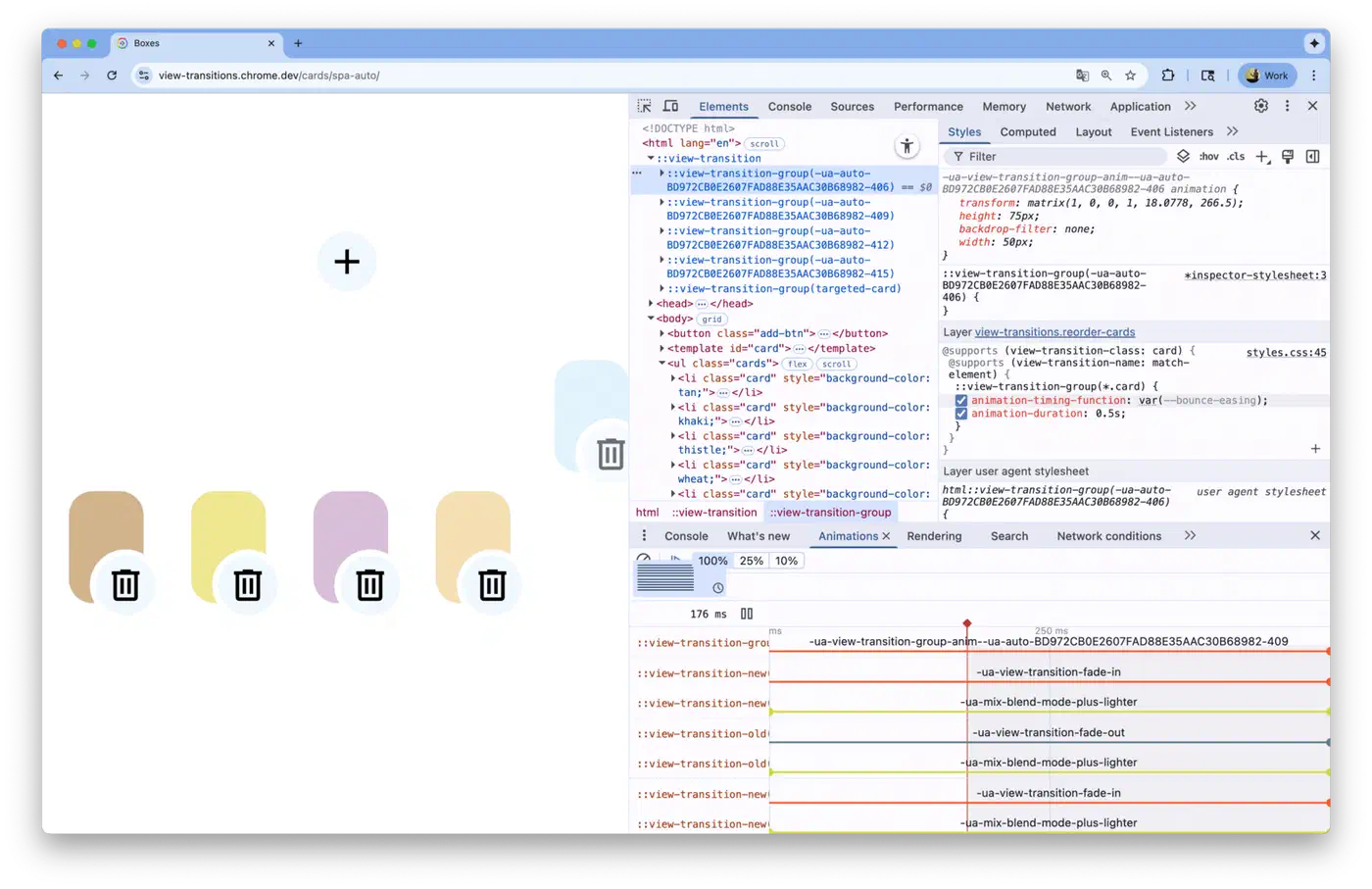
View transitions happen fast: too fast to inspect by eye. Chromium DevTools has built-in support for catching them.
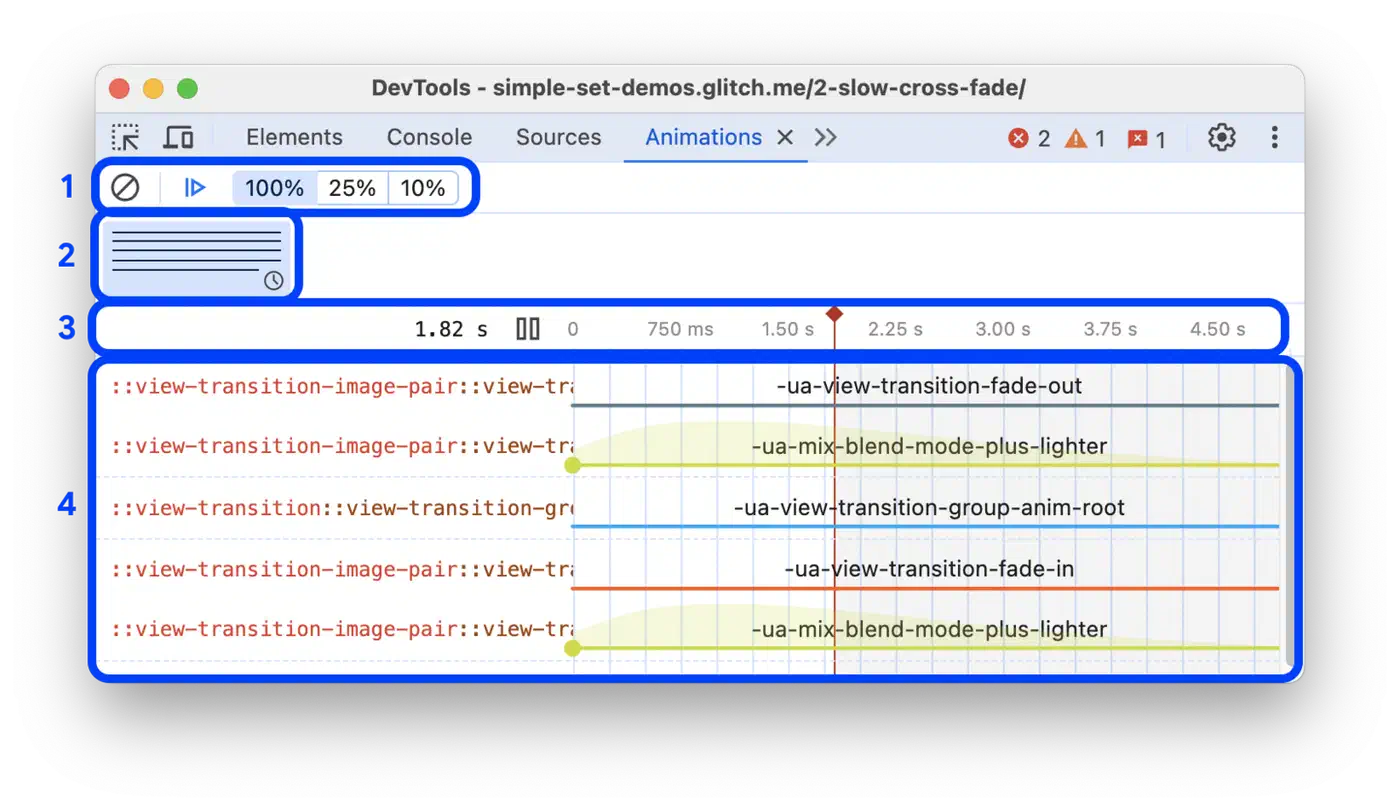
Open the Animations panel to grab view transitions as they fire. Slow playback to 25% or 10% speed and scrub frame-by-frame to see what the browser is tweening. It is the fastest way to debug “it looks wrong” issues.
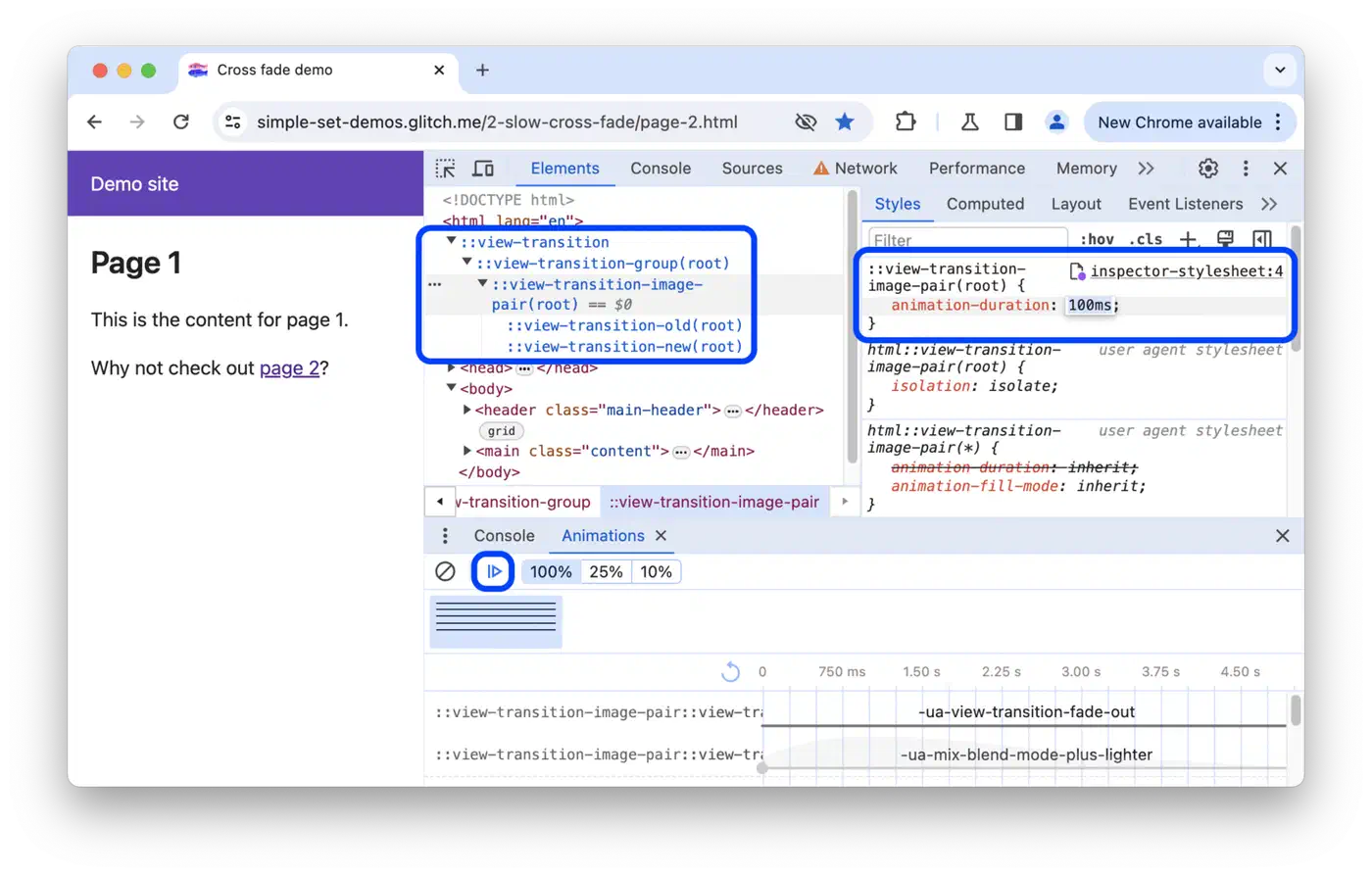
The Elements panel shows the pseudo-element tree during an active transition. You will see ::view-transition, ::view-transition-group(*), ::view-transition-image-pair(*), ::view-transition-old(*), and ::view-transition-new(*) in the DOM tree. Check their computed styles to confirm your CSS is taking effect.
Logging pagereveal and pageswap events in the Console proves the browser is running the cross-document flow:
window.addEventListener("pageswap", (e) => {
  console.log("pageswap", e.viewTransition, e.activation);
});
window.addEventListener("pagereveal", (e) => {
  console.log("pagereveal", e.viewTransition);
});
If e.viewTransition is null, the transition did not fire. Check your @view-transition rule and same-origin needs.
Common Failure Modes
| Symptom | Likely Cause |
|---|---|
| No transition at all | Missing @view-transition rule on one of the two pages, or a cross-origin redirect in the nav chain |
| Transition skipped silently | Duplicate view-transition-name on two elements in the same page |
| Snapshot looks wrong | Element has display: none, visibility: hidden, or is clipped by overflow: hidden at snapshot time |
| Transition skipped after delay | Nav took longer than 4 seconds (Chrome’s timeout cap) |
| Works in Chrome, not in Safari | Safari 18.2+ needed; check you are not using Level 2 spec features that Safari has not shipped yet |
Performance Impact and Web Vitals
The snapshot path is GPU-accelerated. The browser pulls bitmaps from the compositor directly: no extra layout or repaint steps. Animations run at 60fps even on mid-range phones, since they work on compositor layers, not DOM nodes.
There is a real cost, though. Field data from Core Web Vitals research shows cross-document view transitions add about 70ms to LCP on mobile repeat pageviews. Desktop impact is small (around 5ms). The hit scales with CPU speed: a 20x CPU slowdown lifts LCP by 77ms, versus just 5ms on fast hardware.
| Scenario | LCP Impact |
|---|---|
| Desktop, fast CPU | ~5ms |
| Mobile, normal CPU | ~70ms |
| Mobile, 20x CPU slowdown | ~77ms |
| With Speculation Rules prerender | ~0ms (eliminated) |
For INP, transitions push up the presentation delay: the gap between the browser running event handlers and painting the next frame. Snapshotting and animation compositing add render work that the main thread has to drive.
Mitigation Strategies
- Prerender the next page with the Speculation Rules API . That wipes out the LCP cost.
- Wrap your
@view-transitionrule in@media (prefers-reduced-motion: no-preference). That drops the hit for users who opt out of motion, and respects their a11y choice. - Putting the rule inside a
min-widthmedia query skips transitions on mobile, where the cost is highest.
Browser Support and Progressive Enhancement
Cross-document view transitions are opt-in, with an invisible fallback. Browsers that don’t support the API just do a normal full-page nav. Nothing breaks. Users simply don’t see the animation. No polyfill or JS shim is needed.
Here is the support matrix:
| Browser | Cross-Document View Transitions | Notes |
|---|---|---|
| Chrome 126+ | Full support | Shipped June 2024 |
| Edge 126+ | Full support | Follows Chromium releases |
| Opera, Brave, Arc | Full support | Chromium-based |
| Safari 18.2+ | Supported | Partial Level 2 support |
| Firefox | Behind flag | layout.css.view-transitions.enabled; shipping planned via Interop 2026 |
Feature Detection
You rarely need feature detection, since the CSS no-ops cleanly. Still, if you want to apply styles on a condition:
@supports at-rule(@view-transition) {
  /* styles that only make sense when transitions are active */
}
Or in JavaScript:
if (CSS.supports("at-rule", "@view-transition")) {
  // transitions are available
}
Accessibility
Always respect motion preferences. Wrap your transition opt-in, or your custom animations, in the right media query:
@media (prefers-reduced-motion: no-preference) {
  @view-transition {
    navigation: auto;
  }
}
Users with vestibular disorders or motion sensitivity get clean, instant navigation with no animation. The same media-query discipline carries over to other CSS features. A related guide on implementing dark mode in pure CSS shows how to build a flash-free, accessible theme system with no JS. The Interop 2026 project has put view transitions on the front burner for all three browser engines, so cross-browser fit should improve through the year.
Troubleshooting Checklist
When your transition is not firing, walk through this list:
- Check that
@view-transition { navigation: auto; }lives in a stylesheet loaded by both the source and target pages. Both must opt in. - Confirm the scheme, hostname, and port match exactly.
www.example.comandexample.comare different origins. - Look for cross-origin redirects. Even if both endpoints are same-origin, a redirect through another origin in the middle kills the transition.
- Make sure the nav type is supported. Only
traverse,push, andreplacenavs trip transitions. Typing a URL in the address bar or clicking a bookmark does not. - Hunt for duplicate
view-transition-namevalues. Two elements with the same name on one page will abort the whole transition. - Make sure the element is visible at snapshot time. Elements with
display: none, zero size, or clipped byoverflow: hiddenon an ancestor will not snapshot right. - Check that the nav finishes inside 4 seconds. Chrome skips the transition with a
TimeoutErrorif the next page takes too long to load. - Note that cross-document transitions do not work inside iframes yet. Main frame only.
- Log
pageswapandpagerevealevents in the console. Ife.viewTransitionis null, the browser chose not to run the transition.
Getting Started with Hugo
For Hugo sites, the setup is short. Add a partial that injects the CSS on every page:
<!-- layouts/partials/view-transitions.html -->
<style>
  @media (prefers-reduced-motion: no-preference) {
    @view-transition {
      navigation: auto;
    }
  }
</style>
Include it in your <head>:
<!-- layouts/partials/head/custom.html or equivalent -->
{{ partial "view-transitions.html" . }}
For shared element transitions on index-to-post navs, add view-transition-name to your post card template and your single post template, using a unique per-post ID:
<!-- layouts/_default/list.html (inside the post loop) -->
<img src="{{ .Params.featuredimage }}"
     style="view-transition-name: hero-{{ .File.BaseFileName }};"
     alt="{{ .Title }}">

<!-- layouts/_default/single.html -->
<img src="{{ .Params.featuredimage }}"
     style="view-transition-name: hero-{{ .File.BaseFileName }};"
     alt="{{ .Title }}">
That is all it takes. Run hugo server, open Chrome, and click between your index and any post. The hero image will morph between pages with zero JS. If you enjoy shipping visual interactions without JS, a sister piece covers how to place tooltips and popovers in pure CSS
using another strong browser-native API.