 Botmonster Tech
SQLite at the edge: 100x faster reads, Cloudflare D1 and LiteFS

SQLite can now run at the edge. It works inside Cloudflare Workers via D1, on Fly.io via LiteFS replicated volumes, and in any V8 isolate through embedded WASM builds. This gives you sub-millisecond read queries. You get them by placing your database close to your users on a global CDN. A few tools made this practical: LiteFS for transparent SQLite replication, Cloudflare D1 as a managed edge service, Turso for libSQL with server mode and replication, and Litestream for streaming the WAL to S3. SQLite ships as a single file with zero dependencies. So you get a relational database that deploys with your app binary, needs no connection pooling, and handles thousands of reads per second per node.
Why SQLite Is Having a Renaissance at the Edge
For years, most developers treated SQLite as a “toy database” fit for mobile apps and prototypes. That has changed. Edge computing, embedded runtimes, and a new generation of replication tools have turned SQLite into a production database for read-heavy workloads.
The core problem is architectural. Edge computing pushes code into V8 isolates or small VMs at hundreds of global points of presence. Cloudflare runs over 330 locations, Fly.io covers 35+ regions. But databases like PostgreSQL still run in a single region. That adds 50 to 200 milliseconds of latency to every query. That round-trip penalty defeats the whole point of running code at the edge.
SQLite sidesteps this. It is an in-process library, not a client-server database. Every query runs in the same process as your app code. So there are no network round-trips, no TCP overhead, and no connection limits. The whole database is a single file. You can replicate and cache it next to your application.
What changed between 2024 and 2026 was the tooling. LiteFS, built by Fly.io, brought transparent read replication across nodes. Cloudflare shipped D1 as a managed edge SQLite service. Turso launched libSQL, a SQLite fork (now growing into a full Rust rewrite) with server mode and built-in replication. Litestream reached version 0.5 with point-in-time recovery and S3 streaming. Together, these tools solved the distribution problem. That problem had kept SQLite stuck on single machines.
The numbers back this up. Benchmarks show SQLite read queries finish in about 20 microseconds for a simple in-process SELECT. The same query against PostgreSQL in another region takes 30 to 80 milliseconds. That is a 100x to 400x speedup for simple reads. SQLite wins even within the same region. One benchmark put SQLite at about 20,600 nanoseconds per SELECT versus PostgreSQL at about 597,000.
The tradeoff is writes. Edge SQLite shines for read-heavy work like content sites, APIs, and dashboards. The read-to-write ratio should be 100:1 or higher. Writes must go to a single primary node and then spread to replicas. Write-heavy apps still need PostgreSQL or a distributed database. Think social media feeds, real-time docs, and chat systems.
SQLite does have real limits at the edge. You should know them before you commit. The top database size in theory is 281 TB. But the practical cap per edge replica is 1 to 10 GB, due to deployment and replication overhead. Only one writer can run at a time. WAL (Write-Ahead Log) mode does let readers run at the same time as that writer.
Cloudflare D1 - Managed SQLite at the Edge
D1 is Cloudflare’s serverless SQLite database. Workers query it through a binding. It is the lowest-friction path to edge SQLite. Cloudflare handles storage, backups and, once you turn it on, read replication. You just work with a familiar SQL interface. Walking one through end to end, from Wrangler to a CRUD REST API on D1, takes about an afternoon.
Setting up D1 takes a few commands. Create the database with wrangler d1 create my-blog-db, then bind it to your Worker in wrangler.toml:
[[d1_databases]]
binding = "DB"
database_name = "my-blog-db"
database_id = "your-database-id"
Querying from a Worker is straightforward:
const { results } = await env.DB.prepare(
  'SELECT title, slug FROM posts WHERE published = 1 ORDER BY date DESC LIMIT 10'
).all();
Always use parameterized queries with .bind() to block SQL injection. For schema changes, D1 supports migration files. Run wrangler d1 migrations create my-blog-db "add_tags_column" to generate a SQL file, then apply it with wrangler d1 migrations apply. No ORM needed, just raw SQL.
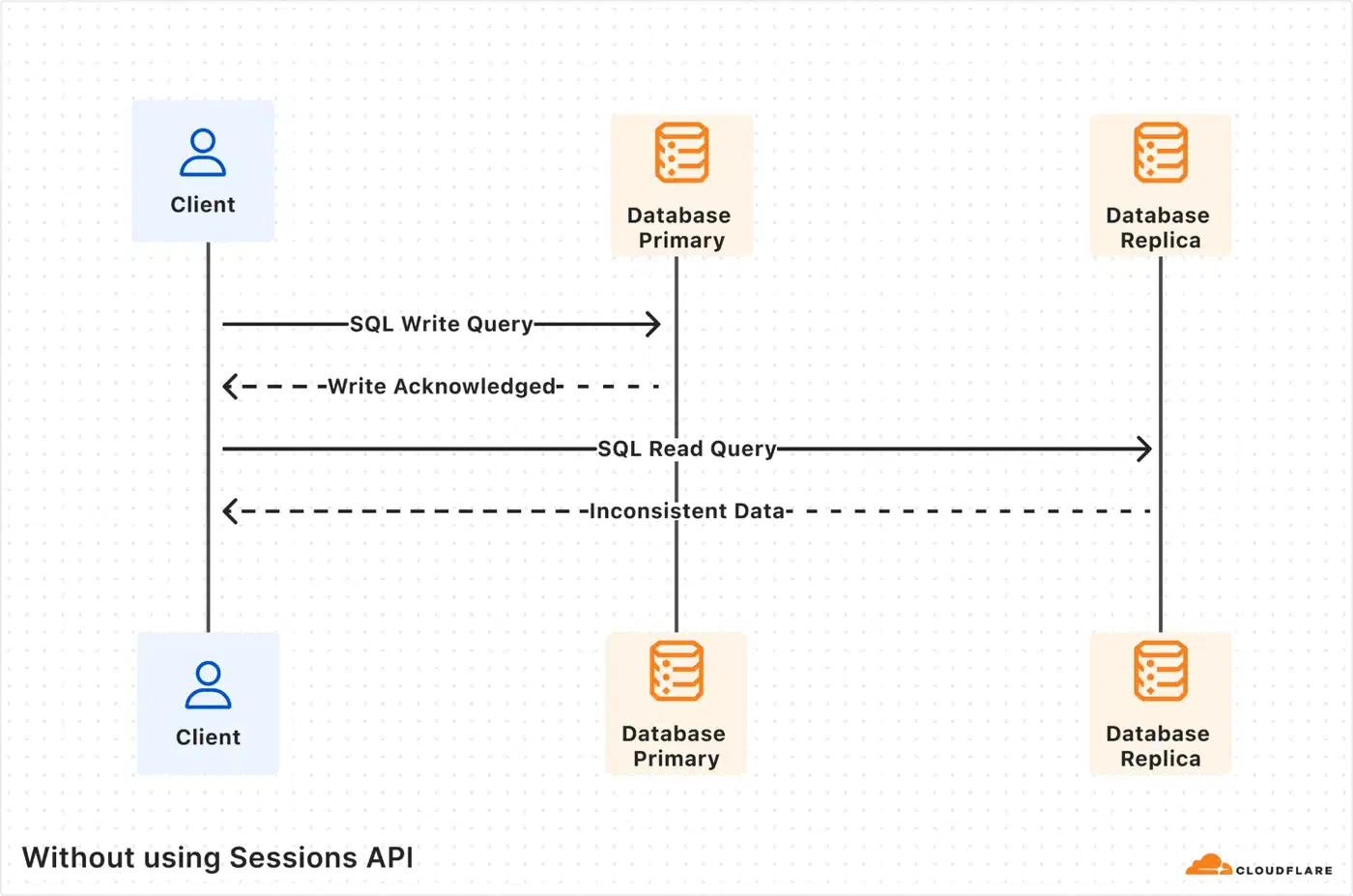
D1 has limits to plan around. Each database is capped at 10 GB, and you can run up to 50,000 databases per account. The design favors many small databases over one large one. You split data per user, per tenant, or per entity. By default every query, read or write, goes to one primary database in one region. Read replication is opt-in: it keeps read-only copies in six regions, and only queries sent through the Sessions API (withSession()) reach them. A session keeps reads sequentially consistent, so a user always sees their own writes.
D1 includes built-in backups through Time Travel. It gives you point-in-time recovery, so you can restore a database to any minute in the last 30 days. This ships with the platform and needs no setup.
On cost, D1 is far cheaper than running a PostgreSQL RDS instance around the clock. It charges $0.001 per million rows read and $1.00 per million rows written. Storage is $0.75 per GB per month. There are no egress or data transfer charges, and read replicas cost nothing extra. The free tier gives you 5 million reads per day and 100,000 writes per day. That is enough for many production sites.
| Feature | Cloudflare D1 | Managed PostgreSQL (e.g., RDS) |
|---|---|---|
| Max DB size | 10 GB per database | Terabytes |
| Read latency (edge) | Sub-millisecond | 30-80ms cross-region |
| Write model | Single primary, global reads | Single primary or multi-region |
| Connection pooling | Not needed | Required (PgBouncer, etc.) |
| Free tier | 5M reads/day, 100K writes/day | None (pay per hour) |
| Backup | Time Travel (30-day PITR) | Snapshots, WAL archival |
Fly.io and LiteFS - SQLite Replication for Self-Hosted Apps
Want edge SQLite without a fully managed service? Fly.io’s LiteFS gives you transparent FUSE-based replication across global regions. Your app reads and writes SQLite as normal. It never sees the replication going on underneath.
LiteFS works by intercepting SQLite’s file I/O through a FUSE filesystem. It captures Write-Ahead Log changes. Then it replicates them from a primary node to read replicas across Fly.io regions. Your app code does not change at all. It just reads and writes a local SQLite file like normal.

To set it up, add LiteFS to your Dockerfile:
FROM flyio/litefs:0.5 AS litefsSet up litefs.yml with your primary region, mount point, and upstream lease endpoint. Then point your SQLite connection to /litefs/data/my.db. LiteFS detects write operations and forwards them to the primary node for you. For explicit control, use the fly-replay response header to redirect write requests to the primary region.
Multi-region deployment is a single command:
fly scale count 3 --region ord,ams,nrtThis deploys replicas in Chicago, Amsterdam, and Tokyo. LiteFS replicates changes within 50 to 200 milliseconds. Readers in each region hit their local replica with microsecond-level latency.
One caveat is worth flagging. LiteFS is stable and runs in production, but it stays in a pre-1.0 beta state. LiteFS Cloud, the managed backup service, was shut down in October 2024. Fly.io has also slowed active work on LiteFS itself. It still works and is usable. But for new projects in 2026, Turso or D1 offer a better-maintained path. If you already run on Fly.io and accept the operational work, LiteFS is still a solid choice.
For monitoring, Fly.io’s Prometheus metrics expose litefs_tx_count, litefs_lag_seconds, and litefs_db_size_bytes. Set alerts on replication lag exceeding one second.
Litestream as a Simpler Alternative
Not on Fly.io, or want a lighter approach? Litestream streams WAL changes nonstop to S3 or compatible object storage. The setup is a single command:
litestream replicate /data/my.db s3://my-bucket/my.dbLitestream v0.5 dropped the CGO dependency in favor of modernc.org/sqlite. It also added NATS JetStream as a replica target alongside S3. It gives you fast point-in-time recovery and manual replica setup. The tradeoff versus LiteFS is scope. Litestream handles backup and restore, but it does not do automatic multi-node read replication. You would have to build that layer yourself.
Turso and libSQL - SQLite Rebuilt for the Network
Turso started with libSQL, an open-source fork of SQLite. The fork added server mode, an HTTP/WebSocket API, and built-in replication. The project has since grown a lot. Turso is now building a full Rust rewrite of SQLite that goes past what a fork can offer. It adds concurrent writes and two-way sync with offline support.
libSQL and the new Turso engine add a lot to standard SQLite. You get a server mode that listens on a port for client connections. You also get an HTTP API, embedded replicas that sync a local file from a remote primary, a native replication protocol, and built-in vector search with no extensions.
Setting up Turso is quick:
turso db create my-blog
turso db tokens create my-blog
Connect with the @libsql/client npm package using the connection URL libsql://my-blog-<org>.turso.io.
The most useful feature for edge deployments is embedded replicas. You create a client that maintains a local SQLite file synchronized from the Turso primary:
import { createClient } from '@libsql/client';

const db = createClient({
  url: 'file:local-replica.db',
  syncUrl: 'libsql://my-blog-org.turso.io',
  authToken: process.env.TURSO_AUTH_TOKEN,
});

await db.sync();
Reads hit the local file with microsecond latency. Writes go to the remote primary and sync back. This pattern works on Cloudflare Workers, Fly.io, or any other deployment target. You get edge-local reads with central writes, and no lock-in to one edge platform.
Turso’s free tier includes 5 GB of storage, 100 databases, and 500 million row reads per month. The Pro tier at $29 per month costs about the same as a small managed PostgreSQL instance. But it serves edge reads globally.
| Platform | Managed | Vendor Lock-in | Replication | Best For |
|---|---|---|---|---|
| Cloudflare D1 | Fully managed | Cloudflare Workers only | Automatic, global | Workers-native apps |
| LiteFS (Fly.io) | Self-managed | Fly.io (practical) | FUSE-based, transparent | Existing Fly.io apps |
| Turso/libSQL | Managed or self-hosted | None (runs anywhere) | Embedded replicas | Multi-platform apps |
| Litestream | Self-managed | None | S3 backup, no multi-node | Disaster recovery |
SQLite Extensions at the Edge
Edge SQLite is not limited to basic relational queries. A growing set of extensions adds capabilities that previously required separate services.
sqlite-vec brings vector search right into SQLite with zero dependencies. It is written in C and dual licensed under MIT and Apache-2.0. It supports K-Nearest Neighbor search with SIMD-accelerated distance metrics. Those include L2 (Euclidean), cosine similarity, and Hamming distance for bit vectors. So you can run RAG (Retrieval-Augmented Generation) flows or similarity search at the edge with no separate vector database. Turso’s libSQL has native vector search built in, so it skips the extension entirely.
The JSON1 extension has shipped with SQLite since version 3.38.0. It lets you store and query data in a document style. You can hold JSON blobs and query into them with functions like json_extract(). That makes SQLite a fit for semi-structured data that would otherwise push you toward MongoDB or a JSONB column in PostgreSQL.
For browser deployments, SQLite compiled to WASM opens another kind of edge use. The official SQLite WASM build, sql.js, and wa-sqlite each bring SQLite into the browser. The official WASM build supports the Origin Private File System (OPFS) for persistent storage. wa-sqlite offers pluggable storage backends, including IndexedDB. Notion famously adopted WASM SQLite to speed up its browser app. It uses OPFS SyncAccessHandle Pool VFS to cache data locally and cut repeated API calls during navigation. DuckDB takes the same route. GeoLibre loads a WASM build of DuckDB to run spatial queries inside the tab, so map data never leaves your machine.
When to Use Edge SQLite and When to Stay with PostgreSQL
Edge SQLite is not going to replace PostgreSQL everywhere, and it does not need to. The choice depends on your workload.
Edge SQLite makes sense under a few conditions. Your read-to-write ratio is 100:1 or higher. Your total database size is under 10 GB. Global read latency counts, as it does for content sites, product catalogs, and read-heavy APIs. And you want little operational overhead. It works best when data changes rarely but gets read from many places.
Stay with PostgreSQL or MySQL for other needs. You may need concurrent writers, complex multi-table transactions, or JSONB with rich indexing and full-text search at scale. Your dataset may also top 10 GB and keep growing. Real-time collaborative apps, social platforms, and write-heavy transactional systems are a poor fit for edge SQLite.
A hybrid approach works well too. Use PostgreSQL as the source of truth. Then replicate a read-optimized subset into edge SQLite for low-latency reads. Many production systems use this layout for user profiles, feature flags, config, and content delivery. PostgreSQL handles writes and complex queries centrally. Edge SQLite replicas serve the hot read path.
The path from development to production edge SQLite is smooth. SQLite is already the default development database for Django, Rails, Laravel, and most frameworks. You can test your schema locally and deploy straight to D1 or Turso with no schema changes. The SQL dialect is nearly the same. When you want third-party services to hit your local build first, a Cloudflare Tunnel webhook relay gives the running app a stable public URL without opening a port.
When you model data for edge SQLite, denormalize hard. Joins are cheap in SQLite, since it is all local I/O. But replication works at the database level, not the table level. Use INTEGER PRIMARY KEY for auto-increment, which maps to SQLite’s rowid. Prefer TEXT over VARCHAR, since SQLite is dynamically typed and the two perform the same.
Several large companies already run SQLite in production at scale. Expensify scaled SQLite to 4 million queries per second on a single server. It processes billions of dollars in transactions through Bedrock, a distributed transaction layer built on SQLite. Notion uses WASM SQLite in the browser to cache data and speed up page navigation. Tailscale uses SQLite for control plane state. All three are core infrastructure choices at companies serving millions of users, not side projects.
Backup, Recovery, and Operational Considerations
Running SQLite at the edge shifts operational concerns around. It does not remove them. Each platform handles backup and disaster recovery in its own way.
Cloudflare D1 provides Time Travel out of the box. That is 30-day point-in-time recovery with no setup, the simplest story of the three. LiteFS on Fly.io makes you set up your own backup strategy, since LiteFS Cloud was deprecated. Pairing LiteFS with Litestream for S3 backups is a common pattern. Turso handles backups as part of its managed service. Point-in-time recovery is there on paid plans.
Write conflict handling varies by platform. D1 routes all writes to a single primary, so conflicts never come up. With replicas on, the Sessions API bookmark keeps each user’s reads in order. LiteFS forwards writes to the primary node for you, which gives the same single-writer model. Turso supports the same pattern with embedded replicas. Writes go to the remote primary and sync back. None of these platforms offer true multi-writer conflict resolution. If your app needs that, you are looking at CRDTs or a distributed database like CockroachDB.
Schema migrations across distributed SQLite replicas need care. D1’s migration tooling applies changes to the primary, which then spread. With LiteFS or Turso, run migrations against the primary and let replication carry the schema changes. The key rule is simple. Never run migrations on a replica. Always target the primary.
Connection pooling is one of the more annoying parts of running PostgreSQL in production. With SQLite it is a non-issue. There is no pool to tune, no PgBouncer to set up, no connection limit to hit. The database is in-process. That alone cuts real operational work, especially in serverless setups where connection exhaustion is a constant headache.
The SQLite edge ecosystem in 2026 is mature enough for production read-heavy workloads. D1 is the easiest path if you are already on Cloudflare. Turso offers the most flexibility across platforms. LiteFS is a solid self-hosted option for Fly.io users who can manage their own infrastructure. And Litestream gives you a safety net no matter which platform you pick. Choose based on your deployment target, your taste for managed versus self-hosted, and whether you need multi-platform portability.