 Botmonster Tech
Claude Code in CI/CD: automate PR reviews and issue fixes with GitHub Actions

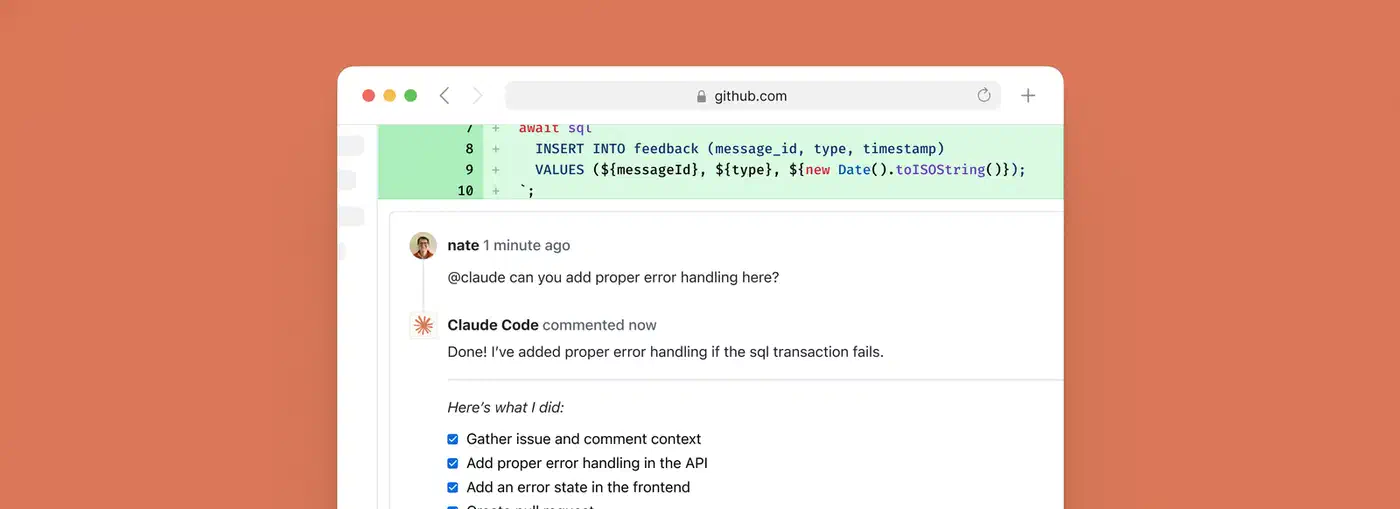
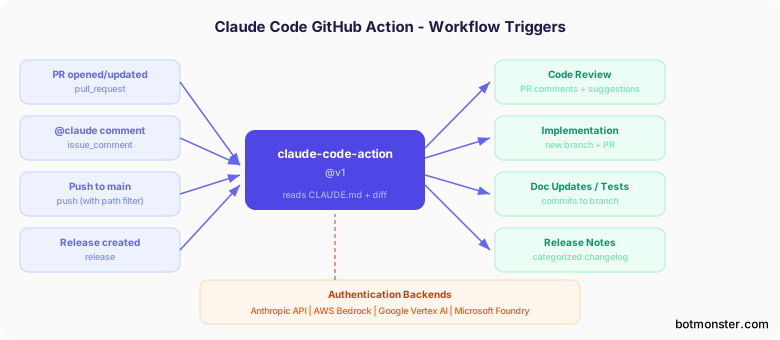
Anthropic ships claude-code-action, an official GitHub Action that runs the full Claude Code runtime inside your CI/CD pipeline. It reviews pull requests, builds features from issues when someone types @claude, writes tests, updates docs, and drafts release notes. It also respects your repo’s CLAUDE.md coding rules. The runtime runs on a GitHub Actions runner, with tool use, file reads, and multi-step reasoning.
It ships with four auth backends: Anthropic API, AWS Bedrock, Google Vertex AI, and Microsoft Foundry. It also has a sister claude-code-security-review action for vuln scans, native GitLab CI/CD support, and real deployments. Deriv runs it across 700+ repos, handling 100+ PRs per week. So this has moved past the demo stage. Teams now wire it into merge gates next to linters and test suites.
Setup and the Five Workflow Recipes That Matter
The gap between “I installed a GitHub Action” and “Claude is useful in my pipeline” is small. You pick the right recipe and set triggers that don’t burn money on docs-only PRs.
Getting Started
Setup starts by running /install-github-app inside Claude Code in your terminal. This walks you through installing the Claude GitHub App, which needs repo admin. It then sets up ANTHROPIC_API_KEY as a repo secret and copies the workflow YAML into .github/workflows/. The app needs repo rights for Contents (read/write), Issues (read/write), and Pull requests (read/write).
The simplest interactive workflow responds to @claude in any PR or issue comment:
on:
  issue_comment:
    types: [created]
  pull_request_review_comment:
    types: [created]
jobs:
  claude:
    runs-on: ubuntu-latest
    steps:
      - uses: anthropics/claude-code-action@v1
        with:
          anthropic_api_key: ${{ secrets.ANTHROPIC_API_KEY }}
From this baseline, five recipes cover the vast majority of CI/CD use cases.
Recipe 1: Automated PR Code Review
This one fires on pull_request: [opened, synchronize]. It uses paths-ignore: ['*.md', 'docs/**'] to skip docs-only changes. Claude posts structured review comments. They cover logic bugs, security flaws, perf issues, and error handling gaps. Set fetch-depth: 0 in the checkout step so Claude has full git history for context.
name: Claude PR Review
on:
  pull_request:
    types: [opened, synchronize]
    paths-ignore:
      - '*.md'
      - 'docs/**'
jobs:
  review:
    runs-on: ubuntu-latest
    permissions:
      contents: read
      pull-requests: write
    steps:
      - uses: actions/checkout@v4
        with:
          fetch-depth: 0
      - uses: anthropics/claude-code-action@v1
        with:
          anthropic_api_key: ${{ secrets.ANTHROPIC_API_KEY }}
          prompt: |
            Review this PR for bugs, security issues, and code quality.
            Focus on logic errors, security vulnerabilities, performance
            issues, and error handling. Be specific and actionable.
            Do NOT comment on style or formatting.
A typical 400-line diff review costs under $0.05 with Claude Sonnet. It burns about 5,000 to 15,000 tokens. Teams running 50 PRs per month see total API spend under $6. Teams with strict data-residency rules can get similar results by automating code reviews with local LLMs on self-hosted runners.
Recipe 2: Issue-to-PR Automation
This one fires on issue_comment: [created] with a guard: if: contains(github.event.comment.body, '@claude'). Claude reads the issue, makes changes on a new branch, and opens a PR that links the issue. It works best for small, well-defined tasks. Think “add a 404 page” or “update the config schema to support the new option,” not “rewrite the auth module.”
Recipe 3: Automated Documentation Updates
This fires on push to main with path filters (src/api/**, src/lib/**). It uses fetch-depth: 2 to compare the new commit against the previous one. It spots API or function signature changes and updates the docs/ folder on its own. Handy for libs or microservices where the API surface shifts a lot.
Recipe 4: Test Generation
This fires on pull_request: [opened] with negative path filters: !src/**/*.test.* and !src/**/*.spec.*. The filters stop infinite loops. Without them, Claude writes tests, the push fires the workflow, and Claude writes more tests. Claude follows the test patterns in your code and commits tests to the same branch.
Recipe 5: Release Notes Generation
This fires on release: [created] with fetch-depth: 0 so it gets full git history and tag access. Claude diffs the new tag against the previous one. It then sorts changes into Features, Bug Fixes, Performance, and Breaking Changes.
Cost Optimization
Cost control is important because uncapped workflows can rack up token bills fast. Token burn was also the loudest theme in what X and Reddit users said about Claude Opus 4.7, so cap spend before you scale. Key levers:
- Use
--max-turnsinclaude_argsto cap iterations. Default is 10. Set 5 for simple reviews. - Set workflow-level
timeout-minutesto stop runaway jobs. - Use GitHub’s
concurrencycontrols to cap parallel runs. - Use specific
@claudecommands. “Review the error handling in auth.ts” beats “review everything.” - Pick the right model.
--model claude-sonnet-4-6is 5x cheaper per token than Opus and is good enough for most reviews.
| Task | Typical Tokens | Estimated Cost (Sonnet) |
|---|---|---|
| Small PR review (< 100 lines) | 5,000-10,000 | $0.01-$0.03 |
| Medium PR review (100-500 lines) | 10,000-30,000 | $0.03-$0.10 |
| Feature implementation from issue | 50,000-200,000 | $0.15-$0.75 |
| Release notes generation | 20,000-50,000 | $0.06-$0.18 |
Configuration Deep Dive
The v1.0 GA release brought breaking changes from the beta. The mode parameter is gone. The action now picks it up from the trigger event. direct_prompt became prompt. The max_turns, model, and custom_instructions fields moved into a single claude_args string that takes any Claude Code CLI flag. On a large repo, cap the context it loads with nested CLAUDE.md files and a token budget or every run pays for the whole tree.
Core action parameters:
prompt: Optional. When omitted for issue or PR comment triggers, Claude replies to the trigger phrase directly.claude_args: Any Claude Code CLI flag, like--max-turns 5,--model claude-sonnet-4-6,--allowedTools,--disallowedTools,--mcp-config /path/to/config.json,--append-system-prompt.anthropic_api_key: Your API key, stored as a repo secret.trigger_phrase: Defaults to@claude.use_bedrockanduse_vertex: Boolean flags for the enterprise auth backends.
Tool Restrictions with allowedTools
The --allowedTools and --disallowedTools flags in claude_args let you cap what Claude can do in CI. For a review-only workflow where Claude should read but never write files:
claude_args: "--allowedTools 'Read,Grep,Glob' --disallowedTools 'Edit,Write,Bash'"For test generation where Claude needs to write test files but nothing else:
claude_args: "--allowedTools 'Bash(npm run test),Edit,Read' --max-turns 5"Note that --disallowedTools wins. If a tool shows up in both lists, it gets blocked. The base GitHub tools (posting comments, opening PRs) are always on and can’t be turned off.
Enterprise Authentication
For AWS Bedrock, use OIDC auth with aws-actions/configure-aws-credentials@v4. Model IDs use a region prefix, like us.anthropic.claude-sonnet-4-6. For Google Vertex AI, use Workload Identity Federation with google-github-actions/auth@v2. Make sure IAM Credentials API, STS API, and Vertex AI API are all on. Microsoft Foundry supports both OIDC and API key auth. It’s the newest backend, so the docs still trail Bedrock and Vertex.
CLAUDE.md in CI Context
Claude Code reads your repo’s custom commands and worktree setup in both local and CI runs. Add CI-only sections for rules that differ from local dev:
## CI-Specific Instructions
- Never modify test fixtures directly
- Always run the full test suite, not just changed files
- Do not install new dependencies without explicit approval in the issue
- Format review comments with file paths and line numbers
The same file that teaches Claude your local coding rules also teaches it how to act in your pipeline. So CI-only rules don’t need a separate config system.
Security-Focused Reviews with claude-code-security-review
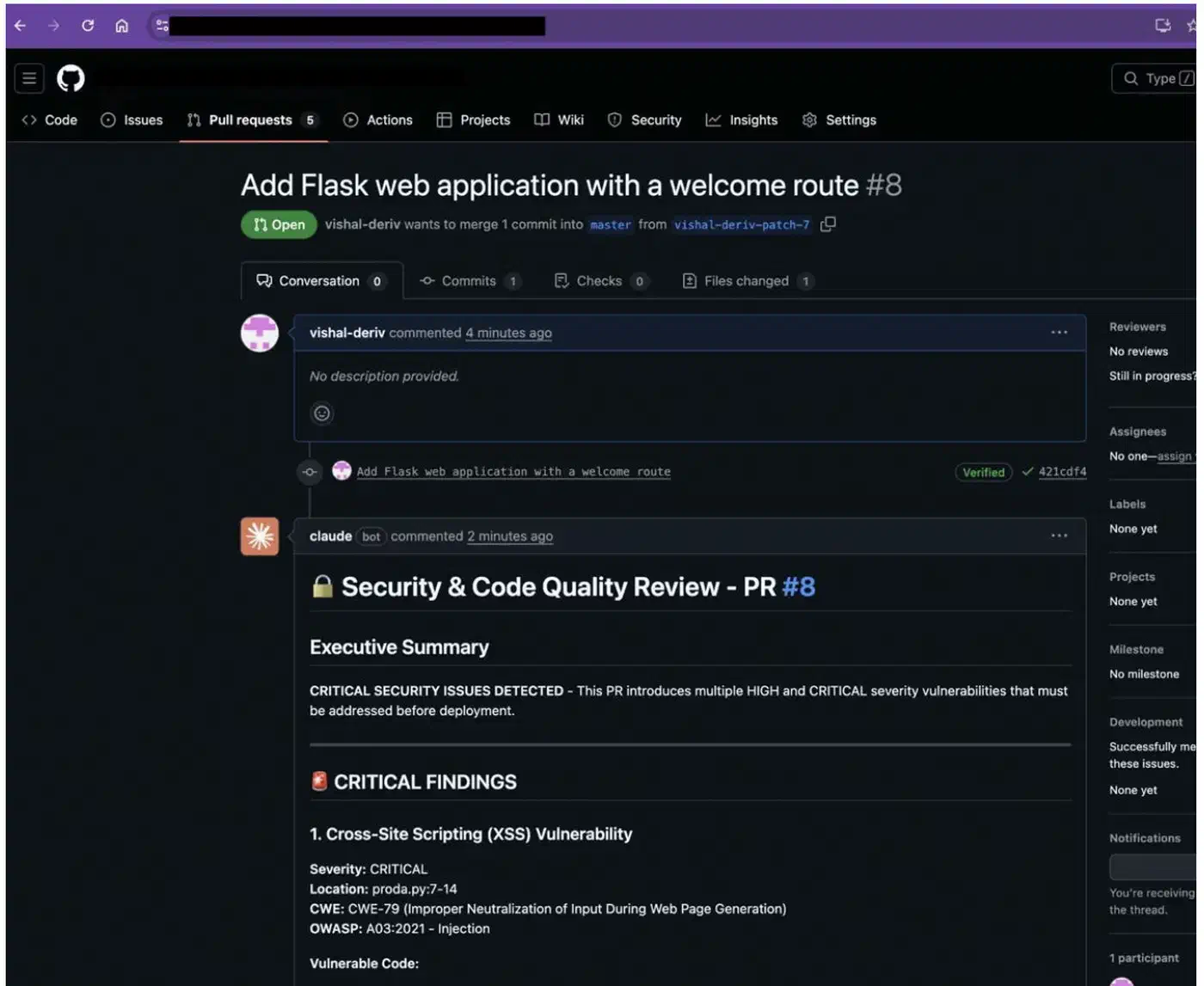
The sister claude-code-security-review action is a separate tool for vuln-specific analysis. It uses semantic reading rather than pattern matching. Where old SAST tools flag every use of eval(), Claude reads whether the input to that eval() is user-controlled or a hard-coded constant.
It scans only the changed files in a PR, not the whole codebase. That keeps noise and cost low. Each finding has a severity rating with a CWE tag, plus a clear write-up and suggested fixes. Built-in filters strip low-impact and false-positive-prone findings before they reach devs.
Vuln coverage includes SQL injection, cross-site scripting (XSS), auth and access flaws, unsafe data handling, dep flaws, SSRF, missing security headers, and hard-coded creds.
The Deriv Case Study
Deriv rolled out Claude Code security reviews across 700+ repos in five GitHub orgs, handling 100+ PRs per week. In the first week, Claude flagged XSS via unsanitized input, debug mode left on in prod, and apps binding to 0.0.0.0 rather than localhost.
Their key lesson: prompt specificity is huge. In Deriv’s words, “The prompt matters… we tell Claude exactly what to look for, how to prioritise findings, and what format to use.” A tight security prompt cut false positives over the first weeks of tuning. Every PR to main or master now gets an auto security review. No extra steps for the dev. No bottleneck from the security team.
Security Caveats
The action is “not hardened against prompt injection attacks” and should only review trusted PRs. For open-source repos, turn on “Require approval for all external contributors.” Workflows then run only after a maintainer reviews the PR. This stops an attacker from crafting a PR that warps Claude’s review via injected prompts in code comments or docstrings.
Beyond GitHub: GitLab CI/CD and Multi-Platform Support
GitHub Actions gets the spotlight. However, Claude Code’s CI/CD story also covers GitLab CI/CD natively. That makes it viable for shops that aren’t GitHub-only.
A minimal GitLab CI configuration:
stages:
  - ai

claude-review:
  stage: ai
  image: node:24-alpine3.21
  rules:
    - if: $CI_PIPELINE_SOURCE == "merge_request_event"
  script:
    - npm install -g @anthropic-ai/claude-code
    - claude --print "Review this merge request for bugs and security issues"
      --allowedTools Read,Grep,Glob
GitLab auth supports the same three backends. Direct Anthropic API. AWS Bedrock via OIDC with GitLab as the identity provider. Google Vertex AI via Workload Identity Federation with GitLab OIDC.
For shops with mixed GitHub and GitLab setups, use the same Bedrock or Vertex AI backend on both. That centralizes API costs and access control while Claude Code runs in both pipelines. The same Claude Agent SDK that powers the GitHub Action is also free for custom builds on other CI/CD platforms. Anything that can run Node.js can run Claude Code on its own.
Practical Recommendations
Based on prod rollouts and community reports, a few patterns stand out for teams using Claude Code in CI/CD. If you’re still picking the right AI coding tool, weigh the workflow tradeoffs between the leading agents before you wire any of them into pipelines. Running Codex in CI pipelines is another option here, with a codex exec mode and a GitHub Action built for pipeline use.
Start with the PR code review recipe. It has the best effort-to-value ratio. Minimal config. Pennies per review. Fast feedback on whether Claude’s tips are useful for your code. Only branch out to issue-to-PR automation or test gen after you’ve tuned the review prompts.
Put real effort into your CLAUDE.md. The quality of Claude’s CI output tracks how specific your rules are. Generic prompts yield generic reviews. Teams that log their architecture choices, testing rules, and known gotchas in CLAUDE.md see clearly better results.
Set budget rails before you scale past a handful of repos. Use --max-turns, workflow timeouts, and concurrency limits early. A misconfigured workflow that fires on every push to every branch in a monorepo will burn API credits fast.
Run the security action next to your existing SAST tools, not in place of them. Claude catches vuln types that pattern-matching tools miss, and the reverse is also true. The security action’s strength is context. It can tell whether a piece of code is reachable with attacker-controlled input. Old tools are better at catching known vuln patterns in deps.
Last, Claude Code Action runs as a standard GitHub check. You can mark it a required status check in your branch protection rules. So a PR that Claude flags with critical security findings stays blocked from merging until the findings get fixed.