 Botmonster Tech
Claude Code hooks that stop the AI from breaking your codebase

This post is open for corrections. Highlight any line of text to challenge it or ask for a clearer explanation and leave a comment.
Claude Code hooks are scripts that fire at lifecycle points like SessionStart, PreToolUse, PostToolUse, and Stop, giving developers firm control over AI agent behavior. The headline capability is PreToolUse with exit code 2, which hard-blocks risky commands such as rm -rf /, git push --force main, or DROP TABLE before they run. Pair that with PostToolUse auto-format, Stop quality checks, and Notification alerts. Together they give you a full CI/CD-like pipeline around your AI coding tool that runs every single time.
Prompt rules in CLAUDE.md only land about 80% of the time, per Blake Crosley’s testing, but hooks are firm. They run as plain shell scripts outside the LLM, fired by Claude’s actions instead of read by the model. A format rule can get skipped during a big multi-file refactor, while a PostToolUse hook on Write|Edit will not.
The Hook Architecture - Lifecycle Events and Handler Types
Hooks are firm control points wired into Claude Code’s run loop, sitting closer to Git hooks or CI steps than to IDE plugins. A plain Git hook can carry AI work too, as in generating conventional commits with Ollama. Claude Code supports over 20 lifecycle events. The list spans SessionStart, UserPromptSubmit, PreToolUse, PermissionRequest, PostToolUse, PostToolUseFailure, Notification, SubagentStart, SubagentStop, TaskCreated, TaskCompleted, Stop, StopFailure, InstructionsLoaded, ConfigChange, CwdChanged, FileChanged, PreCompact, PostCompact, SessionEnd, and more.
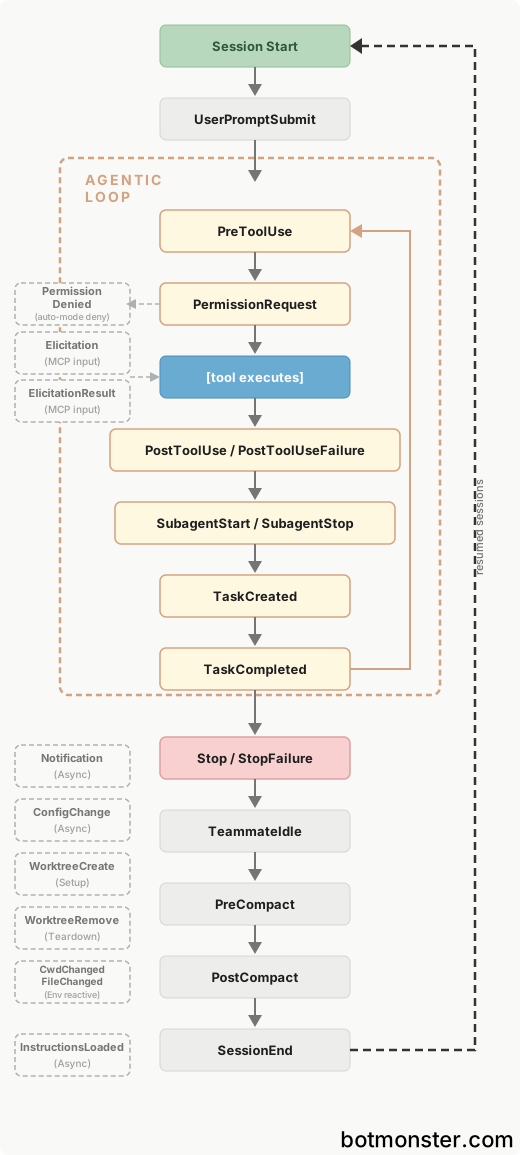
Image: Claude Code Docs
Four handler types serve different complexity levels:
| Handler Type | What It Does | When to Use It |
|---|---|---|
command | Runs a shell script, receives JSON on stdin, communicates via exit codes | Binary pattern matching - is this command destructive? Does this file path match a protected pattern? |
http | POSTs event data to a URL endpoint | Shared team services, centralized logging, webhook integrations |
prompt | Single-turn LLM evaluation (Haiku by default), returns yes/no JSON | Decisions requiring semantic understanding of tool arguments but no file access |
agent | Spawns a subagent with Read/Grep/Glob access, 60s timeout, up to 50 tool-use turns | Verification requiring inspection of actual codebase state |
Configuration lives in JSON settings files at three scopes:
~/.claude/settings.json- personal hooks applied to all your projects.claude/settings.json- project-level, committed to your repo, shared with your team.claude/settings.local.json- project-specific overrides, gitignored
There are also managed policy settings for org-wide rules, plus plugin hooks/hooks.json and skill or agent frontmatter.
The nesting works in three layers: a hook event (like PreToolUse) holds matcher groups that use a regex filter such as Bash|Edit|Write, and each matcher group holds one or more hook handlers. Since version 2.1.85, the if field also filters by tool arguments, so for example "if": "Bash(git *)" fires only on git commands.
When many hooks match the same event, they run in parallel, and for decisions Claude Code picks the strictest answer. A single deny cancels the tool call, no matter what the other hooks return. The additionalContext text from every hook gets passed to Claude together.
PreToolUse - The Safety Gate That Actually Blocks
PreToolUse is the top hook event because it is the only one that can stop an action before it runs. When it fires, your hook gets JSON on stdin with tool_name, tool_input (the full command or file path), and tool_use_id. The hook script then parses this data and decides whether to allow, block, or escalate.
The exit codes are where rules go from advice to enforcement:
- Exit 0 lets the action go through
- Exit 1 is a soft error. It logs a warning, but the action still runs
- Exit 2 hard-blocks the tool call and sends stderr back to Claude as an error
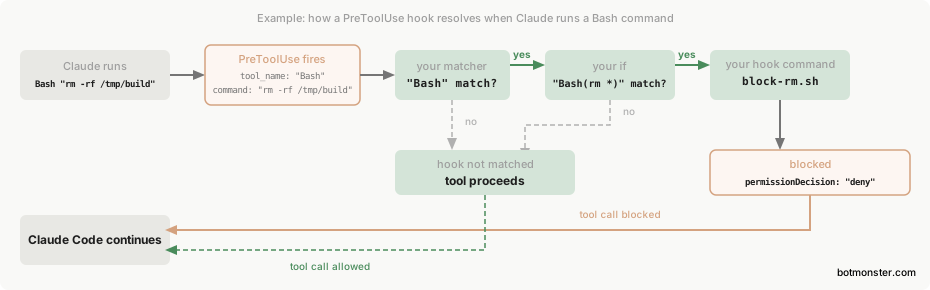
Image: Claude Code Docs
Mixing these up is the top mistake people make with hooks. Writing a “security gate” that uses exit 1 instead of exit 2 creates a hook that logs a warning while the risky command still runs anyway. Every security-critical PreToolUse hook must use exit code 2.
For finer control, JSON output gives you more options than exit codes alone. The permissionDecision field can be set to allow (skip the prompt), deny (cancel the tool call with a reason), ask (show the user a permission dialog), or defer (for non-interactive -p mode). The updatedInput field can rewrite tool arguments before they run, and the additionalContext field passes notes for Claude to read.
For security-focused teams, one detail is key: PreToolUse hooks fire before any permission-mode check. A hook that returns deny blocks the tool even in bypassPermissions mode or with --dangerously-skip-permissions. Hooks are the only rule layer that users cannot bypass by changing their permission mode.
Common blocked patterns from production deployments:
rm -rf /and recursive deletion from rootgit push --force mainandgit reset --hardDROP TABLEandDROP DATABASEterraform destroyandterraform apply -auto-approvekubectl deleteandhelm uninstall- AWS destructive commands (
ec2 terminate,rds delete,cloudformation delete-stack)
The kenryu42/claude-code-safety-net repo and the Boucle framework both ship ready-made safety hook sets, so you can skip writing regex patterns from scratch.
Five Production Hooks You Can Deploy Today
These five hooks come from Blake Crosley’s tutorial and community repos, with each one solving a real workflow pain point through a copy-paste JSON config.
Hook 1: Auto-format on file edit (PostToolUse, matcher Write|Edit). Looks at the file extension and routes to the right formatter, such as Black for Python, Prettier for JS or TS, and rustfmt for Rust. It runs after every file write, regardless of what the model chose to do. Blake Crosley reports running 95 hooks with no perceived lag, because each one finishes in under 200ms.
{
  "hooks": {
    "PostToolUse": [
      {
        "matcher": "Write|Edit",
        "hooks": [
          {
            "type": "command",
            "command": "bash -c 'if [[ \"$FILE_PATH\" == *.py ]]; then black --quiet \"$FILE_PATH\" 2>/dev/null; elif [[ \"$FILE_PATH\" == *.js ]] || [[ \"$FILE_PATH\" == *.ts ]]; then npx prettier --write \"$FILE_PATH\" 2>/dev/null; elif [[ \"$FILE_PATH\" == *.rs ]]; then rustfmt \"$FILE_PATH\" 2>/dev/null; fi'"
          }
        ]
      }
    ]
  }
}
Hook 2: Security gate for risky commands (PreToolUse, matcher Bash). Regex pattern matching against destructive commands, with exit code 2 to block. Hooks also run for subagent actions, so the safety gate cannot be bypassed simply by handing the task off to another agent.
{
  "hooks": {
    "PreToolUse": [
      {
        "matcher": "Bash",
        "hooks": [
          {
            "type": "command",
            "command": "bash -c 'INPUT=$(cat); CMD=$(echo \"$INPUT\" | jq -r \".tool_input.command\"); if echo \"$CMD\" | grep -qE \"rm\\s+-rf\\s+/|git\\s+push\\s+(-f|--force)\\s+(origin\\s+)?main|git\\s+reset\\s+--hard|DROP\\s+TABLE\"; then echo \"BLOCKED: Dangerous command detected: $CMD\" >&2; exit 2; fi'"
          }
        ]
      }
    ]
  }
}
Hook 3: Test runner after changes (PostToolUse, matcher Write|Edit). Finds the matching test file and runs pytest or jest in fail-fast mode, then sends the last 20 lines to Claude’s context so the model sees failures right away and can self-correct without a human in the loop.
Hook 4: Desktop or Slack ping on completion (Notification or Stop event). Fires a native OS alert (osascript on macOS, notify-send on Linux) or hits a Slack webhook for background tasks. This is the most common first hook people set up, because it ends the habit of staring at the terminal during long runs.
Hook 5: Quality check before commit (PreToolUse, matcher Bash with "if": "Bash(git commit*)"). Runs a linter such as ruff or eslint before any git commit is allowed, and blocks the commit with exit 2 if it finds violations. Every commit from Claude Code clears the same quality bar as a human commit going through pre-commit hooks.
{
  "hooks": {
    "PreToolUse": [
      {
        "matcher": "Bash",
        "if": "Bash(git commit*)",
        "hooks": [
          {
            "type": "command",
            "command": "bash -c 'ruff check . --quiet || (echo \"Lint violations found. Fix before committing.\" >&2; exit 2)'"
          }
        ]
      }
    ]
  }
}
GitButler tie-in: GitButler takes a different route to the same goal. Instead of wiring up your own hooks, you run but agent setup, which installs a GitButler skill that teaches Claude Code to drive the but CLI instead of raw git. Each change then lands in its own reviewable branch or commit inside a single working directory - so three Claude Code sessions at once become three clean, stacked branches you can inspect before pushing, with no manual worktree setup needed.

Image: disler/claude-code-hooks-mastery
Community links worth a bookmark: karanb192/claude-code-hooks (copy-paste set), disler/claude-code-hooks-mastery (tutorial repo), hesreallyhim/awesome-claude-code (a curated list of skills, hooks, and plugins), and DataCamp’s hands-on guide.
Prompt and Agent Hooks - When Deterministic Rules Are Not Enough
Shell scripts handle yes-or-no calls well, but some safety and quality calls need real judgment. The two LLM-powered handler types exist for exactly those cases.
Prompt hooks (type: "prompt") send a prompt string with an $ARGUMENTS placeholder to a Claude model (Haiku by default, or swap it with the model field) for a single-turn call. The model returns {"ok": true} to allow or {"ok": false, "reason": "explanation"} to block, and the default timeout is 30 seconds.
Agent hooks (type: "agent") spin up a full subagent with Read, Grep, and Glob tools, so it can run many turns to check the real state of the codebase. The default timeout is 60 seconds, with up to 50 tool-use turns. Reach for these when the hook input alone is not enough and you need to verify conditions against files on disk.
The Stop-hook done-check is a handy pattern worth highlighting. A prompt or agent hook on the Stop event asks “are all tasks actually done?”, and if the model returns {"ok": false, "reason": "tests not passing"}, Claude keeps working instead of stopping. Watch the stop_hook_active field to dodge infinite loops: if you are already inside a stop-hook re-run, exit 0 so Claude can stop. A done-check like this is one practical answer to the confidently-broken marathon runs that shaped the Claude Opus 4.7 community reception, and the same first-shot-completeness gap drove Reddit’s Fable 5 verdict over Opus 4.8.
Pick command for yes-or-no pattern matching, like “is this command destructive?” or “does this file match a protected pattern?”. Pick prompt when the call needs to read the meaning of the tool’s arguments but not access files, such as judging whether a database migration SQL statement is safe. Save agent for checks that need to read the real codebase, such as making sure a code change has matching tests.
Cost note: Prompt and agent hooks make API calls on every matched event. A prompt hook firing on every PreToolUse event across a team of 10 developers can rack up real API bills. Use matchers and the if field aggressively, so hooks only fire when LLM judgment is actually needed.
How Claude Code Hooks Compare to Cursor Rules and Copilot Instructions
Every major AI coding tool reads a different config file for project rules. But the rule-enforcement power varies a lot, and Cursor’s Composer releases keep moving that line release to release.
| Capability | Claude Code Hooks | Cursor Rules (.cursorrules) | Copilot Instructions (.github/copilot-instructions.md) |
|---|---|---|---|
| Can block dangerous actions | Yes (exit code 2 / deny) | No - suggestions only | No - suggestions only |
| Enforcement type | Deterministic (scripts) | Probabilistic (model follows ~80%) | Probabilistic (model follows ~80%) |
| Runs outside the LLM | Yes | No | No |
| Handler types | 4 (command, http, prompt, agent) | Text instructions only | Text instructions only |
| Lifecycle events | 20+ events | None | None |
| Team-wide enforcement | Yes (committed settings.json) | Yes (committed .cursorrules) | Yes (committed instructions) |
| Can rewrite tool inputs | Yes (updatedInput) | No | No |
| Works with –skip-permissions | Yes (hooks still fire) | N/A | N/A |
The gap comes down to enforcement. Cursor rules and Copilot instructions are hints the model reads. Claude Code hooks are scripts the runtime runs. A .cursorrules file saying “never force push to main” relies on the model to recall and follow that rule. A PreToolUse hook with exit 2 on git push --force main blocks the command at the runtime, no matter what the model planned.
A different design point is worth knowing. OpenAI’s kernel-sandboxed terminal coder pushes enforcement down to the operating system kernel, which is harder to bypass than hooks but less flexible for project-specific rules.
Debugging, Pitfalls, and Performance
Hooks that fail in silence are worse than no hooks at all because they create a false sense of safety. Knowing how to debug them counts as much as knowing how to write them.
The /hooks command opens a read-only view of every hook in place, with source paths and event counts. Verbose mode (Ctrl+O) shows stdout and stderr from each hook run inside the transcript. For full run details, including which hooks matched and their exit codes, you can run claude --debug.
Watch out for shell profile leaks. If your ~/.zshrc or ~/.bashrc has plain echo lines, that text gets pushed in front of hook JSON output and breaks JSON parsing. The fix is to wrap echo lines in if [[ $- == *i* ]]; then ... fi so they only run in interactive shells. The bug is sneaky because it only shows up when hooks parse JSON output from other hooks.
The exit code 1 trap snags people all the time, so it bears repeating. Exit code 1 in a PreToolUse hook means “soft error”, meaning the hook logs a warning but the risky command still runs anyway. If you built a security gate and tested it by reading the log (“yes, it printed BLOCKED”), you might miss that the command still went through. Always confirm the tool call was actually cancelled.
Hook run time adds straight onto every matched tool call. Blake Crosley keeps each hook under 200ms and runs 95 of them with no felt lag. The default timeout is 600 seconds for command hooks, but you should cut that to 30 seconds or less for hooks that fire often on PreToolUse and PostToolUse.
When many PreToolUse hooks return updatedInput to rewrite the same tool’s arguments, the last one to finish wins, since hooks run in parallel. Don’t let more than one hook change the same tool’s input. Output size is capped at 10,000 characters, with the excess saved to a file.
A Stop hook that always returns {"ok": false} creates an infinite loop where Claude never finishes. Check the stop_hook_active field in the input JSON, and if it is true, exit 0 so Claude can stop on the second pass.
Getting Started
If you set up nothing else, set up two hooks: the auto-formatter (PostToolUse on Write|Edit) and the security gate (PreToolUse on Bash). The formatter kills style drift across every file Claude touches. The security gate stops the one wipe-out mistake that makes you swear off AI coding tools.
Drop them into .claude/settings.json in your repo root, so every teammate gets the same cover automatically. Then build out from there: add alert hooks when you are comfortable, add quality gates once you have a clean lint baseline, and save prompt and agent hooks for the rare call that regex cannot make.
The Claude Code hooks docs hold the full event reference. The community repos above ship dozens of copy-paste configs for specific frameworks and languages. Start with the two most important ones and build from there. For tooling that goes beyond hooks, see how skill self-repair, GUI control, and session coordination come together in five standout projects.