 Botmonster Tech
Ditching Claude Opus for GLM 5.1 in OpenClaw at $18/mo

Anthropic’s third-party tool rules priced agent users off Claude Opus 4.7. The cheapest working OpenClaw stack now is Z.ai’s $18/mo GLM 5 Turbo plan. Next rungs: Ollama-cloud’s $20/mo GLM 5.1, then MiniMax’s $40/mo highspeed tier. Kimi 2.6 stays API-only since local setup needs about 750 GB of RAM.
Key Takeaways
- Z.ai’s $18/mo plan running GLM 5 Turbo is the cheapest OpenClaw backend that actually works.
- MiniMax highspeed at $40/mo handles heavier workloads without the four-figure surprise bills.
- Kimi 2.6 needs around 750 GB of RAM to self-host, so almost everyone runs it through the API.
- Keep Claude on the planner role; route scheduled jobs to the cheap backends.
- China-hosted models trade dollars for privacy on iMessage, contacts, and email skills.
Why $1,500/mo Opus Bills Pushed Users to GLM
The pressure here is simple. Once Anthropic’s third-party tool rules kicked in, OpenClaw users on the Claude Pro CLI got nudged onto pay-per-token API access. There is still a supported way to stay on the $20 subscription, it just is not the default any more. At Opus 4.7 list pricing of $15 per million input tokens and $75 per million output tokens, agent loops add up fast. The OP of the r/openclaw PSA thread tracked his own bill at about $1,500/mo before he switched. That figure is the anchor most cost threads on the sub now cite. The pricing pain did not ease with the next model either: the community reception of Opus 4.7 leaned on token-burn complaints from power users hitting caps in minutes, which is exactly the pattern that turns an OpenClaw cron fleet into a four-figure surprise.
OpenClaw’s design makes this worse. One user-facing prompt often fans out into a long chain of small tool calls, and each one grows the context. Pay-per-token loves that pattern. Your wallet does not. As the Carly AI explainer put it, OpenClaw can “quietly run up four-figure API bills while [users] slept” if nobody watches the gateway.
The obvious workaround is to keep using the Claude CLI on a Pro or Max plan. That works for chat sessions. However, the Pro and Max plans cap usage about every five hours. A cron-driven OpenClaw fleet (news fetch every 15 minutes, social posts on a schedule, productivity rollups overnight) burns that cap in minutes. So users went looking for a cheaper tier to carry the cron load, with the Claude plan kept on planning duty.
The Cheap-Stack Pricing Table
Here is what people on r/openclaw are actually paying, with sources tagged so you can audit each figure:
| Backend | Price | Best for | Hosted in |
|---|---|---|---|
| Z.ai GLM 5 Turbo (coding plan) | $18/mo | Cron jobs, news, social, summaries | China |
| Ollama-cloud GLM 5.1 | $20/mo | Same workloads, higher rate limit | China-model |
| OpenAI Codex bundled with ChatGPT | $0 incremental | Coding, chat with rate-limit watch | US |
| MiniMax highspeed | $40/mo | Hermes-class agents, heavier loads | China |
| DeepSeek V4 Flash | API metered | High-context cheap inference | China |
| Anthropic Claude Pro | $20/mo | Planning, complex tool-calling | US |
The Z.ai number comes from a commenter on the r/openclaw money-pit thread who said plainly:
$18 a month Z.ai coding plan. Have been using GLM 5 Turbo. Works great with OpenClaw. Also replaced my productivity skills and markdown file with a Postgres and mcp server. Haven’t ran into any usage issues, but also don’t use OpenClaw for coding projects or stuff like that. Mostly just automated news, social media posts, and track productivity stuff.
u/CommitteeDry5570 (r/openclaw money-pit thread, Z.ai GLM 5 Turbo on the $18/mo plan)
The Ollama-cloud number lands one tier up. The same thread shows users dropping Codex auth after hitting rate limits inside 2 to 3 days. They then routed $20/mo to Ollama-cloud GLM 5.1 for a much higher cron-friendly limit. That is why two GLM tiers sit side by side in the cost table: Z.ai for the hobby load, Ollama-cloud when your cron spend hits the rate-limit walls.
MiniMax shows up at the next price point on the highspeed plan. DeepSeek V4 Flash gets glowing mentions in a sibling thread where the OP joked about dropping $25,000 on a workstation to feed it. Treat it as the high-context cheap option once you already own the hardware. For a self-hosted route that skips the China-hosted privacy question entirely, Alibaba’s privacy-friendly Qwen3.6-35B-A3B build ships under Apache 2.0 and runs a 20.9GB quantization on a single laptop. Codex bundled with a ChatGPT business plan is the one path with zero extra cost, with the obvious catch: you pay for the higher ChatGPT tier anyway, and the rate limit is the thing to watch.

How OpenClaw’s CLI-Backend System Actually Swaps Providers
Reading the docs is the only way to make this concrete. The official CLI backends doc ships this default config:
model: {
  primary: "anthropic/claude-opus-4-6",
  fallbacks: ["codex-cli/gpt-5.5"],
},
models: {
  "anthropic/claude-opus-4-6": { alias: "Opus" },
  "codex-cli/gpt-5.5": {},
},
Out of the box, OpenClaw routes between Anthropic and the Codex CLI. The rest (Z.ai GLM, MiniMax, Ollama-cloud) plugs in through the CLI backend plugin system. The login pattern is the same for all backends:
openclaw models auth login --provider anthropic --method cli --set-defaultSwap in --provider codex or --provider z-ai to change routing. That is the whole mechanical change for swapping backends. The rest is a config edit on agents.defaults.cliBackends to say which agents prefer which backend.
There is one gotcha that the docs flag and most blog posts skip. The bundled claude-cli backend is the only one that maps OpenClaw’s /think levels to Claude Code’s native --effort flag automatically. The docs put it like this:
The bundled Anthropic claude-cli backend also maps OpenClaw /think levels to Claude Code’s native –effort flag for non-off levels. minimal and low map to low, adaptive and medium map to medium, and high, xhigh, and max map directly. Other CLI backends need their owning plugin to declare an equivalent argv mapper before /think can affect the spawned CLI.
In practice, here is the catch. If you flip the primary backend to GLM 5 Turbo, and your skills assume /think high means “spend more compute on the next call,” that flag silently becomes a no-op. It stays dead until the Z.ai plugin author wires up the same argv mapper. So GLM only replaces Opus for skills that don’t lean on think-level escalation. Your planner agent stays on Anthropic.
The Privacy Decision Tree (China-Hosted vs US-Hosted)
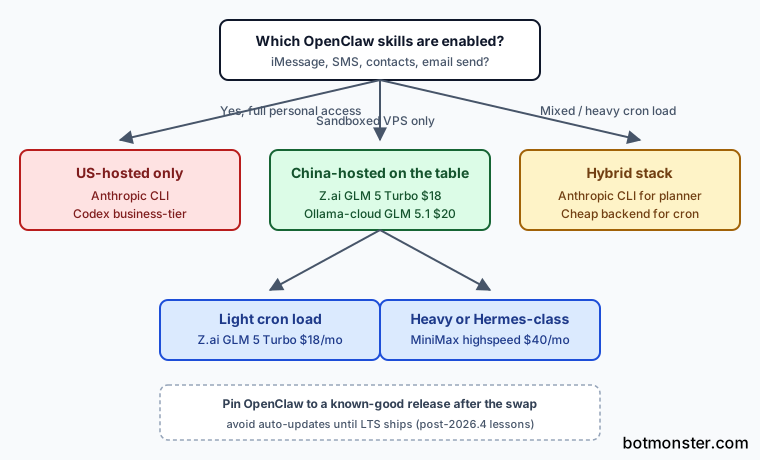
This is the trade-off most cost write-ups dodge. GLM, MiniMax, and Kimi all run on Chinese servers. The cheap inference is truly cheap. However, the OpenClaw skills graph in many setups now includes iMessage, contacts, SMS, and email send. The blunt framing across the money-pit thread is that anything sent to a China-hosted endpoint should be treated as eventually-public, since US privacy law and US courts don’t reach it. Commenters in the same thread describe their own installs: emails plus contacts plus SMS routed through the agent. They then realized that running those prompts through a China-hosted model logs personal mail into a place they cannot subpoena.
If you have already turned on personal-account skills (iMessage, SMS, contacts, email send), every prompt the agent fires against those skills carries personal data. Routing those prompts through a China-hosted endpoint to save $180/mo is a real cost. It just doesn’t show up on the credit card statement.
The decision tree that fits the community pattern looks like this. If iMessage, SMS, contacts, or email-send skills are on, stay on US-hosted backends only (Anthropic CLI, Codex business-tier). If OpenClaw is sandboxed on a throwaway VPS with no personal-account access, China-hosted GLM and MiniMax are fine. If you run it on a personal Mac with full skill access, do not tune for cost first. The skills you have turned on set the backend you can afford to run.
Kimi 2.6 Is API-Only and That Matters
A solid share of “I’m running Kimi locally” claims on the sub turn out to mean “I’m paying for the Moonshot API.” The hardware floor is the reason. The community ballpark from the money-pit thread is about 750 GB of RAM and several high-end GPUs (multiple 5090-class cards) to get the model working locally with a small context window. The canonical reference is the Kimi K2.6 deploy guidance on Hugging Face. The model card confirms a Mixture-of-Experts design. The total parameter count and the per-token VRAM math both push you well past consumer GPU range. So when a thread tells you to “just run Kimi locally,” the real read is API-routed inference on Moonshot’s servers. Skip the weekend you would spend trying to make a 750 GB rig work.

The version-pinning footnote belongs in the same section, since anyone swapping backends inherits OpenClaw’s release-stability story. The community pattern across the money-pit thread is to stop auto-updating. Sit on a known-good build for a month or two at a time. Let the project ship a few releases before you re-test. That advice exists since OpenClaw shipped two bad releases recently, logged in the founder’s rough-week post-mortem. When you swap to a cheap backend, pin the OpenClaw version to a known-good build until the LTS branch ships.
How To Swap OpenClaw From Claude Opus to GLM 5 Turbo
Subscribe to Z.ai’s $18/mo coding plan
Sign up for the Z.ai coding plan at z.ai and confirm GLM 5 Turbo is included as part of the tier. Save the API credentials in a password manager rather than the OpenClaw config file.
Install the Z.ai CLI backend plugin in OpenClaw
Follow the OpenClaw plugin install steps at the CLI backend plugins doc to add the Z.ai provider, then restart OpenClaw to pick up the new backend.
Authenticate against Z.ai
Run openclaw models auth login --provider z-ai --method cli --set-default (substituting whatever provider name your plugin declares); confirm the gateway shows the new backend as available.
Edit agents.defaults.cliBackends in your config
Set the agent’s primary model to the GLM-flavored alias (for example z-ai/glm-5-turbo) and keep anthropic/claude-opus-4-6 as a fallback for sessions tagged interactive.
Tag interactive vs cron agents
Use OpenClaw’s per-agent backend override so chat agents continue to use Anthropic CLI while scheduled and cron agents use the cheap backend. This is where the bulk of the savings come from.
Smoke-test cost behavior for 24 hours
Watch the Z.ai dashboard and OpenClaw logs for a full day. Confirm cron jobs are not spilling into the Anthropic CLI path and that GLM 5 Turbo handles your skill set without degraded tool calls.
Pin OpenClaw to a known-good release
After confirming the swap works, pin the OpenClaw version per the rough-week guidance and avoid auto-updates until the LTS branch ships.
When NOT to Use This
- You need rock-solid prompt-caching that the cheap backends do not match at Anthropic’s CLI level.
- Your OpenClaw skills lean on Claude-specific tool-calling formats. Some do not port cleanly to GLM or Codex.
- Your workflow is bound by rules that exclude China-hosted inference (most enterprise data, regulated industries).
- You do not have the Codex or Anthropic CLI binaries on the host. This recipe assumes a working multi-CLI setup.
- You only run light chat workloads. Your $20 Claude Pro plan on the sanctioned claude-cli backend already covers them at no extra cost.
FAQ
Will my OpenClaw skills work on GLM 5.1 the same as on Claude Opus?
Is the China-hosted privacy concern real?
What's the cheapest plan that handles cron jobs without rate-limit anxiety?
Can I run Kimi 2.6 locally?
Should I pin OpenClaw to a specific version after I switch backends?