 Botmonster Tech
Run DeepSeek R1 locally: reasoning models on consumer hardware

You can run DeepSeek R1’s distilled reasoning models on an RTX 5080 with 16 GB of VRAM. Use Ollama or llama.cpp with 4-bit quantization. The 14B distilled variant (Q4_K_M) fits in about 10 GB of VRAM. It shows visible <think> reasoning traces that rival cloud quality on math, coding, and logic. The full 671B model needs multi-GPU rigs, but the distilled models give you 80-90% of the quality for far less hardware.
Below: model selection for different VRAM budgets, setup with both Ollama and llama.cpp, benchmark results against cloud APIs, and practical integration patterns for daily use.
DeepSeek R1 Model Family - Which One to Run Locally
DeepSeek released several R1 variants with very different hardware needs. Pick the right model for your card first. Get it wrong and you either waste VRAM or get poor reasoning quality.
The full DeepSeek R1 model has 671 billion parameters. It uses a Mixture of Experts (MoE) design with 37 billion active parameters per token. In FP16 it needs roughly 300 GB of memory. Even at Q4 you are looking at about 80 GB, which is firmly multi-GPU turf. Think four RTX 5090s or a cloud box.
For most people, the distilled lineup is the better pick. DeepSeek released dense models trained by distilling R1’s reasoning into smaller, lighter forms:
| Model | Base Architecture | Parameters | Q4_K_M VRAM | Tokens/sec (RTX 5080) |
|---|---|---|---|---|
| DeepSeek-R1-Distill-Qwen-1.5B | Qwen | 1.5B | ~1.5 GB | ~80 |
| DeepSeek-R1-Distill-Qwen-7B | Qwen | 7B | ~5 GB | ~45 |
| DeepSeek-R1-Distill-Llama-8B | Llama | 8B | ~5.5 GB | ~40 |
| DeepSeek-R1-Distill-Qwen-14B | Qwen | 14B | ~10 GB | ~25 |
| DeepSeek-R1-Distill-Qwen-32B | Qwen | 32B | ~20 GB | ~12 |
| DeepSeek-R1-Distill-Llama-70B | Llama | 70B | ~40 GB | ~5 (multi-GPU) |
The sweet spot for 16 GB cards is DeepSeek-R1-Distill-Qwen-14B at Q4_K_M. It uses about 10 GB of VRAM and runs at roughly 25 tokens per second on an RTX 5080. It still holds strong reasoning on math, logic, and coding.
With 24 GB of VRAM (RTX 5090 or similar), you can step up to DeepSeek-R1-Distill-Qwen-32B at Q4_K_M, which needs around 20 GB. The jump from 14B to 32B brings a real gain on hard multi-step problems. Whether the pricier GPU is worth it depends on how often you hit the 14B model’s limits. On a 128GB unified-memory Mac Studio or Strix Halo box, MiniMax M2.7 is the next rung up. It’s an open-weights 230B MoE that scores 78% on SWE-bench Verified.
Going the other way, our guide to the 8 GB VRAM tier with quantization and offload covers the low end. Its MoE design only fires 3.8B parameters per token. So heavy quantization plus CPU-GPU layer offload gets a 26B model running where a dense 14B would struggle.
In Ollama, the model names follow a simple pattern: deepseek-r1:1.5b, deepseek-r1:7b, deepseek-r1:14b, deepseek-r1:32b, deepseek-r1:70b, and deepseek-r1:671b. Ollama picks a fitting quantization level from the tag.
What sets these apart from normal language models: R1 variants show explicit <think>...</think> reasoning traces before the final answer. You can see and debug the thinking. Closed models hide the chain-of-thought and only show you the result.
Setting Up Ollama for R1 Inference
Ollama is the fastest way to get R1 running locally on the GPU. The whole job, from install to download to first query, takes about five minutes.
Installation and First Run
Install Ollama on Linux with a single command:
curl -fsSL https://ollama.com/install.sh | shPull the 14B model (about 8.5 GB download for the Q4_K_M quantization):
ollama pull deepseek-r1:14bVerify it downloaded correctly:
ollama listThis should show the model name, size, and quantization level. Now run a quick test to confirm reasoning is working:
ollama run deepseek-r1:14b "Solve step by step: If a train travels 120km in 1.5 hours, and then 80km in 1 hour, what is the average speed for the entire journey?"You should see a <think> block appear first. It works through the total distance, total time, and the division, then gives the final answer. If you only get a bare answer with no thinking trace, something is set up wrong.
Configuration That Matters
Context length is the most critical setting. R1 reasoning traces run long, often 2,000 to 5,000 tokens just for the thinking part. If the context window is too small, the reasoning gets cut off silently. You then get wrong answers with no clear sign of what broke.
Create a Modelfile to set appropriate parameters:
FROM deepseek-r1:14b
PARAMETER num_ctx 16384
PARAMETER temperature 0.1
Then create a custom model from it:
ollama create deepseek-r1-reasoning -f ModelfileThe temperature setting counts more than usual with reasoning models. For fixed tasks like math and logic, use temperature 0.1 or 0.0. Higher values add noise to the reasoning chain itself. The model often makes a correct point in one step, then contradicts it in the next.
Verifying GPU Offloading
After starting a model, check that it really runs on the GPU:
nvidia-smiYou should see the Ollama process using VRAM. If the model runs but CPU usage spikes while GPU memory stays low, the model is partly or fully on the CPU. That drops speed from around 25 tokens per second down to about 5. The usual cause is another process holding VRAM, or a model too large for your GPU.
You can also check with ollama ps. It shows which models are loaded and whether they use the GPU backend (CUDA or ROCm).
API Access
Ollama serves an OpenAI-compatible API at http://localhost:11434/v1/chat/completions. You can use it with any OpenAI SDK client. Just point the base URL at it:
from openai import OpenAI

client = OpenAI(
    base_url="http://localhost:11434/v1",
    api_key="not-needed"
)

response = client.chat.completions.create(
    model="deepseek-r1:14b",
    messages=[{"role": "user", "content": "Explain why 0.1 + 0.2 != 0.3 in floating point"}]
)
print(response.choices[0].message.content)
Any app that talks the OpenAI protocol can point at this endpoint and use local R1 with no code changes.
Running R1 with llama.cpp for Maximum Control
If you want direct control over quantization, context length, batch jobs, and multi-GPU rigs, llama.cpp is the better pick. It takes more manual setup than Ollama, but it exposes every knob.
Building from Source
Clone and build with CUDA support:
git clone https://github.com/ggerganov/llama.cpp
cd llama.cpp
cmake -B build -DGGML_CUDA=ON
cmake --build build --config Release -j$(nproc)
This needs CUDA Toolkit 12.4 or later. For AMD GPUs, swap -DGGML_CUDA=ON for -DGGML_HIP=ON and make sure ROCm is installed.
Downloading Models
Grab quantized GGUF models from Hugging Face:
huggingface-cli download bartowski/DeepSeek-R1-Distill-Qwen-14B-GGUF \
  --include "DeepSeek-R1-Distill-Qwen-14B-Q4_K_M.gguf" \
  --local-dir ./models
Interactive and Server Modes
Run interactively:
./build/bin/llama-cli \
  -m models/DeepSeek-R1-Distill-Qwen-14B-Q4_K_M.gguf \
  -ngl 99 -c 16384 -t 8 --temp 0.1 \
  -p "Solve step by step: What is the derivative of x^3 * sin(x)?"
The -ngl 99 flag offloads all layers to GPU (any number above the real layer count works). The -c 16384 sets context length. The -t 8 sets how many CPU threads handle any work left on the CPU.
To serve as an API:
./build/bin/llama-server \
  -m models/DeepSeek-R1-Distill-Qwen-14B-Q4_K_M.gguf \
  -ngl 99 -c 16384 \
  --host 0.0.0.0 --port 8080
This exposes an OpenAI-compatible API endpoint, the same as Ollama but with more options to tune.
Multi-GPU and the Full 671B Model
If you have multiple GPUs, llama.cpp supports tensor splitting:
./build/bin/llama-cli \
  -m models/DeepSeek-R1-671B-Q2_K.gguf \
  -ngl 99 --tensor-split 0.5,0.5 \
  -c 8192
With two RTX 5090s (48 GB total VRAM), you can run the Q2_K build of the full 671B model. Big chunks of it will still spill to system RAM. Expect around 5 tokens per second: slow, but it works for tasks that truly need the full model. That ceiling keeps rising, since Moonshot’s 2.8T model dwarfs the 671B R1 and lands well past any home multi-GPU rig.
Quantization Tradeoffs
For the 14B distilled model, here is how quantization levels compare:
| Quantization | Size | VRAM | Quality Notes |
|---|---|---|---|
| Q8_0 | 15 GB | ~16 GB | Near-original quality |
| Q5_K_M | 10.5 GB | ~12 GB | Minimal quality loss |
| Q4_K_M | 8.5 GB | ~10 GB | Sweet spot for most tasks |
| Q3_K_M | 7 GB | ~8 GB | Some degradation on complex reasoning |
| Q2_K | 5.5 GB | ~7 GB | Noticeable quality loss, last resort |
The practical advice: start with Q4_K_M. Drop to a lower level only if you truly cannot fit it. The quality loss from Q4 to Q3 is small. But Q2 adds errors that show up in multi-step reasoning chains, which is exactly what you want a reasoning model for.
Benchmarking R1 Against Cloud APIs
Running locally is only worth it if the quality holds up. To get hard numbers, I ran a suite of 50 problems across four groups: arithmetic and algebra (15), coding challenges (15), logic puzzles (10), and multi-step word problems (10). Each one was graded right or wrong, with partial credit for reasoning quality.
| Model | Overall | Arithmetic | Coding | Logic | Word Problems | Avg Time | Cost |
|---|---|---|---|---|---|---|---|
| R1-Distill-14B-Q4 (local) | 72% | 80% | 67% | 70% | 70% | 8s | $0 |
| R1-Distill-32B-Q4 (local) | 81% | 88% | 73% | 80% | 80% | 15s | $0 |
| DeepSeek R1 API (cloud) | 88% | 93% | 83% | 90% | 85% | 12s | ~$0.55/$2.19 MTok |
| Claude Sonnet (ext. thinking) | 90% | 95% | 87% | 90% | 88% | 10s | ~$3/MTok |
| GPT-4o | 85% | 90% | 80% | 85% | 83% | 8s | ~$2.50/MTok |
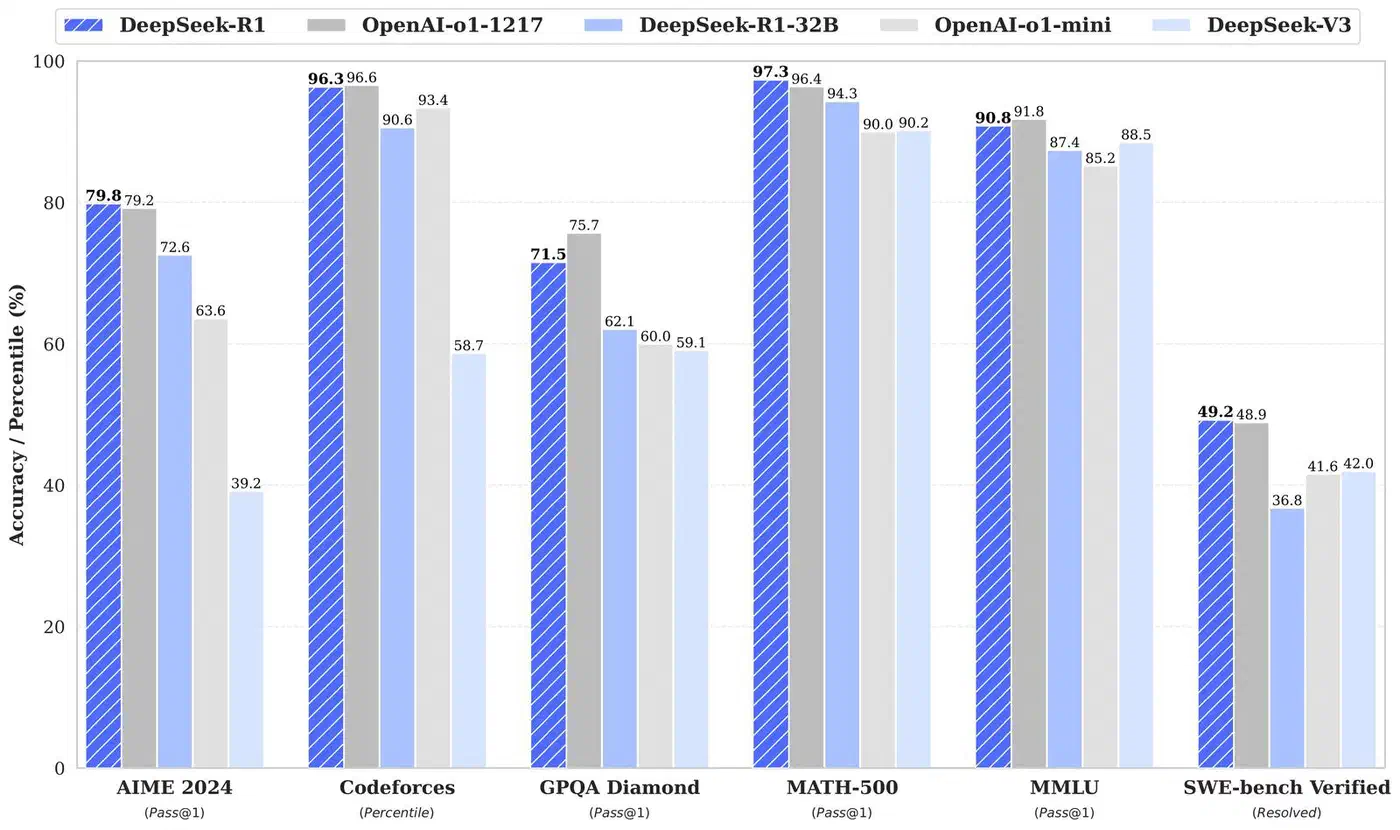
A few things stand out from these results.
The 14B distilled model running locally handles most everyday reasoning tasks well and costs nothing per query. For plain math, debugging help, and standard logic puzzles, it does well enough that you would not notice the gap from cloud APIs in daily use.
The gap widens on harder problems. The full R1 model and Claude with extended thinking pull ahead on problems that need five or more steps, or where the model has to back up and rethink an approach. The 14B model sometimes locks onto a wrong path early and does not recover.
The 32B model closes much of that gap. If your hardware can run it, the jump from 14B to 32B is the single biggest quality gain you can make locally. It handles multi-step reasoning more reliably and makes fewer logic errors in its thinking chains.
Cost counts at scale. If you run hundreds of reasoning queries per day for code reviews, data work, or automated testing, the zero marginal cost of local inference adds up fast. A team running 1,000 queries daily against Claude at $3/MTok, with 2K token replies, would spend roughly $180 a month. The same load on local hardware costs only electricity. To put a real number on that, run your setup through the homelab power cost calculator.
Practical Use Cases and Integration Patterns
A reasoning model running locally opens up workflows that just don’t pencil out when you pay per token.
Code Review Assistant
Pipe your git diff into R1 and ask it to analyze for bugs, security issues, and performance problems:
git diff HEAD~1 | ollama run deepseek-r1:14b "Review this diff for bugs, security issues, and performance problems. Think through each change carefully."The thinking trace is a real help here. You can watch the model reason about each change, so it’s easier to tell if its concerns are real or false alarms. With cloud APIs, you get a list of issues but no view into the analysis. For coding-heavy reviews, Alibaba’s thinking-trace Qwen3.6-35B-A3B reviewer is a more focused option. It scores 73.4 on SWE-bench Verified while firing only 3B parameters per token.
Math and Data Analysis
Feed spreadsheet data or stats questions into R1 and let it work through the analysis step by step. The visible reasoning trace lets you check the method, not just the final number. If the model picks the wrong formula or slips on a calculation, you can catch it in the thinking block instead of trusting an answer that may be wrong.
Local Tutoring and Problem Solving
The <think> traces show the work, which makes R1 handy as a step-by-step problem solver. Give it a system prompt that asks it to explain each step. You then get a tutor that gives answers and shows how it got there.
IDE Integration
The Continue extension for VS Code works with Ollama as a backend. Set http://localhost:11434 as the provider and pick deepseek-r1:14b for hard reasoning tasks.

CI/CD Pipeline Integration
Run R1 in a Docker container as part of your CI pipeline to review pull requests, write docs from code, or check config changes. The zero per-query cost makes high-volume use practical in a way cloud APIs are not. A pre-merge check that runs every PR through a reasoning model costs nothing beyond compute time on your build server.
Parsing the Thinking Trace Programmatically
If you are building tools on top of R1, pull the content between the <think> and </think> tags:
import re

def extract_reasoning(response: str) -> tuple[str, str]:
    think_match = re.search(r'<think>(.*?)</think>', response, re.DOTALL)
    reasoning = think_match.group(1).strip() if think_match else ""
    answer = re.sub(r'<think>.*?</think>', '', response, flags=re.DOTALL).strip()
    return reasoning, answer
Log the reasoning on its own, show it in a collapsible UI panel, or use it as an audit trail for automated decisions. Visible reasoning is a real edge over models that hide the chain-of-thought. You can tell why the model made a given call.
What to Expect Going Forward
The distilled R1 models hit a useful sweet spot: real reasoning on hardware that a lot of developers already own. The 14B model at Q4 is the practical pick for 16 GB cards. The 32B model is worth aiming for if you have 24 GB. For the hardest problems, cloud APIs still win. But for the daily flow of reasoning tasks most developers face, local inference covers it with no ongoing cost.
The setup is simple with either Ollama or llama.cpp. Ollama gets you running in minutes. llama.cpp gives you more knobs to turn. Both serve OpenAI-compatible APIs, so switching between them, or mixing with cloud providers, takes very little code change. Start with the 14B model on Ollama. Benchmark it on your real workload. Scale up only if you find tasks where it falls short. If reasoning is just one of several things you want from a daily driver, our guide to choosing between today’s leading open-weight flagships weighs math, coding, and multimodal strength across all three.