 Botmonster Tech
book-to-skill feeds your agent one chapter, not the book

This post is open for corrections. Highlight any line of text to challenge it or ask for a clearer explanation and leave a comment.
book-to-skill lets you turn a book into an agent skill, compiling one PDF into a small core file plus one file per chapter. Your agent then loads only the chapter it needs, about 5,000 tokens. The project’s own script measured 24x to 51x fewer tokens per question than dumping the whole book into context.
Key Takeaways
- It compiles a book once, then your agent reads one chapter at a time.
- Answering a question costs about 5,000 tokens instead of a whole book.
- Your own docs, notes, and papers work as input too.
- The tool ships no book text, and skills you build stay private.
- Technical books need a slower PDF reader to keep tables and code intact.
What you get when you turn a book into an agent skill
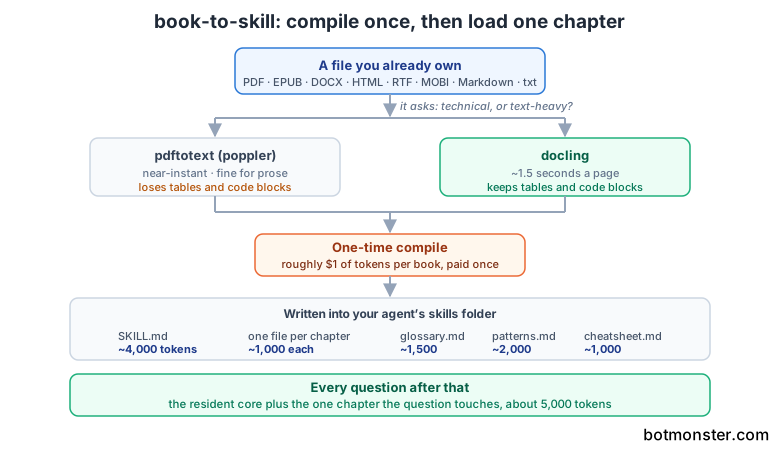
Only the core file stays resident; every other file waits on disk until a question calls for it. The book-to-skill README documents the token budget for each piece.
| File | What is in it | Size |
|---|---|---|
SKILL.md | Core mental models plus a chapter index | ~4,000 tokens |
chapters/ch01-*.md | One file per chapter, read on demand | ~1,000 tokens each |
glossary.md | Key terms A to Z, each tagged with its chapter | ~1,500 tokens |
patterns.md | Techniques, algorithms, and design patterns | ~2,000 tokens |
cheatsheet.md | Decision tables and quick rules | ~1,000 tokens |
A generated skill keeps the book’s structure, which is the first thing a summary loses. The compile pulls out the author’s named frameworks, the decision rules, and the anti-patterns. The chapter files stay on disk for the detail you cannot compress.
It reads PDF, EPUB, DOCX, HTML, RTF, and MOBI, plus plain text, Markdown, reStructuredText, and AsciiDoc.
Output lands in whichever skills folder your agent watches: ~/.claude/skills/ for Claude Code, ~/.copilot/skills/ for GitHub Copilot CLI, or ~/.agents/skills/ for cross-agent use. All three read the same SKILL.md format, because the project follows the open Agent Skills standard.
The token measurement, and where it is generous
The headline claim comes with a script you can run yourself. tools/discovery_tax.py counts the tokens that enter context to answer one targeted question. book-to-skill is fixed at the resident core plus one compiled chapter, roughly 5,000 tokens.
| Book | Whole book in context | Agent navigating the PDF | book-to-skill | Savings |
|---|---|---|---|---|
| Think Python 2 (small chapters) | 119,264 | 12,152 | ~5,000 | 24x / 2.4x |
| Working Backwards (medium chapters) | 175,253 | 33,444 | ~5,000 | 35x / 6.7x |
| AI Engineering (large chapters) | 256,287 | 77,866 | ~5,000 | 51x / 15.6x |
The advantage grows with chapter size, because a big chapter is expensive for an agent to discover and cheap to pre-compile.
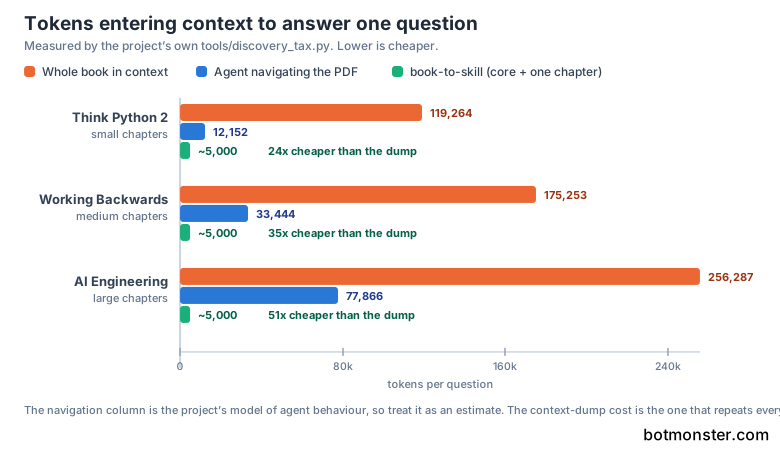
The project prints its own caveats. The navigation column is a model of how an agent behaves, built from each book’s real table of contents and chapter sizes. A well-tuned agent lands nearer the best case, so treat 2.4x as the floor. The context-dump column is the sturdier claim, because that cost recurs on every turn.
Segmentation is the other limit. Splitting a book needs recognisable chapter headings, and the detector covers Arabic numerals, Roman numerals, CJK, Korean, Thai, and several European forms. Still, a titles-only book may not split at all. Pro Git heads its chapters with section titles, so it extracts fine but never auto-segments. You point at its sections by hand instead.
This approach wins when you return to the same knowledge over and over. For one read of one book, a plain PDF agent is fine.
How to compile a technical book into a skill your agent can query
Install a PDF extractor first
For prose-heavy books, install poppler with sudo apt install poppler-utils. For technical books full of code and tables, install docling with pip3 install docling. Docling runs at roughly 1.5 seconds a page, but it keeps tables and code blocks intact.
Check what you have
Run python3 scripts/extract.py --check. It prints which extractors are installed for every format, plus the exact install command for anything missing. MOBI and Kindle files are the awkward case: they need Calibre’s ebook-convert, which is a full desktop app rather than a pip package.
Install the skill itself
Clone the repo into your agent’s skills folder, for example git clone https://github.com/virgiliojr94/book-to-skill.git ~/.claude/skills/book-to-skill. The project also publishes a standalone pip package, but that installs only the text extractor and does not register the /book-to-skill slash command.
Point it at your book
Run /book-to-skill ./my-book.pdf. Before extraction starts, it asks whether the book is technical or text-heavy, then picks the matching extractor for you.
Wait for the compile
The run produces SKILL.md with the mental models and chapter index, one file per chapter, a glossary, a patterns file, and a cheatsheet. On a 244-page book like Think Python 2, that is 119,000 extracted tokens and 19 chapters detected automatically.
Ask a question
Type /your-book-slug replication. The agent loads the core file plus the one relevant chapter, then answers from the real text instead of a half-remembered training set.
Fold in more sources later
Point the command at a folder, a glob, or an existing skill directory to merge new material into the same skill. That is how a research cluster or a docs/ folder stays current as new papers and pages land.
Is it legal to convert a book you bought?
book-to-skill ships no book content. It is a converter you point at files you already have.
Extraction and analysis run on your machine. However, if your agent’s model lives in the cloud, the text you feed it follows that provider’s normal terms, exactly like any other prompt.
The output is a synthesised derivative: framework names and definitions. The project’s own quality rules forbid copying raw passages, and it ships a tools/validate_skill.py checker that tests a generated SKILL.md against each host’s rules. Treat a generated skill like handwritten study notes: yours, for personal use.
What the project tells you not to do is redistribute. Publishing or sharing a skill built from a copyrighted book can infringe the rights holder. Internal documents, your own writing, and openly licensed material are all fine to share within their licence.
At work, your company’s runbooks and architecture decision records are the safest input and probably the highest-value one. None of this is legal advice, and the project says as much.
Beyond books, and what setup costs
The name undersells the tool. The input is any structured prose you re-open often enough to wish you had memorised it. A whole docs/ folder becomes one skill you can query while you code. Your team can ask a 60-page voice-and-tone PDF questions instead of skimming it. Papers and your own notes merge into a single skill you keep folding new material into.
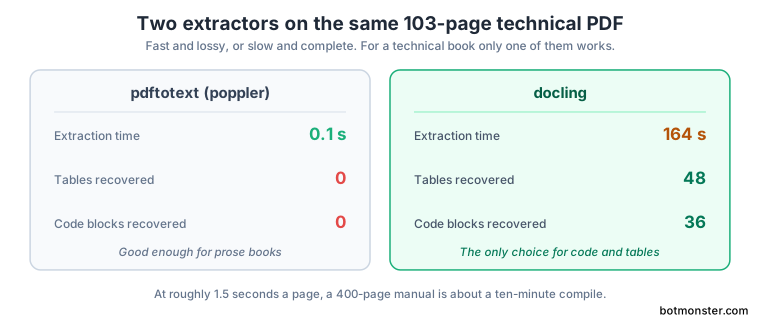
The real friction is the extractor choice. On a 103-page technical PDF, pdftotext finished in 0.1 seconds but recovered no tables and no code blocks, while docling spent 164 seconds on the same file and pulled out 48 tables and 36 code blocks. For a technical book, the slow extractor is the only one that works. A 400-page manual therefore means a ten-minute compile.
The compile has a token bill of its own, which the performance notes put at roughly one dollar per book on Claude Sonnet 4.5. Think Python 2 came to $0.88, Working Backwards to $0.96, and a 501-page Pro Git to $1.23. You pay it once.
| Approach | Best at | Weak at |
|---|---|---|
| book-to-skill | One book or a tight cluster, applied while you work | Searching dozens of unrelated books |
| Whole book in context | A one-off pass over material you never revisit | Cost, because the bill repeats every turn |
| Vector search over PDFs | Finding the passage that mentions a term | Giving you the author’s frameworks by name |
| NotebookLM | Searching across a large library of sources | Living inside your coding workflow |
A vector index answers by similarity, while book-to-skill answers by structure, which is the better trade when the book has a shape worth keeping.
The project is young. The first commit landed in May 2026, it is already on release v1.3.0, and only 13 issues are open. The converter code is MIT licensed Python, and the licence applies to that code alone.