 Botmonster Tech
How uv and Ruff untangled our messy, slow Python monorepo

uv workspaces give Python a Cargo-style monorepo setup. You get one lockfile, one virtual environment, and auto-resolved inter-package dependencies. Cold installs finish in seconds, not minutes. Pair uv with Ruff for linting and formatting, and the pair replaces Poetry, Black, isort, flake8, and pip-tools in one shot. The rest of this post covers workspace setup, inter-package deps, Ruff config, CI, publishing, and the traps that snag teams moving off older tools.
Why Python Monorepos Have Been Painful
Python’s packaging tools spent years ignoring the monorepo use case. pip has no idea what a workspace is. Three packages in one repo meant three virtualenvs, three lockfiles, and three resolver passes. A change to a shared library forced a reinstall in every environment before you could run tests.
Poetry added workspace-like features, but they came at a cost. Poetry’s resolver is written in Python, and on large dep trees it can take minutes. Path dependency handling has shifted across versions, and the monorepo plugin scene is a community effort with mixed quality. pip-tools gave you pip-compile for lockfiles. However, juggling many requirements.txt files across packages was all manual work.
Rust’s Cargo and Node’s npm/pnpm have shipped first-class workspaces for years. uv, built by Astral in Rust, brings the same pattern to Python. You get one uv.lock at the repo root, one .venv, and a resolver that wires up inter-package deps for you.
| Feature | uv Workspaces | Poetry | pip-tools |
|---|---|---|---|
| Native workspace support | Yes | Via plugins | No |
| Lockfile scope | Single root lockfile | Per-project | Per-project |
| Resolver speed (typical project) | Under 1 second | 10-30 seconds | 5-15 seconds |
| Virtual environments | One shared .venv | One per project | Manual |
| Inter-package resolution | Automatic | Plugin-dependent | Manual |
| Written in | Rust | Python | Python |
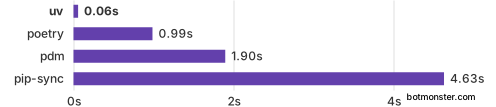
The benchmark numbers tell the story better than the table. uv’s Rust resolver and installer finish dependency installs in a fraction of the time pip or pip-tools needs.
Setting Up the Workspace Root
The workspace configuration lives in a root pyproject.toml. Start by creating the project structure:
monorepo/
├── pyproject.toml           # workspace root
├── uv.lock                  # generated lockfile
├── .venv/                   # shared virtual environment
├── packages/
│   ├── shared-lib/
│   │   ├── pyproject.toml
│   │   └── src/shared_lib/
│   └── data-models/
│       ├── pyproject.toml
│       └── src/data_models/
└── services/
    ├── api/
    │   ├── pyproject.toml
    │   └── src/api/
    └── worker/
        ├── pyproject.toml
        └── src/worker/
The root pyproject.toml declares the workspace members using glob patterns:
[project]
name = "my-monorepo"
version = "0.1.0"
requires-python = ">=3.11"

[tool.uv.workspace]
members = ["packages/*", "services/*"]
The root project can be a “virtual” workspace. That means it only holds workspace config and ships no installable package of its own. If you want the root to be a package too, add the standard [project] metadata next to the workspace table.
Each member gets its own pyproject.toml with standard project metadata:
# packages/shared-lib/pyproject.toml
[project]
name = "shared-lib"
version = "0.1.0"
requires-python = ">=3.11"
dependencies = ["pydantic>=2.0"]

[build-system]
requires = ["hatchling"]
build-backend = "hatchling.build"
For inter-package dependencies, reference other workspace members by name and mark them as workspace sources:
# services/api/pyproject.toml
[project]
name = "api"
version = "0.1.0"
requires-python = ">=3.11"
dependencies = ["shared-lib", "fastapi>=0.100"]

[tool.uv.sources]
shared-lib = { workspace = true }
Run uv sync at the root. uv builds one .venv, installs every member and its deps, and writes uv.lock. Members go in as editable installs by default, so source edits show up right away with no reinstall.
The diagram below shows how the pieces fit. A root pyproject.toml lists the members. One lockfile and one virtual env back the whole tree. Inter-package deps resolve on their own.

Managing Dependencies Across Packages
Dependency work is where monorepos get hairy. It is also where uv’s single-resolver model pays off. If services/api and services/worker both want httpx, uv pins one version in the lockfile. You won’t find version conflicts at deploy time. They surface during uv lock.
Adding a dependency to a specific package:
uv add httpx --package apiThis updates services/api/pyproject.toml and rebuilds the root uv.lock. Other members stay put unless the new dep clashes with their own pins.
For dev and test dependencies, use optional dependency groups:
# services/api/pyproject.toml
[project.optional-dependencies]
dev = ["pytest>=8.0", "httpx"]
The lockfile (uv.lock) is deterministic and cross-platform. Commit it. In CI, cache ~/.cache/uv and the .venv folder keyed by the lockfile hash. Later runs install in near-zero time. The same determinism pays off when you check out a feature branch in a second directory: one uv sync rebuilds an identical environment from the committed lockfile.
Pinning the Python Version
uv can manage Python builds for you, which keeps the whole workspace on the same interpreter:
uv python install 3.12
uv python pin 3.12
The pin command writes a .python-version file at the repo root. Every uv run and uv sync reads that file. So each dev and each CI runner uses the same Python with no manual setup. For repos that also pin Node or Go, mise handles every runtime from one file.
If members need different minimum Python versions, set requires-python in each member’s pyproject.toml. uv resolves deps against the tightest constraint across all members.
Configuring Ruff as the Unified Linter and Formatter
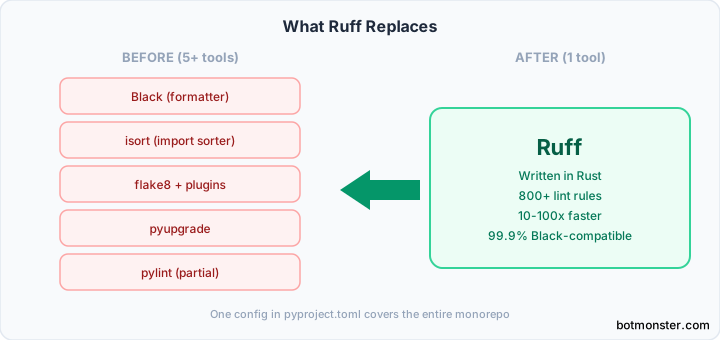
Ruff replaces Black, isort, flake8, and a stack of flake8 plugins with one Rust binary. It ships over 800 lint rules and matches Black’s formatting at greater than 99.9 percent. On real codebases, pre-commit jobs that took 12 to 20 seconds with the old stack drop to low single digits with Ruff.
Install Ruff as a dev dependency at the workspace root:
uv add ruff --devConfigure it once in the root pyproject.toml:
[tool.ruff]
target-version = "py312"
line-length = 88

[tool.ruff.lint]
select = ["E", "F", "I", "UP", "W", "B", "SIM", "RUF"]
# E/W: pycodestyle errors and warnings
# F: pyflakes
# I: isort
# UP: pyupgrade
# B: flake8-bugbear
# SIM: flake8-simplify
# RUF: Ruff-specific rules

[tool.ruff.lint.per-file-ignores]
"tests/**/*.py" = ["S101"]  # allow assert in tests

[tool.ruff.format]
quote-style = "double"
indent-style = "space"
This one config covers every package in the workspace. Per-package overrides go in [tool.ruff.lint.per-file-ignores] keyed by path patterns. No need for a config file in each member.
Run the full suite:
ruff check .            # lint the entire monorepo
ruff check --fix .      # auto-fix what's fixable
ruff format .           # format everything
For pre-commit integration, add a hook that runs both:
# .pre-commit-config.yaml
repos:
  - repo: https://github.com/astral-sh/ruff-pre-commit
    rev: v0.11.0
    hooks:
      - id: ruff
        args: [--fix]
      - id: ruff-format
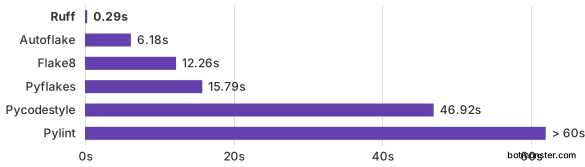
The full check-and-format pass runs in under 2 seconds on a typical monorepo. On bigger codebases with 10,000+ files, Ruff still finishes in single-digit seconds.
The chart below shows Ruff linting the full CPython codebase next to other Python linters. The speed gap is not a small bump. It is a different class of tool.
Running Tests and Scripts per Package
A monorepo needs per-package test runs while sharing the env. uv’s --package flag handles that:
# Run tests for a specific package
uv run --package api pytest

# Run tests for another package
uv run --package shared-lib pytest
Each member can have its own pytest configuration in pyproject.toml. Per-package suites are also a natural home for property-based tests, which generate randomized inputs to surface edge cases plain example tests miss:
# services/api/pyproject.toml
[tool.pytest.ini_options]
testpaths = ["tests"]
addopts = "-v --tb=short"
For CI, run each package’s tests in parallel using a matrix strategy:
# .github/workflows/test.yml
jobs:
  test:
    strategy:
      matrix:
        package: [shared-lib, data-models, api, worker]
    steps:
      - uses: actions/checkout@v4
      - uses: astral-sh/setup-uv@v4
      - run: uv sync
      - run: uv run --package ${{ matrix.package }} pytest
For type checks, set up mypy at the root with per-package overrides:
# mypy.ini
[mypy]
python_version = 3.12
strict = true

[mypy-tests.*]
disallow_untyped_defs = false
Custom CLI entry points go in each member’s pyproject.toml:
[project.scripts]
api-server = "api.main:run"
Publishing Individual Packages from the Monorepo
When a workspace member is ready to ship, build and publish it on its own:
uv build --package shared-lib
uv publish dist/shared_lib-0.1.0.tar.gz
uv build --package builds only that one member and honors its pyproject.toml. The output is a plain Python package with no workspace-only files.
For PyPI authentication, use a token:
uv publish --token $PYPI_TOKENIn GitHub Actions, you can use trusted publishers to skip token wrangling. PyPI’s OIDC link handles auth for you. For internal libraries that shouldn’t be public, a private package registry is a clean swap for PyPI.
Common Pitfalls and Migration Tips
If a member depends on another member but forgets workspace = true in [tool.uv.sources], uv tries to grab the package from PyPI instead of the local path. The error says the package isn’t on PyPI. That can throw you off if you don’t know what to look for.
uv workspaces use only the root lockfile. If a member still has its own uv.lock from a pre-workspace setup, delete it. uv might pick up the wrong lockfile and give odd resolver results.
Moving from Poetry? Export locked deps with poetry export -f requirements.txt, then re-add them with uv add in each member’s folder. Delete poetry.lock and the [tool.poetry] blocks from pyproject.toml. Coming from pip-tools? Fold your requirements.txt and requirements-dev.txt into each member’s pyproject.toml as deps and optional groups. Then run uv lock to write the new lockfile.
Production Docker images shouldn’t pull the whole workspace. Use uv export --package api to write a standalone requirements.txt for the Docker stage:
FROM python:3.12-slim
COPY requirements.txt .
RUN pip install -r requirements.txt
COPY services/api/src /app
CMD ["python", "-m", "api"]
This skips workspace overhead in prod images and gives you smaller, faster containers.
When a Monorepo Is the Wrong Choice
Not every team gains from folding everything into one repo.
Packages that ship on totally different schedules add coordination cost in a monorepo and gain little from shared resolution. Likewise, if two teams never import each other’s code, a monorepo forces them to share CI, lockfile churn, and merge conflicts for no real upside.
A workspace resolves against the tightest requires-python across all members. If one package must support Python 3.9 while another wants 3.13-only features, they fight in the resolver. That setup calls for separate repos, or at least separate workspaces in the same repo.
Monorepos also give every contributor a view of every line of code. That same property helps an autonomous coding assistant reason across packages from a single checkout, but it is a liability when you need security walls between projects, where separate repos with proper permissions are easier to lock down.
For most small to medium teams shipping related services and libraries, though, one lockfile and one uv sync command beats the trade-offs above.