 Botmonster Tech
How to Build an AI-Powered Git Commit Message Generator

You can wire a local LLM into your Git workflow to automatically generate conventional commit messages from staged diffs by creating a prepare-commit-msg Git
hook. The hook runs git diff --cached, sends the output to Ollama
running a model like Llama 4 Scout
or Qwen3, and writes the generated message into the commit message file for you to review before finalizing. The whole setup is roughly 30 lines of shell or Python, costs nothing to run, keeps your code completely local, and produces commit messages that follow Conventional Commits
format - consistently better than the “fix stuff” messages most of us write when we just want to move on to the next task.
Why Auto-Generated Commit Messages Actually Matter
Good commit messages are the most undervalued form of documentation in any codebase. Comments go stale, wiki pages get forgotten, and README files drift out of sync with reality over time. But a commit message is permanently tied to the exact code it describes - it cannot become outdated because it refers to a specific snapshot in time.
Developers absolutely know how to write good commit messages. After spending 30 minutes debugging a race condition in the authentication flow, you know exactly what you changed and why. You also want to move on to the next thing. So instead of writing “fix(auth): prevent race condition in token refresh by adding mutex lock on session store,” you type git commit -m "fix auth bug" and carry on. The knowledge about that fix now lives only in your head, and it will be gone within a week.
AI generation fixes this. The LLM reads the actual diff and produces a structured message describing what changed. You review it, adjust if needed, and confirm. That review takes maybe five seconds instead of the 30 seconds of composition you were trying to avoid. The friction drops enough that good messages become the default rather than the exception.
The Conventional Commits
format structures messages as type(scope): description - for example, feat(auth): add JWT refresh token rotation. This format has practical benefits beyond readability. It enables automated changelog generation with tools like release-please
or standard-version
, supports semantic versioning decisions, and makes git log --grep actually useful for finding specific changes.
On teams, consistency matters too. Five developers write commit messages in five different styles - one person capitalizes, another does not, one writes full sentences while another writes fragments. AI generation normalizes the format across the entire team while every developer retains full editorial control through the review step. The same LLM-on-diff approach also scales to automated code reviews in CI pipelines for teams that want a pre-reviewer running on every pull request.
One thing to emphasize: never set this up to auto-commit without human confirmation. The generated message is a draft that the developer should review for accuracy and supplement with context that the diff alone cannot convey - primarily the “why” behind a change, which no amount of diff analysis can reliably extract.
Setting Up the Git Hook with Ollama
The prepare-commit-msg hook is the cleanest integration point for this. Git calls it after creating the commit message file but before opening your editor. The script receives the message file path as $1 and can write whatever it wants into that file. When you run git commit, your editor opens with the AI-generated message already filled in. You edit, save, and close - or abort if the message is wrong.
Prerequisites
You need Ollama installed and running. If you do not have it yet, install it from ollama.com and pull a capable model:
ollama serve &
ollama pull llama4-scout:17b
If you have limited VRAM, Qwen3 8B works well at this task and runs on 8GB cards:
ollama pull qwen3:8bBash Implementation
Create the hook file at .git/hooks/prepare-commit-msg:
#!/usr/bin/env bash
set -euo pipefail

COMMIT_MSG_FILE="$1"
COMMIT_SOURCE="${2:-}"

# Skip for merge commits, amends, and squashes
if [ -n "$COMMIT_SOURCE" ]; then
    exit 0
fi

# Capture the staged diff
STAT=$(git diff --cached --stat)
DIFF=$(git diff --cached | head -c 12000)

if [ -z "$DIFF" ]; then
    exit 0
fi

PROMPT="You are a git commit message generator. Given a diff, write a commit message following the Conventional Commits specification.

Format: type(scope): description

[optional body]

Types: feat, fix, refactor, docs, style, test, chore, perf, ci, build.
The scope is the area of the codebase affected.
The description must be imperative mood, lowercase, no period, under 72 characters.
Only include a body for non-trivial changes. The body should explain WHY, not WHAT.

Files changed:
$STAT

Diff:
$DIFF"

RESPONSE=$(curl -s --max-time 15 http://localhost:11434/api/generate \
    -d "$(jq -n --arg model "llama4-scout" --arg prompt "$PROMPT" \
    '{model: $model, prompt: $prompt, stream: false}')" \
    | jq -r '.response // empty')

if [ -n "$RESPONSE" ]; then
    echo "$RESPONSE" > "$COMMIT_MSG_FILE"
fi
Make it executable:
chmod +x .git/hooks/prepare-commit-msgPython Implementation
For better error handling and diff truncation logic, a Python version is more practical. Same file location, just with a Python shebang:
#!/usr/bin/env python3
import subprocess
import json
import sys
import urllib.request

COMMIT_MSG_FILE = sys.argv[1]
COMMIT_SOURCE = sys.argv[2] if len(sys.argv) > 2 else ""

# Skip merge commits and amends
if COMMIT_SOURCE:
    sys.exit(0)

# Capture staged diff
stat = subprocess.run(
    ["git", "diff", "--cached", "--stat"],
    capture_output=True, text=True
).stdout

diff = subprocess.run(
    ["git", "diff", "--cached"],
    capture_output=True, text=True
).stdout

if not diff.strip():
    sys.exit(0)

# Truncate diff to ~3000 tokens (roughly 12000 chars)
MAX_DIFF_CHARS = 12000
if len(diff) > MAX_DIFF_CHARS:
    diff = diff[:MAX_DIFF_CHARS] + "\n... (diff truncated)"

prompt = f"""You are a git commit message generator. Given a diff, write a commit message following the Conventional Commits specification.

Format: type(scope): description

[optional body]

Types: feat, fix, refactor, docs, style, test, chore, perf, ci, build.
The scope is the area of the codebase affected.
The description must be imperative mood, lowercase, no period, under 72 characters.
Only include a body for non-trivial changes. The body explains WHY, not WHAT.

Files changed:
{stat}

Diff:
{diff}"""

payload = json.dumps({
    "model": "llama4-scout",
    "prompt": prompt,
    "stream": False
}).encode()

try:
    req = urllib.request.Request(
        "http://localhost:11434/api/generate",
        data=payload,
        headers={"Content-Type": "application/json"}
    )
    with urllib.request.urlopen(req, timeout=15) as resp:
        result = json.loads(resp.read())
        message = result.get("response", "").strip()
        if message:
            with open(COMMIT_MSG_FILE, "w") as f:
                f.write(message)
except Exception:
    # Fail silently - let the developer write manually
    pass
Diff Truncation Strategy
Large diffs are the main practical concern. A 500-line refactor produces a diff that exceeds most models’ useful context window, and even if it fits, the model tends to lose focus on the important changes. The approach above truncates the raw diff to about 12,000 characters (roughly 3,000 tokens), but always includes the full --stat output. The stat summary gives the model a complete picture of which files changed and by how much, even when the detailed diff is cut short. This means a commit touching 20 files still gets an accurate scope description even though the model only sees the detailed changes for the first few files.
Team-Wide Deployment
The hook lives inside .git/hooks/, which is local to each clone and not tracked by Git. For team-wide deployment, configure a shared hooks directory:
git config core.hooksPath .githooksThen commit a .githooks/prepare-commit-msg file to your repository. Every team member who clones the repo and sets the config gets the hook automatically. For projects already using pre-commit
or Husky
(npm), you can integrate the hook through those frameworks instead.
Crafting the Prompt for High-Quality Messages
The prompt you send to the LLM matters more than which model you pick. A vague prompt like “write a commit message for this diff” produces vague messages regardless of model size. The prompt template shown above works, but there are specific refinements worth understanding.
System Prompt Structure
The key instructions in the prompt are:
- Imperative mood (“add feature” not “added feature” or “adding feature”) - this matches Git’s own conventions like
Merge branchandRevert commit - 72-character subject line limit, a long-standing Git convention that ensures messages display properly in
git log --oneline, GitHub’s commit list, and email patches - Body explains why, not what - the diff already shows what changed, so the body should capture motivation, tradeoffs, or context that would otherwise be lost
Including Stat Output First
Structuring the prompt as stat-then-diff makes a measurable difference. The stat output acts as a table of contents:
 src/auth/token.py    | 45 +++++++++++----
 src/auth/session.py  |  8 +--
 tests/test_token.py  | 32 ++++++++++
 3 files changed, 67 insertions(+), 18 deletions(-)
The model reads this and immediately understands the scope - auth-related changes with new tests. When it then encounters the detailed diff, it has context for interpreting each hunk. Without the stat, models often fixate on the first file they see and ignore the rest.
Few-Shot Examples
Adding two or three example diff-to-message pairs in the prompt dramatically improves consistency. For instance:
Example:
Diff: Modified src/api/routes.py to add /health endpoint returning 200 OK
Message: feat(api): add health check endpoint for load balancer probes
This teaches the model your preferred level of detail and specificity. Without examples, some models produce overly verbose messages while others are too terse.
Handling Different Commit Types
The hook’s $2 argument tells you the commit source. An empty value means a normal commit. The value merge means Git is creating a merge commit with its own default message. The value commit means --amend or -c was used. The value squash comes from squash merges. For merge commits, skip AI generation entirely - Git’s default merge message contains the branch names and is already informative. For amends, you might want to re-run generation on the updated diff, or you might want to preserve the original message.
Multi-Line Body Logic
Not every commit needs a body paragraph. A one-line change to fix a typo in a config file does not need explanation beyond fix(config): correct database host typo. But a 50-line refactor that changes the error handling strategy benefits from a body explaining why the previous approach was insufficient.
A simple heuristic: if the diff is under 10 lines, request a subject-only message. If it is over 20 lines, instruct the model to include a body. The prompt can include this logic:
The diff is {line_count} lines. {"Include a 1-2 sentence body explaining the motivation." if line_count > 20 else "Subject line only, no body needed."}Language Specificity
Explicitly instruct the model to name specific functions, files, and configurations in the message. Without this instruction, models tend toward generic descriptions like “update authentication logic” when “add rate limiting to JWT refresh endpoint in token.py” would be far more useful. The instruction “be specific about what changed - name functions, files, configurations; avoid vague descriptions like ‘update code’ or ‘fix bug’” costs a few tokens in the prompt but pays for itself in every generated message.
Advanced Features
The basic hook covers most of what you need, but a few enhancements can make it noticeably better.
Multiple Message Options
Instead of generating one message, generate three with a temperature of 0.7 for variety. Write them into the commit message file as Git comments:
# Option 1: feat(auth): add JWT refresh token rotation
# Option 2: feat(auth): implement automatic token refresh with rotation
# Option 3: feat(security): add rotating refresh tokens to prevent replay attacks
The developer uncomments their preferred option and edits as needed. Lines starting with # are stripped by Git, so only the uncommented line becomes the actual message.
Branch-Aware Context
Parse the current branch name and include it in the prompt:
BRANCH=$(git branch --show-current)
# Adds to prompt: "The current branch is feature/JIRA-1234-user-auth"
If the branch follows a naming convention like feature/JIRA-1234-user-auth, the model can reference the ticket number and feature area in the generated message. This is especially useful on teams that tie branches to issue trackers.
Filtering Noise from Diffs
Some files add noise without useful signal. Lock files (package-lock.json, poetry.lock), generated code, and migration files produced by frameworks tend to inflate the diff without helping the model understand the intent. Filter them out:
DIFF=$(git diff --cached -- . ':!package-lock.json' ':!*.lock' ':!*.generated.*')This keeps the diff focused on the actual code changes you made.
Interactive Refinement
After the initial generation, you might want to give the model additional direction. One approach: in the commit-msg hook (which runs after you save the editor), check for a special marker like # REFINE: mention the security implications. If found, re-run the LLM with the original diff plus the refinement instruction, and reopen the editor. This is more complex to implement but creates a conversational editing flow.
Performance and Reliability
The hook should never block your workflow. Set a timeout of 10-15 seconds on the HTTP request to Ollama. If the model is slow or Ollama is not running, fail silently and let the developer write the message manually. A commit should never fail because an AI service is unavailable.
For perceived responsiveness, you can use Ollama’s streaming API and write tokens to a temporary file as they arrive, but for a commit message this is usually unnecessary - the full generation completes in 2-5 seconds for most models on modern hardware.
Alternative Approaches and Existing Tools
Building your own hook gives you maximum control, but several existing tools offer this functionality out of the box.
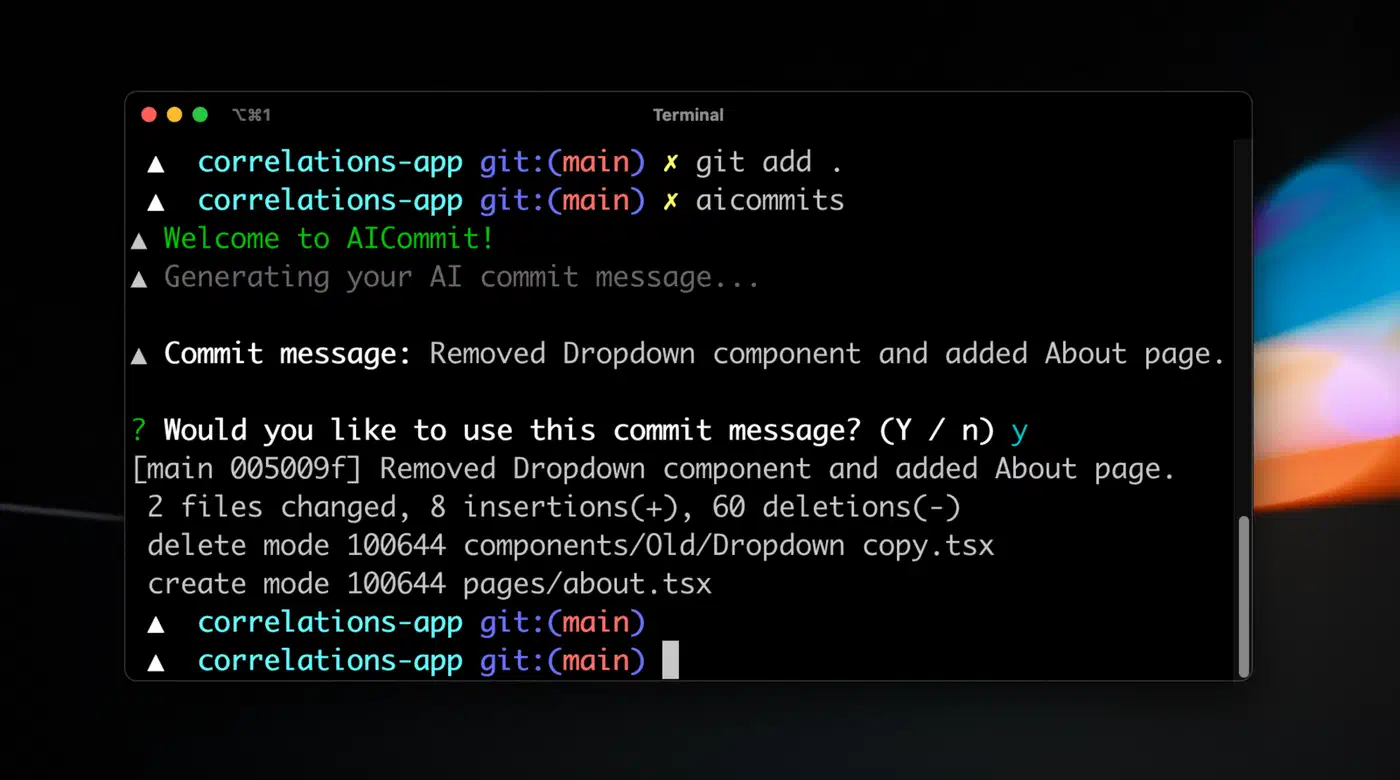
aicommits
is an npm package that uses OpenAI’s API or local Ollama to generate messages. Running npx aicommits stages and commits in one step. It is the fastest way to get started but less customizable than a DIY hook.
opencommit
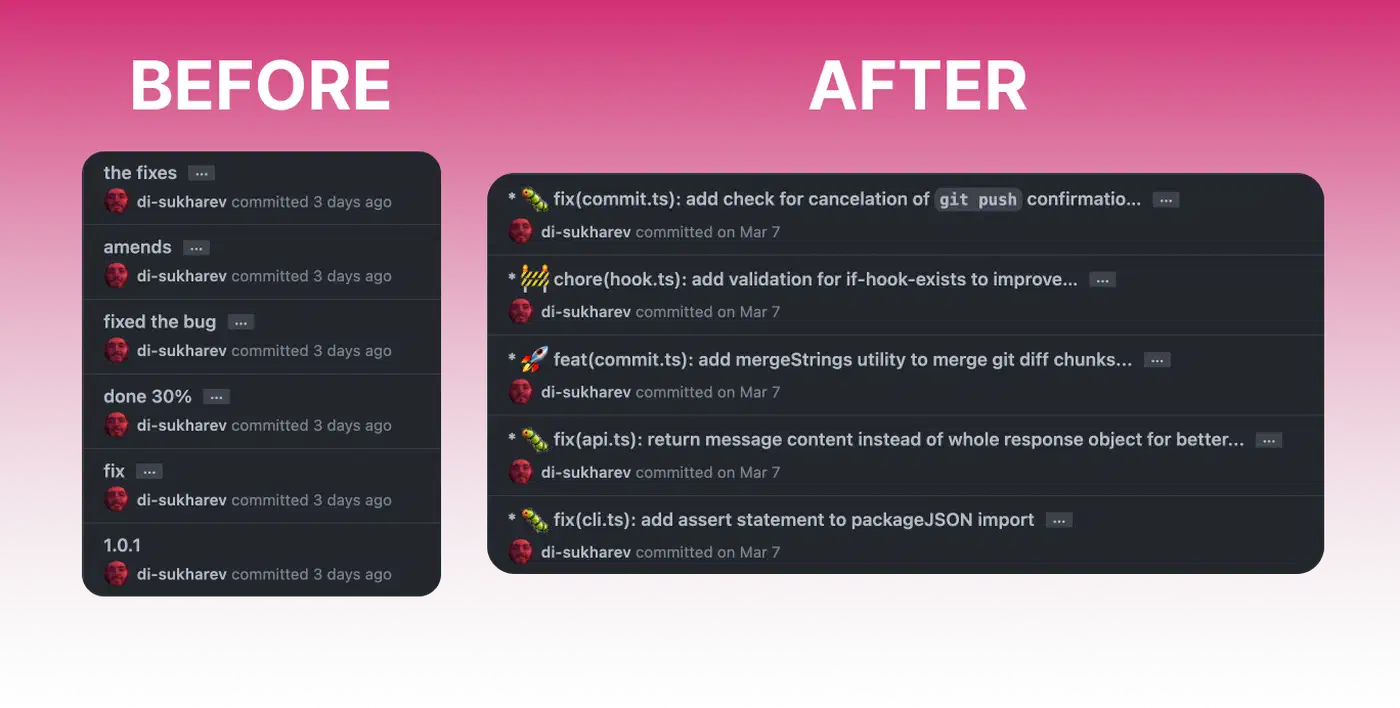
(the oco command) supports multiple AI providers including OpenAI, Anthropic, Ollama, and Azure. It has more features than aicommits, including emoji support and conventional commits enforcement.
Commitizen provides an interactive commit flow that walks you through type, scope, and description fields. Several community plugins add AI-powered pre-filling to this flow. If your team already uses Commitizen, adding AI generation on top of it is straightforward.
Both Claude Code and Cursor generate commit messages from their UIs. If you are already using one of these tools, their built-in generation works well, but it ties you to that specific editor.
The DIY approach has specific advantages: zero external dependencies beyond Ollama and a shell script , no cloud API calls, no subscription costs, full control over prompt engineering, and it works in any terminal, editor, or IDE. You understand every line of the implementation, so you can debug and modify it freely.
My recommendation: start with the DIY hook to understand the mechanics and tune the prompt to your preferences. If you later want a more polished CLI experience, switch to aicommits or opencommit. If you are already working inside Claude Code or Cursor, their built-in generation is convenient enough that a separate tool may be redundant. Whichever path you take, the important thing is getting into the habit of generating and reviewing rather than typing commit messages from scratch under time pressure.